

Microsoft used BETT 2026 to move its education strategy from promise to classroom-ready workflows, unveiling a tightly integrated set of Copilot, Microsoft 365, Teams, Learning Accelerators, and Minecraft Education updates designed to put generative AI where teachers and students already work. The announcements — anchored by a new Teach module inside Microsoft 365 Copilot, a student-facing Study and Learn agent, expanded Learning Accelerators and LMS (LTI) integrations, and new Minecraft Education AI literacy experiences — are less about flashy standalone products and more about embedding AI into everyday lesson planning, differentiation, assessment, and digital literacy practice. These changes, presented across multiple Microsoft sessions at BETT, are already rolling into previews and general availability over the coming weeks and months. ps://www.microsoft.com/en-us/education/blog/2026/01/introducing-microsoft-innovations-and-programs-to-support-ai-powered-teaching-and-learning/)
The last 18 months have seen vendors race to surface generative AI, but Microsoft’s BETT messaging deliberately reframes AI as a set of capabilities stitched into teacher workflows rather than a separate “AI product.” That matters because the friction teachers face is not lack of AI per se, but the time lost to switching apps, rewriting resources for different groups, and producing usable formative assessments at scale. Microsoft’s approach aims to reduce those everyday costs by enabling teachers to create, adapt, and assess learning materials inside tools they already use — Word, OneNote, Teams, Forms, and Minecraft Education — while trying to preserve governance, privacy, and pedagogical intent. The company documented these intentions in multiple official posts and training modules for educators.
At BETT, Microsoft framed these announcements around four practical teacher problems:
Key Teach features announced at BETT include:
Key practical cautions from educators and IT leaders include:
At the same time, these benefits are contingent on high-quality implementation, rigorous teacher moderation, clear governance, and careful IT planning. The most significant operational and ethical risks — accuracy errors, data governance ambiguity, and uneven access — are addressable, but they require proactive district-level policies and independent verification. Practical pilots, audit-ready logging, and mandatory teacher moderation of AI outputs should be baseline requirements for any school deploying these features at scale.
Microsoft’s BETT 2026 message is straightforward: AI should help teachers spend more time with students and less time wrestling tools. The next step — turning convenience into consistent, equitable learning improvements — is on educators and leaders to deliver.
Source: EdTech Innovation Hub BETT 2026: Microsoft reveals major Copilot, AI, and Minecraft Education updates | ETIH EdTech News — EdTech Innovation Hub
 Background: why this matters now
The last 18 months have seen vendors race to surface generative AI, but Microsoft’s BETT messaging deliberately reframes AI as a set of capabilities stitched into teacher workflows rather than a separate “AI product.” That matters because the friction teachers face is not lack of AI per se, but the time lost to switching apps, rewriting resources for different groups, and producing usable formative assessments at scale. Microsoft’s approach aims to reduce those everyday costs by enabling teachers to create, adapt, and assess learning materials inside tools they already use — Word, OneNote, Teams, Forms, and Minecraft Education — while trying to preserve governance, privacy, and pedagogical intent. The company documented these intentions in multiple official posts and training modules for educators. At BETT, Microsoft framed these announcements around four practical teacher problems:
- How to produce standards-aligned lesson plans quickly.
- How to differentiate content for mixed-ability classes without duplicating workload.
- How to give frequent, actionable feedback without spending evenings marking.
- How to teach students about AI and not just with AI.
Teach: Copilot that plans, differentiates, and assesses
What Teach is and where it appears
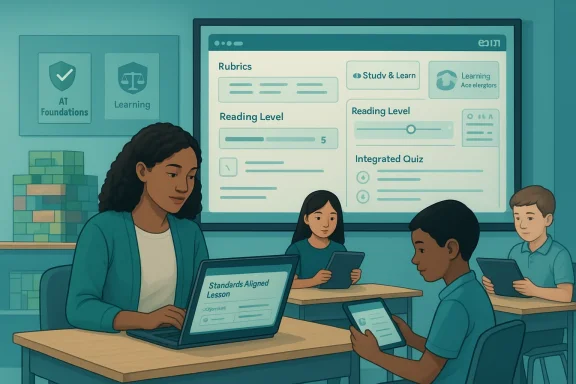
Teach is a new module inside the Microsoft 365 Copilot app and associated education surfaces (Teams Classwork, OneNote Class Notebook, and the Microsoft 365 LTI integration). Its remit: let teachers generate lesson plans, create rubrics and quizzes, and adapt materials to different reading levels and abilities — all with a guided AI workflow that ties content to local or international standards. Microsoft’s Learn and support documentation describe Teach as available to education customers (no separate Copilot license required for basic Teach functionality in many education licensing tiers).Key Teach features announced at BETT include:
- Lesson plan creation with alignment to standards from 35+ countries and the ability to ground plans in uploaded or existing materials.
- Rubric generation linked to explicit learning objectives and scale choices.
- Quiz creation with Microsoft Forms integration and auto-collection settings.
- Automatic differentiation: instructions and scaffolds generated by grade or learner ability.
- Reading-level adjustment that preserves domain-specific vocabulary, avoiding dumbed-down technical accuracy.
- A series of learning activities (flashcards, fill-in-the-blanks, matching, quizzes) that can be created or converted from existing content.
Strengths: time recovery and instructional fidelity
Teach addresses three practical needs:- Time recovery: Drafting a standards-aligned lesson plan from scratch is time-consuming; AI-assisted generation shifts the task to curation and refinement. Early Microsoft customer narratives and internal case studies suggest significant time savings when Copilot is used to scaffold content creation.
- Instructional fidelity: Align-to-standards tooling helps ensure the intent of lessons maps back to learning outcomes, reducing the risk that AI-generated materials drift from curricular goals.
- Differentiation at scale: Rather than making three separate lesson packs (low/medium/high), teachers can produce differentiated instructions from a single source and tweak wording or supports in moments.
Risks and limitations
- Over-reliance and accuracy: Generative outputs can be plausible but incorrect. For assessments or standards mapping, teachers must verify AI-produced rubrics and task statements rather than accept them uncritically.
- Local standards nuance: International standards libraries are helpful, but local curricular nuances often require contextual knowledge that an AI may not capture perfectly. Teachers and leaders should treat Teach outputs as drafts to be adapted, not final canonical documents.
- Equity of access: The benefit depends on licensing, IT provisioning, and device access. While Microsoft positions many features as included for education licenses, districts still need to configure tenant settings and train staff to integrate these features safely.
Study and Learn agent: a student-facing coach built on learning science
How it works
Microsoft introduced a Study and Learn agent — a learner-focused Copilot instance that transforms course materials into study activities (flashcards, fill-in-the-blank, matching games, quizzes, and study guides) and supports retrieval practice, reflection prompts, and adaptive pacing. Microsoft framed the agent as guided by learning science principles (spaced retrieval, reflection, scaffolding) and not a generic answer engine; it’s designed to prompt students to think, practice, and self-assess rather than simply produce answers. The agent entered preview in January 2026, with additional study guide functionality expected to expand during the year.Classroom and study use-cases
- Independent revision outside class: convert lesson notes into self-testing packs.
- Formative practice during class rotations: teachers assign adaptive practice that adjusts difficulty based on student responses.
- Pre-assessment activation: give students quick formative checks before a unit to reveal prior knowledge and misconceptions.
Strengths and caveats
- Strength: The agent’s focus on retrieval practice and structured activities aligns with evidence-based techniques for durable learning.
- Caveat: Like any adaptive tool, fairness and bias checks are necessary — for example, the agent must handle multilingual learners and varied cultural contexts without lowering expectations or introducing bias into feedback.
- Another caveat: the agent’s effectiveness depends on quality of the source materials it converts. Poorly structured notes yield weaker practice sets. Teachers must therefore curate inputs.
Minecraft Education: AI literacy, certification, and lesson integration
Why Microsoft is using Minecraft
Minecraft Education is being explicitly positioned as the hands-on environment for introducing AI literacy in age-appropriate ways. At BETT, Microsoft showcased an AI Foundations curriculum and certification pathway that maps to international frameworks (UNESCO, OECD, and TeachAI) and uses Minecraft worlds like Fantastic Fairgrounds, CyberSafe AI: Dig Deeper, and Reed Smart: AI Detective to teach ethical dilemmas, bias, data use, and algorithmic decision-making through gameplay. These worlds let students role-play as designers and reviewers, surfacing trade-offs in a controlled, tangible setting.Integration with Teach
Microsoft announced that Teach will include the ability to create Minecraft Lesson Plans (preview scheduled for February 2026) and unit plans later in spring. This integration means teachers can generate a lesson scaffold that includes Minecraft activities and step-by-step in-game instructions without leaving the Copilot workflow. The goal is to make game-based learning interoperable with standards-aligned classroom expectations.Strengths and limits
- Strength: Minecraft provides a safe, motivating sandbox that supports inquiry, design thinking, and ethical reasoning without requiring advanced coding skills.
- Limit: Not every classroom can run Minecraft reliably (devices, network, management policies), and lesson fidelity will still depend on teacher facilitation. IT teams must plan for dedicated servers and tenant configurations; Microsoft signaled “dedicated servers” and cross-tenant play functionality rolling into preview, but schools should validate deployment implications ahead of broad rollout.
Learning Accelerators, Microsoft 365 LTI, and LMS integration
What’s new
A major infrastructure shift is the release and expansion of Microsoft 365 LTI, which consolidates OneDrive, Class Notebook, Teams Assignments functionality, Reflect, and importantly Copilot/Teach capabilities into one LTI 1.3 Advantage-compliant tool for LMS platforms (Canvas, Blackboard, D2L/Brightspace, Moodle, PowerSchool Schoology Learning, etc.). The LTI enables:- Create-with-Copilot workflows inside LMS content editors.
- Assignments with AI-assisted rubric and instructions generation without requiring Teams.
- Reading Coach and other independent student practice tools accessible via LMS.
- Reflect check-ins and teacher progress insights available in the LMS gradebook.
Benefits for district IT and curriculum teams
- Reduced context switching for teachers, who can author course materials and use Copilot assistance directly in the LMS.
- Easier grading workflows, with AI-assisted feedback and rubric generation that can sync back to the LMS gradebook.
- A single integration to manage for admins rather than many small LTI connectors.
Risks and operational concerns
- Data governance complexity: integrating Copilot into LMS workflows raises questions about what data is used for model grounding, retention, and student privacy. Districts must audit tenant settings, review Microsoft Graph data usage, and update acceptable-use policies.
- Staff training needs: effective use requires professional learning so teachers can understand when AI is helpful and when teacher judgement is essential.
- Migration work: moving from existing LTI connectors to Microsoft 365 LTI requires planning, testing, and change management at scale.
Governance, academic integrity, and assignment-level AI controls
One of the more consequential announcements is the introduction of assignment-level AI guidance and controls inside Teams Assignments and the LTI experience. Teachers can define permitted AI use for each assignment, choose pre-approved Copilot prompts, and give students clear visibility into acceptable and prohibited support. Microsoft explicitly framed this as an alternative to blanket bans — a way for schools to teach responsible AI use and align allowed AI activities with learning objectives. Previews for these controls are scheduled from February 2026.Why this matters
- Transparency reduces ambiguity for students and can help preserve assessment validity when AI is involved.
- Pre-approved prompts and usage templates can standardize formative use across departments.
- Assignment-level controls allow leaders to audit AI use patterns and respond to misuse while preserving pedagogical innovation.
What’s missing and open questions
- Audit logs and provenance: Microsoft needs to make clear how audit trails will surface AI decision-making (what inputs produced what outputs) so teachers can verify grading or feedback derived from Copilot.
- Plagiarism detection vs. permissible assistance: schools will need policy templates that define allowed AI scaffolding versus academic dishonesty; the product controls help but policy clarity remains a local responsibility.
- External verification: independent audits or third-party evaluations of Copilot’s suitability for summative assessment would strengthen institutional trust.
Early signals from deployments: benefits reported and cautionary notes
Microsoft and several early-adopter districts report notable gains: faster marking cycles, higher frequency of formative checks, and time reclaimed for planning and small-group instruction. Case stories describe teachers photographing student work and getting standard-aligned feedback drafts in minutes rather than hours — a practical throughput improvement if rigor is maintained. However, these accounts are often vendor- or district-provided case studies and should be treated as indicative rather than independently audited outcomes. They point to promise, not guaranteed universal results.Key practical cautions from educators and IT leaders include:
- Always verify AI-generated assessment comments before issuing to students.
- Maintain explicit consent and data-retention policies for student interactions with agents.
- Run pilots with clear success metrics (teacher time saved, quality of feedback, student outcomes) rather than wide rollouts on faith alone.
Practical guidance for schools and IT leaders
If you’re responsible for technology or curriculum decisions, treat BETT 2026 announcements as action items rather than immediate green lights. Here’s a pragmatic rollout checklist:- Inventory current LMS, Teams, OneNote, and Microsoft 365 licensing; confirm what features are included for your tenant.
- Run a controlled pilot with volunteer teachers focused on one subject and grade; measure time-on-task, quality of feedback, and teacher confidence.
- Prepare clear AI-use policies for assignments (use Microsoft’s assignment-level controls as a technical enforcement mechanism where helpful).
- Audit data flows and retention (what Copilot stores, whether student submissions are retained, and how Graph data is used). Engage legal/privacy teams.
- Invest in teacher professional learning: combine how-to training with curriculum-level moderation sessions so teachers learn to evaluate AI outputs against standards.
- Test Minecraft Education at scale and verify device/network readiness before scheduling world-based lessons. Consider using dedicated servers where persistent worlds are needed.
What to watch next: timelines and verification needs
Microsoft published staged timelines at BETT and in accompanying documentation:- Study and Learn agent: preview from January 2026, with expanded study guide features later in the year.
- Minecraft lesson plan creation using Copilot: preview in February 2026; unit planning in Spring 2026.
- Microsoft 365 LTI and Copilot inside LMS content creation: previews are rolling with general availability messaging, but classic LTIs will be retired in 2026; administrators should confirm specific dates for migration windows.
- Assignment-level AI controls: previewing from February 2026 in selected surfaces.
- Accuracy and alignment quality for automated rubric and feedback generation.
- Impact on student outcomes when AI-assisted grading and practice are in routine use.
- Privacy and retention behavior in live deployments.
Verdict: pragmatic optimism with prudent governance
BETT 2026’s Microsoft announcements are notable for their practical emphasis: rather than selling a singular “AI assistant,” Microsoft is embedding capabilities into the teacher workflow and LMS ecosystems that already exist. That approach amplifies the potential for broad adoption because it reduces friction. The Teach module, Study and Learn agent, Microsoft 365 LTI, and Minecraft Education AI literacy moves form a coherent product strategy that targets the everyday tasks teachers complain about most: planning, differentiation, assessment, and learner practice.At the same time, these benefits are contingent on high-quality implementation, rigorous teacher moderation, clear governance, and careful IT planning. The most significant operational and ethical risks — accuracy errors, data governance ambiguity, and uneven access — are addressable, but they require proactive district-level policies and independent verification. Practical pilots, audit-ready logging, and mandatory teacher moderation of AI outputs should be baseline requirements for any school deploying these features at scale.
Final thoughts for WindowsForum readers: what this means for Windows-based schools
If your school runs Windows devices and Microsoft 365, these updates are directly relevant. Microsoft Learning Zone and many Teach capabilities are being surfaced as Windows apps and Microsoft 365 integrations that will be familiar to your staff. Yet the platform-level convenience does not remove responsibility: your IT team must validate device readiness, tenant settings, and privacy controls before broad deployment. For Windows-based deployments, paying attention to Copilot-enabled device requirements (for on-device experiences or Copilot+ PC capabilities), and ensuring Windows Update and Intune/Endpoint settings are aligned with policy, will keep rollouts smooth and secure. Microsoft’s documentation and community blog posts are actively being updated with deployment guidance; refer to tenant admin guidance as you plan pilots.Microsoft’s BETT 2026 message is straightforward: AI should help teachers spend more time with students and less time wrestling tools. The next step — turning convenience into consistent, equitable learning improvements — is on educators and leaders to deliver.
Source: EdTech Innovation Hub BETT 2026: Microsoft reveals major Copilot, AI, and Minecraft Education updates | ETIH EdTech News — EdTech Innovation Hub
