At Build 2026 in San Francisco, Microsoft used its developer keynote to pitch Windows as a secure home for autonomous AI agents, announcing Microsoft Execution Containers, native OpenClaw support, Project Solara concept devices, and RTX Spark-powered Surface hardware. The message was less “here is the next Windows” than “here is what comes after the app-centric PC.” That is a bolder claim than another Copilot sidebar, and a riskier one. Microsoft is no longer merely adding AI to Windows; it is preparing Windows for software that can act on the user’s behalf, sometimes without the user watching.

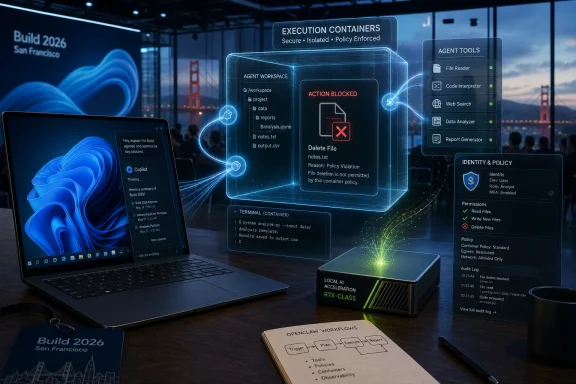
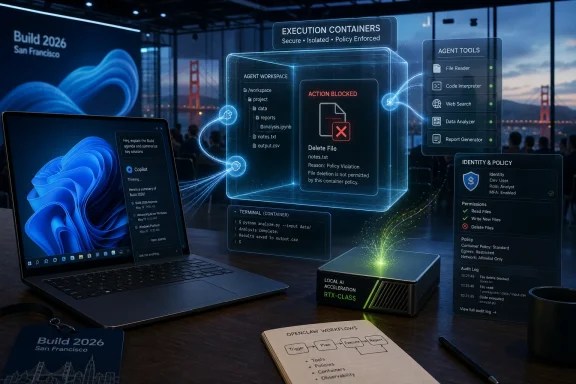
Futuristic Build 2026 security dashboard shows a blocked file deletion in an isolated execution container.Microsoft’s New Windows Pitch Is That Windows Stops Being the Main Event​

For three decades, Microsoft’s operating system story has been about the visible surface of computing: the Start menu, the taskbar, windows, files, apps, settings, notifications, and all the small frictions that make a PC feel like a PC. Build 2026 was different. Microsoft spent its oxygen on agents, containment, identities, and hardware acceleration — the plumbing for a machine that increasingly does things around the desktop rather than inside it.
That is why the most revealing demo was not a productivity miracle. It was an AI agent trying to delete desktop files and failing. In old Windows demos, the failure would have been embarrassing. In this one, failure was the product.
The point was clear enough: if Microsoft wants developers and enterprises to let agents loose on Windows PCs, the first selling point cannot be intelligence. It has to be restraint. An agent that can code, click, summarize, edit, compile, file, and automate is useful only if it cannot also wreck the machine it is supposed to help.
That framing is both shrewd and telling. Microsoft knows the Windows audience has been trained by decades of malware, bloatware, driver drama, telemetry anxiety, and more recently Recall blowback to treat new platform-level automation with suspicion. So the company is trying to make the agentic PC feel less like a chatbot with admin rights and more like a managed workload inside a hardened boundary.

The OpenClaw Demo Was Really a Security Demo in Disguise​

OpenClaw’s role at Build was symbolic as much as technical. It represents the developer world’s fascination with autonomous agents that can operate across a computer: reading context, invoking tools, editing files, launching workflows, and behaving less like a feature than a junior operator. That kind of capability has an obvious appeal to programmers, researchers, and IT teams drowning in repetitive work.
It also has an obvious downside. A useful agent needs access. It needs to inspect directories, call applications, execute commands, and modify artifacts. But the more access it has, the more a hallucination, prompt injection, malicious instruction, or plain misconfiguration can do damage.
Microsoft Execution Containers are Microsoft’s answer to that contradiction. The company described MXC as an operating-system-enforced containment layer that lets developers and administrators define what an agent can reach and what it cannot. In the keynote example, the Desktop folder could be made read-only, and the agent’s attempt to delete files was blocked.
That sounds almost mundane, but it is the core of the pitch. The future Microsoft showed is not a magical assistant that knows everything. It is a permissioned actor running inside a Windows-controlled sandbox, with the system mediating between user intent, agent behavior, and local resources.
The demo’s applause says something about where the industry is. Developers did not cheer because deleting files is hard. They cheered because stopping an autonomous agent from doing the obvious destructive thing is now a platform milestone.

Windows Is Being Recast as the Agent’s Operating Theater​

Microsoft’s language around Windows at Build 2026 was not accidental. It wants Windows to be “a fantastic place to run and scale agents,” which is a very different ambition from making Windows a better place to run Word, Photoshop, Steam, Teams, or Visual Studio. The operating system is being recast as a trusted execution environment for semi-autonomous workers.
That distinction matters because it changes what Windows is competing on. The old desktop wars were about applications, drivers, file compatibility, gaming, enterprise management, and hardware breadth. The new race is about whether a local machine can host models and agents with enough performance, context, isolation, and policy control to be trusted.
In that world, the GUI is no longer the primary interface. The interface may be a prompt, a command, a policy, a scheduled workflow, a message sent from a phone, or an instruction issued by another service. The Windows desktop still exists, but it becomes one layer in a larger choreography rather than the place where all meaningful interaction happens.
That is why the “barely looks like Windows” critique lands. Microsoft did not show a radically redesigned shell because the shell was not the center of the story. It showed a future in which Windows’ most important work may happen behind the glass.

Nvidia Gives Microsoft the Hardware Story It Was Missing​

The agentic PC needs more than slogans. If agents are going to run locally, especially with large models and private data, Microsoft needs hardware that can make the idea plausible. That is where Nvidia’s RTX Spark platform and Microsoft’s Surface Laptop Ultra enter the narrative.
The new Surface pitch is not simply faster Windows on Arm or another premium laptop refresh. It is a claim that a PC can become a local AI workstation: a portable machine with serious unified memory, Nvidia acceleration, and enough local compute to run models and agents without always leaning on the cloud. Microsoft also introduced a Surface RTX Spark Dev Box aimed more squarely at developers building and testing this new class of software.
This is a strategic correction. The first wave of AI PCs was muddled because NPUs were marketed heavily before everyday users had many compelling local AI workloads. A Copilot key and a few camera effects were never going to justify a platform transition. Agents, by contrast, are computationally hungry, latency-sensitive, and potentially privacy-sensitive enough to make local horsepower matter.
But the hardware story also narrows the audience. The people most likely to understand why they need an RTX Spark system are developers, researchers, AI startups, enterprise architects, and power users. Regular Windows customers may hear “personal AI” and see a premium price tag attached to a problem they did not know they had.

Project Solara Hints That Microsoft Is Willing to Route Around the PC​

Project Solara may prove more important than it first looked because it suggests Microsoft is thinking beyond the traditional Windows device. The concept points toward agent-first hardware — machines designed around intent, context, and managed execution rather than conventional apps. That is a profound admission from the company that built the world’s dominant desktop OS.
The PC is not disappearing, and Microsoft is not foolish enough to say it is. But Solara implies that the next growth surface may not be another laptop form factor with a better screen and a faster chip. It may be a class of devices where the user does not launch apps in the usual sense, and where the agent becomes the organizing layer.
That should make Windows loyalists both curious and uneasy. Microsoft has a long history of creating new platform abstractions that complement Windows until, one day, they compete with the assumptions Windows was built on. The web did this. Mobile did this. Cloud services did this. Now agents may do it from inside the house.
The safest reading is that Solara is an enterprise and developer platform experiment. The more aggressive reading is that Microsoft sees the classic PC interface as only one possible endpoint for Windows-era computing. Either way, Build 2026 made clear that Microsoft does not want to be trapped defending yesterday’s desktop metaphors while Apple, Google, OpenAI, Anthropic, and Nvidia define the agent layer.

The Recall Hangover Still Shapes Every AI Promise Microsoft Makes​

Microsoft’s agent push cannot be separated from the company’s recent AI trust problem. Recall turned into a case study in how quickly an ambitious Windows AI feature can become a privacy controversy when users believe the operating system is observing too much, storing too much, or explaining too little. Even after Microsoft revised Recall’s security model, the episode changed the baseline mood.
That is why MXC matters politically as well as technically. Microsoft is not merely saying agents will be useful. It is saying agents will be governed. Permissions, containment, local identities, and administrator control are now front-stage concepts because Microsoft knows the trust deficit is real.
For consumers, the question will be brutally simple: what can this agent do for me that is worth the risk of letting it near my files, apps, browser sessions, and personal data? For enterprises, the question will be more complex but no less skeptical: can this be audited, governed, revoked, logged, isolated, and defended under real-world compliance pressure?
Microsoft is trying to answer before the backlash arrives. Showing an agent fail to delete files was a clever piece of theater because it dramatized control. But theater is not assurance. IT administrators will want documentation, policy hooks, event logs, integration with identity systems, and a clear account of what happens when an agent receives malicious instructions from an email, webpage, document, or compromised workflow.

The Developer Audience Gets the Vision First Because It Has the Pain First​

Build is a developer conference, so it is unsurprising that Microsoft led with developers. But there is a deeper reason the agentic Windows pitch starts there: developers are among the few groups already living with agent workflows daily enough to tolerate the rough edges. They are using coding agents, terminal assistants, repo-aware tools, and local models because the time savings can be tangible.
For that audience, an agent that can safely edit a project, run tests, inspect logs, open issues, or refactor code is not science fiction. It is an imperfect but increasingly normal coworker. If Microsoft can make Windows a better environment for those agents than macOS or Linux, it has a real platform advantage to pursue.
The challenge is that developer enthusiasm can mislead platform companies. Developers love power tools that normal users find baffling. A sandboxed agent with configurable file permissions is exciting if you already understand why arbitrary file access is dangerous. It is not necessarily exciting if you are trying to organize vacation photos, reconcile a family budget, or remove three years of printer utilities from startup.
Microsoft’s bet is that developer workflows preview mainstream workflows. Sometimes that is true. Source control, cloud sync, browser tabs, and collaboration tools all moved from specialist contexts into everyday work. But sometimes the gap remains. The Windows command line is vastly better than it used to be, and most users still never open it.

The Consumer Use Case Is Still the Weakest Link​

The PCMag account rightly highlights the uncertainty around ordinary Windows users. Microsoft can explain why an enterprise agent needs containment. It can explain why a developer might want local OpenClaw. It can explain why Nvidia-class compute matters for model-heavy workloads. It has a harder time explaining why the average Windows 11 user should want an autonomous actor on their personal machine.
There are plausible answers. An agent could clean up downloads, assemble tax documents, manage photos, troubleshoot a driver problem, install and configure software, prepare a presentation from local notes, or coordinate across email, calendar, files, and browser tabs. Those are real annoyances.
But plausibility is not the same as product-market fit. The more valuable the task, the more sensitive the access. The safer the sandbox, the more constrained the agent. The more autonomous the agent, the more the user needs to trust it. The more confirmations Microsoft inserts, the less autonomous it feels.
That is the central design trap. Users do not want an AI agent that constantly asks permission to do obvious things. They also do not want an AI agent that silently does consequential things wrong. The future of Windows may hinge on whether Microsoft can make that middle ground feel natural rather than bureaucratic.

Enterprise IT Will See Both the Opportunity and the Blast Radius​

For IT departments, agents are not just a feature. They are a new class of endpoint actor. A human employee has an identity, permissions, training obligations, and an audit trail. A service account has scope and governance. An AI agent sits awkwardly between those categories, acting on behalf of users while making probabilistic decisions based on instructions and context.
Microsoft’s enterprise instinct is to domesticate that actor. Give it an identity. Put it in a container. Attach policy. Route its access through Windows primitives. Make its actions distinguishable from the human user’s actions. That is the right direction, and it plays to Microsoft’s strengths in identity, endpoint management, and enterprise trust.
Still, the operational questions are immense. Who approves an agent’s permissions? How are permissions reviewed after the agent’s role changes? Can an agent be limited to one project, one data classification, or one business unit? What happens when an agent’s output is wrong but its actions were technically authorized? How do help desks troubleshoot an agent that misread a prompt, exceeded its mandate, or became stuck halfway through a workflow?
These are not edge cases. They are the daily reality of enterprise computing once agents become persistent. Microsoft can make Windows the safest place to run them, but safety will be measured by how the system behaves in the boring, messy, ticket-generating middle of corporate life.

The App Model Is Starting to Look Like Legacy Infrastructure​

One underappreciated consequence of the agent push is what it does to the idea of an application. Windows has always been app-centric: users pick a tool, open a file, manipulate the interface, and save the result. Agents blur that model because the agent’s job is often to move across tools rather than live inside one.
That is unsettling for software vendors. If the user asks an agent to “prepare the weekly report,” the agent might pull from Outlook, Teams, Excel, a CRM, local folders, and a browser. The user may care less which app performed which step. The agent becomes the experience layer, while applications become capability endpoints.
Microsoft is well positioned for this because it owns both the operating system and many of the productivity endpoints. But it also has to avoid making Windows feel like a stage for Microsoft 365 automation at the expense of the broader ecosystem. If agentic Windows works only when every serious action routes through Microsoft’s preferred services, developers and regulators will notice.
The healthier version is a Windows agent model where third-party apps can expose capabilities safely, users can grant granular access, and administrators can enforce policy without killing usefulness. That would be a genuine platform evolution. The unhealthy version is another walled garden wearing an open-platform badge.

Local AI Is About Privacy, Latency, and Control — Not Just Offline Demos​

Microsoft and Nvidia’s local-compute emphasis is easy to caricature as workstation theater, but there is a real architectural argument behind it. Cloud AI is powerful, but it introduces latency, cost, data-governance questions, and dependency on connectivity. Local AI can reduce some of those frictions, especially for sensitive workflows or repetitive tasks that do not need frontier-scale reasoning every time.
For Windows, local agents also align with the PC’s historical identity. A personal computer is supposed to be yours. It should work with your files, your peripherals, your network constraints, and your local context. If the future of Windows is merely a thin client for cloud agents, Microsoft weakens the very premise of the PC.
The more compelling future is hybrid. Small and medium models run locally for private, fast, contextual tasks. Cloud models handle heavier reasoning when policy allows. The operating system brokers the relationship, enforcing access boundaries and preserving a user-visible chain of responsibility.
That is the theory. The practical version will depend on whether Microsoft can make local AI dependable across a fragmented PC market. A Surface Laptop Ultra may be a showcase, but Windows succeeds or fails on millions of less glamorous machines bought through procurement portals, retail discounts, school programs, and family recommendations.

Microsoft Is Trying to Avoid Another Cortana Moment​

The history of Windows assistants is not glorious. Cortana arrived with ambition, retreated into narrow enterprise scenarios, and eventually became a reminder that voice-assistant branding could not substitute for deep utility. Copilot has fared better as a brand, but it has also been stretched across so many products that its meaning can feel mushy.
Agents are Microsoft’s attempt to move beyond assistant theater. A chatbot answers. An agent acts. That difference is why the company is building containment rather than merely designing a friendlier panel.
But the Cortana lesson still applies: platform features fail when users cannot form a durable habit around them. If agents remain impressive keynote demos that ordinary users forget to invoke, they will become another layer of Windows furniture. If they interrupt too much, they will be disabled. If they make mistakes in sensitive contexts, they will be distrusted.
Microsoft needs agentic Windows to become boringly useful. Not dazzling. Not creepy. Not a brand campaign. Useful in the way Task Manager, File Explorer, clipboard history, Windows Hello, and OneDrive sync are useful when they work: quietly, repeatedly, and with a clear mental model.

The New Windows Risk Is Not That AI Fails, but That It Half-Works​

The hardest platform transitions are not the ones where technology obviously fails. They are the ones where it works just often enough to be tempting and fails just often enough to be dangerous. That is the likely near-term state of PC agents.
An agent that correctly completes seven out of ten tasks may be impressive in a lab. On a personal machine, the three failures matter. In an enterprise, the three failures generate tickets, compliance reviews, and executive skepticism. In a regulated environment, one bad action can outweigh many successful automations.
That is why Microsoft’s security-first framing is necessary but incomplete. Containment can prevent certain classes of harm, like unauthorized file deletion. It cannot guarantee that an agent’s judgment is good, that its interpretation of a task is correct, or that its output is accurate. The sandbox can limit the blast radius, but it cannot make the agent wise.
The next stage of this story will be less glamorous than Build. It will involve logs, rollback, explainability, policy templates, safe defaults, user education, and integration with endpoint management. In other words, it will involve the unsexy work that determines whether platform promises survive contact with real deployments.

The Build 2026 Message Windows Users Should Actually Hear​

Microsoft’s Build 2026 keynote was not a Windows 12 reveal, and it was not merely another AI branding exercise. It was a declaration that Windows is being prepared for a world in which software agents are active participants on the PC. The company has not yet proven that ordinary users will want that world, but it has started building the guardrails that would make it less reckless.
  • Microsoft’s most important Windows announcement was not a new interface but a containment model for agents that can act on local resources.
  • OpenClaw’s Windows debut matters because it turns an experimental agent workflow into something Microsoft wants developers to treat as a first-class PC workload.
  • RTX Spark-powered Surface hardware gives Microsoft a more credible local AI story than the first wave of generic AI PC marketing.
  • Project Solara shows Microsoft is already imagining agent-first devices that may not behave like traditional Windows PCs.
  • The consumer case remains underdeveloped because the tasks most worth automating are also the tasks users are most nervous about delegating.
  • Enterprise adoption will depend less on keynote demos than on policy, auditing, identity, rollback, and administrative control.
The future Microsoft showed at Build 2026 barely looks like Windows because Microsoft is trying to move the value of Windows below and beyond the visible desktop. That may be the right bet: if agents become a dominant computing layer, the operating system that can host them safely will matter enormously. But Microsoft still has to prove that “personal AI” is more than a developer dream with a premium GPU attached — and that the next era of Windows can earn trust before it asks for autonomy.
References​

  1. Primary source: PCMag UK
    Published: Wed, 03 Jun 2026 13:05:50 GMT
  2. Related coverage: tomshardware.com
  3. Related coverage: axios.com
  4. Related coverage: windowscentral.com
  5. Official source: blogs.microsoft.com
  6. Related coverage: pcworld.com
  1. Official source: blogs.windows.com
  2. Official source: news.microsoft.com
  3. Official source: commandline.microsoft.com
  4. Related coverage: windowslatest.com
  5. Related coverage: thetechportal.com
  6. Related coverage: techcrunch.com
 

Attachments

  • windowsforum-build-2026-microsoft-windows-becomes-a-secure-platform-for-ai-agents.webp
    windowsforum-build-2026-microsoft-windows-becomes-a-secure-platform-for-ai-agents.webp
    207.1 KB · Views: 0
Microsoft used Build 2026 in San Francisco on June 2 and 3 to recast Windows 11 as a development and execution platform for AI agents, with Copilot, local models, secure containers, new developer tooling, and NVIDIA-powered hardware taking the keynote spotlight. The important shift is not that Copilot is getting another button, sidebar, or marketing refresh. It is that Microsoft is trying to move AI from the app layer into the operating-system contract itself. For Windows users and IT departments, that makes Build 2026 less a product launch than a warning shot: the next fight over Windows will be about who controls the context, the runtime, and the permissions around machine intelligence.

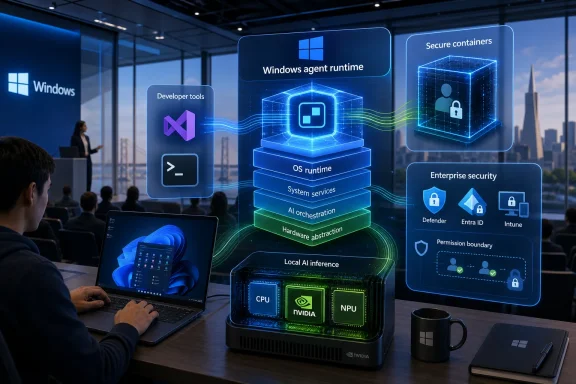
Tech presentation shows Windows agent runtime, OS stack layers, and enterprise security icons in a conference room.Microsoft’s Real Announcement Was an Agent Operating Model​

The submitted framing gets the broad direction right: Copilot and AI dominated Build. But the more precise story is sharper than “Copilot everywhere.” Microsoft did not merely promise a smarter assistant that sits on top of Windows; it positioned Windows as the place where agents can act, be contained, be governed, and increasingly run locally.
That distinction matters. A chatbot can be annoying, useful, or ignored. An agent that can touch files, call tools, execute workflows, interact with developer environments, and inherit enterprise identity is a different class of software. It forces Microsoft to answer questions that Windows has historically answered for human users and traditional applications: What can this thing access? Who approved it? Where did it run? What happens when it misbehaves?
Build 2026’s Windows announcements leaned into that infrastructure layer. Microsoft talked about Windows as a “trusted platform for development,” but the actual center of gravity was an OS that can host AI workloads across local silicon, cloud PCs, containers, terminals, IDEs, and enterprise management systems. Copilot is the visible brand. The runtime is the strategy.
That is why the most consequential announcements were not the most consumer-friendly ones. Microsoft Execution Containers, Windows 365 for Agents, local small language models, Windows Development Skills, Intelligent Terminal, and the Surface RTX Spark Dev Box do not sound like mainstream Windows features. They sound like plumbing because they are plumbing. Microsoft is building the pipes before it tries again to sell the house.

The Copilot Sidebar Was Only the First Draft​

Windows users have already lived through several versions of Microsoft’s AI enthusiasm. Copilot arrived in Windows 11 as a prominent presence, then shifted forms, then became more app-like, then became entangled with a broader family of Microsoft 365, Edge, GitHub, and security-branded Copilots. The experience has often felt less like a coherent assistant and more like a product taxonomy spilled across the Start menu.
Build 2026 suggests Microsoft knows the first draft was messy. Rather than treating Copilot as a single universal panel, the company is now trying to make Copilot’s underlying capabilities available where work actually happens: in Visual Studio, in Windows Terminal, in GitHub workflows, inside local AI APIs, and eventually inside managed agent environments. That is a better product instinct than pretending one chat window can be all things to all users.
The risk is that Microsoft’s vocabulary still runs ahead of the product reality. “Agent-native,” “context-aware,” and “unmetered intelligence” are powerful phrases, but Windows customers have learned to ask a colder question: what changes on my machine, and who is accountable when it breaks? The more Copilot becomes a fabric rather than an app, the harder it becomes to explain where the feature begins and ends.
That is especially true for privacy-sensitive features. Recall, semantic search, and context-aware assistance all promise the same basic magic: the PC understands more about what you have seen, written, opened, searched, and forgotten. The value is obvious. So is the liability. Microsoft’s challenge is not simply to add toggles; it is to make the data boundary legible enough that normal users and administrators can trust it.

Windows Becomes the Place Where Agents Need Permission​

The most interesting Windows feature from Build may be Microsoft Execution Containers, or MXC. The idea is straightforward: agents need a controlled environment where access to files, networking, and other resources can be declared and enforced by the OS. In Microsoft’s telling, developers specify what an agent needs, and Windows supplies containment at runtime.
That is a tacit admission that AI agents cannot be governed like ordinary scripts. A script does what the author wrote, however dangerously. An agent interprets goals, calls tools, responds to intermediate results, and may perform multi-step work that was not explicitly enumerated at the start. If that agent lives on a Windows machine with broad file access and network reach, the blast radius is not theoretical.
For enterprises, MXC is the sort of thing that turns AI from a demo into something a security team can discuss without immediately reaching for the off switch. Microsoft is also tying this into its broader stack: Defender, Entra, Intune, and Purview are the obvious control planes. That is classic Microsoft platform strategy, and it will be both reassuring and suffocating depending on where you sit.
For consumers, the implications are less immediate but still important. Windows has always mediated between users and applications through permissions, file associations, user accounts, and security prompts. If agents become a first-class software category, Windows needs a permission model that is more understandable than “this app wants access to everything.” Build 2026 points in that direction, but the proof will be in the defaults.

Local AI Is Back Because the Cloud Bill Is Real​

One of the quieter corrections at Build 2026 was Microsoft’s renewed emphasis on local AI. The company announced new on-device small language models, broader Windows AI APIs, and support for running more AI capabilities on CPUs, GPUs, and NPUs. The pitch is not just speed or privacy. It is economics.
Cloud AI is powerful, but it is not free, and at enterprise scale the unit costs become strategy. Every Copilot prompt, agent action, model call, embedding lookup, retrieval step, and workflow execution eventually lands somewhere on a bill. Microsoft’s answer is hybrid: use the cloud where scale and frontier models matter, and use the PC where latency, privacy, or cost make local execution preferable.
That is a sensible architecture, and it is also a return to Windows’ historical strength. The PC won because local compute mattered. The browser and cloud weakened that advantage. AI gives Microsoft a chance to argue that client compute matters again, especially when the client has an NPU, a discrete GPU, or a developer-class AI box on the desk.
The Surface RTX Spark Dev Box is the clearest symbol of that argument. It is not a mass-market PC. It is a statement that developers building agentic and local AI workflows need a Windows machine that can run serious models without constant cloud dependency. With up to one petaflop of AI compute and 128GB of unified memory, it is aimed at a narrow audience, but that audience shapes the software ecosystem the rest of Windows eventually inherits.

Developers Are the Beachhead, Not the Audience Microsoft Eventually Wants​

Build is a developer conference, so the developer-heavy emphasis is expected. But this year’s Windows story depends unusually heavily on developers adopting Microsoft’s preferred abstractions before consumers see coherent benefits. The company is asking developers to build Windows-native AI experiences, use Microsoft Foundry on Windows, wire agents into Visual Studio and GitHub Copilot, package workflows for managed execution, and trust Windows as the local half of a hybrid AI stack.
That is a lot of platform gravity to create at once. Microsoft has advantages: Windows remains the dominant desktop OS in many enterprise environments, Visual Studio and VS Code are deeply entrenched, GitHub Copilot has mindshare, and Azure gives the company a cloud back end for the agent era. No other vendor can quite match that combination across desktop, developer tools, identity, productivity software, and enterprise management.
But there is a credibility gap. Windows developers have been promised modern app futures before: UWP, WinUI, Project Reunion, Windows App SDK, Store revitalizations, progressive web app enthusiasm, and various attempts to make Windows development feel less fragmented. Build 2026’s native-app push will be judged against that history. Developers do not need another slogan; they need stable APIs, predictable packaging, good documentation, and users who actually run the new experiences.
The Visual Studio announcements are more grounded. Agents that help with debugging, profiling, testing, merge conflicts, and large-codebase maintenance are credible because they fit existing pain. Developers do not need an AI mascot in the IDE. They need something that can read telemetry, understand a failing test, inspect a stack trace, suggest a fix, and stay out of the way when it lacks confidence.

The Windows AI Push Is Also a Store and Ecosystem Play​

Microsoft’s Build announcements also hint at an old ambition wearing new clothes: make Windows the distribution and monetization layer for a new class of software. If agents become apps, then Microsoft wants the identity, security, packaging, store, analytics, and billing relationships around them. That is not sinister; it is platform capitalism functioning normally. But Windows users should understand the direction of travel.
A world of Windows agents creates new questions. Will enterprises approve agents the way they approve apps? Will consumers download branded agents from the Microsoft Store? Will agents have ratings, declared permissions, audit logs, and revocation paths? Will Microsoft take a cut of agent subscriptions or transactions? Build did not fully answer those questions, but the company’s marketplace language points toward a future in which agents are not just features but commercial units.
This is where Microsoft’s interests and user interests partly align. A chaotic agent ecosystem would be dangerous. Nobody wants random downloadable agents roaming a Windows file system with unclear provenance. A curated, identity-aware, policy-governed channel could be valuable.
The tension is lock-in. If the safest way to deploy agents on Windows is through Microsoft’s identity, Microsoft’s management stack, Microsoft’s store, Microsoft’s cloud, and Microsoft’s models, then “trusted platform” becomes both a security claim and a competitive moat. Enterprises may accept that bargain. Independent developers may be more skeptical.

The Consumer Story Is Still Half-Built​

For everyday Windows users, Build 2026 was both exciting and oddly indirect. The fantasy is easy to understand: search that understands what you mean, a PC that remembers context without forcing you to remember filenames, applications that expose useful actions to AI, and workflows that can be automated by intent rather than by brittle macros. A computer that can help instead of merely respond is a compelling idea.
The problem is that Microsoft’s consumer AI story has repeatedly tripped over intrusiveness. Users who want a faster Start menu, a cleaner Settings app, fewer ads, better update reliability, and less background churn are not automatically thrilled by a proactive assistant. For them, “Copilot everywhere” can sound like “another thing I have to disable.”
Microsoft appears aware of that fatigue. The Windows developer blog’s emphasis on reliability, Explorer, Start, Search, and reducing cognitive load is not accidental. The company knows it cannot sell AI as a substitute for fundamentals. If Windows feels slower, noisier, or more confusing, AI becomes the scapegoat even when the root cause lies elsewhere.
The strongest consumer version of Copilot will probably be the least theatrical one. It will not constantly announce itself. It will appear when a task has enough context to be worth helping with, explain what data it needs, and complete the job without turning the desktop into a prompt engineering exercise. Microsoft’s public demos often show the dream. Windows’ history reminds us to wait for the implementation.

Privacy Is the Feature Microsoft Cannot Treat as Fine Print​

Every serious AI assistant eventually runs into the same paradox: the more context it has, the more useful it becomes, and the more frightening it feels. A Windows assistant that can reason across files, apps, meetings, messages, screenshots, browser history, and enterprise documents could save enormous time. It could also become the most sensitive index ever created on a personal computer.
Microsoft’s answer has to be architectural, not rhetorical. “Responsible AI” language will not be enough for administrators who need to know where data is stored, how long it persists, which models process it, whether it leaves the device, how retrieval is logged, and how policy exceptions are handled. The Recall controversy already showed that users and security researchers will scrutinize any feature that looks like persistent observation.
Local models help, but they do not magically solve trust. A local index can still be abused by malware, exposed by weak account security, or mishandled by a poorly designed permission model. Cloud processing can be acceptable when governance is strong and data boundaries are clear. The real issue is not local versus cloud; it is whether users and organizations can verify what the system is doing.
That is why the agent containment work may prove more important than any single Copilot feature. If Microsoft can make agent permissions visible, enforceable, auditable, and manageable, it has a shot at making AI feel like a controlled extension of Windows. If it cannot, Windows AI will feel like another layer of opacity on an already complex platform.

The Enterprise Pitch Is Stronger Than the Home-PC Pitch​

Microsoft’s clearest audience at Build 2026 was not the Windows hobbyist. It was the enterprise buyer trying to decide whether agents belong inside the company’s operating environment or outside it in a patchwork of SaaS tools. Microsoft’s answer is predictable: bring the agents into the Microsoft stack, where identity, compliance, device management, security telemetry, and productivity data already live.
That pitch will land with many IT departments because it reduces categories of risk they already understand. Entra identities are familiar. Intune policies are familiar. Defender alerts are familiar. Purview governance is familiar. Windows 365 Cloud PCs are familiar. If agents are going to execute work, IT would rather place them inside known management boundaries than leave every department to buy its own black-box automation service.
The strategic beauty for Microsoft is that this makes Windows relevant even when the work is partly cloud-based. Windows 365 for Agents extends the concept of a managed Windows environment to non-human actors. A computer-using agent does not necessarily need the same desktop metaphor as a person, but it does need a controlled workspace. Microsoft is betting that a Cloud PC can become that workspace.
This is also where Microsoft’s language about “agent-native” Windows becomes concrete. The OS is not just a user interface. It is a policy enforcement surface. It is a place where credentials, files, applications, logs, and network access can be composed into a managed environment. That is boring in exactly the way enterprise platforms need to be boring.

The NVIDIA Hardware Moment Shows Where Windows Wants to Compete​

The hardware announcements around NVIDIA-powered developer systems were not a sideshow. They were a signal that Microsoft does not want Windows to be merely the thin client for cloud AI. It wants Windows machines to participate in serious AI development, testing, and execution. That is a meaningful repositioning after years in which the cutting edge of AI often felt more native to Linux servers than to Windows desktops.
WSL helped narrow that gap. Native GPU passthrough, CUDA support, developer configurations, and preinstalled tools push the argument further. Microsoft wants AI developers to stop treating Windows as a compromise machine for coding against remote infrastructure and start treating it as a legitimate local AI workstation.
The Surface RTX Spark Dev Box and DGX Station for Windows are aimed at different ends of that ambition, but both serve the same narrative. If agents and models are going to be built, tested, fine-tuned, and orchestrated locally, Windows needs hardware that makes the experience credible. That does not mean every Windows user needs one. It means Microsoft is courting the developers who will decide whether Windows becomes a first-class AI platform or just another place to open a browser tab.
There is a cultural challenge here. Many AI developers are comfortable in Linux-first environments. Microsoft’s best answer is not to pretend Windows is Linux; it is to make the Windows-plus-WSL-plus-GPU stack convenient enough that developers stop caring where the boundary is. Build 2026 suggests the company understands that developer loyalty is earned through workflow, not keynote slides.

The Submitted “Copilot Pro” Story Overstates What Microsoft Actually Showed​

The source material describes a “Copilot Pro” transformation, proactive workflow optimization, deep OS memory, and broad third-party creative integration as if they were a single announced consumer package. The verified Build story is more nuanced. Microsoft did emphasize Copilot, agents, local AI, Windows developer tooling, and context-aware workflows, but the specific consumer bundle described there should be treated carefully unless Microsoft publishes matching product details.
That matters because Microsoft’s AI branding is already crowded. Copilot Pro, Microsoft 365 Copilot, GitHub Copilot, Security Copilot, Copilot in Windows, Copilot Studio, Copilot Chat, and assorted app-level Copilots do not all mean the same thing. A loose report that collapses them into one “Copilot everywhere” product can mislead readers about what is shipping, what is previewing, what is developer-only, and what remains aspirational.
The safer reading is that Build 2026 advanced three parallel tracks. First, Microsoft is making Windows a better AI development environment. Second, it is building OS-level controls for agents. Third, it is continuing to unify Copilot experiences across developer and productivity surfaces. Those tracks reinforce one another, but they are not the same product.
This is not nitpicking. Windows users have to make decisions based on what actually lands on their PCs. Sysadmins have to prepare policy and training around real features, not vibes. Developers have to target APIs that exist. The AI era already produces enough fog; Microsoft coverage should not add more.

Windows Enthusiasts Should Watch the Defaults​

For the WindowsForum audience, the next year of Insider builds, Microsoft Store updates, and Windows 11 feature drops will matter more than the Build keynote. Microsoft’s ambition is clear. The defaults are not. That is where the practical consequences will appear.
Will on-device models download only when requested by an app, as Microsoft says, or will OEM images and bundled experiences quietly increase the AI footprint? Will Copilot integrations respect user choice, or will they reappear after updates under new names? Will agent permissions be understandable to normal people, or buried in enterprise consoles? Will local AI APIs create genuinely useful applications, or another generation of demo-driven novelty?
Windows power users have learned to evaluate Microsoft not by the first announcement but by the third revision. The first version is the pitch. The second version is the backlash response. The third version reveals whether the company has internalized the criticism or merely renamed the feature.
Build 2026 is the pitch. The backlash response will come when previews land more broadly. The third version will decide whether AI becomes a trusted Windows capability or another item in the long list of services users remove from startup.

The Build 2026 Bet Comes Down to These Windows Trade-Offs​

Microsoft’s Build 2026 message is more coherent than another round of “AI everywhere,” but it also raises the stakes for Windows design. The company is asking users, developers, and enterprises to let the operating system become an active participant in work rather than a passive launcher of applications.
  • Microsoft positioned Windows 11 as a platform for building and running AI agents, not merely as a desktop with Copilot attached.
  • Microsoft Execution Containers are central because agents need enforceable boundaries before enterprises will trust them with files, tools, credentials, and network access.
  • Local AI is becoming strategically important again because latency, privacy, and cloud costs all push some inference and agent tasks back onto the PC.
  • Developers are the first serious audience for this overhaul, with Visual Studio, GitHub Copilot, WSL, Windows Terminal, and AI-ready hardware forming the early platform story.
  • The consumer benefits will depend less on keynote demos than on defaults, privacy controls, performance, and whether Copilot can remain useful without becoming intrusive.
  • The submitted “Copilot everywhere” narrative captures Microsoft’s direction, but some specific product claims should be treated as aspirational until Microsoft ships or documents them clearly.
Microsoft is trying to make Windows the operating system of the agent era, and Build 2026 showed a company that finally understands the job is not just adding a chatbot but building the runtime, permissions, silicon story, developer tools, and enterprise controls around it. The opportunity is large because Windows still sits where work, identity, files, and applications meet. The danger is equally large because an assistant woven too deeply into that fabric can become indistinguishable from surveillance, lock-in, or bloat. The next phase of Windows will be judged not by how often Copilot appears, but by whether Microsoft can make intelligent assistance feel controlled, auditable, fast, and optional enough that users choose it instead of hunting for the disable switch.

References​

  1. Primary source: explosion.com
    Published: 2026-06-04T13:22:09.434832
  2. Related coverage: tomshardware.com
  3. Related coverage: windowscentral.com
  4. Related coverage: tomsguide.com
  5. Related coverage: techradar.com
  6. Official source: news.microsoft.com
  1. Official source: blogs.microsoft.com
  2. Related coverage: windowslatest.com
  3. Official source: blogs.windows.com
  4. Related coverage: que.es
  5. Official source: devblogs.microsoft.com
  6. Related coverage: resources.rework.com
  7. Related coverage: computerbild.de
  8. Related coverage: guiasexpert.com
  9. Related coverage: redmondmag.com
 

At Microsoft Build 2026, held June 2–3 at San Francisco’s Fort Mason Center, Satya Nadella and Microsoft unveiled a developer-heavy AI slate spanning native OpenClaw integration in Windows, unmetered local AI via Windows ML, Surface RTX Spark Dev Box hardware, Project Solara, new models, and Majorana 2. The keynote’s real message was not that Microsoft has seven shiny things to show. It was that Windows is being recast as the place where AI agents run, observe, act, and get contained. That is a more consequential bet than another Copilot sidebar, and it will put new pressure on users, developers, and administrators to decide how much autonomy belongs on the PC.

Cybersecurity concept image with a glowing hologram lock, network nodes, and an AI interface over a dark server setup.Microsoft Puts the Agent Inside the Operating System​

The most Windows-relevant announcement was OpenClaw’s move from a browser-adjacent tool into Microsoft’s native orbit. Microsoft did not merely bless another third-party AI app; it put a popular agent framework in the same conversation as Windows security boundaries, Microsoft 365 context, and OS-level workflow automation.
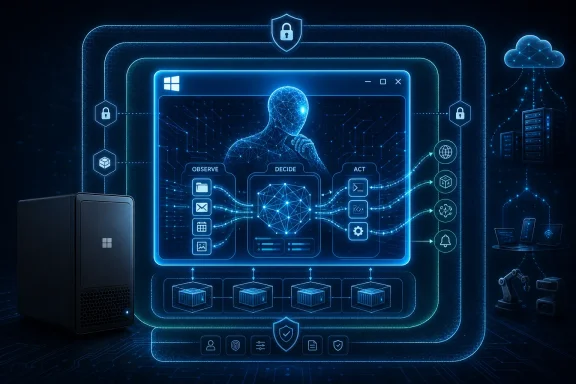
That matters because agentic software is different from the last two years of chatbot enthusiasm. A chatbot answers. An agent is supposed to do. Once software can move files, inspect email, call APIs, edit documents, and trigger workflows, the operating system stops being a passive host and becomes the permission broker.
Microsoft’s answer is to make Windows the runtime and the referee. The company’s pitch around Microsoft Execution Containers is that autonomous workflows can run inside OS-enforced boundaries rather than flailing around with broad user privileges. If that works, Windows gets a new relevance in the AI era: not just as the desktop people tolerate to reach cloud services, but as the trusted execution layer for local and hybrid agents.
The risk is equally obvious. Windows users have spent decades learning that “helpful background process” can mean anything from genuinely useful automation to startup bloat, telemetry creep, and security attack surface. Putting agents deeper into Windows raises the stakes because the software is not merely suggesting actions. It may be authorized to take them.

OpenClaw Is the Consumer Hook, Not the Whole Story​

OpenClaw’s native Windows presence is the announcement most likely to make sense to ordinary enthusiasts. A native app can integrate with notifications, file pickers, identity, local storage, and system permissions in a way a web wrapper cannot. For users already relying on OpenClaw-style workflows, this is the difference between a clever sidecar and something that feels like part of the desktop.
But Microsoft’s interest in OpenClaw is not sentimental. OpenClaw gives the company a credible bridge between the developer community building personal agents and the enterprise customers Microsoft needs to reassure. It lets Microsoft say that Windows will support agent workflows people are already experimenting with, while also steering those workflows toward Microsoft’s security and management stack.
That is classic Microsoft platform strategy. The company rarely wins by inventing every behavior from scratch. It wins by turning a behavior into a platform primitive, giving developers APIs, giving admins policy controls, and then making the Microsoft-flavored path the easiest one to deploy at scale.
For WindowsForum readers, the question is not whether OpenClaw runs better as a native app. It almost certainly will. The question is whether native integration turns into meaningful user control or another layer of “recommended” automation that takes effort to disable.

Unmetered AI Is Really a Hardware Argument​

The phrase “unmetered intelligence” sounds like pricing theater, but the technical claim underneath is more interesting. Microsoft is arguing that more AI inference should happen locally through Windows ML, using CPUs, GPUs, and NPUs already present in modern PCs. If the model runs on your machine, Microsoft does not have to charge every interaction like a cloud API call.
That is the economic reason local AI keeps returning to center stage. Cloud inference is expensive, especially for agentic workflows that may call models repeatedly while planning, checking, retrying, and summarizing. A single user asking one question is manageable. Thousands of corporate users running multi-step agents all day is a bill.
Windows ML is Microsoft’s attempt to make that local compute layer less chaotic. Instead of developers separately targeting NVIDIA, AMD, Intel, Qualcomm, or generic CPU fallback paths, Microsoft wants Windows to supply the runtime and acquire the right execution providers. This is not glamorous, but it is the kind of plumbing that determines whether AI features become mainstream desktop software or remain demo-stage curiosities.
The catch is that “unmetered” does not mean free in any cosmic sense. Users pay through hardware requirements, battery consumption, memory pressure, and possibly subscription bundles. Enterprises pay through device refresh cycles and support complexity. Microsoft’s achievement would be shifting AI cost from a visible meter to an invisible platform assumption.

Surface RTX Spark Dev Box Shows Who Build Is Really For​

The Surface hardware news was not a consumer Surface Pro moment. The standout was the Surface RTX Spark Dev Box, a compact AI workstation aimed at developers who need sustained local compute for model work, agent pipelines, and fine-tuning experiments. That tells us who this Build was really designed to impress.
Microsoft is not primarily trying to sell a new family laptop here. It is trying to convince developers that the Windows ecosystem can be a serious AI workstation environment again. That has not always been an easy sell in a world where much of the AI tooling culture grew up around Linux servers, cloud notebooks, and MacBook-toting researchers.
The Dev Box pitch pairs neatly with Microsoft’s broader local-AI story. If Windows ML is the runtime layer, then high-powered RTX hardware is the proof that Windows machines can do more than forward prompts to Azure. The desktop becomes a small lab, a staging ground for agents and models before they move into production infrastructure.
This also explains why conventional Surface fans may feel underfed. Build is a developer conference, and Microsoft used hardware as a platform signal rather than a holiday shopping pitch. The message was not “buy this laptop because it is thin.” It was “build here because Windows has the silicon path.”

Project Solara Points Beyond the PC Without Replacing It​

Project Solara may be the most speculative announcement, but it fits the pattern. Microsoft described a chip-to-cloud platform for “agent-first” devices, with prototype hardware and a lightweight edge operating environment tied to cloud-hosted agent services. In plain English, Microsoft is imagining devices that are less like traditional computers and more like persistent interfaces to agents.
The interesting wrinkle is that this is not simply Windows everywhere. Reports indicate the device platform uses a lightweight environment based on Android Open Source Project foundations rather than the full Windows stack. That should not be read as Microsoft abandoning Windows. It should be read as Microsoft separating the agent layer from any single form factor.
For the Windows world, Solara is a warning and an opportunity. The warning is that Microsoft no longer believes every important computing experience must start with the Windows desktop. The opportunity is that Windows can become the high-trust, high-capability node in a larger agent mesh, especially for work that involves files, apps, identity, and enterprise policy.
This is where Microsoft’s strategy differs from a pure gadget play. It is not just building a device. It is building a continuity model: agents in the cloud, agents near the edge, agents on Windows, and shared state between them. Whether users find that seamless or creepy will depend on the defaults.

Majorana 2 Is the Moonshot Microsoft Wants Beside the Mundane​

The Majorana 2 quantum announcement served a different purpose from the Windows and AI demos. It was there to remind the audience that Microsoft still wants to be seen as a deep infrastructure company, not merely an enterprise software packager bolting AI onto Office.
Microsoft claims Majorana 2 advances its topological qubit approach, with dramatically improved reliability over its previous generation and a longer-term path toward much larger quantum systems. Quantum computing remains a field where caution is mandatory. The gap between a compelling chip announcement and a practical, fault-tolerant machine is enormous.
Still, the announcement fits Build’s larger narrative. Microsoft wants AI to help design better materials and chips, and it wants better chips to unlock new kinds of computing. That circular story—AI accelerates science, science accelerates AI—is exactly the kind of strategic flywheel Nadella likes to describe.
For Windows users, Majorana 2 will not change the Start menu, gaming performance, or next month’s Patch Tuesday. Its relevance is institutional. If Microsoft can make quantum computing practical later this decade, Azure becomes more attractive for scientific, cryptographic, chemical, and optimization workloads that have little to do with desktop computing but everything to do with Microsoft’s long-term cloud power.

Microsoft’s Own Models Signal a More Independent AI Stack​

The in-house model announcements were easy to miss amid the OpenClaw and hardware chatter, but they may matter more over time. Microsoft has benefited enormously from its OpenAI partnership, but no platform company wants to depend permanently on one model supplier for cost, roadmap, and product identity.
By expanding its own model family, Microsoft gains leverage. It can tune models for Windows scenarios, Microsoft 365 context, image generation, reasoning, on-device use, or enterprise compliance without waiting for a partner to prioritize the same needs. It also gives Microsoft a way to blend cloud and local inference more aggressively.
This does not mean OpenAI disappears from Microsoft products. The relationship remains central. But Build 2026 made clear that Microsoft wants a portfolio, not a monoculture. In enterprise AI, optionality is not a luxury; it is margin protection.
The strategic effect is that Copilot becomes less a single product and more a routing layer. The user asks for help, and Microsoft decides which model, which context source, which runtime, and which device should handle the task. That is powerful, but it is also opaque unless Microsoft gives administrators and users meaningful visibility.

The Always-On Assistant Reopens the Privacy Fight​

Microsoft Scout, described as an always-on personal agent for work built around OpenClaw ideas, is the announcement most likely to divide the room. On one side is the genuine utility: a system that understands your work context, anticipates next steps, and performs routine tasks could be the first Copilot experience that feels less like a chat window and more like actual assistance.
On the other side is the phrase always-on. Windows users still remember Recall’s initial backlash, and enterprise administrators know that context-aware features often become compliance reviews wearing a productivity costume. An assistant that can be useful before you ask must be observing enough to infer what you might need.
Microsoft’s challenge is not just technical privacy. It is trust design. Where does the data live? What is processed locally? What reaches Microsoft’s cloud? How long is it retained? Can administrators disable categories of observation? Can a normal user understand what the assistant knows?
If Microsoft gets those answers right, Scout could become the first credible Windows-native work agent. If it gets them wrong, it risks becoming another example of AI ambition outrunning user consent. The lesson of the last few years is that Windows users will tolerate experimentation, but not surprise surveillance.

Azure Foundry Remains the Factory Behind the Desktop Demo​

Build is still Build, which means the developer tooling behind the stagecraft matters. Azure AI Foundry and related agent tooling provide the production side of Microsoft’s story: create, orchestrate, evaluate, deploy, and govern agents that can use models, tools, enterprise data, and runtime services.
This is where Microsoft’s advantage is strongest. Google can talk about models. OpenAI can talk about frontier capability. Amazon can talk about infrastructure scale. Microsoft can talk about the whole enterprise software estate: identity, Windows, Office, GitHub, Visual Studio, Azure, Defender, Intune, Purview, and Teams.
That breadth is why Build 2026 felt less like a list of AI features and more like an attempt to define the operating model for AI work. Microsoft wants agents built in its tools, grounded in its data layer, secured by its policies, surfaced through its apps, and accelerated by its runtimes. The company is not selling one assistant; it is selling a supply chain for assistants.
For developers, the opportunity is obvious. There will be demand for agentic apps that understand business processes and can operate inside real governance constraints. For admins, the danger is equally obvious. Every agent becomes a new integration surface, and every integration surface becomes something that must be audited, patched, logged, and explained.

Windows Gets More Important by Becoming Less Visible​

The strange thing about Microsoft’s Build 2026 Windows story is that Windows becomes more important precisely as it becomes less front-and-center. The keynote did not revolve around a flashy Windows 12 reveal or a redesigned shell. It revolved around runtimes, containers, local inference, security boundaries, and agent integration.
That is not a retreat. It is a repositioning. Microsoft appears to understand that the next Windows battle is not whether users admire the taskbar. It is whether developers trust Windows as the place where AI software can safely act on behalf of users.
This is a more defensible role than chasing consumer chatbot novelty. Windows sits at the intersection of files, apps, peripherals, identity, corporate policy, and user habit. If agents are going to do real work, they eventually need access to those things. Microsoft wants that access mediated by Windows rather than bypassed through browser tabs and cloud dashboards.
The danger is that platform mediation can feel like platform control. If Microsoft privileges its own agents, its own model routing, or its own subscription bundles too aggressively, developers will notice. So will regulators. The company’s best move is to make Windows the safest and most capable place to run agents, not merely the most Microsoft-dependent one.

The Seven Announcements Add Up to One Bet​

There were seven headline announcements, but they point in one direction: Microsoft wants to own the practical layer of agentic computing. Not necessarily the flashiest model. Not necessarily the coolest device. The practical layer.
That means the runtime, the identity model, the local accelerator path, the developer workstation, the enterprise context graph, the cloud deployment platform, and the security boundary. Microsoft has always been most dangerous when it turns a trend into infrastructure. Build 2026 was an infrastructure event wearing an AI keynote jacket.
The near-term impact for Windows enthusiasts will be uneven. Some users will see OpenClaw integration and new Copilot-style features first. Developers may get value from Windows ML and RTX-class local machines sooner than consumers get a polished always-on assistant. Enterprises will move slowly, because agentic automation touches data governance, endpoint management, and security review all at once.
That slower enterprise pace should not be mistaken for lack of importance. Microsoft does not need every user to run an always-on agent tomorrow. It needs developers and IT departments to start treating agents as inevitable and Windows as the sane place to run them.

The Build 2026 Announcements That Will Actually Hit Windows Desks​

The practical read on Build 2026 is that Microsoft’s announcements fall into three timelines: immediate developer tooling, near-term Windows integration, and long-range infrastructure bets. The trick is not to confuse a keynote demo with a deployment plan.
  • OpenClaw’s native Windows integration is the announcement most likely to be felt first by enthusiasts who already use agentic workflows.
  • Windows ML is the foundation for Microsoft’s “unmetered” AI pitch because local inference can reduce dependence on per-call cloud economics.
  • Surface RTX Spark Dev Box is aimed at developers and AI builders, not mainstream Surface buyers looking for a conventional laptop refresh.
  • Microsoft Scout and always-on agent features will live or die by privacy controls, administrative policy, and user trust.
  • Majorana 2 is strategically important for Microsoft’s cloud and research ambitions, but it is not a near-term Windows feature.
  • The expanded Azure AI tooling is the enterprise factory behind the consumer-facing demos, and it may shape real deployments more than the keynote moments do.
Microsoft’s Build 2026 story is ambitious because it treats AI agents not as an app category but as a new operating assumption for computing. That future could make Windows more useful, more local, and more secure than a browser-only AI world; it could also make the PC feel more observed, more managed, and more dependent on Microsoft’s cloud. The next year will show whether Microsoft can make autonomy feel like empowerment rather than encroachment, and whether Windows can become the trusted home for agents without turning the desktop into another subscription-shaped control plane.

References​

  1. Primary source: explosion.com
    Published: 2026-06-05T14:35:09.623920
  2. Related coverage: tomshardware.com
  3. Related coverage: windowscentral.com
  4. Related coverage: techradar.com
  5. Related coverage: itpro.com
  6. Official source: news.microsoft.com
  1. Related coverage: tomsguide.com
  2. Official source: blogs.microsoft.com
  3. Related coverage: notebookcheck.com
  4. Related coverage: fortune.com
  5. Official source: blogs.windows.com
  6. Related coverage: thetechportal.com
  7. Official source: microsoft.com
  8. Related coverage: arstechnica.com
 

Back
Top