

Microsoft's certification ecosystem has quietly matured into one of the clearest, fastest routes from IT entry-level roles to high-paying, specialized careers — but the path has also become more performance-driven, time‑sensitive, and strategically complex than many candidates realize. ([learn.microsoft.coosoft.com/en-us/credentials/)
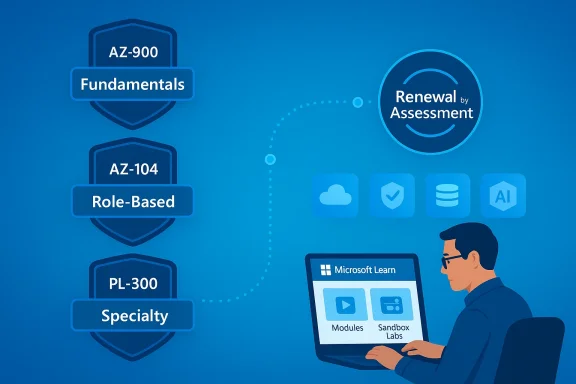
Microsoft certifications now span a tiered ecosystem of Fundamentals, Role‑Based, and Specialty credentials designed to match modern job roles — from cloud administrators and data analysts to security operations and AI engineers. The program's goal is to align measurable skills with employer needs while keeping credentials current through Microsoft Learn and a renewal-by-assessment approach.
In the last few years Microsoft moved away from multi‑year static certifications toward a model that emphasizes continuous relevance. Many role‑based and specialty certifications are now time‑bound and require periodic renewal via short, free assessments on Microsoft Learn rather than paying for retakes of full exams. That shift is intended to ensure that badg‑to‑date skills as cloud services and security practices evolve.
Why this matters right now: employers continue to prize validated cloud and security skills, and salary studies show a material compensation premium for IT professionals holding Microsoft credentials — but success requires a realistic study plan, ethical preparation, and an awareness of exam delivery choices and costs.
Practical reasons employers pay premiums for certified staff:
Beyond exam fees, budget for:
However, the value is conditional on:
If you’re starting now: pick one role‑aligned certification, commit to a practice‑heavy plan, document every lab and project you complete, and plan renewal windows into your two‑year development timeline. That disciplined approach turns a Microsoft certification from a checkbox into a career accelerant.
Conclusion
Microsoft certifications continue to offer a high‑value, high‑visibility route into well‑paid IT careers when pursued ethically and paired with practical experience. Understand the renewal rules, budget realistically for time and fees, and prioritize hands‑on practice — do that, and a Microsoft certification becomes a durable investment, not just a credential.
Source: ilounge.com Microsoft Certifications: Unlocking High-Paying IT Careers
 Background / Overview
Microsoft certifications now span a tiered ecosystem of Fundamentals, Role‑Based, and Specialty credentials designed to match modern job roles — from cloud administrators and data analysts to security operations and AI engineers. The program's goal is to align measurable skills with employer needs while keeping credentials current through Microsoft Learn and a renewal-by-assessment approach.In the last few years Microsoft moved away from multi‑year static certifications toward a model that emphasizes continuous relevance. Many role‑based and specialty certifications are now time‑bound and require periodic renewal via short, free assessments on Microsoft Learn rather than paying for retakes of full exams. That shift is intended to ensure that badg‑to‑date skills as cloud services and security practices evolve.
Why this matters right now: employers continue to prize validated cloud and security skills, and salary studies show a material compensation premium for IT professionals holding Microsoft credentials — but success requires a realistic study plan, ethical preparation, and an awareness of exam delivery choices and costs.
What Microsoft Certifications Cover Today
The three broad categories
- Fundamentals — introductory credentials (for example, Azure Fundamentals AZ‑900 and Microsoft 365 Fundamentals) that validate basic cloud and productivity concepts and are targeted at beginners or business stakeholders. These are intentionally low‑barrier entry points.
- Role‑based — focused on day‑to‑day job duties (examples: Azure Administrator Associate AZ‑104, Azure Developer Associate, Microsoft 365 Modern Desktop Administrator). These require stronger hands‑on skills and usually recommend real‑world experience.
- Specialty — advanced, niche credentials for areas such as security operations, AI engineering, and data analytics (examples include Security Operations Analyst, Azure AI Engineer, Data Analyst Associate). These align closely to high‑demand job bands.
How Microsoft keeps credentials current
Microsoft increasingly uses modular learning content and renewal assessments delivered via Microsoft Learn to keep certifications aligned with rapidly changing cloud services. Renewal assessments are short, free, and designed to be taken when you’re eligible (typically within six months of a certification's expiration window). This approach lowers cost friction for maintaining a credential but raises the bar for ongoing study cadence.The Career and Salary Case for Microsoft Certs
Real payoffs — and where they come from
Independent industry reports consistently find that certified professionals earn more than peers without certifications, and Microsoft credentials often appear among the highest‑earning categories in cloud and enterprise IT. The Global Knowledge IT Skills and Salary Report, for example, shows Microsoft‑certified professionals clustered among well‑paid roles and cites average salary differentials for Microsoft‑certified respondents.Practical reasons employers pay premiums for certified staff:
- Signal of up‑to‑date, vendor‑specific skill — certifications reduce hiring risk by proving the candidate understands Microsoft platforms used in production.
- Faster onboarding & less supervision — certificate holders often require less time to reach productivity on specific stacks.
- Compliance and procurement advantages — some enterprise contracts or managed service frameworks require vendor‑validated skills on staff.
What the data does — and doesn't — prove
Salary reports are useful directional data, not guarantees. Regional market conditions, years of experience, and the ability to translate certification into demonstrable project outcomes matter more than the badg as one input when choosing which certification to pursue.The Practical Path: From Fundamentals to Specialist
A staged roadmap
- Start with a fundamentals cert (e.g., AZ‑900) if you’re new to cloud concepts — 1–2 months of focused study is a realistic estimate for most beginners.
- Move to a role‑based associate cert (e.g., AZ‑104 for Azure Administrator or PL‑300 for Power BI/Data Analyst) once you have hands‑on lab experience — 3–6 months depending on prior experience.
- Target an expert or specialty credential (e.g., AZ‑305 for Azure Solutions Architect or SC‑200/SC‑300 series for security) after significant on‑the‑job exposure and project work.
Study strategies that work
- Official Microsoft Learn modules — free, modular study content tied to exam objectives; use these as your study skeleton, especially for renewal preparation.
- Hands‑on labs — nothing substitutes time spent provisioning resources, configuring security policies, and troubleshooting real deployments. Use sandbox subscriptions, Azure free credits, or local virtualization to practice.
- Practice exams — timed simulations help you build pacing and question‑type familiarity; treat third‑party practice tests as complements, not replacements.
- Study groups and community forums — peer review, shared exam strategies, and lab walkthroughs accelerate learning. Community threads dedicated to AZ‑305, AZ‑104, and other popular exams are rich with practical tips (and ethical warnings).
Costs, Delivery, and Logistics — What to Budget For
Exam pricing and delivery formats
Microsoft exam prices vary by country and exam level; fundamentals historically hovered at the lower end while role‑based/advanced exams cost more. Exams can be taken in‑person at authorized test centers or online with proctoring (Pearson VUE or similar providers). Recent updates to exam pricing and regional adjustments mean candidates should always check the final price shown during registration.Beyond exam fees, budget for:
- Practice test vendors and measureup-style simulators (commonly $40–$150 per test).
- Instructor‑led courses or bootcamps if you prefer structured classroom timek for study, and potential troubleshooting for online proctoring (retests or rescheduling can add hidden cost). Community threads show notable variability in candidate experiences with online proctoring.
Renewal is usually free — but not automatic
The renewal assessments Microsoft provides on Microsoft Learn are generally free, short, and unproctored; they are the mechanism Microsoft now uses to keep many credentials current without forcing a paid full retake. That reduces long‑term cost of credential maintenance but requires ongoing study discipline because renewals are time‑sensitive.Strengths: Why Microsoft Certs Still Matter
- Employer recognition and portability — Microsoft remains a dominant enterprise platform; a certification maps directly to real products companies run every day.
- Clear career mapping — Microsoft’s role‑based model helps candidates choose targeted credentials linked to specific jobs, which simplifies hiring signals.
- Low‑friction renewal model — free renewal assessments remove significant long‑term cost barriers to keeping a credential active.
- Rich, free learning resources — Microsoft Learn provides structured modules, sandboxes, and learning paths that align closely to exam objectives.
Risks, Weaknesses, and Hidden Costs
1) Certification ≠ masteknowledge to a point — it does not certify experience or judgment. Hiring managers increasingly expect certified candidates to combine credentials with demonstrable project experience, Git repositories, or operational track records. Treat certifications as evidence, not proof of full competence.
2) Changing rules and expiration windows
Microsoft’s move to time‑bound, renewable certifications means some credentials retire and are replaced while others require annual or biennial renewal. Candidates who do not actively monitor Microsoft Learn updates can find a previously relevant cert downgraded or retired. Always check certification expiration policy and renewal windows for precise UTC dates.3) Exam delivery pain points and proctoring risk
Community threads report variable experiences with online proctoring providers (connectivity issues, scheduling confusion, and test‑center mishaps). These are operational risks that can add stress or repeat fees if an initial attempt is invalidated by technical problems. Plan for a stable testing environment and allow buffer time.4) The ethical and reputational costare repeated warnings in community forums about “dumps” and illicit exam answer sharing. Relying on these shortcuts can lead to exam bans and damage professional credibility. Ethical preparation — hands‑on practice, official learning, and legitimate practice exams — is the only sustainable route.
5) Regional price and value mismatch
Exam cost and the market value of a cert differ by region. A credential that yields a large pay premium in one market may produce a smaller bump in another. Factor regional salary data, industry demand, and your existing experience into the ROI calculation.How to Choose Which Microsoft Certification to Pursue
Quick decision checklist
- Does the cert map to a job you want? Prioritize role‑based certs that are in your target market.
- Can you demonstrate real experience for that role? If not, plan hands‑on labs or volunteer work to build a portfolio.
- What is the regional demand and compensation differential? Use salary reports to estimate ROI.
- Are renewals required for this credential? If so, factor in the time needed to stay current.
Short recommendations by profile
- New to cloud: AZ‑900 (Azure Fundamentals) followed by an associate path (AZ‑104 or AZ‑204 depending on operations vs development).
- Infrastructure/ops focus: AZ‑104 → AZ‑305 to target solutions architect roles.
- Security focus: Start with Microsoft 365 fundamentals for security basics, then progress to role‑specific security certifications and SOC‑oriented credentials.
- Data/analytics: DP‑900 → PL‑300 or DP‑100 depending on analyst vs data scientist ambitions.
Preparing Ethically and Efficiently: A Practical Study Plan
- Map the certification to the specific exam objective list on Microsoft Learn and build a week‑by‑week plan.
- Allocate time for hands‑on labs (at least 40–60% of study time for role‑based exams).
- Use official practice assessments on Microsoft Learn first, then supplement with reputable third‑party practice exams.
- Join a study group or local community for guided lab sessions and peer review.
- Schedule your exam only after consistently passing timed practice exams at target scores.
Employer Perspective: How Hiring Managers Actually Use Microsoft Certs
Hiring managers generally use Microsoft certifications as a triage tool: they narrow large candidate pools by confirmed knowledge and then probe for practical experience in interviews. Certifications can move a candidate from “may be considered” to “interviewed now,” particularly for cloud and security roles. However, final hiring decisions are typically weightier on demonstrable achievements, problem‑solving ability, and cultural fit. Community hiring guides and Microsoft partner roadmaps reaffirm this practical, hybrid evaluation model.Final Verdict: Are Microsoft Certifications Worth It?
Short answer: Yes — but with conditions. Microsoft certifications remain a valuable, employer‑recognized way to accelerate your IT career and access higher pay bands, especially in cloud, security, and data roles. The combination of role‑based clarity, robust free learning content, and a renewal model that favors current skills makes Microsoft’s program well suited to modern careers.However, the value is conditional on:
- Choosing certs aligned with actual job demand in your market.
- Pairing credentials with hands‑on experience and demonstrable projects.
- Avoiding unethical shortcuts and preparing for the operational realities of exam delivery.
- Monitoring renewal windows and accounting for them in your long‑term career plan.
Practical Checklist Before You Start
- Confirm the exact exam price for your country on the registration portal (prices vary and were updated recently).
- Register a test slot or secure a quiet, high‑bandwidth environment for online proctoring; have ID and system requirements ready.
- Build a 3‑ to 6‑month study schedule that allocates at least half the time to hands‑on labs.
- Use Microsoft Learn modules and the official renewal pages as your primary reference for what is tested.
Closing Thoughts and Next Steps
Microsoft certifications remain an effective lever for career advancement — not because the badge alone guarantees promotion or salary, but because the learning paths, vendor relevance, and employer recognition converge around marketable, on‑the‑job skills. Treat certifications as one pillar in a three‑leg strategy: validated learning (the cert), demonstrable experience (projects and portfolios), and continuous relevance (renewals and upskilling). That combination is what actually unlocks higher salaries and senior roles in today’s IT market.If you’re starting now: pick one role‑aligned certification, commit to a practice‑heavy plan, document every lab and project you complete, and plan renewal windows into your two‑year development timeline. That disciplined approach turns a Microsoft certification from a checkbox into a career accelerant.
Conclusion
Microsoft certifications continue to offer a high‑value, high‑visibility route into well‑paid IT careers when pursued ethically and paired with practical experience. Understand the renewal rules, budget realistically for time and fees, and prioritize hands‑on practice — do that, and a Microsoft certification becomes a durable investment, not just a credential.
Source: ilounge.com Microsoft Certifications: Unlocking High-Paying IT Careers
