

Microsoft’s Copilot is becoming a practical, low‑friction entry point for charities that want the productivity gains of generative AI while keeping data inside familiar Microsoft 365 boundaries — but doing it well means pairing the tool with governance, measurement and new staff skills.
Charities face a familiar, urgent problem: demand for services is rising while staff capacity and budgets remain constrained. AI promises to reclaim time by automating repetitive work and speeding research, but the sector is cautious for good reasons — data sensitivity, regulatory compliance, and the ethical duty to beneficiaries. Recent sector guidance and partner playbooks have converged on a pragmatic message: start small, use tools already in your stack, and invest in people and governance.
Microsoft positions Copilot as a workspace assistant that sits inside the Microsoft 365 apps charities already use — Outlook, Teams, SharePoint, Excel and Dynamics/CRM — and that can therefore apply organisational context to answers and outputs. That in‑tenant model reduces some integration friction and can keep sensitive documents within governed storage if organisations adopt recommended tenant controls first. Practical pilots and partner playbooks echo this advice strongly.
However, there are three important caveats:
Adoption should be incremental and evidence‑based: pilot first, measure honestly, and scale only when the numbers and governance checks line up. If charities do that, Copilot can become an effective partner in doing more with less — but only if mission integrity, beneficiary safety and independent verification remain at the centre of every rollout.
Source: Charity Digital https://charitydigital.org.uk/topics/what-can-microsoft-copilot-do-for-charities-12488/
 Background
Charities face a familiar, urgent problem: demand for services is rising while staff capacity and budgets remain constrained. AI promises to reclaim time by automating repetitive work and speeding research, but the sector is cautious for good reasons — data sensitivity, regulatory compliance, and the ethical duty to beneficiaries. Recent sector guidance and partner playbooks have converged on a pragmatic message: start small, use tools already in your stack, and invest in people and governance.Microsoft positions Copilot as a workspace assistant that sits inside the Microsoft 365 apps charities already use — Outlook, Teams, SharePoint, Excel and Dynamics/CRM — and that can therefore apply organisational context to answers and outputs. That in‑tenant model reduces some integration friction and can keep sensitive documents within governed storage if organisations adopt recommended tenant controls first. Practical pilots and partner playbooks echo this advice strongly.
Why Copilot is especially attractive to charities
Charities often choose Copilot first because it meets three pragmatic requirements at once:- It works inside tools teams already know (Word, Teams, Excel), shortening the learning curve.
- It can be configured to read your organisation’s documents and CRM, producing outputs grounded in internal context rather than generic web-sourced answers.
- Microsoft presents it as an enterprise product with established data handling and compliance controls, which is decisive for organisations that manage sensitive beneficiary records.
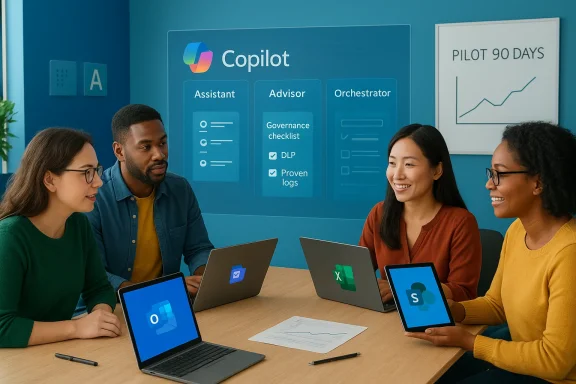
Three practical roles Copilot can play for charities
Below I expand the three ways Copilot is already being used in the sector — Assistant, Advisor, Orchestrator — and translate each into concrete actions charities can trial in short pilots.1) Assistant — meeting capture, drafting, and everyday admin
One of the first productivity wins for charities is reclaiming hours of admin time. Copilot can:- Summarise long meeting threads, extract action items and produce follow‑up emails for attendees. This helps teams recover quickly after back‑to‑back sessions.
- Draft donor and grant communications from templates and tailor language and tone for different audiences, saving repeated copy‑editing cycles.
- Convert documents into accessible formats, simplify language for beneficiaries with lower literacy, and translate materials — speeding inclusive communications.
2) Advisor — turning data into decisions
When Copilot is given controlled access to structured data (Excel, CRM, SharePoint), it can act like a junior analyst:- Produce high‑level interpretations of complex datasets, turning fundraising, service uptake, or monitoring figures into narrative slides and impact statements.
- Surface trends and correlations that teams can interrogate further — for example, identifying donor segments with rising lapse risk or flags in monitoring data that suggest a programmatic pivot.
3) Orchestrator — process optimisation and automation
Beyond single‑task assistance, Copilot and Copilot Agents can help map and streamline workflows:- Identify bottlenecks in month‑end close, reconcile routines, and recommend or automate steps that shorten turnaround.
- Run routine triage agents (for example, a grants‑screening assistant that flags potential funders based on criteria you set, then compiles a short list for human review).
What evidence exists (and what to treat with caution)
Vendor and partner case studies consistently show time savings and higher productivity metrics when Copilot‑style assistants are deployed in governed pilots. Microsoft’s early summaries and several customer stories report broad improvements — for example, a majority of users describing increased productivity and measurable task speed‑ups in specific experiments.However, there are three important caveats:
- Many performance figures are self‑reported or come from convenience samples of early adopters; charities should treat headline numbers as directional rather than definitive. Independent verification within your own workflows is essential.
- Some claims about large headline investments or credential counts in vendor skilling programmes are accurate at the top level but lack granular public reporting on long‑term outcomes; look for independent evaluation studies where possible.
- Generative outputs can hallucinate. Any decision affecting beneficiaries, legal commitments, clinical guidance or safeguarding must have mandatory human sign‑offs and audit trails.
Governance, privacy and procurement: the non‑negotiables
Adopting Copilot responsibly requires three governance pillars.1) Technical controls
- Consolidate content into governed Microsoft 365 storage (SharePoint/Teams) and enforce role‑based access and DLP rules before enabling Copilot on sensitive documents.
- Limit agent access to defined connectors and use conditional access policies to restrict risky endpoints.
- Keep an auditable log of prompts, model versions, and outputs for higher‑risk processes to maintain provenance and enable review.
2) Contract and procurement safeguards
- Ask vendors for explicit contractual guarantees around telemetry, data residency and non‑training clauses (i.e., your tenant data won’t be used to train public models). These are negotiable and worth the effort for organisations handling sensitive personal data.
- Prefer procurement packages that include implementation help, training and governance templates, not just licenses; smaller charities especially benefit from partner‑delivered CoE support and prompt libraries.
3) Human‑in‑the‑loop (HITL) and measurement
- For any output that affects beneficiaries, enforce HITL checkpoints. Make the verification process explicit and auditable.
- Measure outcomes with real KPIs: hours saved on a validated baseline, reduced turnaround times, improved donor response rates or validated reductions in reporting errors. Avoid vanity metrics like raw prompt counts.
Skills and change management: invest in people first
Tools won’t produce impact without the right skills. The most successful charity pilots follow a people‑centred skilling roadmap:- Basic digital literacy and data hygiene (version control, metadata, classification). These are foundations for safe AI use.
- Prompt engineering and verification skills for frontline staff: how to craft precise prompts, detect hallucinations and verify outputs quickly.
- Tenant/IT training for administrators: DLP, identity controls, and how to configure Copilot connectors and agent permissions.
A practical 90‑day starter playbook
Below is a tested, short pilot plan charities can execute with modest resources.- Week 1 — Readiness and baseline
- Run a one‑page readiness checklist. Consolidate key documents into a governed SharePoint structure and record baseline time for target tasks (e.g., drafting a donor report, meeting follow‑ups).
- Week 2–4 — Pilot design
- Choose a single low‑risk use case (meeting summarisation or templated donor emails). Define KPIs and verification gates. Secure any available nonprofit discounts or pilot licenses via TechSoup or Microsoft nonprofit channels.
- Month 2 — Training and initial rollout
- Train a small cohort (10–50 users) with a short role‑based course; run a promptathon to collect common prompts and failures. Enable Copilot read‑only access where possible and require HITL checks for all outputs used externally.
- Month 3 — Measure and decide
- Compare outcomes to baseline, document errors and human edits, and decide to iterate, scale or sunset. If scaling, establish a small CoE to centralise governance, a prompt library, and procurement language that preserves portability.
Costs, discounts and long‑term planning
Microsoft and partners often provide nonprofit discounts, grants and cloud credits that reduce the cost of early pilots. These make experimenting realistic for smaller organisations, but charity leaders must plan for continuity once time‑limited credits expire. Ask vendors for clear renewal terms during procurement and build a modest subscription line into program budgets if the pilot proves valuable. Also consider multi‑vendor skills so staff retain portability in the job market.Real‑world examples and early outcomes
Multiple nonprofit pilots illustrate reproducible benefits when governance is applied:- Large charities have reported time savings on templated reporting and donor communications after consolidating content into governed Microsoft 365 storage and running measured pilots. These results are encouraging but often self‑reported and should be validated in each new context.
- Accessibility‑focused organisations used AI to automate conversion to Braille, audio and simplified text, dramatically reducing manual effort while retaining human review for quality.
- Community organisations have used Copilot to democratise access to institutional knowledge by turning documents into easily searchable content, reducing reliance on a few gatekeepers and improving operational resilience.
Risks to watch and pragmatic mitigations
- Vendor lock‑in: adopt vendor‑agnostic governance language, invest in transferable skills (prompting, verification), and avoid hard‑wiring business processes solely to one provider.
- Data leakage and privacy: enforce DLP, anonymise sensitive inputs, and keep casework out of automated agents until validated controls and contractual protections are in place.
- Hallucinations and quality: require HITL checks and maintain provenance logs. For legally sensitive or clinical advice, avoid automation entirely.
- Overstated vendor claims: ask for pilot methodologies, request independent evaluation where possible, and run local measurements.
Conclusion — a measured invitation to experiment
Microsoft Copilot is not a magic bullet, but it is a practical, lower‑friction platform for charities to explore AI that aligns with familiar workflows and enterprise security models. When charities follow a disciplined approach — consolidate and govern content, choose low‑risk pilots, invest in staff skills, and demand measurable outcomes — Copilot can free time for mission work, strengthen accessibility and surface operational insights that were previously buried in spreadsheets and siloed documents.Adoption should be incremental and evidence‑based: pilot first, measure honestly, and scale only when the numbers and governance checks line up. If charities do that, Copilot can become an effective partner in doing more with less — but only if mission integrity, beneficiary safety and independent verification remain at the centre of every rollout.
Source: Charity Digital https://charitydigital.org.uk/topics/what-can-microsoft-copilot-do-for-charities-12488/
