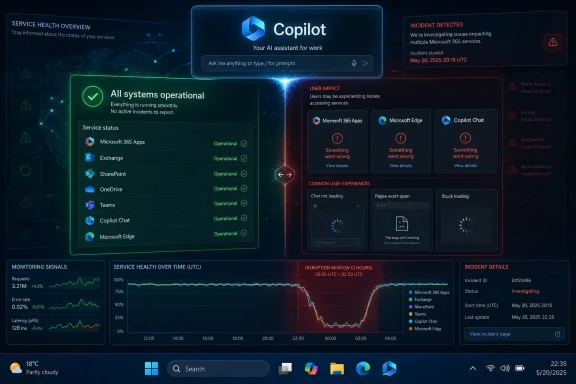
Microsoft Copilot suffered a service disruption on Thursday, June 11, 2026, with outage trackers showing thousands of user reports in the afternoon Pacific window and users describing failures across the Copilot website, app access, authentication, and prompt responses. The interesting part is not that a cloud service went wobbly for a few hours. It is that Microsoft’s assistant is now close enough to the center of Windows, Microsoft 365, and enterprise workflow that a Copilot outage feels less like a website problem and more like a productivity-layer failure. Microsoft has spent the last three years teaching customers to treat Copilot as infrastructure; Thursday’s reports show what happens when infrastructure behaves like an app.

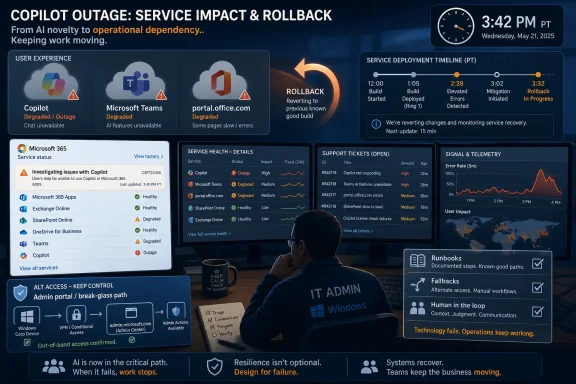
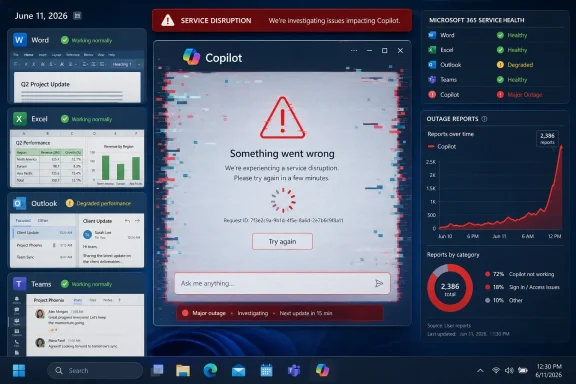
Microsoft 365 Copilot service disruption dashboard shows a major outage and “something went wrong” alert.Copilot’s Outage Was Small Enough to Recover From and Big Enough to Matter​

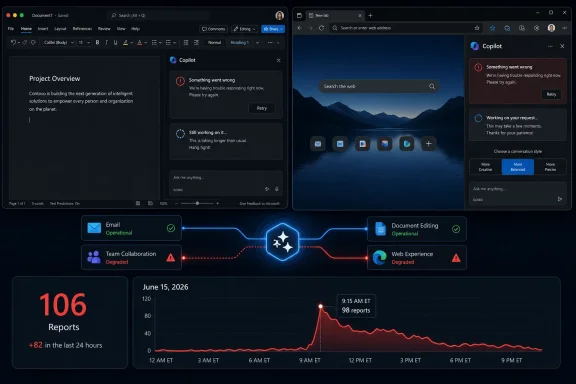
The reported June 11 incident appears to have peaked at more than 4,500 Downdetector reports around 2:03 PM Pacific time, with the bulk of complaints centered on the Copilot website and related access problems. Third-party status pages and user reports also pointed to Microsoft 365 Copilot Chat failures, server error screens, and messages suggesting Microsoft was investigating a potential issue affecting Copilot Chat.
That is not an Azure-scale meltdown, and it should not be described as one. Outage trackers measure user reports, not affected accounts, and a visible spike does not automatically translate into a precise count of customers knocked offline. But the number is large enough to make the incident operationally meaningful, especially because Copilot is no longer positioned as a novelty tab sitting off to the side of Microsoft’s product line.
The outage also landed in a period when Microsoft has been aggressively expanding Copilot’s role from chat companion to workplace interface. Copilot is now sold as the connective tissue between documents, meetings, email, search, Windows, and business data. When that layer fails, it does not merely deny users a chatbot; it interrupts a set of habits Microsoft has deliberately encouraged.
The Sunday Guardian’s report framed the incident as a Thursday afternoon disruption that had stabilized by the following day, while GV Wire highlighted the Downdetector spike. Other monitoring pages showed Copilot returning to normal or baseline levels afterward, though some user reports continued to mention errors around the broader Microsoft 365 Copilot experience. That messy blend of partial recovery, app-specific failure, and user confusion is typical of modern SaaS outages — and it is precisely why they are so difficult for IT teams to explain.

The Downdetector Spike Is a Symptom, Not a Diagnosis​

Downdetector and similar platforms are useful because they catch the experience of users before vendors always say much publicly. They are also limited because they are powered by reports from people motivated enough to complain. A spike tells us that something is happening; it does not tell us the blast radius, root cause, tenant scope, regional concentration, or whether the issue is consumer Copilot, Microsoft 365 Copilot Chat, an identity dependency, or some combination of all of the above.
That distinction matters because “Copilot” is now a brand family rather than a single service. There is consumer Copilot on the web, Copilot in Windows, Copilot Chat in Microsoft 365, paid Microsoft 365 Copilot, Copilot experiences inside Office apps, GitHub Copilot, Security Copilot, and a growing list of agents and extensions. A user saying “Copilot is down” may mean a web page will not load, a Microsoft 365 chat pane is throwing a server error, an Office feature is timing out, or an enterprise connector is not returning data.
Microsoft’s own service health tools remain the canonical source for administrators, but they are not always public in the same way consumer-facing outage pages are. The Microsoft 365 admin center can show tenant-specific advisories and incident IDs, while users outside an organization may only see vague public status pages or third-party trackers. That split creates an information asymmetry: admins may know there is an advisory, end users may only know their prompt failed, and journalists may see only the smoke from Downdetector.
The responsible read, then, is narrower than some outage headlines suggest. There was a real Copilot disruption on June 11, user reports were significant, and the impact appears to have involved website and Copilot Chat access errors. Claims about a specific broken deployment or fully confirmed root cause should be treated carefully unless Microsoft publishes a post-incident review or an administrator-facing advisory that can be independently verified.

Microsoft Built a Productivity Layer, Then Inherited Its Failure Modes​

Copilot’s reliability problem is not that it sometimes goes down. Every large cloud service does. The problem is that Microsoft has encouraged customers to treat Copilot as an ambient layer across daily work while the technical and organizational dependencies underneath remain sprawling, opaque, and vulnerable to the same old cloud failure modes.
A Copilot response may depend on identity, licensing, Microsoft Graph permissions, tenant policy, data indexing, network access, model routing, responsible AI filters, plug-ins, and the front-end shell in which the user happens to be working. That architecture is powerful when it works because Copilot can reach across a company’s information estate. It is also brittle in a very human way: when something fails, the user often receives a vague “try again later” rather than a clear explanation of which dependency broke.
The result is a new kind of support ticket. Traditional SaaS outages often have obvious symptoms: Outlook will not load, Teams calls fail, SharePoint is unavailable. Copilot failures can look more ambiguous. One user may see a blank response, another a login loop, another a server error, and another a perfectly functioning chat box that cannot retrieve the work data it used yesterday.
That ambiguity increases the burden on help desks. If a Copilot pane fails inside Word, is the issue Office, Copilot licensing, a Microsoft 365 incident, a browser cache, Entra ID authentication, a conditional access policy, or a service-side model endpoint? In ordinary times, the answer can be annoying. During an outage, the answer becomes a race between user patience and Microsoft telemetry.

The Assistant Has Become Too Useful to Be Treated as Optional​

The most revealing user complaints during Copilot outages are not the ones that say the chatbot is broken. They are the ones that say work stopped. That is the difference between a feature people occasionally test and a service people have begun to fold into routine production.
Microsoft has been pushing Copilot into precisely those routines. It summarizes meetings, drafts emails, explains documents, builds PowerPoint outlines, reasons over spreadsheets, searches enterprise data, and sits inside the Microsoft 365 app as a front door to work. For many users, that still sounds like convenience. For others, particularly in organizations that have paid for Copilot licenses and trained staff to use it, it has become part of the expected workflow.
That creates a strategic tension for Microsoft. The more successful Copilot becomes, the less tolerance customers will have for treating failures as minor chatbot hiccups. A broken optional assistant is frustrating. A broken productivity layer is a business continuity issue.
There is also a psychological component. Users forgive outages differently depending on what a product has promised them. If a search box fails, users switch to another tab. If an AI assistant has been sold as the way to compress cognitive labor, summarize institutional knowledge, and automate routine work, a failure feels like losing leverage. Microsoft’s marketing has raised the reliability bar faster than the underlying user experience has learned to explain failure.

Enterprise IT Gets the Worst Version of the Outage​

For home users, a Copilot outage is mostly a nuisance. For enterprise administrators, it is a coordination problem with licensing, communications, executive expectations, and audit concerns layered on top. Copilot is not just another Microsoft 365 workload; it is the one that leadership has often been told will justify a costly AI transformation.
That changes the politics of downtime. An Exchange outage is bad, but everyone understands email as infrastructure. A Copilot outage can trigger a different conversation: why are we paying for this, who depends on it, what data is involved, and what do we tell the executives who were promised productivity gains? The incident becomes not only technical but reputational inside the business.
Administrators also face a visibility challenge. Microsoft 365 service health can provide tenant-specific notices, but users frequently learn about issues from Reddit, Downdetector, or internal chat before the official advisory feels complete. That forces IT teams into a familiar cloud-era posture: acknowledge reports, avoid overpromising, monitor Microsoft channels, and prepare a workaround message that mostly says, “Use the underlying apps directly until this clears.”
The workaround problem is especially important. If Copilot fails, Word still opens, Excel still calculates, Outlook still sends mail, and Teams still hosts meetings — assuming the outage is isolated to Copilot. That makes Copilot different from a core Microsoft 365 outage. The task is not always to restore work from zero; it is to help users fall back to the non-AI workflows they may have started to neglect.

The Root Cause Story Is Still Too Thin​

The Sunday Guardian report asserted that Microsoft acknowledged the June 11 outage in its Service Health dashboard and identified a broken software update deployment as the root cause. That may be accurate for tenants that saw a Microsoft advisory, but the public evidence available around the incident is thinner than the confidence of that phrasing suggests. Other trackers described Microsoft 365 Copilot Chat problems and server errors, while user reports pointed to a recent deployment, but public post-incident detail remained limited.
This matters because outage narratives harden quickly. “Broken deployment” is plausible; modern cloud outages often trace back to configuration changes, rollout errors, routing problems, authentication issues, or bad dependencies. But plausible is not the same as confirmed. Without a public incident report, the safer conclusion is that a deployment-related problem was reportedly identified in Microsoft channels, while the full technical chain remains unclear.
The difference is not pedantry. Root cause affects what customers learn. If the problem was a front-end deployment, Microsoft needs stronger rollback and staged rollout controls. If it was authentication, the lesson is about identity dependency and session handling. If it was capacity or model routing, the lesson is about AI inference infrastructure. If it was a Microsoft 365 Copilot Chat-specific service, the lesson is different again from a general consumer Copilot outage.
Microsoft’s broader challenge is that Copilot incidents need clearer public taxonomy. Customers should not have to reverse-engineer whether “Copilot” means the consumer website, Microsoft 365 Copilot Chat, Copilot embedded in Office, or a backend dependency. A brand this broad requires incident language precise enough to match the architecture.

AI Outages Are Becoming a New Class of Workplace Risk​

The Copilot incident should be read alongside a larger trend: AI services are becoming work utilities before they have matured into boring utilities. ChatGPT, Gemini, Claude, Copilot, and enterprise AI layers now occupy space once held by search engines, documentation portals, office templates, and junior analyst workflows. When they fail, users do not simply lose entertainment; they lose a shortcut they may have already embedded into the day.
That is not an argument against adopting Copilot. It is an argument against adopting it without a resilience plan. AI assistants are still mediated by cloud services, rate limits, policy gates, data pipelines, safety systems, and identity infrastructure. They can fail in ways that look subtle rather than catastrophic, and those failures can spread confusion faster than they stop work.
The hardest failures may not be total outages. A service that is completely unavailable is easier to diagnose than one that responds slowly, hallucinates because a connector is unavailable, cannot retrieve fresh data, or silently falls back to a less capable model. The outage headline gets attention, but degraded service is often the more dangerous state for organizations that rely on AI-generated summaries or analysis.
For Windows users, this is where the Copilot-in-the-OS strategy becomes delicate. Microsoft wants AI to feel native to the desktop, not like a website in a wrapper. But native-feeling services are judged by native expectations. If the Start menu works, File Explorer works, and the taskbar works, users will expect the AI affordance beside them to feel equally dependable, even if it is backed by far more complex remote systems.

Microsoft’s Calendar Is Moving Faster Than Customer Trust​

The June 11 disruption also arrives in the shadow of Microsoft’s larger Copilot acceleration. The company has been steadily moving from assistant features to agents, from prompts to workflows, and from isolated productivity aids to cross-application orchestration. That is the logical direction of the product. It is also the direction that makes reliability more consequential.
An assistant that summarizes a document can fail gracefully. An agent that books, files, updates, drafts, routes, or executes across systems needs a deeper trust model. Customers will ask not only whether Copilot can produce good output, but whether it is available, observable, reversible, and governable when the platform itself is degraded.
The WindowsForum audience knows this pattern. Microsoft often pushes platform integration before the operational story feels finished. OneDrive became part of the Windows experience before every user understood sync conflicts. Teams became a default collaboration layer while admins were still wrestling with sprawl. Now Copilot is being threaded through Windows and Microsoft 365 while the outage playbook is still catching up.
That does not mean Microsoft is uniquely unreliable. It means Microsoft is uniquely exposed because of where it sits. If an independent AI tool fails, a company may switch tools for the afternoon. If Microsoft’s AI layer fails inside the productivity stack most businesses already use, the outage becomes part of the Microsoft 365 dependency map.

The Copilot Fallback Plan Should Not Be an Afterthought​

Organizations that are serious about Copilot need to treat it like any other business service: useful, measurable, governable, and fallible. The June 11 outage is a reminder that Copilot adoption should include a downtime script, not just training sessions and license assignments.
That script does not need to be dramatic. Users should know when to switch back to manual workflows, where to check internal status updates, and how to distinguish a tenant-wide issue from a local browser or account problem. Help desks should have canned language ready for common Copilot failure modes, because vague AI errors produce a disproportionate number of tickets.
Administrators should also track which teams have built explicit dependencies on Copilot. A legal department using it for first-pass document review, a sales team using it to generate account briefs, and an engineering manager using it to summarize meetings all experience downtime differently. The right continuity plan depends on the workflow, not the brand name.
There is a governance angle here, too. If Copilot is unavailable, employees may turn to unsanctioned AI tools to fill the gap. That can create data leakage risks, especially if staff copy internal documents into consumer AI services because the approved assistant is temporarily broken. Ironically, the more an organization standardizes on Copilot for security reasons, the more important it becomes to explain what employees should do when Copilot is not available.

The June 11 Lesson Is Written in the Error Screen​

The practical lessons from this outage are not exotic. They are the same lessons cloud administrators have learned from Exchange Online, Teams, SharePoint, Azure AD, and every other dependency that gradually became too important to ignore. Copilot simply adds a new layer of ambiguity and expectation on top.
  • Microsoft Copilot had a visible service disruption on Thursday, June 11, 2026, with third-party trackers showing thousands of user reports during the afternoon Pacific window.
  • The most commonly described symptoms involved website access, Microsoft 365 Copilot Chat errors, failed or blank responses, and authentication-style loops.
  • Downdetector-style spikes are strong evidence of user impact, but they do not provide a complete root cause or exact affected-user count.
  • Microsoft 365 administrators should rely on tenant service health advisories when available, while also watching user-reporting channels for early signs of trouble.
  • Organizations using Copilot for daily work should publish fallback guidance so employees return to standard Microsoft 365 workflows instead of improvising with unsanctioned AI tools.
  • Microsoft needs clearer incident language for the Copilot family because the brand now covers too many surfaces for a single “Copilot is down” label to be operationally useful.
The broader point is simple: Copilot’s reliability now matters because Microsoft succeeded in making it matter. Thursday’s disruption does not prove the platform is unfit for work, but it does show that AI assistants have crossed from experiment to dependency faster than the outage culture around them has matured. If Microsoft wants Copilot to become the front end of work, it must make failure boring, legible, and recoverable — because the next stage of AI adoption will be judged less by demo-day magic than by what happens on the afternoon the magic returns a server error.

References​

  1. Primary source: The Sunday Guardian
    Published: 2026-06-11T21:45:12.238866
  2. Independent coverage: GV Wire
    Published: Thu, 11 Jun 2026 21:06:18 GMT
  3. Related coverage: vaasblock.com
  4. Related coverage: windowscentral.com
  5. Related coverage: isdown.app
  6. Related coverage: downforeveryoneorjustme.com
  1. Related coverage: support.nhs.net
  2. Official source: learn.microsoft.com
  3. Related coverage: outage.report
  4. Related coverage: statusgator.com
  5. Related coverage: spscc.edu
  6. Official source: microsoft.com
  7. Related coverage: techriver.com
  8. Related coverage: ai.firsttech.news
  9. Related coverage: oregon.gov
 

Microsoft confirmed on Thursday, June 11, 2026, that Microsoft 365 Copilot chat and portal.office.com access were disrupted by a recent deployment, then said it reverted to a previous build and resolved the incident by mid-afternoon Pacific time. The outage was short, but its timing was not trivial. It was the second Copilot disruption reported this month, and it landed precisely where Microsoft least wants doubt to grow: in the daily workflow layer it is trying to make feel indispensable. The lesson for Windows shops is not that Copilot is unreliable; it is that AI assistance has crossed the line from novelty to operational dependency faster than many continuity plans have caught up.

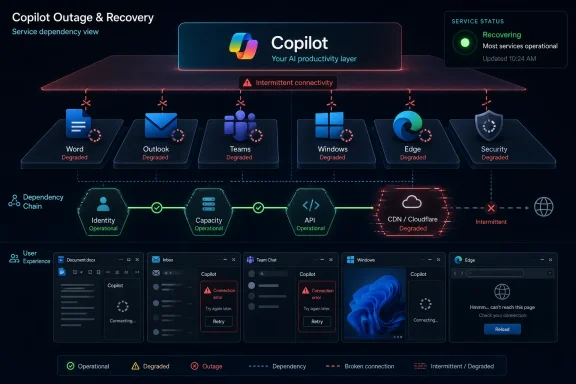
IT admin monitors a Copilot service outage dashboard showing rollback in progress and degraded Microsoft services.Microsoft’s AI Front Door Just Became an Availability Problem​

The June 11 incident was not a sprawling Azure catastrophe or a days-long Microsoft 365 collapse. By Microsoft’s public account, the culprit was a recent deployment affecting users’ ability to access Copilot chat and the Office portal, and the fix was a rollback to a previous build. That is the sort of failure cloud administrators understand instinctively: a change went out, something broke, and the service owner reversed course.
But Copilot is not being sold like an ordinary web app. Microsoft has spent the past several years positioning it as the interface that will sit across Windows, Microsoft 365, Teams, Edge, security products, developer tools, and business applications. When that interface falters, the failure feels larger than its technical blast radius because Microsoft has encouraged customers to treat Copilot as the connective tissue between systems.
That makes even a relatively brief outage revealing. The practical question is no longer whether a user can survive an afternoon without an AI chatbot. Of course they can. The harder question is what happens when organizations have begun routing knowledge work, help-desk triage, document drafting, meeting recap, search, and workflow automation through an assistant whose availability now matters.
Microsoft’s own remediation language was reassuringly conventional: identify the deployment, revert the build, confirm with affected users, mark the issue resolved. The strategic problem is that Copilot is not conventional infrastructure in the customer’s mind. It is marketed as leverage, acceleration, and automation. When leverage disappears, the work does not merely slow; it exposes how much process was quietly rearranged around the tool.

The Second Outage Hurts More Than the First​

One outage can be filed under the normal physics of cloud computing. Two in the same month create a pattern, even if the causes differ and even if the total downtime remains modest. The first June outage reportedly lasted four hours and 25 minutes, leaving some users unable to access Copilot on the desktop or web. The second appears to have been shorter, with Microsoft saying the rollback resolved the issue after the company detected impact from the recent deployment.
For customers, chronology matters. Copilot’s business case rests on habit formation: users are supposed to ask it first, summarize through it first, draft with it first, search through it first. Microsoft needs Copilot to become muscle memory. Repeated access problems interrupt that muscle memory at precisely the moment when many organizations are still deciding whether the license uplift is justified.
This is especially sensitive for Microsoft’s channel partners. Managed service providers and resellers are not merely using Copilot internally; they are explaining it, bundling it into modernization stories, and helping customers identify workflows where AI can shave minutes or hours from routine work. When the service becomes unavailable twice in a month, those partners inherit the uncomfortable follow-up conversation.
That conversation is not “Is AI dead?” It is more mundane and more important: which tasks are safe to depend on Copilot for, which tasks need a manual fallback, and which automations should remain advisory rather than authoritative. In other words, Copilot outages are beginning to sound less like consumer-app hiccups and more like SaaS resilience planning.

A Rollback Is Good Engineering, But It Is Also a Warning​

There is nothing inherently scandalous about reverting a bad build. In mature cloud operations, fast rollback is often a sign that deployment discipline is working. Microsoft identified a recent change, backed it out, and restored service. That is preferable to a prolonged incident in which engineers hunt blindly through layers of dependency while customers wait.
Still, the rollback matters because it points to the fragility of rapid feature delivery in AI-infused productivity software. Copilot is not a static product. It is a fast-moving stack of models, orchestration layers, connectors, identity controls, UI surfaces, compliance boundaries, and service integrations. The more places Microsoft embeds it, the more often a change in one layer can surface as user-visible breakage somewhere else.
For administrators, the incident is a reminder that “AI” does not eliminate the old risks of SaaS. It inherits them. Builds still ship. Authentication still matters. Portals still fail. Dependencies still cascade. Users still open tickets that say only “Copilot is down,” leaving IT to determine whether the problem is local identity, tenant configuration, browser state, regional service health, or Microsoft’s backend.
The difference is that AI tools often sit at the start of a task rather than the end of one. A spreadsheet crash affects the spreadsheet. A Copilot chat failure can affect the user’s path into documents, meetings, email, search, and internal knowledge. That makes availability more psychologically prominent than the raw incident duration might suggest.

The Office Portal Angle Should Make Admins Pay Attention​

The reported impact to portal.office.com is an important detail because it widens the issue beyond a single Copilot-branded chat pane. Microsoft said administrators might still have been able to use the Microsoft 365 admin center through admin.cloud.microsoft as a temporary path. That sort of workaround is useful, but it also underlines a persistent truth of Microsoft 365 operations: there are often multiple doors into the same house, and not all of them fail together.
For sysadmins, this should be a cue to document alternate access routes before an outage. A portal disruption is not the moment to discover which admin URL works, which accounts are break-glass eligible, and which team members know the difference between service health dashboards, admin portals, and user-facing web entry points. The time to test those paths is during a boring week, not during a live incident.
The Teams workaround is similarly revealing. Microsoft reportedly indicated that users leveraging Copilot in Teams might not have experienced the outage and could continue using that version. That suggests the incident’s practical impact varied by surface, which is good news for users but messy for help desks. “Copilot is down” may be true in one interface and false in another.
That fragmentation is now part of the Copilot operating model. There is Copilot in Teams, Copilot in Office apps, Copilot chat, Copilot in Windows, Copilot Studio, role-specific copilots, and assorted agent experiences. Microsoft’s sprawl gives users multiple options, but it also means support teams must think in surfaces, not slogans.

Microsoft Wants Copilot to Be Ubiquitous Before It Is Boring​

The company’s Copilot strategy has always depended on ubiquity. Microsoft does not want a single chatbot tab that users remember once a week. It wants Copilot to appear wherever work happens: beside the document, inside the meeting, above the inbox, within the browser, and eventually inside the process itself. The dream is not a helpful assistant; it is an ambient layer over enterprise software.
That ambition makes reliability less optional. The most trusted enterprise tools are often the least glamorous ones. Email is not exciting, but people expect it to work. Identity is invisible until it fails. File sync is dull until a missing file derails a customer presentation. If Copilot is to become a real productivity substrate, it must graduate from impressive demos to boring dependability.
Microsoft is trying to make that transition while the underlying technology remains unusually dynamic. AI products are still evolving at a pace that encourages experimentation, UI churn, model swaps, and new connectors. Enterprise IT, meanwhile, rewards predictability. The tension between those two cultures is now visible in incidents like this one.
The company can reasonably argue that all cloud services suffer outages. That is true. But Copilot is being introduced into organizations as a new dependency during a period when many business leaders are already predisposed to overestimate what AI can safely automate. The failure mode is not just downtime. It is misplaced confidence.

The Human in the Loop Is Not a Slogan Anymore​

The channel executive quoted by CRN after the earlier June outage put the matter bluntly: AI tools should be treated like any other critical SaaS, and no single vendor should become a single point of failure. That advice sounds obvious until one watches how quickly organizations build new habits around convenience. A tool that saves five minutes 20 times a day becomes infrastructure by stealth.
Keeping a human in the loop is often framed as an accuracy safeguard. Copilot may hallucinate, omit context, misread a document, or produce a polished answer that still needs judgment. But outages add another reason: humans must remain capable of doing the workflow when the assistant is absent. If the organization cannot fall back, the human is not really in the loop; they are downstream of the loop.
That distinction matters for MSPs and internal IT teams trying to write responsible AI adoption plans. It is not enough to say that users should review Copilot’s work. Teams also need to know how to proceed without Copilot. The fallback may be manual search, saved templates, conventional Office features, SharePoint navigation, Power Automate runs that do not depend on Copilot, or escalation to a human operator.
The uncomfortable part is that fallbacks reduce the clean ROI story. If Copilot is merely additive, the business case is simple: buy the license, train the staff, harvest the productivity. If Copilot becomes operationally important, the organization must also spend time on resilience, documentation, governance, and support. That does not make the tool a bad investment. It makes it a real one.

Downdetector Spikes Are Not Telemetry, But They Are Signals​

Outage trackers are imperfect instruments. Downdetector reports do not equal affected users, and they do not prove root cause. They reflect complaint volume, user awareness, and the shape of the service’s customer base. A spike can be noisy, regional, or amplified by social media.
Even so, these spikes matter because they show what users perceive. CRN reported that Copilot problem reports climbed sharply on June 11, from hundreds to nearly 1,900 in less than an hour. That is not the same as Microsoft’s internal service telemetry, but it is an early warning channel administrators increasingly watch because users often notice trouble before status pages fully catch up.
The modern cloud-status ritual is familiar to every admin. A user reports a problem. The help desk checks local factors. Reddit or social media starts filling with similar reports. Downdetector spikes. The vendor status page says it is investigating, or says nothing yet, or posts an incident with careful language. The organization then has to decide whether to burn time troubleshooting locally or declare a likely provider-side issue.
Copilot complicates that ritual because users may report symptoms in vague terms. They may not know whether they are using Microsoft 365 Copilot chat, Copilot in Teams, Copilot in a desktop app, or the general Copilot web experience. They may simply say “AI is broken.” Support teams need sharper intake questions because the product branding is broader than the incident surface.

Windows Shops Need an AI Continuity Plan​

For WindowsForum readers, the practical takeaway is not to panic about Copilot. It is to treat Copilot like a service that now deserves the same operational thinking applied to Exchange Online, Teams, OneDrive, Entra ID, and endpoint management. The moment a tool becomes part of daily work, it belongs in the continuity plan.
That plan should start with inventory. Which departments are using Copilot? Which surfaces do they rely on? Are they using it for drafting, summarization, research, ticket triage, meeting recaps, code generation, data analysis, or customer communications? Are any workflows blocked when Copilot is unavailable, or merely slowed?
Then comes classification. Some uses are low-risk conveniences. If a user cannot ask Copilot to summarize a noncritical email thread, the work continues. Other uses may be closer to operational dependency, especially where Copilot is embedded into sales preparation, support workflows, security investigation, legal review, or executive communications. The same outage has different consequences depending on the business process wrapped around it.
Finally, organizations need communication templates. When Copilot fails, users should not receive a vague “Microsoft is down” message unless that is truly the scope. They should know which surfaces are affected, which alternatives remain available, whether data is at risk, and when IT will update them. Clear outage communication preserves confidence even when the tool itself is unavailable.

The Reliability Bar Rises as Copilot Moves From Chat to Agents​

The stakes will rise further as Copilot becomes less of a chat interface and more of an agentic platform. A chat outage inconveniences users. An agent outage can interrupt a workflow that users expected to run semi-autonomously. That is a different class of dependency.
Microsoft’s product direction is clear enough: Copilot is moving toward task execution, connectors, role-specific workflows, and business-process automation. The more it can do, the more valuable it becomes. But the more it can do, the more carefully customers must ask what happens when it cannot do those things.
This is where enterprise skepticism is useful. IT departments have seen the cycle before. A platform begins as optional convenience, becomes widely adopted, gets embedded into process, and eventually becomes a dependency nobody remembers approving. The right answer is not to block adoption. It is to slow down enough to identify where the dependency is forming.
Copilot’s current outages may be minor compared with the possible future risk of brittle AI-mediated workflows. Today, users may lose access to chat. Tomorrow, a failed assistant could interrupt an automated customer-response process, a compliance review chain, or a security triage workflow. The reliability expectations for those scenarios are higher than the expectations for a drafting helper.

Microsoft’s Transparency Is Better Than Silence, But Customers Need More Than Posts​

Microsoft deserves some credit for public acknowledgement and rapid remediation. The company posted that it was investigating, identified a recent deployment, described the rollback, and later said the issue was resolved. That is the minimum customers expect from a major cloud provider, but minimum competence still matters.
The gap is that enterprise customers increasingly need incident explanations that connect engineering cause to operational prevention. “Recent deployment” is useful, but it does not tell customers whether the risk was testing coverage, configuration drift, a regional dependency, a feature flag, a portal integration, or an unexpected interaction between Copilot surfaces. Some of that detail may be reserved for admin-center advisories or post-incident communications, but customers are right to want more.
This is particularly important because Copilot adoption is still in a persuasion phase. Microsoft is asking organizations to trust the tool with company knowledge, sensitive documents, and workflow context. Trust is built not only by uptime but by candor when uptime fails. The more Copilot becomes a paid enterprise dependency, the less satisfying generic incident language will become.
The company also faces a messaging challenge. Its marketing says Copilot is transformative. Its outage communications often sound like any other service-health note. Those two tones can coexist, but only if Microsoft recognizes that transformative products carry transformative expectations. Customers will not judge Copilot only by what it can generate. They will judge it by whether it is there when work begins.

The June Incidents Turn Copilot From Demo Magic Into Runbook Material​

The immediate operational lesson is straightforward: administrators should stop treating Copilot as an experiment that lives outside standard service management. If users depend on it, it belongs in runbooks, training, outage communications, and vendor-risk discussions. The June incidents give IT teams a concrete excuse to do that work before a more consequential failure arrives.
  • Organizations should document which Copilot surfaces their users rely on, because an outage may affect chat, Teams, Office apps, or portals differently.
  • Help desks should add Copilot-specific triage questions so they can distinguish local account problems from provider-side incidents quickly.
  • Administrators should test alternate Microsoft 365 admin access paths before an outage forces them to improvise.
  • Business owners should classify Copilot workflows by impact, separating convenience use from processes that would stall without AI assistance.
  • MSPs should explain Copilot resilience in the same breath as Copilot productivity, because customers need both the upside and the fallback plan.
  • Users should be trained to continue critical work manually when Copilot is unavailable, especially in regulated, customer-facing, or time-sensitive processes.
None of this makes Copilot a failure. It makes Copilot normal. The most important tools in enterprise computing are not the ones that never break; they are the ones whose failure modes are understood, contained, and rehearsed.

The AI Assistant Era Needs Old-Fashioned Change Control​

There is a temptation to treat AI services as something radically new, exempt from the old governance habits of enterprise IT. In some ways, they are new: probabilistic outputs, model behavior, retrieval grounding, prompt injection, and agent permissions all bring unfamiliar risks. But the June 11 outage is a reminder that some of the most consequential failures remain deeply familiar.
A deployment caused trouble. A rollback fixed it. Users reported access problems. Status channels mattered. Alternate routes mattered. Support teams needed to separate local troubleshooting from cloud-side impact. This is classic SaaS operations wearing an AI badge.
That familiarity should comfort administrators, not bore them. It means the tools for managing Copilot risk already exist: change awareness, incident response, dependency mapping, access alternatives, user communication, service review, and business continuity planning. The AI-specific layer adds complexity, but it does not replace the fundamentals.
Microsoft’s challenge is to prove that Copilot can absorb rapid innovation without making customers feel like unpaid beta testers in their daily productivity stack. Customers’ challenge is to adopt Copilot without surrendering operational judgment to it. The right balance is not anti-AI. It is pro-resilience.
The second Copilot outage of June 2026 will probably fade quickly for most users, especially if Microsoft’s rollback fully contained the problem. But it should linger in IT planning because it marks a transition point: Copilot is no longer just something users try when they want help writing a paragraph. It is becoming a work surface, a support concern, and a dependency. If Microsoft wants Copilot to be the front end of modern work, the next phase is not just smarter answers; it is steadier service, clearer incident detail, and enterprise habits that assume the assistant will sometimes need assistance of its own.

References​

  1. Primary source: crn.com
    Published: Thu, 11 Jun 2026 22:24:00 GMT
  2. Related coverage: tomsguide.com
  3. Related coverage: vaasblock.com
  4. Related coverage: isdown.app
  5. Related coverage: gvwire.com
  6. Related coverage: windowscentral.com
  1. Related coverage: downforeveryoneorjustme.com
  2. Official source: learn.microsoft.com
  3. Related coverage: tech.yahoo.com
  4. Related coverage: pingoru.io
  5. Related coverage: windowsforum.com
  6. Related coverage: outage.report
  7. Related coverage: computerworld.com
  8. Related coverage: gamesradar.com
 

Microsoft Copilot was reported restored after a June 2026 service disruption that affected access to Copilot experiences across Microsoft 365, while the article submitted as a source was itself unavailable behind a Cloudflare origin-connection error at publication time. That odd pairing is not just a nuisance for readers; it is a miniature portrait of modern software dependency. The AI assistant may be back, but the reliability story is bigger than a green status light.
For Microsoft, Copilot is no longer a sidecar chatbot. It is being woven into Word, Outlook, Teams, Windows, Edge, security tooling, admin workflows, and the broader Microsoft 365 productivity estate. When it falters, the outage is not merely an “AI feature” going dark; it is a warning about how quickly enterprises are moving essential work into systems whose failure modes are still being normalized.

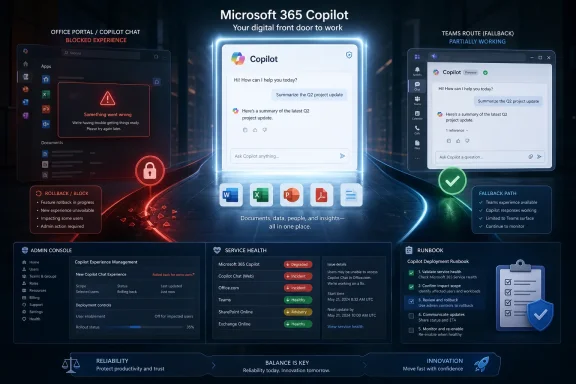
Microsoft Copilot outage recovery dashboard showing degraded services and intermittent connectivity across apps.Copilot’s Recovery Does Not End the Outage Story​

The immediate news is simple enough: users saw trouble reaching or using Copilot, Microsoft investigated, and service later returned. Reports around the June 1 incident described load failures, timeouts, and degraded access, with user complaints appearing across outage trackers and IT communities. By the time many users saw the “restored” language, the operational drama had shifted from emergency response to postmortem speculation.
That shift matters because Copilot is marketed less like a website and more like a new work surface. Microsoft wants users to ask it to summarize email threads, generate documents, reason over meetings, help with code, and eventually act through agents. If that layer becomes routine, then a Copilot outage is not equivalent to losing a novelty button; it becomes a productivity interruption built directly into the operating rhythm of the office.
The submitted source complicates the picture further. Instead of a readable article, the page returned a Cloudflare message saying there was an unknown connection issue between Cloudflare and the origin web server. The message is boilerplate, but its timing is almost too perfect: a story about a restored cloud service was blocked by another cloud dependency failing to connect.
That does not prove any relationship between Cloudflare and Microsoft’s Copilot incident. It does, however, underline the broader reality that users experience outages as a chain, not a topology diagram. Whether the failing link is Microsoft’s service infrastructure, a content delivery network, an identity provider, an overloaded status page, or a publisher’s origin server, the person at the keyboard sees the same thing: work stops.

Microsoft Has Turned Copilot Into Infrastructure​

The original Copilot pitch was easy to understand: chat with an AI assistant and get help drafting, summarizing, searching, or coding. The enterprise pitch is more ambitious. Microsoft 365 Copilot is intended to sit inside the tenant, respect organizational permissions, use Microsoft Graph, and become a reasoning interface over the company’s own data.
That ambition changes the reliability standard. A consumer chatbot can be flaky and still remain useful. An enterprise assistant embedded into Outlook, Teams, Word, Excel, SharePoint, Defender, Purview, and admin experiences has to be judged against the expectations users already apply to email, collaboration, and identity.
Microsoft’s own product direction makes that unavoidable. The company has spent the last two years pulling Copilot into more surfaces, not fewer. It has also started drawing sharper licensing boundaries around which Copilot capabilities are available in which Microsoft 365 experiences, making the assistant both a product differentiator and a workflow dependency.
That is the strategic tension. Microsoft wants Copilot to feel ambient, always available, and deeply integrated. But the deeper the integration, the less tolerant users become of mystery failures. A sidebar that fails to load is annoying; a work pattern built around AI summarization, search, and document generation that suddenly disappears is operationally disruptive.
For WindowsForum readers, this is the important distinction. Copilot is not just “AI in the cloud.” It is a new application layer stretched across identity, data access, compliance policy, prompt orchestration, model routing, service health, browser sessions, desktop clients, and mobile clients. Every one of those layers can become the reason a user says, “Copilot is down.”

The Outage Was a Reminder That AI Depends on Ordinary Plumbing​

There is a temptation to discuss AI outages as if they are exotic. We imagine model failures, hallucination controls, GPU scarcity, runaway agents, or some glamorous new category of failure unique to generative systems. Those risks are real, but many visible Copilot failures still look like old-fashioned cloud problems: routing, capacity, authentication, throttling, service dependencies, client timeouts, and recovery propagation.
That is why the language around the reported June incident sounded familiar to anyone who has administered Microsoft 365. Users saw timeouts and app-load errors. Microsoft reportedly routed requests toward healthier infrastructure and monitored telemetry during recovery. In other words, the visible symptoms were not science fiction; they were cloud operations.
The irony is that ordinary plumbing becomes more important as AI becomes more powerful. A model can produce brilliant summaries only if the service can authenticate the user, retrieve the right tenant data, enforce permissions, call the necessary APIs, return the response, and do all of that quickly enough that the experience feels interactive. The “AI” part is only one component in a long and fragile request path.
That request path is especially demanding in enterprise Copilot scenarios. Unlike a simple public chatbot, Microsoft 365 Copilot must operate inside the constraints of organizational data boundaries. It needs to know what the user can access, what labels or policies apply, and what context is safe to use. That makes reliability a governance issue as much as a performance issue.
This is where admins should resist easy narratives. Not every Copilot outage means the model failed. Not every timeout means Microsoft’s AI stack melted down. Sometimes the problem is that a modern assistant is really a distributed application wearing a conversational mask.

A Cloudflare Error on the Source Page Is the Perfect Metaphor​

The Cloudflare message attached to the submitted source is worth dwelling on because it captures a second-order problem in outage reporting. A reader looking for details about Microsoft Copilot’s restoration could not reach the article because Cloudflare could not connect to the publisher’s origin server. The page advised visitors to try again later and told the site owner to check server logs and provide the Ray ID to support.
That kind of failure is common enough to be mundane. Cloudflare sits between browsers and origin servers for performance, security, caching, and traffic management. When something breaks between the edge and the origin, users may see an error page even if the wider internet is healthy and even if Cloudflare itself is mostly operational.
The larger point is that modern reliability is stacked. Microsoft may restore Copilot, but the story about that restoration can still be unreachable because a publisher’s origin is down. A SaaS vendor may fix its API, but a customer may still be blocked by DNS, conditional access, a local proxy, a browser extension, a broken CDN route, or a stale cached script.
For IT teams, this makes incident communication harder. Users do not care which dependency failed, and they should not have to. They care whether they can do their work. The more services are composed from third-party edges, identity layers, telemetry systems, and embedded web views, the more likely the visible failure will be ambiguous.
That ambiguity is expensive. Help desks burn time distinguishing tenant-specific problems from global incidents. Admins refresh dashboards that may lag reality. Users find Reddit threads, outage maps, or social posts faster than official status pages. In the worst case, organizations start changing configurations during a provider incident and create their own secondary outage.

The Status Page Is Necessary but Not Sufficient​

Microsoft’s official service health tooling remains the first place administrators should look, especially for Microsoft 365 tenants. The admin center’s Service health page can show incidents, advisories, affected workloads, and Microsoft’s current description of impact. It is also where Microsoft often places incident IDs that do not appear in the same detail on public channels.
But the status page has limits. Public status dashboards can be delayed, tenant-scoped incidents may not be visible to everyone, and user reports often precede formal acknowledgement. During major Microsoft 365 incidents, even reaching a status page can become part of the problem, either because of traffic spikes or because the same identity and portal services are degraded.
The June Copilot disruption appears to have followed that familiar pattern: user reports surfaced, Microsoft acknowledged investigation, and recovery language followed later. For administrators, the lesson is not that status pages are useless. It is that they are one signal in a wider incident-detection system.
A mature organization watches multiple signals at once. Service health advisories, synthetic monitoring, endpoint telemetry, help-desk ticket volume, sign-in logs, network traces, and user reports each tell part of the truth. The trick is not to treat any one of them as gospel during the first chaotic hour.
Copilot adds a twist because the user-facing symptom may be vague. “Copilot is not working” could mean the Microsoft 365 Copilot app fails to load, Copilot Chat cannot respond, a rewrite feature in Outlook errors out, a Teams summary is missing, a browser session is stale, or a license boundary has changed. Incident triage has to start with narrowing the surface, not simply confirming the brand name.

Windows Users Feel the Blast Radius Differently​

For individual Windows users, Copilot outages can look deceptively simple. The Copilot app does not load, a chat fails, or a feature inside Microsoft 365 refuses to respond. A reboot, browser refresh, or account sign-out might help if the issue is local, but it will not fix a provider-side incident.
That distinction matters because Windows has become a front end for cloud services. A user’s PC may be perfectly healthy while the experience feels broken. The browser, WebView component, Microsoft account session, Entra ID token, network path, and cloud endpoint all participate in what appears to be a single “app.”
For enthusiasts, this is another chapter in the long shift from local software to cloud-mediated software. Office once failed mostly because a file was corrupt, an add-in crashed, or Windows itself misbehaved. Microsoft 365 can still fail that way, but it can also fail because a remote service, compliance policy, or AI orchestration layer is unavailable.
For businesses, that means desktop troubleshooting needs a different posture. The old instinct to reinstall, repair, or wipe local profiles should be tempered by quick checks against service health and peer reports. If a large number of users see the same Copilot timeouts across devices and networks, the endpoint is probably not the first suspect.
This does not absolve Microsoft of responsibility. Quite the opposite. The more Microsoft turns Windows and Microsoft 365 into launchpads for cloud intelligence, the more it owns the user’s perception of reliability even when the failure is buried several layers deep.

Admins Need an AI-Specific Runbook Now​

The practical response is not to ban Copilot or pretend outages are avoidable. Every major cloud service fails. The question is whether the organization has a runbook that treats AI assistants as real production services rather than optional toys.
That runbook should begin with inventory. Admins need to know where Copilot is enabled, which user groups have which licenses, which applications expose Copilot features, and which business processes have started to assume its availability. Without that map, the help desk cannot distinguish a broad incident from a feature-specific failure.
The next step is communications. During a Copilot outage, users should receive a clear message that separates known facts from speculation. If Microsoft is investigating, say that. If only some features are affected, say that too. If there is no official acknowledgement yet but internal telemetry shows a spike, the message should be honest about uncertainty.
Organizations also need fallback expectations. If users rely on Copilot to summarize meetings, generate first drafts, or search across documents, teams should know what to do when it is unavailable. That may sound obvious, but the whole point of Copilot adoption is to make the assistant habitual. Habits need contingency plans.
Security and compliance teams should be involved as well. Copilot incidents are not only availability events. They can intersect with data access, policy enforcement, sensitivity labels, audit logs, and user trust. Even when an outage has no security component, the response should preserve evidence and avoid hasty changes to tenant policy.

The Reliability Bar Is Higher Because Microsoft Set It Higher​

Microsoft has positioned Copilot as a major platform shift, not a disposable experiment. That framing has consequences. If Copilot is the future of productivity, then its outages deserve the same seriousness as Exchange Online, Teams, SharePoint, or Entra ID incidents.
The company cannot have it both ways. It cannot tell customers that Copilot will transform knowledge work, automate tedious tasks, and become an everyday collaborator, then ask them to treat downtime as a minor inconvenience. The value proposition raises the reliability obligation.
This is especially true as Microsoft moves toward more agentic features. A chatbot that fails mid-answer wastes a few seconds. An agent that is expected to prepare a document, update a plan, inspect a mailbox, or coordinate a workflow introduces more complex failure states. Did it fail before taking action? Did it partially complete the task? Did the user receive a stale summary? Did a retry duplicate work?
Those questions are not hypothetical in the long run. They are the natural consequence of moving from answer generation to task execution. As Copilot becomes more capable, the operational model has to mature from “try again later” to auditable, recoverable, explainable workflows.
Microsoft knows this, and its enterprise messaging already leans heavily on security, governance, and compliance boundaries. But reliability is part of governance. A system that cannot clearly tell admins what failed, who was affected, and whether work was completed is not ready to be treated as a dependable business actor.

The Real Test Is Not Whether Copilot Goes Down Again​

Copilot will go down again. So will Microsoft 365, Azure, Cloudflare, Google Workspace, AWS, Slack, Zoom, and nearly every other cloud platform users depend on. The meaningful question is how quickly providers detect the problem, how clearly they communicate, and how gracefully the product fails.
Graceful failure is still underdeveloped in AI products. Too often, users get a generic error, a spinner, or a vague apology. That may be acceptable for a consumer toy, but it is weak for an enterprise work surface. Users need to know whether the assistant is unavailable, overloaded, blocked by policy, missing context, or unable to reach a dependency.
There is also a user-experience problem in recovery. “Service restored” does not always mean every session is healthy. Some users may need to refresh tokens, reload pages, restart apps, or wait for regional propagation. Others may still hit cached failures or tenant-specific aftershocks. A recovery notice should not be treated as a magic wand.
The source-page Cloudflare failure reinforces this point. A status light can be green somewhere while the user still cannot reach the thing they need. Reliability is local at the moment of use, even when the architecture is global.
For Microsoft, the challenge is to make Copilot resilient enough that failures are bounded and intelligible. For customers, the challenge is to adopt Copilot with eyes open, recognizing that the assistant is becoming part of the productivity stack and therefore part of the incident-management stack.

The Copilot Outage Leaves a Short Checklist Behind​

The June disruption should not be inflated into a catastrophe, but it should not be dismissed as a blip either. It is a useful rehearsal for the kind of AI-layer incident every Microsoft 365 shop is likely to face again.
  • Organizations should treat Copilot availability as a monitored service if employees are using it for routine work.
  • Help desks should separate Copilot app-load failures, chat failures, Outlook rewrite issues, Teams summaries, and licensing problems instead of recording every symptom as “Copilot down.”
  • Administrators should check Microsoft 365 Service health first, but they should compare it with internal telemetry and user reports during the early stages of an incident.
  • Teams that rely on Copilot-generated summaries, drafts, or research should maintain fallback workflows for meetings, documents, and email triage.
  • Security and compliance owners should be included in Copilot incident reviews because AI availability can overlap with permissions, labels, auditability, and user trust.
  • Microsoft should provide clearer failure states inside Copilot experiences as the product moves from assistant to agent.
The restored service is the least surprising part of this story; Microsoft has the engineering depth to recover from cloud incidents, and customers have learned to wait out the occasional rough hour. The more important development is that Copilot is becoming important enough for its outages to matter, and that means both Microsoft and its customers need to stop treating AI reliability as a novelty problem. The next phase of enterprise AI will not be judged only by how clever the assistant sounds when everything works, but by how safely, clearly, and predictably it behaves when part of the chain breaks.

References​

  1. Primary source: asatunews.co.id
    Published: 2026-06-11T22:50:08.846873
  2. Related coverage: radar.cloudflare.com
  3. Related coverage: techtimes.com
  4. Related coverage: copilot.statuspage.io
  5. Related coverage: statusgator.com
  6. Related coverage: outage.now
  1. Related coverage: tbsnews.net
  2. Related coverage: cybernews.com
  3. Related coverage: windowscentral.com
  4. Related coverage: techradar.com
  5. Related coverage: tomsguide.com
  6. Related coverage: support.nhs.net
  7. Related coverage: wordpress.fau.edu
  8. Related coverage: vaasblock.com
  9. Related coverage: isdown.app
  10. Related coverage: windowsforum.com
  11. Related coverage: pingoru.io
  12. Related coverage: crn.com
  13. Official source: learn.microsoft.com
  14. Related coverage: labs.cloudsecurityalliance.org
  15. Official source: cdn-dynmedia-1.microsoft.com
  16. Official source: fpc.microsoft.com
 

Back
Top