

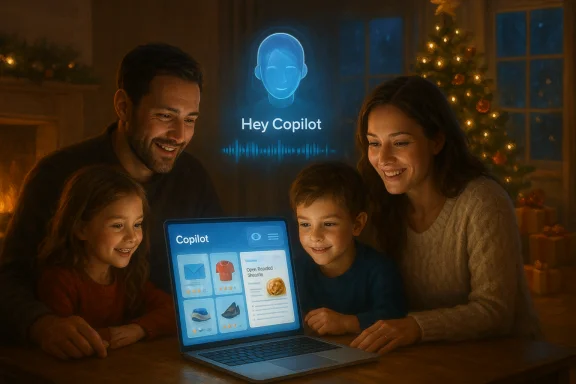
Microsoft’s new holiday ad asks a simple question with a loaded implication: “what if your computer could talk back?” — and then answers it by putting Copilot front and center in a one‑minute family scene that’s meant to be cozy but landed as anything but unanimous cheer. The commercial, rolled into a broader marketing push around the tagline “Meet the computer that you can talk to,” spotlights Copilot Voice and Copilot Vision — the wake‑word and screen‑aware features Microsoft is now pushing as core parts of Windows 11 — and it has reignited the same mix of excitement and skepticism that has followed Copilot since it first arrived in Windows.
Microsoft’s shift is strategic and timed. In October the company doubled‑down on a vision to make “every Windows 11 PC an AI PC,” expanding Copilot from a sidebar helper into a system‑level, multimodal interface that listens, sees, and — where explicitly permitted — acts. The set of features now receiving the most attention are:
That dichotomy is telling: a subset of users are ready for voice and agentic assistance, while another subset sees Copilot as an intrusive, brand‑weighted layer that threatens control or adds complexity. Marketing can only nudge adoption so far; everyday usage patterns and trust will determine whether Copilot becomes a beloved helper or a recurring annoyance.
Source: Windows Latest This holiday, Microsoft wants you to talk to Copilot on Windows 11 and get ready for Christmas
 Background / Overview
Microsoft’s shift is strategic and timed. In October the company doubled‑down on a vision to make “every Windows 11 PC an AI PC,” expanding Copilot from a sidebar helper into a system‑level, multimodal interface that listens, sees, and — where explicitly permitted — acts. The set of features now receiving the most attention are:- Copilot Voice — an opt‑in wake‑word experience activated by “Hey, Copilot.” It summons a floating microphone UI and enables multi‑turn spoken conversations with the assistant.
- Copilot Vision — a permissioned, session‑scoped capability that can analyze selected windows or desktop content, extract text, summarize pages, and point out UI elements. It’s presented as an explicit, temporary screen‑sharing session rather than an always‑on watcher.
- Copilot Actions / Agents — experimental, permissioned automations that can carry out multi‑step tasks inside a visible, auditable workspace (staged to Insiders and Copilot Labs at first).
What Microsoft’s Holiday Ad Actually Highlights
The ad is short and deliberately warm: a family preparing for Christmas, a dad repeatedly invoking “Hey, Copilot,” and an assistive‑sounding Copilot that helps plan, check, and joke. The ad’s central message is that Copilot can reduce friction for holiday tasks — shopping comparisons, checking recipes, cross‑referencing gift lists — by letting users speak and show the assistant what’s on the screen rather than tediously switching tabs or copy+pasting. That consumer‑friendly framing is mirrored in Microsoft’s own marketing materials. The commercial also includes a lightly comic aside — an on‑screen Copilot quip along the lines of “Toy assembly has declined due to hot cocoa consumption” — that reinforces Copilot’s attempt to feel conversational and family‑friendly. That line (reported in the Windows‑focused write‑up you provided) reads like a deliberate attempt to humanize the assistant; the ad itself appears to be the original source for the phrase. The quip has circulated in reaction posts and commentary, although independent transcripts of the ad are not yet widely archived. Treat the joke as part of Microsoft’s creative storytelling rather than technical documentation of Copilot’s capabilities.How Copilot Voice and Copilot Vision Work (the essentials)
Copilot Voice: the wake word and session mechanics
- Activation: Users enable Copilot Voice in the Copilot app settings and then speak “Hey, Copilot” to summon the assistant. The system shows a visible microphone overlay and plays a chime to indicate the session has begun. Sessions can be ended verbally (“Goodbye”), via UI, or after inactivity.
- Privacy design: Microsoft describes a local wake‑word spotter that runs on device, keeping only a short transient audio buffer in memory; transcription and heavier model work typically escalates to cloud services unless the device is Copilot+ and able to do more on‑device inference. That hybrid design is the foundation of Microsoft’s privacy messaging for voice.
Copilot Vision: screen‑aware assistance
- How it’s invoked: Vision is session‑bound and permissioned — you choose windows or a region for Copilot to “see,” and the assistant extracts text (OCR), identifies UI elements, summarizes content, or highlights where to click. Microsoft positions Vision like an intentional, temporary screen share rather than a background recorder.
- Practical examples: Microsoft demos and early hands‑on reports show scenarios such as comparing products in two browser tabs, extracting tables from PDFs, or walking a user through app settings by visually pointing at controls. These are the precise, situational gains Microsoft emphasizes in marketing.
Where Copilot helps right now: practical use cases
The new interactions are not all theoretical. Early testers and Microsoft’s own demonstrations suggest tangible, everyday scenarios where Copilot can reduce friction:- Shopping and comparison: show two product pages and ask Copilot to compare specs and prices across tabs — it can extract visible product details and synthesize a comparison.
- Document triage: quickly summarize long PDFs, extract tables into spreadsheets, or find the specific slide with the data you need.
- Task automation (preview): pilot automations like batch image resizing, renaming files, or extracting invoice data from PDFs via Copilot Actions (preview and limited set of folders initially).
- Accessibility: for users with mobility or dexterity challenges, voice plus visual guidance lowers the barrier to common tasks.
Performance, user experience, and the “rough edges”
Microsoft’s vision is clear, but real‑world experience is mixed. Independent hands‑on reports and community feedback point to three recurring UX problems:- Latency — voice and vision sessions can feel sluggish on non‑Copilot+ hardware because cloud round trips are involved. The experience is demonstrably smoother on 40+ TOPS NPU devices.
- Fragility — Vision’s OCR and UI‑identification are still imperfect; complex layouts, dynamic content, or site anti‑scraping measures can confuse the assistant. That leads to failed actions or incorrect extractions.
- Interruptions and prompts — some users report frequent pop‑ups and prompts that push Copilot features, which can feel intrusive when the assistant is positioned as a help but behaves like persistent marketing. That friction undermines the intent of a seamless helper.
Privacy, data handling, and security: the tradeoffs
Copilot’s strongest strengths create its hardest questions. A few critical privacy and security vectors to watch:- Screen access — Copilot Vision requires permission to view windows or desktop regions. Microsoft frames this as session‑bound and opt‑in, but users must still decide what to share and how often. That decision can be nontrivial if the assistant is useful only when it sees sensitive documents.
- Third‑party connectors — Copilot Connectors let the assistant index and act on data in OneDrive, Outlook, Gmail, and other services via OAuth‑style permissions. This broad access increases Copilot’s usefulness but expands the attack surface and contractual data‑sharing considerations.
- Agentic actions — Copilot Actions that actually modify files or submit forms on behalf of users introduce automation risk. Microsoft’s preview includes visible step logs and revocable permissions, but any agent that runs UI workflows creates the possibility of incorrect or malicious actions if a model hallucinates or misinterprets intent.
- On‑device vs cloud processing — Copilot+ NPUs let Microsoft put more inference on device, improving latency and offering a better privacy posture for some workloads. But most users will rely on cloud processing where data transit and retention policies come into play; that makes transparent controls, logging, and enterprise‑grade governance essential.
The marketing gamble and public reaction
The holiday ad is a purposeful nudge to normalize talking to your PC at home and to plant Copilot in the cultural stream as a family helper. The reaction was predictably mixed. On the one hand, some users embraced the convenience and praised Copilot as “a really good feature” and “the biggest gift of help.” On the other, much of the online commentary used the ad as a running joke or a moment to mock Microsoft — viewers asked Copilot how to uninstall itself, how to install Linux, or how to downgrade to Windows 10, with some describing the ad as “dystopia.”That dichotomy is telling: a subset of users are ready for voice and agentic assistance, while another subset sees Copilot as an intrusive, brand‑weighted layer that threatens control or adds complexity. Marketing can only nudge adoption so far; everyday usage patterns and trust will determine whether Copilot becomes a beloved helper or a recurring annoyance.
Enterprise and IT considerations
For businesses, Copilot’s arrival requires careful policy work. Key considerations for IT teams:- Governance setup: define which features are permitted (Voice, Vision, Actions) and for which user groups. Agents that can act on behalf of users must be limited and auditable.
- Data flow and connectors: vet third‑party connectors and require contractual protections for data handled by Copilot services.
- Device strategy: decide whether Copilot+ hardware is a requirement for particular roles (e.g., interpreters, translators, live transcription use cases) and budget accordingly; the 40+ TOPS NPU threshold is a real line in the sand for premium on‑device features.
- Logging and audit trails: ensure agent actions provide step‑by‑step logs, and establish retention and review processes for any automated operations that touch sensitive systems.
Strengths: what Microsoft gets right
- Useful multimodality — Combining voice and vision with a conversational model is a natural next step for productivity workflows: it reduces friction in scenarios where copying, pasting, and switching contexts is the main cost.
- Incremental rollout and previews — Microsoft’s staged approach (Insiders, Copilot Labs, previews) gives the company a feedback loop to refine agent safety, accuracy, and ergonomics before broad rollout.
- Hardware‑aware experience tiers — separating on‑device Copilot+ features behind a clear NPU threshold lets Microsoft target meaningful latency and privacy improvements to appropriate devices. That division is technically sensible even if it risks fragmentation.
Risks and open questions
- Reliability vs expectation mismatch — If Copilot fails too often (wrong extractions, slow replies), users will conclude that voice and vision are gimmicks rather than productivity boosters. Restoring confidence is much harder than never losing it.
- Trust erosion — Past friction over privacy (for example, controversy around recall‑style features) left some users skeptical. Microsoft needs consistent, independent auditing and transparent telemetry policies to rebuild and maintain trust.
- Monetization and productization creep — The boundaries between genuinely helpful OS features and marketing prompts can blur; intrusive prompts or opaque data collection will draw pushback.
- Fragmentation — Gating the best experiences to 40+ TOPS Copilot+ hardware may create a two‑class user base where only buyers of premium devices enjoy the “true” AI PC. That could complicate support for developers and admins.
Practical advice for consumers
- Enable Copilot Voice and Vision only when you want to use them; both are opt‑in. If privacy is paramount, keep Vision disabled for sensitive apps and files.
- If you’re curious but cautious, try Copilot on a test folder and with non‑sensitive accounts before granting the assistant access to mailboxes, drives, or connectors.
- For faster, more private experiences, consider Copilot+ hardware if your workflows involve heavy local inference (real‑time transcription, image generation, or live translation). Otherwise expect some cloud latency.
- To reduce interruptions, turn off promotional prompts and default suggestions in Copilot settings; Microsoft surfaces multiple toggles for visibility and prompts inside the Copilot app. If you want the assistant on your terms, take control of the settings.
What Microsoft (and OEMs) should do next
- Improve on‑device models and optimize fallbacks so the non‑Copilot+ experience is predictably useful. Users judge features on everyday reliability, not peak capability.
- Make privacy controls granular and discoverable: visible session indicators, explicit connector consent prompts, and easy audit logs for agent activity.
- Reduce marketing friction inside the OS: users tolerate optional helpers, not persistent nudges. Respecting that distinction will help adoption.
- Publish independent performance and privacy audits that enterprises and regulators can review. Copilot’s central promise — to act on user intent — is also its largest governance risk; independent verification matters.
Conclusion
Microsoft’s holiday commercial is a calculated play: a bid to nudge consumers into imagining a future where voice and screen‑aware AI are natural parts of the day‑to‑day PC experience. The underlying technology — Copilot Voice, Copilot Vision, and agentic automations backed by a Copilot+ hardware tier — is one of the most ambitious platform moves in recent Windows history. It promises tangible productivity and accessibility gains, particularly when supported by on‑device NPUs and reasonable governance. But the promise is tempered by reality: inconsistent reliability on non‑Copilot+ machines, legitimate privacy questions around screen access and connectors, and a marketing push that some find intrusive. The Christmas ad captures both the bright side of the vision and the social unease it provokes: for every user delighted that Copilot can compare two SSDs across tabs or summarize a shopping list, there’s another asking how to tell Copilot to go away. Microsoft’s path forward will be defined not by the slogan but by the day‑to‑day experience: faster, accurate, private assistance that helps without intruding. If Microsoft can deliver that, Copilot may become a welcome holiday gift for many households — but the bar for trust and usefulness is high, and the company will need to meet it to convert curiosity into habit.Source: Windows Latest This holiday, Microsoft wants you to talk to Copilot on Windows 11 and get ready for Christmas
