Microsoft Copilot Fall Update: Mico Avatar, Memory, Groups and Edge Actions

  • Thread Author
Microsoft’s latest Copilot Fall Update recasts the assistant as a deliberately social, more expressive, and action-capable companion — led by a new animated avatar called Mico, long‑term Memory & Personalization, multi‑user Copilot Groups, deeper browser agent features in Edge, and a set of grounded health and learning tools intended to make AI feel both useful and more human‑centered.

Blue gradient UI featuring Copilot Groups, Memory, Edge Actions, and a colorful blob icon.Background / Overview​

Microsoft has been steadily integrating Copilot into Windows, Edge, Microsoft 365, and mobile apps for more than a year, and this Fall release is a consolidation of that work into a consumer‑facing package that prioritizes personality, persistence, and agency. The update bundles a dozen headline features designed to make Copilot more personal (memory and connectors), social (shared group chats and an avatar), and agentic (Edge Actions and Journeys), while emphasizing opt‑in consent and visible controls. This is not a mere cosmetic refresh. The company’s stated aim — to make Copilot a true AI companion that can remember context, participate in group workflows, and take permissioned actions on the web — changes how users, product teams, and IT administrators must think about privacy, governance, and user experience. Reuters, The Verge and Microsoft’s own posts provide the public record of the new capabilities and the staged U.S. rollout.

What arrived in the Fall Update: the feature map​

The release mixes visible interface changes with functional platform improvements. Below is a concise snapshot of the most consequential additions.

The headline features (at a glance)​

  • Mico avatar — an optional, animated, non‑photoreal persona that reacts to voice interactions with color and motion.
  • Copilot Groups — shared chats that let up to 32 participants interact with the same Copilot instance, summarize threads, tally votes, and split tasks.
  • Memory & Personalization — persistent, user‑managed memory that can retain preferences, project context, and important dates, with explicit UI to view, edit or delete stored items.
  • Connectors — opt‑in connectors to OneDrive, Outlook, Gmail, Google Drive, and Google Calendar so Copilot can reason over your files and events.
  • Edge: Actions & Journeys — permissioned, multi‑step Actions that can perform things like bookings or form‑filling when explicitly allowed, and Journeys which create resumable browsing storylines out of past searches and tabs.
  • Copilot for Health / Find Care — health responses grounded to vetted publishers and a clinician‑finding flow to make medical queries more reliable.
  • Learn Live — a voice‑enabled “Socratic tutor” experience for interactive learning and practice with scaffolding, whiteboard support and practice artifacts.
This mix of social, personal and agentic capabilities is indicative of a strategic pivot: Copilot is being moved from an on‑demand information widget to a persistent, multimodal assistant that participates in users’ workflows across devices and people.

Meet Mico: a face for voice​

Design intent and behavior​

Mico is a deliberately abstract, animated avatar — a small, floating, amorphous shape that shifts color and form to indicate listening, thinking, or acknowledging. Microsoft positions Mico as an optional visual anchor for voice interactions and education‑focused sessions like Learn Live; it’s intentionally non‑photoreal to avoid the uncanny valley and to limit emotional over‑attachment. The avatar appears by default in Copilot’s voice mode but can be disabled in settings. When enabled, Mico provides nonverbal cues that reduce the social friction of talking to a blank screen and offers visual role signals (for example, tutor‑style cues during Learn Live). Those design goals are consistent across Microsoft’s messaging and early hands‑on coverage.

The Clippy wink — treat as provisional​

Early previews and media coverage captured a playful easter‑egg: repeatedly tapping Mico in mobile builds can briefly morph it into a Clippy‑like paperclip. That behavior has been reported in staged previews, but it is not presented as a full resurrection of the old Office assistant and should be considered a preview artifact unless Microsoft documents it as a permanent feature. This nuance matters because the “Clippy” comparison carries both nostalgia and UX baggage.

Copilot Groups: social AI at scale​

How Groups works (practical mechanics)​

Copilot Groups lets users create a shareable session where multiple people interact with the same Copilot instance. Invitations are link‑based and, once joined, participants share a common conversational context that Copilot can synthesize and act upon. The consumer implementation supports up to 32 people, and Copilot can summarize the thread, tally votes, propose solutions, and split tasks for the group. The feature is aimed at friends, students, and small teams rather than replacing enterprise collaboration platforms.

Benefits and use cases​

  • Lightweight planning and coordination (trips, events, study groups).
  • Quickly synthesizing multi‑person input into a shared outcome (agendas, shopping lists, study plans).
  • Reducing repeated context setting by letting Copilot hold the shared history.

Governance and consent questions​

Shared contexts introduce thorny consent and data‑boundary questions: who can mute or remove Copilot, how long is group context retained, and whether group messages may be used for model improvement or safety review. Microsoft’s early product notes emphasize visible controls and staged rollouts, but organizations and privacy‑sensitive users should treat shared sessions cautiously and verify retention and review policies before adopting Groups for anything sensitive.

Memory & Personalization: Copilot as a second brain​

What the memory system does​

Copilot’s Memory now retains facts, preferences, ongoing projects, and important dates — all surfaced in a management UI that lets users view, edit, or delete stored items. Microsoft emphasizes that Memory is opt‑in and provides conversational controls (including voice commands in some modes) to forget or update memories. The aim is to reduce repetitive prompts and enable more proactive, context‑aware suggestions.

Practical effects and productivity gains​

  • Less repetition: Copilot can recall your project context across sessions and avoid re‑asking the same background questions.
  • Proactive nudges: Memory enables Proactive Actions that suggest next steps based on recent activity (e.g., follow‑ups on a project).
  • Cross‑account recall: When Connectors are enabled, Copilot can pull together context from Gmail, Google Calendar, Outlook and OneDrive — making suggestions that span services.

Risks and control mechanisms​

Persistent memory is powerful but raises privacy and compliance risks. Microsoft provides memory controls and deletion options, but users and administrators should evaluate:
  • Retention policies — how long memories persist by default.
  • Scope of access — which connectors and accounts are allowed to feed Copilot.
  • Auditability — logging and export of what Copilot remembered and when it used that data.
Until administrators confirm retention and processing policies for their environment, Memory should be enabled selectively for non‑sensitive contexts.

Edge: agentic Actions, Journeys, and Copilot Mode​

From summarization to multi‑step actions​

Edge’s evolving Copilot Mode lets Copilot reason across open tabs, summarize web content, compare information, and — when explicitly permitted — perform multi‑step Actions such as booking hotels or filling forms via launch partners like Booking.com, Expedia, OpenTable and others. The workflow is permissioned: Copilot will ask for explicit consent and surface visible indicators when it reads or acts on a page.

Journeys: resumable browsing storylines​

Journeys convert a user’s past browsing and research into resumable, project‑oriented storylines so you can close tabs without losing context. These Journeys surface on the New Tab page and are designed to help users pick up where they left off on a line of investigation. This addresses one of the chronic frictions of web research: lost context when tabs proliferate.

Safety, credentials and consent​

Because Actions can require credentials and multi‑step interactions, Microsoft emphasizes visible consent dialogs, indicators of when Copilot is acting, and partner integrations for bookings. Nevertheless, agentic features increase the stakes: users should review which sites are allowed, whether Copilot can use stored credentials, and whether actions are reversible. Conservative defaults are recommended for enterprise pilots.

Copilot for Health and Learn Live: grounded answers and educational scaffolding​

Health: grounding answers and Find Care​

Copilot’s health flow prioritizes vetted sources (Microsoft references partners like Harvard Health) and offers a Find‑Care experience to surface clinicians tailored by specialty, language, and location. The intent is to reduce hallucinations in sensitive medical queries and provide safer, actionable next steps rather than definitive diagnoses. This is a measured approach, but users should interpret Copilot’s guidance as informational and follow up with licensed professionals for medical decisions.

Learn Live: Socratic tutoring​

Learn Live pairs voice interaction, Mico’s tutor persona, and an interactive board to run guided lessons, practice sessions and quizzes. It’s explicitly designed to behave like a Socratic tutor — asking follow‑ups, scaffolding learning, and generating practice artifacts — rather than simply handing students answers. This makes it useful for revision, tutoring and language practice, with the caveat that educators should validate outputs for accuracy and bias.

Strengths: why this release matters​

  • Practical productivity gains: Memory, Connectors, and Actions reduce context switching and automate repetitive tasks, which can meaningfully shorten workflows.
  • Social and educational utility: Copilot Groups and Learn Live open new collaborative and pedagogy‑oriented uses that go beyond single‑user Q&A.
  • Conscious design tradeoffs: Mico’s non‑human aesthetic and opt‑in controls show an awareness of past UI mistakes (Clippy) and an attempt to balance personality with control.
  • Permissioned agentic workflows: Edge Actions and Journeys are designed around explicit consent and visible indicators, which is essential for user trust.
These strengths make Copilot not just another chatbot update but a strategic push to make AI an integrated, everyday collaborator on the PC and in browsers.

Risks and trade‑offs: where the new model strains policy and practice​

Privacy, data residency and review​

Persistent memory and shared group contexts broaden the sphere of data Copilot can access. Even when opt‑in, connectors that read email, files and calendars increase exposure and complicate compliance. Administrators will need clear retention controls, audit trails, and policies about whether group chats may be used to improve models or inspected for safety. Privacy‑conscious users should verify what is stored locally, what is sent to the cloud, and the deletion guarantees.

Reliability and hallucination risk​

Grounding health responses to vetted sources is a meaningful mitigation, yet generative systems still hallucinate. Users must treat medical, legal, or financial Copilot outputs as starting points, not authoritative advice, and require provenance checks for critical decisions. Microsoft’s conservative sourcing reduces risk but does not eliminate it.

Social dynamics and moderation​

Copilot Groups enable collective decision‑making, but shared AI presence in social contexts raises moderation questions: who mutes, who edits, and how are disputed outputs handled? The more Copilot participates in group life, the more product teams must design for consent, revocation, and dispute resolution.

Psychological effects of personable AI​

Giving Copilot a face and a conversational personality increases engagement — and with it the possibility of emotional attachment or misplaced trust. Microsoft’s opt‑in, abstract design reduces these risks, but the psychological dynamics of repeated, social AI interaction deserve careful study and conservative defaults.

Deployment guidance for consumers and IT teams​

  • Start with restricted pilots: enable Memory and Connectors only for a narrow user group and non‑sensitive workloads.
  • Verify retention and audit settings: confirm how long memories persist, how group chat logs are stored, and whether data is used for model improvement.
  • Configure conservative agentic defaults: require explicit permission for all Actions and prevent credential use until workflows are validated.
  • Train users on provenance: ensure employees and students understand Copilot’s limits and how to request citations or sources for sensitive outputs.
  • Monitor and iterate: gather feedback from pilots, log false positives/negatives, and adjust policies before broad rollouts.

How this compares to competitors​

Microsoft’s integrated bet — combining a platform‑level assistant with voice, vision, memory, and agentic browser actions — is distinct from single‑app assistants. The move increases Microsoft’s differentiation: Copilot is not just an AI in Office or Edge, but an OS‑level collaborator that spans accounts and people. Outlets such as Reuters and The Verge position the update as a landmark consumer push that competes directly with the likes of Google’s assistant efforts and generative models from other vendors. That competitive dynamic raises the innovation bar — but also heightens scrutiny on safety and interoperability.

What remains provisional or worth watching​

  • The long‑term availability of the Clippy easter‑egg and exact participant caps for Groups have been observed in previews and reporting but are subject to change as Microsoft publishes final release notes. Treat preview observations as provisional until Microsoft’s documentation finalizes them.
  • Enterprise availability and compliance gating for some features (especially agentic Actions and cross‑account connectors) will vary by SKU and region. Expect Microsoft to require additional administrative controls before bringing certain capabilities into regulated corporate tenants.
  • The practical limits of Journeys and Actions in real‑world, multi‑site flows (edge cases, credentialed services, CAPTCHAs) remain to be stress‑tested at scale.

Verdict: significant step, sensible caution​

The Copilot Fall Update is the most consequential consumer release to date for Microsoft’s assistant: it layers memory, group context, agentic web actions, and an expressive avatar into a single product push that materially changes Copilot from a helpful tool into a persistent collaborator. The user experience benefits are tangible — fewer context switches, collaborative group assistance, and voice‑friendly tutoring — and Microsoft has sensibly designed many features to be opt‑in and permissioned.
At the same time, the update amplifies governance, privacy, and reliability responsibilities. Administrators and consumers should adopt a measured rollout: enable the features that deliver clear, low‑risk value; insist on conservative defaults for agentic workflows; and require clear audit, retention and deletion policies for memory and group contexts. If those guardrails are in place, Copilot’s Fall Update can deliver meaningful productivity and social utility without unnecessary exposure.

Short checklist for readers (actionable)​

  • If you’re a consumer: toggle Mico and Memory off by default; enable them selectively for learning or social uses.
  • If you’re an admin: pilot Connectors and Actions with a small group, verify retention and audit logs, and require explicit consent flows.
  • If you teach or tutor: test Learn Live with sample lessons and validate outputs before recommending to students.
  • If you use Copilot for health queries: treat Copilot as an information aid and follow up with licensed professionals for diagnosis or treatment.

Microsoft’s Copilot Fall Update is an ambitious synthesis of personality, memory, and action. It marks a deliberate design shift toward making AI feel more companionable, collaborative, and capable — and it asks users and IT teams to match that ambition with careful governance and critical scrutiny before fully embracing it.
Source: Windows Report Copilot Fall Update Brings Mico Avatar, Memory, and Collaboration Tools
 

Microsoft’s Copilot just got a face: Mico, a floating, blob‑shaped animated avatar that Microsoft introduced during its Fall 2025 Copilot Sessions, is designed to add emotional cues, real‑time expressions, and a playful wink to the company’s AI assistant while arriving alongside a major set of collaboration, memory, and safety features that together reshape how Copilot will show up across Windows, Edge, and mobile.

A cute gradient blob avatar winks on the Copilot chat window inside a modern UI.Background​

Microsoft framed the Fall 2025 Copilot Release as a pivot toward “human‑centered AI”: a package that pairs an expressive avatar with features to make Copilot more collaborative, persistent, and action-capable. The announcement, presented at Copilot Sessions in Los Angeles in late October 2025, bundles Mico with group sessions, long‑term memory (with controls), a Socratic tutoring mode called Learn Live, and browser agent features in Edge. Multiple independent outlets reported the same feature set, and Microsoft’s own event materials confirm the rollout and its primary goals. This release is significant because it represents a shift from short, single‑session Q&A interactions to a persistent, multimodal assistant that can remember context, participate in group workflows, and — crucially for this update — show that it’s listening and thinking through a visible, animated presence.

What Mico is — design, role, and the Clippy echo​

A deliberately non‑human face​

Mico is an intentionally non‑photoreal, amorphous avatar that appears primarily in Copilot’s voice mode and on Copilot’s home surface. It reacts with shape, color, and expression changes in real time to indicate states such as listening, thinking, or acknowledging, and it supports simple touch interactions that animate it. Microsoft describes the feature as optional and toggleable; users who prefer a silent or text‑only Copilot can disable the avatar.
  • Form: floating blob/emoji‑like avatar
  • Behavior: real‑time facial expressions, color shifts, tap interactions
  • Scope: voice mode, Learn Live (tutoring), Copilot home surface
  • Control: opt‑in / toggleable by the user
These design choices are explicitly meant to avoid the uncanny valley and discourage emotional over‑attachment that can come from photorealistic faces. The avatar is positioned as an interface layer — expressive skin on top of Copilot’s underlying models — not as a separate intelligence.

The Clippy Easter egg — nostalgia, not a return​

One of the viral moments of the reveal was a playful Easter egg: repeated taps on Mico in preview builds reportedly cause the avatar to briefly transform into Clippy, the famed Office Assistant from the late 1990s. Multiple hands‑on reports captured the transformation, but Microsoft has treated the behavior as a lighthearted nod rather than a formal product change. That means the tap‑to‑Clippy behavior is visible in preview builds and marketing, but it should be treated as provisional until Microsoft documents it as a first‑class option. Why this matters: Clippy’s failure was not because it had personality, but because it was intrusive and uncontrollable. Mico’s designers say they learned from that lesson: scope the avatar to specific contexts, make it optional, and avoid unsolicited interruptions.

The Copilot Fall Release — the features Mico arrives with​

Mico is the most visible element of a broader update that affects collaboration, grounding, memory, and browser actions. The headline features include:
  • Copilot Groups — shared Copilot sessions that allow multiple participants to collaborate with a single assistant. Microsoft positioned Groups for friends, classmates, and small teams; reporting and previews consistently mention support for up to 32 participants. Copilot can summarize threads, propose options, tally votes, and split tasks within these sessions.
  • Learn Live — a voice‑enabled, Socratic tutoring mode designed to scaffold learning rather than simply deliver answers. Learn Live pairs voice flows with interactive whiteboards and practice artifacts, and uses Mico’s visual cues to make tutoring feel more human and supportive.
  • Real Talk — a new conversational style intended to reduce sycophancy by pushing back when appropriate and surfacing reasoning and counterpoints. The goal is to make Copilot less of a “yes‑man” and more of a critical thinking partner.
  • Memory & Connectors — opt‑in long‑term memory stores with UI controls to view, edit, or delete remembered items; connectors let Copilot ground answers in user data from OneDrive, Outlook, and, optionally, consumer services like Gmail and Google Drive (permissioned by the user). Microsoft emphasized consent and manageability in these systems.
  • Copilot for Health — a health‑focused experience that aims to provide grounded responses citing credible sources (example partnerships noted include Harvard Health) and includes a “Find Care” flow to help identify clinicians by specialty, location, and language. Microsoft describes this as a conservatively‑designed path to reduce hallucinations in health guidance.
  • Edge & Windows integration — deeper Copilot capabilities in Microsoft Edge (Actions and Journeys that can perform multi‑step tasks with explicit permission, summarize tabs, and resume browsing sessions) and tighter Windows integration so Copilot can create Office documents, summarize open tabs, and act on browser‑based tasks. Reporting indicates staged rollouts and some platform differences between web, mobile, and native Windows builds.
These components together move Copilot from an isolated Q&A box into a persistent assistant that can act across people and apps — which is precisely why Microsoft paired that functional upgrade with an expressive anchor like Mico.

Technical verification and rollout details​

Multiple hands‑on writeups and Microsoft’s own messaging line up on the core facts:
  • Mico debuted at Microsoft’s Copilot Sessions event in Los Angeles (October 22–23, 2025) and initially rolled out to U.S. users, with staged expansion planned.
  • Copilot Groups support link‑based sharing and up to 32 participants per session, and Copilot can summarize and split tasks inside those sessions.
  • Mico is optional, scoped mainly to voice and Learn Live flows, and includes tap interactions and cosmetic customization.
Independent outlets corroborate these points: Windows Central and TechCrunch provide detailed product descriptions and usage context, The Register and AP coverage captured the event and the Clippy nod, and Reuters/Tom’s Hardware verified Edge’s agentic Mode features. These multiple independent reports constitute cross‑confirmation for the primary claims. Caveats and provisional items:
  • The Clippy transformation has been seen in preview builds and demonstrations; Microsoft has not committed to making Clippy a permanent default avatar, so treat the Easter egg as observed in preview rather than a guaranteed, documented feature.
  • Availability and behavior vary by platform and staged rollout; some reviewers reported Mico appearing first on web/mobile voice modes while native Windows integration can lag for broader builds. Administrators and power users should expect phased availability.

UX, accessibility, and inclusion considerations​

Mico’s interface choices reflect a deliberate UX strategy: provide nonverbal confirmation during voice sessions and reduce social friction for people who find talking to a blank screen awkward. The avatar’s lightweight animations and non‑human form help avoid uncanny valley issues and mitigate emotional over‑attachment risks. Mico also supports cosmetic cues (for instance, “study” visual states with glasses) to reinforce pedagogical roles during Learn Live sessions.
From an accessibility perspective, the presence of a visible avatar can be beneficial for users with hearing or cognitive processing differences — visual indicators of listening/processing can be helpful. However, avatar animations must be implemented with accessibility controls: high‑contrast, reduced motion options, and keyboard/voice toggles are essential to avoid excluding users with vestibular disorders or visual impairments. The announcement materials emphasize optional toggles; IT procurement should insist on robust accessibility settings before large‑scale deployments.

Governance, privacy, and enterprise implications​

Turning a faceless assistant into a persistent, visually expressive agent with memory and group sharing raises concrete governance questions for organizations and IT professionals:
  • Data access and connectors: Copilot’s usefulness increases as it can access calendars, OneDrive files, and external consumer connectors (Gmail, Drive). Those connectors are permissioned, but an enterprise admin’s policies should define what connectors are allowed and whether Copilot’s memory is permitted for tenant data.
  • Memory controls and auditability: Microsoft emphasizes user‑managed memory and the ability to view/edit/delete remembered items. Organizations should demand admin controls and audit logs for any memory that touches tenant data or PII. Ask whether memory entries are retained in tenant‑owned storage, whether they inherit Exchange/tenant protections, and what deletion semantics look like in compliance contexts.
  • Rollout and default installations: Microsoft announced aggressive pushes to embed Copilot more deeply (including automatic Microsoft 365 Copilot app installations for devices with Microsoft 365 desktop clients in some regions). Administrators will need to prepare user communications, helpdesk resources, and update policies (note: EEA exclusions and opt‑outs were mentioned). Locking down default installs, reviewing update channels, and testing for compatibility should be prioritized.
  • Regulatory and health safety: Copilot for Health claims grounding in credible sources such as Harvard Health, but health guidance delivered by generative AI requires conservatism. Enterprises and consumers should treat Copilot’s health outputs as informational and require citations and provenance for any clinical guidance or decisions. Microsoft’s materials indicate more conservative plumbing here, but independent validation is prudent.
  • Psychological and behavioral risks: Persona‑driven interfaces can increase engagement and trust — not all of it deserved. Mico’s warm expressions could increase perceived credibility of the assistant, which underscores the need for transparency about when Copilot is citing sources, when it is speculating, and how to challenge or verify claims. The inclusion of a “Real Talk” mode that pushes back is an explicit attempt to counter habituated sycophancy, but institutions should test its behavior in scenarios relevant to their mission.

Practical advice — what IT and power users should do next​

  • Pilot first, scale later. Run narrow pilots for Learn Live, Groups, and memory features with clear evaluation metrics (productivity gains, accuracy, user satisfaction), and test whether Mico’s presence helps or distracts in your workflows.
  • Lock down connectors and defaults. Only enable connectors that meet your data governance and compliance requirements. Validate whether tenant controls exist to prevent Copilot from using enterprise content in public memory.
  • Configure accessibility and preference defaults. Ensure reduced‑motion and accessibility settings are available and defaulted appropriately for users who need them. Make the Mico avatar opt‑out the enterprise default if you anticipate distraction.
  • Train helpdesk staff. Expect questions about Copilot behavior, memory, and the Mico avatar; prepare scripts and knowledge base articles explaining opt‑out mechanisms and privacy settings.
  • Require provenance for critical outputs. For health, legal, or finance outputs, insist that Copilot produce citations and that outputs be verified by a human professional before action. Leverage the Real Talk mode and explicit sourcing where possible.

Strengths, trade‑offs, and potential risks​

Strengths​

  • Improved conversational UX: Mico fills a usability gap for voice interactions by providing visual cues that the assistant is listening, thinking, or ready, which should reduce friction in long voice dialogs and tutoring flows.
  • More collaborative Copilot: Copilot Groups and memory features make Copilot a candidate for real group workflows and ongoing projects, not just ad‑hoc queries.
  • Safety features: Real Talk and grounding in vetted sources for health queries are explicit attempts to reduce hallucinations and sycophantic behavior.

Trade‑offs & Risks​

  • Governance complexity: Memory, connectors, and group sessions introduce new data governance vectors. Without strong admin controls and auditability, Copilot could surface or store sensitive information in unintended ways.
  • Attention and engagement: A friendly avatar increases engagement; it also risks nudging users to accept outputs without verification because the interface feels more trustworthy. Transparency and source citations are crucial mitigations.
  • Rollout variability and platform gaps: Early reports show inconsistent availability across web, mobile, and native Windows apps; expect gaps and functional differences during staged rollouts.

Conclusion​

Mico is Microsoft’s most visible attempt to give Copilot a personality that supports utility rather than undermining it. The avatar’s design choices — abstract, optional, and context‑scoped — show that Microsoft absorbed the hard lessons of Clippy and Cortana. Paired with group collaboration, memory, Real Talk, and Edge agent features, Mico signals a strategic bet: a Copilot that feels like a teammate, not a tool. That bet can pay off, but the payoff depends on disciplined governance, conservative defaults for sensitive domains, and careful accessibility and privacy engineering at scale.
For IT leaders and Windows enthusiasts, the sensible path is deliberate experimentation. Enable what clearly improves workflows, lock down what touches sensitive tenant data, demand provenance for high‑stakes outputs, and treat the Clippy easter egg as a charming preview — not the product’s thesis. The coming months of staged rollouts, enterprise pilots, and independent audits will determine whether Mico becomes a helpful interface upgrade or a charming veneer over unresolved governance challenges.
Source: Analytics India Magazine Microsoft Brings Back Clippy as Expressive AI Assistant Mico | AIM
 

Copilot Fall Update: a glowing blue helper amid panels for Groups, Memory, and Actions.
Microsoft’s Copilot Fall Update reframes the assistant as a persistent, multimodal companion — introducing an animated avatar called Mico, long‑term memory and personalization controls, shared Copilot Groups for up to 32 participants, expanded third‑party connectors, and agentic browser features in Microsoft Edge that can perform permissioned multi‑step tasks.

Background / Overview​

Microsoft presented the Fall Update as part of a broader push toward what it calls human‑centered AI: making Copilot feel more personal, socially useful, and contextually aware across Windows, Edge, Microsoft 365 and mobile surfaces. The package stitches together visible UI changes (the animated avatar Mico and new conversational styles) with platform capabilities (long‑term memory, connectors to Gmail/Google Drive/OneDrive/Outlook, and Edge Actions/Journeys) and domain‑specific experiences such as Copilot for Health and Learn Live.
This is a staged, U.S.‑first rollout where many features are opt‑in and may require a signed‑in account or a Microsoft 365 subscription; availability will vary by region, SKU and device. Treat early hands‑on quirks (for example, playful easter‑eggs observed in previews) as provisional until Microsoft’s full release notes finalize behavior.

What’s new at a glance​

  • Mico — an optional animated avatar that gives Copilot a visual presence during voice sessions and Learn Live tutoring flows.
  • Copilot Groups — shared, link‑based sessions that allow multiple people (reported up to ~32 participants) to interact with the same Copilot instance for brainstorming, voting and task splitting.
  • Memory & Personalization — long‑term memory that can store user preferences and project context with UI controls to view, edit or delete stored items.
  • Connectors — opt‑in links to OneDrive, Outlook and consumer Google services (Gmail, Google Drive, Google Calendar) so Copilot can ground answers in your files and events.
  • Edge agent featuresActions (permissioned, multi‑step web tasks such as bookings or filling forms) and Journeys (resumable browsing storylines and tab reasoning).
  • Real Talk — a conversational style designed to push back and surface reasoning, rather than reflexively agreeing.
  • Learn Live & Copilot for Health — voice‑led, Socratic tutoring experiences and health flows grounded in vetted publishers and clinician‑matching.
These items are not cosmetic add‑ons — they change how Copilot trades off convenience and persistence against user control and governance.

Mico: an avatar by design, not by accident​

What Mico is and where it appears​

Mico (a contraction of Microsoft + Copilot) is a deliberately non‑photoreal, abstract animated avatar — described as a small, shape‑shifting “blob” with a simple face that changes color and expression to signal listening, thinking and responding. It appears primarily in Copilot’s voice mode, on the Copilot Home surface, and inside Learn Live tutoring sessions. Microsoft positions Mico as an optional UI layer intended to reduce the social friction of voice interactions.
Designers intentionally avoided a lifelike face to prevent emotional over‑attachment and uncanny‑valley issues; the avatar is framed as an interface cue rather than a personified intelligence. That design choice matters because visual presence changes user expectations and the perceived agency of the assistant.

The Clippy Easter egg and UX guardrails​

Preview builds include a playful easter‑egg: repeated taps on Mico can momentarily morph it into the old Office paperclip (Clippy). Microsoft treats this as a nostalgic nod rather than a resurrection of Clippy‑style intrusive behavior, and the company emphasizes opt‑in controls to avoid past mistakes. Still, the comparison to historical assistants underscores how quickly a charming persona can become annoying if it is not tightly scoped and controllable.

Groups and collaboration: AI as a shared workspace​

Copilot Groups converts the assistant into a collaborative workspace where multiple people can join a single Copilot session via a shareable link. Reported limits in initial rollouts top out at about 32 participants, and Copilot can summarize discussion threads, tally votes, split tasks, and propose next steps — essentially acting as a non‑human meeting facilitator.
This expands Copilot’s use cases from one‑on‑one assistance to group planning and study groups, but it also raises new governance questions: who controls what the assistant remembers about group members, how summaries are stored or exported, and how sensitive conversations are handled. Administrators will need to consider group‑level policies and shared memory controls.

Memory & Personalization: convenience and the new surface of risk​

How memory works (and how users control it)​

Copilot’s long‑term memory lets the assistant retain user preferences, ongoing project context, and recurring details to reduce repetitive prompts and preserve continuity across sessions. Microsoft provides a Memory & Personalization UI where users can view, edit and delete stored items. The feature is explicitly opt‑in and includes conversational commands for managing stored memories.
From an IT and compliance perspective the practical implications are immediate: memory improves productivity but expands the attack surface for data leakage, misattribution or accidental retention of sensitive information. Organizations will need clear policies on what memory features are allowed for managed accounts and how memory persists across device and tenant boundaries.

Recommended memory controls (practical guidance)​

  1. Default to disabled for enterprise tenants until governance is validated.
  2. Create training materials showing how to view, edit and delete memory entries.
  3. Audit memory usage regularly and integrate memory controls into data loss prevention (DLP) policies.
  4. Require explicit consent for connectors that bring in third‑party mail or drive content.
These steps balance the productivity lift from persistence with the reality that stored context is an organizational security property, not just a personal convenience.

Third‑party connectors: useful, but require explicit consent​

Copilot now supports connectors to consumer and enterprise services — including Gmail, Google Drive, Google Calendar, OneDrive and Outlook — allowing the assistant to search and reason across linked content once the user explicitly opts in. That capability makes Copilot more useful in mixed‑ecosystem environments and reduces the friction of switching accounts to find an email or file.
However, connectors mean Copilot may access personal and business content from multiple vendors. Best practice is to treat connectors as policy‑gated features: enterprises should document allowed connectors, require multi‑factor authentication for link creation, and explicitly restrict connector scope for managed devices.

Edge: agentic features, Actions and Journeys​

Microsoft is leaning into the idea of the browser as an “AI platform” by giving Copilot agentic capabilities inside Edge. Two headline features stand out:
  • Actions — permissioned, multi‑step tasks that Copilot can execute on the web, such as booking a hotel or filling forms. These require explicit user confirmation before execution.
  • Journeys — resumable browsing storylines that capture multi‑tab research sessions and allow Copilot to summarize, compare pages and pick up where you left off.
These features move Copilot from summarizer to actor. They can save time but also increase risk: an Action that books or pays requires careful confirmation flows and robust intent checks to avoid erroneous transactions or leakage of payment data. Privacy controls are opt‑in and Microsoft emphasizes permission prompts, but admins should test agentic flows with a security mindset before enabling broadly.

Health, Learn Live and domain grounding​

The Fall Update includes domain‑specific experiences designed to reduce hallucinations and provide safer outputs:
  • Copilot for Health — health guidance that is grounded in vetted publishers and includes a Find‑Care flow to surface clinicians by specialty and language. Microsoft frames this as assistive, not diagnostic.
  • Learn Live — a voice‑led, Socratic tutor flow that uses guided questioning, visual whiteboards and scaffolding; it is paired with Mico to create a more natural tutoring environment.
Both features prioritize grounding and safety, but they also highlight the limits of generative systems: domain‑specific guardrails reduce but do not eliminate the risk of incorrect or outdated advice. Organizations using Copilot in regulated contexts (healthcare, legal, finance) must layer human review and institutional sourcing requirements on top of the assistant.

The technical underpinnings and rollout mechanics​

The Fall Update is built on a multi‑model stack: Microsoft continues to use its in‑house MAI family for specialized voice/vision tasks while routing other tasks to large reasoning models. Early reporting and release notes reference model names such as MAI‑Voice‑1, MAI‑Vision‑1 and MAI or GPT‑based routing for specific task types. Some Windows Insider release notes reference client versions (e.g., 1.25095.161.0) for certain feature sets. Availability is being staged, prioritized for U.S. consumers and Windows Insiders first.
Because rollout details and exact participant caps are still being finalized, treat platform‑specific claims (exact version numbers, default‑on behaviors) as subject to change until Microsoft’s formal documentation is posted for each SKU. Where specifics matter to an organization, validate against the official Microsoft admin center and release notes before deploying.

Security, privacy and governance: the checklist IT teams need​

The Fall Update raises concrete questions for IT and security teams. These are the key governance controls to evaluate before enabling features widely:
  • Access control and identity: require strong identity verification when creating connectors.
  • Data classification: block connectors for accounts that contain regulated data unless DLP is verified.
  • Memory policies: disable or restrict long‑term memory for managed accounts until auditability is in place.
  • Agent testing: perform penetration and intent‑flow tests on Edge Actions to confirm transaction safety.
  • Group controls: define retention and export policies for Copilot Groups to avoid accidental sharing of PII.
  • User training: create short, practical guidance that covers how to opt out of Mico, manage memory, and revoke connectors.
These actions convert theoretical risks into measurable controls and align Copilot features with organizational risk tolerance.

Strengths, practical benefits and early use cases​

  • Faster workflows: direct export to Office formats and the ability for Copilot to act on the web reduce context switches.
  • Better group productivity: Groups let teams consolidate brainstorming into a single AI‑mediated thread, reducing redundant context setting.
  • More natural voice interaction: Mico and voice‑first features make long‑form voice sessions (tutoring, study and hands‑free workflows) more comfortable and discoverable.
  • Grounded domain experiences: Copilot for Health and Learn Live are crafted to be safer and more pedagogically sound than generic LLM prompts.
For individual and consumer users the update is likely to feel like a meaningful usability improvement; for enterprises it delivers productivity gains but requires measured rollout.

Risks, caveats and unverifiable or provisional claims​

  • Some preview behaviors — notably the tap‑to‑Clippy morph — were observed in early builds and should be considered provisional. Microsoft’s formal product documentation may change or remove such easter‑eggs. Flagged as preview‑observed and not guaranteed.
  • Exact regional availability, participant caps and subscription gating are being staggered. Organizations must confirm final availability and license requirements in Microsoft’s admin documentation before planning wide deployment. Availability and SKU details remain subject to Microsoft’s staged rollout.
  • While Copilot for Health is grounded to vetted publishers and clinician matching is offered, any automated health advice should be treated as informational and not a substitute for professional medical diagnosis. Microsoft frames the health features as assistive, not diagnostic. Users and organizations must maintain clinician oversight for medical decisions.
Where the public record is thin or changing, those claims have been labeled as provisional; teams should verify the final behavior in the official release notes before acting.

Practical rollout recommendations for IT and power users​

  1. Pilot in a controlled environment: enable memory and connectors only for a small test group and monitor telemetry.
  2. Build a one‑page quick guide for end users that explains how to enable/disable Mico, manage memory, and revoke connectors.
  3. Integrate Copilot connectors into DLP workflows and conditional access policies.
  4. Test Edge Actions with test payments and test accounts to validate confirmation flows and error handling.
  5. Consider retention and export policies for Copilot Groups and ensure compliance with internal legal holds.
These steps minimize surprises and create an auditable path to wider adoption.

Conclusion​

Microsoft’s Copilot Fall Update is a meaningful reframing of the assistant from a reactive Q&A widget into a persistent, multimodal companion that can remember, collaborate and — with permission — act on behalf of users. The addition of Mico gives voice interactions a visual anchor, while Groups, Memory, Connectors, and Edge Actions materially expand Copilot’s scope and value. These changes deliver tangible usability and productivity benefits but also raise new governance, privacy and safety questions that organizations must address before broad enablement.
For users and admins, the practical path is clear: treat these features as powerful new capabilities that should be piloted carefully, governed deliberately, and communicated clearly to end users so the balance of convenience and control favors productivity without sacrificing security.

Source: varindia.com Microsoft updates Copilot with new features, animated character Mico
 

Microsoft’s latest Copilot update recasts the assistant from a reactive helper into a persistent, social and action‑capable companion — introducing an animated avatar called Mico, long‑term memory with user controls, shared Copilot Groups for up to 32 people, deeper integrations with Outlook and consumer Google services, and permissioned, agent‑style behaviors in Microsoft Edge that can summarize tabs, create resumable “Journeys,” and perform multi‑step Actions when explicitly allowed.

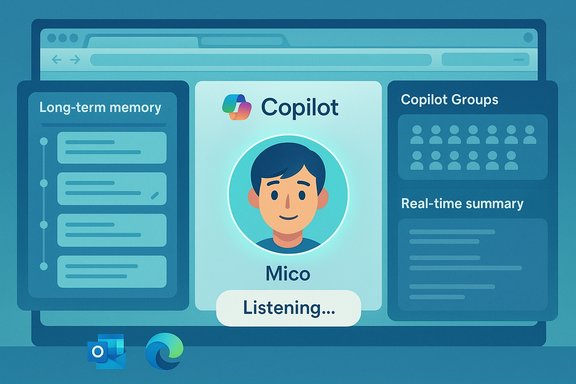
Copilot UI illustration showing Mico’s profile with memory, groups, and real-time listening.Background / Overview​

Microsoft unveiled this consumer‑facing bundle as part of a Copilot Fall release and accompanying Copilot Sessions, framing it as a move toward human‑centered AI — an assistant that remembers context, facilitates group work, and can act across apps and the web with visible consent. The rollout is staged and begins in the United States with broader availability planned for the United Kingdom, Canada and other markets in the weeks following the launch. This release stitches together several previously previewed capabilities — voice wake words, vision features, cross‑service connectors, and agentic actions — into a coherent product push. What makes it notable is not any single headline feature but the combination: personality (Mico), persistence (long‑term memory), sociality (Groups), and agency (Edge Actions & Journeys). Those axes change how people will use Copilot: from one‑off Q&A to an assistant that maintains continuity across time, people, and devices.

What’s new — the feature map​

Below is a concise, verifiable list of the most consequential changes introduced in this release.
  • Mico — an optional, animated avatar for Copilot’s voice mode and Learn Live tutoring sessions. Mico reacts with shape, color and expression to indicate listening, thinking, or acknowledging. The avatar is intentionally non‑photoreal and toggleable.
  • Long‑term memory — a persistent memory layer that can store user‑approved facts and project context, surfaced with a management UI to view, edit or delete entries. Memory is opt‑in and controlled by the user.
  • Copilot Groups — shared Copilot sessions that allow link‑based participation by multiple people (reported support for up to 32 participants) so Copilot can summarize threads, tally votes, propose options and split tasks in real time.
  • Edge: Copilot Mode, Actions & Journeys — permissioned features that let Copilot reason across open tabs to summarize or compare content, convert past browsing into resumable “Journeys,” and, with explicit consent, perform multi‑step web tasks such as form filling or bookings. These agentic behaviors surface visible consent dialogs and are currently region‑ and preview‑gated.
  • Connectors & integrations — opt‑in connectors to Outlook/OneDrive and consumer Google services (Gmail, Google Drive, Google Calendar) to ground answers in a user’s personal files, mail and calendar events.
  • Copilot for Health & Learn Live — domain‑grounded health guidance that cites vetted publishers and offers a Find‑Care flow for clinician matching; and a “Learn Live” voice‑first tutoring mode that pairs Mico’s visual cues with Socratic, scaffolded lessons and practice artifacts.

Deep dive: Mico — a face that listens, not a new model​

Design, intent, and usage​

Mico is a deliberately non‑human, stylized avatar designed to reduce the social friction of voice interactions by giving Copilot a visible anchor that signals when it’s listening, thinking, or responding. The UI avoids photorealism to minimize emotional over‑attachment and the uncanny valley; Mico is an optional interface layer that can be disabled for users who prefer a text‑only experience. Microsoft positions Mico as a UX tool — not a separate intelligence.

Why an avatar now?​

Voice interfaces improve when users receive nonverbal feedback. Mico’s quick animations and color changes shorten conversational turn taking in long voice sessions (for example, tutoring or multi‑step research) and help users know when Copilot is active. This is a pragmatic design decision that addresses a real UX gap for voice on PCs.

The Clippy question — nostalgia vs. caution​

Preview builds have shown a playful easter egg — repeated taps can briefly morph Mico into a paperclip reminiscent of Clippy. That behavior has been observed in demos and early builds, but Microsoft has not committed to making the Clippy transformation a permanent or central experience; treat the easter egg as provisional. Flag: preview‑only features and demos are not the same as confirmed GA behavior.

Long‑term memory: convenience with control​

What it does​

Copilot’s memory can persist project context, user preferences, recurring lists, and other personalized facts so you don’t have to repeat them across sessions. The new memory UI makes stored items visible and editable; users can selectively forget items or purge memory entirely. Microsoft emphasizes opt‑in controls and conversational memory management.

Why it matters​

Memory is the functional linchpin for turning Copilot into a continuity layer. With memory, Copilot can resume partially finished research, recall a running to‑do list, or maintain the context of an ongoing project — shifting the assistant from stateless responses to stateful aid. That continuity increases productivity but also raises governance considerations.

Risks and safeguards​

Persisting user data across sessions creates privacy and security surface area. Microsoft’s answer so far: opt‑in toggles, a memory management dashboard, visible consent flows, and platform controls for connectors. For enterprise and privacy‑sensitive users, these measures are necessary but not sufficient — administrators will need policy controls and careful onboarding to prevent unintended exposure of sensitive tenant data.

Copilot Groups: the assistant as a shared room​

How Groups works​

Groups are link‑based shared Copilot sessions where multiple participants can join and co‑author with the same Copilot instance. The assistant can:
  • Summarize the conversation to catch latecomers up
  • Propose options or next steps
  • Tally votes and split assigned tasks
  • Generate drafts or combined outputs from group input
Microsoft reports support for up to 32 participants in consumer Groups, making it useful for study groups, family planning, clubs, and ad‑hoc collaboration.

Where it fits — and where it doesn’t​

Groups is aimed at lightweight, viral collaboration — not a replacement for enterprise collaboration suites. It’s optimized for quick coordination, brainstorming, and shared authoring rather than governed workflows requiring audit trails and strict access controls. For teams that require enterprise‑grade controls, administrators should treat Groups as a convenience layer and pilot its use with clear policies.

Edge gets agentic: Actions, Journeys, and tab reasoning​

What Edge can now do​

When allowed by users, Copilot in Microsoft Edge can read open tabs, summarize and compare pages, and package past browsing into Journeys — resumable topic threads that live on the New Tab page. Copilot can also perform permissioned, multi‑step Actions like filling forms or initiating bookings with confirmation dialogs. These agentic features are gated behind explicit consent and visible UI affordances that show when Copilot is acting.

Practical scenarios​

  • Turn a messy set of research tabs into a structured “story channel” or Journey for later review.
  • Ask Copilot to compare product pages across tabs and produce a compact pros/cons table.
  • Allow Copilot to book a hotel or make a reservation using partner integrations after explicit approval.
These workflows reduce friction between discovery and action, shortening the path from research to task completion.

Reliability and limitations​

Hands‑on previews show promise but also reveal brittleness: some Actions may fail silently, misreport completion, or struggle with unstructured web forms. For now, agentic features are best used as productivity aids that require human verification for any high‑stakes transaction. Microsoft’s visible consent model is a positive step, but conservative defaults and clear undo paths will be critical. Flag: early reliability concerns have been reported in previews and should be expected in consumer‑grade launches.

Health, learning, and the domain grounding challenge​

Copilot for Health​

Microsoft explicitly improved Copilot’s health responses by grounding them in vetted publishers and adding a clinician‑finding flow. The assistant will prioritize credible sources for sensitive medical queries and surface next steps rather than definitive diagnoses. This is a safer posture, but Copilot remains an informational tool — not a replacement for licensed medical advice.

Learn Live and educational tutoring​

The Learn Live mode pairs Mico with voice interaction and a persistent virtual board to deliver Socratic tutoring: guided questioning, flashcard practice, and spaced repetition artifacts. The mode aims to make Copilot an active learning coach rather than a passive answer engine. This could be transformative in study groups and informal education settings, especially when combined with Groups.

Privacy, governance and enterprise considerations​

What admins and power users need to know​

  • Opt‑in memory and connectors must be governed. Long‑term memory and cross‑account connectors introduce risk if tenant data is inadvertently exposed; enterprises should enforce connector policies and limit memory where regulatory compliance is a factor.
  • Agentic features require conservative controls. Edge Actions that use saved credentials or partner integrations must be restricted for sensitive users and audited for correctness. Require human confirmation for external transactions.
  • Shared sessions need access controls and retention policies. Groups simplify collaboration but also widen the exposure surface; IT should prescribe retention, membership and data export rules for shared Copilot sessions.
  • Prove provenance for high‑stakes outputs. For health, legal, or financial guidance, demand source citations and human review before acting. Microsoft’s grounding steps help, but independent verification is still necessary.

Recommended rollout posture​

  • Pilot: test Groups and Edge Actions with volunteer teams and clear templates.
  • Limit: disable connectors for high‑risk accounts until policy is in place.
  • Train: brief users on how memory works, how to edit/forget items, and how to revoke connectors.
  • Monitor: log Copilot‑initiated actions and require attestations for financial or legal transactions.

Strengths: why this release matters for Windows users​

  • Continuity and productivity: Memory + Journeys + Groups reduce repetitive context switching and tab sprawl, directly addressing longstanding productivity pains.
  • Ease of collaboration: Link‑based shared sessions lower the barrier for group brainstorming, tutoring, and family planning without requiring everyone to adopt an enterprise tool.
  • Human‑centered UX: Mico and Real Talk modes aim to make interactions feel natural and more useful, offering tone‑aware conversational styles and visual feedback in voice sessions.
  • Safer domain outputs: Grounding health responses and offering clinician‑matching flows reduces the hallucination risk in sensitive areas — a necessary step for trusted consumer AI.

Weaknesses and risks​

  • Privacy creep and data sprawl: Long‑term memory and connectors, if poorly governed, can increase data exposure and create compliance headaches. Users must be able to see and purge what Copilot remembers.
  • Agent reliability: Multi‑step web Actions are brittle in early previews; misexecuted actions or false success confirmations are real risks for transactions and should be treated cautiously.
  • Feature fragmentation by region and SKU: Staged rollouts and platform differences mean inconsistent user experiences across devices and geographies, which complicates enterprise adoption.
  • Perception challenges: Nostalgic touches like the Clippy easter egg can delight but also reawaken skepticism over persona‑driven assistants. Microsoft must balance charm with restraint.

Practical tips for Windows enthusiasts and administrators​

  • If you’re curious, enable features selectively for small groups first. Use pilot programs to measure real gains before broad enablement.
  • Teach users how to manage Copilot memory: show them how to view, edit and delete entries and revoke connectors.
  • For Edge Actions, insist on a confirmation step before any action that touches accounts, payments, or bookings.
  • Treat Copilot Groups as a lightweight collaboration tool for ideation and planning rather than a replacement for heavily audited enterprise workflows.
  • Keep alert for updates: Microsoft’s staged rollout means behavior, availability and reliability will evolve over coming weeks.

The competitive and strategic context​

This release places Copilot squarely in the crosshairs of an evolving AI interface landscape: assistants are becoming persistent, multimodal, and social. Microsoft’s combination of memory, connectors, avatar UX, and agentic browsing features is a deliberate bet that users will prefer an assistant that remembers, collaborates, and acts — provided those powers are bounded by clear consent and controls. The arrival of Mico and Groups signals that Microsoft wants Copilot to be both more useful and more sticky across the Windows and Edge ecosystems.

Quick summary — what to remember​

  • Microsoft’s Copilot Fall release adds Mico (animated avatar), long‑term memory, Copilot Groups (up to 32 participants), Edge Actions & Journeys, connectors to Outlook and Google consumer services, and improved health and learning experiences.
  • Features are rolling out U.S. first with staged expansion to other countries; availability varies by platform and subscription.
  • The practical gains — continuity, group facilitation, and fewer context switches — are meaningful, but privacy, governance, and agent reliability require careful oversight.

Final analysis: a pragmatic optimism​

Microsoft’s Fall Copilot release is ambitious, coherent and strategically sensible: the company is packaging personality, memory and agency together because those elements amplify each other in real workflows. For Windows users the payoff is immediate — fewer repeated explanations, simpler group coordination, and a more natural voice experience — but that payoff has tradeoffs. The long‑term success of this shift will depend on conservative defaults, transparent consent surfaces, robust admin controls, and steady improvements to agent reliability.
In short: this is a step forward for consumer AI on Windows that should be welcomed cautiously. Enable and test where you can measure value, insist on visibility and revocability for any persistent data, and treat agentic Actions as helpful accelerators that still need human verification for important transactions.

Source: VOI.ID Microsoft Copilot Gets New Features, From Long-Term Memories To New Avatars
 

Back
Top