

Microsoft’s Copilot appears to be getting a refreshed screenshot tool — one designed to let the assistant “see” and act on on‑screen content more smoothly — but the launch comes with familiar privacy fault lines that Microsoft has yet to fully close. ([windowslatest.com]atest.com/2025/04/02/microsoft-launches-new-copilot-app-on-windows-11-with-o3-reasoning-screenshots-tool/)
Microsoft has been on an aggressive cadence to fold Copilot — its on‑device and cloud‑assisted AI assistant — deeper into Windows, Edge, Xbox tools, and Microsoft 365. That strategy has produced a web of features that let Copilot read and act on screen content: from side‑pane web rendering in the Copilot app to Gaming Copilot’s screenshot-aware tips and Windows Recall’s periodic snapshots. These changes aim to reduce friction: instead of copying text, swting, users can hand a screenshot or an open window to Copilot and ask it to summarize, extract, or act.
But convenience and continuous visual access to a user’s desktop are a privacy minefield. The rollout of features that capture screenshots or analyze visible content has already produced backlash, clarifications, and feature adjustments — notably around Recall, Gaming Copilot, and taskbar “Share with Copilot” affordances. The incident history shows how even optional features and in‑session captures quickly become contentious when defaults, telemetry, or retention practices are not crystal clear.
But the history of Recall, Gaming Copilot, and related features makes clear that how Microsoft implements defaults, permission models, retention, and telemetry is as important as the underlying technology. The company can deliver a productive, privacy‑respectful experience — but it will require transparent documentation, conservative defaults, and enterprise‑grade controls to do so without repeating past mistakes. Until Microsoft publishes full technical details on retention, vaulting, and telemetry, prudent users and admins should treat image‑sharing features as powerful but sensitive tools and exercise caution when enabling anything that touches credentials or long‑term recording.
The new screenshot tool could be a genuine productivity leap — if Microsoft follows through with the technical transparency, robust admin controls, and privacy protections that today’s users and regulators expect.
Source: Neowin Copilot is getting a new screenshot tool, hopefully without the privacy risks this time
 Background
Microsoft has been on an aggressive cadence to fold Copilot — its on‑device and cloud‑assisted AI assistant — deeper into Windows, Edge, Xbox tools, and Microsoft 365. That strategy has produced a web of features that let Copilot read and act on screen content: from side‑pane web rendering in the Copilot app to Gaming Copilot’s screenshot-aware tips and Windows Recall’s periodic snapshots. These changes aim to reduce friction: instead of copying text, swting, users can hand a screenshot or an open window to Copilot and ask it to summarize, extract, or act.But convenience and continuous visual access to a user’s desktop are a privacy minefield. The rollout of features that capture screenshots or analyze visible content has already produced backlash, clarifications, and feature adjustments — notably around Recall, Gaming Copilot, and taskbar “Share with Copilot” affordances. The incident history shows how even optional features and in‑session captures quickly become contentious when defaults, telemetry, or retention practices are not crystal clear.
What Microsoft says is changing (overview)
According to reporting on the s and Insider previews, the new screenshot capability is part of the Copilot app’s expansion of visual workflows. Key elements being trialed or rol Copilot sidepane that can render web links inside the Copilot window and persist tabs to a conversation, allowing images or pages to be saved with chat context.- A “Share with Copilot” affordance in taskbar previews and app thumbnails enabling one‑click screen capture of a single window for analysis.
- Screenshot upload + analysis paths used by variants like Gaming Copilot and Copilot Vision, which can extract text (OCR), identify UI elements, or answer questions about what’s visible.
How the new screenshot tool works (technical outline)
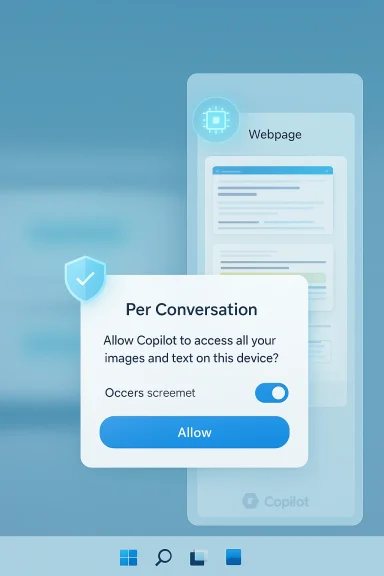
Microsoft’s public notes and Insider previews indicate a few architectural and UI patterns that matter for both funy:Per‑conversation scoping and sidepane rendering
- When a user opens a link or a captured image inside the Copilot app, the content is rendered in a docked sidepane tied to that Copilot conversation. Tabs and snaps opened in this sidepane can be saved with the chat for later reference. That scoping is intended to reduce a blanket “always‑on” vision across the system.
Explicit pepilot is described as requesting permission before it reads content from web pages or windows opened within a conversation. Microsoft frames this as a per‑conversation grant rather than global browser access. The devil is in the UI/UX details here: how explicit are those prompts, and do they persist as clear visual indicators while Coent?
Optional credential/form autofill
- The sidepane can optionally use synced passwords and form data to autopopulate login flows in the sidepane. Microsoft labels autofill as opt‑in, but enabling it materially changes the threat model because the assistant might handle passwords or other form data as part of multi‑step flows.
Local vs cloud processing
- Microsoft’s published feature notes and blog posts have been careful to say Copides that leverage local on‑device processing (particularly on Copilot+ PCs with NPUs) or cloud services — but specific processing boundaries, telemetry fields, and retention rules are not always fully documented in preview announcements. Where image processing happens impacts exposure, compliance, and regulatory risk.
Why privacy concerns keep resurfacing
The core privacy issues repeat across each Copilot visual feature: capture scope, deftry, storage/retention, and training usage.1) Scope creep: from a single window to “everything”
Microsoft’s earlier Recall concept — a photographic memory that takes periodic screenshots for long‑term search — sparked major controversy because the idea implies constant capture of private chats, banking sessions, and other sensitive content. Even when features are later limited or made opt‑in, users remember the original scope and remain skeptical.2) Defaults and discoverability
Defaults matter. Several Copilot experiments (including Gaming Copilot) were criticized because users discovered captures or default training toggles turned on without clear, upfrontuse the affordances made it easy to trigger an upload by accident. When capture or model‑improvement toggles are enabled by default, the privacy risk expands quickly.3) Retention and cloud backups
A repeated blindspot in Microsoft’s early previews was lack of clarity on how long saved tabs, conversation‑linepane artifacts are retained — and whether they are stored locally only or synced to the cloud and backed up. For enterprises under compliance regimes this is a concrete operational risk.4) Mixing credentials and assistant context
The optional autofill/credential sync increases attack surface: if a Copilot conversation saves the pages and the autofill metadata, a breach of the Copilot app, the Microsoft account, or backups could expose credentials, especially if the password store for Copilot differs from the browser’s protected vault. Microsoft hasn’t alwat key escrow, vault protections, or cross‑product keying.Cross‑referenced verification of major claims
To evaluate statements about the new screenshot tool and privacy posture, I cross‑checked Microsoft community posts, Insider release notes, and reporting from technology outlets:- The Copilot sidepane with per‑conversation tabs and scoped permission model is described in Microsoft Insider release notes and has been independently reported by press outlets covering Insider builds. Those posts indicate saved tabs get attached to a conversation and that Copilot asks for permission before reading page content.
- Gaming Copilot’s screenshot capture behavior and the subsequent privacy clarifications by Microsoft are documented in multiple reports. Microsoft responded publicly that screenshot data in Gaming Copilot was not used for model training and that captures were limited to active, user‑initiated interactions — but the initial discovery and defaults are what raised concerns.
- Recall’s rollout and the attendant debate over always‑on captures, opt‑in vs default behavior, and enterprise governance have been written about by news outlets and technology analysts; Microsoft has since emphasized opt‑in controls and enterprise policies but left several implementation details for later documentation. (feeds.bbci.co.uk
Strengths of the new approach
There are several clear advantages to the screenshot + Copilot model when implemented responsibly:- Faster workflows. Turning screenshots into actionable context (OCR, extraction, form‑filling) saves users the repetitive copy/paste and manual transcription steps that interrupt flow. This is particularly valuable in research, tech support, and accessibility scenarios.
- **Contextual persisteving tabs and snaps with a conversation creates a reusable research workspace, which helps long tasks and follow‑ups without hunting down previously opened links.
- Edge/Local processing potential. With Copilot+ PCs and local neural processors, Microsoft can move more image analysis on‑device to reduce cloud roundtrips and surface data residency advantages for regulated customers. Local inference narrows the exposure window when implemented correctlcrosoft.com]
- Granular UI affordances. If permission dialogs and persistent visual indicators are clear and easily revocable, the per‑conversation model can make access explicit and auditable for users.
Remaining risks and mitigations (critical analysis)
The strengths above are real, but adoption will hinge on how Microsoft handles several structural risks.Risk: Ambiguous retencs
- Why it matters: If conversation artifacts or saved tabs are automatically synced to the cloud and included in backups, sensitive content becomes discoverable or subject to legal holds. Enterprises need explicit retention/erasures semantics.
- Mitigation: Microsoft should publish clear retention tables, default retention windows, and per‑conversation delete/expunge controls, and ensure enterprise customers can override cloud sync.
Risk: Credential storage and- Why it matters: Mixing Copilot conversation data with autofill raises privilege escalation scenarios. If Copilot uses a distinct vault with weaker protections than Windows Credential Manager, risk increases.
- Mitigation: Use the platform’s existing, audited vault (e.g., Windows Credential Manager or Edge’s encrypted store) with transparent key management and optional hardware‑backed keys. Make credential access and autofill strictly opt‑in and visible.
Risk: Accidental or discoverable capturrability/UI design
- Why it matters: A floating “Share with Copilot” or taskbar hover affordance reduces friction but also increases accidental activation risk. When capture is one click away, more screenshots are taken inadvertently.
- Mitigation: Provide confirmatory microprompts, clear in‑UI indicators while Copilot is viewing, and a deterministic “don’t ask again for this session” policy that’s visible and reversible.
Risk: Telemetry and training ambiguity
- Why it matters: Users must know whether screenshots or extracted text can be used to train models. Even anonymized telemetry can leak patterns. Past incidents showed confuing toggles were found enabled by default.
- Mitigation: Microsoft must explicitly separate telemetry for product diagnostics from any data used to train models, document retention and deletion for both, and default to opt‑out for training unless users explicitly consent.
Risk: Enterprise governance gap
- Why it matters: Admins need comprehensive, easily enforceable controls across Group Policy,point Manager, and the Copilot feature set. Partial policies force admins to apply brittle layering via AppLocker or WDAC.
- Mitigation: Provide a one‑stop policy suite for Copilot features with clear documentation, auditing hooks, and event logs that feed SIEMs for compliance monitoring.
Practical guidance for users and admins
If you’re an individual user, a Windows Insider tester, or an enterprise admin evaluating the new screenshot tool, here’s a prioritized checklist.- Individuals (power users):
- Treat screenshot/autofill features as permissions that deserve scrutiny; do not enable credential sync casually.
- Test the feature with low‑value or throwaway accounts to understand what is saved and how it appears in conversation history.
- Enable strong multi‑factor authentication on your Microsoft account and consider hardware security keys for extra protection.
- Enterprise admins:
- Test the behavior of Copilot previews in a lab environment and inspect telemetry/retention artifacts.
- Apply Group Policy / Intune controls toot features on managed devices until policies and documentation are complete.
- Update acceptable use and data governance policies to reflect the possibility of saved screen artifacts tied to conversations.
- Security practitioners:
- Monitor logs and SIEM for unexpected Copilot app activity.
- Use end AppLocker) to limit Copilot process privileges where necessary.
- Review the cryptographic model for any Copilot credential store before enabling organization‑wide autofill.
What Microsoft should do next (recommendations)
Microsoft can retain the productivity benefits while reducing backlash by adopting the following concrete steps:- Publish a technical whitepaper describing processing loci (what runs locally vs. in the cloud), telemetry fields, and retention timelines for conversation‑attached assets.
- Default to privacy‑protective settings: autopopulation and model‑training toggles set to off; explit required to enable.
- Use the platform’s vetted credential vaults and document the key escrow, recovery flows, and whether hardware-backed keys are supported.
- Provide enterprise logging hooks and audit trails for every Copilot visual capture so organizations can meet regulatory and e‑discovery requirements.
- Design the UI so permission grants are granular, persistent, and revocable with visible indicators whenever Copilot is viewing or processing a window.
Comparison to alternatives and competitors
Other platforms and standalone tools implement image‑aware assistants and OCR features, but two differences stand out for Microsoft’s approach:- Integration depth: Copilot’s embedding directly in Windows and across Microsoft apps means the assistant can stitch together cross‑app context more easily than third‑party solutions — a powerful productivity win but one that concentrates more sensitive signals in a single vendor stack.
- On‑device inference potential: Copilot+ PCs with NPUs give Microsoft a technical lever to process images locally, reducing cloud exposure in ways that cloud‑only assistants can’t easily match. The utility of this depends on how much Microsoft chooses to run on the device and whetherintained between cloud and local modes.
Conclusion
Microsoft’s new screenshot tool for Copilot is the logical next step in the company’s push to make visual context first‑class in day‑to‑day computing. The convenience gains are tangible: instant OCR, context‑aware answers, and sidepane research workspaces are useful in many real workflows.But the history of Recall, Gaming Copilot, and related features makes clear that how Microsoft implements defaults, permission models, retention, and telemetry is as important as the underlying technology. The company can deliver a productive, privacy‑respectful experience — but it will require transparent documentation, conservative defaults, and enterprise‑grade controls to do so without repeating past mistakes. Until Microsoft publishes full technical details on retention, vaulting, and telemetry, prudent users and admins should treat image‑sharing features as powerful but sensitive tools and exercise caution when enabling anything that touches credentials or long‑term recording.
The new screenshot tool could be a genuine productivity leap — if Microsoft follows through with the technical transparency, robust admin controls, and privacy protections that today’s users and regulators expect.
Source: Neowin Copilot is getting a new screenshot tool, hopefully without the privacy risks this time
