

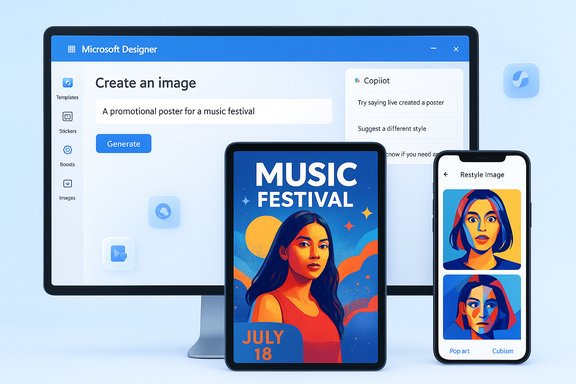
Microsoft has officially moved its AI-powered Designer app out of preview and made it broadly available to anyone with a Microsoft account, turning a once-experimental canvas into a full‑fledged, cross‑platform tool that brings AI-generated images, avatars, templates, and Copilot-powered design helpers to mobile and desktop users.
Background / Overview
Microsoft Designer began life as an experiment in blending template-driven graphic design with generative AI capabilities. Over the last two years Microsoft has folded image-generation tech and prompt-based layout suggestions into a single, accessible interface, positioning Designer as a direct competitor to consumer-first tools such as Canva and other AI-driven visual editors. The company announced that Designer is now available on iOS and Android and as a web/desktop experience, with native integration points into Microsoft Photos and Microsoft 365 apps through Copilot. Designer’s public launch includes a set of user-facing mechanics meant to simplify creative work:- A “Create with AI” flow that turns text prompts into composed images and layouts.
- Image editing and enhancement features powered by AI — background removal, object erase, auto-crop, filters.
- Restyle Image, which can “reimagine” a user photo into stylised avatars across multiple artistic genres.
- A credit-like system of daily “Boosts” used for generating or accelerating AI edits; the free tier receives 15 boosts/day and Copilot Pro subscribers receive 100 boosts/day.
What’s new and what actually changed
Designer as a product — trimmed to essentials
Designer’s core value proposition is straightforward: let non‑designers create clean, modern assets fast. The app layers generative models with prebuilt templates and guided prompts, so a user can go from idea to finished poster, social tile, sticker, or avatar in a few clicks. The mobile app delivers a simplified interface for casual creators, while the web/desktop view exposes templates and integration features that are useful for quick business content creation.Restyle Image and AI avatars
A marquee feature at launch is Restyle Image, which takes an uploaded photo and transforms it into multiple stylized avatars — pop art, cubism, stylized 3D, and similar treatments. The tool integrates the photographer’s original subject detection so edits like background replacement and framing can be applied automatically before restyling. The result is fast, polished avatar sets intended for social profiles, stickers, or lightweight branding. Microsoft’s marketing emphasizes speed and accessibility: most restylings complete in under a minute. Caveat: Microsoft has not publicly disclosed the full composition of datasets or individual artist contributions used to train Designer’s image models, which leaves open valid questions about provenance and artistic attribution. Where training provenance matters, the public record remains partial and company statements about “responsible use” do not replace granular disclosure. Treat model training and dataset provenance as partially opaque until independent verification is available.Boosts, Copilot Pro and Microsoft 365 ties
Designer introduces a usage throttling mechanic called Boosts:- Free Microsoft account users receive 15 Boosts per day for image generation and enhanced edits.
- Copilot Pro subscribers — the paid Copilot tier Microsoft offers for power users — receive 100 Boosts per day plus priority access to new Copilot improvements and model updates. Copilot Pro has been offered around the $20/month price point in Microsoft’s consumer lineup.
Why Microsoft is pushing Designer now: strategic context
A defensive and offensive play
Microsoft’s Designer rollout is simultaneously defensive (retain and extend content creation inside Microsoft ecosystems) and offensive (compete for casual creators who gravitate to Canva, Figma, or mobile avatar apps). Canva’s Magic Studio, launched as an AI-first expansion for design workflows, changed the competitive landscape by offering users rapid text-to-design tools and creator compensation programs — Microsoft’s Designer is a clear move to stake its claim on the same real estate for everyday users and Office customers.Bundling AI into productivity
Microsoft has been rebundling AI across Windows and Microsoft 365 offerings (Copilot in Office, Copilot Chat, Image Creator rebrands, and more). Designer’s integration into Word, PowerPoint, and Microsoft Photos is consistent with Microsoft’s aim to make generative AI a built-in productivity feature rather than a standalone novelty. For enterprise and consumer customers, this creates a strong incentive to remain inside Microsoft’s ecosystem for both document and image generation needs.Feature deep dive: the tools and how they work
Create with AI and prompt helpers
Designer’s “Create with AI” flow sacrifices granular control for speed: the app presents prompts, styles, and quick suggestion chips that guide users to generate an initial concept. For many non‑designers this reduces decision paralysis; for pros it’s a fast prototyping surface. The tool can also produce stickers, monograms, emojis, and templated social posts purely from short descriptions.Image editing: remove, replace, restyle
Designer blends standard photo editing actions with generative fills:- Remove or replace backgrounds via AI‑assisted masking.
- Auto‑detect and isolate subjects for targeted edits.
- Restyle Image to generate a whole new art treatment based on the original subject.
The mobile experience focuses on touch-friendly tools while the browser offers broader layout and export options.
Integration with Microsoft Photos and Office
Designer’s editing core is being folded into Microsoft Photos features in preview on Windows Insider builds, so users can perform Designer edits without leaving the native Photos app. In Office, Copilot will surface Designer prompts for inline image generation and layout suggestions. This is where "Boosts" are fungible across scenarios: image generation in Photos, a sticker for a PowerPoint slide, or a background for a Word banner.Strengths: why the product will matter for many users
- Accessibility: Designer reduces technical entry barriers; non‑designers can create on‑brand visuals quickly without learning complex tooling.
- Ecosystem integration: Designers who already live in Microsoft 365 get a native, permissioned way to create visuals that plug straight into documents, presentations, and local photo libraries.
- Mobile + web parity: Having robust capabilities across iOS, Android, and the web makes Designer a practical tool for content creators who work on the go.
- Boost allowances: The daily boost quota gives casual users a reliable allotment of generation capacity without surprise paywalls, while Copilot Pro buyers get heavy usage caps for power workflows.
Risks, ethical challenges and industry implications
Artist rights, dataset provenance and copyright risk
The lightning rod issue is training provenance. Designer’s Restyle Image and other generative outputs are convincing, but Microsoft has not published a fully auditable dataset ledger for the image models that run under the hood. That opacity raises legal and ethical concerns:- Artists and illustrators worry their work has been scraped into training datasets without consent.
- Creatives fear market pressure as commoditized, AI‑generated assets undercut commissioned work.
- Legal disputes about fair use and derivative works remain unresolved in many jurisdictions.
Defensive tools and countermeasures
Artists and advocacy groups have developed tools and approaches to push back: watermarking, web robots.txt rules to block scraping, and data‑poisoning techniques such as Nightshade that deliberately modify images so generative models learn corrupted signals. Nightshade and similar tools illustrate both the ingenuity and the fragility of the current landscape: data poisoning can protect individual portfolios but may also degrade benign models or be abused to sabotage other systems. The technology tradeoffs are complex and the outcomes uncertain.Quality, hallucination and misuse
Generative image systems still hallucinate or produce unexpected artifacts; reliance on them without human oversight can introduce visual inaccuracies, brand mismatches, or misrepresentations. From an enterprise standpoint, those mistakes can be reputationally costly if an autogenerated asset contains unintended or misleading content. Microsoft’s moderation and filtering systems reduce obvious abuse vectors, but they cannot eliminate all kinds of model error.Market disruption and creator economics
Mass adoption of tools like Designer will reshape the supply and demand for mid‑level creative work. Tasks such as social tiles, simple banners, and template ads can be automated, shifting value to specialized design, strategy, and bespoke creative services. Companies and freelancers should expect workflow changes and prepare to move up the value chain — toward direction, concepting, and complex craft — rather than commodity execution.Practical guidance for WindowsForum readers and admins
- If you manage Microsoft 365 for a small business, test Designer in a controlled environment before broadly switching templates or marketing assets to generative outputs. Keep a human review step for brand‑critical content.
- For creators concerned about training provenance, use metadata and watermarks on public work and consider opt‑out tools (robots.txt or legal options) where feasible.
- If your organization uses Copilot Pro or plans to subscribe, map the Boost allocation to expected workflows — 100 boosts/day shifts usability expectations considerably versus the free 15/day allotment.
How Designer compares to other AI design tools
- Canva (Magic Studio): Canva doubled down on AI with Magic Studio, a broad suite that focuses on everyday design flows and enterprise safety features like indemnities and creator compensation programs. Microsoft’s Designer competes primarily on ecosystem integration and the convenience of Copilot connectivity inside Office apps.
- Lensa and mobile avatar apps: Specialist avatar apps often offer very stylized, small‑batch avatars; Designer’s Restyle Image aims to win by integrating avatar generation into broader asset pipelines (stickers, frames, social posts) rather than offering only avatars. The results can be similar in feel but Designer’s value is in plug‑and‑play Office use.
- Dedicated image generators (Midjourney, DALL‑E family): Those tools often provide finer control over generative output and are favored by artists who want specific aesthetic control. Designer’s advantage is convenience and templated outputs for everyday business and consumer needs.
The regulation and policy dimension
Generative AI is increasingly subject to legislative scrutiny. Policymakers are debating rules around consent for training data, required provenance labels, and liability for AI outputs. Microsoft’s public commitment to “responsible AI” is part of a broader industry positioning ahead of regulatory changes. Practically, that means vendors will be pressured to provide better provenance, clearer opt‑outs for creators, and audit mechanisms — but those reforms take time and will likely evolve market behavior over months or years, not weeks.Final analysis: where Designer wins and where it still must prove itself
Microsoft Designer is significant because it operationalizes generative image features inside products people already use every day. For casual creators and productivity‑driven teams it will be a real time saver: the combination of templates, prompt guidance, and Copilot‑linked workflows creates a product that feels immediately useful and familiar.However, a few structural issues limit Designer’s defensibility as a long‑term substitutive tool for professional creatives:
- Dataset transparency remains a central unresolved issue. Unless Microsoft provides more granular provenance and licensing details, creative communities will continue to press for guarantees and compensation models.
- Quality and control for high‑end creative work still favor specialist tools and human designers. Designer efficiently generates “good enough” content, but craft and nuance remain human domains.
- Economic and policy friction will shape downstream adoption: creator compensation schemes, corporate indemnities, and national AI laws will force new product choices and pricing models in the years ahead.
Microsoft's Designer is now a practical, widely available tool that demonstrates how quickly generative AI capabilities have been folded into mainstream productivity software. For Windows‑centric creators, admins, and everyday users, the app provides a fast path to polished visuals. For artists, legal teams, and policy watchers, Designer is a live case study in how companies balance product convenience, creative labor economics, and responsible AI governance — and the debate over those tradeoffs will shape not just this product’s roadmap but the rules that govern generative AI in creative industries going forward.
Source: Mashable Microsoft has let its AI-powered Designer app out of preview mode
