

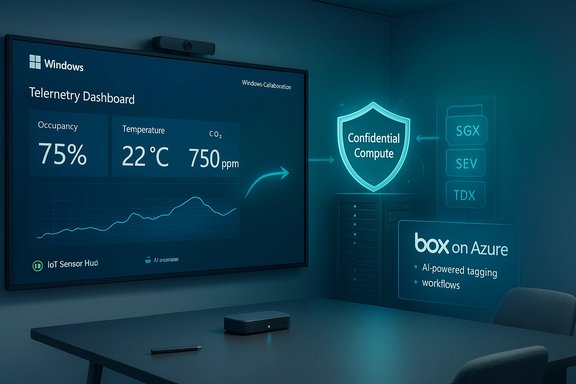
Microsoft’s recent flurry of announcements and product moves—spanning sensorized meeting-room displays, stronger protections for “data in use,” a commercial tie-up to bring Box storage tighter into Azure, and a problematic Windows 11 cumulative update that disrupted Azure Virtual Desktop sessions—makes clear that Microsoft’s enterprise story in 2026 is simultaneously expansive and operationally brittle: big platform promises, real technical progress, and an urgent need for clearer governance, testing and operational playbooks.
Microsoft’s public roadmap and partner announcements in recent months show three converging vectors: deliver edge- and sensor-driven scenarios (Windows Collaboration Displays), harden cloud confidentiality (Azure Confidential Compute), and expand cloud-driven content+AI workflows (Box on Azure and new Azure integrations). Each is pragmatic on its face—modular hardware, hardware-backed TEEs for sensitive workloads, and content platforms plugged into hyperscale AI services—but each also amplifies operational exposure: firmware lifecycles, enclave complexity, governance over telemetry and data flows, and the real-world fragility of large update rollouts.
This article synthesizes the announcements, summarizes the technical specifics that matter to IT teams and procurement leads, evaluates benefits and risks, and provides a practical checklist for organizations evaluating these technologies.
Yet the operational bar is high. Success depends less on marketing and more on disciplined procurement, careful pilots, airtight governance around telemetry and keys, and robust update/rollback engineering. The KB5074109 AVD regression is a cautionary highlight: an otherwise routine cumulative update introduced a high-impact regression on a mission-critical scenario—authentication for remote desktops—forcing organizations to choose between immediate patching and operational stability.
In short: the technologies are ready for careful, governed adoption—not for blind, broad rollouts. Procurement and security teams should treat these advances as opportunity plus responsibility: the rewards are measurable (automation, energy savings, protected computation, smarter content workflows), but the failure modes are real and often human (inadequate testing, weak key custody, and imprecise telemetry governance). Build pilots, demand attestation and transparency, and keep rollback plans close at hand. When those boxes are checked, these innovations will deliver concrete operational value; when they aren’t, they create costly surprises.
Source: BetaNews https://betanews.com/article/micros...sers-know-if-they-can-upgrade-to-windows-11/]
 Background / Overview
Microsoft’s public roadmap and partner announcements in recent months show three converging vectors: deliver edge- and sensor-driven scenarios (Windows Collaboration Displays), harden cloud confidentiality (Azure Confidential Compute), and expand cloud-driven content+AI workflows (Box on Azure and new Azure integrations). Each is pragmatic on its face—modular hardware, hardware-backed TEEs for sensitive workloads, and content platforms plugged into hyperscale AI services—but each also amplifies operational exposure: firmware lifecycles, enclave complexity, governance over telemetry and data flows, and the real-world fragility of large update rollouts.This article synthesizes the announcements, summarizes the technical specifics that matter to IT teams and procurement leads, evaluates benefits and risks, and provides a practical checklist for organizations evaluating these technologies.
Windows Collaboration Displays: IoT-ready, sensorized meeting-room displays
Microsoft’s Windows Collaboration Display (WCD) initiative is a partner-centric hardware specification: OEMs build large-format, pen-and-touch 4K displays with integrated cameras, far-field microphones and an IoT sensor hub that emits environmental telemetry (occupancy, light, temperature, CO2 proxy) to Azure services such as Azure IoT and Azure Digital Twins. Partners like Sharp and Avocor shipped certified models, and Microsoft pitched the WCD as a modular alternative to Surface Hub—separating the display from the compute endpoint to lower cost and increase flexibility.What’s in a Windows Collaboration Display (technical profile)
- 4K large-format panels (example: Sharp’s ~70" 3840×2160 models).
- Multi-touch and active pen support with low-latency ink.
- Integrated conference camera (some models with 4K sensors).
- Far-field microphone arrays and integrated speakers tuned for room telepresence.
- An IoT sensor unit for temperature, humidity, ambient light and occupancy sensing, intended to act as a gateway to Azure Digital Twins and IoT services.
- Single-cable USB-C connectivity for video, touch-back and power; support for BYOD wireless casting.
Where WCDs add measurable value
- Lower TCO vs. all-in-one appliances: Organizations can reuse existing PCs or pick endpoint compute appropriate to the room’s needs, reducing upfront capital for compute refreshes.
- Sensorized spaces: Facilities teams gain room-usage analytics, HVAC automation triggers and richer scheduling integrations through Azure Digital Twins ingestion.
- Ecosystem choice: OEM variation enables matching camera / microphone / pen fidelity to room size and budget.
Key operational and governance risks
- Fragmentation and procurement complexity: Not all WCDs implement the spec identically—pen feel, camera FOV, and sensor fidelity vary by OEM. IT buyers must treat each SKU as a different product with different firmware practices.
- Telemetry, privacy and data residency: Environmental telemetry may look harmless, but combined occupancy + calendar + AV metadata can leak sensitive operational patterns. Organizations must demand a clear “IoT data map” from OEMs that states what is collected, how often it is transmitted, and retention policies.
- Firmware and lifecycle support: Large-format displays are durable goods with long field life; OEMs’ firmware update SLAs vary. Without committed long-term patching, WCDs become a maintenance liability.
Procurement checklist (practical)
- Confirm Teams/Skype certification for the specific model and region.
- Request a written IoT telemetry map (sensor types, sampling rates, transmitted fields).
- Verify the OEM’s firmware update cadence and an enterprise SLA for security patches.
- Pilot for 4–8 weeks to validate pen latency, audio pickup and sensor accuracy.
- Segment network and enforce tenant-level telemetry controls: use separate VLANs or IoT overlays and an Azure tenant dedicated to facility telemetry.
Azure Confidential Compute: protecting data while it’s processed
Microsoft’s push to make Azure “confidential” moves beyond encrypting data at rest and in transit: Confidential Compute seeks to protect data in use by running sensitive processing inside hardware- or hypervisor-backed Trusted Execution Environments (TEEs). Azure’s portfolio includes SGX-style enclaves, Hyper‑V Virtual Secure Mode (VSM) and whole‑VM memory encryption options such as AMD SEV‑SNP and Intel TDX, plus attestation and Managed HSM integrations.How the technology stacks map to real choices
- SGX enclaves (process-level, CPU-backed): Strong hardware-enforced isolation suitable when customers need to exclude the cloud operator from the trust boundary. Offers remote attestation of code measurement.
- VSM (Hyper‑V software TEE): Easier to adopt for refactoring services into protected modules; depends on hypervisor and firmware for isolation guarantees.
- Confidential VMs (SEV‑SNP / TDX): Whole-VM memory encryption enabling lift-and-shift scenarios without enclave rewrites—attractive for migration of existing workloads.
Practical use cases
- Confidential multi-party analytics where multiple firms combine datasets but cannot share plaintext with each other.
- Protected ML inference on sensitive inputs (e.g., medical images) where input privacy is essential.
- Database operations where encrypted columns are computed on inside an enclave (reduced data‑exposure surface).
Strengths — why confidential compute is material
- Addresses an important gap: protecting data while it’s processed mitigates privileged‑insider and host‑level compromise threats.
- Offers flexible trust models and platform tooling (attestation, key management with Managed HSM/Key Vault).
Real caveats and threat-model caveats
- TEEs are not invulnerable: microarchitectural side‑channel attacks (historically demonstrated against SGX, for example) mean that TEEs raise the bar but don’t make systems impervious. Attestation policies and microcode patching are operational necessities. Claims that “not even the cloud provider can see the data” must be qualified.
- Key management is the fulcrum: if attestation or key-provision workflows are misconfigured, confidentiality can be undermined. Bring‑Your‑Own‑Key and Managed HSM patterns are essential controls.
- Developer and operational complexity: enclave programming, attestation flows and limited observability inside TEEs increase CI/CD and incident response complexity. Architectures and runbooks must be updated.
Practical adoption checklist for architects
- Define the trust boundary: does your compliance posture require excluding the cloud operator, or is VM-level confidentiality sufficient?
- Require attestation evidence and a documented attestation policy before provisioning secrets.
- Use Managed HSM / Dedicated HSM or BYOK for key custody where audit and separation are required.
- Plan for microcode and firmware patching: maintain processes to validate attestation changes after platform updates.
- Run realistic performance and tail-latency benchmarks—TEEs and confidential VMs can have resource and latency implications.
Box + Azure: content management meets hyperscaler AI
Microsoft’s commercial move to make Box storage and Box Skills available to Azure customers signals the continuing convergence of enterprise content management and cloud AI services. The partnership lets organizations keep Box’s content platform while applying Azure cognitive services and AI skills to that content, enabling automated tagging, transcription and search workflows.Business upside
- Rapid access to cognitive services for enterprise content: search, transcription, video indexing and automated metadata extraction without forcing customers to migrate off Box.
- Flexibility: enterprises can preserve content residency and Box’s management model while consuming Azure processing where it makes sense.
Risks and cost dynamics
- Data governance complexity: mixing Box storage with Azure processing increases the points where data could be logged, indexed, or transformed. Organizations must map data flow, retention and egress charges.
- Model validation and accuracy: automated extraction (OCR/transcript/tagging) must be validated for legal, regulatory and high‑risk contexts (e.g., contract review, medical records).
- Commercial entanglement: storage + cognitive processing economics—egress, API inference costs and long-term TCO—can shift quickly. Pilot and cost-model before broad rollout.
Practical pilots and governance steps
- Pilot with a well-scoped corpus and measurable success criteria (precision/recall for search; transcript WER for audio).
- Define a human-in-the-loop review policy for any automated labels used in compliance or decisioning.
- Contractually define data residency, model retention, and whether embeddings or derived artifacts will be stored.
Windows 11 cumulative update KB5074109: A notable regression and operational lesson
The January 13, 2026 cumulative update for Windows 11 (KB5074109) triggered a regression that could break Azure Virtual Desktop (AVD) connections on affected clients, producing immediate authentication failures. Microsoft acknowledged the issue and published guidance recommending that enterprises deploy a Known Issue Rollback (KIR) or other mitigations while engineering prepares a permanent fix. Administrators were advised to pause deployments and follow Microsoft’s published mitigations.Symptoms observed in the field
- Immediate AVD session failures with authentication error messages such as “An authentication error has occurred (Code: 0x80080005)” reported by enterprise operators.
- Uninstalling KB5074109 restored connectivity in reproductions, pointing to a client-side regression in credential prompt handling for Remote Desktop / AVD flows.
Microsoft’s mitigation and admin guidance
- Microsoft published a Known Issue Rollback (KIR) package and Group Policy guidance for managed environments that need a fast mitigation path; deploying KIR and rebooting affected devices restored previous behavior. Administrators were urged to stage KIR via standard update management tooling rather than direct uninstalls in broad fleets.
Lessons for patch management and platform reliability
- Test update deployment on representative devices—especially ones that rely on SSO/Entra-based flows and Remote Desktop clients.
- Maintain rollback and recovery plans: enterprise update rings, staged rollouts and rigorous telemetry collection are essential to detect breakages quickly.
- Demand clearer pre-release telemetry and extended rollout windows for changes that touch authentication/SSO or remote access paths. The KB5074109 event is a reminder that even security/quality cumulatives can introduce high-impact regressions.
The optics problem: “Community‑First” AI data centers, agentic Windows concepts, and user backlash
Microsoft’s aggressive framing of AI-era product and datacenter narratives—“community-first” AI data centers, agentic desktop concepts, and deep integration of Copilot-style services—has provoked pushback from parts of the Windows community and developer base. Critics argue that marketing language outpaced operational detail, and small UI/UX regressions or opt‑in/opt‑out nuances in preview builds have turned into trust flashpoints. The reaction shows up as memes, developer commentary about platform control, and repeated calls for stronger governance and transparency.Why the backlash matters for enterprises
- Perception impacts adoption: if businesses and developers see an OS moving toward opaque, agentic automation without strong admin controls, they will delay adoption or push back in contractual negotiations.
- Governance and auditability: enterprises demand auditable automation, explicit opt-in and clear policy interfaces for any feature that acts on user data or automates actions.
- Hardware and feature segmentation: agentic features that require specific NPU or Copilot+ silicon risk bifurcating the install base and driving cost pressure for device refresh programs.
What Microsoft should do (and what organizations should demand)
- Treat agentic and memory‑persisting features as opt‑in by default, with durable, auditable controls.
- Publish measurable improvement SLAs and timelines addressing small visible UX regressions (taskbar, File Explorer) which disproportionately affect perception.
- For procurement: require clear documentation on what agentic services store, where the data flows, and how customers can audit or remove persisted context.
Recommendations — an actionable roadmap for IT leaders
- For Facilities / AV teams evaluating WCDs:
- Pilot one model per room size for 4–8 weeks.
- Demand firmware SLAs and an IoT telemetry contract itemization.
- Segment WCD devices on a dedicated network and tenant with role-based telemetry access.
- For security architects considering Confidential Compute:
- Define threat model: do you need to exclude the cloud operator or simply reduce privileged‑insider risk?
- Insist on attestation proof before provisioning secrets.
- Use Managed HSM / BYOK and test attestation + key-provision workflows in staging.
- Schedule periodic microcode/firmware validations and stress-test incident response playbooks.
- For content and knowledge management owners evaluating Box+Azure:
- Run a small pilot with a measurable success metric and cost forecast.
- Define human-in-the-loop review policies for extraction artifacts.
- Contractually nail down data residency, embedding retention and egress pricing.
- For Windows update and endpoint teams:
- Use multiple deployment rings with telemetry gating for cumulative updates, especially those touching authentication or remote access.
- Maintain scripted KIR deployment paths and a validated rollback plan.
- Communicate clearly with end users when authentication/SSO behaviors may be affected and provide playbook steps for helpdesk triage.
Final assessment — promise, but operationally unforgiving
Microsoft’s recent announcements are important and technically substantive: Windows Collaboration Displays transform meeting-room glass into instrumented IoT endpoints; Azure Confidential Compute closes a long-standing security gap by protecting data in use; Box on Azure creates a practical path for content-driven AI workflows. Those are meaningful advances that map to real enterprise needs.Yet the operational bar is high. Success depends less on marketing and more on disciplined procurement, careful pilots, airtight governance around telemetry and keys, and robust update/rollback engineering. The KB5074109 AVD regression is a cautionary highlight: an otherwise routine cumulative update introduced a high-impact regression on a mission-critical scenario—authentication for remote desktops—forcing organizations to choose between immediate patching and operational stability.
In short: the technologies are ready for careful, governed adoption—not for blind, broad rollouts. Procurement and security teams should treat these advances as opportunity plus responsibility: the rewards are measurable (automation, energy savings, protected computation, smarter content workflows), but the failure modes are real and often human (inadequate testing, weak key custody, and imprecise telemetry governance). Build pilots, demand attestation and transparency, and keep rollback plans close at hand. When those boxes are checked, these innovations will deliver concrete operational value; when they aren’t, they create costly surprises.
Source: BetaNews https://betanews.com/article/micros...sers-know-if-they-can-upgrade-to-windows-11/]
