

Microsoft has confirmed a measured — and expensive — safety net for organizations that are still running Windows 10 Enterprise LTSB 2016 and Windows 10 IoT Enterprise LTSB 2016, and it has signaled more uncertainty for Windows Server 2016 customers by scheduling end-of-support dates and preparing an Extended Security Updates (ESU) program that is explicitly temporary and deliberately priced to encourage migration.
Microsoft’s official guidance puts hard, non-negotiable dates on the calendar that should be treated as board-level deadlines for IT, procurement, and security teams:
The clock is real. Microsoft has given enterprise customers a bridge — but it is a bridge that grows more expensive the longer you linger on it. For security, compliance, and cost reasons, the prudent course for most organizations is to treat ESU as a tactical lever and not a strategic platform choice. Start the inventory and pilots today, choose a modern management approach that pays for itself, and convert that temporary bridge into a completed migration before the emergency price tags grow heavier.
Source: Windows Central Microsoft preps ESU program for Windows 10 LTSB releases retiring in 2026
 Background: the calendar you cannot ignore
Microsoft’s official guidance puts hard, non-negotiable dates on the calendar that should be treated as board-level deadlines for IT, procurement, and security teams:- Windows 10 Enterprise LTSB 2016 — end of support: October 13, 2026. Devices will receive their final monthly security update on that date; after that Microsoft will stop releasing security patches, quality updates, bug fixes, technical support, and online technical content updates for that edition.
- Windows 10 IoT Enterprise 2016 LTSB — end of support: October 13, 2026. The same end-of-support behavior applies for these IoT-focused LTSB devices.
- Windows Server 2016 — end of support: January 12, 2027. This server OS reaches the end of its Extended Support lifecycle on that date, after which routine security and quality updates cease.
What Microsoft is offering: ESU structure and pricing (what we know)
Microsoft has published an ESU pathway for Windows 10 Enterprise LTSB 2016 and is preparing options for the IoT LTSB edition and Server 2016, but the delivery channels and pricing differ:- Windows 10 Enterprise LTSB 2016 ESU
- Availability: expected in the second quarter of 2026 through Volume Licensing and Microsoft Cloud Solution Providers (CSPs).
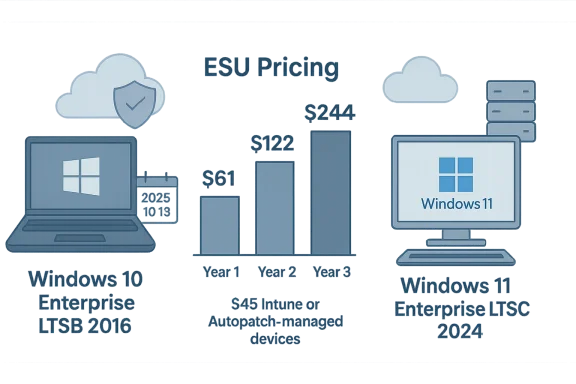
- Pricing: $61 per device for Year 1, with a discounted rate of $45 per device for systems managed by Microsoft Intune or Windows Autopatch.
- Escalation: price doubles every consecutive year, for a maximum enrollment period of three years; ESU licenses are cumulative, meaning enrolling late requires paying for previous years as well.
- Coverage: security-only updates — no feature updates, no design changes, limited technical support (activation/installation assistance and troubleshooting update-caused issues).
- Windows 10 IoT Enterprise 2016 LTSB ESU
- Availability: only through device manufacturers (OEMs); organizations must work with their device makers for pricing and purchasing.
- Same cumulative and escalating pricing model applies, though specific per-device pricing is set by OEMs.
- Windows Server 2016 ESU
- Microsoft noted the ESU pathway for servers but has not published detailed pricing or licensing mechanics at the time of the announcement; specifics were to follow in later communications.
Why the ESU pricing is consequential (and why it’s intentionally punitive)
The structure Microsoft chose — a modest Year 1 fee that doubles in Years 2 and 3 and cumulative liability for late enrollees — has several practical consequences:- Escalating total cost: A device that enrolls immediately for all three years will cost $61 + $122 + $244 = $427 in aggregate under the base price. Devices managed by Intune or Autopatch pay $45 + $90 + $180 = $315 across three years. The arithmetic is blunt: delaying migration becomes progressively more expensive.
- Incentive to modernize: Discounting for managed devices is a clear nudge toward modern management. Organizations using Microsoft Intune or Windows Autopatch can realize a meaningful per-device discount, turning ESU into an additional ROI argument for moving to cloud-based device management.
- Budget and procurement complications: ESU being cumulative means procurement teams must account for retroactive licensing obligations if they delay enrollment. If you join in Year 2, you owe Year 1 pricing as well; enroll in Year 3, and you owe Years 1 and 2 too.
- Operational friction for IoT devices: Requiring OEM-mediated purchases for IoT devices introduces variability and negotiation overhead; vendors may price ESU higher for low-volume or legacy devices, or may push for device replacement programs instead.
The practical security and compliance risk of staying on old builds
Running unsupported software is not just an abstract policy risk — it translates to real-world security exposure and regulatory/insurance implications:- Unpatched vulnerabilities accumulate. Once the final patches are issued on the EOS date, new vulnerabilities discovered afterward will not be fixed unless you have ESU coverage. That increases attack surface and window of exposure.
- Compliance exposure. Industries with regulatory requirements for timely patching (finance, healthcare, government) will find it harder to certify compliance if core systems run end-of-support software unless documented compensating controls are in place.
- Insurance and vendor risk. Cyber insurers and third-party service providers often require supported software levels as part of policy terms. Unsupported OS instances can trigger higher premiums or declined claims following an incident.
- Operational fragility. Legacy builds can make it difficult to adopt new security tooling, telemetry, or encryption standards — all of which can increase long-term operational costs.
Migration pathways and the choices organizations face
Microsoft suggests a few direct upgrade paths and these represent the practical options you should evaluate:- Upgrade path for desktops and specialized devices
- Windows 11 Enterprise LTSC 2024 — the target if the hardware supports Windows 11 requirements (TPM 2.0, Secure Boot-capable UEFI, supported CPU family/generation, and other platform requirements).
- Windows 10 Enterprise LTSC 2021 — the fallback for devices that cannot meet Windows 11 hardware requirements but still need a supported LTSC option.
- Upgrade path for servers
- Windows Server 2025 — Microsoft recommends planning to upgrade server workloads to the newest supported server platform.
- Azure migration — historically, Microsoft has provided specific incentives and options for hosted workloads (including extended support or migration assistance) when servers move to Azure; this can be an attractive path for those who want to avoid on-prem ESU complexity.
- IoT device strategy
- OEM engagement is central: many IoT devices are appliance-like, locked down, or have firmware-dependent deployment models. Engage device manufacturers early for offered LTSC upgrades, ESU pricing, or device replacement programs.
Recommended plan: a practical, time-boxed migration playbook
If your organization is still running Windows 10 LTSB 2016 editions or Windows Server 2016, treat these dates as project delivery deadlines. Here’s a practical playbook to follow, broken into sequential phases you can act on today.- Inventory and classification (Weeks 0–2)
- Build a complete inventory of devices running Windows 10 Enterprise LTSB 2016, Windows 10 IoT Enterprise LTSB 2016, and Windows Server 2016.
- Classify devices by role: desktop, kiosk, ATMs, industrial control systems, POS, virtualization hosts, domain controllers, application servers.
- Tag devices where upgrade is blocked by hardware, vendor constraints, or regulatory constraints.
- Risk assessment and prioritization (Weeks 1–4)
- Score devices by exposure risk, business criticality, and data sensitivity.
- Prioritize for migration by high-risk/high-impact first — e.g., externally-facing servers, systems storing regulated data, and devices that can’t be isolated.
- Cost modeling and procurement (Weeks 2–6)
- Model ESU costs vs migration costs (replacement hardware, labor, software compatibility).
- Include the cumulative ESU pricing in procurement models; evaluate Intune/Autopatch adoption to access discounts.
- Engage OEMs for IoT devices early to obtain ESU quotes or upgrade offers.
- Proof of concept and compatibility testing (Weeks 3–8)
- Build pilot environments for Windows 11 Enterprise LTSC 2024 and Windows 10 Enterprise LTSC 2021.
- Test application compatibility, driver support, peripheral compatibility, and management tooling.
- For servers, validate workload compatibility, backup/restore, and high-availability scenarios on Windows Server 2025.
- Modern management adoption (Weeks 4–12)
- If not already using Intune or Windows Autopatch, evaluate onboarding the most critical fleets; the ESU discount may offset onboarding costs.
- Deploy telemetry and endpoint detection to monitor modernization progress and to validate that patched systems remain compliant.
- Migration waves and rollback plans (Months 3–18)
- Execute migration in waves: pilot -> limited production -> full production.
- Maintain rollback plans and snapshot/backup strategies for each migration to avoid extended outages.
- Endgame: ESU enrollment (as needed)
- If migration is not complete before the EOS date, enroll devices in the ESU program as a controlled, documented temporary measure.
- Use ESU only to buy time — not as an indefinite extension. Maintain a visible timeline with budget approvals and procurement milestones.
Special considerations for IoT and embedded devices
IoT and embedded devices are the most challenging category for EOS workstreams:- OEM-only ESU channels: For Windows 10 IoT Enterprise LTSB 2016, ESU must be purchased through device manufacturers, not directly from Microsoft for most customers. This creates negotiation complexity and potential long lead times.
- Hardware-locked appliances: Many IoT devices are purpose-built with firmware and drivers that are not easily migrated to newer OS versions. Manufacturers may prefer selling replacement hardware rather than enabling in-field upgrades.
- Regulatory and lifecycle locks: Some industries expect devices to be supported for many years; if vendors decide not to offer ESU or upgrades for particular models, organizations must budget for early replacement or re-architect replacement devices with newer platforms.
- Security controls for legacy devices: When replacement is impossible before EOS, apply compensating controls — network segmentation, strict firewalling, jump hosts, monitoring, and strict maintenance windows — to reduce risk exposure.
Alternatives to paying for ESU: Azure, third-party support, and architecture changes
ESU is not the only route to keep workloads secure; consider these alternatives as part of your migration planning:- Host on Azure: Historically, Microsoft has provided special pathways (including, in some cases, extended support or migration assistance) for workloads migrated to Azure. For some customers, the cost and operational benefits of migrating server workloads to cloud infrastructure outweigh ESU payments and hardware refresh costs.
- Azure Arc and hybrid management: For hybrid environments, Azure Arc can centralize management, and Microsoft has signaled offerings that make hybrid lifecycles and management easier for legacy server families.
- Third-party extended support: Some enterprise vendors provide custom extended support agreements beyond vendor EOS. This is typically expensive and limited to very specific fixes, but may be viable for critical, low-count systems.
- Application replatforming: In many cases, refactoring legacy applications to cloud-native or containerized architectures can eliminate the need to maintain legacy OS images, enabling modern CI/CD and security practices.
What this means for procurement, security, and executive stakeholders
The ESU announcement should trigger cross-functional action at multiple levels:- Security leadership should treat EOS dates as risk thresholds for incident response, asset-criticality reviews, and compliance calendars.
- Procurement and finance should model the cumulative ESU costs and hardware replacement budgets, explicitly accounting for the doubling-price mechanics and the Intune/Autopatch discount.
- Operations and endpoint management should prioritize adoption of modern management tooling to both lower operational friction and reduce ESU costs.
- Enterprise architects should revisit application platform lifecycles and migration roadmaps to align with server and desktop upgrades.
Common questions and practical answers
- Can we just keep running these systems after the EOS dates?
Technically yes, but you will be running unsupported software. Without ESU, you will receive no security updates for new vulnerabilities discovered after the EOS date, which materially increases risk. - Can we enroll in ESU retroactively if we miss the date?
Microsoft’s model for these LTSB ESUs is cumulative: you can enroll later, but you will be charged for prior years you missed. That means retroactive enrollment carries a financial penalty. - Is ESU the same as support?
No. ESU covers security updates only. Microsoft explicitly limits technical support to activation of ESU licenses, installation assistance for monthly ESU updates, and troubleshooting update-caused issues. - Will ESU keep our drivers and firmware updated?
No. ESU does not deliver new features, drivers, or firmware updates outside of security patches for the OS. Driver and firmware updates remain the responsibility of vendors and device makers. - What about consumer Windows 10 ESU?
Consumer ESU programs and the enterprise LTSB ESU pathways differ: consumer ESU enrollment and pricing are separate and limited in duration. Treat the enterprise LTSB ESU as a distinct program with its own procurement channels.
Final analysis: strengths, risks, and how to decide
Microsoft’s announcement is technically sound and operationally predictable — it sets firm dates, channels, and a pricing model that organizations can plan around. There are real strengths in its approach:- Predictability: Fixed EOS dates and published ESU pricing allow predictable budgeting and program planning.
- Targeted scope: ESU’s security-only focus keeps risk visible and prevents the ESU program from becoming a vehicle for indefinite legacy maintenance.
- Incentives for modern management: Discounts for Intune/Windows Autopatch make the business case for modern management stronger.
- Costly stopgap: The cumulative and doubling pricing model can make ESU an expensive stopgap that compounds if you procrastinate.
- IoT complexity: OEM-dependent ESU channels for IoT devices can create uneven availability and inconsistent pricing across vendors.
- Operational debt: Relying on ESU delays necessary platform modernization, increases complexity for security tooling, and may complicate cross-platform integration later.
- If a device is business-critical and migration is complex or risky, plan ESU only as a short-term bridge while you execute a controlled migration.
- If a device is low-risk or easily replaceable, prioritize replacement or upgrade now — don’t pay to prolong an inevitable cost.
- Adopt modern management (Intune/Windows Autopatch) as part of the migration plan to reduce long-term lifecycle costs and benefit from ESU discounts if you need them.
Checklist: immediate actions for IT teams (the 30-day sprint)
- Run a complete inventory of affected editions and versions; tag by criticality.
- Engage procurement and finance to model ESU vs migration costs using the cumulative pricing model.
- Contact OEMs for inventories of IoT devices and request ESU pricing and upgrade options.
- Start compatibility testing with Windows 11 Enterprise LTSC 2024 and Windows 10 Enterprise LTSC 2021.
- Evaluate Azure migration options for server workloads as an alternative to on-prem ESU.
- If not managed by Intune/Windows Autopatch, evaluate enrollment to access ESU discounts.
- Communicate a clear migration plan and funded project timeline to executive stakeholders.
The clock is real. Microsoft has given enterprise customers a bridge — but it is a bridge that grows more expensive the longer you linger on it. For security, compliance, and cost reasons, the prudent course for most organizations is to treat ESU as a tactical lever and not a strategic platform choice. Start the inventory and pilots today, choose a modern management approach that pays for itself, and convert that temporary bridge into a completed migration before the emergency price tags grow heavier.
Source: Windows Central Microsoft preps ESU program for Windows 10 LTSB releases retiring in 2026
