

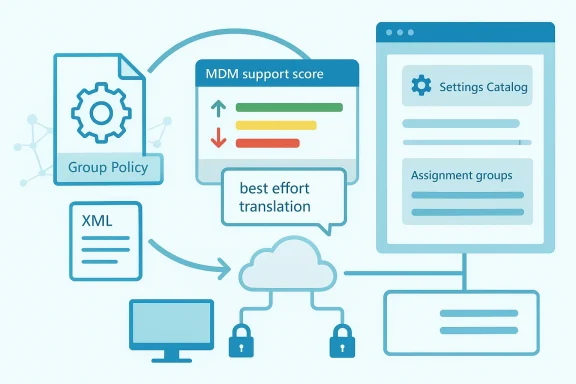
As organizations accelerate the shift from on-premises Active Directory to cloud-first endpoint management, Microsoft Intune’s Group Policy analytics has become one of the most useful bridges between the old world and the new. The idea is simple, but the execution matters: you do not literally “import a GPO” and call it a day. Instead, you analyze a backed-up Group Policy Object, determine what maps to MDM / Policy CSP, and then rebuild the viable pieces as an Intune profile. Microsoft’s own guidance makes clear that this is a best-effort translation, not a one-click conversion, which is exactly why migration planning matters so much. (learn.microsoft.com)
For IT teams, the appeal of this workflow is obvious. Group Policy remains deeply embedded in Windows administration, but it is fundamentally tied to domain-joined management and the legacy Group Policy engine, while Intune manages settings through modern MDM channels on Windows, macOS, iOS/iPadOS, and Android. That makes Intune the natural endpoint for a broader modernization project, especially when an organization wants fewer on-prem dependencies and a more unified policy model.
The real value of Group Policy analytics is that it replaces guesswork with a compatibility report. Microsoft says imported GPOs are analyzed and surfaced with the settings available in Intune, and supported settings can be turned into a Settings Catalog policy for deployment. That gives administrators a practical migration path instead of a theoretical one, and it helps expose the exact settings that will need redesigning or replacing. (learn.microsoft.com)
That said, the migration process is intentionally not automatic. Microsoft explicitly warns that some Group Policy settings do not make sense for cloud-native endpoints, some settings do not migrate exactly, and some fail altogether. In other words, the analysis step is not just administrative busywork; it is where the architecture of the future management model gets defined. (learn.microsoft.com)
For readers who are moving their first few policies, that distinction is critical. A successful migration is not about preserving every legacy knob in every case. It is about preserving the settings that still matter, retiring the ones that no longer fit modern management, and rebuilding the rest in a way that is easier to govern long term. (learn.microsoft.com)
That shift has practical implications for both enterprise and consumer-adjacent Windows environments. Enterprises want consistent baselines, easier remote management, and policies that do not depend on VPN availability or domain connectivity. End users, meanwhile, increasingly expect their machines to work anywhere without the friction of legacy infrastructure overhead. Intune sits in the middle of that trade-off.
What makes this especially important in 2026 is that many organizations are now in mixed-state reality. Some devices are still domain-joined and governed through GPO, while others are cloud-managed, and many are in transition between the two. That creates overlap, conflicts, and ownership ambiguity unless teams make a deliberate plan for which platform controls which setting. (learn.microsoft.com)
In that sense, Group Policy analytics is as much a governance tool as a technical one. It helps teams decide whether a setting should migrate to the Settings catalog, move into Endpoint Security, be scripted, or simply be retired. The best migrations are the ones that remove ambiguity, not preserve it. (learn.microsoft.com)
A well-structured export matters because the backup generates the XML-backed files that Intune expects for analysis. Microsoft’s Group Policy analytics documentation also notes limits such as file size and Unicode formatting requirements, which means sloppy exports can fail before the migration even begins. That is the sort of detail administrators only learn once—usually the hard way.
A smart migration team will also label backups carefully and keep a description of the business intent behind the policy. That makes the later redesign phase easier because unsupported settings can then be grouped by function instead of being treated as a random pile of failures. In migrations, context is half the battle. Losing that context is one of the quickest ways to turn a clean project into policy archaeology. (learn.microsoft.com)
The upload stage also introduces scope tags, which matter in distributed IT environments. Microsoft notes that only admins scoped to the imported GPO can later create a settings catalog policy from that imported object, and if no scope tag is selected, the Default scope tag is used. That is a subtle but important governance detail, because migration is not just about settings—it is about who is allowed to manage them. (learn.microsoft.com)
That distinction matters because organizations often overestimate how much of their legacy estate actually needs preserving. Many GPOs include old operating system artifacts, aging browser settings, or hardening tweaks that made sense years ago but are no longer relevant. Intune’s compatibility view forces teams to confront that reality. (learn.microsoft.com)
A high score is useful, but it should never be treated as a guarantee of success. A policy can score well numerically and still omit a single setting that is operationally critical. Conversely, a policy with a mediocre score may still cover the subset of controls the organization truly cares about. The useful question is not “How high is the score?” but which specific settings survive the translation? (learn.microsoft.com)
That nuance is important because unsupported does not always mean “drop it.” Sometimes it means redesign it, move it, or express it through a different Intune workload. That is particularly true for security policies, where the modern endpoint security stack often gives a better administrative experience than a legacy GPO recreation. (learn.microsoft.com)
A useful way to think about the decision tree is to separate operational control from habit. If a setting protects data, enforces identity or compliance, or ensures a baseline security posture, it likely belongs in the new model. If a setting merely preserves old user interface preferences or obsolete assumptions, it may not justify the complexity of reimplementation. Not every legacy habit is a requirement. (learn.microsoft.com)
For example, Microsoft specifically calls out that endpoint security settings often have a better home in the security stack than in a generic settings catalog policy. That suggests a broader architectural lesson: migration is not just about porting objects, it is about choosing the right policy surface for the outcome you want. (learn.microsoft.com)
The process is intentionally conservative. Microsoft warns that the tool is best effort, and some settings may differ from the exact original configuration. That is not a flaw so much as an admission of the underlying reality: legacy Group Policy and modern MDM are related, but they are not the same system. (learn.microsoft.com)
Microsoft also notes that conflicting settings are detected early, and when two GPOs contain the same setting with different values, you must select only one version to continue. That is a good reminder that migration is a rationalization exercise as much as a technical one. Consolidation can be painful, but it usually pays off. (learn.microsoft.com)
That is why the safest path is to roll out in phases. Start small, validate on a representative set of Windows 10 and Windows 11 devices, and then widen the assignment only after the policy proves stable. The discipline here is not bureaucratic caution; it is how you avoid converting a policy migration into a help desk incident.
It is also wise to document what success looks like before you deploy. That means defining acceptance criteria for settings behavior, user impact, compliance reporting, and rollback thresholds. If you do not define “done,” you will end up arguing about whether the policy is good enough after the fact. (learn.microsoft.com)
It also changes how security teams think about policy ownership. In the GPO era, one setting often lived in one place, linked to one OU, and managed by one team. In the Intune era, settings may come from Settings Catalog, Endpoint Security, Administrative Templates, scripts, or remediation workflows. That flexibility is powerful, but it also requires cleaner operational boundaries. (learn.microsoft.com)
For larger organizations, the governance payoff may be even bigger than the technical one. Once you know which settings are supported, unsupported, or conflict-prone, you can create migration standards and templates that reduce friction for every future policy conversion. That turns a one-time project into a repeatable operating model. (learn.microsoft.com)
For small shops, the biggest upside is control without servers. You do not need to maintain a traditional domain controller just to apply many of the same Windows management concepts. At the same time, the analytics surface tells you whether your old settings actually belong in the cloud-managed world or whether they were only ever survivable because everyone tolerated them.
That said, smaller organizations should be especially careful not to confuse convenience with completeness. Group Policy analytics can help you move faster, but it is not a guarantee that every legacy expectation will survive intact. In a small environment, one missed setting can feel disproportionately painful, which is exactly why pilots matter there too. (learn.microsoft.com)
What to watch next is less about whether Intune can keep absorbing GPOs and more about how organizations adapt their operating model. The winning teams will be the ones that stop asking, “How do we reproduce every GPO?” and start asking, “Which policies should exist in a cloud-managed world at all?” That is a more strategic question, and also a more profitable one. (learn.microsoft.com)
Source: Petri IT Knowledgebase How to Import Group Policy Objects to Microsoft Intune
 Overview
For IT teams, the appeal of this workflow is obvious. Group Policy remains deeply embedded in Windows administration, but it is fundamentally tied to domain-joined management and the legacy Group Policy engine, while Intune manages settings through modern MDM channels on Windows, macOS, iOS/iPadOS, and Android. That makes Intune the natural endpoint for a broader modernization project, especially when an organization wants fewer on-prem dependencies and a more unified policy model.The real value of Group Policy analytics is that it replaces guesswork with a compatibility report. Microsoft says imported GPOs are analyzed and surfaced with the settings available in Intune, and supported settings can be turned into a Settings Catalog policy for deployment. That gives administrators a practical migration path instead of a theoretical one, and it helps expose the exact settings that will need redesigning or replacing. (learn.microsoft.com)
That said, the migration process is intentionally not automatic. Microsoft explicitly warns that some Group Policy settings do not make sense for cloud-native endpoints, some settings do not migrate exactly, and some fail altogether. In other words, the analysis step is not just administrative busywork; it is where the architecture of the future management model gets defined. (learn.microsoft.com)
For readers who are moving their first few policies, that distinction is critical. A successful migration is not about preserving every legacy knob in every case. It is about preserving the settings that still matter, retiring the ones that no longer fit modern management, and rebuilding the rest in a way that is easier to govern long term. (learn.microsoft.com)
Why GPO Migration Matters Now
The push toward Intune is not just about technology taste; it is about the changing shape of Windows management itself. Traditional Group Policy was designed for a world where device membership in Active Directory was the anchor point for control. Modern MDM assumes the opposite: devices may be Entra-joined, hybrid, remote, or outside the corporate network entirely, and policy delivery has to follow them wherever they are.That shift has practical implications for both enterprise and consumer-adjacent Windows environments. Enterprises want consistent baselines, easier remote management, and policies that do not depend on VPN availability or domain connectivity. End users, meanwhile, increasingly expect their machines to work anywhere without the friction of legacy infrastructure overhead. Intune sits in the middle of that trade-off.
The old model versus the new
Group Policy is powerful, but it is also inherently brittle when lifted outside its natural habitat. If a setting is tied to a legacy administration pattern, or if it depends on old templates and assumptions, it may not have a clean MDM equivalent. Intune’s analytics surface that gap explicitly, so the organization can redesign the policy instead of discovering the mismatch after rollout. (learn.microsoft.com)What makes this especially important in 2026 is that many organizations are now in mixed-state reality. Some devices are still domain-joined and governed through GPO, while others are cloud-managed, and many are in transition between the two. That creates overlap, conflicts, and ownership ambiguity unless teams make a deliberate plan for which platform controls which setting. (learn.microsoft.com)
In that sense, Group Policy analytics is as much a governance tool as a technical one. It helps teams decide whether a setting should migrate to the Settings catalog, move into Endpoint Security, be scripted, or simply be retired. The best migrations are the ones that remove ambiguity, not preserve it. (learn.microsoft.com)
Step 1: Export the GPO Correctly
The first step is still the most old-school: back up the policy in the Group Policy Management Console (GPMC). Microsoft’s migration guidance assumes that you already have the imported GPO artifacts available, and the older export process remains the source material for the analytics engine. In practical terms, that means the GPO backup is the raw input for the entire workflow.A well-structured export matters because the backup generates the XML-backed files that Intune expects for analysis. Microsoft’s Group Policy analytics documentation also notes limits such as file size and Unicode formatting requirements, which means sloppy exports can fail before the migration even begins. That is the sort of detail administrators only learn once—usually the hard way.
What to verify before upload
Before uploading anything into Intune, verify that the backup is complete and belongs to the policy you actually intended to migrate. It is surprisingly easy to grab a sibling GPO, a stale version, or a policy with conflicting settings that never should have been in scope. The analytics engine can only interpret what you feed it. (learn.microsoft.com)A smart migration team will also label backups carefully and keep a description of the business intent behind the policy. That makes the later redesign phase easier because unsupported settings can then be grouped by function instead of being treated as a random pile of failures. In migrations, context is half the battle. Losing that context is one of the quickest ways to turn a clean project into policy archaeology. (learn.microsoft.com)
- Back up the GPO from GPMC.
- Confirm the backup contains the intended settings.
- Check file size and encoding before import.
- Keep a description of the policy’s business purpose.
- Store the backup in a location your migration team can access.
Step 2: Import Into Intune Group Policy Analytics
Once the backup is ready, the next step is to upload the XML files into Devices > Group Policy analytics in the Intune admin center. Microsoft’s documentation shows that the import process is designed around selecting one or more XML files and then letting Intune parse them into an analyzable object. The workflow is straightforward, but the value lies in what comes next: compatibility assessment.The upload stage also introduces scope tags, which matter in distributed IT environments. Microsoft notes that only admins scoped to the imported GPO can later create a settings catalog policy from that imported object, and if no scope tag is selected, the Default scope tag is used. That is a subtle but important governance detail, because migration is not just about settings—it is about who is allowed to manage them. (learn.microsoft.com)
Why the upload is not a trivial formality
It may be tempting to view the upload as a simple file transfer, but it is better thought of as the normalization step for the policy. Once Intune has parsed the GPO, it can compare each setting against its own catalog of supported management options. The result is not merely a yes/no answer; it is a structured map of what can, cannot, or only partially can be migrated. (learn.microsoft.com)That distinction matters because organizations often overestimate how much of their legacy estate actually needs preserving. Many GPOs include old operating system artifacts, aging browser settings, or hardening tweaks that made sense years ago but are no longer relevant. Intune’s compatibility view forces teams to confront that reality. (learn.microsoft.com)
- Navigate to Devices > Group Policy analytics.
- Import the XML files from the GPO backup.
- Apply the correct scope tag.
- Use the import to establish policy ownership.
- Treat the upload as a policy analysis step, not a deployment step.
Step 3: Read the MDM Support Score Like an Architect
The headline metric in Group Policy analytics is the MDM support score. Microsoft’s documentation and migration guidance make clear that supported settings are identified so administrators can create a Settings Catalog policy, while unsupported or partially supported settings require alternate handling. In other words, the score is not a vanity metric; it is the map of your migration effort.A high score is useful, but it should never be treated as a guarantee of success. A policy can score well numerically and still omit a single setting that is operationally critical. Conversely, a policy with a mediocre score may still cover the subset of controls the organization truly cares about. The useful question is not “How high is the score?” but which specific settings survive the translation? (learn.microsoft.com)
Unsupported does not always mean useless
Microsoft’s migration page says that some settings do not migrate exactly and may be mapped to a similar Intune option, while other settings fail to migrate because of format issues or missing child settings. The platform even flags certain scenarios—such as AppLocker and Firewall rules—where the Migrate option is disabled entirely and administrators should use Endpoint Security instead. (learn.microsoft.com)That nuance is important because unsupported does not always mean “drop it.” Sometimes it means redesign it, move it, or express it through a different Intune workload. That is particularly true for security policies, where the modern endpoint security stack often gives a better administrative experience than a legacy GPO recreation. (learn.microsoft.com)
- Use the score to identify migration readiness.
- Drill into unsupported items individually.
- Check whether a setting has a better home in Endpoint Security.
- Look for alternate settings when exact parity is unavailable.
- Do not rely on the percentage alone. (learn.microsoft.com)
Step 4: Decide What Deserves to Move
The most successful migrations are selective. Microsoft’s guidance implies exactly that by warning admins not to assume every Group Policy setting should be carried forward. Some settings are central to modern device management, some are nice-to-have, and some should be retired because they belong to an older management era. (learn.microsoft.com)A useful way to think about the decision tree is to separate operational control from habit. If a setting protects data, enforces identity or compliance, or ensures a baseline security posture, it likely belongs in the new model. If a setting merely preserves old user interface preferences or obsolete assumptions, it may not justify the complexity of reimplementation. Not every legacy habit is a requirement. (learn.microsoft.com)
Practical migration tiers
A phased approach tends to work best. Tier 1 settings are the ones that protect the environment or preserve business continuity. Tier 2 settings improve consistency but are not urgent, and Tier 3 settings either no longer matter or should be replaced with a different tool entirely. That tiering is a sensible way to avoid trying to modernize everything at once.For example, Microsoft specifically calls out that endpoint security settings often have a better home in the security stack than in a generic settings catalog policy. That suggests a broader architectural lesson: migration is not just about porting objects, it is about choosing the right policy surface for the outcome you want. (learn.microsoft.com)
- Tier 1: BitLocker, Defender, compliance, identity, update control.
- Tier 2: UI defaults, browser preferences, secondary hardening.
- Tier 3: Internet Explorer-era logic, obsolete network assumptions, legacy cruft.
- Prioritize settings with security or business impact.
- Drop settings whose value is mainly historical.
Step 5: Migrate the Supported Settings
The actual migration happens when you select settings and let Intune build the new profile. Microsoft says the Migrate feature parses the imported GPO and translates it into a relevant setting in the Settings Catalog if one exists, and the resulting profile can then be assigned to users or devices. That is the bridge from assessment to deployment. (learn.microsoft.com)The process is intentionally conservative. Microsoft warns that the tool is best effort, and some settings may differ from the exact original configuration. That is not a flaw so much as an admission of the underlying reality: legacy Group Policy and modern MDM are related, but they are not the same system. (learn.microsoft.com)
Why best effort is a feature, not a bug
A best-effort migrator prevents false confidence. If Intune pretended that every setting had perfect parity, admins would discover conflicts only after rollout. By surfacing gaps, alternate mappings, and failures up front, Microsoft gives teams the chance to re-engineer policies with their eyes open. That is far better than an apparently clean migration that quietly breaks a business workflow. (learn.microsoft.com)Microsoft also notes that conflicting settings are detected early, and when two GPOs contain the same setting with different values, you must select only one version to continue. That is a good reminder that migration is a rationalization exercise as much as a technical one. Consolidation can be painful, but it usually pays off. (learn.microsoft.com)
- Select the settings you actually want to migrate.
- Review the generated configuration values.
- Name the profile clearly and consistently.
- Use assignments to target the right groups.
- Confirm conflicting settings before deployment. (learn.microsoft.com)
Step 6: Assign, Pilot, and Validate
Deployment is where a migration becomes real. Microsoft’s guidance says the resulting policy is assigned to users or devices and applied the next time devices check in, which is exactly why a pilot group is essential. A policy that looks correct in the portal can still behave differently on actual hardware, with real user sessions, conflicting settings, and regional variability. (learn.microsoft.com)That is why the safest path is to roll out in phases. Start small, validate on a representative set of Windows 10 and Windows 11 devices, and then widen the assignment only after the policy proves stable. The discipline here is not bureaucratic caution; it is how you avoid converting a policy migration into a help desk incident.
Pilot design that actually tells you something
A good pilot group should include different device roles, not just the easiest machines in the fleet. If a policy is meant to secure remote laptops, test it on remote laptops. If it affects shared workstations or critical business apps, include those scenarios too. Otherwise, the pilot may succeed in the lab and fail in the real world. The point of a pilot is exposure, not comfort. (learn.microsoft.com)It is also wise to document what success looks like before you deploy. That means defining acceptance criteria for settings behavior, user impact, compliance reporting, and rollback thresholds. If you do not define “done,” you will end up arguing about whether the policy is good enough after the fact. (learn.microsoft.com)
- Start with a pilot group.
- Include realistic device and user scenarios.
- Validate security and usability outcomes.
- Expand only after the first wave is stable.
- Keep rollback criteria documented.
Enterprise Implications
For enterprises, the value of this workflow goes beyond simplification. It creates a repeatable method for decommissioning the old policy stack while preserving business-critical controls. That is especially useful for organizations trying to reduce dependence on domain infrastructure, branch connectivity, or legacy scripting around the edges of their management architecture.It also changes how security teams think about policy ownership. In the GPO era, one setting often lived in one place, linked to one OU, and managed by one team. In the Intune era, settings may come from Settings Catalog, Endpoint Security, Administrative Templates, scripts, or remediation workflows. That flexibility is powerful, but it also requires cleaner operational boundaries. (learn.microsoft.com)
The end of “lift and pray”
The old habit was to copy policies forward and hope the result was close enough. Intune analytics discourages that habit by showing exactly where the gaps are. It forces a conversation about whether a legacy setting is still needed, whether it should move to a better policy surface, or whether it should be abandoned entirely. That is a healthier default for modern IT. (learn.microsoft.com)For larger organizations, the governance payoff may be even bigger than the technical one. Once you know which settings are supported, unsupported, or conflict-prone, you can create migration standards and templates that reduce friction for every future policy conversion. That turns a one-time project into a repeatable operating model. (learn.microsoft.com)
- Reduces dependence on domain-bound policy delivery.
- Clarifies policy ownership across teams.
- Encourages standardized Intune design.
- Helps eliminate redundant or obsolete controls.
- Makes policy drift easier to identify.
Consumer and Small-Business Impact
Small businesses and consumer IT enthusiasts will feel the migration story differently, but the principle is similar. If you have ever managed a small network with a few critical Windows machines, the move to cloud policy can feel like both liberation and loss: less infrastructure to maintain, but also less direct familiarity with what each setting really means. Intune’s analytics reduce that uncertainty.For small shops, the biggest upside is control without servers. You do not need to maintain a traditional domain controller just to apply many of the same Windows management concepts. At the same time, the analytics surface tells you whether your old settings actually belong in the cloud-managed world or whether they were only ever survivable because everyone tolerated them.
Why this matters to lean teams
Lean IT teams rarely have the luxury of preserving old and new management systems forever. If a setting can move to Intune cleanly, that reduces complexity. If it cannot, the team can choose an alternative path deliberately instead of discovering the problem after a remote device stops behaving the way it should. (learn.microsoft.com)That said, smaller organizations should be especially careful not to confuse convenience with completeness. Group Policy analytics can help you move faster, but it is not a guarantee that every legacy expectation will survive intact. In a small environment, one missed setting can feel disproportionately painful, which is exactly why pilots matter there too. (learn.microsoft.com)
- Fewer servers to maintain.
- Easier remote administration.
- Better fit for cloud-managed devices.
- Less legacy dependency.
- More transparent policy validation.
Strengths and Opportunities
The biggest strength of Microsoft’s Group Policy analytics flow is that it gives organizations a structured migration path instead of forcing them to guess. It also pushes admins toward the more modern policy surfaces when those surfaces are a better fit, which is exactly the kind of architectural nudge that large IT estates need. The opportunity here is not just to migrate policies, but to rethink how policy should be authored in the first place. (learn.microsoft.com)- Clear visibility into MDM support for each setting.
- Straightforward conversion into a Settings Catalog profile.
- Early detection of conflicting values.
- Better fit for cloud-native endpoints.
- Encourages modernization instead of cloning legacy habits.
- Supports phased rollout and pilot validation.
- Reduces uncertainty during Active Directory to cloud transition. (learn.microsoft.com)
Risks and Concerns
The main risk is assuming that analysis equals portability. It does not. Microsoft is explicit that the migrate process is best effort, that some settings translate differently, and that some policies do not belong in the Settings Catalog at all. If administrators overtrust the tool, they may deploy a policy that appears complete but omits critical behavior in production. (learn.microsoft.com)- Some settings will not migrate exactly.
- AppLocker and firewall rules may require Endpoint Security instead.
- Conflicting GPO values can block migration until resolved.
- Poor scope tagging can create governance confusion.
- Legacy settings may be misleadingly familiar but technically obsolete.
- Skipping pilots can expose users to avoidable breakage.
- Treating the MDM score as the whole story can distort priorities. (learn.microsoft.com)
Looking Ahead
The future of Windows management is clearly heading toward more cloud-native policy design, and Group Policy analytics is a bridge, not a destination. Microsoft’s current documentation already frames the workflow around settings catalog policies, Endpoint Security, and assignment-based management, which means the center of gravity is moving away from classic GPO dependency. That will likely continue as Intune becomes the primary control plane for more organizations. (learn.microsoft.com)What to watch next is less about whether Intune can keep absorbing GPOs and more about how organizations adapt their operating model. The winning teams will be the ones that stop asking, “How do we reproduce every GPO?” and start asking, “Which policies should exist in a cloud-managed world at all?” That is a more strategic question, and also a more profitable one. (learn.microsoft.com)
- Broader use of Settings Catalog for migrated policy.
- Continued reliance on Endpoint Security for security-heavy settings.
- More emphasis on pilot-based deployment.
- Better tooling for conflict detection and policy rationalization.
- Greater pressure to retire obsolete Group Policy patterns. (learn.microsoft.com)
Source: Petri IT Knowledgebase How to Import Group Policy Objects to Microsoft Intune
