

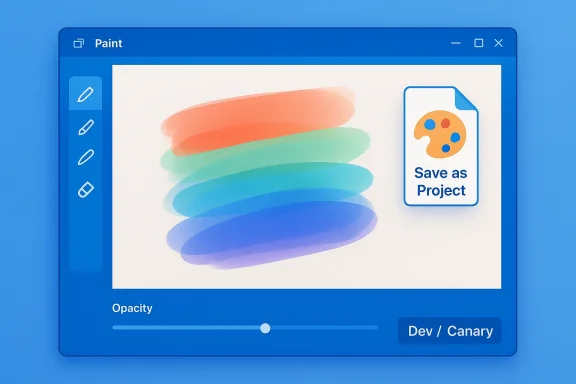
Microsoft Paint is shedding one of its most persistent limitations: you can now save your work as an editable project file that preserves layers and edit state, and the app finally adds per-tool opacity controls for Pencil and Brush — changes already rolling out to Windows Insiders as part of a coordinated update to Paint, Snipping Tool and Notepad. (https://windowsreport.com/paint-app...controls-in-v11-2508-361-0/?utm_source=openai))
For decades, Microsoft Paint served as the simplest raster editor bundled with Windows: fast, tiny, and intentionally limited. Over the past few years, Microsoft has been quietly modernizing Paint in stages — adding layers, transparency, Copilot-driven features like Cocreator and generative edits, and a Copilot menu that centralizes AI tools — turning a nostalgic utility into a lightweight creative surface. Those incremental changes established the foundation for the two updates announced in the latest Insider flight: an editableh a .paint extension, and an on-canvas opacity slider for drawing tools.
The new functionality is part of an Insider preview release for Windows 11 and appears to be bundled in Paint app builds tied to the Insider channels; the update has been linked to app version 11.2508.361.0 in reporting and to simultaneous updates for Snipping Tool and Notepad in the same flight. These are sta to Insiders in the Canary and Dev channels as Microsoft validates the experience before broad availability.
However, the true value will depend on follow-through: whether Microsoft documents the .paint format, whether the app retains its lightweight footprint, and how it manages the interplay between local features and cloud- or Copilot-driven capabilities. For users who only ever needed quick edits, the change is essentially invisible in terms of complexity but meaningful in convenience. For creators who previously used external editors for session continuity, Paint can now be a credible, no-cost alternative for many tasks.
The update is currently in Insider previews and is being validated in the Canary and Dev channels. If you depend on Paint for light creative work, these changes make it worth a second look; if you’re an IT admin or archivist, treat .paint as a new file type that requires policy consideration until Microsoft provides long-term format guidance. Either way, this is one of those rare product moves that improves the day-to-day experience of a broad user base in a simple, sensible way — and for many, it’s long overdue.
Source: Neowin A highly-requested feature is finally coming to Paint in Windows 11
 Background
For decades, Microsoft Paint served as the simplest raster editor bundled with Windows: fast, tiny, and intentionally limited. Over the past few years, Microsoft has been quietly modernizing Paint in stages — adding layers, transparency, Copilot-driven features like Cocreator and generative edits, and a Copilot menu that centralizes AI tools — turning a nostalgic utility into a lightweight creative surface. Those incremental changes established the foundation for the two updates announced in the latest Insider flight: an editableh a .paint extension, and an on-canvas opacity slider for drawing tools.The new functionality is part of an Insider preview release for Windows 11 and appears to be bundled in Paint app builds tied to the Insider channels; the update has been linked to app version 11.2508.361.0 in reporting and to simultaneous updates for Snipping Tool and Notepad in the same flight. These are sta to Insiders in the Canary and Dev channels as Microsoft validates the experience before broad availability.
What changed in Paint — the essentials
Save as project (.paint): what it is and why it matters
- Paint can now write and reopen a single, editable project file using a new .paint container.
- The format serializes layers, layer ordering, and editing state so you can close Paint and return later to continue non-destructive editing. ly mirrors what professional editors have offered for years — for example, Adobe Photoshop’s PSD or Paint.NET’s PDN project files — but it brings that convenience to Paint’s audience of casual creators, students, and quick editors.
Opacity slider for Pencil and Brush shading
- Paint now offers an opacity slider for the Pencil and Brush tools, letting artists control stroke transparency in real time.
- The slider appears alongside the existing size controls and gives immediate feedback on the canvas as you paint. This is especially valuable combined with Paint’s layer support: semi-transparent strokes make shading, highlights, and subtle blends far easier.
Technical specifics and verification
Build and app version
Reporters tracking the Insider flight list Paint app version 11.2508.361.0 as the release carrying project file and opacity features. That version tag is consistenerage outlets and Insider chatter. If you’re checking your machine, confirm the Paint app version in the app’s About dialog; Insiders on the Canary and Dev channels should see the new options once their Store app updates.How the .paint container behaves
- The .paint file is described as a serialized project container that preserves layers, layer order, and the current edit state when saved via Save as project.
- When reopened in Paint, the file restores the canvas exactly as it was, allowing further non-destructive edits or export to flattened formats like PNG/JPEG if needed. This brings Paint in line with standard project workflows used by hobbyist and professional editing tools.
Opacity ce opacity control applies to the Pencil and Brush tools on the canvas in real time; the UI offers a slider near the size control, giving immediate feedback.
- The addition is lightweight (a per-tool numeric slider) rather than a wholesale brush-engine overhaul; it enables transparency layering without introducing complex brush dynamics, pressure simulation, or tilt sensitivity beyond what existing inking APIs already support.
How to try these features now
- Enroll in the Windows Insider Program (if you aren’t already) and opt into the Dev or Canary channel. These features are initially visible to Insiders in those channels. ([windowsreportreport.com/paint-app-gets-project-files-and-opacity-controls-in-v11-2508-361-0/)
- Update the Paint app via the Microsoft Store (or the built-in Windows app update flow) until you see app version 11.2508.361.0 or later in Paint’s About details.
- Open Paint and use the File menu to select Save as project; save a .paint file and confirm that reopening it restores layers and edit state.
- Select Pencil or Brush and look for the new opacity slider near the size control; adjust it and paint to test blending and translucency on layers.
Why this matters: practical benefits
For casual creators and educators
- Save-as-project removes a major workflow hurdle for students and hobbyists who lack a multi-file workflow or external editors. You can sketch, save, come back laut rebuilding layers. That makes Paint genuinely useful for multi-session projects in classrooms or home setups.
For rapid prototyping and UI mockups
- A lightweight editable format speeds iterative mockups. Designers and developers who need a quick raster mock without launching a full editor can sketch, save state, and hand off flattened images when needed. The low friction of Paint’s UI plus session files reduces context switching.
For accessibility and low-end hardware
- Paint remains extremely accessible on lower-spec machines. The new features provide meaningful artistic tools (opacity control and project continuity) without adding heavy resource requirements, keeping Paint a go-to for machines that can’t comfortably run full-featured editors.
Critical analysis: strengths, limits, and risks
Strength: closes a clear, long-standing gap
Providing a native, editable project format is a straightforward, high-impact fix to a complaint users have made for years. This isn’t a flashy AI novelty; it solves a routine productivity problem for the app’s core audience and aligns Paint with basic expectations of modern editors. The opacity slider is a similarly pragmatic addition that enhances expressiveness without complicating the UI.Strength: staged rollout reduces risk
Microsoft’s choice to deliver these features through the Insider channels and feature flights helps catch regressions or workflow gaps before broad releasech is appropriate for changes that touch file formats and persistent state.Limit: format openness and long-term portability
- The major unresolved question is whether .paint will be documented or supported by third parties. If the format remains proprietary and undocumented, users who rely on .paint files risk lock-in or future compatibility issues if Microsoft significantly changes the format. That risk is common to proprietary project formats but is still meaningful for users who might archive work for long-terviews don’t include a formal spec, so caution is warranted.
Limit: scope of the brush improvements
- The opacity slider is an important usability gain, but it’s not a replacement for a full brush engine: there’s no evidence of advanced pressure simulation, dynamics, or a custom brush designer in this update. Users expecting a pro-level painting experience should temper expectations; Paint is evolving into a more capable casual editor rather than competing directly with full-featured tools.
Risk: feature bloat vs. simplicity trade-off
Microsoft must balance adding capabiint approachable. Feature creep could alienate legacy users who appreciated Paint’s minimalism. The team appears to be mindful of this trade-off — the changes are incremental and conservative — but the risk persists if future updates layer AI/Cloud requirements or complicated dialogs into the app.Privacy and telemetry concerns for AI features
While the .paint and opacity features themselves are local UX improvements, other Paint developments (Copilot menu, Sticker generator, AI-based Restyle, etc.) have required online or Copilot+ gating in earlier rollouts. Users and administrators should remain attentive to how AI features are gated, whether they require account sign-in, and what data is sent to cloud services. The project file feature seems local, but related AI features in Paint have been explicitly gated to Copilot+ hardware or account sign-in in other flights, and organizations may want to review governance policies.Broader context: Paint’s role in Microsoft’s product strategy
Microsoft has been repositioning Windows’ built-in apps as small, modern productivity and creativity surfaces that also serve as testbeds for Copilot-style features. Paint’s evolution demonstrates two simultaneous priorities:- Make small, concrete usability wins (layers, .paint projects, opacity slider) that improve everyday workflows.
- Use Paint to trial more ambitious AI-driven experiments (Cocreator, Restyle, Sticker generwidely available app.
Enterprise and IT considerations
- Manageability: Because these features are rolling out through Insider channels, enterprise IT should not expect them to appear on production devices until Microsoft formally ships them in a mainstream update. Admins using Insider rings for testing should track app versions and evaluate whether .paint files fit into their organization’s content lifecycle and backup strategies.
- File format governance: If users begin saving business or training artifacts as .paint files, IT policies should address backup retention and long-term accessibility, especially if the format is initially undocumented. Consider addind file-type lists for archiving if your organization plans to depend on it.
- Privacy and security: AI features in Paint (separate from .paint) can be gated and may requirtors should confirm whether any AI-enabled workflows send content to Microsoft services and whether that raises compliance concerns.
What we don’t yet know (and what to watch for)
- Formal documentation and interchange spec for .paint: Will Microsoft publish the container format or provide an import/export SDK? That determines long-term portability and third-party support.
- Whether .paint will support advanced project metadata, embedded smart objects, or version history beyond a simple serialized state. Current previews describe state preservation, but the feature depth remains to be seen.
- The timeline for general availability: Insider rollouts don’t map directly to public release dates. Expect the feature to be validated in Dev/Canary before Microsoft ships it broadly; watch official Microsoft update notes and Store versioning for the general availability signal.
Verdict: pragmatic, overdue, and well-targeted
The addition of Save as p an opacity slider** is a low-risk, high-reward update for Paint. It addresses long-standing friction for everyday users and nudges Paint toward becoming a genuinely useful lightweight editor without betraying its simplicity. By delivering these as minor, staged enhancements rather than sweeping redesigns, Microsoft keeps Paint accessible while improving its utility.However, the true value will depend on follow-through: whether Microsoft documents the .paint format, whether the app retains its lightweight footprint, and how it manages the interplay between local features and cloud- or Copilot-driven capabilities. For users who only ever needed quick edits, the change is essentially invisible in terms of complexity but meaningful in convenience. For creators who previously used external editors for session continuity, Paint can now be a credible, no-cost alternative for many tasks.
Quick checklist for readers
- Confirm you are on the Dev or Canary Windows Insider channel to try the new Paint features.
- Update Paint to app version 11.2508.361.0 (or later) and check the File menu for Save as project.
- Test opacity controls by selecting Pencil/Brush and adjusting the new slider next to size controls.
- If you plan to rely on .paint for important work, export flattened copies and archive them separately until Microsoft publishes format details or guarantees backward compatibility.
Conclusion
Microsoft’s Paint has taken another deliberate step away from being merely a nostalgic accessory and toward being a practical, session-aware image editor. The .paint project container and per-tool opacity slider are precisely the kind of practical, low-friction improvements that broaden Paint’s usefulness without adding unnecessary complexity. They solve real problems for everyday users: preserving the work-in-progress, enabling layered composition, and making shading and blending intuitive.The update is currently in Insider previews and is being validated in the Canary and Dev channels. If you depend on Paint for light creative work, these changes make it worth a second look; if you’re an IT admin or archivist, treat .paint as a new file type that requires policy consideration until Microsoft provides long-term format guidance. Either way, this is one of those rare product moves that improves the day-to-day experience of a broad user base in a simple, sensible way — and for many, it’s long overdue.
Source: Neowin A highly-requested feature is finally coming to Paint in Windows 11
