

Microsoft’s latest patent filing suggests the humble clipboard — the one thing we take for granted between Ctrl+C and Ctrl+V — may be about to graduate into a genuinely useful AI-powered productivity feature rather than a background convenience that occasionally mangles formatting or pastes raw HTML into a mail draft.
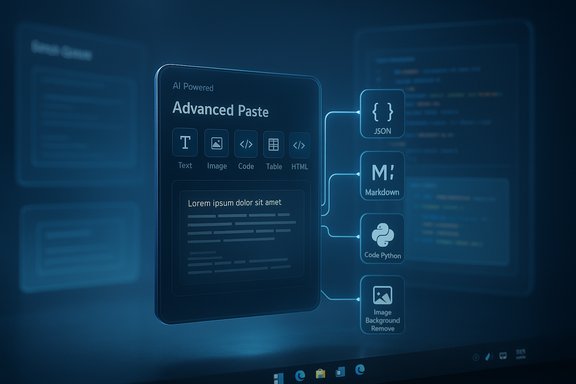
Microsoft recently filed a patent application titled Systems and Methods for Advanced Copy and Paste (Publication No. 20250355731), describing an advanced paste UI that connects clipboard contents to a language model and a library of conversion functions. The filing describes a system that recognizes the data type of the copied item (text, image, code, table, HTML, etc., surfaces context-sensitive conversion options, and accepts a natural-language prompt to transform the clipboard contents before pasting. The patent proposes a hybrid approach: a mix of predefined conversion functions (for fast, deterministic transformations) and LLM-driven orchestration or “too custom” conversions when the request goes beyond predefined rules.
This is not Microsoft’s first dabble with smarter paste operations. PowerToys’ Advanced Paste and various Copilot features already offer AI-based editing and conversion inside apps. What the patent adds — and what makes it notable — is system-level integration: an OS-level clipboard that previews and transforms content with AI before insertion, including batch operations, image edits, code translations, and markup conversions.
Practical, high-value examples include:
A key differentiator in the patent text is the LLM’s role as an orchestrator that decides which of the predefined functions to run — rather than placing full generative responsibility on the LLM for every conversion. That hybrid approach helps reduce hallucinations, speeds up common cases, and offers clear upgrade paths: add more conversion functions over time while keeping the LLM as a fallback.
However, the power of an AI-aware clipboard demands careful handling: the feature must respect privacy by default, provide reliable deterministic options, and clearly mark any content that was generated or substantially altered by an AI model. If Microsoft delivers on those fundamentals, an Advanced Paste integrated with an LLM would be one of the most genuinely useful, low-friction uses of generative AI in the OS — turning a trivial UX moment into a consistent productivity win rather than a source of new risks.
Source: Windows Report Microsoft Might Soon Integrate Copilot Into the Clipboard, and This Time It Could Be Useful
 Background
Microsoft recently filed a patent application titled Systems and Methods for Advanced Copy and Paste (Publication No. 20250355731), describing an advanced paste UI that connects clipboard contents to a language model and a library of conversion functions. The filing describes a system that recognizes the data type of the copied item (text, image, code, table, HTML, etc., surfaces context-sensitive conversion options, and accepts a natural-language prompt to transform the clipboard contents before pasting. The patent proposes a hybrid approach: a mix of predefined conversion functions (for fast, deterministic transformations) and LLM-driven orchestration or “too custom” conversions when the request goes beyond predefined rules.This is not Microsoft’s first dabble with smarter paste operations. PowerToys’ Advanced Paste and various Copilot features already offer AI-based editing and conversion inside apps. What the patent adds — and what makes it notable — is system-level integration: an OS-level clipboard that previews and transforms content with AI before insertion, including batch operations, image edits, code translations, and markup conversions.
Overview of the proposed feature
The patent envisions the clipboard as an active workspace rather than passive storage. Key ideas include:- Automatic data-type detection on copy to present relevant paste transformations.
- A compact Advanced Paste UI that displays selectable conversion functions (for example, “paste as JSON,” “paste as markdown,” “paste image without background,” or “paste code converted to Python”).
- A natural-language text field inside that UI where users can enter custom conversion requests (e.g., “convert this Java snippet to Python and add VS-like syntax highlighting”).
- Use of an LLM to either perform transformations directly or to select and sequence predefined conversion functions to fulfill the custom request.
- Preview before paste, giving users a chance to inspect and accept the transformed content.
- Batch processing support to transform multiple clipboard items and paste them together.
- A fallback “too custom” function that routes complex conversions back to the LLM for generation if the predefined modules are insufficient.
Why this matters: productivity and everyday workflows
Most users interact with the clipboard dozens of times per day but rarely think about its capabilities beyond simple copy-and-paste. The patent’s approach could change that by turning the paste step into an opportunity to shape content exactly how you need it — without context switching.Practical, high-value examples include:
- Turning copied paragraphs into bulleted lists, summaries, or email drafts at paste time.
- Converting a selected HTML table into cleanly formatted HTML for a CMS or into a spreadsheet-friendly CSV without opening converters.
- Developers: copy a code snippet and paste it converted into a different language or formatted for a specific linter, style guide, or editor (with syntax highlighting applied in preview).
- Content creators: strip backgrounds from copied images, extract text from screenshots, or paste an image’s textual content cleaned up and ready to edit.
- Research and note-taking: batch-process multiple copied excerpts into structured notes (JSON, Markdown, or OPML) in one step.
Technical design and likely implementation details
The patent lays out a multi-component architecture that can be distilled into practical building blocks:- Clipboard monitor and type detector — recognizes data types and selects relevant conversion options.
- Conversion function library — a set of tested, deterministic transformers (e.g., HTML->Markdown, HTML table->CSV, remove image background, OCR extract, language-to-language code transpiler).
- LLM orchestrator — takes a user’s natural-language instruction and either:
- picks the appropriate deterministic functions (and their order), or
- executes the transformation directly where the conversion is too bespoke.
- Local vs. cloud execution layer — some conversions may run purely locally (for speed and privacy), while others may require cloud LLM inference.
- Preview pane — a lightweight renderer that shows the transformed content with syntax highlighting and allows rollback.
- Batch queue manager — supports multiple items and ordered pastes.
Where Microsoft already stands: ties to PowerToys and Copilot
Microsoft has already introduced AI-powered paste functionality in community-facing tools such as PowerToys’ Advanced Paste, and it has gradually added AI-driven clipboard and screen-capture integrations to Copilot-driven workflows. Those implementations are app-level or utility-level; the patent moves the logic into the OS layer.A key differentiator in the patent text is the LLM’s role as an orchestrator that decides which of the predefined functions to run — rather than placing full generative responsibility on the LLM for every conversion. That hybrid approach helps reduce hallucinations, speeds up common cases, and offers clear upgrade paths: add more conversion functions over time while keeping the LLM as a fallback.
Strengths: what’s well designed about this approach
- Context-aware choices: Presenting conversion options that depend on the clipboard type reduces cognitive load and speeds user decision-making.
- Preview and control: The preview step fixes an old clipboard problem — accidental pastes with unexpected formatting. Preview before paste restores user agency.
- Hybrid execution model: Combining deterministic functions and LLM orchestration gives a balance between reliability and flexibility.
- Batch operations: For power users, being able to copy multiple items and process them together saves significant time.
- Developer-friendly conversions: On-the-fly code translations and format conversions could become a unique productivity multiplier for engineers switching between languages or environments.
- Potential for privacy-first options: If implemented with local LLM support (or selective routing), Microsoft could offer privacy-preserving transformations that never leave the device.
Risks and downsides: security, privacy, accuracy
No new OS-level AI feature is without risk. The clipboard is a particularly sensitive zone because it can carry passwords, personal data, API keys, and confidential snippets. Introducing LLM-powered transformations raises several concerns:- Data exfiltration risk: If clipboard content is routed to cloud LLMs by default, sensitive information could be transmitted to external servers. A single inadvertent paste could create a long tail of exposure.
- Default behavior and opt-in: If AI transformations become the default paste behavior, users may accidentally paste transformed content that alters meaning or leaks information. Defaults matter — especially with system-level features.
- Hallucinations and content drift: LLMs can hallucinate or rewrite content in ways that change intent (for example, converting code incorrectly or altering legal text). For serious workflows, a generative transformation needs robust verification and clear visual cues that content was rephrased.
- Malicious clipboard poisoning: Clipboard content is already a vector for malware or phishing (e.g., clipboard hijackers replacing copied wallet addresses). An automated clipboard processor that runs conversions could be an additional attack surface if not properly sandboxed and permissioned.
- Enterprise governance challenges: Organizations will want control over whether clipboard content can be processed by cloud models, what telemetry is collected, and how transformations are logged or blocked.
- Accessibility and discoverability: Power features are only useful if users know they exist and understand how to control them. Hiding the Advanced Paste UI behind obscure shortcuts could limit uptake and increase accidental misuse.
Privacy and governance: what must be in place
If Microsoft ships this, a safe roll-out would include these elements:- Explicit consent and clear settings: Users must opt in to LLM-based transformations; a clear privacy dashboard should show what was processed and where it was routed.
- Local-mode availability: A first-class on-device mode (running models locally or through a user-controlled engine like Ollama/Foundry Local) should be available so that no data leaves the device for basic transformations.
- Redaction and filters: Automatic PII detection and redaction for clipboard content destined for cloud inference. The system should refuse to send probable secrets and offer to scrub metadata.
- Enterprise policy controls: Group policy or MDM settings to disable cloud LLM integration, allow only deterministic conversions, or log paste transformations for compliance.
- Transparent preview and provenance: The preview must clearly indicate when content was generated or altered by an AI model and provide an “original vs. transformed” toggle.
Developer and ecosystem implications
For developers, an OS-level transformation layer changes integration patterns. Opportunities include:- New extension APIs: Allow third-party apps to register custom conversion functions or to mark certain paste targets as needing sanitized input.
- Standardized paste hooks: Developers could build paste-aware UIs that surface specialized converters for their app context (e.g., a spreadsheet app asking whether to convert an HTML table to cells or keep markup).
- Automation and macros: Power users could create repeatable paste transformations (for example, chain functions: OCR -> clean -> translate -> format).
- Tooling convergence: Some separate clipboard managers and third-party paste utilities might converge toward OS-level APIs, while others will offer more niche, specialized features.
Comparison to existing tools and precedents
A few relevant comparators:- PowerToys Advanced Paste: Already demonstrates the concept of AI-assisted paste via a utility. Moving the capability to the OS broadens reach and makes it a default affordance.
- Clipboard managers and utilities: Many third-party tools offer history, multi-item buffers, and simple format-stripping. The patent’s LLM orchestration would be a step beyond.
- Copilot and Edge features: Copilot already supports image and screenshot inputs in some flows; integrating AI at the clipboard level would extend those capabilities system-wide.
- On-device AI initiatives: Recent advances enabling local model execution (via vendor toolchains or NPU support) are relevant — they make privacy-preserving versions of this vision feasible.
Likelihood of shipping and caveats
A patent filing gives us a documented design and intent, not a shipping roadmap. Key caveats:- Patents are aspirational: Filing does not imply imminent release. Companies patent broad concepts as part of R&D and IP strategy.
- Implementation details may differ: The shipped feature could be more limited (e.g., only predefined conversions at first, with LLM orchestration added later).
- Regulatory and business constraints: Enterprise adoption, privacy rules, and competitive landscape (including cloud model costs) will influence rollout timing and scope.
- Reliance on model availability: On-device options are promising but not universal; Microsoft will likely offer both local and cloud modes, influencing performance and privacy.
Recommended design and policy principles Microsoft should follow
To ship this feature responsibly and make it broadly useful, the product should embody these principles:- Privacy-by-default: Local-only processing for sensitive types, explicit opt-in for cloud LLMs, and automatic redaction of probable secrets.
- Deterministic-first UX: Offer reliable, deterministic conversion functions for common tasks; surface generative options behind a deliberate action.
- Clear provenance: Always show whether and how content was changed by AI, with easy revert to original clipboard content.
- Enterprise control: Expose fine-grain controls for IT administrators to audit, disable, or limit conversions.
- Safe defaults for batch operations: Batch transformations should require an explicit confirmation step with previews for each item.
- User education and discoverability: Include contextual help and onboarding so users understand what transforms do and why.
What to watch for next
- Whether Microsoft names Copilot explicitly as the LLM integration point, or whether the feature is marketed as part of Windows/PowerToys/Copilot branding.
- The balance between local and cloud execution paths — on-device model support would be a meaningful differentiator for privacy-conscious users.
- The initial scope: will Microsoft ship a modest set of deterministic converters first, or will it debut full LLM orchestration and natural-language prompts at launch?
- Enterprise settings and compliance controls — these will determine adoption across businesses.
- Integration with existing clipboard features like Recall and Click to Do, and whether the OS-level paste ties into other Windows AI capabilities (search, snapshots, file previews).
Conclusion
The concept in Microsoft’s patent transforms a tiny, ubiquitous OS primitive into a potential productivity multiplier. By making paste an active, context-aware step that can convert, clean, and format content — and by allowing natural-language prompts to drive those conversions — Microsoft could solve an everyday pain point for professionals and casual users alike.However, the power of an AI-aware clipboard demands careful handling: the feature must respect privacy by default, provide reliable deterministic options, and clearly mark any content that was generated or substantially altered by an AI model. If Microsoft delivers on those fundamentals, an Advanced Paste integrated with an LLM would be one of the most genuinely useful, low-friction uses of generative AI in the OS — turning a trivial UX moment into a consistent productivity win rather than a source of new risks.
Source: Windows Report Microsoft Might Soon Integrate Copilot Into the Clipboard, and This Time It Could Be Useful
