

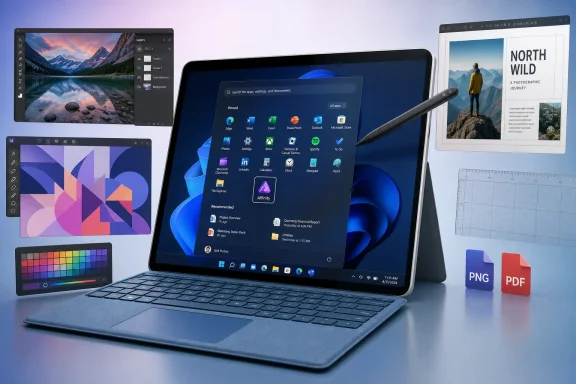
Microsoft Turns the Start Menu Into a Creative Software Billboard
The most important part of this announcement is not that Affinity will be available on Surface. Windows users could already download it. The change is that Microsoft is making Affinity visible before the user has formed a workflow on a new machine.
That matters because the Start menu is not a neutral shelf. It is one of the few places where Microsoft can still shape behavior on a Windows PC without asking the user to visit the Microsoft Store, open a browser, or search for an installer. A pinned app is not the same as a default app, but it is a recommendation with the authority of the operating system behind it.
For years, PC makers have been accused of using that space to push clutter, trialware, antivirus upsells, and services that age badly. Microsoft’s Surface line was supposed to be the cleaner counterexample: the Windows PC as Microsoft thinks it should exist. If Affinity is being placed there, it is because Microsoft wants the Surface buyer to see creative capability as part of the out-of-box promise, not as an accessory installed later.
That also makes the partnership more pointed than the usual “available in the store” arrangement. Microsoft’s own language, including the line that the relationship runs deeper than a touchpad gesture, invites exactly the speculation it has generated. Companies do not talk that way about a random pinned shortcut unless they want people to notice the alignment.
Affinity’s Free Turn Made This Possible
Affinity’s rise was already interesting before Surface entered the story. Serif built the suite as a credible alternative to Adobe’s core creative applications: Affinity Photo against Photoshop, Designer against Illustrator, and Publisher against InDesign. The old pitch was refreshingly simple in an industry addicted to recurring billing: buy the software once and keep using it.
Canva’s acquisition of Serif changed the stakes. Instead of turning Affinity into another conventional subscription suite, Canva relaunched the product as a free all-in-one creative application for desktop users, with paid Canva features and AI capabilities sitting around it. That transformed Affinity from a low-cost Adobe alternative into a much more aggressive distribution play.
That distinction is crucial. A cheap professional tool can win goodwill, but a free professional tool can change the top of the funnel. Students, freelancers, hobbyists, small businesses, and cash-conscious departments all become plausible users before procurement, habit, or Adobe muscle memory locks them into a different stack.
Microsoft’s Surface decision only makes sense in that context. Bundling a paid creative suite with premium hardware would be a licensing story. Pinning a free creative suite is a growth story. Microsoft can present the move as user value, Canva can acquire users at the exact moment they unbox new hardware, and Adobe suddenly has to compete not just with a rival product but with a rival product placed in front of premium Windows customers by Microsoft itself.
Surface Needed a Creator Story That Wasn’t Just About AI
The new Surface Pro and Surface Laptop announcement is full of the language that now surrounds every premium PC launch: local AI, cloud AI, NPUs, hybrid workflows, performance per watt, and optimized experiences. That is the market Microsoft helped create with Copilot+ PCs, and it is not going away. But AI alone does not make a machine a creator’s machine.
Creative users care about displays, input latency, battery life, color fidelity, pen behavior, GPU performance, file compatibility, export reliability, and whether the tools they need are actually there. Microsoft can claim Surface is built for creators, students, developers, and professionals, but those claims are stronger when the device arrives with software that visibly maps to those jobs.
Affinity fills that gap neatly. It gives the Surface launch a concrete creative anchor that is not another Copilot demo. A pinned design suite says, “Here is something you can use to edit photos, lay out a document, make a logo, or build campaign assets right now.”
This is also why the partnership sits comfortably beside Microsoft’s haptics and input messaging. Surface has always depended on the idea that hardware and software should meet at the fingertip: the kickstand, the pen, the detachable keyboard, the precision touchpad, the display. Affinity gives Microsoft a real creative workload to attach to that argument.
Adobe Is Still the Standard, But the Default Is Getting Noisier
None of this means Adobe is suddenly in existential trouble on Windows. Creative Cloud remains deeply embedded in agencies, design departments, production houses, universities, and professional pipelines. Its file formats, plug-ins, collaboration features, stock libraries, fonts, generative tools, and enterprise licensing relationships are not replaced by a Start menu pin.
But Adobe’s greatest strength is also its vulnerability. The company is the incumbent, the verb, the workplace expectation, and the line item that finance departments recognize. That makes it powerful. It also makes it the target of every user frustrated by subscription pricing, licensing friction, cloud dependency, cancellation pain, or feature bloat.
Affinity does not need to defeat Adobe everywhere to matter. It only needs to become the good-enough default for enough users at the edges: students learning design, creators making thumbnails and merch, small businesses building flyers, photographers who do not need Lightroom’s cataloging universe, and IT departments that want fewer subscription seats.
The Surface placement helps most in those edge cases. A professional designer already knows what they need and will install it. A new Surface owner exploring creative work may simply click what Microsoft put in front of them.
The Start Menu Has Become a Distribution Layer Again
Windows distribution used to be a sprawling mess of downloads, OEM preload deals, bundled utilities, browser toolbars, and corporate images. Then the web took over, and many users learned to treat the operating system as a launchpad for browser-based services. Now the Start menu is becoming valuable again because attention at setup is scarce.
The first hour with a new PC is when users decide what the machine is for. They sign in, update, restore files, pin apps, uninstall annoyances, and test the screen, keyboard, camera, and battery. If Affinity is already present in that moment, it becomes part of the device’s identity.
That is why this is not merely a Canva story or an Adobe story. It is a Windows distribution story. Microsoft is using Surface to curate a software stack for a specific kind of buyer, and in doing so it is putting a thumb on the scale in a third-party software market.
There is a delicate line here. Windows users have little patience for unwanted preloads, especially on premium hardware. The difference between useful inclusion and bloatware is partly product quality, partly user intent, and partly whether the app respects the user after launch. Affinity’s free model and professional reputation give Microsoft a better argument than it would have with a trialware bundle, but the test will be how cleanly the experience behaves over time.
For IT, “Free” Is Not the Same as Frictionless
Surface for Business adds an important wrinkle: Microsoft’s own footnote says Affinity requires installation on business devices. That sounds minor, but it reveals the split between consumer marketing and managed reality. Enterprise IT rarely wants surprise software, even when that software is useful and free.
A pinned app on a consumer Surface is a convenience. In a managed fleet, it becomes a governance question. Who controls deployment? What account is required? What telemetry is collected? Are Canva integrations enabled? Can the app be removed from images? Does it update through the Microsoft Store, a vendor updater, or another channel?
For administrators, the answer may be simple: remove it, deploy it selectively, or ignore it. But the larger point is that “free creative suite” does not automatically mean “approved creative suite.” Organizations with Adobe agreements, brand-control workflows, regulated data, or strict software allowlists will still evaluate Affinity like any other application.
That does not weaken the partnership. It clarifies its audience. Microsoft is primarily selling the emotional immediacy of Surface to creators and professionals, while leaving business deployment to the usual controls. The consumer sees readiness; the admin sees optionality.
Canva Gets the One Thing Adobe Has Always Had: Habit
Canva’s strategic interest is obvious. It bought Affinity to move upmarket from lightweight browser design into professional desktop creation. But professional software is not adopted by press release. It is adopted through habit, teaching, templates, file exchange, client expectations, and repeated use.
Surface gives Canva a wedge into habit formation. A user who opens Affinity on day one to crop a photo may later try layout tools. A student who learns it because it was already there may bring that preference into a workplace. A freelancer who builds a few client assets in Affinity may decide Adobe’s monthly cost is unnecessary.
The deeper play is not just to replace Photoshop. It is to connect desktop-grade creation with Canva’s broader collaboration, template, publishing, and AI ecosystem. Canva does not need every Affinity user to become a paid customer immediately. It needs Affinity to become the professional front door into Canva’s platform.
That is why “free forever” should be read as a competitive tactic, not a charity slogan. Canva can afford to make the editor free if the surrounding platform captures teams, brand assets, premium AI features, content workflows, and organizational usage. Microsoft’s Surface hardware now becomes one of the more prominent entry points into that funnel.
Microsoft Gains a Credible Anti-Subscription Talking Point Without Saying It
Microsoft is hardly an anti-subscription company. It has built one of the most successful subscription businesses in software with Microsoft 365, Azure consumption, GitHub, security services, and Copilot licensing. But in the creative market, Adobe’s subscription dominance gives Microsoft a useful contrast to exploit without directly attacking Adobe.
Surface buyers can now be told that professional creative tools are available immediately and, for many uses, without another monthly bill. That fits neatly with the way premium hardware is sold. Spend more upfront on the device, get more capability out of the box, and avoid some of the software scavenger hunt that follows a fresh Windows setup.
There is also a subtle Windows-versus-macOS angle. Apple has long benefited from a creative reputation that is partly historical, partly cultural, and partly reinforced by its own first-party creative tools. Microsoft does not have equivalents to Final Cut Pro or Logic Pro in the same cultural sense. Affinity gives Surface a more persuasive third-party creative package to point at.
The irony is that Microsoft is doing this through partnership rather than ownership. That may be smarter. Buying or building a full Adobe rival would be expensive, risky, and outside Microsoft’s current center of gravity. Elevating Canva’s Affinity lets Microsoft strengthen Surface’s creator appeal while leaving the creative software fight to a company that actually wants it.
The Hardware Claims Are Doing Double Duty
The Surface announcement also leans on sustainability, repair, battery life, display quality, and Snapdragon X2 performance. Those details are not separate from the Affinity story. Creative software is only persuasive on a machine if the machine can plausibly run creative workloads well.
Microsoft says the new Surface Pro and Surface Laptop models use Snapdragon X2 processors, with substantial graphics gains over previous-generation Snapdragon Surface devices. It also emphasizes optional OLED on the Surface Pro, sharper display density on the 15-inch Surface Laptop, and battery-life claims that stretch into all-day territory. These are exactly the kinds of hardware claims that make a preloaded creative app feel coherent rather than decorative.
The sustainability claims serve a different but related purpose. Microsoft says the devices use 100 percent recycled aluminum in specified enclosure components and exceed ENERGY STAR efficiency baselines by at least 50 percent. In isolation, those are procurement-friendly details. In the broader Surface story, they position the hardware as premium without being wasteful, repairable without being ugly, and powerful without being framed as a battery-hostile workstation.
That positioning matters because creators are not a single market. Some need maximum GPU horsepower and will still buy mobile workstations or desktops. Others need a light machine with a good screen, pen support, responsive apps, and enough performance to finish work between classrooms, meetings, or client visits. Microsoft is clearly chasing the second group.
The Real Fight Is Over the Next Generation of Creative Defaults
The creative software market is entering a strange phase. Adobe still owns the professional center, but the edges are in motion. Canva dominates simple design workflows for millions of non-designers. Figma changed how teams think about interface design and collaboration. DaVinci Resolve made serious video editing accessible at low cost. Procreate shaped an iPad-native illustration culture. Affinity now wants to be the free desktop suite that makes Adobe optional for a larger slice of users.
Microsoft’s Surface placement should be understood against that broader fragmentation. The old creative stack was relatively easy to describe: buy the Mac, get Adobe, maybe add a few specialized tools. The new stack is messier, cheaper in places, more cloud-connected, more AI-infused, and more dependent on the user’s niche.
That fragmentation is good for users but complicated for IT and educators. Teaching “Photoshop” used to be shorthand for teaching professional image editing. Now the question is whether students should learn concepts that transfer across tools, or whether employers will still demand Adobe muscle memory. Affinity’s visibility on Surface will not settle that debate, but it pushes more users into it.
For Adobe, the threat is not that every professional will defect. The threat is that fewer beginners will assume Adobe is the inevitable starting point. Once the default assumption weakens, the incumbent has to justify its cost more often.
The Windows Store Is Not the Center of This Story
It would be tempting to see this as a Microsoft Store win, but that misses the point. The Store can distribute applications, but it has not become the definitive place where Windows users discover serious desktop software. Many Windows users still treat it as optional, confusing, or irrelevant depending on the app category.
The Start menu is more powerful because it bypasses that discovery problem. A pinned app does not require the user to believe in the Store as a destination. It simply appears in the same place users already go to open things.
That is particularly important for traditional desktop software. Creative users are accustomed to heavyweight applications that feel more native than web apps and more capable than mobile-first tools. If Affinity can deliver that experience cleanly on Snapdragon-based Surface hardware, Microsoft gets to argue that Windows on Arm is no longer a compatibility compromise for mainstream creative work.
That is a bigger prize than one app placement. Microsoft has spent years trying to make Arm-based Windows PCs feel normal. Every credible native or optimized application chips away at the old hesitation: will my real apps work?
The Partnership Language Was the Signal
Companies often bury the most interesting part of an announcement in tone rather than specs. “Runs deeper than a touchpad gesture” is marketing copy, but it is not accidental. It suggests Microsoft wants the Affinity relationship to be seen as part of Surface’s design philosophy, not just its preload list.
That does not mean a deeper integration roadmap is guaranteed. There is no confirmed evidence here of exclusive features, bundled paid Canva tiers, first-party Microsoft investment, or a broader anti-Adobe alliance. The responsible reading is narrower: Microsoft is publicly endorsing Affinity as a professional creative tool suited to its flagship hardware.
Still, language shapes expectations. If Affinity remains a pinned app and nothing more, the line will look like launch-day flourish. If future Surface updates bring deeper pen support, haptic feedback hooks, color workflows, local AI acceleration, or Canva-connected collaboration features, this week’s wording will look like the first breadcrumb.
The uncertainty is part of why the story has traveled. Microsoft could have said, “Affinity is included.” Instead, it chose phrasing that made observers wonder whether the partnership has another act.
A Premium PC Now Has to Arrive With a Point of View
The larger Surface lesson is that premium PCs can no longer compete only on specifications. OLED panels, NPUs, aluminum shells, repair tools, and battery-life claims matter, but buyers increasingly expect a curated answer to the question: what is this machine for?
Apple answers that through vertical integration and a tightly controlled software ecosystem. Gaming laptop makers answer it through GPUs, refresh rates, thermals, and vendor utilities. Enterprise PC makers answer it through manageability, security, serviceability, and procurement scale. Surface has always tried to answer through a more abstract promise: the best expression of Windows hardware.
Affinity gives that promise more substance for creative buyers. It says the machine is not just thin, efficient, and AI-ready. It is ready to make something.
That may sound like a small distinction, but it is the kind of distinction that matters at retail, in campus purchasing, and among freelancers choosing between devices. A buyer comparing two premium laptops may not care about every benchmark. They may care that one feels more immediately useful after setup.
Surface Users Get a Shortcut, Adobe Gets a Warning, and Canva Gets a Doorway
The practical meaning of this announcement is less dramatic than the competitive symbolism, but it is still concrete. Surface buyers get a visible creative suite on day one. Canva gets distribution on high-profile Windows hardware. Microsoft gets a cleaner creator story for Surface. Adobe gets another reminder that its pricing and ubiquity have created room for challengers.
The main points are straightforward:
- Microsoft is pinning Affinity to the Start menu on new consumer Surface Pro and Surface Laptop models, making the app visible immediately after sign-in.
- Surface for Business devices are treated differently, with Affinity requiring installation rather than simply appearing as part of the same consumer setup flow.
- Affinity’s current free model makes the bundle easier to frame as user value rather than as a trialware-style preload.
- The move strengthens Microsoft’s pitch that Surface is hardware for creators, not merely another Copilot-ready premium PC.
- Adobe remains entrenched in professional creative workflows, but Affinity’s placement lowers the barrier for users who have not yet committed to Adobe’s ecosystem.
- The real strategic prize is habit formation, because the creative tool a user opens on a new PC can become the tool they learn, recommend, and standardize around.
Microsoft is not declaring war on Adobe, and a Start menu pin will not rewrite the creative software market by itself. But platform defaults have always mattered, especially at the moment a user first opens a new machine and decides what kind of work it is meant to do. If Affinity turns that moment into sustained usage, Surface will have done something more consequential than preload an app: it will have helped make a serious Adobe alternative feel like part of the Windows creative mainstream.