

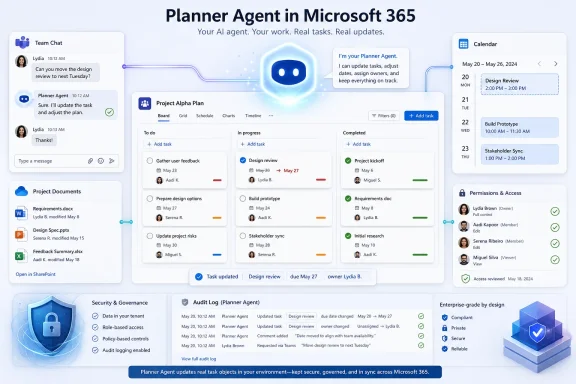
Microsoft has moved Planner Agent for Microsoft 365 Copilot to general availability for worldwide standard commercial tenants in June 2026, after a March preview, giving Copilot-licensed organizations a task-management agent for creating, organizing, updating, and summarizing Planner work from within the Microsoft 365 Copilot experience. That sounds modest compared with Microsoft’s louder agentic AI promises, but it is precisely the kind of feature that will test whether Copilot can become operational software rather than a chat box glued to Office. Planner Agent is not a moonshot; it is Microsoft trying to turn the mundane mechanics of work into the proving ground for enterprise AI. The important question is no longer whether Copilot can draft prose, but whether it can touch the systems where work is assigned, tracked, delayed, audited, and eventually blamed on someone.
Planner is not the glamorous corner of Microsoft 365. It does not carry the cultural weight of Outlook, the spreadsheet gravity of Excel, or the meeting-room ubiquity of Teams. It is where tasks go after the meeting ends, where follow-up items either become accountable work or disappear into the soft fog of “circle back.”
That makes Planner exactly the right place for Microsoft to push Copilot from assistant to agent. A chatbot that summarizes a document can be useful; an agent that creates tasks, updates plans, and helps users reason about project status can alter the rhythm of how teams operate. The stakes are not whether Planner suddenly becomes Jira, Asana, or Monday.com. The stakes are whether Microsoft can make the Microsoft 365 work graph feel less like a pile of connected apps and more like a coordinated workplace.
The roadmap entry is careful, almost understated. Microsoft says Planner Agent will start with core task and plan management features, with more advanced project-management capabilities to arrive over time. That phrasing matters. Microsoft is not claiming that Copilot can replace project managers; it is claiming that Copilot can make the lower-level coordination layer less manual.
This is the Microsoft 365 Copilot strategy in miniature. The company does not need every worker to become a prompt engineer. It needs Copilot to show up inside ordinary workflows often enough that workers stop treating it as a novelty and start treating it as part of the furniture.
Planner Agent is different because task management is inherently stateful. A plan has owners, dates, buckets, dependencies, status changes, conversations, and consequences. If Copilot creates or updates tasks, it is no longer just producing text; it is modifying a shared record of responsibility.
That is why the “agent” label is both useful and risky. In Microsoft’s framing, agents are specialized AI assistants that can perform tasks and operate with business context. In practice, administrators will want to know exactly where the boundary sits between helpful automation and unreviewed action.
The early Planner Agent feature set appears designed to stay on the safer side of that line. It focuses on task and plan management rather than full autonomous project execution. It is a copilot for work tracking, not a silent project office making decisions in the background.
But even that limited scope changes the user expectation. If a user can ask Copilot to create a plan from a project brief, generate tasks, summarize progress, or help update work items, Planner becomes less a destination and more a substrate. The interface fades; the work object remains.
That is not a dramatic delay, but the wording shows the caution Microsoft has learned to apply around Copilot features. The company’s roadmap pages are full of estimated dates, staged releases, and softened commitments. In the Copilot era, “launched” rarely means every tenant sees the same thing at the same hour.
For administrators, that nuance matters. A roadmap item marked launched may still be subject to licensing, regional rollout, admin policy, app availability, and the difference between Copilot in the web experience, Teams, Planner itself, and the broader Microsoft 365 app shell. In other words, “available” is not the same as “usable by everyone tomorrow morning.”
This has become one of Microsoft 365’s recurring frustrations. The platform’s value comes from integration, but its rollout reality is layered and uneven. Features surface in one client, then another. Documentation catches up. Admin controls arrive in separate places. Users ask why their colleague can see something they cannot.
Planner Agent will likely follow that familiar path. Microsoft’s public description is clean; tenant reality will be messier.
That distinction will shape adoption. Organizations that already licensed Microsoft 365 Copilot may see Planner Agent as another argument for expanding usage beyond executives, analysts, and enthusiastic early adopters. Organizations still skeptical of Copilot’s return on investment will treat it as another feature behind the same expensive door.
This is Microsoft’s central Copilot challenge. The company can keep adding agents, but each new agent must justify not only its own existence but the broader platform purchase. A Planner agent that saves a few minutes per week is nice. A Planner agent that improves accountability across multiple teams is a stronger business case. A Planner agent that creates noise, duplicate tasks, or bad assignments becomes one more reason for users to roll their eyes at AI.
The licensing model also creates a two-tier workplace. Some users will be able to ask Copilot to organize and interrogate project work; others will still click through the plan manually. In mixed-license environments, that split can become awkward. The agent may improve the productivity of licensed users while leaving unlicensed collaborators inside the same plans but outside the AI-assisted experience.
That is not unique to Planner Agent. It is the broader Microsoft 365 Copilot adoption problem, made visible inside task management.
Planner Agent sits in that architecture as a practical bridge. Meetings produce action items. Documents imply deliverables. Chats contain decisions. Project plans need owners and due dates. A useful Planner Agent would help turn those fragments into structured work without forcing users to manually transcribe everything from one app to another.
That is the dream version. The harder version is that enterprise work is full of ambiguity. “Jane will take the first pass next week” may be a commitment, a suggestion, or a polite dodge. “We should follow up with legal” may require a task, a calendar event, a Teams message, or all three. AI can infer; systems of record need certainty.
Microsoft’s advantage is context. Copilot has access, subject to permissions and tenant controls, to the information Microsoft 365 already stores. Its disadvantage is the same context. The more data Copilot can see, the more administrators must worry about oversharing, stale permissions, and users discovering information they technically could access but were never meant to operationalize.
Planner Agent therefore becomes another test of Microsoft’s trust story. It is not enough for the AI to be clever. It has to be boringly predictable in how it respects permissions, records changes, and explains what it did.
The good news is that Microsoft has been building agent governance into the Microsoft 365 admin story. Agents can be managed through the broader Copilot and integrated-app controls, and Microsoft’s documentation distinguishes between Microsoft-provided agents, admin-installed agents, and user-installed agents. That framework matters because agent sprawl is becoming the new Teams app sprawl.
Planner Agent also intersects with Planner-specific controls. Admins may need to think separately about the agent in Microsoft 365 Copilot, Planner Agent experiences in Planner, and any premium-plan functionality that resembles the older “Copilot in Planner” experience. Naming changes do not help here. Microsoft’s AI branding is moving faster than many IT departments can update internal guidance.
The risk is not simply that users will get access to an unwanted feature. The risk is that task records will become harder to interpret. If Copilot creates twenty tasks from a project note, who owns the quality of those tasks? If Copilot summarizes a plan incorrectly, who notices? If users begin asking the agent for status instead of reading the plan, how do teams ensure that the plan itself remains clean?
These are not reasons to reject Planner Agent. They are reasons to pilot it with the same seriousness organizations apply to workflow automation. AI that edits shared work objects deserves change-management discipline.
But security teams will still care about behavior, not only architecture. A user who manually reads a document and creates a task is one kind of risk. An agent that can rapidly summarize, transform, and act on accessible information is another. The permission boundary may be unchanged, while the practical blast radius expands.
This is especially important in project-management contexts. Plans often encode sensitive operational details: product launches, hiring pipelines, remediation work, incident response, customer commitments, legal review, procurement steps, and security exceptions. Even when every participant has legitimate access, summarization and automation can expose patterns that were previously buried in the noise.
Auditability becomes essential. Organizations need to know when AI-assisted changes were made, by whom, and ideally with enough context to reconstruct intent. If Planner Agent remains mostly an interface for user-directed changes, accountability can stay anchored to the user. If future capabilities become more autonomous, Microsoft will need to make the agent’s fingerprints clearer.
The other governance concern is hallucination in administrative clothing. A bad AI answer in a chat window is annoying. A bad task assignment in a shared plan can become process debt. The more Copilot is allowed to structure work, the more organizations must teach users to review its output before the team treats it as truth.
The better version is a conversational layer that reduces app switching. A manager should be able to ask what is overdue, what changed this week, which tasks lack owners, and whether the plan reflects the decisions from the last meeting. A contributor should be able to update work without spelunking through buckets and tabs. A project lead should be able to convert a rough objective into a draft structure, then refine it rather than start from a blank board.
That kind of use is not flashy. It is exactly why it matters. Enterprise productivity gains rarely arrive as a cinematic transformation. They arrive when enough small frictions disappear that people stop inventing parallel systems in spreadsheets and chats.
Planner has always suffered from being useful but not always central. Teams users encounter Planner through tabs and task apps. Outlook and To Do users see related task experiences. Project users may view Planner as too light. Planner Agent gives Microsoft a way to raise Planner’s visibility without asking users to become Planner enthusiasts.
The agent becomes the pitch: you do not have to love the app; you just have to ask for the work.
Microsoft’s advantage is distribution. Planner is already inside many Microsoft 365 tenants, and Copilot is being positioned as the cross-suite AI layer. If Planner Agent is “good enough,” many organizations will prefer the tool they already have over another point solution with another vendor review.
The disadvantage is depth. Dedicated project and work-management platforms often have richer workflows, reporting, dependencies, templates, integrations, and domain-specific project controls. Planner Agent may make Planner easier to use, but it does not magically turn Planner into the best tool for every project-management scenario.
That creates a likely dividing line. Planner Agent is most compelling for lightweight team coordination, departmental planning, recurring operational work, and projects that already live inside Microsoft 365. It is less likely to displace mature portfolio-management systems, engineering trackers, regulated workflow platforms, or ticketing systems with hardened process requirements.
Microsoft probably knows this. The roadmap language about adding advanced project-management capabilities over time suggests a gradual climb rather than an immediate land grab. The company does not need to win every project plan. It needs to capture the vast middle layer of work that currently exists in meeting notes, email threads, and half-maintained spreadsheets.
Planner Agent has a chance because its output is concrete. A task exists or it does not. A due date is present or missing. A plan has owners or gaps. Unlike a generated paragraph, a generated project structure can be inspected, corrected, and measured against reality.
That concreteness cuts both ways. Copilot’s failures will be visible. Duplicate tasks, vague titles, unrealistic due dates, and misplaced ownership will not hide behind eloquent prose. If the agent creates busywork, users will abandon it quickly.
The adoption pattern will probably be uneven. Some teams will find immediate value in turning messy project notes into structured plans. Others will see the agent as another Microsoft feature that almost works but requires enough cleanup to erase the benefit. As with most Copilot experiences, the difference will depend on data hygiene, user expectations, licensing coverage, and how well the organization teaches people to use the tool.
Microsoft can improve the model and the interface, but it cannot fully automate organizational clarity. If teams do not know who owns what, an agent can expose the confusion faster. It cannot make the underlying management problem disappear.
The timing is also important because Microsoft’s Copilot story is broadening rapidly. The company is selling agents as the next phase of enterprise AI, not just as a productivity garnish. Planner Agent is one of the more practical manifestations of that story because it sits close to everyday work and produces artifacts teams actually use.
That makes it a useful credibility test. If Microsoft can make a task-management agent reliable, governable, and genuinely helpful, the broader agent strategy becomes easier to believe. If even Planner becomes confusing, inconsistent, or poorly controlled, customers will be more skeptical of agents that promise to handle higher-stakes workflows.
The feature’s modesty may be its strength. Nobody needs Planner Agent to reinvent project management on day one. It needs to save time, reduce missed follow-ups, and make plans easier to maintain. Those are humble goals, but they are also the goals that determine whether enterprise software becomes habit or shelfware.
For WindowsForum readers, the interesting part is not the novelty of another Copilot button. It is the operational question of how AI-assisted work tracking changes support, governance, and user training across a Microsoft-centric environment.
 Microsoft Picks the Most Boring App for Its Most Important AI Test
Planner is not the glamorous corner of Microsoft 365. It does not carry the cultural weight of Outlook, the spreadsheet gravity of Excel, or the meeting-room ubiquity of Teams. It is where tasks go after the meeting ends, where follow-up items either become accountable work or disappear into the soft fog of “circle back.”That makes Planner exactly the right place for Microsoft to push Copilot from assistant to agent. A chatbot that summarizes a document can be useful; an agent that creates tasks, updates plans, and helps users reason about project status can alter the rhythm of how teams operate. The stakes are not whether Planner suddenly becomes Jira, Asana, or Monday.com. The stakes are whether Microsoft can make the Microsoft 365 work graph feel less like a pile of connected apps and more like a coordinated workplace.
The roadmap entry is careful, almost understated. Microsoft says Planner Agent will start with core task and plan management features, with more advanced project-management capabilities to arrive over time. That phrasing matters. Microsoft is not claiming that Copilot can replace project managers; it is claiming that Copilot can make the lower-level coordination layer less manual.
This is the Microsoft 365 Copilot strategy in miniature. The company does not need every worker to become a prompt engineer. It needs Copilot to show up inside ordinary workflows often enough that workers stop treating it as a novelty and start treating it as part of the furniture.
The Agent Era Arrives Through Task Hygiene
The first wave of Microsoft 365 Copilot was about generating and summarizing content. Draft this email. Recap this meeting. Make a PowerPoint from this document. Those use cases were easy to understand, but they also left Copilot sitting beside the work rather than inside the machinery of work.Planner Agent is different because task management is inherently stateful. A plan has owners, dates, buckets, dependencies, status changes, conversations, and consequences. If Copilot creates or updates tasks, it is no longer just producing text; it is modifying a shared record of responsibility.
That is why the “agent” label is both useful and risky. In Microsoft’s framing, agents are specialized AI assistants that can perform tasks and operate with business context. In practice, administrators will want to know exactly where the boundary sits between helpful automation and unreviewed action.
The early Planner Agent feature set appears designed to stay on the safer side of that line. It focuses on task and plan management rather than full autonomous project execution. It is a copilot for work tracking, not a silent project office making decisions in the background.
But even that limited scope changes the user expectation. If a user can ask Copilot to create a plan from a project brief, generate tasks, summarize progress, or help update work items, Planner becomes less a destination and more a substrate. The interface fades; the work object remains.
Microsoft’s Calendar Slip Says More Than the Marketing Copy
The roadmap history is revealing. Microsoft says the feature entered preview in March 2026, while general availability was expected in June. The latest update on June 29, 2026, still lists the feature as launched, with the standard worldwide tenant cloud and desktop platform noted in the roadmap details.That is not a dramatic delay, but the wording shows the caution Microsoft has learned to apply around Copilot features. The company’s roadmap pages are full of estimated dates, staged releases, and softened commitments. In the Copilot era, “launched” rarely means every tenant sees the same thing at the same hour.
For administrators, that nuance matters. A roadmap item marked launched may still be subject to licensing, regional rollout, admin policy, app availability, and the difference between Copilot in the web experience, Teams, Planner itself, and the broader Microsoft 365 app shell. In other words, “available” is not the same as “usable by everyone tomorrow morning.”
This has become one of Microsoft 365’s recurring frustrations. The platform’s value comes from integration, but its rollout reality is layered and uneven. Features surface in one client, then another. Documentation catches up. Admin controls arrive in separate places. Users ask why their colleague can see something they cannot.
Planner Agent will likely follow that familiar path. Microsoft’s public description is clean; tenant reality will be messier.
The Licensing Gate Keeps the Revolution Selective
Planner Agent is tied to Microsoft 365 Copilot licensing. That is both expected and consequential. Microsoft is not giving away its agentic future as a free Planner enhancement; it is using Planner to make the Copilot license feel more operationally necessary.That distinction will shape adoption. Organizations that already licensed Microsoft 365 Copilot may see Planner Agent as another argument for expanding usage beyond executives, analysts, and enthusiastic early adopters. Organizations still skeptical of Copilot’s return on investment will treat it as another feature behind the same expensive door.
This is Microsoft’s central Copilot challenge. The company can keep adding agents, but each new agent must justify not only its own existence but the broader platform purchase. A Planner agent that saves a few minutes per week is nice. A Planner agent that improves accountability across multiple teams is a stronger business case. A Planner agent that creates noise, duplicate tasks, or bad assignments becomes one more reason for users to roll their eyes at AI.
The licensing model also creates a two-tier workplace. Some users will be able to ask Copilot to organize and interrogate project work; others will still click through the plan manually. In mixed-license environments, that split can become awkward. The agent may improve the productivity of licensed users while leaving unlicensed collaborators inside the same plans but outside the AI-assisted experience.
That is not unique to Planner Agent. It is the broader Microsoft 365 Copilot adoption problem, made visible inside task management.
Planner Becomes the Front Door to Microsoft’s Work Graph
The strategic prize is not Planner by itself. It is the graph of work across Microsoft 365: meetings in Teams, messages in Outlook, files in SharePoint and OneDrive, tasks in Planner and To Do, loops of commentary and decision-making scattered across the tenant. Microsoft has spent years building that connective tissue. Copilot is the attempt to make it conversational and actionable.Planner Agent sits in that architecture as a practical bridge. Meetings produce action items. Documents imply deliverables. Chats contain decisions. Project plans need owners and due dates. A useful Planner Agent would help turn those fragments into structured work without forcing users to manually transcribe everything from one app to another.
That is the dream version. The harder version is that enterprise work is full of ambiguity. “Jane will take the first pass next week” may be a commitment, a suggestion, or a polite dodge. “We should follow up with legal” may require a task, a calendar event, a Teams message, or all three. AI can infer; systems of record need certainty.
Microsoft’s advantage is context. Copilot has access, subject to permissions and tenant controls, to the information Microsoft 365 already stores. Its disadvantage is the same context. The more data Copilot can see, the more administrators must worry about oversharing, stale permissions, and users discovering information they technically could access but were never meant to operationalize.
Planner Agent therefore becomes another test of Microsoft’s trust story. It is not enough for the AI to be clever. It has to be boringly predictable in how it respects permissions, records changes, and explains what it did.
Admins Will Judge the Feature by Control, Not Demos
Microsoft’s Copilot demos tend to show a tidy world: a user asks for help, Copilot understands, the app updates, and everyone saves time. Administrators live in a less cinematic environment. They need to know who can use the agent, where it appears, what it can change, how to disable it, and how to support users when the answer is “it depends.”The good news is that Microsoft has been building agent governance into the Microsoft 365 admin story. Agents can be managed through the broader Copilot and integrated-app controls, and Microsoft’s documentation distinguishes between Microsoft-provided agents, admin-installed agents, and user-installed agents. That framework matters because agent sprawl is becoming the new Teams app sprawl.
Planner Agent also intersects with Planner-specific controls. Admins may need to think separately about the agent in Microsoft 365 Copilot, Planner Agent experiences in Planner, and any premium-plan functionality that resembles the older “Copilot in Planner” experience. Naming changes do not help here. Microsoft’s AI branding is moving faster than many IT departments can update internal guidance.
The risk is not simply that users will get access to an unwanted feature. The risk is that task records will become harder to interpret. If Copilot creates twenty tasks from a project note, who owns the quality of those tasks? If Copilot summarizes a plan incorrectly, who notices? If users begin asking the agent for status instead of reading the plan, how do teams ensure that the plan itself remains clean?
These are not reasons to reject Planner Agent. They are reasons to pilot it with the same seriousness organizations apply to workflow automation. AI that edits shared work objects deserves change-management discipline.
The Security Story Is Familiar, but the Behavior Is New
Microsoft’s standard Copilot promise is that enterprise data protection, existing permissions, and Microsoft 365 compliance controls carry forward into Copilot experiences. That is the right baseline, and it is one of Microsoft’s strongest advantages over disconnected AI tools. The platform does not need users to paste project data into a third-party chatbot.But security teams will still care about behavior, not only architecture. A user who manually reads a document and creates a task is one kind of risk. An agent that can rapidly summarize, transform, and act on accessible information is another. The permission boundary may be unchanged, while the practical blast radius expands.
This is especially important in project-management contexts. Plans often encode sensitive operational details: product launches, hiring pipelines, remediation work, incident response, customer commitments, legal review, procurement steps, and security exceptions. Even when every participant has legitimate access, summarization and automation can expose patterns that were previously buried in the noise.
Auditability becomes essential. Organizations need to know when AI-assisted changes were made, by whom, and ideally with enough context to reconstruct intent. If Planner Agent remains mostly an interface for user-directed changes, accountability can stay anchored to the user. If future capabilities become more autonomous, Microsoft will need to make the agent’s fingerprints clearer.
The other governance concern is hallucination in administrative clothing. A bad AI answer in a chat window is annoying. A bad task assignment in a shared plan can become process debt. The more Copilot is allowed to structure work, the more organizations must teach users to review its output before the team treats it as truth.
Users Do Not Need Another Dashboard
The success of Planner Agent will depend less on whether it can produce impressive first-run output and more on whether it reduces daily friction. Workers already have too many surfaces: Outlook, Teams, Planner, To Do, Loop, OneNote, SharePoint, project boards, ticketing systems, and whatever SaaS product a department bought before IT could object. A new AI agent that merely adds another place to check work will fail quietly.The better version is a conversational layer that reduces app switching. A manager should be able to ask what is overdue, what changed this week, which tasks lack owners, and whether the plan reflects the decisions from the last meeting. A contributor should be able to update work without spelunking through buckets and tabs. A project lead should be able to convert a rough objective into a draft structure, then refine it rather than start from a blank board.
That kind of use is not flashy. It is exactly why it matters. Enterprise productivity gains rarely arrive as a cinematic transformation. They arrive when enough small frictions disappear that people stop inventing parallel systems in spreadsheets and chats.
Planner has always suffered from being useful but not always central. Teams users encounter Planner through tabs and task apps. Outlook and To Do users see related task experiences. Project users may view Planner as too light. Planner Agent gives Microsoft a way to raise Planner’s visibility without asking users to become Planner enthusiasts.
The agent becomes the pitch: you do not have to love the app; you just have to ask for the work.
The Competition Is Not Standing Still
Microsoft is not introducing AI task management into an empty market. Atlassian, Asana, Monday.com, ServiceNow, Google, Slack/Salesforce, Notion, ClickUp, and a long tail of workplace platforms are all trying to add AI layers to planning, work tracking, knowledge retrieval, and automation. Everyone has discovered the same marketing sentence: work should manage itself.Microsoft’s advantage is distribution. Planner is already inside many Microsoft 365 tenants, and Copilot is being positioned as the cross-suite AI layer. If Planner Agent is “good enough,” many organizations will prefer the tool they already have over another point solution with another vendor review.
The disadvantage is depth. Dedicated project and work-management platforms often have richer workflows, reporting, dependencies, templates, integrations, and domain-specific project controls. Planner Agent may make Planner easier to use, but it does not magically turn Planner into the best tool for every project-management scenario.
That creates a likely dividing line. Planner Agent is most compelling for lightweight team coordination, departmental planning, recurring operational work, and projects that already live inside Microsoft 365. It is less likely to displace mature portfolio-management systems, engineering trackers, regulated workflow platforms, or ticketing systems with hardened process requirements.
Microsoft probably knows this. The roadmap language about adding advanced project-management capabilities over time suggests a gradual climb rather than an immediate land grab. The company does not need to win every project plan. It needs to capture the vast middle layer of work that currently exists in meeting notes, email threads, and half-maintained spreadsheets.
The Real Product Is Confidence
For all the talk about agents, the real product Microsoft must sell is confidence. Users need confidence that Copilot understood the request. Managers need confidence that generated plans are useful. Admins need confidence that controls work. Security teams need confidence that permissions and logs mean what Microsoft says they mean. Finance teams need confidence that another Copilot feature moves the ROI needle.Planner Agent has a chance because its output is concrete. A task exists or it does not. A due date is present or missing. A plan has owners or gaps. Unlike a generated paragraph, a generated project structure can be inspected, corrected, and measured against reality.
That concreteness cuts both ways. Copilot’s failures will be visible. Duplicate tasks, vague titles, unrealistic due dates, and misplaced ownership will not hide behind eloquent prose. If the agent creates busywork, users will abandon it quickly.
The adoption pattern will probably be uneven. Some teams will find immediate value in turning messy project notes into structured plans. Others will see the agent as another Microsoft feature that almost works but requires enough cleanup to erase the benefit. As with most Copilot experiences, the difference will depend on data hygiene, user expectations, licensing coverage, and how well the organization teaches people to use the tool.
Microsoft can improve the model and the interface, but it cannot fully automate organizational clarity. If teams do not know who owns what, an agent can expose the confusion faster. It cannot make the underlying management problem disappear.
The June Launch Turns Planner Into a Copilot Credibility Test
By marking Planner Agent as launched for general availability in June 2026, Microsoft has moved it out of the speculative preview bucket and into the operational expectations of paying customers. That shift changes the tone. Preview users forgive rough edges; general-availability users file tickets.The timing is also important because Microsoft’s Copilot story is broadening rapidly. The company is selling agents as the next phase of enterprise AI, not just as a productivity garnish. Planner Agent is one of the more practical manifestations of that story because it sits close to everyday work and produces artifacts teams actually use.
That makes it a useful credibility test. If Microsoft can make a task-management agent reliable, governable, and genuinely helpful, the broader agent strategy becomes easier to believe. If even Planner becomes confusing, inconsistent, or poorly controlled, customers will be more skeptical of agents that promise to handle higher-stakes workflows.
The feature’s modesty may be its strength. Nobody needs Planner Agent to reinvent project management on day one. It needs to save time, reduce missed follow-ups, and make plans easier to maintain. Those are humble goals, but they are also the goals that determine whether enterprise software becomes habit or shelfware.
The Practical Readout for WindowsForum Readers
Planner Agent is not a Windows feature in the narrow sense, but it lands squarely in the daily world of Windows administrators and Microsoft 365 shops. The desktop platform tag on the roadmap is a reminder that much of this experience will be consumed from the workstations, browsers, Teams clients, and managed endpoints that IT already supports.For WindowsForum readers, the interesting part is not the novelty of another Copilot button. It is the operational question of how AI-assisted work tracking changes support, governance, and user training across a Microsoft-centric environment.
- Planner Agent reached general availability in June 2026 for worldwide standard Microsoft 365 tenants after entering preview in March 2026.
- Access depends on Microsoft 365 Copilot licensing, so organizations should expect mixed user experiences where Copilot seats are not broadly assigned.
- The initial feature scope is centered on core task and plan management rather than full autonomous project management.
- Administrators should review agent governance, Planner controls, and user communication before treating the feature as simply another app update.
- The feature is most likely to help teams that already keep work in Planner or Microsoft 365, while teams with mature external project systems may see it as a useful assistant rather than a replacement.
- The biggest adoption risk is not that Planner Agent will be too powerful, but that users will trust AI-generated task structures without enough review.
References
- Primary source: Microsoft 365 Roadmap
Published: 2026-06-29T23:02:39.0286478Z
Microsoft 365 Roadmap | Microsoft 365
The Microsoft 365 Roadmap lists updates that are currently planned for applicable subscribers. Check here for more information on the status of new features and updates.www.microsoft.com
- Official source: support.microsoft.com
What is Planner Agent in Copilot? | Microsoft Support
Planner Agent in Microsoft 365 Copilot is a specialized agent for intelligent work and task management.support.microsoft.com - Official source: techcommunity.microsoft.com
- Official source: news.microsoft.com
Introducing the Frontier Suite - Source EMEA
 news.microsoft.com
- Related coverage: blog-en.topedia.com
Planner Agent in Microsoft 365 Copilot reaches general availability | Topedia Blog
Microsoft will release the Planner Agent to general availability, enabling all Microsoft 365 Copilot users to create and manage tasks and plans within Copilot experiences. The agent is automatically preinstalled for eligible users, with no option to restrict the availability to specific users.blog-en.topedia.com - Official source: learn.microsoft.com
Turn off or restrict access to Planner Agent and Planner Agent chat in Planner - Microsoft Planner | Microsoft Learn
This document walks you through the process of turning off the Planner Agent and Planner Agent chat feature for your organization through our PowerShell suitelearn.microsoft.com
- Related coverage: windowsreport.com
Microsoft Planner Agent Is Now Available for All Microsoft 365 Copilot Users
Microsoft Planner Agent is now generally available for Microsoft 365 Copilot users, adding AI task updates, goals, and draft plans. windowsreport.com
- Related coverage: techradar.com
Microsoft 365 confirms new premium tier focused on AI and productivity | TechRadar
Microsoft adds new E7 plan to cope with AI usagewww.techradar.com - Related coverage: windowscentral.com
Microsoft Copilot Wave 3 adds AI agents and E7 Frontier Suite | Windows Central
Microsoft Copilot is rolling out more agentic AI control and model support in a new subscription tier for Microsoft 365.www.windowscentral.com - Related coverage: itpro.com
Copilot Cowork is now generally available: Everything you need to know, including pricing, usage limits, and new features | IT Pro
Microsoft has announced that Copilot Cowork is now generally available for users globally, following a beta period via the tech giant’s Frontier program.www.itpro.com - Official source: download.microsoft.com
- Related coverage: tomsguide.com
Biggest Microsoft Build 2026 announcements — agentic AI, RTX Spark Dev Box, GitHub Copilot app, new MAI models, and more | Tom's Guide
All the big news from Microsoft's AI-focused eventwww.tomsguide.com - Official source: dmc.partner.microsoft.com
Loading…
dmc.partner.microsoft.com - Related coverage: content.shi.com
- Related coverage: 4425088.fs1.hubspotusercontent-na1.net
- Official source: marketingassets.microsoft.com
