

Microsoft’s leadership has finally acknowledged what large swaths of the Windows community have been saying for months: Windows 11’s day-to-day reliability has drifted below acceptable levels, and the company is redirecting engineering priorities to fix the problems that matter most to real users. Pavan Davuluri, Microsoft’s president of Windows and Devices, told reporters that feedback from customers and Windows Insiders has been “clear” and that the team will concentrate on performance, battery and power-state stability, driver and firmware compatibility, and more predictable update behavior — a visible pivot toward reliability over rapid feature expansion.
Microsoft launched Windows 11 in 2021 with an eye toward modernizing the desktop experience, integrating AI, and pushing new UI paradigms. Adoption has been significant, but not without friction: Windows 11’s aggressive update cadence, coupled with increasingly complex hardware and firmware interaction across a billion-plus devices, has magnified regressions when they appear. The situation gained urgency after Microsoft ended mainstream free updates and support for Windows 10 on October 14, 2025, moving millions of users into a single upgrade path and increasing the stakes for Windows 11 update reliability.
At the same time, market-sensing services and trade outlets reported visible churn and hesitancy among users and IT buyers. Several outlets noted dips and rebounds in Windows 11 market share and flagged user sentiment as a key variable driving slowdowns in enterprise rollouts. Those swings are telling: when an operating system platform that’s the default destination for hundreds of millions of PCs shows inconsistent update behavior, the downstream cost to enterprises, creators, and small businesses multiplies.
Strengths
Microsoft must also reconcile two strategic trajectories: continuing investment in AI-driven experiences (Copilot, agentic features) while proving Windows is a dependable platform for productivity and creative work. If those threads are allowed to conflict — with flashy AI features shipped at the expense of testing and regression control — the trust gap will widen again.
The better path is visible discipline: a public roadmap of reliability milestones, transparent reporting on root causes for high-severity regressions, and continued investment in the tooling (telemetry, KIR, Insider channels) that enable proactive detection and surgical mitigation. Those steps will show, in measurable ways, that the company isn’t just promising fixes — it’s building the operational muscle to prevent regressions in the first place.
For users and IT teams, the best posture remains cautious pragmatism: keep systems backed up, test updates in controlled rings, monitor Microsoft’s health guidance, and apply KIRs or deferrals as appropriate. For Microsoft, the job is to turn this period of turbulence into a case study in disciplined execution — prove that the OS can be both innovative and reliably inert when it needs to be, and Windows 11 can transform a rocky list of regressions into renewed confidence that the platform “just works.”
If Microsoft follows through — with less spectacle and more engineering discipline — the outcome will be simple but profound: quieter Patch Tuesdays, fewer device outages, and a Windows 11 that stays out of the way so people can do their work. That’s the everyday reliability users asked for long before the headlines arrived; now it’s Microsoft’s task to deliver it.
Source: findarticles.com Microsoft Admits Windows 11 Bugs And Pledges Fixes
 Background
Microsoft launched Windows 11 in 2021 with an eye toward modernizing the desktop experience, integrating AI, and pushing new UI paradigms. Adoption has been significant, but not without friction: Windows 11’s aggressive update cadence, coupled with increasingly complex hardware and firmware interaction across a billion-plus devices, has magnified regressions when they appear. The situation gained urgency after Microsoft ended mainstream free updates and support for Windows 10 on October 14, 2025, moving millions of users into a single upgrade path and increasing the stakes for Windows 11 update reliability. At the same time, market-sensing services and trade outlets reported visible churn and hesitancy among users and IT buyers. Several outlets noted dips and rebounds in Windows 11 market share and flagged user sentiment as a key variable driving slowdowns in enterprise rollouts. Those swings are telling: when an operating system platform that’s the default destination for hundreds of millions of PCs shows inconsistent update behavior, the downstream cost to enterprises, creators, and small businesses multiplies.
What went wrong: concrete failure modes that eroded trust
Windows 11’s problems haven’t been uniform or trivial. They’re a mix of regressions introduced by updates, long-standing performance deficits, and a few high-profile faults that affect basic device usability.- PCs failing to enter sleep or failing to wake reliably after updates — a severe usability hit for laptop users who expect predictable power behavior.
- Systems refusing to power off or exhibiting unexplained reboots and intermittent instability after cumulative updates. These regressions create downtime and troubleshooting overhead.
- Boot failures or BitLocker recovery prompts triggered by patch rollouts on some Intel platforms, leaving machines unusable until manual intervention. Those incidents prompted Known Issue Rollbacks (KIRs) and emergency mitigations.
- Peripheral and recovery-tool breakages — for example, users unable to use USB mice and keyboards in recovery environments after a particular update, which directly interferes with the very repair workflows meant to recover broken systems.
- Odd printing behavior — dual-mode USB printers spitting out protocol headers or gibberish after a preview update, a problem Microsoft detected via the Windows Health Dashboard and mitigated using KIR tooling.
How Microsoft says it will respond
Microsoft’s public pivot centers on three visible commitments:- A swarming approach inside engineering: when a high-priority regression is found, Microsoft will pull additional engineering resources together — across teams — to shorten time-to-fix and remove organizational friction that can slow root-cause analysis and remediation.
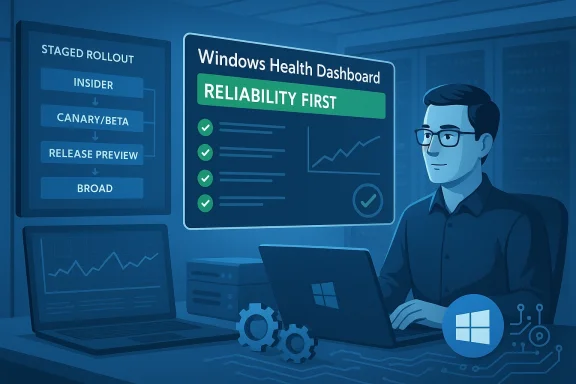
- Greater emphasis on staged rollouts and telemetry-based guardrails: tighter ring-based rollouts (Insider → Canary/Beta → Release Preview → Broad deployment) and sharper telemetry thresholds will be used to pause, throttle, or rollback changes before they reach vulnerable populations.
- Bigger role for the Windows Insider Program and Known Issue Rollback tooling: more diverse hardware testing via Insider channels and a willingness to use KIRs to surgically undo problematic non-security changes without forcing users to remove an entire cumulative update.
The tools Microsoft already has — and how they matter
Microsoft is not starting from scratch. Several existing mechanisms are central to the remediation plan.- Windows Health Dashboard: Microsoft tracks known problems and publishes mitigation guidance and KIR announcements here. This dashboard increases transparency about active regressions and mitigations, but it depends on timely and precise information to restore trust quickly.
- Known Issue Rollback (KIR): KIR lets Microsoft roll back a specific non-security change from affected systems without uninstalling the entire update package. For many regressions this is a pragmatic, lower-friction alternative to removing a full cumulative update. Enterprises also get MSI policy packages to deploy KIRs via Group Policy.
- Ringed and staged deployments, plus the Windows Insider channels: these allow Microsoft to surface regressions on varied hardware earlier — provided the test coverage and telemetry signals are comprehensive enough to catch edge cases.
Critical analysis: strengths and realistic limits of Microsoft’s plan
Microsoft’s plan has credible merit — and clear constraints.Strengths
- Focused triage and “swarming” can dramatically shorten fix cycles. Bringing the right experts together reduces hand-offs and organizational latency, especially for complex driver/firmware/OS interactions.
- KIR and staged rollouts are proven technical mitigations. When used promptly and widely, they reduce the blast radius of an errant update and restore devices faster than full rollback processes.
- The company has incentives to succeed: with Windows 10 out of mainstream support, Microsoft cannot afford persistent regressions to disincentivize migrations or force enterprise stagnation. The economic and reputational stakes align with a serious, sustained reliability push.
- Complexity of modern PCs: the heterogeneity of hardware, drivers, and OEM firmware means regressions can show up on a tiny fraction of devices but have an outsized visible impact. Swarming and triage can solve many problems, but they can’t guarantee that every path through hardware stack permutations is covered.
- Organizational trade-offs: Microsoft has invested heavily in AI-driven features and an “agentic” vision for Windows. Shifting resources away from those initiatives short-term is feasible; sustaining that shift long-term — especially if AI features remain strategic — may be harder. The company must strike a balance between reliability workstreams and long-term platform investments.
- Perception vs. reality: communication matters. Users remember the outage, not the patch. Even when fast KIRs and updates fix a problem within days, the initial damage to trust can linger and drive slower adoption or more conservative enterprise policies. Regaining confidence is a journalism-sized effort in transparency and measurable improvement.
Specific incidents and concrete lessons
Several high-profile incidents illustrate where Microsoft’s approach must be surgical:- Boot failures after cumulative updates. Some commercial PCs moved into a state where subsequent security updates caused boot-time errors or BitLocker recovery prompts. Those incidents required emergency mitigations and left IT managers demanding clearer root-cause analysis. The absence of precise hardware lists or reproducible conditions made risk assessment difficult.
- USB input failure in recovery tools. When recovery environments can’t accept USB keyboard/mouse input after an update, automated repair paths break down. That’s a critical regression because it impairs human-led recovery workflows and increases the chance of device replacement or reinstall.
- Printer output gibberish: a preview update caused dual-mode USB printers to print IPP protocol headers and junk. The bug was tracked via the Windows Health Dashboard and mitigated with KIRs — a case study in how targeted rollback can avoid wholesale update removal.
What success looks like — measurable signals to watch
Promises are useful; measurable outcomes are the currency of regained trust. Here are the KPIs that Microsoft and IT managers should track:- Fewer high-severity Known Issue Dashboard entries after Patch Tuesday. A measurable decline in the number and impact of new WIs (Windows Issues) would be an early win.
- Faster time-to-fix for high-priority regressions — ideally measured in days rather than weeks. Swarming should compress triage and resolution latency.
- Reduced frequency of boot/sleep/power regressions reported in telemetry and third-party monitoring (Lansweeper, enterprise ticket volumes).
- Clearer, faster communication in the Windows Health Dashboard and KB articles — with specific affected hardware lists and mitigation steps. Administrators need actionable information.
- Improved sentiment metrics among enterprise admins and Windows Insiders measured through surveys and forum signals; fewer emergency rollbacks and fewer staged deployment pauses.
Practical advice for users and IT administrators today
Even as Microsoft reallocates resources, device owners and IT teams must keep devices safe and stable. Here’s a pragmatic checklist.- Pause automatic updates on critical production machines until patches have proven stable in a controlled ring. Use Windows Update for Business or Group Policy to manage deferrals.
- Monitor the Windows Health Dashboard before wide deployment of Patch Tuesday changes. If Microsoft posts a Known Issue Rollback (KIR), evaluate whether you should apply the KIR MSI via Group Policy in enterprise environments.
- Take regular backups and maintain a tested recovery plan. If an update bricks a PC, you must be able to restore operating state without elevating business disruption.
- Use staged deployment in your organization: pilot (10–20 devices) → broader pilot (100–1,000) → production. Capture telemetry and user-reported regressions at each stage.
- Keep firmware and drivers current from OEMs when Microsoft advises compatibility fixes; many regressions start at the firmware-driver boundary.
Why regaining trust is harder than fixing a bug
Software engineers often measure success by resolved tickets; users measure it by not being interrupted. A series of well-handled KIRs and a few successful hotfixes won’t fully restore user confidence if communication is opaque and actionable guidance is sparse.Microsoft must also reconcile two strategic trajectories: continuing investment in AI-driven experiences (Copilot, agentic features) while proving Windows is a dependable platform for productivity and creative work. If those threads are allowed to conflict — with flashy AI features shipped at the expense of testing and regression control — the trust gap will widen again.
The better path is visible discipline: a public roadmap of reliability milestones, transparent reporting on root causes for high-severity regressions, and continued investment in the tooling (telemetry, KIR, Insider channels) that enable proactive detection and surgical mitigation. Those steps will show, in measurable ways, that the company isn’t just promising fixes — it’s building the operational muscle to prevent regressions in the first place.
The bottom line
Microsoft’s admission — that Windows 11 needs to improve in concrete, daily ways — is an important turning point. The company has the technical primitives (Windows Health Dashboard, Known Issue Rollback, Insider channels, staged deployment mechanisms) and the organizational levers (centralized Windows engineering leadership) to make meaningful progress. But the promise will only convert to trust if fixes arrive quickly, communication is clear, and updates stop creating new pathologies that require emergency workarounds.For users and IT teams, the best posture remains cautious pragmatism: keep systems backed up, test updates in controlled rings, monitor Microsoft’s health guidance, and apply KIRs or deferrals as appropriate. For Microsoft, the job is to turn this period of turbulence into a case study in disciplined execution — prove that the OS can be both innovative and reliably inert when it needs to be, and Windows 11 can transform a rocky list of regressions into renewed confidence that the platform “just works.”
If Microsoft follows through — with less spectacle and more engineering discipline — the outcome will be simple but profound: quieter Patch Tuesdays, fewer device outages, and a Windows 11 that stays out of the way so people can do their work. That’s the everyday reliability users asked for long before the headlines arrived; now it’s Microsoft’s task to deliver it.
Source: findarticles.com Microsoft Admits Windows 11 Bugs And Pledges Fixes


