

Microsoft’s internal posture toward Windows 11 has quietly shifted: after a year of aggressive, visible AI rollouts — Copilot buttons stamped across the taskbar, context menus, Notepad, Paint and more — company teams are now publicly reported to be dialing back the “AI everywhere” approach and refocusing Windows on utility, performance and trust. This is not a small cosmetic tweak; it’s a strategic course correction that acknowledges failures in adoption, user experience, and privacy perception, while preserving AI as an under-the-hood technology rather than the operating system’s constant billboard.
Since the introduction of Copilot and a wider push to weave generative AI into Windows, Microsoft pursued a rapid, high-visibility strategy: integrate AI affordances into as many surfaces as possible, from the taskbar to core apps. The ambition was twofold — make AI a daily habit on billions of devices, and create compelling hooks for Microsoft’s broader AI business. But multiple reporters and industry observers now say internal telemetry and user feedback painted a far less flattering picture: visible Copilot placements did not translate to broad, sustained usage and frequently produced the opposite of their intended effect — clutter, confusion and user frustration. This has prompted leadership to reconsider where AI belongs in the Windows experience and how it should be delivered.
This is not a retreat from AI, but a redefinition of how AI belongs in an operating system. The success of the new approach will depend on measurable improvements in usability, adoption of revised features, meaningful privacy safeguards, and clearer admin controls. Users and IT decision-makers should watch upcoming releases closely, test the new settings in controlled environments, and hold Microsoft accountable to delivering a version of Windows that places utility and trust ahead of spectacle.
Source: ENTREVUE.FR Microsoft acknowledges excess and launches a slimming-down of Windows 11 - INTERVIEW
 Background
Since the introduction of Copilot and a wider push to weave generative AI into Windows, Microsoft pursued a rapid, high-visibility strategy: integrate AI affordances into as many surfaces as possible, from the taskbar to core apps. The ambition was twofold — make AI a daily habit on billions of devices, and create compelling hooks for Microsoft’s broader AI business. But multiple reporters and industry observers now say internal telemetry and user feedback painted a far less flattering picture: visible Copilot placements did not translate to broad, sustained usage and frequently produced the opposite of their intended effect — clutter, confusion and user frustration. This has prompted leadership to reconsider where AI belongs in the Windows experience and how it should be delivered.- Microsoft’s public-facing AI push (Copilot buttons, taskbar experiments) was intended to normalize a new assistant-driven model.
- User reaction and usage metrics reportedly fell short of expectations; adoption of many Copilot endpoints remained low.
- The result: teams are pausing some surface-level rollouts and re-prioritizing core usability fixes and performance improvements.
What Microsoft appears to be changing
From omnipresent buttons to tactical placement
Reports indicate Microsoft has paused or slowed plans to add Copilot UI buttons to additional built-in apps and is reconsidering the design language that makes Copilot so visually prominent. The company increasingly favors a model where AI works behind the scenes — powering search, developer APIs and performance features — rather than announcing itself with a new icon on every toolbar.- Visible Copilot placements are being re-evaluated; future appearances will be more selective and context-sensitive.
- Changes to the taskbar and search experience are being developed with options that let users choose whether Copilot is the default search or an optional feature.
A concrete signal: admin controls and uninstallability
Administrators on Pro, Enterprise and EDU SKUs now have more levers to remove the Copilot app in certain builds — a recognition that enterprise customers and IT departments often require explicit control over bundled assistants. This is an operational change with immediate value for organizations trying to limit surface-level AI integrations.UI clutter reduction is underway
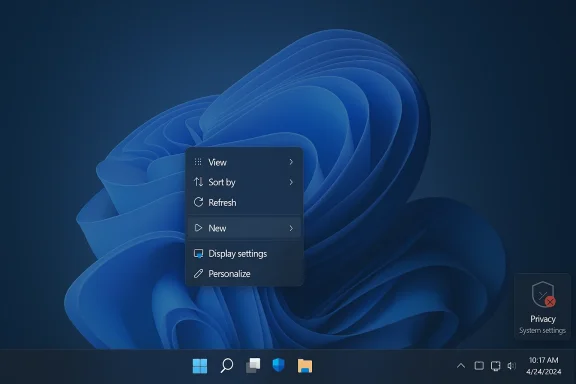
Microsoft engineers have also been addressing long-standing UI bloat separately from AI. Work on cleaning up the right-click (context) menu, grouping low-value items into nested menus, and trimming repetitive entries is already visible in Insider builds. These refinements reduce the vertical size of menus and remove friction created by dozens of one-off actions that previously crowded the UI. The change is a direct response to user complaints about an increasingly cluttered desktop experience.Why this shift matters — adoption, trust, and business reality
Weak conversion despite heavy investment
Microsoft’s investment in AI has been enormous — reflected in corporate spending and product development resourcing — but adoption patterns highlight a disconnect. A recent analysis found that paid Copilot seats represent a small fraction of the overall Microsoft 365 user base, suggesting that visible placement alone does not convert passive exposure into paid, habitual use. In short, visibility is not the same as value.Product-first thinking over investor signaling
The push to plaster Copilot across Windows was in part a response to competitive pressure and a desire to demonstrate leadership in generative AI. That pursuit had a cost: Windows began feeling like a rolling showcase rather than a stable platform. Internal reporting and external feedback increasingly framed Windows as an environment that should primarily serve productivity, creativity and reliability — not act as a constant product advertisement. The current pivot aims to re-center those priorities.Privacy, consent and the Recall controversy
One of the most consequential flashpoints was the feature often referred to as “Recall” (or similar background memory/recall experiments) which created serious privacy and safety concerns. That controversy did measurable reputational damage and forced the company to rethink how data is collected and presented. Microsoft’s re-evaluation of Recall-style features illustrates the hard trade-offs between capability and user trust. Reports say Recall’s present incarnation is regarded internally as a failure and is under active redesign or removal consideration. Reported plans are not the same as formal product decisions; watch for official Microsoft disclosure before treating these reports as final.The technical and UX reorientation
AI as a foundation, not a billboard
The new stated emphasis is on using AI to power technical underpinnings — semantic search, developer tools, background optimizations — rather than explicit UI experiences everywhere. This means investments will shift toward:- Improving file and device search with semantic layers.
- Exposing APIs and tooling that let developers build sensible, contextual AI experiences.
- Using AI to optimize performance, resource scheduling and diagnostics behind the scenes.
Interface simplification and context-aware surfaces
Practical UX work is underway: the right-click menu refinements and nested menus introduced in Insider builds are an early example. The goal is to make actions context-aware and compact, reserving surface-level real estate for the items users actually need, and hiding lower-value or infrequently-used actions behind sensible nests. These updates can reduce menu footprint and cognitive load by grouping similar functions.Enterprise, OEMs and the hardware market: implications
Corporate control and configuration
Enterprises and managed customers have been vocal about the need for administrative control. The ability for admins to remove Copilot in specific scenarios is a direct response to that demand and a necessary concession to IT governance and procurement realities. For businesses, the ability to control what runs on endpoints — and to disable AI surfaces altogether — significantly reduces friction for organizational adoption of newer Windows versions.OEM relationships and pricing sensitivity
PC manufacturers told Microsoft that AI branding alone won’t justify price increases or complex device requirements for many buyers. OEM partners want a stable, predictable platform that doesn’t confuse mainstream customers with pulsing AI bells and whistles. A lightweight, reliable Windows that focuses on performance and long-term compatibility is better suited to broad market adoption. That commercial reality helps explain why Microsoft is reprioritizing.The user movement toward “debloated” Windows — what it tells us
Community projects and third-party builders have been producing trimmed-down Windows images for years, and their popularity speaks to a simple truth: many users want a fast, minimal desktop that does the job without constant prompts. Projects like Tiny11 and other community-driven debloaters remove inbox apps, telemetry components and extraneous services to produce a much smaller installation footprint — sometimes at the cost of official support and update convenience. These community efforts are both a symptom and a signal: they show demand for a lighter, more focused Windows experience and pressure Microsoft to respond.- Community images can substantially reduce installation size and RAM requirements.
- They are useful for hobbyists, kiosks and legacy hardware, but bring trade-offs in support and updateability.
- Microsoft’s move toward a leaner default experience reduces the incentive for users to resort to unofficial builds.
Risks and trade-offs in Microsoft’s retreat
1) The “pause” vs. “abandon” ambiguity
What’s being reported is a re-think, not a definitive end to AI in Windows. Microsoft is likely to keep AI at the platform level and in selective features. Reported pauses and redesigns could be temporary — the company can reintroduce more visible AI if telemetry, UX improvements, or ecosystem feedback justify it. Treat current reports as a pivot, not a capitulation.2) Internal politics and product fragmentation
Large organizations rarely change direction without friction. Product groups that invested heavily in Copilot UX may see work deprioritized, which can slow innovation and create fragmentation. Users could end up with a mix of legacy Copilot affordances in some apps and stripped experiences in others — a patchwork that may be confusing until a coherent design language is fully adopted.3) Balancing innovation and reliability
The fundamental tension is timeless: shipping bold features quickly can win headlines but risks degrading perceived product quality. Slowing visible AI rollouts reduces surface-level friction but also delays user-facing innovations that might be valuable if integrated properly. The challenge for Microsoft is to prove that re-centering on performance and trust doesn’t mean stalling AI-driven progress — instead, it should mean delivering AI in ways that demonstrably help users.What you — as a Windows user or admin — should know and do now
Immediate actions (for everyday users)
- Check taskbar and Copilot settings: if Copilot buttons are intrusive, you can often hide the button in taskbar settings or disable specific prompts.
- Manage privacy and Recall-like features: verify what background capture or telemetry features you have enabled, and disable anything that feels intrusive.
- Keep updates on: Microsoft’s changes will roll out across Insider and public channels; staying current helps you get the UX and security fixes that accompany the reorientation.
For IT admins and enterprise decision-makers
- Review new Group Policy options and Insider build notes to understand the controls available to disable or remove Copilot where necessary. The "RemoveMicrosoftCopilotApp" Group Policy is an example of an admin control available in preview builds.
- Map user workflows: prioritize the features that users actually rely on, and pilot changes in controlled rings before broad deployment.
- Audit privacy and logging: the Recall controversy shows why careful data handling and clear consent are non-negotiable for corporate deployments.
How to judge Microsoft’s pivot: a checklist for healthy skepticism
- Look for product changes in Stable and Release Preview channels — Insider talk is useful, but only official releases prove commitment.
- Evaluate adoption metrics: are redesigned features actually more useful and used more frequently than their predecessors?
- Watch for clearer privacy controls and default settings that favor user choice (not company push).
- Track OEM messaging: are hardware partners embracing the new direction, or are they hedging?
The longer view: a healthier Windows experience?
If Microsoft follows through, the post-pivot Windows could deliver several practical gains for users:- Cleaner, faster UI with fewer visual distractions and more compact, context-aware menus.
- AI that accelerates workflows (semantic search, smarter indexing, developer hooks) without demanding attention.
- Better administrative controls for organizations that need to limit or remove AI surfaces.
- Improved privacy defaults and a return to conservative approaches for background capture features.
Conclusion
Microsoft’s reported decision to “slim down” Windows 11 — by pulling back on pervasive Copilot placements, rethinking Recall-style features, and focusing AI where it’s technically merited rather than everywhere it can be seen — is a significant course correction. The company appears to be responding to real signals: low adoption of some high-visibility AI endpoints, privacy backlash, OEM and enterprise sensitivity to pricing and control, and a broad user desire for a cleaner, faster desktop.This is not a retreat from AI, but a redefinition of how AI belongs in an operating system. The success of the new approach will depend on measurable improvements in usability, adoption of revised features, meaningful privacy safeguards, and clearer admin controls. Users and IT decision-makers should watch upcoming releases closely, test the new settings in controlled environments, and hold Microsoft accountable to delivering a version of Windows that places utility and trust ahead of spectacle.
Source: ENTREVUE.FR Microsoft acknowledges excess and launches a slimming-down of Windows 11 - INTERVIEW
