

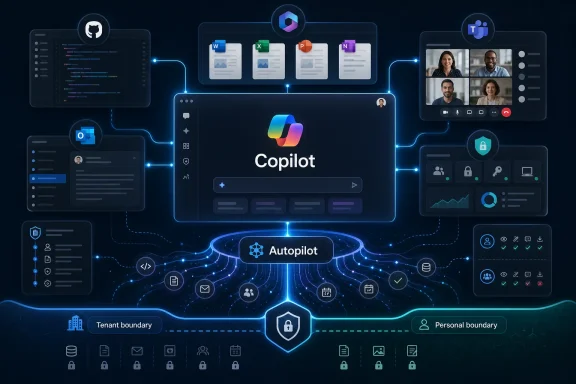
Microsoft is reportedly preparing a unified Copilot “super app” for release by the end of summer 2026, combining GitHub Copilot, Copilot chat, Copilot Cowork, Microsoft 365 Copilot access, and a new agentic workflow layer internally called Autopilot into one central interface. That is the plain version of the news; the more interesting version is that Microsoft appears to be admitting its AI strategy has become too scattered for ordinary users, developers, and IT departments to understand. The company that spent three years putting Copilot buttons everywhere now seems to believe the next phase requires fewer doors, not more. If it works, Copilot becomes Microsoft’s new front end for work; if it fails, it becomes another reminder that distribution is not the same thing as coherence.
For a while, Microsoft’s AI strategy could be summarized as a real-estate grab. Copilot appeared in Windows, Edge, Bing, Teams, Outlook, Word, Excel, PowerPoint, GitHub, Security, Power Platform, and enough admin portals to make even seasoned Microsoft watchers lose track. The logic was obvious: if AI is the next platform shift, Microsoft wanted a Copilot affordance inside every place a user might pause long enough to ask a machine for help.
The problem is that this kind of ubiquity can feel less like integration than infestation. A Windows user sees one Copilot. A Microsoft 365 customer sees another. A developer sees GitHub Copilot. A manager gets pitched on Microsoft 365 Copilot. A security team gets its own Copilot. The brand says “one assistant,” but the product experience says “many assistants with overlapping powers, different subscriptions, and uneven memory.”
That fragmentation mattered less when these systems were glorified chat boxes. It matters a great deal more when they are being asked to take action. A chatbot can be tolerated as a novelty; an agent that reads mail, files bugs, writes code, edits documents, schedules meetings, and manipulates enterprise data needs a comprehensible control surface.
That is why the reported internal slogan, “Delivering one Copilot,” is more than marketing housekeeping. It is a strategic course correction. Microsoft is not merely trying to make Copilot prettier; it is trying to make Copilot legible.
Microsoft’s version is different because it does not need to become a consumer everything-app. It already owns the work graph for a large chunk of the professional world. Email, documents, calendars, meetings, code repositories, identity, device management, compliance, and collaboration are already tied together through Microsoft accounts, Entra ID, Microsoft Graph, Azure, Windows, and GitHub.
The harder part is not reach. It is experience. Microsoft has the ingredients for a work super app, but it has historically struggled to make those ingredients feel like one product rather than a procurement catalog.
That is where the reported Copilot bundle becomes interesting. Combining GitHub Copilot, Copilot chat, Copilot Cowork, Microsoft 365 Copilot switching, and an Autopilot-style workflow capability suggests Microsoft wants a single pane where users can move from asking to delegating. The difference between “write me a paragraph” and “coordinate this task across my inbox, codebase, calendar, and documents” is the difference between a feature and a platform.
But a platform needs a center of gravity. Until now, Copilot’s center has moved depending on which Microsoft business unit was speaking.
Microsoft tried, in various ways, to make Copilot feel ambient. Windows had a sidebar. Office had contextual commands. Bing had search-adjacent chat. Edge had a browsing companion. The consumer Copilot app went through visual identities that seemed to borrow from more emotionally expressive assistants before snapping back toward the minimal, model-picker-and-prompt-box grammar made familiar by ChatGPT and Claude.
That convergence is not accidental. ChatGPT taught the market what an AI product looks like. Claude refined the workspace feel. Perplexity trained users to expect answer-plus-sources. GitHub Copilot trained developers to expect AI inline. Microsoft’s challenge is that it wants all of those patterns at once.
The leaked design comparisons matter less as a question of who copied whom than as a sign that the industry is standardizing around a cockpit. The next competitive frontier is not whether the prompt box is centered, peach-colored, or monochrome. It is what happens after the user presses Enter.
If Copilot becomes a super app, the interface has to do more than host chats. It has to expose state, permissions, account boundaries, tool access, cost, and task progress without turning into a dashboard from a 2008 enterprise suite. That is where Microsoft’s instinct to add options could become either a strength or a liability.
The name also carries risk. Autopilot implies motion. It implies a machine staying on course while the human supervises. That is exactly the metaphor Microsoft wants for agentic work, and exactly the metaphor that will make security teams nervous.
A useful agent needs access. It needs to read data, call tools, create artifacts, and sometimes make changes. In a Microsoft environment, that can mean documents in SharePoint, messages in Teams, mail in Exchange, code in GitHub, tickets in DevOps, records in Dynamics, and identity controls in Entra. The more useful Copilot becomes, the more consequential its mistakes become.
This is why the super app is not merely a UI project. It is a trust project. Microsoft can unify the front end, but enterprise buyers will ask what happens behind it: which model handled the request, which connector was invoked, which tenant boundary applied, what data was retrieved, what action was taken, and whether an admin can audit or reverse the result.
The old Copilot sprawl was annoying. Agentic Copilot sprawl would be dangerous.
Bringing GitHub Copilot into a common Copilot surface could be powerful. A product manager might move from a Teams thread to a spec, from that spec to GitHub issues, from those issues to code suggestions, from code to pull-request summaries, and from the pull request back to release notes. That is the sort of cross-surface workflow Microsoft has been promising since the earliest Microsoft 365 Copilot demos.
It could also make the product messier. Developers do not necessarily want the same assistant experience as sales managers, HR leads, or students. GitHub Copilot has its own context, habits, pricing, trust concerns, and culture. Folding it into a broader super app risks diluting what made it work.
The right answer may be federation rather than homogenization. “One Copilot” should not mean one flattened interface for everyone. It should mean a shared identity, permission model, memory layer, and task framework, with specialized surfaces where they still make sense.
Microsoft has a habit of mistaking bundling for integration. GitHub Copilot is the test case that will reveal whether this new push is architectural or merely cosmetic.
Microsoft supplied much of the distribution muscle and cloud infrastructure that helped bring generative AI into the mainstream. But ChatGPT owns the mindshare. For many users, Copilot still feels like the Microsoft version of something they met somewhere else.
That puts Microsoft in a delicate position. It needs OpenAI’s models and credibility, but it cannot allow ChatGPT to become the default work interface sitting above Microsoft 365. If the AI layer becomes where users start their day, Microsoft wants that layer to be Copilot, not a third-party app connected back into Microsoft’s data estate.
This is why design similarities between Copilot, ChatGPT, and Claude are not just aesthetic gossip. They are evidence of a narrowing market. Everyone is building toward the same destination: one app where the user chats, delegates, generates, searches, codes, and manages tasks through AI.
The question is whether Microsoft’s advantage in enterprise plumbing can overcome OpenAI’s advantage in product clarity. ChatGPT feels like a product first and a platform second. Copilot often feels like a platform trying to impersonate a product.
That makes Build the obvious place to tease a unified Copilot direction, even if the reported app itself is not ready for a full demonstration. Microsoft can use the keynote to talk about models, agent frameworks, GitHub automation, Windows hooks, and Microsoft 365 integration while leaving the super app as the implied destination. The company does not need to show every screen to make the strategic point.
The risk is overpromising. Microsoft has spent the last several years showing slick Copilot demos that compress messy enterprise realities into a few seconds of stage magic. Anyone who has deployed Microsoft 365 Copilot in a real tenant knows the distance between “summarize my work life” and “accurately retrieve the right information from permissioned, messy, stale, duplicated corporate data.”
A unified app will not fix bad SharePoint hygiene. It will not make unclear permissions clear. It will not make every meeting transcript useful, every document current, or every internal process automatable. In fact, by putting more Copilot functions in one place, Microsoft may make underlying governance problems more visible.
That is not a reason to avoid the project. It is a reason to judge it by boring things: admin controls, logging, data boundaries, rollback, cost visibility, and whether users can tell which Copilot is doing what.
Windows 11 has already been through several Copilot identity changes, from a sidebar-like experience to a more app-like model. That shift was not just design churn. It reflected a deeper uncertainty about whether Copilot belongs inside Windows as a native layer or beside Windows as a service that happens to be pinned, invoked, and promoted by the OS.
A super app could clarify that. If Copilot becomes a proper cross-platform hub, Windows can stop pretending every AI interaction must be welded into the shell. That might be good news for users who want Windows to remain a predictable operating system rather than a billboard for Microsoft’s AI ambitions.
But Microsoft will be tempted to blur the line again. A unified Copilot is more valuable if it is always nearby. That could mean deeper Start menu hooks, taskbar integration, file explorer actions, context menus, notification suggestions, and device-level recall-like features. Some of those could be useful; some could feel intrusive.
The difference will be consent and control. Windows users have tolerated many Microsoft pushes when they are optional, reversible, and clearly beneficial. They have reacted poorly when the company treats the PC like a managed endpoint in a marketing campaign.
Yet consolidation also concentrates risk. When several limited assistants become one broader assistant, administrators need to understand the blast radius of every permission grant. An app that can see across mail, files, meetings, code, and workflows is not just another productivity tool. It is a privileged interface to organizational memory.
That will put pressure on Microsoft to make governance visible in the product, not merely documented in admin pages. Users should know when they are operating in a personal context versus a work tenant. They should know when GitHub data is in scope. They should know when an agent is drafting versus executing. Admins should know which connectors are enabled and which actions require human confirmation.
The reported account-switching idea for productivity-focused Microsoft 365 Copilot is therefore central, not peripheral. If Microsoft cannot make personal and enterprise boundaries obvious, the super app will inherit every anxiety that already surrounds AI at work. The consumer dream of one friendly assistant collides quickly with the enterprise reality of retention policies, legal holds, data residency, least privilege, and audit trails.
The strongest version of Copilot would make those constraints feel like part of the product’s intelligence. The weakest version would hide them until something goes wrong.
That does not mean Microsoft is about to abandon OpenAI. It means the company wants optionality. A Copilot super app that routes tasks across different models, tools, and agents is more valuable if Microsoft can choose the right engine for the job, negotiate from strength, and avoid being boxed into a single supplier’s roadmap.
Copilot Cowork’s reported Anthropic connection is a useful clue. In the real world, customers do not care much which model family handles a workflow if the result is reliable, compliant, and cost-effective. Microsoft cares a great deal, because model choice affects margins, performance, differentiation, and strategic leverage.
A unified Copilot interface could become the abstraction layer where model competition disappears from the user’s view. The app says Copilot; the back end chooses Microsoft, OpenAI, Anthropic, or some mixture of specialized models depending on the task. That is attractive for Microsoft, but it also makes transparency harder.
If an AI assistant is just answering trivia, model provenance is a nerdy detail. If it is changing code, handling customer records, or preparing business decisions, provenance becomes part of accountability.
That phase may be ending. As AI assistants become work tools, they are being pulled toward the sober visual grammar of productivity software. The interface becomes less about personality and more about task state, context, model selection, file handling, and workflow control.
There is a loss in that. The best consumer assistants had some sense of atmosphere. But there is also a necessary maturation. If Copilot is supposed to move across code, calendars, documents, and enterprise data, it cannot behave like a mood board with a prompt box attached.
The danger for Microsoft is overcorrecting into clutter. A super app can easily become the place where every team inside the company insists on a tab, toggle, tile, or upsell. The screenshot jokes about “Microsoft being Microsoft” land because they contain a history lesson.
Great super apps feel inevitable. Bad ones feel like portals.
The market is converging on a simple premise: whoever owns the default AI surface can mediate the user’s relationship with everything else. That surface may be a chat app, a voice assistant, a browser, an operating system layer, a productivity suite, or some hybrid. The important point is that it becomes the place where intent begins.
Microsoft’s advantage is that it already owns many of the places where work happens after intent is expressed. Its disadvantage is that users do not always choose Microsoft products because they love the experience. They often use them because their employer, school, or organization standardizes on them.
That distinction matters in AI. People will tolerate a clunky expense system because they have to. They may not tolerate a clunky assistant if a clearer, faster, more capable alternative is one browser tab away. AI tools are unusually easy to compare because their interfaces are so similar and their outputs are immediate.
Copilot’s super app cannot win merely by being bundled. It has to be better at Microsoft work than ChatGPT is at pretending to understand Microsoft work.
Once users build habits around a daily assistant, switching costs accumulate quickly. Memories, custom instructions, files, workflows, connectors, chat histories, team practices, and billing all become moats. Microsoft has the enterprise moat, but OpenAI has the habit moat. Anthropic has the trust-and-craft moat among many technical users. Google and Apple have distribution moats of their own.
A Copilot super app is Microsoft’s attempt to collapse those moats into its own ecosystem. That is rational. It is also difficult, because Microsoft’s ecosystem is both its greatest asset and its greatest source of complexity.
If the app ships as a thin wrapper over existing Copilot silos, users will notice. If it ships as an orchestrator with real continuity across tasks, accounts, and tools, Microsoft will have done something more consequential than another rebrand.
 Microsoft Has Finally Found the Limit of Putting Copilot Everywhere
For a while, Microsoft’s AI strategy could be summarized as a real-estate grab. Copilot appeared in Windows, Edge, Bing, Teams, Outlook, Word, Excel, PowerPoint, GitHub, Security, Power Platform, and enough admin portals to make even seasoned Microsoft watchers lose track. The logic was obvious: if AI is the next platform shift, Microsoft wanted a Copilot affordance inside every place a user might pause long enough to ask a machine for help.The problem is that this kind of ubiquity can feel less like integration than infestation. A Windows user sees one Copilot. A Microsoft 365 customer sees another. A developer sees GitHub Copilot. A manager gets pitched on Microsoft 365 Copilot. A security team gets its own Copilot. The brand says “one assistant,” but the product experience says “many assistants with overlapping powers, different subscriptions, and uneven memory.”
That fragmentation mattered less when these systems were glorified chat boxes. It matters a great deal more when they are being asked to take action. A chatbot can be tolerated as a novelty; an agent that reads mail, files bugs, writes code, edits documents, schedules meetings, and manipulates enterprise data needs a comprehensible control surface.
That is why the reported internal slogan, “Delivering one Copilot,” is more than marketing housekeeping. It is a strategic course correction. Microsoft is not merely trying to make Copilot prettier; it is trying to make Copilot legible.
The Super App Pitch Is Really a Confession About AI Confusion
The phrase super app carries baggage. In Asia, it usually invokes WeChat-style ecosystems where messaging, payments, commerce, identity, and services collapse into one daily-use platform. In the West, the phrase has become a recurring ambition for companies that want to be the default home screen of digital life, from X to Uber to Coinbase to Meta.Microsoft’s version is different because it does not need to become a consumer everything-app. It already owns the work graph for a large chunk of the professional world. Email, documents, calendars, meetings, code repositories, identity, device management, compliance, and collaboration are already tied together through Microsoft accounts, Entra ID, Microsoft Graph, Azure, Windows, and GitHub.
The harder part is not reach. It is experience. Microsoft has the ingredients for a work super app, but it has historically struggled to make those ingredients feel like one product rather than a procurement catalog.
That is where the reported Copilot bundle becomes interesting. Combining GitHub Copilot, Copilot chat, Copilot Cowork, Microsoft 365 Copilot switching, and an Autopilot-style workflow capability suggests Microsoft wants a single pane where users can move from asking to delegating. The difference between “write me a paragraph” and “coordinate this task across my inbox, codebase, calendar, and documents” is the difference between a feature and a platform.
But a platform needs a center of gravity. Until now, Copilot’s center has moved depending on which Microsoft business unit was speaking.
The ChatGPT Shape Won Because Users Needed a Mental Model
It is fashionable to dunk on AI chat interfaces as temporary scaffolding, and perhaps they are. But the reason every major AI product has converged on the same basic shape is not because designers suddenly ran out of imagination. It is because users understand a box where they can type a request and watch the machine respond.Microsoft tried, in various ways, to make Copilot feel ambient. Windows had a sidebar. Office had contextual commands. Bing had search-adjacent chat. Edge had a browsing companion. The consumer Copilot app went through visual identities that seemed to borrow from more emotionally expressive assistants before snapping back toward the minimal, model-picker-and-prompt-box grammar made familiar by ChatGPT and Claude.
That convergence is not accidental. ChatGPT taught the market what an AI product looks like. Claude refined the workspace feel. Perplexity trained users to expect answer-plus-sources. GitHub Copilot trained developers to expect AI inline. Microsoft’s challenge is that it wants all of those patterns at once.
The leaked design comparisons matter less as a question of who copied whom than as a sign that the industry is standardizing around a cockpit. The next competitive frontier is not whether the prompt box is centered, peach-colored, or monochrome. It is what happens after the user presses Enter.
If Copilot becomes a super app, the interface has to do more than host chats. It has to expose state, permissions, account boundaries, tool access, cost, and task progress without turning into a dashboard from a 2008 enterprise suite. That is where Microsoft’s instinct to add options could become either a strength or a liability.
Autopilot Is the Name That Gives the Game Away
The reported “Autopilot” branding is clever because it says out loud what the AI industry has been circling for the past year: the next product is not a smarter chatbot, but a system that can run a workflow. In Microsoft terms, that means a Copilot that does not simply answer from your work data but coordinates across the software estate.The name also carries risk. Autopilot implies motion. It implies a machine staying on course while the human supervises. That is exactly the metaphor Microsoft wants for agentic work, and exactly the metaphor that will make security teams nervous.
A useful agent needs access. It needs to read data, call tools, create artifacts, and sometimes make changes. In a Microsoft environment, that can mean documents in SharePoint, messages in Teams, mail in Exchange, code in GitHub, tickets in DevOps, records in Dynamics, and identity controls in Entra. The more useful Copilot becomes, the more consequential its mistakes become.
This is why the super app is not merely a UI project. It is a trust project. Microsoft can unify the front end, but enterprise buyers will ask what happens behind it: which model handled the request, which connector was invoked, which tenant boundary applied, what data was retrieved, what action was taken, and whether an admin can audit or reverse the result.
The old Copilot sprawl was annoying. Agentic Copilot sprawl would be dangerous.
GitHub Copilot Makes the Bundle More Than an Office Story
The inclusion of GitHub Copilot is the strongest signal that Microsoft is thinking beyond office productivity. GitHub Copilot is arguably the most successful Copilot-branded product because it solved a specific problem for a specific audience before the broader brand became a corporate umbrella. Developers knew what it was for: write, explain, complete, refactor, test, and increasingly operate inside the software development lifecycle.Bringing GitHub Copilot into a common Copilot surface could be powerful. A product manager might move from a Teams thread to a spec, from that spec to GitHub issues, from those issues to code suggestions, from code to pull-request summaries, and from the pull request back to release notes. That is the sort of cross-surface workflow Microsoft has been promising since the earliest Microsoft 365 Copilot demos.
It could also make the product messier. Developers do not necessarily want the same assistant experience as sales managers, HR leads, or students. GitHub Copilot has its own context, habits, pricing, trust concerns, and culture. Folding it into a broader super app risks diluting what made it work.
The right answer may be federation rather than homogenization. “One Copilot” should not mean one flattened interface for everyone. It should mean a shared identity, permission model, memory layer, and task framework, with specialized surfaces where they still make sense.
Microsoft has a habit of mistaking bundling for integration. GitHub Copilot is the test case that will reveal whether this new push is architectural or merely cosmetic.
The OpenAI Race Is Now Also a Microsoft Race
The most awkward part of this story is that Microsoft is racing not only Google, Anthropic, Meta, and Apple, but also its most important AI partner. OpenAI’s ChatGPT has already become the canonical AI super app in the public imagination. It handles chat, voice, image generation, file analysis, coding help, memory, custom instructions, connectors, and increasingly agent-like tasks from a single consumer-friendly destination.Microsoft supplied much of the distribution muscle and cloud infrastructure that helped bring generative AI into the mainstream. But ChatGPT owns the mindshare. For many users, Copilot still feels like the Microsoft version of something they met somewhere else.
That puts Microsoft in a delicate position. It needs OpenAI’s models and credibility, but it cannot allow ChatGPT to become the default work interface sitting above Microsoft 365. If the AI layer becomes where users start their day, Microsoft wants that layer to be Copilot, not a third-party app connected back into Microsoft’s data estate.
This is why design similarities between Copilot, ChatGPT, and Claude are not just aesthetic gossip. They are evidence of a narrowing market. Everyone is building toward the same destination: one app where the user chats, delegates, generates, searches, codes, and manages tasks through AI.
The question is whether Microsoft’s advantage in enterprise plumbing can overcome OpenAI’s advantage in product clarity. ChatGPT feels like a product first and a platform second. Copilot often feels like a platform trying to impersonate a product.
Build Is the Right Stage for a Product Microsoft May Not Be Ready to Show
Microsoft Build is where the company tells developers what it thinks the next platform is. In past eras, that meant Windows APIs, .NET, Azure, Teams apps, cloud-native tooling, or the Microsoft Graph. In 2026, the platform story is agents, models, connectors, and tools that let AI systems do more than produce text.That makes Build the obvious place to tease a unified Copilot direction, even if the reported app itself is not ready for a full demonstration. Microsoft can use the keynote to talk about models, agent frameworks, GitHub automation, Windows hooks, and Microsoft 365 integration while leaving the super app as the implied destination. The company does not need to show every screen to make the strategic point.
The risk is overpromising. Microsoft has spent the last several years showing slick Copilot demos that compress messy enterprise realities into a few seconds of stage magic. Anyone who has deployed Microsoft 365 Copilot in a real tenant knows the distance between “summarize my work life” and “accurately retrieve the right information from permissioned, messy, stale, duplicated corporate data.”
A unified app will not fix bad SharePoint hygiene. It will not make unclear permissions clear. It will not make every meeting transcript useful, every document current, or every internal process automatable. In fact, by putting more Copilot functions in one place, Microsoft may make underlying governance problems more visible.
That is not a reason to avoid the project. It is a reason to judge it by boring things: admin controls, logging, data boundaries, rollback, cost visibility, and whether users can tell which Copilot is doing what.
Windows Users Should Watch the Boundary Between App and Operating System
For Windows enthusiasts, the most important question is not whether the Copilot super app looks like ChatGPT or Claude. It is where Microsoft draws the line between a standalone app, an operating-system affordance, and a cloud service that Windows increasingly assumes will be present.Windows 11 has already been through several Copilot identity changes, from a sidebar-like experience to a more app-like model. That shift was not just design churn. It reflected a deeper uncertainty about whether Copilot belongs inside Windows as a native layer or beside Windows as a service that happens to be pinned, invoked, and promoted by the OS.
A super app could clarify that. If Copilot becomes a proper cross-platform hub, Windows can stop pretending every AI interaction must be welded into the shell. That might be good news for users who want Windows to remain a predictable operating system rather than a billboard for Microsoft’s AI ambitions.
But Microsoft will be tempted to blur the line again. A unified Copilot is more valuable if it is always nearby. That could mean deeper Start menu hooks, taskbar integration, file explorer actions, context menus, notification suggestions, and device-level recall-like features. Some of those could be useful; some could feel intrusive.
The difference will be consent and control. Windows users have tolerated many Microsoft pushes when they are optional, reversible, and clearly beneficial. They have reacted poorly when the company treats the PC like a managed endpoint in a marketing campaign.
Enterprise IT Will Care Less About the Logo Than the Blast Radius
For IT departments, “one Copilot” sounds attractive for a reason. Fewer entry points can mean simpler training, clearer policy, easier support, and a better chance of explaining to employees what the tool is actually for. If the current Copilot landscape is a maze, a unified app could become the map.Yet consolidation also concentrates risk. When several limited assistants become one broader assistant, administrators need to understand the blast radius of every permission grant. An app that can see across mail, files, meetings, code, and workflows is not just another productivity tool. It is a privileged interface to organizational memory.
That will put pressure on Microsoft to make governance visible in the product, not merely documented in admin pages. Users should know when they are operating in a personal context versus a work tenant. They should know when GitHub data is in scope. They should know when an agent is drafting versus executing. Admins should know which connectors are enabled and which actions require human confirmation.
The reported account-switching idea for productivity-focused Microsoft 365 Copilot is therefore central, not peripheral. If Microsoft cannot make personal and enterprise boundaries obvious, the super app will inherit every anxiety that already surrounds AI at work. The consumer dream of one friendly assistant collides quickly with the enterprise reality of retention policies, legal holds, data residency, least privilege, and audit trails.
The strongest version of Copilot would make those constraints feel like part of the product’s intelligence. The weakest version would hide them until something goes wrong.
Microsoft’s Model Strategy Is Becoming Less Subtle
The user-facing Copilot story is unfolding alongside a broader shift in Microsoft’s model posture. For much of the generative AI boom, Microsoft could present itself as the enterprise and infrastructure partner to OpenAI’s frontier-model engine. That relationship remains enormously important, but Microsoft has increasingly signaled that it wants more control over its own model stack.That does not mean Microsoft is about to abandon OpenAI. It means the company wants optionality. A Copilot super app that routes tasks across different models, tools, and agents is more valuable if Microsoft can choose the right engine for the job, negotiate from strength, and avoid being boxed into a single supplier’s roadmap.
Copilot Cowork’s reported Anthropic connection is a useful clue. In the real world, customers do not care much which model family handles a workflow if the result is reliable, compliant, and cost-effective. Microsoft cares a great deal, because model choice affects margins, performance, differentiation, and strategic leverage.
A unified Copilot interface could become the abstraction layer where model competition disappears from the user’s view. The app says Copilot; the back end chooses Microsoft, OpenAI, Anthropic, or some mixture of specialized models depending on the task. That is attractive for Microsoft, but it also makes transparency harder.
If an AI assistant is just answering trivia, model provenance is a nerdy detail. If it is changing code, handling customer records, or preparing business decisions, provenance becomes part of accountability.
The Peach, the Blob, and the End of AI Whimsy
The reported disappearance of Copilot’s softer consumer design language is a small but telling detail. Early consumer AI products often tried to avoid looking like enterprise software. They used warm colors, friendly blobs, rounded surfaces, and lightly anthropomorphic vibes to suggest companionship rather than command lines.That phase may be ending. As AI assistants become work tools, they are being pulled toward the sober visual grammar of productivity software. The interface becomes less about personality and more about task state, context, model selection, file handling, and workflow control.
There is a loss in that. The best consumer assistants had some sense of atmosphere. But there is also a necessary maturation. If Copilot is supposed to move across code, calendars, documents, and enterprise data, it cannot behave like a mood board with a prompt box attached.
The danger for Microsoft is overcorrecting into clutter. A super app can easily become the place where every team inside the company insists on a tab, toggle, tile, or upsell. The screenshot jokes about “Microsoft being Microsoft” land because they contain a history lesson.
Great super apps feel inevitable. Bad ones feel like portals.
Apple, OpenAI, and the Coming Fight Over the Default AI Surface
Microsoft is not making this move in a vacuum. Apple is expected to keep pushing Siri toward a more capable app-like and system-wide AI experience. OpenAI is turning ChatGPT into a multi-tool workspace. Anthropic is giving Claude more file, coding, and computer-use capabilities. Google is threading Gemini through Android, Workspace, Search, and developer tools.The market is converging on a simple premise: whoever owns the default AI surface can mediate the user’s relationship with everything else. That surface may be a chat app, a voice assistant, a browser, an operating system layer, a productivity suite, or some hybrid. The important point is that it becomes the place where intent begins.
Microsoft’s advantage is that it already owns many of the places where work happens after intent is expressed. Its disadvantage is that users do not always choose Microsoft products because they love the experience. They often use them because their employer, school, or organization standardizes on them.
That distinction matters in AI. People will tolerate a clunky expense system because they have to. They may not tolerate a clunky assistant if a clearer, faster, more capable alternative is one browser tab away. AI tools are unusually easy to compare because their interfaces are so similar and their outputs are immediate.
Copilot’s super app cannot win merely by being bundled. It has to be better at Microsoft work than ChatGPT is at pretending to understand Microsoft work.
The Summer Race Will Be Won in the Unsexy Details
The reported end-of-summer target gives Microsoft a narrow window to turn a sensible strategy into a usable product. The timing also suggests urgency. The company knows that the AI interface layer is still fluid, but it will not stay fluid forever.Once users build habits around a daily assistant, switching costs accumulate quickly. Memories, custom instructions, files, workflows, connectors, chat histories, team practices, and billing all become moats. Microsoft has the enterprise moat, but OpenAI has the habit moat. Anthropic has the trust-and-craft moat among many technical users. Google and Apple have distribution moats of their own.
A Copilot super app is Microsoft’s attempt to collapse those moats into its own ecosystem. That is rational. It is also difficult, because Microsoft’s ecosystem is both its greatest asset and its greatest source of complexity.
If the app ships as a thin wrapper over existing Copilot silos, users will notice. If it ships as an orchestrator with real continuity across tasks, accounts, and tools, Microsoft will have done something more consequential than another rebrand.
The Copilot Summer Will Test Whether Microsoft Can Simplify Itself
The reported plan is easy to summarize and hard to execute: one Copilot, many capabilities, fewer seams. For WindowsForum readers, the concrete stakes are not abstract AI futurism but the everyday shape of Windows, Microsoft 365, GitHub, and enterprise administration over the next year.- Microsoft is reportedly targeting the end of summer 2026 for a unified Copilot app that brings multiple Copilot-branded tools into one interface.
- The most important reported addition is Autopilot, an agentic workflow layer meant to coordinate tasks rather than merely answer prompts.
- GitHub Copilot’s inclusion would make the product relevant to developers as well as office workers, but it also raises the risk of flattening a specialized tool into a generic assistant.
- The app’s success will depend less on visual resemblance to ChatGPT or Claude than on permissions, auditability, account separation, and reliable workflow execution.
- Windows users should watch whether Microsoft treats the unified Copilot as an optional app, a shell-level feature, or another service promoted aggressively through the operating system.
- Enterprise administrators should evaluate the product as a privileged work interface, not as a chatbot with a new coat of paint.
References
- Primary source: spyglass.org
Published: 2026-06-02T09:22:06.102744
Loading…
spyglass.org - Related coverage: aiweekly.co
- Related coverage: windowscentral.com
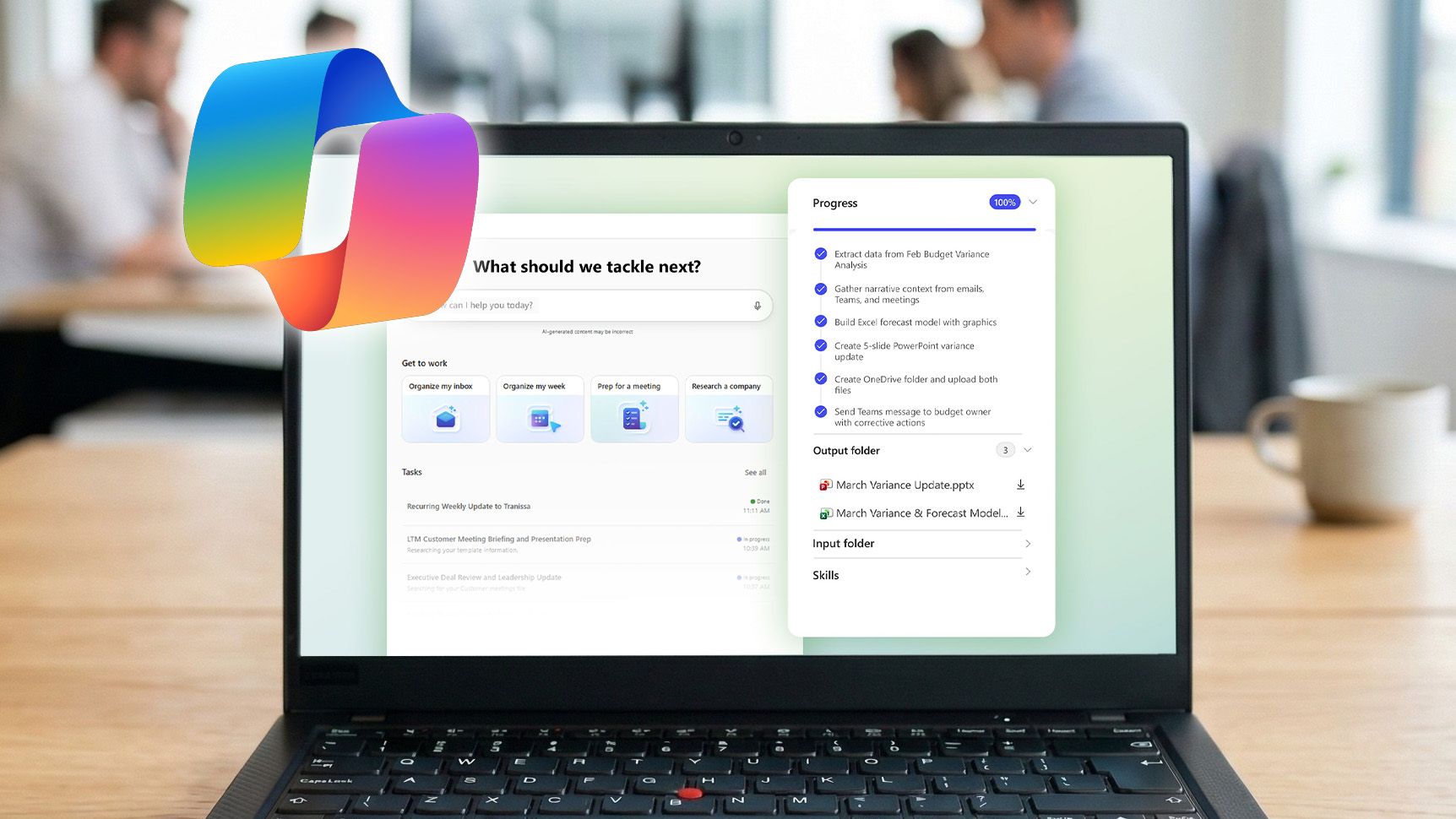
Copilot Cowork suddenly makes Microsoft 365’s AI‑centric E7 subscription far more compelling
Copilot Cowork makes Microsoft 365’s AI‑focused E7 subscription a stronger value proposition for $99 per month. www.windowscentral.com
- Related coverage: fortune.com

Exclusive: Microsoft is building a super app that combines coding, chat, and other Copilot AI tools | Fortune
The project is being spearheaded by new Copilot chief Jacob Andreou, as Microsoft seeks to streamline its lineup of AI tools amid competition from Google, OpenAI, and Anthropic.fortune.com
- Official source: learn.microsoft.com
Loading…
learn.microsoft.com - Related coverage: tomshardware.com
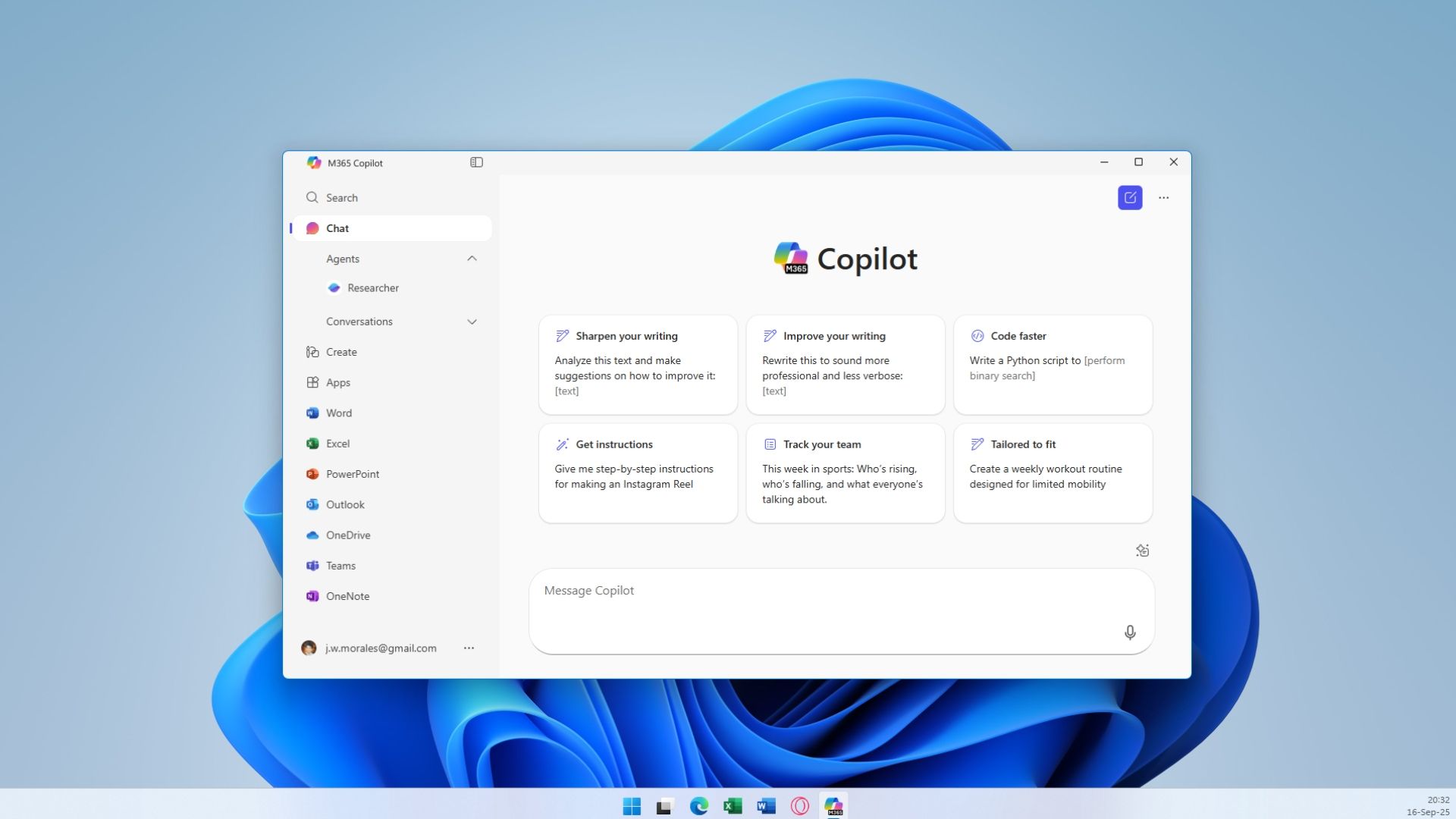
Microsoft will force install the Copilot AI app for users with desktop versions of 365 apps like Word and Excel — coming October, with no way to opt out for personal users
More bloatware added to Windows, courtesy of Microsoft 365.www.tomshardware.com

- Related coverage: windowsforum.com
Loading…
windowsforum.com - Related coverage: accesspath.com
Loading…
www.accesspath.com - Official source: github.com
Loading…
github.com - Related coverage: pcgamer.com
Loading…
www.pcgamer.com - Related coverage: itpro.com

Anthropic's Claude Cowork tool is coming to Microsoft Copilot
The new Copilot Cowork tool will be made available through a new Microsoft 365 tier at the end of March www.itpro.com
- Related coverage: it-boltwise.de
Loading…
www.it-boltwise.de - Related coverage: pasqualepillitteri.it
Loading…
pasqualepillitteri.it - Related coverage: cryptobriefing.com
Loading…
cryptobriefing.com - Related coverage: tomsguide.com
Loading…
www.tomsguide.com - Official source: microsoft.com
Loading…
www.microsoft.com - Related coverage: aldridge.com
Loading…
aldridge.com