

Microsoft used a June 4, 2026 Source essay by Steven Miller, its Area Vice President for Australia and New Zealand, to argue that Australia’s next major AI productivity opportunity lies not in offices but on construction sites, mine sites, utilities networks, and other field-based workplaces. The argument is simple but politically loaded: if AI is only designed for desk workers, Australia will automate the wrong bottlenecks. The harder task is building AI that respects trades, safety rules, union concerns, remote work conditions, and the messy reality of job sites. That makes the job site not a sideshow to the AI economy, but one of its most important proving grounds.
The first wave of mainstream generative AI adoption has been sold through the language of knowledge work. Draft the email. Summarize the meeting. Build the slide deck. Query the spreadsheet. For Microsoft, that framing has made commercial sense: Microsoft 365 Copilot lives where millions of salaried workers already spend their days.
But Australia’s productivity problem does not live only in Outlook and Teams. It lives in delayed site reports, duplicated compliance forms, paper-based safety processes, supervisor shortages, fragmented contractor systems, and the after-hours admin that turns a skilled trade into a part-time clerical job. Miller’s piece is therefore less a product announcement than a strategic reframing: the next frontier for AI is not the office worker who wants a better meeting recap, but the field worker who wants to get back to the work itself.
That is a useful corrective. Much of the AI debate has treated physical work as either untouched by software or eventually replaced by robotics. In between those extremes sits a much larger and more immediate opportunity: software that reduces the administrative drag around physical work without pretending to replace the human judgment at its center.
For WindowsForum readers, that distinction matters. The future being described here is not a sci-fi job site filled with humanoid robots. It is a more prosaic stack of voice interfaces, mobile devices, secure identity, workflow automation, digital twins, predictive analytics, and line-of-business integration. In other words, it is exactly the sort of infrastructure problem IT teams end up owning once the keynote glow wears off.
That matters far beyond corporate efficiency. Construction productivity feeds into housing supply, infrastructure costs, public project delivery, and business investment. If every new school, road, apartment block, data center, mine expansion, and energy project takes more labour hours than it should, the whole economy pays.
Miller’s essay leans on a striking comparison: construction labour productivity has grown by roughly 17 percent over about three decades, while the broader market sector has grown by around 64 percent. Those numbers have become a shorthand for a sector that is essential, busy, and yet structurally difficult to modernize.
The temptation is to see AI as a magic productivity lever. Microsoft understandably wants to present it as one. The more sober reading is that AI may be useful precisely because construction and field work are so resistant to simple digitization. These industries do not need another dashboard that nobody opens after induction week. They need systems that fit into the tempo of the work.
That is where voice-first AI starts to look genuinely practical. A technician who struggles with touch typing but can clearly explain what happened on a site should not need to burn an evening turning field notes into polished documentation. A supervisor who needs to lodge an incident report should not have to manually update several disconnected systems if an AI agent can assemble the draft, route the notification, and leave the human responsible for review and approval.
This is not glamorous AI. It is clerical compression. But clerical compression may be one of the most valuable forms of AI in field-heavy sectors, because the work being compressed is often performed by people whose time is scarce and expensive.
The phrase that matters in Miller’s essay is “still with human oversight.” That caveat is doing a lot of work. Incident reports, safety notifications, maintenance logs, and regulatory records are not casual documents. If AI fabricates details, normalizes sloppy reporting, or hides accountability behind automation, it will create risk rather than reduce it.
The useful model is not “AI does the paperwork.” It is “AI prepares the paperwork faster, using structured context, and the accountable worker signs off.” That is a narrower claim, but it is also the one enterprises can actually defend.
Field work punishes bad software more brutally than office work. Gloves, dust, heat, rain, poor reception, rotating contractors, shared devices, fatigue, and safety constraints change the design brief. A system that is merely annoying at a desk can become unusable on a job site.
That is why Miller’s warning against “simply adding another system or app” is more important than it may first appear. The problem in many field environments is not a lack of software. It is the accumulation of incompatible software: scheduling tools, asset registers, safety systems, HR systems, contractor portals, inspection apps, document libraries, and spreadsheets that persist because they are still the easiest thing to use under pressure.
AI can make that worse. A poorly integrated chatbot becomes yet another interface sitting on top of the mess. A well-integrated agent, by contrast, can become a translation layer across the mess, allowing workers to describe what they need in natural language while the system handles the routing.
That is the promise, anyway. The implementation burden is substantial. Identity and access control must be right. Data quality must be good enough. Offline and low-connectivity scenarios must be handled. Devices must be rugged and manageable. Audit trails must survive scrutiny. Security teams must understand what the AI system can see, retain, summarize, and transmit.
In an office, a Copilot assistant can summarize email and documents because the Microsoft 365 substrate already contains much of the work. On a job site, the relevant context may sit in maintenance systems, CAD files, building information models, asset databases, safety platforms, geospatial tools, procurement systems, and contractor records. Some of that data may be current. Some of it may be wrong. Some of it may be locked behind vendor systems that were never designed for AI-mediated workflows.
That is why digital twins and predictive analytics appear alongside Copilot agents in the CIMIC Group example. A digital twin is not just a shiny 3D model; when done properly, it becomes a live representation of assets, schedules, conditions, and dependencies. Predictive analytics can surface risk earlier, but only when the underlying data pipeline is trustworthy. Copilot-style agents can make those insights easier to access, but they cannot compensate for a rotten data foundation.
The most likely near-term winners are not companies that “deploy AI” as a slogan. They are companies that already know where their operational data lives, which workflows create the most friction, and which workers are drowning in repetitive documentation.
For IT departments, this means the field-AI project starts before the model selection meeting. It starts with workflow mapping, data governance, device strategy, identity architecture, and a brutally honest inventory of existing systems.
AI raises the stakes because it can blur the line between assistance and monitoring. A voice note that helps a technician write a report is one thing. A system that analyzes every note, movement, delay, and incident for performance management is another. Workers will notice the difference, even if the product brochure does not.
The involvement of unions does not guarantee good outcomes, but it changes the adoption conversation. It acknowledges that legitimacy cannot be retrofitted after deployment. If workers are expected to use AI in safety-sensitive environments, they need a say in what the system does, what data it captures, how errors are handled, and whether the tool makes their day better or simply makes management’s dashboard prettier.
This is where the “responsible AI” language often used by vendors meets the real world. Responsible deployment is not just about bias testing or content filters. It is about power. Who decides what gets automated? Who benefits from the time saved? Who is blamed when the system gets something wrong?
Microsoft’s essay is careful to say AI should support trade knowledge, not override it. That line deserves emphasis. The best field workers carry tacit knowledge that is hard to formalize: the sound of a failing component, the smell of overheating equipment, the shortcut that is safe only under certain conditions, the way a site actually operates versus the way the manual says it does. AI systems trained around forms and procedures will miss much of that unless deployments are shaped by the people doing the work.
If a supervisor can report an incident by voice and have the relevant forms and notifications assembled automatically, that could improve reporting compliance. If AI can flag patterns across near misses, equipment failures, and site conditions, it could help managers intervene earlier. If workers can ask for the right procedure without digging through a document library, that could make safe work easier.
But AI can also introduce new failure modes. A hallucinated procedure is not an inconvenience on a job site; it can be dangerous. A summary that omits a critical detail can distort an investigation. A predictive model that flags the wrong assets for maintenance can waste attention while real risks accumulate elsewhere.
This is why human oversight cannot be a decorative phrase. In safety-critical workflows, the AI system should draft, retrieve, summarize, and route. It should not become the final authority unless the process has been engineered, validated, and governed to a much higher standard than most current enterprise AI deployments.
The field-AI debate should therefore borrow less from consumer chatbot culture and more from industrial control, aviation, healthcare, and regulated infrastructure. The question is not whether the model sounds confident. The question is whether the system is reliable enough for the decision it is being asked to influence.
Training has to be job-specific. A maintenance technician, crane operator, electrical supervisor, safety officer, and project manager do not need the same AI curriculum. They need examples grounded in their own workflows, language, risks, and devices.
That includes the unglamorous details. Can the tool understand Australian accents and industry shorthand? Does it work in noisy environments? Can it distinguish between a casual observation and a reportable incident? Does it support review before submission? Can it operate securely where connectivity is intermittent? Does it make the worker faster after the first week, or only during the pilot?
Good training also has to teach skepticism. Workers should know when not to trust an AI-generated summary, when to escalate, when to check source documents, and when a workflow is outside the tool’s approved use. The goal is not blind adoption. The goal is competent use.
Microsoft and its partners are right to emphasize tailored modules. But the deeper test is whether organizations budget for ongoing support after the launch. Field adoption is not won in the executive demo. It is won during the third month, when the initial novelty has faded and workers decide whether the tool is worth keeping in their daily routine.
If AI can reduce their paperwork, it may increase effective supervisory capacity. A supervisor who spends less time chasing forms may spend more time walking the site, coaching apprentices, resolving blockers, and spotting hazards. That is a plausible productivity gain that does not require replacing anyone.
But supervisor shortages also create a temptation to automate judgment. If one supervisor can oversee more sites because AI handles more reporting, the organization may push the span of control too far. The result could be a thin layer of human oversight stretched over a larger automated bureaucracy.
This is the classic productivity trap: the tool saves time, and management immediately captures all of it as higher workload rather than better work. If that happens, workers will see AI as extraction, not empowerment.
The better test is whether AI reduces after-hours reporting, improves safety follow-up, and makes supervisors more present on site. If deployments do not change those lived conditions, the productivity story will sound hollow.
A serious national AI strategy has to include the industries where productivity gains are hardest to achieve. Construction, energy, mining, logistics, utilities, agriculture, and infrastructure services are not peripheral to the economy. They are the operating system beneath it.
This is where Australia’s geography intensifies the challenge. Remote sites, dispersed assets, fly-in fly-out workforces, harsh environmental conditions, and connectivity gaps complicate every software rollout. An AI system that assumes stable broadband and a desk-based user will not travel well.
That also gives Australia an opportunity. If vendors and employers can make AI work securely and practically in demanding field settings, those patterns will be exportable. Voice-first workflows, offline-capable AI assistance, rugged endpoint management, safety-aware automation, and union-informed deployment models are not uniquely Australian needs.
The job site may therefore become a better test of enterprise AI maturity than the office. It forces vendors to prove that their tools can survive constraint, not just convenience.
The company’s framing casts AI as a productivity tool, a safety enhancer, and a source of more rewarding work. Those outcomes are possible. They are not automatic. They depend on procurement choices, governance, worker consultation, training, integration quality, and whether employers use productivity gains to improve work or simply intensify it.
There is also a platform angle. The more AI becomes the interface to operational work, the more strategic the platform provider becomes. If Copilot agents sit between workers and the systems they use, Microsoft is not merely selling a productivity add-on. It is positioning itself as a control plane for enterprise workflows.
That will appeal to many CIOs because it promises simplification. It will worry others because it deepens dependency on a small number of cloud and AI vendors. In safety-sensitive industries, that dependency must be weighed carefully.
The right response is not reflexive suspicion. It is disciplined architecture. Organizations should ask where data is stored, how prompts and outputs are logged, how permissions are enforced, how third-party systems are connected, how model behavior is monitored, and what happens when the AI service is unavailable.
That makes device management a front-line AI issue. If a worker is dictating reports, accessing site documentation, or interacting with operational systems through AI, the device must be secure, patched, enrolled, authenticated, and recoverable. Shared-device scenarios need particular care because identity mistakes can become safety and compliance mistakes.
Windows administrators should also expect more pressure around local performance and network resilience. AI experiences are often presented as cloud services, but job sites will test latency, offline access, caching, synchronization, and fallback workflows. “Try again later” is not a workflow strategy for a remote site.
Security teams will have their own concerns. Voice notes, site photos, incident descriptions, engineering documents, and asset data can be sensitive. AI systems that ingest and summarize this material need clear data boundaries. The convenience of natural language access can become a data leakage problem if permissions are poorly modeled.
In that sense, Microsoft’s field-AI push is not just a story for executives or construction firms. It is a preview of the next wave of endpoint, identity, and data governance work heading toward IT departments.
Enterprise systems often fail because they underestimate that convenience. A paper form may be inefficient at the organizational level, but it is perfectly legible to the person filling it out under pressure. A messaging thread may be a governance nightmare, but it works when a crew needs a quick answer.
AI has a chance because it can make structured systems feel less structured to the user. If a worker can speak naturally and the system can generate the structured record in the background, the organization gets better data without forcing the worker through a brittle interface.
That is the heart of the field-AI opportunity. Not replacing the worker. Not dazzling the board with a chatbot demo. Translating messy human work into structured organizational knowledge with less friction than before.
But the standard is unforgiving. If the AI takes longer than the workaround, workers will abandon it. If it creates errors that workers must clean up, they will resent it. If it becomes a surveillance tool, they will resist it. If it saves them real time and makes compliance less painful, they will use it.
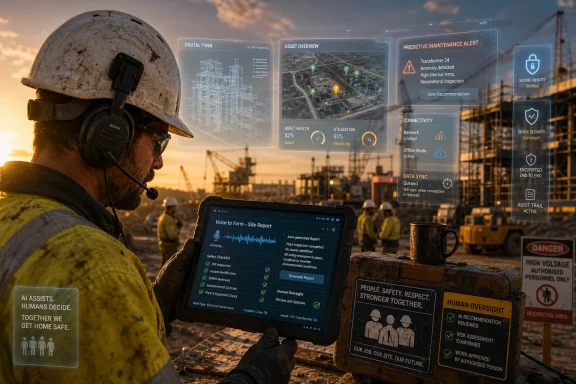 Microsoft Moves the AI Debate Out of the Office Tower
The first wave of mainstream generative AI adoption has been sold through the language of knowledge work. Draft the email. Summarize the meeting. Build the slide deck. Query the spreadsheet. For Microsoft, that framing has made commercial sense: Microsoft 365 Copilot lives where millions of salaried workers already spend their days.But Australia’s productivity problem does not live only in Outlook and Teams. It lives in delayed site reports, duplicated compliance forms, paper-based safety processes, supervisor shortages, fragmented contractor systems, and the after-hours admin that turns a skilled trade into a part-time clerical job. Miller’s piece is therefore less a product announcement than a strategic reframing: the next frontier for AI is not the office worker who wants a better meeting recap, but the field worker who wants to get back to the work itself.
That is a useful corrective. Much of the AI debate has treated physical work as either untouched by software or eventually replaced by robotics. In between those extremes sits a much larger and more immediate opportunity: software that reduces the administrative drag around physical work without pretending to replace the human judgment at its center.
For WindowsForum readers, that distinction matters. The future being described here is not a sci-fi job site filled with humanoid robots. It is a more prosaic stack of voice interfaces, mobile devices, secure identity, workflow automation, digital twins, predictive analytics, and line-of-business integration. In other words, it is exactly the sort of infrastructure problem IT teams end up owning once the keynote glow wears off.
Australia’s Productivity Problem Gives the Pitch Its Urgency
Microsoft’s argument lands because Australia has a real productivity headache. The Productivity Commission has repeatedly warned that labour productivity growth has weakened sharply, with recent long-run performance among the slowest in decades. The construction sector, in particular, has become a symbol of the problem: output per hour has barely improved compared with broader market-sector growth.That matters far beyond corporate efficiency. Construction productivity feeds into housing supply, infrastructure costs, public project delivery, and business investment. If every new school, road, apartment block, data center, mine expansion, and energy project takes more labour hours than it should, the whole economy pays.
Miller’s essay leans on a striking comparison: construction labour productivity has grown by roughly 17 percent over about three decades, while the broader market sector has grown by around 64 percent. Those numbers have become a shorthand for a sector that is essential, busy, and yet structurally difficult to modernize.
The temptation is to see AI as a magic productivity lever. Microsoft understandably wants to present it as one. The more sober reading is that AI may be useful precisely because construction and field work are so resistant to simple digitization. These industries do not need another dashboard that nobody opens after induction week. They need systems that fit into the tempo of the work.
The Admin Burden Is the Most Believable AI Use Case
The strongest part of Microsoft’s argument is not the grand claim about national productivity. It is the smaller observation that skilled field workers spend too much time doing work adjacent to their actual work. Reports, incident forms, job notes, compliance updates, shift handovers, and maintenance records are necessary, but they are not why most tradespeople entered the profession.That is where voice-first AI starts to look genuinely practical. A technician who struggles with touch typing but can clearly explain what happened on a site should not need to burn an evening turning field notes into polished documentation. A supervisor who needs to lodge an incident report should not have to manually update several disconnected systems if an AI agent can assemble the draft, route the notification, and leave the human responsible for review and approval.
This is not glamorous AI. It is clerical compression. But clerical compression may be one of the most valuable forms of AI in field-heavy sectors, because the work being compressed is often performed by people whose time is scarce and expensive.
The phrase that matters in Miller’s essay is “still with human oversight.” That caveat is doing a lot of work. Incident reports, safety notifications, maintenance logs, and regulatory records are not casual documents. If AI fabricates details, normalizes sloppy reporting, or hides accountability behind automation, it will create risk rather than reduce it.
The useful model is not “AI does the paperwork.” It is “AI prepares the paperwork faster, using structured context, and the accountable worker signs off.” That is a narrower claim, but it is also the one enterprises can actually defend.
The Job Site Is Hostile Territory for Bad Software
Anyone who has watched enterprise software fail in the field will recognize the trap Microsoft is trying to avoid. A head office buys a platform. The platform promises visibility. The rollout adds another login, another app, another duplicate data entry step, and another reason for workers to quietly route around the system.Field work punishes bad software more brutally than office work. Gloves, dust, heat, rain, poor reception, rotating contractors, shared devices, fatigue, and safety constraints change the design brief. A system that is merely annoying at a desk can become unusable on a job site.
That is why Miller’s warning against “simply adding another system or app” is more important than it may first appear. The problem in many field environments is not a lack of software. It is the accumulation of incompatible software: scheduling tools, asset registers, safety systems, HR systems, contractor portals, inspection apps, document libraries, and spreadsheets that persist because they are still the easiest thing to use under pressure.
AI can make that worse. A poorly integrated chatbot becomes yet another interface sitting on top of the mess. A well-integrated agent, by contrast, can become a translation layer across the mess, allowing workers to describe what they need in natural language while the system handles the routing.
That is the promise, anyway. The implementation burden is substantial. Identity and access control must be right. Data quality must be good enough. Offline and low-connectivity scenarios must be handled. Devices must be rugged and manageable. Audit trails must survive scrutiny. Security teams must understand what the AI system can see, retain, summarize, and transmit.
Copilot on the Tools Is Really a Systems Integration Story
Microsoft naturally frames examples around Copilot, but the field-worker opportunity is not a single-product story. It is a Microsoft cloud, endpoint, identity, and partner ecosystem story. Copilot is the interface; the value depends on what it can safely connect to.In an office, a Copilot assistant can summarize email and documents because the Microsoft 365 substrate already contains much of the work. On a job site, the relevant context may sit in maintenance systems, CAD files, building information models, asset databases, safety platforms, geospatial tools, procurement systems, and contractor records. Some of that data may be current. Some of it may be wrong. Some of it may be locked behind vendor systems that were never designed for AI-mediated workflows.
That is why digital twins and predictive analytics appear alongside Copilot agents in the CIMIC Group example. A digital twin is not just a shiny 3D model; when done properly, it becomes a live representation of assets, schedules, conditions, and dependencies. Predictive analytics can surface risk earlier, but only when the underlying data pipeline is trustworthy. Copilot-style agents can make those insights easier to access, but they cannot compensate for a rotten data foundation.
The most likely near-term winners are not companies that “deploy AI” as a slogan. They are companies that already know where their operational data lives, which workflows create the most friction, and which workers are drowning in repetitive documentation.
For IT departments, this means the field-AI project starts before the model selection meeting. It starts with workflow mapping, data governance, device strategy, identity architecture, and a brutally honest inventory of existing systems.
Worker Trust Is Not a Soft Issue
Microsoft’s collaboration with the Australian Council of Trade Unions is politically astute, but it is also operationally necessary. Field workers have good reasons to distrust technology programs imposed from above. Too many “efficiency” initiatives have meant more surveillance, more paperwork, unrealistic productivity targets, or systems that misunderstand the work they claim to improve.AI raises the stakes because it can blur the line between assistance and monitoring. A voice note that helps a technician write a report is one thing. A system that analyzes every note, movement, delay, and incident for performance management is another. Workers will notice the difference, even if the product brochure does not.
The involvement of unions does not guarantee good outcomes, but it changes the adoption conversation. It acknowledges that legitimacy cannot be retrofitted after deployment. If workers are expected to use AI in safety-sensitive environments, they need a say in what the system does, what data it captures, how errors are handled, and whether the tool makes their day better or simply makes management’s dashboard prettier.
This is where the “responsible AI” language often used by vendors meets the real world. Responsible deployment is not just about bias testing or content filters. It is about power. Who decides what gets automated? Who benefits from the time saved? Who is blamed when the system gets something wrong?
Microsoft’s essay is careful to say AI should support trade knowledge, not override it. That line deserves emphasis. The best field workers carry tacit knowledge that is hard to formalize: the sound of a failing component, the smell of overheating equipment, the shortcut that is safe only under certain conditions, the way a site actually operates versus the way the manual says it does. AI systems trained around forms and procedures will miss much of that unless deployments are shaped by the people doing the work.
Safety Is the Place Where the Hype Must Slow Down
Safety is one of the most compelling AI use cases in field work, and also one of the easiest to overstate. Faster incident reporting, better hazard identification, predictive maintenance, and improved access to procedures could all reduce risk. But safety systems depend on accuracy, trust, and accountability, not merely speed.If a supervisor can report an incident by voice and have the relevant forms and notifications assembled automatically, that could improve reporting compliance. If AI can flag patterns across near misses, equipment failures, and site conditions, it could help managers intervene earlier. If workers can ask for the right procedure without digging through a document library, that could make safe work easier.
But AI can also introduce new failure modes. A hallucinated procedure is not an inconvenience on a job site; it can be dangerous. A summary that omits a critical detail can distort an investigation. A predictive model that flags the wrong assets for maintenance can waste attention while real risks accumulate elsewhere.
This is why human oversight cannot be a decorative phrase. In safety-critical workflows, the AI system should draft, retrieve, summarize, and route. It should not become the final authority unless the process has been engineered, validated, and governed to a much higher standard than most current enterprise AI deployments.
The field-AI debate should therefore borrow less from consumer chatbot culture and more from industrial control, aviation, healthcare, and regulated infrastructure. The question is not whether the model sounds confident. The question is whether the system is reliable enough for the decision it is being asked to influence.
Training Has to Start With the Way Trades Actually Communicate
The Akkodis Academy example in Microsoft’s essay points to a practical truth: generic AI training will not work equally well for office staff and field workers. A one-hour webinar on prompt writing is not a serious adoption strategy for a workforce that may rely more on voice, shorthand, site-specific terminology, and practical demonstration than typed prompts.Training has to be job-specific. A maintenance technician, crane operator, electrical supervisor, safety officer, and project manager do not need the same AI curriculum. They need examples grounded in their own workflows, language, risks, and devices.
That includes the unglamorous details. Can the tool understand Australian accents and industry shorthand? Does it work in noisy environments? Can it distinguish between a casual observation and a reportable incident? Does it support review before submission? Can it operate securely where connectivity is intermittent? Does it make the worker faster after the first week, or only during the pilot?
Good training also has to teach skepticism. Workers should know when not to trust an AI-generated summary, when to escalate, when to check source documents, and when a workflow is outside the tool’s approved use. The goal is not blind adoption. The goal is competent use.
Microsoft and its partners are right to emphasize tailored modules. But the deeper test is whether organizations budget for ongoing support after the launch. Field adoption is not won in the executive demo. It is won during the third month, when the initial novelty has faded and workers decide whether the tool is worth keeping in their daily routine.
The Supervisor Shortage Makes Automation More Tempting
Miller’s essay connects AI to a shortage of skilled supervisors, and that is a revealing point. Supervisors sit at the intersection of productivity, safety, compliance, scheduling, mentoring, and dispute resolution. They are often the people most crushed by administrative overload.If AI can reduce their paperwork, it may increase effective supervisory capacity. A supervisor who spends less time chasing forms may spend more time walking the site, coaching apprentices, resolving blockers, and spotting hazards. That is a plausible productivity gain that does not require replacing anyone.
But supervisor shortages also create a temptation to automate judgment. If one supervisor can oversee more sites because AI handles more reporting, the organization may push the span of control too far. The result could be a thin layer of human oversight stretched over a larger automated bureaucracy.
This is the classic productivity trap: the tool saves time, and management immediately captures all of it as higher workload rather than better work. If that happens, workers will see AI as extraction, not empowerment.
The better test is whether AI reduces after-hours reporting, improves safety follow-up, and makes supervisors more present on site. If deployments do not change those lived conditions, the productivity story will sound hollow.
Australia’s National AI Plan Needs Dirt Under Its Fingernails
Microsoft positions its work as aligned with Australia’s National AI Plan and the broader goal of responsible deployment. That connection is important because national AI strategies often drift toward abstractions: sovereign capability, innovation ecosystems, model governance, investment attraction, and high-level skills programs. Those things matter, but they can feel distant from a ute, a hard hat, and a half-finished report at 7 p.m.A serious national AI strategy has to include the industries where productivity gains are hardest to achieve. Construction, energy, mining, logistics, utilities, agriculture, and infrastructure services are not peripheral to the economy. They are the operating system beneath it.
This is where Australia’s geography intensifies the challenge. Remote sites, dispersed assets, fly-in fly-out workforces, harsh environmental conditions, and connectivity gaps complicate every software rollout. An AI system that assumes stable broadband and a desk-based user will not travel well.
That also gives Australia an opportunity. If vendors and employers can make AI work securely and practically in demanding field settings, those patterns will be exportable. Voice-first workflows, offline-capable AI assistance, rugged endpoint management, safety-aware automation, and union-informed deployment models are not uniquely Australian needs.
The job site may therefore become a better test of enterprise AI maturity than the office. It forces vendors to prove that their tools can survive constraint, not just convenience.
The Vendor Pitch Is Sensible, but the Incentives Need Watching
Microsoft has every reason to expand the addressable market for Copilot and AI agents. Office workers were the obvious first audience. Field workers are the next growth frontier. That does not invalidate the argument, but it should make readers attentive to the incentives.The company’s framing casts AI as a productivity tool, a safety enhancer, and a source of more rewarding work. Those outcomes are possible. They are not automatic. They depend on procurement choices, governance, worker consultation, training, integration quality, and whether employers use productivity gains to improve work or simply intensify it.
There is also a platform angle. The more AI becomes the interface to operational work, the more strategic the platform provider becomes. If Copilot agents sit between workers and the systems they use, Microsoft is not merely selling a productivity add-on. It is positioning itself as a control plane for enterprise workflows.
That will appeal to many CIOs because it promises simplification. It will worry others because it deepens dependency on a small number of cloud and AI vendors. In safety-sensitive industries, that dependency must be weighed carefully.
The right response is not reflexive suspicion. It is disciplined architecture. Organizations should ask where data is stored, how prompts and outputs are logged, how permissions are enforced, how third-party systems are connected, how model behavior is monitored, and what happens when the AI service is unavailable.
The Windows Endpoint Still Matters in an AI Job-Site Future
For all the talk of agents and cloud intelligence, the endpoint remains decisive. Field AI will often arrive through phones, tablets, rugged laptops, shared kiosks, vehicle-mounted systems, headsets, and eventually more specialized wearables. Windows will not own every one of those surfaces, but Windows-based devices and Microsoft management tools will remain central in many industrial environments.That makes device management a front-line AI issue. If a worker is dictating reports, accessing site documentation, or interacting with operational systems through AI, the device must be secure, patched, enrolled, authenticated, and recoverable. Shared-device scenarios need particular care because identity mistakes can become safety and compliance mistakes.
Windows administrators should also expect more pressure around local performance and network resilience. AI experiences are often presented as cloud services, but job sites will test latency, offline access, caching, synchronization, and fallback workflows. “Try again later” is not a workflow strategy for a remote site.
Security teams will have their own concerns. Voice notes, site photos, incident descriptions, engineering documents, and asset data can be sensitive. AI systems that ingest and summarize this material need clear data boundaries. The convenience of natural language access can become a data leakage problem if permissions are poorly modeled.
In that sense, Microsoft’s field-AI push is not just a story for executives or construction firms. It is a preview of the next wave of endpoint, identity, and data governance work heading toward IT departments.
The Real Competition Is the Clipboard
The hardest competitor for field AI is not another vendor. It is the clipboard, the WhatsApp message, the spreadsheet, the photo roll, the whiteboard, the radio call, and the tribal workaround that already gets the job done. These tools survive because they are immediate, flexible, and understood.Enterprise systems often fail because they underestimate that convenience. A paper form may be inefficient at the organizational level, but it is perfectly legible to the person filling it out under pressure. A messaging thread may be a governance nightmare, but it works when a crew needs a quick answer.
AI has a chance because it can make structured systems feel less structured to the user. If a worker can speak naturally and the system can generate the structured record in the background, the organization gets better data without forcing the worker through a brittle interface.
That is the heart of the field-AI opportunity. Not replacing the worker. Not dazzling the board with a chatbot demo. Translating messy human work into structured organizational knowledge with less friction than before.
But the standard is unforgiving. If the AI takes longer than the workaround, workers will abandon it. If it creates errors that workers must clean up, they will resent it. If it becomes a surveillance tool, they will resist it. If it saves them real time and makes compliance less painful, they will use it.
The Job Site Will Judge AI by the Minutes It Gives Back
The most concrete lesson from Microsoft’s argument is that field AI should be evaluated in ordinary units: minutes saved, duplicate entries removed, incidents reported faster, supervisors freed from after-hours admin, training delivered in language workers actually use, and systems connected without another app shoved onto the home screen.- AI adoption in field industries will succeed only if it reduces administrative drag rather than adding another layer of digital process.
- Voice-first workflows are likely to matter more for many tradespeople than clever prompt engineering built around typing.
- Worker consultation is not a public-relations accessory, because trust determines whether AI tools are used honestly, reluctantly, or not at all.
- Safety-related AI must remain tightly governed, with human review and clear accountability for reports, procedures, and incident workflows.
- The biggest technical challenge is integration across existing operational systems, not the chatbot interface itself.
- IT teams should treat field AI as an endpoint, identity, data governance, and change-management program, not merely a Copilot deployment.
References
- Primary source: Microsoft Source
Published: Thu, 04 Jun 2026 00:03:08 GMT
Australia’s next AI frontier is on the job site - Source Asia
 news.microsoft.com
- Related coverage: oecd.org
- Related coverage: pc.gov.au

Can Australia be a productivity leader? - PC productivity insights
This paper presents Australia’s relative levels of productivity and income compared with other advanced economies.www.pc.gov.au - Related coverage: theguardian.com

Australia building half as many homes for every hour worked compared with 30 years ago, Productivity Commission finds
‘Decades of poor performance’ in dwelling construction is contributing to the housing affordability crisis, report sayswww.theguardian.com
- Official source: microsoft.com

AI Frontiers - Microsoft Research
AI Frontiers was founded in October 2023 as a mission-driven lab within Microsoft Research to lead through one of the most transformative shifts in technology: Artificial Intelligence. We exist to foster a culture and vision that resonates with this transformative era—where AI is reshaping how...www.microsoft.com - Related coverage: assets.pc.gov.au
