

Microsoft’s new Security Dashboard for AI arrives as a pragmatic — and urgently needed — response to a problem CISOs have been warning about for months: enterprise AI is proliferating faster than governance, and visibility is the first line of defense when human oversight can’t scale. Announced into public preview in mid-February 2026, the dashboard consolidates posture and real‑time risk signals from Microsoft Defender, Microsoft Entra, and Microsoft Purview into a single pane of glass, pairs that telemetry with Security Copilot’s natural‑language insights, and promises inventory, discovery, prioritization, and delegated remediation for AI agents, models, MCP servers, and applications across Microsoft and third‑party stacks.
Enterprises now run dozens — often hundreds — of AI assets: tenant‑bound Copilot agents, low‑code automations, dedicated model servers, third‑party SaaS assistants, and internally built pipelines that call out to external LLM APIs. That sprawl multiplies attack surfaces: sensitive data can leak through vectorized prompts, models inherit vulnerabilities, misconfigurations expose credentials, and autonomous agents can act in ways that violate policy or regulation.
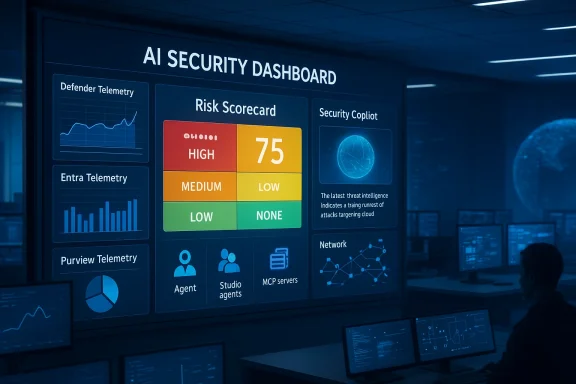
Microsoft’s Security Dashboard for AI is a governance and operational control plane designed to give security leaders a consolidated view of that sprawling estate. The product surfaced at Microsoft Ignite and moved to public preview in February 2026, with the stated intent of aggregating identity, threat, and data signals from Entra, Defender, and Purview into an interactive executive and practitioner portal. Key visible capabilities include an AI risk scorecard, a comprehensive AI inventory (agents, models, MCP servers, applications), correlated risk views, and built‑in playbooks and recommendations that can be delegated to teams via Outlook and Teams notifications.
This release follows a series of Microsoft investments in “agent‑aware” tooling — Copilot Studio, Agent 365 control plane concepts, the Model Context Protocol (MCP) ecosystem, and Security Copilot — and aims to stitch them together under an operational governance surface for CISOs and AI risk leaders.
It also tracks posture drift: if an agent previously compliant with a policy changes behavior, configuration, or data‑access patterns, that drift is flagged for investigation. Recommendations are prescriptive and actionable; teams can delegate tasks and push remediation notifications into Microsoft Teams or Outlook to speed response.
But tools matter only when governance, enforcement, and telemetry hygiene are in place. The dashboard should be treated as the single consolidated source of insight — not the single source of truth. Expect to pair it with third‑party verification, ongoing red‑teaming, and robust change control that enforces registration of every agent and model before production use.
For security leaders: adopt the dashboard quickly if you’re already a Microsoft security customer, but do so with realistic KPIs, strong playbooks, and an organizational commitment to enforcement. This combination — improved visibility, disciplined process, and active enforcement — is the only practical way to limit the new classes of risk introduced by agentic and model‑centric AI at enterprise scale.
Security teams that get this balance right will move from firefighting to governance: discovering shadow agents, curbing data exfiltration, and building an auditable lifecycle for models and agents — all without slowing the velocity of AI innovation. For organizations that delay, the risk landscape will only become more complex and costly as AI continues to bake into everyday workflows.
In short: Security Dashboard for AI is a practical, high‑impact tool in the fight to make enterprise AI manageable. It buys time and structure for CISOs facing exponential AI sprawl, but it is not a substitute for disciplined governance, telemetry completeness, and enforcement mechanisms. Adopt it as the central operations surface, then invest heavily in the processes and people that turn insight into lasting control.
Source: Cloud Wars Microsoft Security Dashboard Strengthens Control Over Expanding AI Ecosystems
 Background / Overview
Enterprises now run dozens — often hundreds — of AI assets: tenant‑bound Copilot agents, low‑code automations, dedicated model servers, third‑party SaaS assistants, and internally built pipelines that call out to external LLM APIs. That sprawl multiplies attack surfaces: sensitive data can leak through vectorized prompts, models inherit vulnerabilities, misconfigurations expose credentials, and autonomous agents can act in ways that violate policy or regulation.Microsoft’s Security Dashboard for AI is a governance and operational control plane designed to give security leaders a consolidated view of that sprawling estate. The product surfaced at Microsoft Ignite and moved to public preview in February 2026, with the stated intent of aggregating identity, threat, and data signals from Entra, Defender, and Purview into an interactive executive and practitioner portal. Key visible capabilities include an AI risk scorecard, a comprehensive AI inventory (agents, models, MCP servers, applications), correlated risk views, and built‑in playbooks and recommendations that can be delegated to teams via Outlook and Teams notifications.
This release follows a series of Microsoft investments in “agent‑aware” tooling — Copilot Studio, Agent 365 control plane concepts, the Model Context Protocol (MCP) ecosystem, and Security Copilot — and aims to stitch them together under an operational governance surface for CISOs and AI risk leaders.
What the dashboard does — features and mechanics
Unified risk visibility and the AI scorecard
At its core the dashboard provides a centralized risk scorecard that aggregates posture data and real‑time alerts from the three underlying pillars:- Microsoft Defender — cloud and endpoint threat telemetry, identity‑linked detection, and application posture.
- Microsoft Entra — identity posture, agent identity bindings, access policies, and anomalous sign‑in behavior.
- Microsoft Purview — data classification, sensitive data discovery, and DSPM‑style signals for data handling risk.
AI inventory, discovery, and shadow agent detection
A critical operational gap for most enterprises today is discovery. The dashboard’s AI inventory aims to discover and catalogue:- Agentic AI instances (Copilot agents, Copilot Studio agents, Microsoft Foundry agents)
- Deployed models and their contexts
- MCP servers and other model hosting endpoints
- Third‑party AI apps and SaaS assistants (announced coverage includes major external services and protocols)
Correlated risk, drift detection, and prescriptive remediation
The dashboard correlates identity, threat, and data signals into coherent risk items — for example, linking an agent’s use of sensitive data repositories (Purview) to anomalous outbound network flows (Defender) and a misconfigured service principal (Entra).It also tracks posture drift: if an agent previously compliant with a policy changes behavior, configuration, or data‑access patterns, that drift is flagged for investigation. Recommendations are prescriptive and actionable; teams can delegate tasks and push remediation notifications into Microsoft Teams or Outlook to speed response.
Security Copilot integration and natural‑language investigation
Security Copilot is embedded as the investigative layer. Security leaders can use natural‑language prompts to explore asset behavior, request incident summaries, and generate remediation steps. This copilot‑assisted workflow shortens mean time to understand (MTTU) by turning correlated telemetry into human‑readable insights and suggested playbooks.Coverage: Microsoft stack and third‑party models
Microsoft advertises coverage across its own agent and application portfolio — Microsoft 365 Copilot, Copilot Studio agents, and Foundry apps — and also states the dashboard can surface risks for third‑party models, applications, and MCP servers. The intent is to deliver a single operational surface irrespective of where the model or agent is hosted.Licensing and availability
The Security Dashboard for AI is available in public preview and is included for customers already using the underlying Microsoft Security products (Defender, Entra, Purview) with no additional license required. That positioning lowers the barrier to testing for organizations already embedded in Microsoft security tooling.Why this matters: the strategic strengths
1. Visibility at enterprise scale
Consolidated visibility is the immediate win. Many organizations struggle with fragmented evidence: identity logs in one tool, DLP alerts in another, and model endpoints unknown. The dashboard’s promise to fuse these signals into prioritized risk items addresses a fundamental operational need: if you can’t see the AI estate, you can’t secure it.2. Operationalizing governance
Visibility without action is academic. The dashboard maps observations to delegated remediation paths and practitioner workflows — a practical step toward operational governance. The ability to assign remediation tasks and surface them through Teams or Outlook short‑circuits the slow manual handoffs that often kill response speed.3. Copilot‑driven investigation accelerates triage
Security Copilot’s natural language interface reduces reliance on specialized query authorship (KQL, advanced logs) for initial triage. Security teams can summarize incidents, ask “why” questions about drift, and generate remediation checklists in conversational form — speeding the triage loop and helping less experienced staff complete first‑cut investigations.4. No incremental licensing for many customers
For organizations already consuming Defender, Entra, and Purview, Microsoft’s choice to include the dashboard in the existing product set reduces friction to adoption. That’s a powerful commercial move; the tradeoff for many enterprises is less vendor shopping and faster enablement.5. Cross‑product engineering reduces integration work
By leveraging existing Microsoft signals and connectors, customers can avoid building bespoke integrations and pipelines to create unified AI security views. For security teams with limited staff, reduced integration overhead is an operational multiplier.Where the dashboard’s promise can fall short — risks and blind spots
1. Visibility is not the same as enforcement
The dashboard excels at surfacing risk. What it cannot — by design or limitation — always guarantee is enforcement. Discovering a shadow agent is meaningful only if the organization can implement consistent policy enforcement, deprovisioning, or network controls. Visibility without enforcement workflows — or organizational buy‑in to use them — leaves the gap open.2. Single pane can create a false sense of control
Consolidation reduces cognitive load but can also create complacency. A single dashboard simplifies oversight, but it can mask nuanced differences in detection fidelity across underlying products and third‑party connectors. Security teams must still validate alerts and not assume the dashboard identifies everything.3. Third‑party coverage is asymmetric
Microsoft states the dashboard covers third‑party AI models and MCP servers. In practice, the depth of coverage depends on available telemetry and API connectivity for each third‑party service. For SaaS assistants that do not expose telemetry or that route traffic outside corporate networks, detection and attribution fidelity will be lower. Expect gaps where third‑party telemetry or logging is limited.4. Potential vendor lock‑in and data residency concerns
Enterprises that choose a tightly integrated Microsoft control plane for AI security may find themselves deeper into Microsoft’s ecosystem. For organizations with multi‑cloud strategies or regulatory constraints about data residency, this must be weighed carefully. Ensuring exported compliance reports and audit trails that meet regulatory requirements will be critical.5. Enforcement gaps for on‑prem or air‑gapped models
AI assets running in isolated on‑prem infrastructure or in air‑gapped environments may not surface full telemetry to cloud services. Where workloads are deliberately isolated for compliance, the dashboard’s capabilities will be limited unless on‑prem connectors are deployed and properly configured.6. Reliance on telemetry quality and completeness
All detection and correlation rely on telemetry quality. If instrumentation is incomplete — misconfigured logging, missing agent telemetry, or disabled data classification — the risk scorecard will under‑represent actual exposure. Organizations must treat the dashboard as part of a broader telemetry hygiene program.7. Automation risk and delegation governance
Automated delegation speeds remediation but also introduces the risk of misdelegation or alert fatigue. If remedial tasks are improperly delegated or not reviewed, automation can accelerate incorrect changes and generate compliance exposure. Clear policies around delegation and approval are necessary.Practical checklist: how CISOs should evaluate and adopt the dashboard
- Confirm eligibility and scope
- Verify your tenant has Defender, Entra, and Purview entitlements and confirm the dashboard is available in public preview for your region.
- Inventory telemetry sources and connectors
- Map all AI endpoints, model hosts, MCP servers, and external LLM integrations. Ensure logging and telemetry are shipped into Defender, Entra, and Purview where possible.
- Establish ownership and playbooks
- Assign a single executive owner for AI risk and create working‑level playbooks for discovery, triage, remediation, and escalation.
- Tune data classification and DLP
- Enrich Purview data classification to ensure sensitive data categories are correctly labeled. Deploy AI‑aware DLP policies to monitor prompt and model‑output flows.
- Configure Entra for agent identity
- Ensure service principals, managed identities, and agent IDs are constrained with least privilege and automation is in place to rotate secrets and remove stale identities.
- Validate detection coverage
- Run tabletop exercises and red‑team scenarios that simulate common AI risks: prompt exfiltration, unauthorized model access, and agent misbehavior. Confirm the dashboard surfaces those events.
- Define remediation SLAs and delegation rules
- Create clear SLAs for different risk severities and define who gets delegated what task. Avoid automatic removal actions without human review for high‑impact assets.
- Integrate with change and release processes
- Ensure new agent deployments or model rollouts must register with the AI inventory as part of change control; make registration a gating check for production deployment.
- Monitor privacy and compliance posture
- Use the dashboard’s compliance summaries for board reporting, but also run independent audits to ensure data sovereignty, retention, and access controls meet regulatory requirements.
- Plan for continuous improvement
- Track MTTU (mean time to understand), MTTR (mean time to remediate), and the number of unmanaged assets discovered over time to measure program maturity.
Operational playbook: triage, investigation, and remediation with the dashboard
Triage (first 15 minutes)
- Use the AI risk scorecard to surface top priority alerts.
- Apply Security Copilot’s prompts to generate a concise incident summary, affected assets, and likely impact.
- Categorize incidents by data sensitivity and business impact; escalate as necessary.
Investigation (15–120 minutes)
- Drill into correlated telemetry (Entra sign‑in anomalies, Defender network flows, Purview data access) and validate the asset identity.
- Use Copilot to enumerate related assets, recent configuration changes, and privileged access grants.
- Reproduce the risk in a safe sandbox if possible (especially to validate agent behavior or prompt injection vectors).
Remediation (2–24 hours)
- Execute prescriptive remediation steps: revoke tokens, isolate the agent, block outbound channels, or apply targeted DLP rules.
- Delegate the remediation with clear instructions and required verification steps. Use Teams/Outlook notifications for operational handoff.
- Document the root cause and update configuration baselines to prevent recurrence.
Post‑incident (24–72 hours)
- Run a post‑mortem: capture lessons, update playbooks, and make configuration changes persistent.
- Feed findings into model development lifecycles — e.g., add prompt‑handling constraints or implement model‑level red teams.
Metrics and KPIs that matter
- Number of AI assets discovered (managed vs. unmanaged)
- Time to discovery for new agent deployments
- Mean time to understand (MTTU) for AI risk items
- Mean time to remediate (MTTR) for high‑severity AI incidents
- Number of sensitive data exposures linked to AI assets
- Percentage of AI assets with least‑privilege identity bindings
- Drift events detected and remediated per month
Legal, privacy, and compliance considerations
Enterprises must remember that AI governance is not purely technical. The dashboard provides visibility and tools, but legal and compliance teams must be tightly coupled into workflows.- Data residency: Ensure the dashboard’s telemetry processing and any exportable reports conform to jurisdictional data residency obligations. Some organizations may require on‑prem telemetry retention.
- Auditability: Maintain immutable logs and change histories for any automated remediation actions. Auditors will want chain‑of‑custody for decisions affecting models and data.
- Vendor risk: Third‑party models present contractual and SLA considerations. The dashboard’s discovery is only the start; ensure contractual controls exist for data handling and incident notification with model providers.
- Regulatory reporting: Where AI decisions impact customers or regulated outcomes (credit, insurance, hiring), ensure governance flows from discovery to attestations and audit evidence required by regulators.
Realistic expectations and roadmap for maturity
The Security Dashboard for AI is an important control plane — but it is not a turn‑key panacea. Expect the following staged maturation path:- Phase 1 — Discovery and visibility: Teams will use the dashboard to find unmanaged agents and build an initial inventory.
- Phase 2 — Procedural integration: Playbooks, delegations, and remediation SLAs are introduced and exercised.
- Phase 3 — Automation and prevention: Organizations shift from reactive to proactive controls — network segmentation, hardened identity for agents, and preventative DLP at model boundaries.
- Phase 4 — Continuous governance: A feedback loop ties model development, deployment, and operations into a continuous compliance and security lifecycle.
Final analysis: how to treat the dashboard in your security arsenal
Microsoft’s Security Dashboard for AI is a significant, timely addition to enterprise tooling. It recognizes a new reality: AI is not a single product but an emergent layer across identity, data, and application surfaces. By aggregating signals from Defender, Entra, and Purview and pairing them with Security Copilot’s investigative assistance, Microsoft gives CISOs the operational scaffolding to answer the most urgent questions about AI risk.But tools matter only when governance, enforcement, and telemetry hygiene are in place. The dashboard should be treated as the single consolidated source of insight — not the single source of truth. Expect to pair it with third‑party verification, ongoing red‑teaming, and robust change control that enforces registration of every agent and model before production use.
For security leaders: adopt the dashboard quickly if you’re already a Microsoft security customer, but do so with realistic KPIs, strong playbooks, and an organizational commitment to enforcement. This combination — improved visibility, disciplined process, and active enforcement — is the only practical way to limit the new classes of risk introduced by agentic and model‑centric AI at enterprise scale.
Security teams that get this balance right will move from firefighting to governance: discovering shadow agents, curbing data exfiltration, and building an auditable lifecycle for models and agents — all without slowing the velocity of AI innovation. For organizations that delay, the risk landscape will only become more complex and costly as AI continues to bake into everyday workflows.
In short: Security Dashboard for AI is a practical, high‑impact tool in the fight to make enterprise AI manageable. It buys time and structure for CISOs facing exponential AI sprawl, but it is not a substitute for disciplined governance, telemetry completeness, and enforcement mechanisms. Adopt it as the central operations surface, then invest heavily in the processes and people that turn insight into lasting control.
Source: Cloud Wars Microsoft Security Dashboard Strengthens Control Over Expanding AI Ecosystems
