

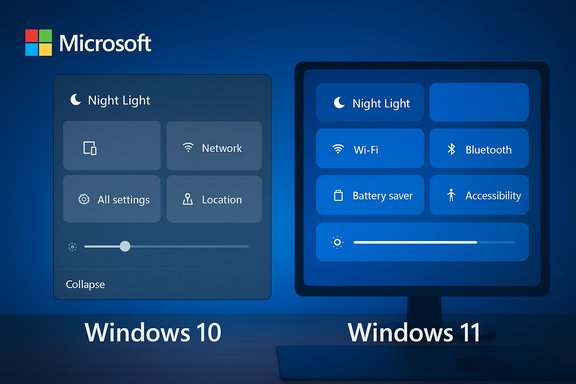
Microsoft’s support feed accidentally used a Windows 10 UI to illustrate a modern Windows 11 feature, a small public slip that nonetheless reveals larger gaps in content governance, automation, and messaging at a pivotal moment for Microsoft’s desktop strategy. The social post — an X (Twitter) message from Microsoft’s official support account promoting the Night light feature — included a short animated GIF that clearly shows the Windows 10 Action Center UI rather than Windows 11’s Quick Settings. The mismatch was noticed and amplified by the tech press and community channels, and came only days after Windows 10 reached its official end-of-support milestone.
Microsoft has spent the last several years steering users toward Windows 11, emphasizing new design, security baselines, and AI-driven features. That migration effort intensified as Microsoft set a firm end-of-support date for Windows 10: October 14, 2025. After that date, mainstream security and feature servicing ceased for most Windows 10 editions, with limited exceptions available through paid or enterprise Extended Security Updates (ESU) paths. The lifecycle end date and ESU program are documented in Microsoft’s lifecycle and support pages. Meanwhile, Microsoft’s customer-facing social channels — particularly the Microsoft Support/X account @MicrosoftHelps — are a high-visibility touchpoint used to explain features, triage common issues, and flag official guidance. Given that context, the social feed is expected to reflect current OS visuals and up-to-date guidance for Windows 11-first guidance. That expectation is why the Night light post drew attention: it was content that, on its face, should have shown Windows 11 Quick Settings but instead displayed Windows 10’s Action Center chrome.
 Switch it on to help ease
  strain,” and a link to support guidance. The post’s alt text read: “Graphical depiction of turning on the night light setting on a Windows PC.” Observers quickly noticed the GIF’s UI chrome is unmistakably Windows 10’s Action Center and not Windows 11’s Quick Settings, which uses a separate Quick Settings overlay and a distinct visual language. The tweet copy, alt text, and the GIF therefore created an odd cognitive mismatch: the caption and link suggested current guidance, but the imagery reflected a retired OS. Independent tech outlets and social-media aggregators reproduced the post and highlighted the discrepancy. Several outlets captured screenshots, comment threads, and automated replies that further underscored the communications fallout: users asked how to get the “UI” shown in the GIF, others mocked the company for “still using Windows 10,” and automated responses from Microsoft’s moderation or support bots sometimes misinterpreted questions — all of which multiplied the embarrassment.
Strengths:
Practical takeaways:
Microsoft’s social media GIF misstep will likely be a footnote in the broader Windows 10 to Windows 11 migration story, but the lessons it surfaces are enduring: content is code for perception, automation needs human judgment at the margins, and governance matters. Correct those things and the narrative — and user trust — will be easier to manage through the next major change.
Source: PCWorld Microsoft slips up and highlights Windows 10 in a social media own goal
 Background
Microsoft has spent the last several years steering users toward Windows 11, emphasizing new design, security baselines, and AI-driven features. That migration effort intensified as Microsoft set a firm end-of-support date for Windows 10: October 14, 2025. After that date, mainstream security and feature servicing ceased for most Windows 10 editions, with limited exceptions available through paid or enterprise Extended Security Updates (ESU) paths. The lifecycle end date and ESU program are documented in Microsoft’s lifecycle and support pages. Meanwhile, Microsoft’s customer-facing social channels — particularly the Microsoft Support/X account @MicrosoftHelps — are a high-visibility touchpoint used to explain features, triage common issues, and flag official guidance. Given that context, the social feed is expected to reflect current OS visuals and up-to-date guidance for Windows 11-first guidance. That expectation is why the Night light post drew attention: it was content that, on its face, should have shown Windows 11 Quick Settings but instead displayed Windows 10’s Action Center chrome. What happened (the social post and the visual mismatch)
On October 20, 2025, the Microsoft Support account posted a short GIF with the caption: “Turning on Night Light while we're working is easier than wearing blue light glasses Switch it on to help ease strain,” and a link to support guidance. The post’s alt text read: “Graphical depiction of turning on the night light setting on a Windows PC.” Observers quickly noticed the GIF’s UI chrome is unmistakably Windows 10’s Action Center and not Windows 11’s Quick Settings, which uses a separate Quick Settings overlay and a distinct visual language. The tweet copy, alt text, and the GIF therefore created an odd cognitive mismatch: the caption and link suggested current guidance, but the imagery reflected a retired OS. Independent tech outlets and social-media aggregators reproduced the post and highlighted the discrepancy. Several outlets captured screenshots, comment threads, and automated replies that further underscored the communications fallout: users asked how to get the “UI” shown in the GIF, others mocked the company for “still using Windows 10,” and automated responses from Microsoft’s moderation or support bots sometimes misinterpreted questions — all of which multiplied the embarrassment. Why this matters — beyond a harmless meme
On the surface, a GIF is a small thing. But at scale, and for a company pushing a migration narrative, this kind of slip matters for three practical reasons:- Brand and product alignment: Official channels are expected to model the product currently being promoted. When a support account demonstrates a feature using retired UI, it undermines the brand’s message that Windows 11 is the standard customer experience. The inconsistency weakens the visual case Microsoft is making for migration.
- User confusion and helpdesk friction: Support posts are often first-line guidance. Showing an older UI can confuse users who try to follow the visual walkthrough, triggering additional questions, help-desk tickets, and social responses. During a migration window where many users already feel uncertain, this adds avoidable friction.
- Operational hygiene and automation risk: The incident highlights probable failures in digital asset management (DAM), version control, and automated publishing pipelines. It also shows brittleness in automated moderation or help bots that replied out-of-context to users — a risk area for any enterprise using scaled automation on social channels.
Verifying the facts and technical claims
To assess the event accurately, the main factual claims were verified against multiple independent sources:- The text and timing of the Microsoft Support social post were reproduced and archived by third-party aggregators and outlets that captured the tweet content and GIF. Reports from community-focused outlets and social-post archives display the same tweet text and screenshot evidence.
- The GIF’s UI is visually the Windows 10 Action Center: industry write-ups and UI comparisons confirm Action Center (Windows 10) differs from Windows 11’s Quick Settings and Notification Center. How‑to documentation for Night light on Windows 10 and Windows 11 explains their different access paths and UI affordances. That difference supports the observation that the GIF is a Windows 10-era asset.
- The Windows 10 end-of-support (EOL) date is corroborated by Microsoft’s lifecycle documentation: Windows 10 reached end of support on October 14, 2025, and Microsoft’s public guidance recommends migration or enrollment in ESU options. That official lifecycle date places the social post in a sensitive, post-EOL communications window.
Root-cause analysis (likely but not proven)
The public evidence and historical patterns in enterprise content operations point to a small set of likely root causes:- Legacy assets in the digital library: Large organizations accumulate thousands of creative assets. If tagging or version metadata is weak, older images or GIFs can surface when social teams search for “night light” or “nightlight.” The GIF’s animation style resembles Windows 10-era art direction, suggesting the use of an older asset rather than a freshly rendered Windows 11 animation. This hypothesis is consistent with common DAM failures.
- Rapid posting cadence and human shortcuts: Social teams often operate with short windows to publish tips and trending content. In the absence of a required version-check or a small human-in-the-loop review for high-visibility support posts, reuse of an older asset can slip through.
- Automation/templating gaps: Publishing workflows that allow automated or templated posts to publish without a version guard (e.g., a check that prevents “deprecated” assets from being published) are vulnerable. Combined with bots powered by weak intent classifiers, this can lead to out-of-context replies and an escalating pile of misaligned interactions.
The communications and credibility cost
Mismatches like this are small on an absolute technical scale but carry outsized reputational costs in a few ways:- Perception of sloppiness: When a public help channel shows outdated UI elements, the perception is that content governance and product knowledge are misaligned. That perception erodes trust at the margin and gives critics rhetorical ammunition.
- Fuel for community skepticism: Loyal Windows 10 users — who may prefer the older UI — seized on the GIF as proof Microsoft still “likes” Windows 10. For users on the fence about upgrading, the slip reinforces the argument that Windows 11’s visual differences are unnecessary, which is exactly the opposite outcome Microsoft seeks.
- Automation backlash: The screenshots of automated replies that misinterpreted user intent raise a second-order problem: poor bot behavior can multiply the noise and make the official account a net source of confusion rather than a help resource. Automated moderation and reply systems must be judged not only by speed but by precision and escalation behavior.
What Microsoft — and other enterprises — should fix now
This incident is a practical checklist for operational improvements that reduce the odds of similar slip-ups:- Reinforce DAM hygiene and version tags. Ensure every asset includes required metadata fields such as OS version, deprecated flag, and last-review date. Searching “night light” should return a filtered set of current-UI assets first.
- Add automated publish-time validation. Include a light-weight rule in publishing tools to prevent “deprecated” assets from publishing unless a human override is provided and logged.
- Institute a human-in-the-loop for high-impression support posts. Social posts from official support accounts should pass a quick review by someone who can validate OS/version consistency.
- Harden bot confidence thresholds. Automated responders should fall back to human triage when intent classification confidence is low or when images/GIFs are attached.
- Maintain a curated set of canonical “how-to” animations for current OS versions and tie those assets to product teams so they’re refreshed as UI evolves.
The bigger picture: Windows 10 EOL, ESU, and the migration narrative
The GIF mishap is a small incident inside a much larger transition: Windows 10’s end of support introduced a complex blend of technical, business, and messaging challenges.- Many devices cannot upgrade to Windows 11 easily due to TPM, UEFI, processor, or vendor driver constraints. For those users, Microsoft has provided ESU options and migration guidance, but ESU is a stopgap and sometimes charged. The lifecycle details and ESU timelines are public and important context for understanding why many users remain on Windows 10 despite Microsoft’s migration push.
- OEM and third-party software messaging has also shifted to a Windows 11 baseline post-EOL, producing occasional documentation omissions that then cause community anxiety (for example, driver release notes that emphasize Windows 11 compatibility lines). Those communication slip-ups, when combined with a visible Microsoft mistake, make the narrative that “support is being dropped” easier to amplify.
- For enterprises, consistent lifecycle messaging matters for compliance and procurement decisions. UI-level mistakes aren’t contractually significant, but they add noise to conversations that already contain compliance, licensing, and operational risk factors. Clear, reliable official messaging matters more than ever in this window.
A balanced take: strengths and risks
This episode exposes both strengths and weaknesses in Microsoft’s public posture.Strengths:
- Large-scale communications capability: Microsoft’s support accounts successfully reach millions with practical tips and links to knowledge-base articles, which is valuable for user education. The presence of alt text, a short how-to link, and consistent topic curation shows process rigor in many dimensions.
- Rapid community and press response: The tech community’s quick capture and analysis of the slip reveals a self-correcting ecosystem that surfaces issues and forces vendors to respond quickly — a useful accountability mechanism.
- Process and governance gaps: As discussed, asset management, publishing tooling, and automation thresholds appear insufficiently guarded against this class of error. In a migration period where Microsoft is promoting a new OS, such misalignments are more than cosmetic.
- Amplification of migration resistance: Inadvertent use of Windows 10 imagery can be weaponized by migration critics and thrifty consumers who resist hardware replacements or OS upgrades. That rhetorical leverage can slow adoption, increase help-desk costs, and feed negative narratives around Windows 11’s value proposition.
Final assessment and recommendations for readers
The MicrosoftHelps Night light GIF incident is not evidence of systemic product failure. It is, however, an instructive micro-case in how operational detail — a single image — can undermine a carefully scripted product narrative and add friction to a sensitive migration cycle.Practical takeaways:
- Microsoft should audit high-visibility social assets, implement publish-time checks that prevent deprecated assets from being reused, and tighten bot escalation logic.
- IT teams and help desks should treat social guidance as one of many inputs; cross-check visual walkthroughs against official support pages and in-OS guidance when users report confusion.
- Users who remain on Windows 10 should understand the timeline: the EOL date was October 14, 2025, and limited ESU paths exist for those who need time to migrate. Planning is preferable to panic.
Microsoft’s social media GIF misstep will likely be a footnote in the broader Windows 10 to Windows 11 migration story, but the lessons it surfaces are enduring: content is code for perception, automation needs human judgment at the margins, and governance matters. Correct those things and the narrative — and user trust — will be easier to manage through the next major change.
Source: PCWorld Microsoft slips up and highlights Windows 10 in a social media own goal
