

Microsoft’s recent refresh of the Teams Admin Center (TAC) brings a focused set of trust and compliance features that centralize app evaluation, elevate certified solutions, and shorten the time it takes IT teams to approve safe third‑party integrations across Microsoft Teams. These changes — led by a new “Apps to Consider Allowing” tile, an expanded Security & Compliance column with trust‑based filters, and curated collections of certified apps — are designed to collapse a multistep verification process into a single admin workflow while tying visibility to signals such as Microsoft 365 Certification, publisher attestations, and compliance evidence.
Microsoft Teams has long been a central collaboration surface for enterprises, and as usage grew, so did the quantity and variety of third‑party apps and bot integrations that organizations must evaluate. Historically, Teams admins relied on a combination of the Teams Admin Center’s existing Security & Compliance tab, vendor documentation, and separate compliance portals to determine whether an app met organizational standards. That approach required manual cross‑checking of publisher identity, permission scopes, documented data access, and external compliance attestations — a slow process that left approvals bottlenecked in security and procurement. Over the past year Microsoft has been rolling out admin‑centric controls to reduce that friction: automated app‑centric management, publisher attestation visibility, and, most recently, trust‑focused UI surfaces in TAC that consolidate compliance signals and surface recommended apps for approval. These updates are built on two visible pillars — richer metadata surfaced in TAC and data sourced from Microsoft Defender for Cloud Apps (MDA) — enabling Teams administrators to make risk decisions with more complete and consistent information.
The net effect is constructive: more transparent, faster app approvals combined with scalable control options that help organizations balance collaboration velocity with enterprise risk management. The utility of these improvements will ultimately depend on disciplined governance and ongoing monitoring — the responsibility for which remains squarely with tenants and their security teams.
Consolidated admin checklist (quick reference)
Source: Petri IT Knowledgebase Microsoft Teams Admin Center Updates Simplify App Trust and Compliance
 Background
Microsoft Teams has long been a central collaboration surface for enterprises, and as usage grew, so did the quantity and variety of third‑party apps and bot integrations that organizations must evaluate. Historically, Teams admins relied on a combination of the Teams Admin Center’s existing Security & Compliance tab, vendor documentation, and separate compliance portals to determine whether an app met organizational standards. That approach required manual cross‑checking of publisher identity, permission scopes, documented data access, and external compliance attestations — a slow process that left approvals bottlenecked in security and procurement. Over the past year Microsoft has been rolling out admin‑centric controls to reduce that friction: automated app‑centric management, publisher attestation visibility, and, most recently, trust‑focused UI surfaces in TAC that consolidate compliance signals and surface recommended apps for approval. These updates are built on two visible pillars — richer metadata surfaced in TAC and data sourced from Microsoft Defender for Cloud Apps (MDA) — enabling Teams administrators to make risk decisions with more complete and consistent information. What changed in the Teams Admin Center
“Apps to Consider Allowing” — one tile to find trusted apps
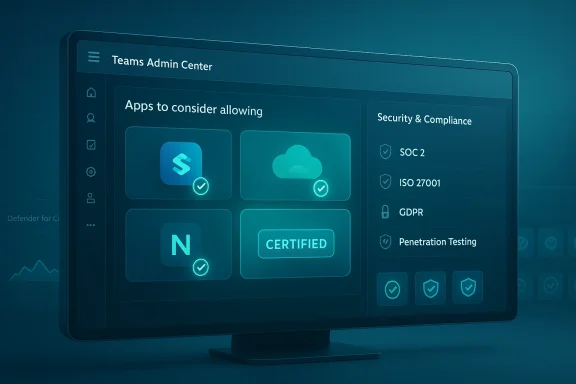
A new tile on the Manage apps page called Apps to Consider Allowing aggregates high‑confidence candidates for IT approval. It highlights apps that meet one or more trust criteria — Microsoft 365 certified, publisher‑attested, or those that supply strong compliance documentation — and provides quick counts and links to drill into each candidate. This single entry point aims to reduce discovery friction and surface apps likely to meet an organization’s baseline trust bar.Security & Compliance column and trust‑based filters
The TAC now displays a Security & Compliance column that can reveal a range of compliance attributes for apps and agents, including SOC 2, ISO 27001, FedRAMP, HIPAA, GDPR and even penetration testing evidence where available. Admins can filter the app list by these attributes to narrow candidate apps quickly. Importantly, some of this compliance data is pulled from Microsoft Defender for Cloud Apps (MDA), extending visibility beyond only Microsoft‑certified apps to many third‑party solutions that have telemetry or published attestations.Dedicated collections and curated lists
To speed discovery, TAC now offers dedicated collections of certified and attested apps. These curated lists group trusted solutions in one place so admins can review like‑for‑like alternatives without hunting across the app catalog. This is helpful for standardizing app selection across similar capability domains (e.g., survey tools, CRM connectors, scheduling bots).Runle‑based org settings (coming/rolling out)
Complementing the visibility features, Microsoft is rolling out rule‑based enablement that allows admins to set org‑wide policies to automatically make Microsoft 365 certified apps available to users when they meet specified conditions (permissions, publisher names, etc.. This control is being delivered as part of a staged rollout and is disabled by default; admins must opt in and customize the rules for their environments. Timeline guidance and message‑center notices indicate a phased GA plan around late 2025 into early 2026 for many tenants.Why this matters: benefits for admins, ISVs and security teams
- Faster, evidence‑driven approvals: By consolidating trust signals in a single dashboard, TAC reduces time spent cross‑referencing vendor claims, speeding approval cycles and reducing friction for end users.
- Better discovery for trusted apps: Certified or attested apps are easier to find, helping IT standardize on solutions with verified compliance postures.
- Policy‑driven controls: Rule‑based enablement lets administrators scale safe‑by‑default app availability across the tenant while retaining granular control over permissions and publishers.
- Broader visibility: Because TAC now surfaces compliance data from MDA, admins can evaluate apps that aren’t fully certified but still show enough security evidence to be considered safe under internal policies.
Technical specifics and verification
Which compliance attributes are visible
TAC’s Security & Compliance column and its filters can include industry‑standard attestations and security signals such as:- SOC 2 and other third‑party audit results
- ISO 27001 certification status
- FedRAMP authorization for cloud‑hosted services (where applicable)
- HIPAA suitability or statements for health data handling
- GDPR and privacy compliance indicators
- Penetration testing evidence and CSA STAR status where published
Licensing and preview availability
The enhanced trust dashboard and many of the visibility features are being made available in public preview in waves. Certain capabilities that surface MDA‑sourced compliance information or that provide advanced filtering may require licensing entitlements (for example, Microsoft Defender for Office 365 Plan 2 is cited as a requirement for the preview dashboard experience). Admins should consult their tenant Message Center entries and product documentation to confirm which features are enabled in their tenants and which require additional licenses.Rollout and staging behavior
Microsoft’s rollout model for admin tools is staged and regionally varied. Message Center notices indicate that some features are enabled by default while others are opt‑in or disabled by default (notably, the rule‑based enablement control that will remain disabled until an administrator enables it). Admins should expect phased availability and confirm tenant‑specific timelines via the Microsoft 365 Message Center. Expect discrepancies in availability between tenants and the need to pilot features in a representative ring before broad enablement.Critical analysis — strengths, blind spots and operational risks
Strengths
- Centralized trust signals: Consolidation of compliance attributes into a single TAC view materially reduces the administrative burden of app reviews and lowers the risk of human error during manual cross‑checks. This is a clear productivity win for busy security and procurement teams.
- Evidence‑driven decisions: Surfacing third‑party attestations and penetration testing results alongside permission scopes and publisher identity helps admins make decisions that are both faster and more defensible in audits.
- Operational scale: Rule‑based org settings let organizations scale trust policies while retaining safe defaults, reducing repetitive manual configuration for large numbers of apps.
Blind spots and risks
- Certification vs. continuous security: Certification and attestation are time‑bound snapshots. A certified app can still introduce risk after certification if its continuous development, change management, or dependency handling is weak. Relying strictly on a certification flag without ongoing monitoring can create a false sense of security. This is a classic “snapshot vs. streaming” risk that organizations must manage.
- Incomplete coverage for non‑certified apps: Although MDA extends visibility, not all apps will have complete or current evidence. Some compliance indicators may be self‑reported or based on vendor documents that are not independently verified in real time — a factor that must be addressed in approval workflows. Flag any evidence sourced only from vendor claims for additional verification.
- Over‑reliance on admin UI decisions: Centralized lists and filters make it easy to approve apps quickly — potentially too easy. Admins must avoid turning discoverability into an approval shortcut; short‑cut approvals increase the risk of granting broad permissions to apps without the right least‑privilege checks.
- Operational/rollout mismatch: Staged rollouts and tenant differences mean some organizations will see features months earlier or later than colleagues, making centrally documented playbooks drift if they assume uniform availability. Confirm tenant Message Center notices before policy changes.
Supply‑chain and permissions risk
Even trusted, certified apps can be vectors for supply‑chain compromise. Permissions remain the single biggest operational risk factor: apps that request broad Graph or mailbox access should be subject to additional human review, conditional access constraints, and monitoring. TAC’s improved permission visibility is useful, but it must be part of a broader app governance program that includes least‑privilege, token lifetimes, and refresh/revocation processes.Practical checklist for Teams admins (adopt and defend)
- Inventory and map: Use the TAC Manage apps page to build a baseline inventory of apps in your tenant and note which are Microsoft 365 certified, publisher‑attested, or have MDA evidence.
- Pilot the new dashboard: Enable the preview in a pilot tenant or pilot group first. Validate filters, collections, and the “Apps to Consider Allowing” recommendations against known safe and unsafe apps to calibrate trust thresholds.
- Integrate checks into procurement: Add TAC compliance attributes into procurement checklists. Require ISVs to provide continuous evidence and a security contact for expedited incident coordination.
- Use rule‑based enablement cautiously: If adopting org‑wide rule‑based availability for Microsoft 365 certified apps, start with conservative rules and exclude any app that requests high‑risk permissions until reviewed manually. Note the default‑off status for these controls and the staged rollout.
- Enforce least privilege: Pair app approvals with conditional access and token lifetime policies. Limit app access scopes to the minimum required and apply monitoring to detect unexpected scope elevation.
- Pipeline MDA telemetry into SIEM: Where possible, route MDA and Defender signals into your SIEM or XDR so security teams can monitor app behavior and detect anomalous activity post‑approval.
- Document and communicate: Publish an internal app approval policy that explains the new TAC signals, how to interpret them, and the escalation path for apps lacking independent attestations.
- Re‑verify periodically: Make app re‑validation a scheduled task: every 6–12 months revisit permissions, attestations, and scan results, and require updated penetration test reports for high‑risk apps.
ISV playbook: getting visible and staying trustworthy
- Pursue Microsoft 365 Certification: Certification materially improves visibility inside TAC and increases the likelihood of enterprise adoption; it is now a practical commercial differentiator as much as a security credential. Maintain certification and publish change logs that admins can consume.
- Publish compliance evidence: Provide up‑to‑date SOC 2, ISO 27001 and penetration testing summaries, and publish privacy and data‑handling documents. Make machine‑readable attestation metadata available if possible.
- Minimize permission scope: Design apps to request the fewest possible Graph scopes and implement incremental consent where feasible.
- Support incident coordination: Provide a dedicated security contact and an SLA for incident response handling so tenant admins can act quickly if issues arise.
Roadmap signals and what to watch next
- Message Center notices and roadmap items show the expanded security and compliance visibility is already rolling out and that the rule‑based org settings for Microsoft 365 certified apps are staged with phased completion windows. Admins should monitor MC1162951 and MC1085133 entries for tenant‑specific timelines and for changes to default behaviors.
- Continued integration of MDA as the primary data feed suggests Microsoft will expand detection and classification capabilities over time, improving the fidelity of non‑certified app assessments — but that improvement depends on MDA’s coverage and the frequency of vendor‑provided metadata.
- Expect follow‑on features that tie app governance into conditional access and tenant‑wide policies more tightly, and pay attention to how Microsoft surfaces revocation timelines and publisher‑identity changes in TAC.
Final assessment
Microsoft’s TAC trust enhancements are a meaningful, pragmatic step toward reducing the friction of app governance in Teams. By centralizing compliance signals, elevating Microsoft 365 certified apps, and giving administrators rule‑based controls, TAC shifts app approvals from a labor‑intensive chore to a more automated, evidence‑driven process. These changes are likely to accelerate safe app adoption and reduce the time administrative teams spend in low‑value verification tasks. However, these improvements are not a substitute for rigorous app governance. Certifications and attestation metadata are necessary but not sufficient; continuous monitoring, least‑privilege design, supply‑chain vigilance, and robust incident procedures remain essential. The new TAC features are powerful tools in an admin’s toolbox — but they must be wielded with policies that account for snapshot attestations, staged rollouts, and the potential for incomplete evidence on non‑certified apps. Admins should approach adoption methodically: pilot the dashboard, bake TAC signals into procurement and approval workflows, integrate telemetry into SIEM/XDR, and use rule‑based enablement only after conservative validation. For ISVs, Microsoft 365 Certification now delivers tangible admin visibility — a competitive advantage that comes with an obligation to keep attestations current and to design for least privilege.The net effect is constructive: more transparent, faster app approvals combined with scalable control options that help organizations balance collaboration velocity with enterprise risk management. The utility of these improvements will ultimately depend on disciplined governance and ongoing monitoring — the responsibility for which remains squarely with tenants and their security teams.
Consolidated admin checklist (quick reference)
- Inventory apps and annotate certification/attestation status.
- Pilot TAC trust features before tenant‑wide enablement.
- Require vendor compliance artifacts and an on‑call security contact.
- Use least‑privilege and conditional access to mitigate permission risk.
- Ingest MDA telemetry into SIEM and schedule periodic re‑validation.
Source: Petri IT Knowledgebase Microsoft Teams Admin Center Updates Simplify App Trust and Compliance
