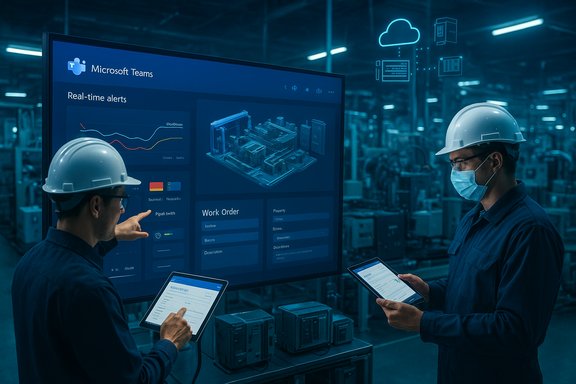
The shop floor is no longer a separate world of paper logs and two‑way radios; it’s a live, cloud‑connected workspace where alerts, videos, maintenance tickets, and work instructions arrive in the same pane of glass—often inside Microsoft Teams—giving frontline operators, maintenance crews, and managers a shared picture of the factory in real time.
Manufacturing’s digital shift has moved beyond isolated IoT dashboards and bespoke OT consoles into unified, human‑centric collaboration platforms. That change is embodied by Microsoft Teams for Manufacturing, a collection of integrations and practices that places operational data, communications, and AI‑assisted knowledge work inside the collaboration environment widely used across enterprise IT. The trend was visible at Hannover Messe 2025, where Microsoft and partners demonstrated predictive maintenance flows, Copilot‑generated guidance, and digital‑thread scenarios that bring OT telemetry, Dynamics 365 workflows, and Fabric analytics into Teams. This article synthesizes the vendor narratives, public case studies, analyst survey data, and independent reporting to explain what Teams for Manufacturing actually does, why customers adopt it, where it delivers measurable ROI today, and the governance, cybersecurity, and operational risks that factories must manage while they pursue that connected‑workforce future. It also flags claims that could not be independently verified, and offers a pragmatic adoption checklist for IT and operational leaders.
Key controls and how they map to factory needs:
However, the approach is not a silver bullet. Manufacturing leaders must treat AI and collaboration as a socio‑technical program that requires IT rigor, safety procedures, and sustained investment in skills and governance. The connected factory that Teams enables can produce quieter floors, less waste, and faster decisions—but only when people, processes, and platforms are deliberately aligned.
Documented customer stories—Florida Crystals’ 78% telecom savings, SMA Solar’s global telephony standardization, MaxLinear’s 30% invoice time reduction, and Kodak Alaris’s marketing cost consolidation—show real financial and operational value when Teams is deployed as a platform, not merely as a chat window. At the same time, independent industry research (Deloitte’s 2025 Smart Manufacturing survey) and community reporting emphasize that smart manufacturing is a multi‑year journey that requires investment in data readiness, security, and upskilling—areas where Teams is a powerful enabler but not a stand‑alone solution. The connected factory rhythm that Teams enables is attractive because it aligns decision speed with machine speed. The promise is clear: fewer interrupted production cycles, faster repairs, and knowledge that sticks across shifts. Realizing that promise requires clear governance, careful OT integration, and a safety‑first mindset for AI—conditions that separate productive pilots from risky, brittle rollouts. The next steps for manufacturing leaders are practical: pick a high‑value workflow, secure the gateway, pilot with verification, and measure the outcomes. The quiet intelligence of a well‑connected plant is not built overnight—but Teams can be the workspace where that intelligence finally starts to hum in unison.
Source: UC Today Microsoft Teams for Manufacturing: The Connected Factory Workforce
 Background / Overview
Manufacturing’s digital shift has moved beyond isolated IoT dashboards and bespoke OT consoles into unified, human‑centric collaboration platforms. That change is embodied by Microsoft Teams for Manufacturing, a collection of integrations and practices that places operational data, communications, and AI‑assisted knowledge work inside the collaboration environment widely used across enterprise IT. The trend was visible at Hannover Messe 2025, where Microsoft and partners demonstrated predictive maintenance flows, Copilot‑generated guidance, and digital‑thread scenarios that bring OT telemetry, Dynamics 365 workflows, and Fabric analytics into Teams. This article synthesizes the vendor narratives, public case studies, analyst survey data, and independent reporting to explain what Teams for Manufacturing actually does, why customers adopt it, where it delivers measurable ROI today, and the governance, cybersecurity, and operational risks that factories must manage while they pursue that connected‑workforce future. It also flags claims that could not be independently verified, and offers a pragmatic adoption checklist for IT and operational leaders.The problem Teams for Manufacturing aims to solve
Manufacturing suffers when people, systems, and machines operate at different tempos. Data often arrives in a centralized historian or ERP hours after an event, while the people who must act—operators, technicians, planners—lack the unified context to move fast. The result is slow root cause analysis, extended downtime, and fractured knowledge that leaves improvements trapped in individual notebooks or tribal knowledge.- Machines generate high‑frequency telemetry; people act in minutes.
- ERP and ticketing systems record events; frontline teams need contextual, taskable actions.
- Legacy telephony, siloed chat apps, and email threads create friction when speed matters.
What Microsoft Teams for Manufacturing is, technically
Microsoft positions Teams as a “control surface” where data and people meet. In manufacturing deployments this typically includes:- Teams Phone and Teams Rooms to replace PBX and bring voice/video into the collaboration layer.
- Teams channels and apps that surface alerts from IoT, PLCs, and MES via adaptive cards and connectors.
- Deep integration with Dynamics 365 (Field Service, Finance, Customer Insights) to convert alerts into work orders, approvals, and customer records without context switching.
- Copilot and Azure OpenAI‑backed agents embedded into Teams for summarization, drafting, and Q&A over asset data.
- Microsoft Fabric Real‑Time and Digital Twin Builder for simulation, semantic modeling, and event‑driven analytics feeding actionable signals into Teams.
Proven business outcomes and customer examples
Real customer deployments illustrate tangible gains and practical patterns.- Florida Crystals consolidated PBX systems and adopted Teams Phone/Teams Rooms; after decommissioning leased lines and PBX servers the company reports a 78% reduction in telecom expenses and far greater meeting reliability—evidence that unified telephony plus cloud conference rooms can be a straightforward cost and operations win.
- SMA Solar Technology AG standardized global telephony on Teams Phone, consolidated disparate voice systems, and reported operational benefits that included reduced support tickets and simplified global provisioning—showing the same unification pattern in an engineering‑heavy manufacturer.
- MaxLinear automated finance approvals by integrating Dynamics 365 with Teams approvals; invoice processing time dropped by roughly 30% and manual procurement effort fell dramatically—an example of cross‑functional gain when back‑office workflows are brought into the collaboration layer.
- Kodak Alaris consolidated fragmented CRM and marketing stacks into Dynamics 365 Customer Insights, cut marketing automation costs by 61%, and now uses Copilot‑powered features inside Dynamics to accelerate content and journey building—demonstrating that Teams‑centric workflows are often one part of a broader Dynamics‑led consolidation.
- Hard dollar savings from telecom consolidation and elimination of multi‑vendor telephony infrastructure.
- Productivity gains from bringing approvals, field service tickets, and meeting summaries into a single environment where people can act fast.
How Teams changes operations and maintenance workflows
Teams is being used as a digital command center for maintenance and operations rather than merely a messaging tool.- IoT and edge alarms can be routed into Teams channels as adaptive cards that include machine ID, alert details, and a direct action to open a Dynamics 365 Field Service ticket.
- Technicians receive the alert, review photos or video uploaded by the operator, accept the work order, and chase spare parts or escalation from the same thread.
- Copilot can draft step‑by‑step repair instructions from machine manuals or previous resolved tickets and produce a short checklist that becomes part of the work order or task. Microsoft showcased similar frontline agent scenarios at Hannover Messe 2025 where partners and customers demonstrated AI agents that speed troubleshooting and generate operational guidance.
Driving innovation, knowledge capture, and the connected worker
Teams changes culture because it captures fragments of work—photos, voice notes, annotations—that previously died in shift handovers.- Operators can upload images of defects, narrate the event, and tag a specialist without leaving the shop floor.
- Those artifacts become searchable corporate knowledge in SharePoint/OneDrive and Teams, enabling better root cause analysis and more consistent corrective action plans.
- Partners such as Siemens and SymphonyAI are demonstrating integrations where spoken descriptions are transcribed, translated, and routed into engineering systems—bridging language barriers and accelerating fixes.
The security, compliance, and governance model
A connected factory increases attack surface and regulatory complexity. Microsoft’s approach embeds enterprise controls into the collaboration stack, but that does not remove responsibility from factory IT and OT teams.Key controls and how they map to factory needs:
- Role‑based access control and shared device modes let line workers collaborate on shared Android devices without exposing enterprise data unnecessarily.
- Files stored in Teams inherit Microsoft 365 encryption, Purview retention, and DLP rules—helpful for IP protection and regulated records.
- Teams templates and lifecycle policies can standardize how projects and permissions are provisioned and retired, easing auditability in regulated industries.
Predictive maintenance, digital twins, and the Fabric connection
Teams is the human interface; the predictive models and simulations that feed Teams often live in Microsoft Fabric, Azure IoT, and specialized analytics stacks.- Data from sensors typically flows to Azure IoT or Fabric for ingestion and modeling.
- Analytics identify patterns (temperature drift, vibration anomalies) and push actionable alerts into Teams channels.
- Digital Twin Builder in Microsoft Fabric (preview) provides a low‑code path to create semantic, real‑time representations of physical assets and environments; these digital twins can drive simulations and what‑if analyses and surface their findings into Teams workflows. Fabric’s Digital Twin Builder was announced and documented in Microsoft’s product documentation and is available in preview.
Strengths: why Teams is working for manufacturers today
- Single pane of action: consolidates voice, video, chat, approvals, and work ticketing into a place frontline and back‑office workers already use.
- Familiarity and adoption: Teams is often already in the enterprise, lowering friction for shop‑floor adoption versus bespoke MES GUIs.
- Partner ecosystem: rich partner integrations (AV, operator connect, field service tools, digital twin vendors) make it practical to connect legacy devices and systems.
- Rapid knowledge capture: multimedia, transcription, and Copilot summaries transform ephemeral operator knowledge into searchable artifacts.
- Measurable wins: telco cost reductions, approvals automation, and process consolidation are documented in customer stories (Florida Crystals, SMA Solar, MaxLinear, Kodak Alaris).
Risks, unknowns, and areas demanding caution
- Over‑reliance on AI without verification
- Generative AI can draft instructions or summaries quickly but may hallucinate or omit safety‑critical constraints. The “speed‑but‑verify” paradox requires formal verification steps in regulated manufacturing environments. Independent analyses caution that deskilling and verification burdens can erode claimed productivity gains if not managed.
- IT/OT integration complexity
- The legacy OT landscape (proprietary PLCs, disconnected historians, different fieldbus protocols) still requires careful engineering. Integrating sensors and controllers into cloud flows is nontrivial and often needs industrial middleware or partner platforms. Attempts to shortcut this integration risk producing noisy alerts and alarm fatigue.
- Cybersecurity and supply chain exposure
- Greater connectivity raises the stakes: lateral movement from an Office 365 compromise to OT systems is a recognized threat. Effective deployment must pair Teams’ cloud controls with industrial zoning, IDS/IPS at OT boundaries, and hardened identity practices.
- Governance and data residency questions
- Moving engineer notes, design artifacts, and regulated documentation into cloud collaboration raises retention, residency, and IP classification issues. Governance policies must be explicit and enforced.
- Unverifiable or partially verified vendor claims
- Some vendor and media narratives attribute specific outcomes to Teams integrations at named customers. While many case studies are published directly by Microsoft and corroborated by partner materials, other claims—such as specific internal architectures at certain large manufacturers described in secondary reporting—could not be independently validated from public sources. These should be treated as indicative, not definitive. (Where relevant, this article calls out verifiable customer stories and flags items that lack independent confirmation.
Adoption checklist: practical steps for IT and operations leaders
- Start with a high‑value workflow
- Identify a single, repeatable workflow (critical machine downtime, spare parts approval, or invoice approvals) that will benefit from a single pane of collaboration.
- Map data sources and ownership
- Catalogue sensors, PLCs, historians, and enterprise systems. Establish who owns each data feed and how it will be ingested (edge gateway, Azure IoT, or Fabric).
- Secure the gateway
- Apply industrial network segmentation, identity, and least privilege. Harden the bridge between Teams/M365 and OT.
- Pilot Teams integration and Copilot carefully
- Deploy Copilot or AI agents in a limited pilot with formal verification rules. Use Copilot to draft instructions but require human sign‑off for safety‑critical procedures.
- Standardize and govern
- Use Teams templates, retention policies, and DLP to control how projects are created and retired. Define a classification policy for frontline artifacts and ensure Copilot content ingestion respects IP controls.
- Measure and iterate
- Define KPIs (MTTR, approval time, telecom spend, first‑time fix rate) and instrument them so pilot outcomes can be quantified.
- Invest in change management and training
- Upskilling is critical. Documented pilots show that digital literacy and frontline adoption programs prevent uneven benefits and the “productivity vs dependency” trap.
Regulatory and compliance considerations
Manufacturers in regulated industries (pharma, aerospace, food) must ensure that collaborative artifacts used for quality or traceability meet audit requirements. Teams can support compliance when integrated with Purview retention, and when Teams artifacts are tied to official records in Dynamics or the ERP, but the work to maintain an auditable trail must be explicit—not assumed.How partners and the ecosystem accelerate outcomes
Microsoft’s strengths are amplified by partners that tackle OT edge ingestion, voice integration, and industry domain knowledge. Examples include:- Operator Connect and PSTN partners for global telephony reach.
- Integrators that map PLC and historian data into Fabric/OneLake.
- Industrial AI vendors that contextualize OT signals into domain alerts, then route them to Teams and Copilot agents.
Final assessment: when Teams for Manufacturing makes sense
Microsoft Teams for Manufacturing delivers the fastest returns where three conditions align:- An existing Microsoft 365 footprint reduces deployment friction.
- Painful cross‑functional handoffs (maintenance, approvals, telephony) create measurable costs today.
- The organization is prepared to pair collaboration with disciplined OT integration and governance.
However, the approach is not a silver bullet. Manufacturing leaders must treat AI and collaboration as a socio‑technical program that requires IT rigor, safety procedures, and sustained investment in skills and governance. The connected factory that Teams enables can produce quieter floors, less waste, and faster decisions—but only when people, processes, and platforms are deliberately aligned.
Conclusion
The Connected Factory is not a product you buy but a set of capabilities you build: integrated telemetry, shared communications, automated actions, and AI‑assisted knowledge capture. Microsoft Teams functions increasingly as the human‑facing layer of that stack—bringing voice, approvals, work orders, and AI into the same flow where frontline work happens.Documented customer stories—Florida Crystals’ 78% telecom savings, SMA Solar’s global telephony standardization, MaxLinear’s 30% invoice time reduction, and Kodak Alaris’s marketing cost consolidation—show real financial and operational value when Teams is deployed as a platform, not merely as a chat window. At the same time, independent industry research (Deloitte’s 2025 Smart Manufacturing survey) and community reporting emphasize that smart manufacturing is a multi‑year journey that requires investment in data readiness, security, and upskilling—areas where Teams is a powerful enabler but not a stand‑alone solution. The connected factory rhythm that Teams enables is attractive because it aligns decision speed with machine speed. The promise is clear: fewer interrupted production cycles, faster repairs, and knowledge that sticks across shifts. Realizing that promise requires clear governance, careful OT integration, and a safety‑first mindset for AI—conditions that separate productive pilots from risky, brittle rollouts. The next steps for manufacturing leaders are practical: pick a high‑value workflow, secure the gateway, pilot with verification, and measure the outcomes. The quiet intelligence of a well‑connected plant is not built overnight—but Teams can be the workspace where that intelligence finally starts to hum in unison.
Source: UC Today Microsoft Teams for Manufacturing: The Connected Factory Workforce