

MicroWorld’s eScan antivirus was used as a delivery vehicle for a malicious update on January 20, 2026, when an unidentified threat actor breached a regional update server and pushed a trojanized update for roughly two hours — a supply‑chain compromise that turned a trusted security tool into a backdoor launcher for targeted endpoints.
In a rare and worrying escalation of supply‑chain attacks against security vendors, MicroWorld Technologies — the company behind eScan — confirmed that unauthorized access to a regional update server configuration allowed an incorrect, malicious file to be placed into the product’s update distribution path. The malicious package was distributed to customers who downloaded updates from that affected cluster during a limited window on January 20, 2026.
Security researchers who analyzed the delivered payload describe a multi‑stage infection chain that culminates in a persistent downloader/backdoor. The incident highlights two painful realities for defenders: first, that even security software can be weaponized when update infrastructure is compromised; and second, that attackers now deliberately include anti‑remediation techniques to hinder recovery.
At the same time, independent researchers have reported a broader set of telemetry indicating infections on some enterprise and consumer endpoints, while other firms reported that at least some customers running additional protections (EDR, layered detection) were able to detect and block the chain.
Important caveats:
From a vendor‑risk perspective, the following are important signals to follow:
Cautionary notes on attribution:
Defenders should respond decisively: assume compromise for any endpoint with indicators, perform thorough forensic checks, rotate credentials, and apply vendor remediation. At the same time, organizations should press their vendors for full transparency about root cause and remediation effectiveness and demand robust protections around update systems going forward.
Supply‑chain attacks are not theoretical; they are now a recurring operational reality. The only winning strategy is a layered defense that anticipates vendor failures and limits the blast radius when they occur.
Source: TechRadar Top antivirus hacked to push out a malicious update - find out if you're affected
 Background
In a rare and worrying escalation of supply‑chain attacks against security vendors, MicroWorld Technologies — the company behind eScan — confirmed that unauthorized access to a regional update server configuration allowed an incorrect, malicious file to be placed into the product’s update distribution path. The malicious package was distributed to customers who downloaded updates from that affected cluster during a limited window on January 20, 2026.Security researchers who analyzed the delivered payload describe a multi‑stage infection chain that culminates in a persistent downloader/backdoor. The incident highlights two painful realities for defenders: first, that even security software can be weaponized when update infrastructure is compromised; and second, that attackers now deliberately include anti‑remediation techniques to hinder recovery.
What happened (overview)
- On January 20, 2026, MicroWorld’s monitoring and customer reports flagged anomalous update behavior.
- An unauthorized file was placed into the update distribution path on one regional update server cluster and served to clients for about two hours.
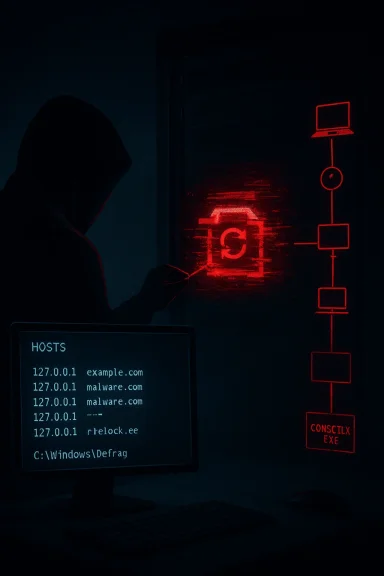
- The modified update replaced or trojanized an updater component (reported as a modified Reload.exe), which then dropped a downloader/backdoor (reported as CONSCTLX.exe or related binaries).
- The trojanized component attempted to block further remediation by modifying the Windows HOSTS file and tampering with eScan update configurations.
- MicroWorld isolated the affected infrastructure, rotated credentials, rebuilt the cluster, and produced a remediation update and guidance for impacted customers.
Why this matters: security products as attack surfaces
Security software sits at the heart of an organization’s defense posture — it has high privileges, broad system visibility, and trust from users and administrators. When the update mechanism of such a product is abused, the consequences are amplified:- A compromised update server can deliver signed or otherwise trusted binaries to many endpoints in a single action.
- Malware arriving via a vendor update often runs with the same privileges as the legitimate updater, enabling persistence and deep system modification.
- Anti‑remediation measures embedded in the payload — like hosts file changes and registry tampering — deliberately interfere with automatic recovery, forcing time‑consuming manual remediation.
Technical picture: the reported malware chain
Security analysts who investigated the incident observed a multi‑stage architecture with specific behaviors that warrant attention.Stage 1 — Trojanized updater component
- The initial file delivered through the update infrastructure was a modified updater binary (reported as Reload.exe in multiple technical writeups). The replacement was crafted to be executed by the legitimate update mechanism so the attack would appear normal to the client.
- The trojanized binary carried a certificate or signature that appeared to belong to the vendor but the signature was reported as invalid when checked by Windows/third‑party services — a classic attempt to leverage perceived vendor trust while evading quick detection.
Stage 2 — Persistence, evasion, and anti‑remediation
- The malicious update established persistence through scheduled tasks and registry entries. Scheduled tasks used innocuous‑sounding names (examples reported included "CorelDefrag") and locations such as C:\Windows\Defrag\ to blend in.
- The payload modified the Windows HOSTS file to block access to vendor update servers, effectively preventing automatic updates and vendor remediation from reaching infected endpoints.
- Registry keys with randomly generated GUID names were reportedly used to store encoded payloads or scripts, complicating automated scanning.
Stage 3 — Downloader / Backdoor
- Final payloads observed on infected systems included a downloader/backdoor component (reported as CONSCTLX.exe, among other names). This component provided remote command execution, outbound communication to command‑and‑control (C2) infrastructure, and the ability to fetch additional modules or payloads.
- Observed capabilities included running arbitrary commands, modifying system files, and maintaining long‑term access to compromised systems.
Who was affected — scope and uncertainty
MicroWorld states that the product itself was not tampered with and that only customers who downloaded updates from the affected regional cluster during the approximately two‑hour window were impacted. The company also reports proactive outreach to affected customers.At the same time, independent researchers have reported a broader set of telemetry indicating infections on some enterprise and consumer endpoints, while other firms reported that at least some customers running additional protections (EDR, layered detection) were able to detect and block the chain.
Important caveats:
- MicroWorld has not published exact user counts for the impacted cluster; the company said it supports “millions” of users overall but did not disclose how many downloaded the malicious package.
- The identity of the threat actor remains unknown; press coverage has reminded readers of a 2024 campaign that exploited eScan updates (GuptiMiner / Gupti/related campaigns), but attribution in this 2026 incident has not been publicly confirmed.
Indicators and artifacts to look for (what admins and power users should check)
If you run eScan or manage endpoints that do, investigate the following signs immediately. These are the indicators that multiple incident reports and technical analyses flagged as suspicious.- Presence of trojanized updater file names such as Reload.exe in eScan folders.
- Presence of downloader/backdoor binaries with names similar to CONSCTLX.exe or other unusual executables in eScan or system directories.
- Unexpected scheduled tasks named to appear benign (examples reported include CorelDefrag) — particularly if they run from C:\Windows\Defrag.
- Modifications to the Windows HOSTS file that block known eScan update domains or other security vendor domains.
- eScan update failures or popup messages about updates being unavailable on January 20, 2026.
- Registry keys with randomly generated GUIDs under HKLM or HKCU containing odd binary data or encoded scripts.
- Outbound network connections to suspicious domains or IP addresses observed in the writeups (note that specific C2 domains and IPs were reported by researchers; defenders should rely on official IOCs from their own vendors).
- Unusual processes spawning PowerShell or making outbound HTTPS/HTTP requests to strange domains.
Immediate actions: a 9‑step incident response checklist
- Isolate impacted hosts from the network immediately to prevent lateral movement and further C2 communication.
- Preserve logs and volatile data (memory, event logs, running processes) for forensic analysis.
- Run a complete EDR/antivirus scan with multiple engines if available; do not rely on a single vendor to find this attack.
- Inspect and restore the Windows HOSTS file; look for blocked entries that prevent vendor updates.
- Check scheduled tasks and remove any suspicious tasks (document original state first).
- Search the registry for unknown GUID keys containing encoded payloads; export them for analysis before removal.
- Reset credentials for admin/service accounts that accessed affected systems; rotate any secrets that may have been exposed.
- Apply vendor remediation guidance or manual patch provided by MicroWorld; confirm update channels are functional after remediation.
- If infection is confirmed or artifacts are present, engage a qualified incident response team for thorough eradication and recovery.
Vendor response and what to watch for
MicroWorld reported detection on January 20, 2026, isolation of the affected infrastructure, credential rotation, and distribution of a remediation update. Customers were reportedly contacted directly as part of remediation efforts.From a vendor‑risk perspective, the following are important signals to follow:
- Did MicroWorld provide a transparent timeline and detailed IOCs to enterprise customers and incident response providers?
- Is the vendor publishing cryptographic details (which code‑signing certificate was used, revocation steps, and validity checks)?
- Are remediation steps verifiable and repeatable across affected systems, including a documented manual patch for systems that lost update functionality?
- Has the vendor completed a root‑cause investigation and described the attack vector used to breach the update server (compromised credentials, vulnerability in the update portal, misconfigured access controls)?
Broader analysis: what this reveals about supply‑chain risk
This incident is a textbook example of supply‑chain risk for software distribution:- Attackers increasingly target upstream infrastructure (update servers, CI/CD pipelines, software repositories) because a single successful compromise can scale across many organizations.
- Security vendors are a high‑value target because the software they push runs with elevated privileges and is trusted by customers.
- Modern attackers combine code‑tampering with anti‑remediation — for example, modifying hosts files to block update servers — to buy time and maximize persistence.
- Never assume any single control is infallible; apply defense‑in‑depth.
- Monitor for anomalous changes to update channels, file signatures, and unusual scheduled tasks.
- Validate the integrity of vendor updates where possible (checksums, signing verification, out‑of‑band confirmation).
- Harden vendor communication channels (e.g., TLS enforcement, certificate pinning where feasible, strict server‑side controls).
Risk mitigation: policies and technical controls you should consider
- Enforce egress filtering and DNS controls to block known malicious C2 domains and suspicious dynamic DNS names at the perimeter.
- Implement allow‑listing for critical update processes and restrict which binaries may be launched by your update mechanism.
- Treat any high‑privilege updater as a high‑risk service: deploy additional monitoring and process attestation around it.
- Use multiple, independent telemetry sources (EDR, network monitoring, DNS logs) to detect post‑installation anomalies that a single product might not flag.
- Require vendors to adopt secure update practices: HTTPS for updates, mandatory code signing with certificate verification, and strong operational controls on update servers.
Practical guidance for Windows users (non‑admins)
If you run eScan on a personal Windows PC, follow these steps right away:- Reboot the PC into safe mode if you suspect infection, and then inspect the Windows HOSTS file for unexpected entries that block update domains.
- Open Task Scheduler and look for tasks you did not create, especially tasks named to look innocuous (e.g., anything containing “Defrag” but not part of your system maintenance).
- Check your programs and installed updates for unfamiliar entries and scan the system with a second trusted scanner or an on‑demand malware scanner.
- If in doubt, disconnect from the internet, preserve any logs or alerts, and contact eScan support for vendor‑provided remediation tools.
The attribution question: who did it?
Public reporting on this incident emphasizes that the threat actor is unknown at present. Media coverage reminded readers of a 2024 series of incidents (GuptiMiner/Gupti campaigns) that exploited weaknesses in eScan’s update chain and were linked by some researchers to North Korean actors in at least one instance.Cautionary notes on attribution:
- Similar tactics, techniques, and procedures (TTPs) do not automatically imply the same actor is responsible; attackers often reuse tools and methods or copy successful campaigns.
- Attribution requires robust telemetry, code overlap analysis, infrastructure linkage, and often classified intelligence — none of which have been publicly confirmed for this event.
- Public reporting so far documents the technical chain and remediation steps, but does not provide a conclusive actor identity.
Strengths and weaknesses of the response
Strengths
- MicroWorld detected the issue and reported isolating the affected infrastructure.
- The vendor appears to have rotated credentials, rebuilt systems, and pushed a remediation update.
- Independent security researchers rapidly analyzed the malware chain and published detection artifacts, helping defenders respond.
Weaknesses and risks
- Lack of a full public root‑cause statement and limited disclosure on the number of impacted customers reduce confidence and complicate response for administrators.
- The malware’s anti‑remediation capabilities (hosts file changes and update tampering) raise the bar for recovery and can prevent automated vendor fixes.
- If attackers accessed signing material or other privileged keys, the long‑term trustworthiness of vendor artifacts could be questioned until a full audit is completed.
Longer‑term lessons for enterprises and vendors
For enterprises:- Treat software update channels as high‑risk infrastructure. Monitor and protect them just like any other critical service.
- Maintain strong segregation for vendor update traffic, with egress and DNS monitoring, and with fallback validation plans in case vendor updates fail.
- Hardening update infrastructure must be a priority: enforce TLS, sign and validate updates properly, restrict update server access, and maintain an auditable key management posture.
- Build and test incident response processes for update server compromise scenarios, including out‑of‑band remediation mechanisms that cannot be disabled by a compromised endpoint.
How to tell if you’re affected: quick checklist
- Did you see update errors or popups from eScan around January 20, 2026?
- Is the Windows HOSTS file blocking eScan or other security domains?
- Are there newly created scheduled tasks with odd names like “CorelDefrag”?
- Do you see unknown executables in eScan directories (Reload.exe, CONSCTLX.exe, or similarly named files)?
- Has your endpoint made outbound connections to unfamiliar domains around the incident timeframe?
Final verdict: vigilance, not panic
This incident is a stark reminder that trust in software vendors must be paired with controls and verification. While the number of affected customers appears limited to the subset that used the compromised regional update cluster during the two‑hour window, the technique — weaponizing an antivirus update to plant a backdoor and then blocking remediation — is especially dangerous and should be treated as a wake‑up call.Defenders should respond decisively: assume compromise for any endpoint with indicators, perform thorough forensic checks, rotate credentials, and apply vendor remediation. At the same time, organizations should press their vendors for full transparency about root cause and remediation effectiveness and demand robust protections around update systems going forward.
Supply‑chain attacks are not theoretical; they are now a recurring operational reality. The only winning strategy is a layered defense that anticipates vendor failures and limits the blast radius when they occur.
Source: TechRadar Top antivirus hacked to push out a malicious update - find out if you're affected
