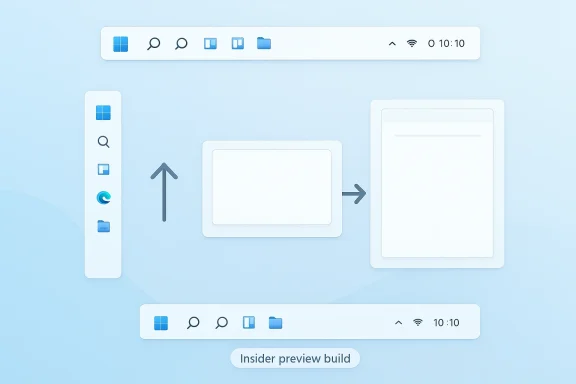
Microsoft’s renewed interest in a movable Windows 11 taskbar marks one of the clearest signs yet that the company is finally willing to revisit a long-standing design decision that has frustrated power users since launch. After years of hearing complaints about the taskbar being fixed to the bottom edge, Microsoft is now openly signaling that alternate taskbar positions are part of its 2026 Windows quality push. That is more than a cosmetic tweak. It suggests a broader shift in how Redmond is thinking about personalization, workflow flexibility, and user satisfaction in Windows 11. (blogs.windows.com)
When Windows 11 arrived, one of its most controversial changes was not the new Start menu or centered icons, but the removal of a behavior many people considered basic: moving the taskbar to the top or sides of the screen. Microsoft’s support documentation still states plainly that there are no settings for moving a taskbar to the top or to the side of the screen, and that the taskbar is positioned at the bottom. That limitation has remained in place even as Microsoft gradually expanded other taskbar options, including alignment, badges, system tray controls, and search presentation. (support.microsoft.com)
The company has, however, kept refining the taskbar in smaller ways. Over the past several Insider releases, Microsoft has tested or shipped changes such as taskbar icon scaling, improvements to taskbar search, new hover animations, and other polish items that make the surface more responsive and adaptive. These changes matter because they show the taskbar is no longer a frozen legacy element. It is becoming a living part of the Windows shell again, even if the most requested layout option was held back for much longer than users expected.
The renewed focus on taskbar flexibility also fits a larger corporate message. In March 2026, Microsoft said it was raising the bar on Windows 11 quality, with explicit mention of expanded taskbar personalization options, including alternate taskbar positions and a smaller taskbar. That is the most important official signal so far. It does not guarantee a shipping date, but it does confirm that the feature is no longer just community speculation or a dream of registry hacks and third-party tools. It is now part of Microsoft’s own roadmap language. (blogs.windows.com)
This is also a response to years of user friction. Since the Windows 11 launch, the taskbar position has been a shorthand complaint for a broader critique: that Microsoft was making the shell simpler in some ways, but less adaptable in others. The latest hints suggest the company has finally internalized that flexibility is not the enemy of modern design. In fact, for many users, it is the difference between a product that feels elegant and one that feels constrained. (support.microsoft.com)
There is also a subtle but meaningful distinction between what Microsoft has officially said and what the rumor mill has described. Reports have suggested that a preview of the feature appeared in a deleted video and that the implementation might use settings-based controls rather than a right-click shortcut. Those are plausible details, but they remain unconfirmed. What is confirmed is the strategic intent: Microsoft wants to give users more control over the taskbar surface. (blogs.windows.com)
The criticism of Windows 11 has never been only about aesthetics. It has been about the feeling that Windows lost configurability in the transition from Windows 10. Microsoft still allows icon alignment changes and several taskbar behavior toggles, but the broader message from users has been consistent: give us back the ability to shape the shell around our habits. That is the pressure behind this feature’s staying power. (support.microsoft.com)
There is also an emotional component. The taskbar is one of the oldest and most visible parts of the Windows identity. When Microsoft freezes it, users interpret that as a statement about what the company values. Restoring movement would therefore be read not simply as a feature add, but as an admission that Windows 11 needed to become more forgiving, more adaptable, and more respectful of legacy workflows. (support.microsoft.com)
That is likely why the rumored preview reportedly collapsed the full search box into a smaller icon when the taskbar was moved to the side. Even without official confirmation, the logic makes sense. Side-mounted taskbars have far less width, so a full search field would either waste space or distort the entire layout. A compact icon preserves usability without forcing the shell to become awkward. (support.microsoft.com)
A well-designed movable taskbar would therefore need to account for several edge cases at once. It must work with the system tray, avoid clipping pinned apps, preserve the Start button’s discoverability, and keep animations smooth enough not to feel like an afterthought. If Microsoft gets that right, the feature could feel like a natural extension of the Windows shell rather than a bolt-on legacy concession. (blogs.windows.com)
That would fit Microsoft’s broader Windows 11 philosophy. The company has often favored deliberate settings flows and standardized controls over ad hoc shell manipulation. The downside is that long-time users lose some immediacy. The upside is that Microsoft can better support the feature, especially across varied device types and future shell changes. That tradeoff is likely to define the debate if and when the feature arrives. (blogs.windows.com)
The risk, of course, is that Microsoft ships a movable taskbar that technically satisfies the request while still feeling less natural than the old behavior. Users do not only want a placement menu; many want the tactile, reflexive experience of just grabbing and moving the bar. If the company omits that and buries the option too deeply, it may solve the problem only on paper. (support.microsoft.com)
The consumer impact also extends to accessibility. Some users benefit from moving interface elements into positions that reduce strain or better match their monitor arrangement. For them, a movable taskbar is not a novelty. It is a practical accommodation that can improve the comfort of daily use in subtle but meaningful ways. (support.microsoft.com)
There is also a training benefit. Some workers are deeply attached to taskbar placement because their job involves dense window switching, multiple desktops, or specialist applications. Giving those users a supported way to configure the shell can reduce friction, improve adoption, and make Windows 11 less likely to be seen as a downgrade from Windows 10.
That said, enterprises will want the feature to be tightly controlled. Too much freedom can create inconsistent support tickets, especially if some devices use a top taskbar and others do not. The best outcome for IT is a feature that is available, policy-aware, and easy to standardize, not one that becomes yet another user-side variable. (blogs.windows.com)
It also helps blunt the appeal of third-party shell utilities. When Microsoft locks down customization, a market opens for Start menu replacements, Explorer mods, and taskbar tools that promise to restore lost functionality. Some of those tools are popular, but they also introduce fragility. A native feature reduces that shadow ecosystem’s leverage.
There is a broader branding implication as well. Microsoft has spent years trying to reposition Windows as modern, secure, and adaptive. Delivering long-requested personalization now would support the narrative that Windows 11 is not just being maintained, but actively improved in response to actual user pain points. That is a small UI change with a large symbolic footprint. (blogs.windows.com)
The same report also mentioned a smaller taskbar, which hints that Microsoft may be rethinking the taskbar as a scalable platform rather than a fixed strip. That could open the door to more ambitious personalization later, including density settings, touch-oriented modes, or even more aggressive icon adaptations. If that happens, the taskbar could become one of the most flexible parts of Windows again. (blogs.windows.com)
There is a strategic reason for this as well. Windows 10 support ended on October 14, 2025, and Microsoft wants users to see Windows 11 as the modern home for the desktop. Better shell customization helps with that transition because it addresses one of the most visible reasons people hesitated to move forward. (support.microsoft.com)
If the company gets the implementation right, this could be one of those rare UI changes that feels small on paper but significant in practice. A movable taskbar would restore a sense of agency to Windows 11, reduce the need for hacks, and show that Microsoft is willing to revisit decisions that did not age well. It would also send a broader message that the desktop still matters, and that user preference can still beat one-size-fits-all design. (blogs.windows.com)
Source: Windows Report https://windowsreport.com/microsoft-teases-long-awaited-movable-taskbar-for-windows-11/
 Background
When Windows 11 arrived, one of its most controversial changes was not the new Start menu or centered icons, but the removal of a behavior many people considered basic: moving the taskbar to the top or sides of the screen. Microsoft’s support documentation still states plainly that there are no settings for moving a taskbar to the top or to the side of the screen, and that the taskbar is positioned at the bottom. That limitation has remained in place even as Microsoft gradually expanded other taskbar options, including alignment, badges, system tray controls, and search presentation. (support.microsoft.com)The company has, however, kept refining the taskbar in smaller ways. Over the past several Insider releases, Microsoft has tested or shipped changes such as taskbar icon scaling, improvements to taskbar search, new hover animations, and other polish items that make the surface more responsive and adaptive. These changes matter because they show the taskbar is no longer a frozen legacy element. It is becoming a living part of the Windows shell again, even if the most requested layout option was held back for much longer than users expected.
The renewed focus on taskbar flexibility also fits a larger corporate message. In March 2026, Microsoft said it was raising the bar on Windows 11 quality, with explicit mention of expanded taskbar personalization options, including alternate taskbar positions and a smaller taskbar. That is the most important official signal so far. It does not guarantee a shipping date, but it does confirm that the feature is no longer just community speculation or a dream of registry hacks and third-party tools. It is now part of Microsoft’s own roadmap language. (blogs.windows.com)
This is also a response to years of user friction. Since the Windows 11 launch, the taskbar position has been a shorthand complaint for a broader critique: that Microsoft was making the shell simpler in some ways, but less adaptable in others. The latest hints suggest the company has finally internalized that flexibility is not the enemy of modern design. In fact, for many users, it is the difference between a product that feels elegant and one that feels constrained. (support.microsoft.com)
What Microsoft Has Confirmed
Microsoft has not issued a polished product announcement for a movable taskbar in the consumer sense, but it has now said enough to make the direction unmistakable. The March 2026 Windows quality post explicitly listed alternate taskbar positions as part of the broader Windows 11 improvement effort. That language is important because Microsoft typically reserves roadmap-style phrasing for work it is seriously pursuing, not casual experiments. (blogs.windows.com)The clearest official clue
The most telling detail is that Microsoft tied taskbar positioning to a larger quality initiative, not a standalone feature tease. That implies the company sees the change as part of a more holistic polish effort. It is not merely about enabling a menu option; it is about making the shell feel more consistent, dependable, and user-driven across desktop and tablet-like scenarios. (blogs.windows.com)There is also a subtle but meaningful distinction between what Microsoft has officially said and what the rumor mill has described. Reports have suggested that a preview of the feature appeared in a deleted video and that the implementation might use settings-based controls rather than a right-click shortcut. Those are plausible details, but they remain unconfirmed. What is confirmed is the strategic intent: Microsoft wants to give users more control over the taskbar surface. (blogs.windows.com)
- Confirmed: Microsoft is working on alternate taskbar positions.
- Confirmed: The work is part of a broader Windows 11 quality initiative.
- Confirmed: Microsoft still currently documents Windows 11 taskbar placement as fixed to the bottom.
- Not confirmed: Whether the final UI will live in Settings, a context menu, or another control surface.
- Not confirmed: Whether classic drag-to-move behavior will return. (blogs.windows.com)
Why the Taskbar Matters So Much
The taskbar is not a trivial UI strip. In Windows, it is the central control point for launching apps, monitoring open windows, checking notifications, and accessing search. Microsoft’s own documentation describes the taskbar as the place where users interact with Search, Task View, pinned apps, system tray items, and desktop shortcuts. If that surface changes, the workflow changes with it. (support.microsoft.com)A workflow surface, not just chrome
For many people, especially power users, the taskbar position is tied to muscle memory and screen geometry. A bottom taskbar suits some ultrawide and laptop setups, but a top taskbar can better complement certain monitor arrangements and reduce mouse travel. On multi-monitor desktops, the preferred placement can even become part of a carefully tuned ergonomic setup. That is why a missing option can feel like a genuine regression rather than a stylistic disagreement. (support.microsoft.com)The criticism of Windows 11 has never been only about aesthetics. It has been about the feeling that Windows lost configurability in the transition from Windows 10. Microsoft still allows icon alignment changes and several taskbar behavior toggles, but the broader message from users has been consistent: give us back the ability to shape the shell around our habits. That is the pressure behind this feature’s staying power. (support.microsoft.com)
There is also an emotional component. The taskbar is one of the oldest and most visible parts of the Windows identity. When Microsoft freezes it, users interpret that as a statement about what the company values. Restoring movement would therefore be read not simply as a feature add, but as an admission that Windows 11 needed to become more forgiving, more adaptable, and more respectful of legacy workflows. (support.microsoft.com)
- The taskbar sits at the center of daily navigation.
- It affects launching, switching, searching, and monitoring.
- Its placement influences mouse travel and screen ergonomics.
- The setting has symbolic weight because it reflects Microsoft’s design philosophy.
- Restoring it would address one of the most persistent Windows 11 complaints. (support.microsoft.com)
How the New Design Could Work
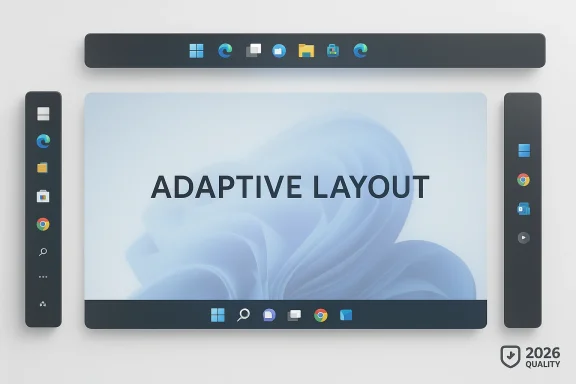
The reported preview behavior suggests Microsoft is thinking beyond a simple on/off switch. A movable taskbar has to behave intelligently when placed on the top, left, or right edges, because the current Windows 11 shell is designed with the bottom edge in mind. That means the company must solve not just layout, but also spacing, icon scaling, search presentation, and animation behavior. (support.microsoft.com)Adaptive UI is the real challenge
One of the most plausible implementation paths is a dynamic taskbar that adapts its components based on screen edge. Microsoft has already shown interest in this general idea through taskbar icon scaling, where icons automatically shrink when the bar is crowded. That same design mindset could extend to placement, allowing the shell to reduce elements or swap them for compact variants when horizontal space is limited.That is likely why the rumored preview reportedly collapsed the full search box into a smaller icon when the taskbar was moved to the side. Even without official confirmation, the logic makes sense. Side-mounted taskbars have far less width, so a full search field would either waste space or distort the entire layout. A compact icon preserves usability without forcing the shell to become awkward. (support.microsoft.com)
A well-designed movable taskbar would therefore need to account for several edge cases at once. It must work with the system tray, avoid clipping pinned apps, preserve the Start button’s discoverability, and keep animations smooth enough not to feel like an afterthought. If Microsoft gets that right, the feature could feel like a natural extension of the Windows shell rather than a bolt-on legacy concession. (blogs.windows.com)
- Edge-aware layout will be essential.
- Search may need to shrink or simplify on side placements.
- Animations matter because shell movement should feel polished.
- System tray behavior must remain readable on narrower surfaces.
- Touch and mouse use cases will need separate attention. (support.microsoft.com)
Settings Versus Dragging
The big open question is whether Microsoft will restore the classic drag-to-move behavior users remember from older Windows versions. At this stage, there is no official confirmation that drag repositioning is returning. In fact, the evidence points to a more controlled model, where placement may be managed from Settings rather than direct dragging. (blogs.windows.com)That would fit Microsoft’s broader Windows 11 philosophy. The company has often favored deliberate settings flows and standardized controls over ad hoc shell manipulation. The downside is that long-time users lose some immediacy. The upside is that Microsoft can better support the feature, especially across varied device types and future shell changes. That tradeoff is likely to define the debate if and when the feature arrives. (blogs.windows.com)
The risk, of course, is that Microsoft ships a movable taskbar that technically satisfies the request while still feeling less natural than the old behavior. Users do not only want a placement menu; many want the tactile, reflexive experience of just grabbing and moving the bar. If the company omits that and buries the option too deeply, it may solve the problem only on paper. (support.microsoft.com)
Consumer Impact
For everyday consumers, a movable taskbar is less about technical power and more about comfort. Some users simply prefer the Start button at the top because it keeps the main workflow near the window controls. Others want the bottom of the screen free for dock-like apps, video playback, or larger task surfaces. Windows 11’s current limitation has forced everyone into one layout, regardless of preference. (support.microsoft.com)The home desktop angle
On a family PC or casual laptop, the feature may not be used every day, but its presence matters because it makes Windows feel less rigid. Even if most consumers leave the taskbar at the bottom, knowing they can move it can improve the perception of control. That psychological effect should not be underestimated; it often shapes satisfaction more than raw feature usage. (blogs.windows.com)The consumer impact also extends to accessibility. Some users benefit from moving interface elements into positions that reduce strain or better match their monitor arrangement. For them, a movable taskbar is not a novelty. It is a practical accommodation that can improve the comfort of daily use in subtle but meaningful ways. (support.microsoft.com)
- More layout freedom for home desktops.
- Better ergonomics for mixed-monitor setups.
- A more familiar experience for users coming from Windows 10.
- Less reliance on third-party tweaks or registry hacks.
- A stronger sense that Windows 11 listens to feedback. (support.microsoft.com)
Enterprise Impact
For enterprises, this feature is more consequential than it may first appear. IT departments care deeply about workflow consistency, training burden, and the ability to support users without introducing unstable third-party utilities. A native movable taskbar would reduce the need for unsupported tools that often break with updates or raise security concerns.Supportability and policy
Enterprises also tend to value predictable management. If Microsoft exposes taskbar placement through Settings or policy controls, administrators could standardize it across devices rather than relying on user-level workarounds. That would be a material improvement over the current state, where the official answer is still essentially “bottom only.” (support.microsoft.com)There is also a training benefit. Some workers are deeply attached to taskbar placement because their job involves dense window switching, multiple desktops, or specialist applications. Giving those users a supported way to configure the shell can reduce friction, improve adoption, and make Windows 11 less likely to be seen as a downgrade from Windows 10.
That said, enterprises will want the feature to be tightly controlled. Too much freedom can create inconsistent support tickets, especially if some devices use a top taskbar and others do not. The best outcome for IT is a feature that is available, policy-aware, and easy to standardize, not one that becomes yet another user-side variable. (blogs.windows.com)
- Helps reduce dependence on unsupported shell mods.
- Improves supportability by keeping the feature native.
- Could be managed through policy if Microsoft exposes the right controls.
- May reduce user complaints during Windows 11 migration.
- Needs consistency to avoid new help desk complexity.
Competitive and Market Implications
It may sound odd to talk about competition in a taskbar story, but shell design is a competitive arena. Operating systems differentiate themselves not only through apps and services, but through how much control they give users over the desktop. Microsoft’s willingness to re-open taskbar positioning suggests it understands that Windows cannot win by being merely consistent; it has to be configurable too. (blogs.windows.com)Linux and macOS as the quiet benchmark
Desktop environments in the broader PC ecosystem have long offered a mix of dock and panel placement choices. Even when users stay within Windows, they often compare the shell’s flexibility with other platforms. By restoring taskbar movement, Microsoft narrows one of the more obvious usability talking points critics have used against Windows 11. (support.microsoft.com)It also helps blunt the appeal of third-party shell utilities. When Microsoft locks down customization, a market opens for Start menu replacements, Explorer mods, and taskbar tools that promise to restore lost functionality. Some of those tools are popular, but they also introduce fragility. A native feature reduces that shadow ecosystem’s leverage.
There is a broader branding implication as well. Microsoft has spent years trying to reposition Windows as modern, secure, and adaptive. Delivering long-requested personalization now would support the narrative that Windows 11 is not just being maintained, but actively improved in response to actual user pain points. That is a small UI change with a large symbolic footprint. (blogs.windows.com)
How It Fits Microsoft’s 2026 Quality Push
The taskbar story makes the most sense when viewed as part of Microsoft’s 2026 Windows quality agenda rather than as a standalone feature leak. The company’s March 2026 message focused on improving reliability, feedback loops, and shell consistency, while also naming alternate taskbar positions as a concrete area of work. That combination strongly suggests a broader release cycle centered on user-perceived polish. (blogs.windows.com)Quality over novelty
This is a notable shift in tone. In earlier Windows 11 eras, Microsoft often emphasized new experiences, AI hooks, or surface-level design adjustments. The 2026 framing is different. It leans into quality, consistency, and trust. A movable taskbar fits that approach because it is not flashy, but it is deeply meaningful to the people who use Windows every day. (blogs.windows.com)The same report also mentioned a smaller taskbar, which hints that Microsoft may be rethinking the taskbar as a scalable platform rather than a fixed strip. That could open the door to more ambitious personalization later, including density settings, touch-oriented modes, or even more aggressive icon adaptations. If that happens, the taskbar could become one of the most flexible parts of Windows again. (blogs.windows.com)
There is a strategic reason for this as well. Windows 10 support ended on October 14, 2025, and Microsoft wants users to see Windows 11 as the modern home for the desktop. Better shell customization helps with that transition because it addresses one of the most visible reasons people hesitated to move forward. (support.microsoft.com)
Strengths and Opportunities
Microsoft’s renewed taskbar work has several obvious upsides if the company executes it cleanly. Most importantly, it would restore a long-missing control that power users have been asking for since Windows 11 launched, while also reinforcing the idea that Microsoft is finally taking desktop quality seriously again. It could also improve both consumer satisfaction and enterprise acceptance, which is rare for a single shell feature.- Restores a highly requested legacy workflow.
- Improves ergonomics on certain monitor setups.
- Reduces the need for unsupported third-party tools.
- Strengthens Microsoft’s quality-first messaging for Windows 11.
- Helps Windows 11 feel more like a mature desktop platform.
- Could provide a foundation for future taskbar density and layout options.
- Signals that Microsoft is listening to long-term user feedback. (blogs.windows.com)
Risks and Concerns
The biggest danger is that Microsoft ships a partial solution that looks good in demos but feels awkward in real use. A movable taskbar must work well on all screen edges, preserve discoverability, and avoid making search or tray access clumsy. If the feature arrives as a half-baked compromise, it could reignite the same criticism that has dogged Windows 11 from the beginning.- The final UI may be settings-heavy and less natural than drag-and-drop.
- Side placements may force awkward search bar compromises.
- Poor animation or layout behavior could make the shell feel unstable.
- Enterprises may need policy controls to avoid inconsistent deployments.
- Users could be disappointed if drag-to-move does not return.
- The feature may create new bugs in touch or multi-monitor scenarios.
- Microsoft could overcorrect and make the taskbar too rigid in the opposite direction. (blogs.windows.com)
Looking Ahead
The next phase will be about proof, not promises. Microsoft has already set expectations by placing alternate taskbar positions inside its broader Windows quality plan, but users will judge the feature by how it behaves in the hands of Insiders and, eventually, in production builds. The details will matter more than the announcement, especially if Microsoft wants to avoid a repeat of past taskbar experiments that never fully landed. (blogs.windows.com)If the company gets the implementation right, this could be one of those rare UI changes that feels small on paper but significant in practice. A movable taskbar would restore a sense of agency to Windows 11, reduce the need for hacks, and show that Microsoft is willing to revisit decisions that did not age well. It would also send a broader message that the desktop still matters, and that user preference can still beat one-size-fits-all design. (blogs.windows.com)
- Watch for Insider builds that expose placement controls.
- Watch whether Microsoft uses Settings, a context menu, or both.
- Watch for confirmation on drag-to-move support.
- Watch how the UI behaves with the taskbar on the top and sides.
- Watch whether Microsoft pairs placement with smaller taskbar options. (blogs.windows.com)
Source: Windows Report https://windowsreport.com/microsoft-teases-long-awaited-movable-taskbar-for-windows-11/
Last edited: