

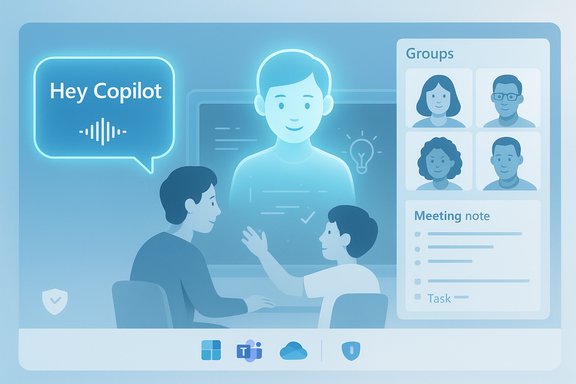
Satya Nadella’s recent on-record video and public remarks make clear that Microsoft’s CEO treats Copilot not as a set of one-off tricks but as everyday collaborators — three daily habits he describes (voice wake, the “Mico” persona, and multi-user Groups) signal how Microsoft expects AI to live inside Windows and Microsoft 365 as an always-available assistant.
Microsoft has been systematically folding generative AI into Windows, Edge and Microsoft 365 for more than a year, moving from isolated features to a platform-level Copilot that can listen, see and act when users opt in. The company’s public product updates and insider documentation show a staged rollout of voice wake capabilities, screen-aware Vision features, agentic Actions and a consumer-focused push that adds long-term memory and multi-person collaboration modes. In a short video posted to X on 24 October, Satya Nadella highlighted three Copilot behaviors he uses as part of his day-to-day workflow. He framed them as “daily habits” and described the experience in concrete terms — from invoking Copilot with a voice wake phrase to using a friendly voice persona for tutoring and working in shared AI-enabled sessions with family and colleagues. That clip is notable because the CEO’s public habits function as both user guidance and a signal to enterprise customers about how Microsoft expects this technology to be adopted. This article unpacks Nadella’s three habits, verifies the technical claims that make them possible, assesses benefits and risks for Windows and Microsoft 365 users, and gives practical guidance for IT teams who must steward adoption across organizations.
Source: AI Magazine What Are Satya Nadella’s Daily Microsoft AI Habits?
 Background / Overview
Microsoft has been systematically folding generative AI into Windows, Edge and Microsoft 365 for more than a year, moving from isolated features to a platform-level Copilot that can listen, see and act when users opt in. The company’s public product updates and insider documentation show a staged rollout of voice wake capabilities, screen-aware Vision features, agentic Actions and a consumer-focused push that adds long-term memory and multi-person collaboration modes. In a short video posted to X on 24 October, Satya Nadella highlighted three Copilot behaviors he uses as part of his day-to-day workflow. He framed them as “daily habits” and described the experience in concrete terms — from invoking Copilot with a voice wake phrase to using a friendly voice persona for tutoring and working in shared AI-enabled sessions with family and colleagues. That clip is notable because the CEO’s public habits function as both user guidance and a signal to enterprise customers about how Microsoft expects this technology to be adopted. This article unpacks Nadella’s three habits, verifies the technical claims that make them possible, assesses benefits and risks for Windows and Microsoft 365 users, and gives practical guidance for IT teams who must steward adoption across organizations.What Satya Nadella said — the three daily Copilot habits
1) “Hey, Copilot” — voice as a new input modality
Nadella emphasizes voice-first interaction as a daily habit: he invokes Copilot with a wake phrase — “Hey, Copilot” — when drafting documents or emails, and calls it “the most exciting new way to interact with a computer since touch,” likening it to “a new mouse” that happens to be a voice. This is not marketing hyperbole; Microsoft has shipped an opt‑in wake-word feature that lets users invoke Copilot hands‑free when the PC is unlocked. The official Windows Insider documentation explains the feature, how to enable it, and the privacy design: wake‑word detection runs locally via a short on‑device buffer and only sends audio to the cloud after the wake phrase is detected. Key characteristics Nadella highlighted:- Instant invocation: Say “Hey, Copilot” to start a voice session without touching the keyboard.
- Natural, conversational interaction: Ask questions, request edits, or follow up with context as you would in a conversation.
- On-device privacy guard: Wake‑word spotting is performed locally; the system only streams audio to cloud services once a session begins (and only if the user’s settings permit it).
2) Mico — a persona for conversational tutoring and learning
Nadella also called out Mico, the voice-first persona Microsoft uses in consumer Copilot builds. He described Mico as a Socratic tutor — an engaging, personality-driven interface that helps him and his daughter learn together. The Mico persona is built to be expressive (non-photorealistic by design) and to adopt pedagogical patterns (questioning, guided problem-solving) that help users learn, not just be handed answers. Microsoft’s consumer Copilot updates and demonstrations show Mico as a deliberate attempt to make voice interactions feel human-friendly and pedagogically useful.3) Groups — shared Copilot sessions for family and teams
The third habit Nadella mentioned is Groups, a multi-user Copilot mode that lets multiple people join a shared Copilot session. He described using Groups for family learning and quick coordination — a way to “jam together with AI.” Microsoft’s consumer roadmap shows shared, group-oriented Copilot chats and collaboration features designed for up to dozens of participants in casual scenarios, with explicit invitations and opt-in semantics. The capability extends Copilot from a personal assistant to a collaborative facilitator, with new UX patterns for shared memory, split tasks, and joint summarization.Technical verification — what’s real and how it works
To evaluate Nadella’s comments, it helps to separate user-visible features from the platform architecture that enables them.Voice wake and local spotting
The wake-word feature “Hey, Copilot” is publicly documented and began rolling out to Windows Insiders in mid‑May as an opt‑in setting. The design uses an on‑device low‑latency wake-word spotter with a rolling audio buffer; that buffer itself is not stored, and audio is only sent to cloud services after the wake phrase triggers a full Copilot Voice session. This preserves a basic level of microphone privacy while enabling always-available voice invocation when the PC is unlocked.Persona and UX design (Mico)
Mico — the friendly, tutor-style persona — is a consumer-facing design choice rather than a fundamentally new model architecture. It is a trained set of response styles, prompting templates and UX affordances (visual avatar, varied tones, guided Socratic flows). Microsoft’s product demos and news pages show that Mico is opt‑in, non-photorealistic by design, and attached to memory and profile controls that the company says users can manage. Treat Mico as a presentation and behavior layer designed to increase engagement, especially for learning scenarios; its capabilities depend on the underlying language model and connectors the user grants.Cross-surface connectors and model routing
More profound than a single feature is the work Microsoft has done to let Copilot reason across apps (Outlook, Teams, OneDrive/SharePoint, local files and vision inputs) and do so economically. Microsoft’s public descriptions of Copilot include server-side routing between model variants (to balance latency, cost and depth of reasoning) and longer context windows for multi-document synthesis. These engineering choices — model routing, context expansion, and tenant-grade connectors — underpin the advanced behaviors Nadella uses, like synthesizing meeting history or assembling a project rollup from dispersed signals. These claims have been corroborated in Microsoft materials and in contemporaneous reporting on the Copilot rollout.Why these habits matter for knowledge workers and Windows users
Nadella’s three habits are lightweight but strategically instructive. They highlight how Microsoft wants Copilot to be used and what benefits enterprises and individuals can expect.- Lower friction for common tasks: Voice invocation reduces the friction of starting a quick query, jotting an idea, or asking Copilot to reframe an email while mid-composition.
- Faster learning and tutoring: Persona-driven tutoring (Mico) reframes Copilot from a static Q&A engine to an interactive teacher that can scaffold learning, especially for family or classroom-style use.
- Shared situational awareness: Groups turn a solo assistant into a collaborative thread — useful for planning, summarization and aligning small teams or households quickly.
Strengths and practical benefits
Immediate productivity lifts
- Rapid drafting and editing by voice or typed prompts reduces context switches.
- Structured outputs (KPIs, timelines, Q&A lists) are faster to produce than manual aggregation.
- Time‑audit and synthesis templates (the kinds of prompts shown publicly by Microsoft leadership) let managers surface misalignments between stated priorities and actual activity.
Accessibility and learning
- Voice-first interaction and persona-guided tutoring can lower barriers for users who prefer spoken interaction or need assistive support.
- Shared Groups and long-term memory features can support collaborative learning and handoffs.
Platform integration
- Copilot’s access to Office/Outlook/Teams and Vision inputs creates coherent cross-application workflows — for example, extracting commitments from meeting transcripts and surfacing them as task lists.
Risks, blind spots and governance considerations
Nadella’s examples are powerful but not risk-free. Responsible adoption requires explicit attention to four categories of risk.1) Data privacy and consent
Voice invocation raises immediate questions about when and what audio is captured, how long transcripts are retained, and whether shared Group sessions leak private context. Microsoft’s on‑device wake-word design reduces some exposure, but the cloud processing that follows is subject to tenant and consumer settings; organizations must explicitly set policies for audio capture, retention, sharing and inspection.2) Hallucinations and factual accuracy
AI assistants can present plausible-sounding but incorrect statements (hallucinations). When leaders use Copilot to assess launch readiness, predict meeting questions, or generate probability estimates, those outputs must be treated as decision inputs, not replacement for verification. Any numeric probability or readiness metric produced by Copilot depends on the completeness and correctness of the data the system can access. Flag these outputs and require human sign-off for high-stakes decisions.3) Overreliance and cultural effects
When senior leaders model using Copilot for rapid assessments and meeting prep, teams may feel implicit pressure to adopt the same workflow — sometimes before governance or training is in place. Organizational adoption should be opt‑in, evidence-based, and accompanied by training so Copilot is used to augment human judgment rather than short-circuiting critical review.4) Auditability and compliance
Enterprises in regulated industries must maintain audit trails that show what data Copilot used to produce an output. Microsoft provides tenant-level controls and connectors, but IT teams should validate that Copilot’s provenance features and logs meet regulatory requirements before using Copilot outputs as the basis for regulatory filings, financial forecasts or clinical decisions.Practical steps for IT and Windows admins
Adopting Copilot safely and effectively across a team or organization requires a plan. Below is a concise, sequential playbook to operationalize Nadella-style workflows while mitigating risk.- Inventory and map data connectors
- Identify which services (Outlook, Teams, OneDrive, SharePoint, CRM, third-party apps) Copilot will access.
- Determine tenant settings and consent requirements.
- Run targeted pilots
- Start with low-risk templates: meeting summaries, time audits, and draft emails.
- Measure time saved, accuracy and user satisfaction.
- Establish governance and human-in-the-loop rules
- Define mandatory verification steps for any Copilot-produced recommendation with operational impact.
- Require source disclosure: Copilot outputs used for decisions must include provenance and a review signature.
- Configure privacy and recording policies
- Decide default settings for wake-word enablement and audio retention.
- Provide transparent guidance for shared sessions (Groups) and long-term memory.
- Train users and leaders
- Teach how to interpret probabilities and risk flags.
- Share Nadella’s simple prompt templates as repeatable patterns — but pair them with cautionary notes about verification.
- Monitor and audit
- Track usage patterns, identify overreliance, and enforce periodic reviews of Copilot-generated decisions.
- Iterate and scale
- As confidence and controls mature, expand to more complex templates and cross-app automations (agentic Actions) with staged guardrails.
How to implement Nadella’s specific habits in your organization
Below are practical, IT-friendly adaptations of the three habits Nadella described.- “Hey, Copilot” for quick queries
- Policy: enable wake-word only for designated user groups during pilot.
- Technical: ensure endpoint microphone permission policies and disable when lock-screen is used.
- Training: show staff how wake-word detection works and how to end sessions.
- Mico-style tutoring for onboarding and learning
- Policy: provide Mico-like experiences only on company-managed, privacy-approved devices when the knowledge base contains public or sanitized content.
- Technical: couple persona behavior with filters that block access to sensitive PII during training or tutoring sessions.
- Training: emphasize that persona responses are pedagogical starting points and must be verified for technical accuracy.
- Groups for shared briefings
- Policy: define who can create and join Groups; treat Group sessions with the same confidentiality classification as meetings.
- Technical: log invitations and session transcripts to an auditable store.
- Training: demonstrate shared tasks, joint summarization and how to export decisions to task trackers.
Notable strengths — why Microsoft’s approach is convincing
- Product consistency and integration: Copilot’s presence across Windows, Edge and Microsoft 365 creates a consistent, cross-surface assistant rather than islands of functionality.
- Privacy-first engineering choices: On-device wake-word detection is a practical middle ground that reduces continuous cloud listening while preserving natural voice invocation.
- Design for learning and collaboration: Persona (Mico) plus Groups show Microsoft is aiming beyond utility toward engagement and social workflows — a valuable move for education, family use and informal team coordination.
- Operational templates from the top: When the CEO publicly shares simple reusable patterns, it accelerates organizational experimentation and reduces the friction for pilot design.
Caveats and unverifiable claims
Some claims tied to advanced Copilot behaviors deserve cautious treatment:- Any claim that Copilot can reliably produce probability estimates for launch readiness should be treated as conditional: the numeric probabilities are only as good as the connected data, the scope of the query, and the explicitness of the assumptions Copilot is asked to make. Do not treat Copilot probability outputs as objective odds without human vetting.
- The long-term memory and group-sharing semantics are evolving features. Availability and behavior can vary by tenant, region and product channel; pilot results published by Microsoft may not reflect every organization’s environment. Verify feature availability in your tenant before planning dependent workflows.
Recommended prompt templates inspired by Nadella (practical, repeatable)
These templates are intentionally short and operational — they echo the type of prompts Nadella has demonstrated and are designed to be safe starting points for pilots.- Meeting anticipatory prep:
- “Based on my prior interactions with [name], list 5 things they’re likely to raise in our next meeting, and cite the messages or meeting notes used.”
- Project rollup:
- “Draft a 1‑page project update for [project name] synthesizing emails, chats and meeting notes: KPIs vs. targets, top 3 risks, recent wins, and 3 expected tough questions with suggested answers.”
- Launch readiness snapshot:
- “Assess readiness for [milestone date] using engineering updates, pilot feedback and open risks; produce a short rationale and a confidence estimate, and list missing evidence required to improve confidence from X% to Y%.”
- Time audit:
- “Review my calendar and email from [date range]; produce 5 buckets of where I spent time, percent allocation and one suggested reallocation to align with strategic priority [priority name].”
- Email-anchored meeting brief:
- “Review this email chain and prepare 6 bullet talking points for my next meeting, noting any commitments I made and suggested next steps.”
Conclusion
Satya Nadella’s public “daily Copilot habits” are more than personality-driven PR — they are a practical preview of how Microsoft wants AI to enter everyday computing: voice-first invocation for low-friction queries, persona-driven tutoring that supports learning, and shared AI sessions that facilitate collaboration. Those habits are enabled by concrete engineering choices — on-device wake-word detection, cross-app connectors, and model routing — that Microsoft has documented and begun to ship. For organizations, the opportunity is real: reclaim time, make meeting prep and project rollups faster, and extend learning through persona-based interactions. The equally real responsibility is to govern, verify and audit. Practical pilots, explicit governance, human-in-the-loop verification and staged rollouts will be the difference between Copilot as a productivity multiplier and Copilot as an ungoverned source of risk. Nadella’s three habits are useful templates — but they work best when paired with policies that keep human judgment at the center of consequential decisions.Source: AI Magazine What Are Satya Nadella’s Daily Microsoft AI Habits?
