

Discord Arrives Where Windows on Arm Needed It Most
For years, Windows on Arm has lived in a strange middle ground: technically viable, increasingly polished, and still too easy to dismiss because the wrong app at the wrong moment could break the illusion. Microsoft could talk about battery life, Qualcomm could talk about performance per watt, and OEMs could ship thin laptops with fanless confidence. But if a user’s everyday communications app felt sluggish, drained power, or looked like a compatibility compromise, the platform still felt unfinished.
Discord matters because it is not a niche line-of-business tool, nor is it a synthetic benchmark that looks good in a keynote. It is the kind of app people leave open all day. It sits in the background during work, gaming, study, support calls, community moderation, and idle social life. On laptops, those always-on apps often matter more than the programs users consciously launch.
A native ARM64 Discord client means one fewer heavy Electron-style desktop app leaning on Windows’ x86 translation layer. Modern Windows emulation has become impressive, especially on the Snapdragon X generation, but emulation is still a tax. Sometimes that tax appears as CPU overhead, sometimes as battery drain, sometimes as heat, and sometimes as the vague feeling that the machine is fast but not quite effortless.
The move also lands at a useful moment for Microsoft. The company has spent the past two years trying to turn Windows on Arm from a perennial promise into a mainstream laptop category. Discord’s quiet arrival helps validate that push because platform credibility is built less by splashy first-party demos than by the slow accumulation of apps users expect to find without thinking.
The Installer Choice Is the Message
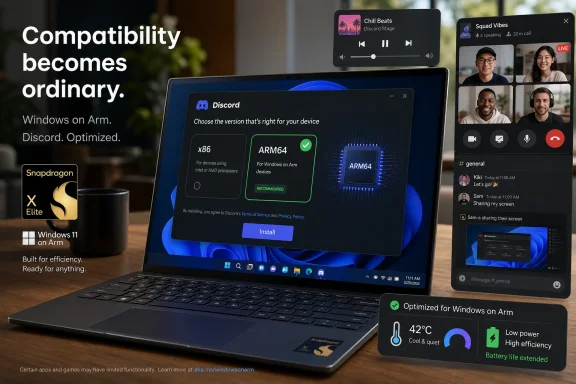
The most telling part of this release is not a press release, because there does not appear to be one. It is the option on Discord’s own download page. The Windows download flow now exposes a choice between x86 and ARM64, which is exactly the kind of boring, visible plumbing that makes a platform feel real.
That distinction matters. Windows on Arm has often suffered from a discoverability problem as much as a compatibility problem. Users could run many x86 apps, but they could not always tell whether they were getting the best version of an app, whether a Store listing supported Arm, or whether a web download was silently serving the wrong architecture. The result was a platform that asked normal users to think like deployment engineers.
Microsoft has at least given users a way to check. Task Manager’s Details tab can show an app’s architecture, letting Windows on Arm owners see whether a running process is native ARM64 or translated x86/x64. That is useful, but it is also a reminder of the problem. If a consumer has to open Task Manager to verify that their chat app is truly native, the ecosystem has not fully normalized yet.
Discord’s website-level architecture selector is therefore more than a convenience. It is a signal that the vendor recognizes Windows on Arm as a target, not merely a compatibility scenario. That is the kind of signal other developers watch, particularly when the app in question has a large user base and a reputation for being central to online communities.
The Microsoft Store wrinkle is less flattering. Reports indicate that Discord’s Store listing and hardware requirements have not clearly reflected ARM64 support, even as the direct download does. That gap is familiar to anyone who has watched Windows app distribution over the past decade: Microsoft wants the Store to be a trusted front door, but many important Windows apps still treat the web installer as the canonical path.
Native Code Beats Good Emulation by Being Boring
Microsoft and Qualcomm deserve credit for how far Windows emulation has come. The old Windows RT scar tissue still shapes public memory, but today’s Windows on Arm PCs can run a broad range of conventional Windows software with far fewer rough edges. For many users, the platform’s success has depended precisely on not forcing every developer to recompile on day one.
But emulation is a bridge, not a destination. A healthy platform cannot rely indefinitely on translation for the apps users keep running from boot to shutdown. The more central the app, the more native code matters.
Discord is a good example because it touches several parts of the system at once. It handles text chat, voice, video, notifications, overlays, media playback, screen sharing, and background presence. Even modest inefficiencies can add up when the app is open for hours. On a battery-powered Arm laptop, that is the difference between theoretical efficiency and lived efficiency.
The performance argument is not just about raw speed. A native app can wake the CPU less aggressively, avoid translation overhead, interact more cleanly with system libraries, and behave more predictably under load. For users, the win often feels less like “Discord launches 30 percent faster” and more like “my laptop stays cooler while I’m in a call and writing in another app.”
That is why the native Discord release has significance beyond Discord. Every frequently used native app lowers the platform’s background friction. Windows on Arm does not need every obscure utility to be perfect before it can succeed. It needs the apps that live in the tray, steal focus during meetings, play audio, handle identity, sync files, and wake the machine to stop feeling like guests.
Snapdragon X Changed the Negotiating Position
The Snapdragon X1 generation gave Microsoft something Windows on Arm had lacked for years: a credible installed base story. Before that, developers could reasonably ask why they should prioritize native builds for a platform with limited volume and uncertain user expectations. With Copilot+ PCs, new Surface models, and a broader OEM push, that calculation began to change.
The upcoming Snapdragon X2 generation raises the pressure further. Microsoft has already signaled that new Surface hardware with Qualcomm’s next wave of chips is coming after its latest Intel-based business refresh. That staggered strategy is revealing. Intel remains indispensable to the Windows PC market, especially in business fleets, but Microsoft is no longer treating Arm as a curiosity.
Developers notice when Microsoft keeps returning to the same bet. They notice when Surface hardware ships on Arm repeatedly, when Adobe and other major software vendors improve native support, when browsers are already native, and when battery life becomes part of the buying conversation again. At some point, the cost of ignoring ARM64 becomes harder to justify.
Discord is not necessarily leading that transition; it is joining it. But that may be the more important fact. Early adopters prove possibility. Mainstream apps prove inevitability.
The timing is especially relevant because Discord’s audience overlaps awkwardly with Windows on Arm’s weak spots. Gamers use Discord heavily, and gaming remains one of the least straightforward parts of the Arm PC story. Anti-cheat systems, GPU drivers, game launchers, and performance expectations all complicate the picture. A native Discord client does not solve Arm gaming, but it removes one obvious contradiction: the gaming chat app itself no longer has to be emulated on the gaming-adjacent Windows laptop of the future.
The Gaming App That Outgrew Gaming
Discord’s importance to Windows on Arm is partly a story about how Discord outgrew its original market. The service still speaks the language of gaming, and its brand remains deeply tied to multiplayer communities. But in practice, Discord has become a general-purpose social and coordination platform for students, developers, fandoms, open-source projects, support communities, creators, and friend groups.
That makes it a surprisingly important productivity app. Many users who would never describe Discord as “enterprise software” nonetheless rely on it for work-adjacent communication. For IT pros, developers, and community moderators, it is often open alongside Teams, Slack, browsers, terminals, and documentation. In that environment, native support matters because the app becomes part of the baseline workload.
There is a useful irony here. Windows on Arm’s pitch has often centered on productivity, battery life, instant-on behavior, and mobility rather than hardcore gaming. Discord, meanwhile, is associated with gamers but now serves many users who fit the Arm laptop profile perfectly: people who spend long days in browsers, calls, documents, code editors, and chat clients.
That crossover helps explain why the app’s native arrival feels more important than its category might suggest. A laptop platform wins not only when it can run Photoshop or compile code, but when the ordinary social fabric of computing is present. Users do not evaluate platforms app by app. They evaluate the feeling of absence.
Discord’s absence was never total, because emulation worked for many users. But a translated client is still a subtle absence. It says the platform is supported by accident rather than by design.
The Store Still Has to Catch Up With the Platform
The reported mismatch between Discord’s direct download and its Microsoft Store metadata should annoy Microsoft more than anyone else. If Windows on Arm is going mainstream, the Store should be the place where architecture support is obvious, reliable, and boring. Instead, the web remains the safer route for many users who want the latest installer.
That is a problem because architecture confusion is one of the easiest ways to make Windows on Arm feel more technical than it needs to be. A buyer should not have to know the difference between x86, x64, ARM64, and ARM64EC just to install a chat app. The platform can expose that information for power users, but ordinary users should be guided toward the right build automatically.
Microsoft has made progress here. The Store has improved since its lowest moments, and Windows itself is far better at handling mixed-architecture software than it used to be. But the ecosystem remains uneven. Some apps clearly label Arm support. Others bury it. Some vendors ship native builds through direct downloads first. Others use the Store but lag in metadata or packaging.
For sysadmins, the issue becomes more concrete. If a fleet includes Arm-based Windows laptops, software inventory and deployment tooling need to know which architecture is installed, which channel updates it, and whether the vendor supports the build officially. A native app is good news; a confusing distribution story is still operational drag.
Discord’s direct-download ARM64 option is therefore a win with a caveat. The platform is moving, but the app distribution layer still needs discipline. Windows on Arm will feel mainstream when users stop celebrating native builds and stop checking whether they accidentally installed the wrong one.
Microsoft’s Developer Campaign Is Working, Slowly
The larger story is that Microsoft’s developer campaign for Windows on Arm appears to be producing cumulative results. The company has spent years trying to convince software makers that native Arm builds are worth the engineering and testing cost. That campaign has included tools, emulation improvements, developer hardware, marketing pressure, and the blunt force of new consumer devices.
The results have not arrived all at once. Windows on Arm has advanced through accretion: native browsers, native Microsoft 365 apps, more creative tools, more VPN and security support, more developer utilities, more drivers, and now more mainstream consumer apps. Each addition makes the next one easier to justify.
That is how platform transitions usually work. Apple’s move to Apple Silicon looked sudden from the outside because Apple controlled the hardware, OS, developer tools, and customer migration path with unusual force. Microsoft’s transition is messier because the Windows ecosystem is broader, older, more hardware-diverse, and more dependent on third-party choices. Windows cannot simply command the market into recompilation.
Instead, Microsoft has to make native ARM64 support feel commercially rational. That is harder, but it may also be more durable once it takes hold. Developers move when users exist, users buy when apps exist, and OEMs invest when both sides look credible. Discord’s native client is a small gear in that loop, but it is still a gear.
The danger for Microsoft is assuming that progress equals completion. The Windows on Arm app gap has narrowed, but it has not disappeared. Specialized hardware utilities, pro audio tools, old enterprise agents, anti-cheat components, drivers, and niche productivity software can still turn a promising Arm laptop into the wrong machine for the wrong user.
Enterprise IT Will Care Less About Discord and More About the Signal
Most corporate IT departments are not standardizing on Discord. In many environments, the app is restricted, discouraged, or treated as a consumer service outside the approved collaboration stack. But even there, Discord’s native release carries a useful signal: Windows on Arm is becoming normal enough that large app vendors cannot ignore it indefinitely.
Enterprise adoption of Arm PCs is usually conservative. IT leaders care about manageability, security tooling, VPN compatibility, endpoint protection, printer drivers, device lifecycle, procurement, repairability, and user training. They do not buy fleets because one popular chat app compiled for ARM64.
Still, the app ecosystem affects confidence. If employees bring Arm-based Windows devices into mixed environments, or if executives want lightweight Surface hardware with better battery life, IT departments need fewer exceptions. Every native app reduces the support argument against the platform.
The Discord release also speaks to a broader class of software that enterprises do care about: always-running communication clients. Teams, Slack, Zoom, Webex, browsers, sync tools, password managers, and endpoint agents matter enormously on Arm laptops because they define idle drain and responsiveness. If those apps are native and efficient, Arm’s advantages become more visible in daily use.
That is the practical enterprise lesson. Windows on Arm does not have to beat x86 everywhere. It has to be excellent in the workflows where its hardware profile makes sense. Native background apps are part of that excellence.
Compatibility Is No Longer the Whole Debate
For a long time, the Windows on Arm discussion could be reduced to one question: does the app run? That was understandable during the platform’s weaker years, when compatibility failures were frequent enough to dominate the experience. But the better Windows on Arm gets, the less satisfying that question becomes.
The new question is whether the app runs like it belongs there. Does it update correctly? Does it use the right architecture? Does it integrate with notifications, media controls, camera and microphone permissions, screen sharing, GPU acceleration, and power management without weirdness? Does it behave the same way after sleep, on battery, and during a long call?
Native Discord support moves the answer in the right direction. It does not guarantee perfection, and early users will no doubt find edge cases. But it changes the baseline from “Windows can translate this” to “Discord ships a build for this.” That shift matters psychologically as much as technically.
It also changes how reviewers should talk about Arm PCs. Benchmarks remain useful, but they miss the cumulative effect of native everyday software. A laptop that runs a browser, Office, Teams, Discord, Spotify, a password manager, a VPN, and a code editor natively is a different proposition from one that runs half of those through translation, even if both look similar in a short review window.
This is where Windows on Arm has to win: not in dramatic moments, but in the dull continuity of a day’s work.
The Real Test Comes After the Download Button
The most concrete takeaway from Discord’s ARM64 release is simple: Windows on Arm users should prefer the native build when installing from Discord’s website. But the more interesting implications are broader than a single installer.
- Discord now appears as a native ARM64 Windows option on its official download page, reducing reliance on x86 emulation for one of the most persistent background apps on many PCs.
- Users who want to confirm what they are running can check the Architecture column in Task Manager’s Details tab.
- The Microsoft Store listing may not yet make ARM64 support as clear as the direct download path, so the website is currently the more transparent route.
- Native support should help most in the places emulation hurts quietly: background CPU use, battery life, thermals, call stability, and responsiveness during multitasking.
- The release strengthens the Windows on Arm software story ahead of Snapdragon X2 hardware, but it does not erase remaining gaps in games, drivers, anti-cheat systems, and specialized enterprise tools.
- For Microsoft, the win is not that Discord alone changes the market; it is that another high-profile daily-use app now treats ARM64 Windows as a normal target.
The caution is that native availability is only the first stage. Discord will still need to maintain parity with its x86 Windows client, keep updates flowing through the right channels, and make sure features like voice, video, streaming, overlays, notifications, and hardware acceleration behave reliably. A native build that lags or breaks would quickly become a symbol of token support rather than real commitment.
For Windows on Arm, that is the recurring pattern. Each app announcement is welcome, but the platform’s reputation is built in maintenance. Users are not buying architecture; they are buying a laptop that should not make them think about architecture at all.
The App Gap Is Shrinking Into Something More Subtle
Discord’s native Windows on Arm client is a small event with a large shadow. It shows that Microsoft’s Arm push is no longer dependent only on first-party apps, browser benchmarks, and optimistic hardware launches. The ecosystem is filling in, and it is filling in where users actually live: chat, calls, communities, and all-day background presence.
The remaining challenge is subtler than the old compatibility gap. Microsoft now has to make Windows on Arm feel administratively boring, commercially obvious, and culturally normal. That means cleaner Store metadata, better architecture detection, continued developer pressure, and fewer moments where users have to ask whether their expensive new laptop is running the “real” version of an app.
Discord’s arrival does not make Windows on Arm inevitable, but it makes the skeptical case a little harder to sustain. The platform is no longer waiting for a single killer app or a single perfect chip. It is winning, if it wins, by removing one objection at a time — and this week, one of the loudest apps on the modern desktop stopped being one of them.
References
- Discord is now available natively on Windows on ARM - Neowin Neowin · Mon, 25 May 2026 18:22:40 GMT