

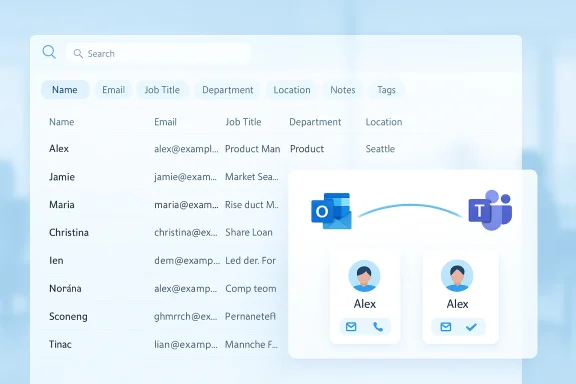
The new Outlook’s People experience is a reminder that software can still improve in the most basic, overdue ways. Microsoft is rolling out a redesigned contacts view that lets users search by name, email address, job title, department, location, notes, and tags, while also unifying contacts across Outlook, Teams, and linked accounts. It’s not just a cosmetic refresh; it directly addresses one of the most frustrating parts of modern Microsoft 365 navigation, where finding a person often required too many clicks, too much memory, and too much patience. (techcommunity.microsoft.com)
For years, Outlook users have lived with a split reality. The classic desktop client offered a familiar contacts model, while the new Outlook tried to modernize the experience without always preserving the muscle memory that power users depend on. Microsoft’s own support guidance still reflects the older paradigm: search from the ribbon, search while composing mail, or use the People pane, with different fields and behaviors depending on which search box you choose. (support.microsoft.com)
The new People experience matters because contact lookup is not a niche task. In enterprise environments, the contact list is part address book, part organizational map, and part relationship database. If search only works when you remember a name precisely, it fails the real test of work software: helping you recover information you half-remember under time pressure. Microsoft is clearly trying to make Outlook feel more like a modern, context-aware index and less like an old-school directory browser. (support.microsoft.com)
This also arrives against a backdrop of broader contact unification across Microsoft 365. Microsoft announced that Teams and Outlook contacts would be brought into a single experience for Entra ID users, with synchronized updates and merged duplicates. In other words, the search overhaul is not an isolated feature drop; it is part of a larger architectural push to treat people data as a shared Microsoft 365 asset rather than as app-specific silos. (techcommunity.microsoft.com)
That is important because the old model created obvious friction. A contact created in Teams might not appear in Outlook, and changes in one app would not necessarily propagate cleanly to the other. Microsoft’s 2024 and 2025 roadmap materials described this as a unified contact experience, with rollout timelines stretching into 2025 and a consistent list across endpoints. The new People search is best understood as the interface layer finally catching up to the data layer. (techcommunity.microsoft.com)
The redesigned experience is trying to eliminate that cognitive overhead. If you can search by department, location, or even personal notes, the app starts to behave more like a memory aid than a filing cabinet. That is a subtle but major shift, especially for users who maintain large contact lists across teams, clients, vendors, and personal relationships.
Classic Outlook’s People flow could handle partial names and some metadata, but it still leaned heavily on structured directories and address-book conventions. The new Outlook now promises keyword search across attributes that better reflect human recall, including personal notes and tags. That is a meaningful usability upgrade because it reduces the need to remember how Microsoft chose to model the person in the first place.
This also makes the app feel more forgiving. People don’t always remember names correctly, and they certainly don’t remember every card field they filled in months ago. A better search system turns those fragments into a viable route back to the right contact.
This is especially helpful for enterprise users because the directory itself is often only part of the story. The people you work with may be the ones you email constantly, not the ones most prominently listed in an org chart. Predictive ranking can bridge that gap, although it will only feel “smart” if Microsoft keeps precision high and irrelevant suggestions low.
Tags matter for similar reasons. They allow people to impose their own mental model on the contact list instead of relying solely on company metadata. In practical terms, that means a contact can be found by business context rather than by formal identity alone.
This is a critical move for Microsoft 365 because collaboration increasingly spans both mail and chat. People don’t think in app boundaries; they think in relationships, tasks, and contexts. A unified contact store is therefore not just convenient, but strategically necessary if Microsoft wants Teams, Outlook, and Graph to feel like one ecosystem rather than three loosely coordinated surfaces. (techcommunity.microsoft.com)
From an IT perspective, unified contacts also reduce support burden. Fewer duplicate records, fewer sync surprises, and fewer “why can’t I find this person?” tickets all add up. That’s the quiet value proposition of the feature: it removes friction that frontline users feel every day, but administrators spend hours diagnosing.
In practice, this means unified contacts are not just a nice visual layer. They are a reconciliation engine, and those engines are only as good as their conflict rules. Enterprises should expect some cleanup, especially if their users have been maintaining parallel contact sets for years.
That last point is easy to miss, but it’s important. When contact data becomes consistent across Outlook, Teams, and Graph, the benefit extends beyond the UI. It improves downstream automation, directory lookups, and any custom process that depends on person records.
That reorientation matters because it changes how Outlook fits into daily work. If users can scan, filter, batch-edit, and act on contacts without opening multiple cards, the app starts to support workflows rather than just look up records. It becomes more operational.
Quick actions are equally important. Emailing, calling, or starting a Teams chat directly from the list reduces context switching, which is one of the most universal costs in modern productivity software. If Microsoft gets this right, People may finally feel like a place where work happens instead of a place where work gets stored.
Bulk operations are similarly useful, especially for admins and assistant users who manage many relationships at once. Being able to categorize, email, or update multiple contacts in one pass is the kind of improvement that saves minutes every day and hours over a month.
That said, good export support is only half the story. Enterprises will want predictable behavior around formatting, duplicate handling, and category retention when contacts move between systems.
That distinction matters because some of the praise around the update risks overstating the novelty. What’s genuinely new is the way Microsoft is collapsing search, contact unification, and immediate action into a single workflow. The old client had features; the new one is trying to create a fluid interaction model.
That is a better fit for modern productivity software, especially when paired with unified contacts. It reflects a broader industry trend: less directory navigation, more contextual retrieval.
That’s why Microsoft’s progress on offline support, file types, and search consistency is so important. It is not enough to add a shiny People experience if the rest of the app still feels like a compromise.
That split is useful because it shows Microsoft is trying to serve both organized corporate directories and more chaotic personal address books. A good contacts feature has to handle both.
That history shapes how this People update will be received. Users are not evaluating it in a vacuum; they are judging it against a long record of incomplete parity, shifting UI decisions, and feature gaps. Every meaningful improvement therefore has to do two jobs: solve a problem and rebuild confidence. (support.microsoft.com)
This also explains the importance of continuity. The new Outlook must preserve enough of the old mental model that users don’t feel exiled from their own data.
That cadence matters because modern software adoption is often less about one dramatic release and more about whether the app keeps closing gaps month after month. Outlook appears to be doing that now, even if it took longer than users would have liked.
A partial improvement is still an improvement, but it also raises the bar. Once search becomes smarter for one user, the old limitations become more obvious to everyone else.
The competitive angle is subtle but real. If Outlook can reliably surface the right person faster than a rival can, that saves time in email, chat, meetings, and calling. Over time, that adds up to a meaningful advantage, because contact lookup is one of those background tasks that shapes user perception without always being consciously noticed. (techcommunity.microsoft.com)
That integration is the moat. The new People experience strengthens it by making the hub easier to use.
If Microsoft succeeds, the gap between “enterprise software” and “consumer-grade usability” narrows a bit more.
In that sense, the feature is both user-friendly and strategically self-reinforcing.
It also positions Outlook as a more credible relationship hub inside Microsoft 365. If the app can become the fastest path to the right person, users will spend more time there and less time improvising around it.
That matters especially in enterprise settings, where predictability often beats cleverness. A great contact system should feel helpful without becoming mysterious.
That means IT leaders may need to update internal guides, screenshots, and onboarding documents sooner than they expected.
The rollout timeline also matters. Microsoft’s own materials show that unified contacts have been moving across Outlook and Teams over the course of 2024 and 2025, and the new People experience is now landing in Outlook for desktop with web rollout in progress. That suggests the company is still stitching together the final pieces of a much larger contact architecture. (techcommunity.microsoft.com)
Source: Windows Central The new Outlook finally gets the contact search it always should have had
 Overview
For years, Outlook users have lived with a split reality. The classic desktop client offered a familiar contacts model, while the new Outlook tried to modernize the experience without always preserving the muscle memory that power users depend on. Microsoft’s own support guidance still reflects the older paradigm: search from the ribbon, search while composing mail, or use the People pane, with different fields and behaviors depending on which search box you choose. (support.microsoft.com)The new People experience matters because contact lookup is not a niche task. In enterprise environments, the contact list is part address book, part organizational map, and part relationship database. If search only works when you remember a name precisely, it fails the real test of work software: helping you recover information you half-remember under time pressure. Microsoft is clearly trying to make Outlook feel more like a modern, context-aware index and less like an old-school directory browser. (support.microsoft.com)
This also arrives against a backdrop of broader contact unification across Microsoft 365. Microsoft announced that Teams and Outlook contacts would be brought into a single experience for Entra ID users, with synchronized updates and merged duplicates. In other words, the search overhaul is not an isolated feature drop; it is part of a larger architectural push to treat people data as a shared Microsoft 365 asset rather than as app-specific silos. (techcommunity.microsoft.com)
That is important because the old model created obvious friction. A contact created in Teams might not appear in Outlook, and changes in one app would not necessarily propagate cleanly to the other. Microsoft’s 2024 and 2025 roadmap materials described this as a unified contact experience, with rollout timelines stretching into 2025 and a consistent list across endpoints. The new People search is best understood as the interface layer finally catching up to the data layer. (techcommunity.microsoft.com)
Why this update feels overdue
The complaint here is not that Outlook lacked contact search entirely. It’s that search often felt too narrow, too literal, or too dependent on knowing exactly where to look. Microsoft support has long documented that one search box only searches names and email addresses, while another People search mode can include company names, phone numbers, and addresses. That split is efficient only if you already know the rules. (support.microsoft.com)The redesigned experience is trying to eliminate that cognitive overhead. If you can search by department, location, or even personal notes, the app starts to behave more like a memory aid than a filing cabinet. That is a subtle but major shift, especially for users who maintain large contact lists across teams, clients, vendors, and personal relationships.
What Microsoft is signaling
Microsoft’s messaging around the feature is telling. The company describes a “completely reimagined” People experience, “smart suggestions,” and “one search, every contact source.” That language is less about novelty than about normalizing expectations: contact search should be immediate, unified, and predictive. The emphasis on instant actions like email, call, and Teams chat also suggests that Outlook wants to be a command surface, not just a database. (support.microsoft.com)The Search Problem Outlook Had to Fix
The core issue is simple: search is only useful if it matches how people remember people. Real users rarely remember a colleague’s formal directory entry, but they do remember a department, city, project tag, or a note like “met at CES” or “vendor for Q4 rollout.” Microsoft’s new People experience explicitly supports that style of lookup, which is why it feels so much more practical than older, tree-based directory browsing. (techcommunity.microsoft.com)Classic Outlook’s People flow could handle partial names and some metadata, but it still leaned heavily on structured directories and address-book conventions. The new Outlook now promises keyword search across attributes that better reflect human recall, including personal notes and tags. That is a meaningful usability upgrade because it reduces the need to remember how Microsoft chose to model the person in the first place.
From directory trees to keyword search
Directory hierarchies make sense for administrators. They are less useful for employees who just need to find “the person on the legal team in Austin” or “the contact with the blue category tag.” By replacing organization-tree navigation with keyword search, Outlook is flattening the access path to people data. That’s a modern design choice, and it aligns with the way search already works across files and messages.This also makes the app feel more forgiving. People don’t always remember names correctly, and they certainly don’t remember every card field they filled in months ago. A better search system turns those fragments into a viable route back to the right contact.
What “smart suggestions” really change
Microsoft says suggestions are tuned by communication patterns and organizational context. That likely means the system is learning from existing collaboration signals, not just matching exact text. The result should be fewer dead ends and more relevant guesses as you type, especially in large organizations where contact lists can be noisy. (techcommunity.microsoft.com)This is especially helpful for enterprise users because the directory itself is often only part of the story. The people you work with may be the ones you email constantly, not the ones most prominently listed in an org chart. Predictive ranking can bridge that gap, although it will only feel “smart” if Microsoft keeps precision high and irrelevant suggestions low.
Why notes and tags are a big deal
The ability to search notes is one of the most underrated parts of the announcement. Notes are where users store the contextual clues that software often ignores: who introduced whom, what project someone worked on, which conference badge they wore, or which client account they belong to. Once those details become searchable, Outlook becomes dramatically more useful for long-tail retrieval.Tags matter for similar reasons. They allow people to impose their own mental model on the contact list instead of relying solely on company metadata. In practical terms, that means a contact can be found by business context rather than by formal identity alone.
Unified Contacts Across Outlook and Teams
The biggest architectural shift behind the new People experience is contact unification. Microsoft has already said that Entra ID users can access and manage the same set of contacts across Teams and Outlook, with updates synchronized and duplicates merged where possible. That gives the search experience a cleaner foundation, because the app is no longer trying to query entirely separate silos. (techcommunity.microsoft.com)This is a critical move for Microsoft 365 because collaboration increasingly spans both mail and chat. People don’t think in app boundaries; they think in relationships, tasks, and contexts. A unified contact store is therefore not just convenient, but strategically necessary if Microsoft wants Teams, Outlook, and Graph to feel like one ecosystem rather than three loosely coordinated surfaces. (techcommunity.microsoft.com)
Why unification was necessary
The old split was a productivity tax. If Teams knew one version of a contact and Outlook knew another, users had to remember where they created it, where it was editable, and which version to trust. Microsoft explicitly acknowledged feedback about “context switching and dual effort” caused by that segregation. (techcommunity.microsoft.com)From an IT perspective, unified contacts also reduce support burden. Fewer duplicate records, fewer sync surprises, and fewer “why can’t I find this person?” tickets all add up. That’s the quiet value proposition of the feature: it removes friction that frontline users feel every day, but administrators spend hours diagnosing.
What happens to duplicates and conflicts
Microsoft says obvious duplicates between Teams and Outlook contacts will be merged into a single contact. Where conflicts arise, the system may preserve a copy tagged with “Teams conflicts” so users can review it. That is a pragmatic compromise: it avoids data loss, but it also acknowledges that contact reconciliation is messy in real life. (techcommunity.microsoft.com)In practice, this means unified contacts are not just a nice visual layer. They are a reconciliation engine, and those engines are only as good as their conflict rules. Enterprises should expect some cleanup, especially if their users have been maintaining parallel contact sets for years.
The enterprise payoff
For corporate users, the upside is obvious. A single contact list means one less thing to mentally translate between apps, and it creates a more reliable base for collaboration features like calling, sharing, and contact suggestions. Microsoft also notes that contact updates are synchronized through Microsoft Graph APIs, which matters for organizations that build workflows or internal tooling on top of contact data. (techcommunity.microsoft.com)That last point is easy to miss, but it’s important. When contact data becomes consistent across Outlook, Teams, and Graph, the benefit extends beyond the UI. It improves downstream automation, directory lookups, and any custom process that depends on person records.
What the New People Experience Actually Adds
The feature list goes beyond search alone. Microsoft describes a modern multi-column table view, quick actions from the contact list, multi-select, bulk operations, categories, and import/export support. In other words, the People area is being repositioned as a working surface, not just a contact repository. (techcommunity.microsoft.com)That reorientation matters because it changes how Outlook fits into daily work. If users can scan, filter, batch-edit, and act on contacts without opening multiple cards, the app starts to support workflows rather than just look up records. It becomes more operational.
A faster contact list for real work
The new table view is probably the most conventional but still valuable improvement. Traditional contact cards are good for detail, but tables are better for comparison, sorting, and bulk edits. A good table view lets people manage large address books the way they manage spreadsheets: quickly, visually, and with fewer clicks.Quick actions are equally important. Emailing, calling, or starting a Teams chat directly from the list reduces context switching, which is one of the most universal costs in modern productivity software. If Microsoft gets this right, People may finally feel like a place where work happens instead of a place where work gets stored.
Categories and bulk management
Categories sound mundane until you maintain hundreds or thousands of contacts. Color-coded labels like “Key Clients,” “Project Team,” or “Vendors” turn a flat list into a functional map. They also give users a lightweight organizational system that can sit on top of the corporate directory. (techcommunity.microsoft.com)Bulk operations are similarly useful, especially for admins and assistant users who manage many relationships at once. Being able to categorize, email, or update multiple contacts in one pass is the kind of improvement that saves minutes every day and hours over a month.
Import and export still matter
Microsoft’s mention of CSV import and export may sound like a checkbox feature, but it is actually a reassurance. It signals that the new People model is not a closed walled garden. Users can still move data in and out, which matters for migrations, backups, and compliance workflows.That said, good export support is only half the story. Enterprises will want predictable behavior around formatting, duplicate handling, and category retention when contacts move between systems.
How It Compares With the Classic Outlook Experience
The classic Outlook People pane already offered search, filtering, and contact cards, and Microsoft’s support pages still describe fairly robust lookup behavior in the older interface. You could search by phone, address, company name, or other fields, and Outlook would return card-style results with photos and phone numbers. The new Outlook is not inventing contact search from scratch; it is reorganizing and modernizing it. (support.microsoft.com)That distinction matters because some of the praise around the update risks overstating the novelty. What’s genuinely new is the way Microsoft is collapsing search, contact unification, and immediate action into a single workflow. The old client had features; the new one is trying to create a fluid interaction model.
Familiar capability, different philosophy
In the classic client, power users often learned where each field lived and how each search box behaved. The new Outlook appears to be moving away from that memorization burden. Instead of expecting users to know the right pane or the right field, it tries to surface the right contact based on broader clues.That is a better fit for modern productivity software, especially when paired with unified contacts. It reflects a broader industry trend: less directory navigation, more contextual retrieval.
The lingering advantage of the classic client
Still, the classic client has one major advantage: maturity. Longtime Outlook users know where things are, and many corporate environments have built workflows around that behavior. The new Outlook may be catching up quickly, but it still has to earn trust feature by feature, especially with users who remember the rocky early rollout. (support.microsoft.com)That’s why Microsoft’s progress on offline support, file types, and search consistency is so important. It is not enough to add a shiny People experience if the rest of the app still feels like a compromise.
Enterprise and consumer split
For enterprise users, search by job title, department, and directory context is the real headline. For consumers and small businesses, the value is more likely to come from personal notes, linked accounts, and a simplified view of all contacts in one place. The feature may be the same, but the payoff differs by audience.That split is useful because it shows Microsoft is trying to serve both organized corporate directories and more chaotic personal address books. A good contacts feature has to handle both.
Outlook’s Rocky Road to Relevance
The new Outlook has had a difficult reputation to overcome. Microsoft has spent years nudging users toward the new app, while also adding offline capabilities and broader file support after early criticisms that it was not ready for prime time. The fact that Microsoft had to break apart Mail & Calendar for some users just to accelerate adoption says a lot about how difficult that transition was. (support.microsoft.com)That history shapes how this People update will be received. Users are not evaluating it in a vacuum; they are judging it against a long record of incomplete parity, shifting UI decisions, and feature gaps. Every meaningful improvement therefore has to do two jobs: solve a problem and rebuild confidence. (support.microsoft.com)
Why confidence matters more than feature checklists
Many app launches fail not because the feature list is too short, but because the trust deficit is too large. If users believe the app is still changing under their feet, they hesitate to migrate even when the experience improves. That seems to be one reason Microsoft has been careful about describing this as a rolling, gradually available feature rather than a big-bang replacement.This also explains the importance of continuity. The new Outlook must preserve enough of the old mental model that users don’t feel exiled from their own data.
The importance of incremental fixes
The new People experience is part of a broader pattern of gradual repair. Microsoft has added offline mail, calendar, and settings support; expanded file handling; and introduced search scoping improvements. Those are not glamorous features, but they are the building blocks of credibility. (support.microsoft.com)That cadence matters because modern software adoption is often less about one dramatic release and more about whether the app keeps closing gaps month after month. Outlook appears to be doing that now, even if it took longer than users would have liked.
What still feels unfinished
The remaining challenge is not whether the app can search contacts better. It’s whether it can feel unified everywhere, from desktop to web to Teams, without edge cases. Microsoft’s own materials suggest the rollout is gradual, and that means some users will see the new behavior before others. That can create confusion inside organizations where coworkers compare notes and get different answers.A partial improvement is still an improvement, but it also raises the bar. Once search becomes smarter for one user, the old limitations become more obvious to everyone else.
The Competitive Landscape
Microsoft is not making this change in isolation. Contact search and relationship management have become table stakes across collaboration platforms, CRM tools, and cloud productivity suites. By improving Outlook’s People experience, Microsoft is trying to make its ecosystem stickier and reduce the incentive for users to manage people data elsewhere. (techcommunity.microsoft.com)The competitive angle is subtle but real. If Outlook can reliably surface the right person faster than a rival can, that saves time in email, chat, meetings, and calling. Over time, that adds up to a meaningful advantage, because contact lookup is one of those background tasks that shapes user perception without always being consciously noticed. (techcommunity.microsoft.com)
Against standalone contact managers
Specialized contact managers can be powerful, but they rarely own the communication workflow the way Outlook does. Microsoft’s edge is that the contact list sits next to mail, calendar, Teams, and Graph-based context. If the company can keep those surfaces synchronized, it can offer a more integrated relationship hub than a standalone app ever could.That integration is the moat. The new People experience strengthens it by making the hub easier to use.
Against Google-style simplicity
Google’s productivity stack tends to win on simplicity and speed, particularly in search. Microsoft’s answer here is to make Outlook search broader and more contextual without requiring users to switch apps or remember exact filing logic. The goal is not just feature parity; it is to make Microsoft 365 feel equally frictionless for people lookup.If Microsoft succeeds, the gap between “enterprise software” and “consumer-grade usability” narrows a bit more.
Why ecosystem lock-in is the real prize
A better People experience makes it less likely that users maintain separate, unofficial contact systems. That is good for Microsoft because it keeps identity and collaboration data inside its ecosystem. It is also good for IT teams because it reduces shadow data stores and makes compliance management more coherent.In that sense, the feature is both user-friendly and strategically self-reinforcing.
Strengths and Opportunities
The strongest aspect of this update is that it solves a daily pain point with a plausibly modern design rather than a superficial facelift. It also builds on Microsoft’s broader push toward unified contact data across Outlook, Teams, and Graph, which gives the feature real enterprise value. If Microsoft keeps refining ranking, offline behavior, and cross-platform consistency, People could become one of the more quietly valuable parts of Outlook.- Broader search fields make contact lookup far more natural for human memory.
- Unified contacts reduce duplicates and app-hopping between Teams and Outlook.
- Instant actions turn search results into a working surface, not just a list.
- Categories and bulk tools help users manage large contact sets efficiently.
- Import/export support preserves portability and migration flexibility.
- Cross-platform consistency makes training and support easier for IT teams.
- Context-aware suggestions can surface the right person faster than exact-match search.
Why this is more than convenience
The real opportunity here is workflow compression. Every click removed from contact lookup is time returned to the user, and every avoided app switch reduces friction. That may sound minor, but in aggregate it can materially improve daily productivity.It also positions Outlook as a more credible relationship hub inside Microsoft 365. If the app can become the fastest path to the right person, users will spend more time there and less time improvising around it.
Risks and Concerns
The main risk is that Microsoft could overpromise a unified, smart search experience while users still run into edge cases, duplicates, or incomplete indexing. New Outlook has already accumulated enough skepticism that even small failures can feel larger than they are. There is also a risk that the redesigned People experience becomes another partially rolled-out feature that behaves differently across tenants and platforms.- Gradual rollout can create inconsistent experiences inside the same organization.
- Duplicate contact merging may surface conflicts that require manual cleanup.
- Search indexing gaps could frustrate users who rely on notes and tags.
- Cross-platform differences may persist between desktop, web, and Teams.
- Enterprise trust remains fragile because the new Outlook still carries legacy skepticism.
- Training overhead may increase temporarily as users learn the new People interface.
- Overreliance on suggestions could hide contacts if ranking is not tuned well.
The hidden cost of “smart” systems
Whenever search becomes more predictive, users worry about missing the thing they expected to see. If ranking is wrong, smart search can feel less reliable than blunt keyword lookup. Microsoft will need to balance convenience with transparency so users understand why a result appears and how to refine it.That matters especially in enterprise settings, where predictability often beats cleverness. A great contact system should feel helpful without becoming mysterious.
The rollout problem
Rolling features out gradually is sensible, but it can also be confusing. One team member may have the new People experience while another sees the old behavior, leading to inconsistent advice and unnecessary support tickets. Microsoft has done the right thing by making the change incremental, but the burden of communication still falls on organizations adopting it.That means IT leaders may need to update internal guides, screenshots, and onboarding documents sooner than they expected.
Looking Ahead
The most important question is whether this People experience is a one-off usability fix or the beginning of a broader rethink of Outlook as a relationship-centric productivity hub. Microsoft has already laid the groundwork by unifying contacts and expanding search behavior, so the next logical step is deeper semantic retrieval and tighter integration with collaboration history. If that happens, Outlook could start surfacing not just the right contact, but the right context around that contact.The rollout timeline also matters. Microsoft’s own materials show that unified contacts have been moving across Outlook and Teams over the course of 2024 and 2025, and the new People experience is now landing in Outlook for desktop with web rollout in progress. That suggests the company is still stitching together the final pieces of a much larger contact architecture. (techcommunity.microsoft.com)
What to watch next
- Whether notes search remains reliable across all account types.
- Whether Teams and Outlook stay fully synchronized as conflicts arise.
- Whether web parity arrives without feature gaps versus desktop.
- Whether Microsoft exposes better search filters or ranking controls.
- Whether the app gets more offline-friendly contact behavior.
- Whether users can trust the new People view for large, messy directories.
- Whether Microsoft extends the same model into more of the Microsoft 365 ecosystem.
Source: Windows Central The new Outlook finally gets the contact search it always should have had
