

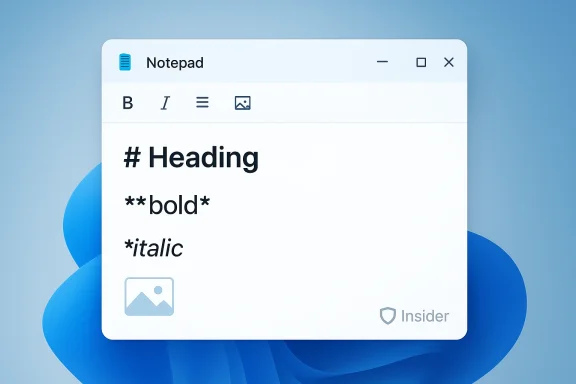
Microsoft’s decades‑old Notepad is quietly changing shape: recent Insider builds and promotional “What’s new” panels now show an Insert image control in Notepad’s toolbar, signaling that Microsoft is preparing to let users place inline pictures inside Notepad documents as part of the app’s broader Markdown and lightweight formatting push. What began as small formatting upgrades — headings, bold/italic, inline links and tables — has matured into a richer authoring surface that may soon include images, streaming AI responses, and more, and that shift has practical, security, and policy consequences for everyday users and IT teams alike. verview
Notepad’s evolution over the last 18 months has been deliberate. Microsoft has been rolling a Markdown‑aware formatting layer into the app, delivering features such as table insertion, an expanded formatting toolbar, and on‑device streaming AI for write/summary tasks in Insider builds. Those earlier updates were shipped as Notepad version 11.2510.6.0 to the Canary and Dev channels, with Microsoft saying the changes are aimed at making quick note‑taking and simple documentation easier without turning Notepad into a full word processor. The official Windows Insider blog and multiple community reports document this staged rollout.
Adding image handling is the logical next step for a Markdown‑first editor: Markdown itself has a long‑standing image syntax (e.g.,
 ), and many modern note apps pair lightweight markup with embedded visuals. Insider screenshots and “What’s new” panels have revealed an image icon in Notepad’s UI, and several outlets — citing Insider sightings — report the control is being tested but may not be functional in every internal flight yet. Microsoft has described the change as part of the ongoing Markdown/formatting layer work.
However, the change alone‑thing Notepad historically guaranteed: simplicity. Users who rely on Notepad’s ultra‑fast launch, tiny footprint, and plain‑text behavior may find the new defaults and UI distracting. Microsoft has been careful to retain a toggle between formatted (Markdown‑rendered) and classic plaintext views in prior updates, but how those toggles behave for file types, double‑click defaults, and printing remains a usability and policy question. Community posts and early coverage have raised concerns about whether Markdown formatting will become the default view for .md files and how that will change workflows.
That incident is important context for image support: images and remote resources in Markdown are another vector for tricking users (for example, images that render as clickable or that load remote content). Security researchers and community members have warned that adding conveniences like inline images increases the opportunities for social engineering and exploitation. The Notepad Markdown patch demonstrates Microsoft is actively fixing bugs, but defenders must assume new features will require additional scrutiny.
That strategy has trade-offs. It reduces context switching and increases the chance that an official, always‑installed app becomes the canonical place users keep mixed content (text + images). For Microsoft this may improve engagement and Copilot usage; for enterprises it raises management and governance questions that weren’t present when Notepad was a plaintext-only tool.
Notepad’s long, slow transformation illustrates a broader trend: basic, ubiquitous tools are becoming lightweight productivity surfaces and convenient AI testbeds. Images in Notepad are not inherently dangerous — they’re a natural capability for a Markdown‑aware editor — but the history of parser bugs and the reality of social engineering mean defenders must treat the feature as consequential. For users, the arrival of images promises practical convenience; for IT and security teams, it demands attention, testing, and an updated set of controls and policies. The most responsible posture right now is pragmatic curiosity: validate in controlled pilots, keep systems patched, and pressure vendors for clear admin controls and documentation when new features roll out.
Conclusion: Notepad with images is coming into view — not as a cataclysmic shift but as an incremental, meaningful expansion of capability. If Microsoft follows the same pattern it has used for tables and AI streaming — preserving underlying Markdown for portability, exposing the features in Insider channels first, and iterating with community feedback — this will be a useful upgrade for many users. But the security lessons of recent months are clear: with greater convenience comes greater responsibility, and organizations and individuals should plan accordingly.
Source: Windows Report https://windowsreport.com/windows-11-notepad-may-soon-support-images-microsoft-teases/
Notepad’s evolution over the last 18 months has been deliberate. Microsoft has been rolling a Markdown‑aware formatting layer into the app, delivering features such as table insertion, an expanded formatting toolbar, and on‑device streaming AI for write/summary tasks in Insider builds. Those earlier updates were shipped as Notepad version 11.2510.6.0 to the Canary and Dev channels, with Microsoft saying the changes are aimed at making quick note‑taking and simple documentation easier without turning Notepad into a full word processor. The official Windows Insider blog and multiple community reports document this staged rollout.
Adding image handling is the logical next step for a Markdown‑first editor: Markdown itself has a long‑standing image syntax (e.g.,
 What we know right now
The visible signals
- An Insert image icon has been spotted in Notepad’s toolbar and in the app’s “What’s new” dialog in Windows Insider builds. That icon appears alongside other formatting controls (bold, italic, table), implying image insertion will be a peer feature inside Notepad’s lightweight formatting layer.
- Multiple outlets that track Insider flights — and community discussion boards — are reporting that the image button currently appears in previews but is sometimes non‑functional in the tested builds, suggesting the UI element has been exposed ahead of full implementation.
- This work is happening against the backdrop of Notepad’s broader modernization strategy: earlier updates added native tables and streaming AI responses in version 11.2510.6.0 for Insiders. Expect images to be presented as part of the same Markdown/formatting model rather than turning Notepad into a proprietary binary document container.
Microsoft’s public messaging (and partial claims)
Reports indicate Microsoft has told some testers the image addition has a minimal performance impact, and the company has framed these UI changes as an incremental expansion of Notepad’s lightweight authoring capabilities rather than a wholesale reinvention. Independent reporters and community sleuths who examine Insider flights are the primary sources for the image story; Microsoft has not yet published a formal product blog post announcing image support to general users as of the latest Insider evidence.Why this matters: product and workflow impacts
For everyday users
Notepad is one of the most frequently opened apps on Windows. Adding images will make a single, always‑available tool capable of handling a broader set of tasks: quick annotated screenshots, README drafts with inline diagrams, and more expressive notes. That means fewer app switches and a more integrated experience for the casual user who wants formatted text plus images without firing up a separate note app.However, the change alone‑thing Notepad historically guaranteed: simplicity. Users who rely on Notepad’s ultra‑fast launch, tiny footprint, and plain‑text behavior may find the new defaults and UI distracting. Microsoft has been careful to retain a toggle between formatted (Markdown‑rendered) and classic plaintext views in prior updates, but how those toggles behave for file types, double‑click defaults, and printing remains a usability and policy question. Community posts and early coverage have raised concerns about whether Markdown formatting will become the default view for .md files and how that will change workflows.
For developers and technical writers
If images are implemented using standard Markdown semantics and the underlying files remain text (with image references), Notepad could be very useful for lightweight documentation tasks, README editing, and simple notes that travel well in source control. Microsoft’s earlier table feature mapped WYSIWYG table editing to pipe‑delimited Markdown under the hood, preserving portability; image support could follow the same principle (storing local relative paths or data URLs). That design would be friendly to developers who need human‑readable, diff‑friendly files. Evidence from prior updates suggests Microsoft is intentionalxt portability when possible.For enterprises and IT admins
Inline images in a ubiquitous, inbox app change risk profiles. Built‑in apps are managed differently than third‑party software in enterprise images; many organizations rely on Notepad for quick edits during troubleshooting and scripting. Image rendering increases Notepad’s attack surface because: images can trigger additional parser code paths, and Markdown rendering enables clickable links and remote content references. Recent security history (see next section) shows this is not theoretical. IT teams should plan pilot testing, update controls, and review update channels before a broad rollout.Security and privacy: the elephant in the room
The patched Markdown vulnerability (CVE‑2026‑20841)
Notepad’s move to richer Markdown handling has already attracted security attention. In February 2026 Microsoft patched a high‑severity vulnerability tracked as CVE‑2026‑20841 that stemmed from improper neutralization of special elements used in a command — effectively a command‑injection pattern in the presence of certain Markdown links. The vulnerability could allow remote code execution (RCE) if a user opened malicious Markdown and clicked or triggered crafted content. Vendors and independent outlets have documented the patch and the associated risks.That incident is important context for image support: images and remote resources in Markdown are another vector for tricking users (for example, images that render as clickable or that load remote content). Security researchers and community members have warned that adding conveniences like inline images increases the opportunities for social engineering and exploitation. The Notepad Markdown patch demonstrates Microsoft is actively fixing bugs, but defenders must assume new features will require additional scrutiny.
Specific risks introduced by image support
- Remote content loading: If Notepad allows remote image URIs, opening a file could cause the app to connect outbound, revealing metadata (IP, headers) about the host or user. This is a common privacy leak vector.
- Image parser exploits: Historically, image format parsers (TIFF, JPEG) have been abused to trigger memory corruption bugs. While modern image libraries are hardened, adding an image decoding pipeline can expose low‑level bugs.
- Phishing and social engineering: Inline images can make a malicious Markdown document look authoritative (company headers, logos, invoices). Rendered content with links and images increases the realism attackers can achieve.
- Malicious metadata and steganography: Images can carry hidden content or malformed metadata that interacts with downstream tools unpredictably.
Practical recommendations for users and administrators
Below are pragmatic, prioritized steps IT teams and users can take now to prepare for Notepad’s image support and to reduce risk exposure.- Patch and update:
- Apply the February 2026 security updates and any subsequent cumulative patches that Microsoft publishes for Notepad and Windows. The recent CVE fix demonstrates Microsoft will address vulnerabilities quickly; keeping systems updated is the first line of defense.
- Control Notepad updates:
- For managed devices, consider controlling Notepad updates through the Microsoft Store for Business/Enterprise or update management tooling so you can validate Insider/feature flights before they reach production.
- Pilot and test:
- Enroll a small set of test machines in your team to run Insider or early release Notepad builds and produce a risk/benefit report. Test common workflows (opening .md files, double‑click behavior, printing, file export) and check for unexpected outbound connections during image rendering.
- Harden email and file handling:
- Treat incoming .md files like other risky attachments. Ensure email gateways and endpoint protections scan Markdown attachments for suspicious content and disable automatic previewing of untrusted file types in mail clients.
- User awareness and training:
- Educate users that Notepad may begin rendering images and links inline. Train staff to verify the origin of documents before clicking links or downloading referenced remote resources.
- Monitor and log:
- Add logging rules that flag Notepad network activity originating from endpoints that normally don’t access external content. An uptick in outbound connections from Notepad could indicate intentional exfiltration or exploitation attempts.
- Evaluate policy controls:
- If your organization needs to prevent formatted Markdown rendering centrally, evaluate configuration management or application control tools that can restrict Notepad updates or block specific feature sets. Note: as of the latest public disclosures there is no documented single Group Policy toggle to disable only image rendering — treat this as an area requiring pilot testing and vendor engagement. (We flag this as an unverified point: Microsoft may add admin controls later; verify with official documentation when the feature ships.)
Usability and compatibility questions — what Microsoft needs to clarify
The community and enterprise IT professionals repeatedly raise the same operational questions when an inbox app like Notepad gains richer features. These are the most important clarifications Microsoft should publish before a broad rollout:- Default behavior for .md files: Will double‑clicking a Markdown file open it in rendered (formatted) view by default, or will Notepad preserve plaintext as the default until users opt in? Early reports note toggles exist, but defaults matter for large fleets.
- How are images stored: Will Notepad embed images (e.g., base64 data URLs), or will it insert references to local file paths or remote URIs? Embedding increases file size but reduces external calls; linking is more flexible but raises privacy concerns.
- Print and export fidelity: How does printing behave — will printed output preserve layout and images? Are there new Save As behaviors (.md vs. a formatted export)?
- Enterprise controls and telemetry: Will Microsoft provide granular controls for blocking remote image load, restricting rendering, or disabling the lightweight formatting layer via policy?
- Accessibility and screen readers: How will Notepad render images for assistive technologies? Adding image support must include alt text flows and accessible editing affordances.
The competitive and product strategy angle
Microsoft’s decision to gradually build features into Notepad follows a practical playbook: remove WordPad from base images; fold light‑weight rich‑text features into the always‑present Notepad; use the Microsoft Store and Insider channels to iterate quickly; and push Copilot style AI where it can deliver obvious user value. The result is a family of inbox apps that are both more useful and more consequential as security/economics touchpoints. Notepad with Markdown, tables, images, and streaming AI starts to encroach on spaces occupied by third‑party note apps, simple WYSIWYG editors, and basic documentation tools.That strategy has trade-offs. It reduces context switching and increases the chance that an official, always‑installed app becomes the canonical place users keep mixed content (text + images). For Microsoft this may improve engagement and Copilot usage; for enterprises it raises management and governance questions that weren’t present when Notepad was a plaintext-only tool.
What to watch next (a timeline and signals list)
- Confirmed blog post from Microsoft describing image support (expect detailed behavior, storage model, and admin controls). Watch the Windows Insider blog and Notepad release notes for an authoritative writeup.
- Insider builds that enable the image button fully (not just the UI shell). When the control functions in Canary/Dev flights, reviewers will test insertion, saving, and cross‑editor portability.
- Any follow‑on security advisories tied to the new feature. Given the recent CVE tied to Markdown handling, Microsoft and researchNotepad image code paths closely.
- Enterprise admin controls and policy templates. If Microsoft provides Group Policy or Intune configuration to restrict image rendering or formatting, that will be a critical enabler for conservative deployments.
- Community feedback — accessibility, performance, and integration behavior — gathered through Feedback Hub and tech press. Expect iterative changes based on early feedback.
Bottom line: pragmatic curiosity, not panic
The move to add images to Notepad is part of a clear product arc: Microsoft is turning small, frequently used inbox apps into richer surfaces that can handle everyday tasks without forcing users into heavier applications. That’s a reasonable direction for product design — but it’s not without consequences.- Users will gain convenience and richer note-taking capabilities.
- Developers and technical writers may appreciate portable Markdown with embedded visuals.
- Enterprises must acknowledge an increased attack surface and prepare by patching, piloting, and applying controls where necessary.
Quick checklist for end users (actionable)
- Update Windows and Notepad when updates are available.
- Don’t open .md files from unknown senders; treat them like other potentially dangerous attachments.
- If you rely on Notepad for scripts or config edits, use the plaintext toggle or a separate plain‑text editor to avoid accidental formatting changes.
- Report problems or unexpected behavior through Feedback Hub builds.
Quick checklist for IT teams (actionable)
- Apply security patches immediately; follow Microsoft’s guidance for CVE‑2026‑20841 and related updates.
- Pilot image‑enabled Notepad builds on a small group of managed devices and evaluate behavior, network activity, and file compatibility.
- Update baseline images only after you have validated the feature set and any necessary policy controls.
- Expand endpoint monitoring rules to include unusual Notepad network activity.
Notepad’s long, slow transformation illustrates a broader trend: basic, ubiquitous tools are becoming lightweight productivity surfaces and convenient AI testbeds. Images in Notepad are not inherently dangerous — they’re a natural capability for a Markdown‑aware editor — but the history of parser bugs and the reality of social engineering mean defenders must treat the feature as consequential. For users, the arrival of images promises practical convenience; for IT and security teams, it demands attention, testing, and an updated set of controls and policies. The most responsible posture right now is pragmatic curiosity: validate in controlled pilots, keep systems patched, and pressure vendors for clear admin controls and documentation when new features roll out.
Conclusion: Notepad with images is coming into view — not as a cataclysmic shift but as an incremental, meaningful expansion of capability. If Microsoft follows the same pattern it has used for tables and AI streaming — preserving underlying Markdown for portability, exposing the features in Insider channels first, and iterating with community feedback — this will be a useful upgrade for many users. But the security lessons of recent months are clear: with greater convenience comes greater responsibility, and organizations and individuals should plan accordingly.
Source: Windows Report https://windowsreport.com/windows-11-notepad-may-soon-support-images-microsoft-teases/
