

Cybercriminals are weaponizing the very convenience that OAuth was designed to provide, turning routine consent prompts in Microsoft Entra ID into stealthy, password‑less conduits straight into corporate inboxes.
OAuth 2.0 was created to let users grant applications limited access to resources without sharing passwords. In Microsoft’s Entra ID (formerly Azure AD), that model manifests as a consent flow: applications request delegated permissions (scopes) such as reading a user’s profile, accessing calendar items, or — critically — reading mail. When a user or administrator approves those permissions, the identity platform issues tokens that allow the application to act on behalf of the user until the token or consent is revoked.
This design delivers real benefits: it reduces password re‑use risks, enables SaaS integrations, and enables secure, delegated app access. But security researchers and incident responders have documented an escalation of attacks that exploit the consent model itself: by tricking users into approving powerful scopes for malicious or attacker‑controlled apps, threat actors obtain long‑lived access to corporate resources without ever stealing a password or materially tripping classic sign‑in detections.
The recent investigation into OAuth consent abuse shows that attackers can convert legitimate, trusted, or look‑alike applications into persistent, stealthy gateways into enterprise email. The implications for incident detection and enterprise identity posture are profound: tokens issued to a seemingly legitimate application often look and behave like normal traffic, bypassing alerts that focus on credential theft and anomalous logins.
There are also licensing trade‑offs. High‑fidelity audit events and some Graph API artifacts that make investigations feasible are only fully available with premium Entra or Microsoft 365 licenses. Budget and procurement cycles mean many organizations must operate with incomplete telemetry — and attackers know this.
Finally, there’s the human factor: consent dialogs are often short, with technical permissions that users do not understand. Attackers exploit this information asymmetry. Robust user training helps, but it cannot replace technical controls.
Source: Petri IT Knowledgebase OAuth Abuse in Microsoft Entra ID Enables Stealthy Email Access
 Background
OAuth 2.0 was created to let users grant applications limited access to resources without sharing passwords. In Microsoft’s Entra ID (formerly Azure AD), that model manifests as a consent flow: applications request delegated permissions (scopes) such as reading a user’s profile, accessing calendar items, or — critically — reading mail. When a user or administrator approves those permissions, the identity platform issues tokens that allow the application to act on behalf of the user until the token or consent is revoked.This design delivers real benefits: it reduces password re‑use risks, enables SaaS integrations, and enables secure, delegated app access. But security researchers and incident responders have documented an escalation of attacks that exploit the consent model itself: by tricking users into approving powerful scopes for malicious or attacker‑controlled apps, threat actors obtain long‑lived access to corporate resources without ever stealing a password or materially tripping classic sign‑in detections.
The recent investigation into OAuth consent abuse shows that attackers can convert legitimate, trusted, or look‑alike applications into persistent, stealthy gateways into enterprise email. The implications for incident detection and enterprise identity posture are profound: tokens issued to a seemingly legitimate application often look and behave like normal traffic, bypassing alerts that focus on credential theft and anomalous logins.
How the attack works
The consent pivot: one click, long‑term access
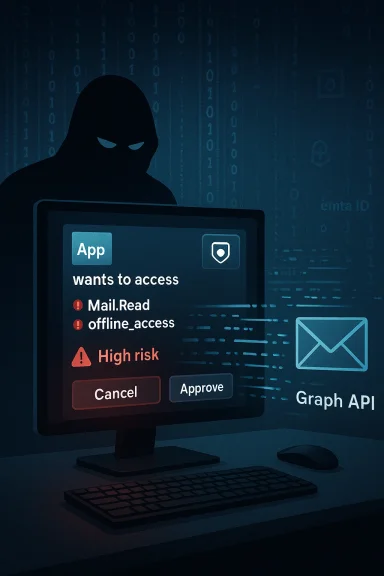
At its core the attack targets the consent decision. A user is presented with a familiar or convincing consent prompt — sometimes for a legitimate third‑party service, sometimes for a crafted look‑alike. If the user accepts, they grant the requesting application one or more scopes such as:- Mail.Read — read access to the user’s mailbox
- offline_access — ability to obtain refresh tokens for long‑lived access
- profile / openid — identity claims and profile access
Trusted apps and look‑alikes
Attackers use two broad approaches:- Abuse or compromise a legitimate application or service principal already registered in a tenant (or trick users into consenting to an attacker‑controlled app that masquerades as a known brand).
- Create look‑alike service principals that present the same publisher name or familiar branding in the consent dialog to convince nontechnical users.
Why Mail.Read is particularly dangerous
The Mail.Read scope lets an app read all messages in a user mailbox. When combined with offline_access this becomes a persistent, silent data‑exfiltration channel. Threat actors can:- Harvest sensitive attachments and confidential discussions.
- Monitor conversations to prepare targeted internal phishing (BEC) or lateral compromise attempts.
- Use email contents for reconnaissance to expand access or manipulate financial workflows.
Detection challenges and the telemetry blind spots
Tokens versus sign‑ins
Traditional detection pipelines are frequently optimized to detect anomalous sign‑ins: unfamiliar IPs, impossible travel, or credential stuffing. OAuth token misuse sidesteps many of those signals because actions are executed by bearer tokens against APIs — and often by legitimate Microsoft service endpoints. The token presents as valid, authorized activity.Limited visibility without premium telemetry
Important audit events that can expose OAuth abuse — such as application consent events, service principal additions, or Graph API access logs — are available in Entra ID and the Unified Audit Log, but full fidelity often requires higher licensing tiers or advanced telemetry ingestion. For example, mailbox access actions that provide application‑level identifiers may only be visible when advanced auditing or E5/G5 features are enabled, limiting incident response capabilities for organizations on lower licensing tiers.Noisy logs and scarcity of context
Even when logs are available, signal‑to‑noise is a problem. Tenants often have dozens or hundreds of third‑party apps legitimately connecting. Distinguishing a malicious consent from a legitimate one requires correlation: who consented, when, from what IP, and what scopes were granted. Two audit events are crucial signals for early detection: an event where a new service principal is created or added, and the subsequent consent‑to‑application event identifying the user who granted scopes. Correlating these events quickly is nontrivial in large or poorly instrumented environments.Practical detection playbook
The following detection and triage steps are practical, sequential actions that security teams can adopt immediately.- Identify newly created or newly active service principals and applications.
- Cross‑reference any new app against your known, approved app catalog and sanction lists.
- Search Entra ID audit logs for explicit consent events and identify the consenting user, timestamp, and IP address.
- Examine granted delegated permissions for high‑risk scopes (Mail.Read, Files.Read.All, Sites.Read.All, Chat.Read, offline_access).
- For any Mail. or Files. permissions, query mailbox access logs (MailItemsAccessed) for the application ID and examine what items were accessed.
- If token refresh or long token lifetimes are observed, treat as high priority — a refresh token plus offline_access equals persistence.
- Revoke consent and app credentials for suspicious applications and rotate affected accounts.
- Where possible, ingest Entra ID logs into a SIEM or Azure Sentinel to pivot across service principal creation, consent events, sign‑ins, and Graph API calls.
Hardening controls that materially reduce risk
The solution space is straightforward in principle, but teams must balance security with user productivity. The following controls create meaningful barriers to consent‑based abuse:- Restrict user consent by default. Disable or tightly scope non‑admin user consent and require administrator approval for high‑risk scopes. Configure the Entra admin center to require admin review for any request that includes Mail. or Files. scopes.
- Create an allowed app catalog and enforce app governance. Only pre‑approve sanctioned apps and block others. Use an app review process for any new third‑party integrations.
- Require admin consent for delegates with offline_access. Treat refresh‑token capability as an operationally privileged permission; require an administrator to make that decision.
- Enforce Conditional Access policies to block or limit device code flows and legacy flows. Device‑code and similar flows can be exploited in voice‑phishing or social engineering campaigns; conditional access can block those flows where not required.
- Apply least‑privilege to APIs. Encourage vendors to use minimal scopes. Review and remove broad “read all” permissions where fine‑grained alternatives exist.
- Shorten token lifetimes where practical. Avoid long default lifetimes for refresh tokens and use continuous access evaluation if available.
- Monitor and alert for MailItemsAccessed and service principal sign‑ins. Prioritize alerts for new apps accessing mail or for dormant apps suddenly becoming active.
- User education and phishing resilience. Train users to recognize consent prompts and to report unexpected permission requests.
Tools and telemetry: where to invest
- Unified Audit Log and Entra audit logs. These are the baseline; ensure logs are retained and ingested into a SIEM.
- Graph API and MailItemsAccessed events. For mailbox activity, these events provide the strongest evidence of app‑level access. Enabling advanced auditing or an appropriate licensing tier may be required to capture the most useful fields.
- Service Principal Sign‑ins. Use the dedicated service principal sign‑in logs to detect non‑interactive or app‑driven access.
- Open‑source detection utilities. Community tools can accelerate investigations: run scripts that export consent events, service principal changes, and recent app permissions to triage anomalies.
- CASB and DLP integration. Cloud Access Security Brokers can block or quarantine risky app connections and apply DLP rules to data taken by third‑party apps.
- App governance platforms. These centralize approval workflows, maintain an allowlist/denylist, and can surface risky combinations of permissions automatically.
Risk trade‑offs and operational costs
Security teams face a classic trade‑off: locking down consent reduces the probability of OAuth abuse, but it increases friction for legitimate SaaS integrations. The more you restrict user consent, the more IT becomes a gatekeeper for everyday productivity apps. That increases operational overhead and time‑to‑provision.There are also licensing trade‑offs. High‑fidelity audit events and some Graph API artifacts that make investigations feasible are only fully available with premium Entra or Microsoft 365 licenses. Budget and procurement cycles mean many organizations must operate with incomplete telemetry — and attackers know this.
Finally, there’s the human factor: consent dialogs are often short, with technical permissions that users do not understand. Attackers exploit this information asymmetry. Robust user training helps, but it cannot replace technical controls.
Case studies and government guidance: what responders are seeing
Security vendors and public‑sector advisories have converged on the same core observations:- OAuth consent phishing and malicious OAuth apps have been employed by opportunistic cybercriminals and advanced persistent threat groups alike.
- Attackers gain persistence by obtaining delegated permissions and long‑lived refresh tokens, then using the Graph API or Exchange APIs to read and exfiltrate mail.
- Detection is possible by correlating service principal creation, consent events, and application‑level mailbox access logs — but it often requires advanced telemetry, manual correlation, or dedicated investigative tooling.
Recommended incident response runbook
If you discover or suspect OAuth consent abuse, follow a rapid, repeatable response:- Immediately disable or block the suspected application and revoke its credentials.
- Revoke refresh tokens and access tokens associated with affected accounts.
- Identify the consenting user, the IP address, and timeframe of consent. Determine whether the consent was prompted during a phishing flow.
- Search MailItemsAccessed and mailbox audit logs for documents or emails accessed by the app’s application ID.
- Preserve logs: export relevant Entra and mailbox logs to immutable storage for forensic analysis.
- Reset multi‑factor authentication for high‑risk accounts and consider forcing password rotation or account re‑provisioning for any accounts that demoted protections.
- Scan for secondary artifacts: suspicious forwarding rules, inbox rules that exfiltrate mail, or newly created service principals.
- Conduct a risk assessment: determine data exfiltrated, downstream risks (e.g., BEC), and whether credentials were subsequently used to expand access.
- Remediate and strengthen controls (tighten consent policy, enforce admin consent for high‑risk scopes, and update user training).
- Notify impacted stakeholders and, where required, regulatory bodies.
Critical analysis: strengths, weaknesses, and where vendors fall short
OAuth’s strength — delegation without password sharing — is also its Achilles’ heel when the decision to delegate rests on uninformed user consent. Several systemic weaknesses make consent‑based attacks practical:- User consent by nonadmins: Many tenants allow end users to grant permissions; attackers target those users with social engineering, reducing the cost and complexity of attacks.
- Broad default scopes: Some applications request or are granted overly broad scopes (e.g., tenant‑wide read access). These amplify abuse potential.
- Telemetry and licensing gaps: Full detection requires advanced logging and longer retention periods, which not every organization purchases.
- Frictionless attack surface: Because consent can be granted via legitimate Microsoft domains or trusted service principals, standard phishing filters and sign‑in anomaly detectors often fail to flag malicious activity.
- Operational inertia: Changing consent settings, implementing an app review program, or investing in advanced telemetry requires time, budget, and coordination across security, IT, and procurement teams.
What security leaders should do next
- Conduct an immediate inventory of all applications and service principals in your tenant. Identify which ones request Mail., Files., or Sites.* permissions.
- Tighten consent policies and require admin review for any app that requests sensitive scopes.
- Increase telemetry retention and ingest Entra ID and mailbox logs into your SIEM. If advanced auditing is not in place, budget for it — the investigative gaps are real and expensive when exploited.
- Deploy app governance — maintain an allowlist and denylist and integrate approval workflows with procurement.
- Update incident response plans to include OAuth‑consent abuse scenarios and practice the containment steps above.
- Run targeted phishing simulations that include OAuth consent prompts so users learn to recognize and report suspicious consent requests.
- Consider conditional access rules to block or restrict device code and legacy OAuth flows in environments where they are not required.
Conclusion
OAuth was meant to make integrations secure and eliminate risky password behavior — but when user consent is weaponized, it becomes a stealthy and persistent attack vector. The solution is not to abandon OAuth but to treat delegated consent as a formal security control: enforce admin oversight for high‑risk scopes, invest in telemetry and governance, and equip users with the knowledge to spot deceptive consent prompts. Organizations that adopt a policy‑first approach to app consent — combined with robust logging, automated detection, and decisive incident playbooks — will turn a growing attack surface back into a manageable, auditable integration model.Source: Petri IT Knowledgebase OAuth Abuse in Microsoft Entra ID Enables Stealthy Email Access
