

A decades‑old secret tucked into Microsoft Office 97 has resurfaced: enter a handful of specific steps in Word 97 and the long‑dormant Clippit (Clippy) will pop up with a developer credits screen — a find that underlines both the playful culture of 1990s software teams and why the paperclip still matters to product designers today.
For hobbyists curious to reproduce the Word 97 Easter egg, proceed with preserved VMs and legal software; for everyday users and administrators facing Mico and Copilot, focus on toggles, memory controls, and policy guardrails — enjoy the paperclip cameo, but don’t let nostalgia obscure the need for rigorous privacy and security practices.
Source: Windows Report https://windowsreport.com/microsoft-office-97-clippy-easter-egg-discovered-after-nearly-30-years/
 Background
The Office 97 discovery in brief
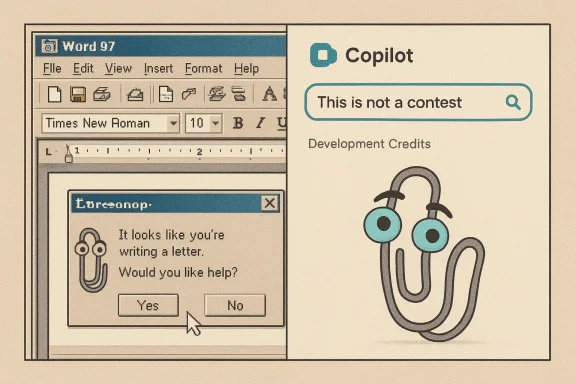
A retrocomputing sleuth exploring Office 97 in a modern environment discovered an Easter egg that reveals the development credits and a short, whimsical commentary from Clippit. The reported activation sequence requires changing the host system date, interacting with Word’s toolbar while holding a modifier key, clicking the Office Assistant, and entering the phrase “This is not a contest” before invoking Search — after which Word 97 opens a hidden credits window that includes voice/lines tied to the paperclip. Multiple outlets covering the find reproduced the steps and the resulting credits screen in hands‑on testing.Why this matters now
Clippit debuted with Microsoft Office 97 as an early, earnest attempt to make software feel conversational. Its intrusive behavior eventually made it infamous, and the assistant was removed from mainstream Office UI years later. The new discovery matters because it connects the present era of AI assistants — where companies intentionally craft personalities for chatbots — with the experimental, human‑scaled playfulness of late‑90s development teams. The Easter egg also reveals how teams immortalized their work in ways users rarely saw, and it spotlights a cultural artifact that Microsoft and the broader industry still reference when thinking about assistant design.The Office 97 Clippy Easter egg: what was found and how to reproduce it
Step‑by‑step (as reported)
The reproduced activation steps — tested and published by retrocomputing reports and mainstream tech outlets — are compact but precise:- Set the host system date to any year after 1997.
- Launch Word 97.
- Hold the Ctrl key and move the Standard toolbar to different positions on the UI, releasing the key after each move.
- Click the Clippy (Office Assistant) icon.
- Enter the phrase “This is not a contest” into the assistant’s input box.
- Press the Search button.
Reproducibility and caveats
- The find is context‑sensitive: the Easter egg appears in authentic Office 97 builds and is easiest to trigger in a controlled environment such as a virtual machine running a preserved Office 97 installation.
- Modern Office distributions do not contain this Easter egg — it’s a relic of the Office 97 binaries and resource sets. Attempting to reproduce the steps on modern Office apps or cloud versions will not work.
- Exact behavior may vary with language packs, localization, or patched copies of Office 97; several writeups recommend using a clean, unmodified Office 97 image or a well‑preserved virtual machine snapshot to minimize differences.
Clippy’s arc: from Office Assistant to cultural touchstone
A short history
- 1997 — Office 97: Microsoft shipped the Office Assistant, officially named Clippit, as a visual, animated helper intended to surface contextual tips (e.g., “It looks like you’re writing a letter…”). It was designed to make help more discoverable for mainstream users.
- Early 2000s — Backlash: The assistant’s frequent interruptions and poor contextual accuracy made it a lightning rod for user frustration and satire.
- 2007 — Retirement: Microsoft removed the Office Assistant from the default Office UI as the company retooled help and discoverability strategies.
- 2000s–2020s — Legacy and memehood: Clippy became a recurring meme, cultural shorthand for misplaced software helpfulness, and a nostalgic artifact for a generation of users.
Why engineers hid Easter eggs like this
Developer credits and private in‑product jokes were common in pre‑cloud software. Building an Easter egg into a shipped product was a way for teams to leave an imprint amid monolithic releases and closed source. The Office 97 find is a textbook example: humanizing commentary and a hidden credits screen intended more for colleagues than consumers. The renewed attention today underscores how much software culture has changed — not just technically, but socially — since the 1990s.The other side of the headline: Clippy's modern cameo inside Copilot
Mico — Copilot’s new avatar and the modern Clippy nod
In 2025 Microsoft introduced Mico, an animated, non‑human avatar for Copilot’s voice interactions, designed to provide nonverbal cues (listening, thinking, emotion) during long voice sessions and learning flows. In preview builds, repeatedly tapping Mico causes a cosmetic transformation into a Clippy‑like paperclip as an Easter egg — an intentional nostalgia callback rather than a functional reintroduction of the old Office Assistant model. This behavior has been independently reported by several outlets and witnessed in hands‑on demonstrations.What Microsoft says — and what the evidence shows
- Microsoft frames Mico as optional: it can be disabled for users and is scoped primarily to voice mode, Learn Live tutoring sessions, and certain collaborative contexts. The Clippy reveal is a cosmetic easter egg in preview builds and not a restored help agent.
- Multiple reputable outlets confirmed the tap‑to‑Clippy behavior during early rollouts and previews. The transformation is a skin or animation overlay — it does not restore Clippy’s old interruptive heuristics. Observers also noted that Mico is part of a larger Copilot Fall Release that adds group features, memory, and “Real Talk” conversational modes.
Conflicting numbers and rollout detail
Different outlets reported slightly different numbers for Copilot Groups participant limits in early coverage: Windows Central and TechCrunch reported support for up to 32 participants, while other previews referenced roughly 30 participants. These discrepancies are typical during staged rollouts: preview builds and regional tests can change limits as engineers iterate, so treat early numeric caps as provisional until Microsoft updates official documentation.Analysis: nostalgia, product strategy, and design trade‑offs
Nostalgia as product marketing — benefits and motives
- High engagement, low cost: A Clippy cameo is cheap to implement but tends to generate social sharing, headlines, and user curiosity.
- Emotional shorthand: Clippy functions as a cultural meme that signals Microsoft’s self‑awareness about past mistakes with personality‑driven helpers.
- On‑ramp for features: Nostalgia can coax users into trying new features (voice mode, Learn Live) they might otherwise ignore.
Design trade‑offs and the risk landscape
Bringing a recognizably personified element into an assistant raises several practical and ethical challenges:- Perceived intrusiveness: The original Clippy failed because it intruded without consent. Modern designs must avoid defaults that feel invasive, especially on work devices.
- Privacy and memory: Copilot’s long‑term memory and connectors increase surface area for data collection. An avatar that “remembers” things can deepen emotional attachment — increasing the stakes for secure defaults and transparent controls.
- Misdirection risk: Personality and charm can mask limitations. Users who anthropomorphize an assistant may overtrust responses, especially in domains like health or legal advice.
- Regulatory and enterprise concerns: Corporate admins and regulators will scrutinize how persistent memory, group sessions, and agentic browsing operate in managed environments. Clear policies and controls are required to avoid accidental data leakage or misuse.
Technical verification of key claims
Claim: The Office 97 Easter egg exists and is reproducible by following specific steps.
Verification: Reported steps and the resulting credits screen were reproduced in coverage by multiple outlets focused on retrocomputing and consumer tech, suggesting the find is genuine if executed on authentic Office 97 images. That said, reproducibility depends on build integrity, language/localization, and runtime environment; hobbyists are advised to use preserved VM snapshots for fidelity.Claim: Mico can be tapped repeatedly to transform into Clippy; Mico is enabled by default in voice mode in some markets.
Verification: Hands‑on reporting, official Microsoft previews, and major outlets corroborate both the tap‑to‑Clippy Easter egg and the default‑on behavior for voice mode in initial markets. Multiple independent reports confirm the cosmetic nature of the transformation — it is an overlay, not a full reintroduction of the old assistant behavior. Different outlets also documented the staged rollout and settings that allow disabling the avatar.Claim: Copilot Groups supports up to 32 participants.
Verification: Windows Central and other reputable outlets reported a 32‑participant limit in preview materials; a handful of hands‑on reports referenced roughly 30 participants. Given the preview state, the number is provisional and should be confirmed against Microsoft’s official release documentation for production use.Practical guidance for readers and IT pros
For curious hobbyists (reproducing the Office 97 find)
- Use a dedicated virtual machine with a preserved, unmodified Office 97 installation.
- Document the VM snapshot before experimenting so you can revert if something behaves unexpectedly.
- Be mindful of licensing and vintage software distribution rules; use legally obtained installation media.
For everyday users encountering Mico/Clippy in Copilot
- Mico is optional: if the avatar is distracting, disable it in Copilot or voice mode settings.
- Check privacy and memory settings: confirm whether Copilot is saving memory entries and which connectors (email, drive, calendar) have permission.
- Treat the Clippy transformation as a cosmetic Easter egg — not an indication that the assistant will behave like the old Office Assistant.
For IT administrators
- Audit Copilot defaults in your tenant and set organization‑wide policies for Copilot and Edge agenting.
- Disable or restrict Copilot features that involve agentic actions (booking, payments) until manual confirmation and logging are enforced.
- Provide employee guidance on privacy, memory deletion, and how group sessions may include external participants.
- Monitor regional availability; feature rollouts and caps may vary between preview channels and general availability.
Strengths, risks, and product lessons
Notable strengths
- Human cues improve voice UX: Avatars like Mico provide nonverbal feedback that can reduce conversational awkwardness and improve multi‑turn voice exchanges.
- Scoped, optional design reduces past failure modes: Microsoft’s emphasis on opt‑in memory and toggles addresses the classic problems that made Clippy unpopular.
- Nostalgia drives discovery without major engineering cost: A cosmetic Clippy cameo is an effective way to generate buzz and invite users to test new features.
Key risks
- Emotional over‑attachment and misplaced trust: Personified assistants can cause users to trust responses more than they should, especially in sensitive domains.
- Privacy surface expansion: Memory, connectors, and group sessions increase the risk of accidental data exposure if defaults are lax.
- Regulatory scrutiny: Agentic behaviors (automated bookings, web actions) necessitate clear logs, consent flows, and auditability to meet enterprise and regulatory requirements.
Broader context: what these two Clippy stories together tell us
The Office 97 Easter egg and the Mico Clippy cameo form a narrative arc: a playful, developer‑level artifact from the late 1990s reappears in the modern AI era as both a historical curiosity and a marketing shorthand. That juxtaposition reveals two things about the industry today:- Teams are more deliberate about personality than they were in the 1990s: Mico is explicitly scoped, tested, and accompanied by permissioned connectors and memory controls.
- Nostalgia remains a powerful design lever: companies can use cultural touchpoints to lower adoption friction, but nostalgia alone is not a substitute for solid UX, privacy engineering, and clear defaults.
Conclusion
The Office 97 Clippy Easter egg rediscovered after nearly 30 years is a delightful reminder of software culture’s human origins — of teams that hid tiny, private celebrations in shipping products. At the same time, Microsoft’s modern reuse of the paperclip as a wink inside Copilot’s Mico avatar shows how the industry reinterprets its past to introduce and market new interaction models. Both stories together illuminate an essential lesson for designers and IT pros: personality in software can be delightful and inviting, but only when paired with sane defaults, transparent controls, and robust governance that prevent a nostalgic wink from turning into a real‑world problem.For hobbyists curious to reproduce the Word 97 Easter egg, proceed with preserved VMs and legal software; for everyday users and administrators facing Mico and Copilot, focus on toggles, memory controls, and policy guardrails — enjoy the paperclip cameo, but don’t let nostalgia obscure the need for rigorous privacy and security practices.
Source: Windows Report https://windowsreport.com/microsoft-office-97-clippy-easter-egg-discovered-after-nearly-30-years/
