

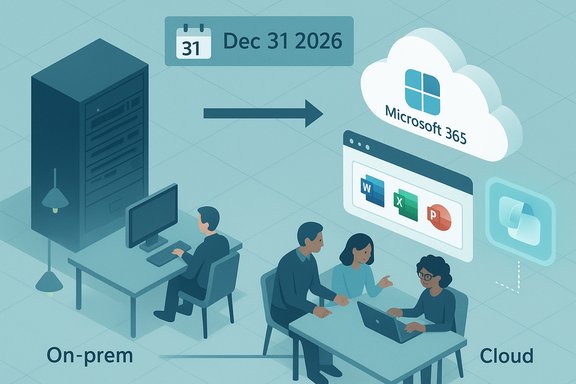
Microsoft has confirmed that Office Online Server (OOS) — the on‑premises engine that powered in‑browser Word, Excel, PowerPoint and OneNote hosting inside customer datacenters — will be retired and reach end‑of‑support on December 31, 2026, forcing organizations that relied on local browser editing to choose between migrating to Microsoft 365, adopting desktop alternatives, or accepting increased operational risk.
Office Online Server was the on‑premises counterpart to Office for the web, enabling browser‑based document preview, light editing and live coauthoring when integrated with products such as Exchange Server, SharePoint Server and Power BI Report Server. It has long been the practical option for organizations that needed a web experience without moving sensitive content into Microsoft’s cloud.
Microsoft’s official Tech Community announcement states the product will no longer receive security updates, bug fixes, or technical support after December 31, 2026, and urges customers to begin planning migration to cloud alternatives such as Microsoft 365. Independent reporting confirms the date and the company’s cloud‑first framing. This development is part of a broader shift in Microsoft’s strategy: consolidate browser‑based Office investments into a single, cloud‑native stack where continuous delivery, model updates and AI integrations like Microsoft 365 Copilot are easier to operate at scale. That strategic rationale appears throughout Microsoft’s messaging, though observers note commercial incentives (subscription revenue, simplified engineering) also play a role.
Key points from that survey and public commentary:
Source: Kahawatungu Microsoft to Retire Office Online Server by 2026, Shifts Focus to Cloud and AI Tools - Kahawatungu
 Background / Overview
Office Online Server was the on‑premises counterpart to Office for the web, enabling browser‑based document preview, light editing and live coauthoring when integrated with products such as Exchange Server, SharePoint Server and Power BI Report Server. It has long been the practical option for organizations that needed a web experience without moving sensitive content into Microsoft’s cloud.Microsoft’s official Tech Community announcement states the product will no longer receive security updates, bug fixes, or technical support after December 31, 2026, and urges customers to begin planning migration to cloud alternatives such as Microsoft 365. Independent reporting confirms the date and the company’s cloud‑first framing. This development is part of a broader shift in Microsoft’s strategy: consolidate browser‑based Office investments into a single, cloud‑native stack where continuous delivery, model updates and AI integrations like Microsoft 365 Copilot are easier to operate at scale. That strategic rationale appears throughout Microsoft’s messaging, though observers note commercial incentives (subscription revenue, simplified engineering) also play a role.
What Microsoft announced — the essentials
- Retirement / End‑of‑Support date: December 31, 2026. After that date Microsoft will not ship security updates, bug fixes, or provide technical support for Office Online Server.
- No forced immediate shutdown: Microsoft says it will not actively block existing OOS installations, but unsupported software quickly becomes a liability because it will receive no patches.
- Affected integrations: On‑premises workflows that used OOS — notably Outlook on the web (OWA) file preview and in‑browser live edit, Excel workbook hosting in Power BI Report Server, and certain SharePoint/Skype for Business flows — will lose the vendor‑supported browser editing path. Administrators should expect degraded UX (download‑first workflows) unless they deploy alternatives.
- Microsoft’s recommendation: Migrate browser editing workloads to Microsoft 365 (Office for the Web) for continued support, richer collaboration features and access to Copilot. For purely on‑prem editing needs, Microsoft points to Microsoft 365 Apps for Enterprise (desktop clients) or Office LTSC 2024 as local alternatives — with the caveat these do not replicate the browser coauthor and cloud AI features.
Why Microsoft says it’s happening — the official rationale and the subtext
Microsoft frames the change as a necessary consolidation: maintaining a parallel on‑premises web‑app stack imposes significant engineering, security and QA burdens and slows delivery of cloud‑native innovations including AI. Consolidating into Office for the Web allows continuous updates, centralized telemetry and faster rollout of Copilot features. That rationale aligns with the technical truth that many AI features rely on centralized model infrastructure, telemetry pipelines and rapid model updates that are impractical to distribute across thousands of customer‑hosted servers. However, strategic and commercial incentives — recurring cloud revenue, simplified product footprint and reduced support overhead — are also plausible drivers of the decision. Those incentives are not denied by Microsoft; they simply aren’t framed as the headline reason. Treat such interpretive claims as informed analysis rather than Microsoft’s own direct admission.Who is affected — scope and severity
Enterprise on‑prem customers
Organizations with integrated on‑prem SharePoint, Exchange or Power BI Report Server instances that used OOS for in‑browser editing will be directly affected. For many, OOS provided the only practical way to deliver browser‑based editing while keeping data inside their own compliance boundaries. Those features will lose vendor‑supported behavior after the retirement date.Regulated and sovereign environments
Public sector agencies, defense contractors, healthcare, and financial institutions that are legally constrained to retain data on‑prem will feel the impact most acutely. OOS has been the vendor‑backed path for web editing without cloud migration; its retirement forces painful choices: accept degraded UX, pay for complex hybrid/third‑party tooling, or adopt desktop clients with more manual workflows.Skype for Business Server customers
Skype for Business customers who relied on OOS for high‑fidelity PowerPoint rendering, presenter notes and in‑meeting annotations will see these capabilities diminish. Microsoft recommends migration to Teams for modern meeting experiences, but many on‑prem telephony or compliance scenarios complicate that move.The Copilot question: hybrid AI and Microsoft’s survey to admins
Microsoft has simultaneously reached out to gather administrator feedback on bringing Copilot‑style features to Exchange Server on‑premises, through a survey that asks about acceptable data flows, feature sets and non‑negotiables such as data residency and audit controls. The outreach is exploratory — it indicates Microsoft is testing the boundaries of hybrid AI deployments rather than shipping a guaranteed on‑prem Copilot product.Key points from that survey and public commentary:
- Microsoft is asking admins which Copilot features would be valuable (email summarization, drafting assistance, server health monitoring, eDiscovery help).
- The survey probes whether organizations would accept sending limited data (metadata or excerpts) to the cloud for AI processing while keeping mailboxes on‑premises.
- This is a policy and engineering probe: Microsoft is effectively asking customers to define the red lines for hybrid AI. Responses could shape future product design, but they do not constitute a shipping pledge.
Technical and operational impacts — what will break or change
- Outlook on the web (OWA): If your Exchange on‑premises deployment used OOS to preview or live‑edit attachments in OWA, that capability will no longer be maintained. After OOS retirement, on‑prem users will likely have to download attachments to view or edit them unless an alternate path is implemented. Exchange Online customers are unaffected because the cloud uses Office for the web.
- SharePoint Server: In‑browser editing that relied on OOS integrations will lose vendor support. SharePoint Server itself remains supported under its own lifecycle, but its browser editing paths will need rework.
- Power BI Report Server: Hosting Excel workbooks through OOS will no longer be supported. The practical alternative is to open workbooks in the desktop Excel client or migrate reports to the Power BI cloud service.
- Skype for Business Server: Several OOS‑dependent meeting features (high‑fidelity slide rendering, presenter notes, in‑meeting annotations, embedded video) will lose vendor support.
- Custom integrations: Any bespoke apps that depended on OOS for server‑side rendering or editing will need code changes or architectural redesign. There are few drop‑in third‑party on‑prem replacements that replicate OOS behavior.
Security, compliance and lifecycle risk
Running unsupported OOS after December 31, 2026, will carry increasing security and compliance risk:- No security updates means new vulnerabilities discovered after that date will remain unpatched.
- Auditors typically flag unsupported server software as a compliance risk; regulated entities may struggle to pass audits without compensating controls or a migration plan.
- As OS, browser and TLS stacks evolve, OOS may suffer compatibility failures because it will not be updated for modern runtimes.
Validated alternatives and trade‑offs
Microsoft’s official guidance and community playbooks present four practical options — each with clear trade‑offs:- Move to Microsoft 365 / Office for the Web (cloud)
- Benefits: Continuous updates, in‑browser coauthoring, integrated Copilot and DLP, tighter Teams/OneDrive/SharePoint integration.
- Drawbacks: Data residency and legal issues for highly regulated customers; licensing and migration costs.
- Adopt hybrid architectures
- Benefits: Retain sensitive mailboxes or content on‑prem while offloading browser editing to Microsoft 365 cloud where permitted.
- Drawbacks: Complexity in identity (Azure AD Connect), conditional access, data governance and network design.
- Use desktop clients (Microsoft 365 Apps for Enterprise or Office LTSC 2024)
- Benefits: Keeps data local; supported desktop editing.
- Drawbacks: No browser coauthoring or Copilot cloud features; LTSC has finite servicing windows.
- Continue running OOS with strict compensating controls (short term only)
- Benefits: Minimal immediate user disruption if you accept download‑first workflows.
- Drawbacks: Unsupported software, no security fixes, audit and compliance risks. This is a temporary stopgap, not a long‑term solution.
Practical migration roadmap — a recommended timeline
- Inventory (0–2 months)
- Build a complete inventory of OOS usage: Exchange OWA dependencies, SharePoint farms, Power BI workbooks, Skype for Business integration points and any custom apps that call OOS. Record the feature dependencies and business impact for each integration.
- Risk assessment and decisioning (1–3 months)
- Classify workloads by compliance sensitivity and user impact. Decide which workloads can move to Microsoft 365, which must remain on‑premises and which require hybrid patterns. Document risk acceptance and fallback plans.
- Pilot migration (3–9 months)
- Pilot moving representative workloads to Microsoft 365 or to hybrid configurations. Validate DLP, conditional access, Copilot privacy settings and model handling for any AI features you plan to adopt.
- Production rollout and decommissioning (9–18 months)
- Migrate user data and content, update identity and networking, train end users for new workflows, and shut down or isolate OOS servers. Prepare compensating controls where full migration is impossible before the December 31, 2026 date.
- Post‑retirement remediation (after Dec 31, 2026)
- If OOS is retained beyond retirement, treat it as unsupported: isolate it, enforce strict firewall rules, increase monitoring and add documented compensating controls. Plan a hard migration or replacement as a priority.
Cost and procurement considerations
Migrating to Microsoft 365 typically converts capital expenditures into recurring operating expenses. Available Microsoft 365 plans vary widely by feature set and price; migrating at scale will require licensing analysis that factors in:- Per‑user monthly costs for Microsoft 365 plans
- FastTrack or migration service fees for larger customers
- Identity and networking upgrades (Azure AD, conditional access, bandwidth)
- Staff time for pilots, testing and rollout
- Potential third‑party tooling for hybrid or sovereign cloud scenarios
Strategic analysis — strengths, risks and long‑term implications
Notable strengths of Microsoft’s approach
- Faster innovation and security delivery: Consolidating browser experiences into Office for the Web allows Microsoft to ship updates, security patches and AI capabilities at cloud scale, which benefits the majority of customers who accept cloud residency.
- Unified engineering and telemetry: A single cloud codebase simplifies QA, model training, telemetry and rapid iteration — essential for delivering AI features like Copilot reliably.
Significant risks and tensions
- Data sovereignty and regulatory friction: The retirement eliminates a vendor‑supported on‑prem browser editing path that many regulated organizations relied on. For such customers, Microsoft’s recommendation to migrate to cloud creates a policy gap that cannot be closed by technology alone.
- Operational and audit risk: Running unsupported OOS will be flagged in audits; compensating controls are imperfect substitutes for vendor patches.
- Vendor consolidation and lock‑in: Moving critical collaboration functions to Microsoft’s cloud deepens reliance on Microsoft’s tenant, telemetry and AI model controls. Organizations should weigh the productivity gains against reduced architectural independence.
What the move signals about Microsoft’s roadmap
The OOS retirement is a concrete signal that Microsoft prioritizes cloud and AI integration across its productivity stack. The company appears willing to invest in hybrid approaches only where there is clear customer demand and where customers agree to constrained data flows for AI processing. The Exchange Copilot survey illustrates Microsoft’s attempt to map the boundaries of acceptable hybrid AI — but it remains exploratory, not a product commitment.What administrators should do now — a short checklist
- Inventory OOS usage across Exchange, SharePoint, Power BI, Skype for Business and custom apps.
- Engage legal and compliance early to map acceptable migration options and identify non‑negotiable residency requirements.
- Respond to Microsoft’s Copilot/Exchange survey with concrete, enforceable requirements if hybrid AI is of interest.
- Pilot hybrid configurations early if a phased model is required. Test DLP, telemetry, and Copilot privacy controls before wide adoption.
- Build a migration timeline that completes high‑risk moves well before December 31, 2026, and document compensating controls for any systems that will remain on OOS temporarily.
Caveats and unverifiable claims — what to watch for
- Microsoft’s public message centers on modernization and cloud‑first innovation; attributing the retirement solely to revenue motives or AI ambitions is plausible but partly interpretive. Such strategic claims should be treated as informed analysis rather than provable fact.
- The Exchange Copilot survey is exploratory. Responses will shape Microsoft’s options, but the survey does not guarantee a shipped product or contractual guarantees for hybrid Copilot behavior. Treat survey results as indicative, not authoritative.
Conclusion
Microsoft’s retirement of Office Online Server by December 31, 2026 marks a decisive pivot: the company is consolidating browser‑hosted Office capabilities into a single cloud stack optimized for continuous delivery and AI integration. For most organizations, the recommended path is migration to Microsoft 365, which offers modern browser editing, continuous security updates and access to Copilot. For organizations constrained by legal, regulatory or sovereign requirements, the announcement removes a long‑standing vendor‑supported on‑prem browsing option and crystallizes a hard choice between degraded user experiences, complex hybrid engineering, or accepting unsupported infrastructure risk. Administrators should inventory dependencies now, engage compliance and legal teams, and begin migration planning immediately to meet the December 31, 2026 milestone.Source: Kahawatungu Microsoft to Retire Office Online Server by 2026, Shifts Focus to Cloud and AI Tools - Kahawatungu
