

Microsoft’s cloud-first posture is unmistakable, but the story of on‑premises Microsoft services is not over: companies can — and in many cases must — continue to run core Microsoft platforms in their own datacenters, provided they understand the tradeoffs around licensing, lifecycle, and innovation cadence.
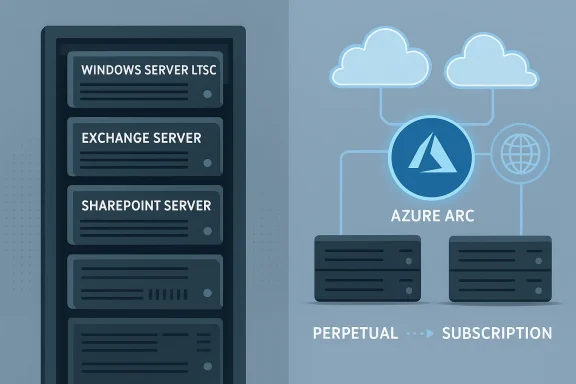
Igor’sLAB and other industry observers make a simple but important point: while Azure, Microsoft 365, and cloud‑native security services receive the lion’s share of Microsoft’s investment and marketing, a meaningful portfolio of classic server products remains available for in‑house operation. That portfolio includes Windows Server (LTSC) as the datacenter OS foundation, on‑premises variants of Exchange Server, SharePoint Server, and legacy real‑time platforms such as Skype for Business Server, plus device‑bound Office options via Office LTSC. This reality supports conscious IT strategies that prioritize data sovereignty, regulatory containment, and operational control over pure cloud convenience. crosoft’s commercial and engineering momentum is shifting: subscription pricing and cloud‑first feature rollouts are reshaping the economics and capabilities of on‑premises operation. IT leaders therefore need a practical, source‑verified roadmap to decide when and how to operate Microsoft services locally — or in hybrid modes that mix local control with cloud services.
This trend has two practical consequences for IT finance:
For IT leaders, the right posture is pragmatic: treat on‑premises as a valid option that requires disciplined lifecycle management, hardened operations, and a readiness to adopt hybrid tools that reduce operational friction. Reassess licensing, support timelines, and vendor announcements frequently; verify lifecycles and contractual details before major investments; and design architectures that preserve the option to move workloads — or to consume cloud enhancements — when business needs change. The choice to operate Microsoft services locally is not a rejection of innovation but a different tradeoff between control, cost, and capability — and it remains entirely defensible for organizations that plan for it rigorously.
Source: igor´sLAB Microsoft services without cloud constraints: Strategies and perspectives for on-premises operation | igor´sLAB
 Background / Overview
Igor’sLAB and other industry observers make a simple but important point: while Azure, Microsoft 365, and cloud‑native security services receive the lion’s share of Microsoft’s investment and marketing, a meaningful portfolio of classic server products remains available for in‑house operation. That portfolio includes Windows Server (LTSC) as the datacenter OS foundation, on‑premises variants of Exchange Server, SharePoint Server, and legacy real‑time platforms such as Skype for Business Server, plus device‑bound Office options via Office LTSC. This reality supports conscious IT strategies that prioritize data sovereignty, regulatory containment, and operational control over pure cloud convenience. crosoft’s commercial and engineering momentum is shifting: subscription pricing and cloud‑first feature rollouts are reshaping the economics and capabilities of on‑premises operation. IT leaders therefore need a practical, source‑verified roadmap to decide when and how to operate Microsoft services locally — or in hybrid modes that mix local control with cloud services.The product picture today: what remains available on‑premises
Core server stack still supported
- Windows Server (LTSC) continues to be available as a standalone operating system for datacenter deployments and remains the primary platform for classic Microsoft server workloads. Microsoft’s lifecycle pages and vendor documentation continue to show long support windows for current LTSC releases, and organizations should verify exact end‑of‑support dates against Microsoft’s lifecycle matrix before committing hardware refresh cycles.
- Exchange Server and SharePoint Server remain available in on‑premises editions, and Microsoft has introduced Subscription Edition (SE) variants for some server products to align on‑premises licensing with subscription economics. Exchange SE reached general availability in mid‑2025, signaling Microsoft’s intent to make subscription licensing a mainstream option for on‑premises communications servers.
- Skype for Business Server (and earlier on‑premises real‑time platforms) are still supported in commercially available server editions for cuswill not migrate to cloud‑only services such as Microsoft Teams. However, innovation in communications is highly cloud‑centered, and Teams is Microsoft’s strategic priority for collaboration.
- Office LTSC remains the route to get perpetual, device‑based Office licenses (Word, Excel, PowerPoint, Outlook, etc.) without mandatory cloud connectivity. Microsoft documents confirm Office LTSC’s availability for commercial and government customers and a defined support lifecycle under the fixed policy.
Newer hybrid and sovereign offerings
Microsoft has expanded hybrid and sovereign choices that blur the line between cloud and local control. Products such as Azure Arc let organizations manage on‑premises servers, VMs, Kubernetes clusters, and data services with Azure management tooling — effectively projecting on‑premises resources into Azure’s control plane. Separately, Microsoft’s Azure Local and Microsoft 365 Local initiatives aim to provide in‑country and disconnected deployment models for customers with strict sovereignty or isolation requirements. These moves reflect a pragmatic recognition that many regulated customers need cloud capabilities delivered inside controlled footprints.Licensing: perpetual, subscription, and the economic pivot
From perpetual to subscription — what’s changed
Historically, many enterprises purchased perpetual server licenses and optionally attached Software Assurance (SA) for upgrade rights and extended support; pricing could be amortized and capitalized. Over the past several years Microsoft has accelerated the shift to subscription licensing even for on‑premises server products. Exchange’s Subscription Edition and other “versionless” or subscription models introduced in 2025 illustrate this trend: customers moving to certain on‑premises SE products are expected to use subscription SKUs and, in many upgrade scenarios, maintain SA or equivalent coverage.This trend has two practical consequences for IT finance:
- Predictability and OpEx orientation: Subscriptions smooth costs and are easier to forecast from a cash‑flow perspective, but they convert capital expenditures into recurring operational expenses.
- Vendor dependence and lock‑in risk: subscriptions tie organizations to ongoing payments for updates and support; when products are bundled into cloud‑centric contracts, there is less room to run indefinitely without vendor engagement.
Short‑term lifelines: ESU and migration windows
For products reaching end of support, Microsoft has historically offered Extended Security Updates (ESU) for limited durations to buy migration time. For example, Microsoft established limited ESU windows around the October 14, 2025 cutover dates for some Exchange and Skype server versions; IT teams needing more time to migrate have relied on short, paid ESU programs or partner‑provided remediation. These stopgap measures are finite — and they can be costly — so they must be factored into migration timelines and budgets.Support lifecycles and the innovation gap
Fixed lifecycles for server products
On‑premises server software still follows Microsoft’s fixed lifecycle policies: clearly defined mainstream and extended support dates are published and must be followed for patching and compliance reasons. For example, Windows Server LTSC releases and Office LTSC have specific end‑of‑support dates organizations must track to avoid running unsupported code in regulated environments. These lifecycle anchors are useful for long‑term planning, but they are not static — administrators must re‑check Microsoft’s official lifecycle pages before procurement and upgrades.Cloud‑first innovation and the feature gap
A recurring pattern is that new capabilities surface in cloud services first, and sometimes exclusively. Security features, telemetry‑driven threat detection, advanced AI capabilities, and integrated SaaS enhancements often debut in Microsoft 365 and Azure. On‑premises counterparts receive security updates and maintenance, but functional parity can lag or never fully arrive. That gap raises strategic questions:- Will the organization need the latest collaborative features or advanced AI integrations?
- Can business processes accept a slower cadence of innovation on local systems?
- Is hybrid operation (local core + cloud adjuncts) feasible given regulation and policy?
Hybrid models: the practical middle ground
Azure Arc and management parity
Azure Arc is explicitly designed to bring Azure management to on‑premises resources. It enables inventory, policy, monitoring, updates, and some VM lifecycle operations across non‑Azure servers, letting enterprises apply a consistent governance model across cloud and local infrastructure. For IT teams seeking the manageability of cloud while retaining data in‑house, Arc is often the most pragmatic integration point. Microsoft Learn modules and guidance show Arc’s range — from server management to Azure data services running on Kubernetes.Sovereign and disconnected options
For org jurisdictional constraints, Azure Local and Microsoft 365 Local provide architectures that can be run in‑country or even disconnected from public cloud control planes. Microsoft’s sovereign cloud announcements emphasize local processing, in‑country AI, and partner‑operated architectures for regulated sectors. These options reduce the need to choose between cloud innovation and local control, but they also introduce complexity in procurement, operations, and partner selection.Hybrid desktop and VDI scenarios
Newer hybrid VDI strategies allow session hosts to run on‑premises while brokering, identity, and management are handled in the cloud — a model announced with Azure Virtual Desktop integrations and vendor collaborations (e.g., Nutanix support for AVD session hosts). This pattern is relevant where local compute or storage must remain in a datacenter, but centralized management is desired.Security, compliance, and operational realities of on‑premises operation
Data sovereignty and regulatory posture
Sectors that handle sensitive personal data — public administration, healthcare, defense, finance, and critical infrastructure — often require data locality, specific access controls, and auditable, demonstrable processing chains. Operating on‑premises simplifies some aspects of compliance: physical access, encryption key custody, and jurisdictional controls can be fully owned by the organization. Conversely, cloud sovereignty features (Azure Local / Microsoft 365 Local) attempt to replicate that control for customers unwilling — or unable — to host everything themselves. Regulatory teams must map contractual obligations and local law to platform capabilities and choose the option that provides verifiable compliance.Patch management and threat exposure
On‑premises systems do not get the same continuous defensive investments as Microsoft’s cloud fabric; they rely on customer patching, detection tooling, and incident response maturity. Recent active exploit campaigns against SharePoint Server demonstrated that unpatched on‑premises software can become high‑value targets and that cloud variants were protected by Microsoft’s centralized controls. If you operate locally, assume a higher burden for:- Rapid patch testing and deployment
- Endpoint and network detection (Defender for Endpoint, SIEM)
- Backup and immutable storage for ransomware resilience
- Regular incident tabletop exercises and forensics readiness
A pragmatic checklist for deciding on on‑premises operation
Below is a practical set of questions and checks that organizations should run before choosing an on‑premises route for Microsoft services.- Regulatory and contractual constraints
- Is processing restricted to a specific country or jurisdiction?
- Do contracts forbid use of public cloud providers outside defined regions?
- Functional requirements
- Do business processes depend on cloud‑only features (e.g., Copilot, advanced M365 AI)?
- Can users tolerate lagging feature parity?
- Lifecycle and vendor policy
- What are the exact end‑of‑support dates for involved products? Verify against Microsoft lifecycle pages before any procurement.
- Are required on‑premises SKUs being converted to subscription models? Will SA be needed to maintain upgrade rights?
- Cost and procurement
- Compare total cost of ownership (hardware, staffing, energy, cooling, networking, security tooling) to cloud operating costs.
- Factor in potential future price increases and subscription conversion costs.
- Security and incident readiness
- Do you have a documented patch‑testing and deployment pipeline?
- Are backups isolated (air‑gapped or immutable) and tested regularly?
- Hybrid integration capability
- Can Azure Arc or other hybrid tooling be adopted to centralize management and reduce operational overhead?
- Business continuity and disaster recovery
- Do you have an independently tested DR plan that covers local datacenter failure scenarios?
- If using Azure Local or disconnected modes, how will failover be performed?
Step‑by‑step operational guidance for on‑premises Microsoft services
- Inventory and baseline
- Catalog existing on‑premises Microsoft workloads, versions, SA status, and third‑party dependencies.
- Verify lifecycles and support options
- Check Microsoft lifecycle pages for each product (Windows Server, Exchange, SharePoint, Office LTSC) and note ESU availability and timelines.
- Evaluate licensing paths
- Work with your Microsond migration options: perpetual + SA, subscription conversions, or new SE purchases. Confirm whether on‑premises rights require SA or qualifying cloud subscriptions.
- Adopt hybrid management early
- If feasible, onboard Azure Arc or similar to gain centralized policy, monitoring, and update capabilities. This reduces manual configuration drift and improves governance.
- Harden and automate patching
- Implement automated patch pipelines, test rings, and emergency patch playbooks to reduce exposure from disclosed vulnerabilities.
- Secure identity and access
- Plan for hybrid identity with Microsoft Entra ID and conditional access, MFA, and Privileged Access Workstations for administration.
- Test disaster recovery and incident response
- Run regular DR failover drills and simulate ransomware/compromise scenarios.
- Reassess annually
- Revisit the on‑premises decision at least yearly, because vendor product policy, lifecycles, and regulatory landscapes evolve.
Strengths, risks, and tradeoffs — a candid analysis
Strengths of on‑premises Microsoft services
- Maximum control: organizations retain custody of data, keys, and network boundaries.
- Regulatory alignment: simple mapping from policy to infrastructure for many compliance frameworks.
- Predictable performance: local I/O, latency, and deterministic compute are easier to guarantee on dedicated hardware.
Key risks and weaknesses
- Innovation lag: cloud versions often receive new features first, and some cloud‑only capabilities (integrated AI, continuous telemetry) may not be feasible locally. This can create functional divergence over time.
- Operational burden: patching, telemetry, detection, and 24/7 incident response fall squarely on the buyer.
- Commercial pressure: Microsoft’s shift to subscriptions and cloud‑centric packaging raises the prospect of higher long‑term vendor costs and contractual complexity.
- Short‑term support traps: limited ESU windows and forced upgrade paths can impose unplanned costs and operational strain.
What to watch next (signals that should trigger reappraisal)
- Official lifecycle changes and end‑of‑support announcements for Windows Server, Exchange, SharePoint, or Office LTSC. These are the clearest indicators that a migration will be required.
- New Microsoft licensing bulletins that shift on‑premises SKUs to subscription‑only models or tighten SA requirements. Early partner announcements and Volume Licensing updates are primary signals.
- Broader sovereign cloud rollouts (Azure Local, Microsoft 365 Local) that may make cloud parity and compliance achievable without full public cloud adoption. These programs are evolving and can materially change the calculus for regulated customers.
- Security incident patterns affecting on‑premises products: active exploitation against server software should accelerate patching and may motivate hybrid shifts to cloud‑managed defenses.
Conclusion
On‑premises operation of Microsoft services is not an anachronism — it is a deliberate strategic choice for many organizations facing regulatory, contractual, or operational constraints. Microsoft continues to support and evolve on‑premises and hybrid tooling, offering paths such as Office LTSC, Exchange Server (including Subscription Edition), SharePoint Server, and Azure Arc for governance and management. However, the commercial and innovation vectors tilt increasingly toward subscription models and cloud‑first feature delivery. That makes careful, evidence‑driven planning essential.For IT leaders, the right posture is pragmatic: treat on‑premises as a valid option that requires disciplined lifecycle management, hardened operations, and a readiness to adopt hybrid tools that reduce operational friction. Reassess licensing, support timelines, and vendor announcements frequently; verify lifecycles and contractual details before major investments; and design architectures that preserve the option to move workloads — or to consume cloud enhancements — when business needs change. The choice to operate Microsoft services locally is not a rejection of innovation but a different tradeoff between control, cost, and capability — and it remains entirely defensible for organizations that plan for it rigorously.
Source: igor´sLAB Microsoft services without cloud constraints: Strategies and perspectives for on-premises operation | igor´sLAB
