
Web browsers have become the modern operating system for a huge slice of daily work, but that convenience comes with a cost: tab sprawl, profile fragmentation, and the constant mental overhead of remembering where each service lives. Pake, an open-source tool built on Rust and Tauri, tackles that problem by turning any website into a standalone desktop app with its own window, icon, and launch entry. For people who live inside browser-based workflows, it offers a simple but surprisingly powerful way to separate tools from tabs.
The idea behind Pake is not new, but the timing is what makes it compelling. For years, browsers have doubled as app launchers for everything from email and chat to note-taking, media, and internal dashboards. That has made the browser indispensable, but also messy, especially for users who juggle dozens of services across work and personal life.
The default alternative has often been Electron, the framework that powers a long list of desktop apps. Electron made cross-platform development practical, but it also normalized a heavy runtime model: each app brings its own Chromium-based browser layer and supporting stack. That design simplifies development, yet it can inflate startup times, memory consumption, and disk footprint in ways users immediately notice.
Pake sits in a different lane. It uses Tauri under the hood, which means it leans on the operating system’s native webview instead of bundling an entire browser runtime into every app. On Windows, that means WebView2; on macOS, WKWebView; and on Linux, WebKitGTK. That architecture matters because it changes the economics of “wrapping” a website: lighter binaries, faster launches, and a much smaller penalty for turning one more service into its own app.
There is also a broader usability story here. Users have been experimenting with progressive web apps, site-specific browsers, and launcher-style wrappers for years, but most of those solutions still feel like browser tabs in disguise. Pake aims to go further by making a website feel like a first-class application, complete with its own icon, window behavior, shortcut handling, and packaging flow.
At the same time, the tool arrives at a moment when productivity software is increasingly web-first. Chat interfaces, design tools, document editors, and dashboards are all living in the browser by default. In that environment, any utility that reduces context switching and declutters the browser deserves attention—especially if it does so without adding much overhead.
The practical benefit is easy to understand. A separate app window creates a separate mental container, and that can matter as much as the technical implementation. Email stops feeling like “another tab,” calendar stops disappearing into a sea of pinned pages, and frequently used web tools can live on the dock or taskbar where they belong.
Pake also ships with prebuilt apps for popular services, which lowers the barrier to entry further. If a user does not want to create a custom wrapper, they can download ready-made builds for services such as ChatGPT, Gemini, DeepSeek, Grok, YouTube, YouTube Music, X, and Excalidraw. That makes Pake usable almost immediately, which is crucial for a tool whose value depends on habit formation.
That difference matters in practice. A lightweight shell built around a native webview usually starts faster and consumes less memory than an Electron app carrying an embedded browser engine. The trade-off is that the experience can vary more from platform to platform, because each operating system brings its own rendering stack and quirks. In exchange, users get something that feels less bloated and more integrated with the desktop.
The broader significance is that Tauri has become a credible route for building site-specific browsers without inheriting the full weight of Electron. That opens the door for developers and power users who want one-page or one-service apps, but do not want to pay the memory tax of a full embedded browser runtime.
The distribution model is smart because it meets users where they are. Most people do not want to learn Rust, install build dependencies, or figure out cross-platform packaging just to turn a website into a desktop app. They want the app to exist, be installable, and behave like software they already trust.
Pake also uses a GitHub Actions workflow for custom builds. That means you can fork the project, fill in a form with the site URL, app name, and icon choices, then let GitHub’s hosted runner do the work. The build process is effectively outsourced to the cloud, which is exactly the sort of thing a modern open-source utility should do when it wants to reduce friction. GitHub’s runner images are designed for this kind of automated build workflow across Windows, macOS, and Linux.
The command-line path is where Pake becomes more than a convenience wrapper. Users can define default window dimensions, choose their own app icons, and tailor how the wrapped website appears on launch. Those details are small individually, but together they create an experience that feels more intentional and less generic.
That flexibility matters because different web apps have different ergonomics. A note-taking app may benefit from a narrow window, a dashboard may need more horizontal space, and a media service may work best with a borderless frame. Being able to tune those settings helps each wrapped app feel deliberately designed rather than incidentally captured.
Pake takes a cleaner route by producing a standalone desktop application. That gives it a more consistent launch point, a dedicated identity in the OS, and more predictable window behavior. Instead of a browser pretending to be an app, you get an app that happens to render web content.
That distinction may sound philosophical, but users feel it immediately. Dedicated shortcuts work as expected, navigation behaves consistently, and the app can be launched independently of your browser state. When a tool is used many times a day, those tiny differences become meaningful.
This is especially useful for people who already run a semi-distributed workflow. Email may live in one service, notes in another, chat in a third, and media in a fourth. Wrapping each one in its own app reduces the odds that one distraction-heavy browser session spills into another task.
That separation is not merely aesthetic. It can help preserve state, reduce accidental tab closures, and make workspace switching less chaotic. In enterprise environments, that can be especially helpful for internal dashboards, admin panels, and vendor portals that need to feel accessible without becoming part of the general browsing pile.
That permissiveness is one reason tools like this often gain traction in niche productivity communities. If a wrapper is useful, lightweight, and easy to distribute, it can become part of someone’s daily workflow very quickly. Once that happens, adoption tends to compound through word of mouth rather than formal marketing.
The open-source angle also gives Pake credibility with power users who prefer inspectable software. If a tool is going to sit between the desktop and your daily web services, many users want confidence that it is not doing anything opaque with their credentials or browsing data. Open source does not guarantee safety, but it does give users a better chance to inspect what is happening.
There is also the issue of platform-specific behavior. Native webviews are efficient, but they are not always identical across operating systems. A website that behaves perfectly inside one webview may have small rendering differences, shortcut inconsistencies, or layout surprises on another platform. For users who need identical behavior everywhere, that can matter.
And then there is the maintenance question. If the underlying website changes its layout, authentication flow, or browser assumptions, the wrapped app may need updating. That is not unique to Pake, but it is a reminder that any web-to-desktop conversion inherits the fragility of the web itself.
The opportunity ahead is even bigger. As more services become web-first, the demand for site-specific desktop shells will only grow. Pake could become a template for lightweight personal productivity tools, internal dashboards, and specialized workflows that do not justify a full native app.
There is also an ecosystem risk. Native webview behavior can change with operating system updates, and those changes may affect how a packaged app behaves over time. That is especially relevant for users who want to depend on the same wrapper for years.
For Pake specifically, the most promising path is to remain lightweight, predictable, and easy to adopt. If it keeps lowering the friction between “a website I use” and “a tool I keep on my desktop,” it will continue to make sense for power users, small teams, and anyone who has outgrown the tab bar.
Pake’s real promise is not that it turns the web into something else, but that it helps the web behave like the part of computing it already is: the place where a lot of real work now happens. For anyone drowning in tabs, that is more than a neat trick—it is a practical, everyday improvement that can make the desktop feel manageable again.
Source: MakeUseOf This open-source tool turns any web page into a desktop app, and I can’t stop using it
 Background
The idea behind Pake is not new, but the timing is what makes it compelling. For years, browsers have doubled as app launchers for everything from email and chat to note-taking, media, and internal dashboards. That has made the browser indispensable, but also messy, especially for users who juggle dozens of services across work and personal life.The default alternative has often been Electron, the framework that powers a long list of desktop apps. Electron made cross-platform development practical, but it also normalized a heavy runtime model: each app brings its own Chromium-based browser layer and supporting stack. That design simplifies development, yet it can inflate startup times, memory consumption, and disk footprint in ways users immediately notice.
Pake sits in a different lane. It uses Tauri under the hood, which means it leans on the operating system’s native webview instead of bundling an entire browser runtime into every app. On Windows, that means WebView2; on macOS, WKWebView; and on Linux, WebKitGTK. That architecture matters because it changes the economics of “wrapping” a website: lighter binaries, faster launches, and a much smaller penalty for turning one more service into its own app.
There is also a broader usability story here. Users have been experimenting with progressive web apps, site-specific browsers, and launcher-style wrappers for years, but most of those solutions still feel like browser tabs in disguise. Pake aims to go further by making a website feel like a first-class application, complete with its own icon, window behavior, shortcut handling, and packaging flow.
At the same time, the tool arrives at a moment when productivity software is increasingly web-first. Chat interfaces, design tools, document editors, and dashboards are all living in the browser by default. In that environment, any utility that reduces context switching and declutters the browser deserves attention—especially if it does so without adding much overhead.
What Pake Actually Does
At its core, Pake wraps a URL in a desktop shell and exposes it like a normal application. That sounds modest, but it solves a very specific pain point: keeping browser-based tools out of the same tab bar that holds research, shopping, documentation, and everything else. The result is less visual noise and a more intentional workflow.The practical benefit is easy to understand. A separate app window creates a separate mental container, and that can matter as much as the technical implementation. Email stops feeling like “another tab,” calendar stops disappearing into a sea of pinned pages, and frequently used web tools can live on the dock or taskbar where they belong.
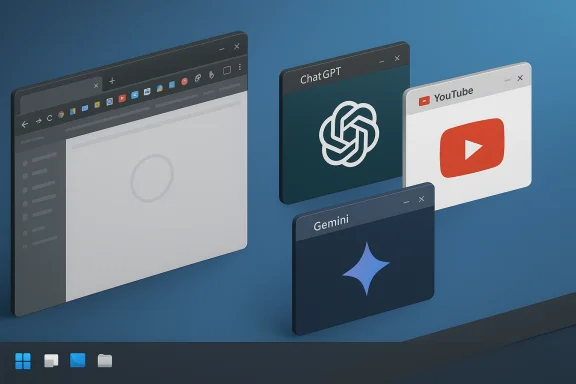
Pake also ships with prebuilt apps for popular services, which lowers the barrier to entry further. If a user does not want to create a custom wrapper, they can download ready-made builds for services such as ChatGPT, Gemini, DeepSeek, Grok, YouTube, YouTube Music, X, and Excalidraw. That makes Pake usable almost immediately, which is crucial for a tool whose value depends on habit formation.
Why This Matters for Tab Hoarders
The most important shift is not technical, but behavioral. When a service becomes a separate app, users are more likely to treat it as a dedicated workflow rather than a casually reopened page. That distinction helps prevent the browser from becoming a dumping ground for everything that exists online.- Browser tabs become more purposeful.
- Frequently used tools get their own identity.
- It becomes easier to switch contexts cleanly.
- The browser itself stays focused on browsing.
- Shutdown and relaunch behavior becomes more predictable.
Why Tauri Gives It an Edge
Pake’s biggest technical advantage is that it does not follow Electron’s all-in-one bundling model. Electron apps are convenient for developers because they provide a consistent runtime everywhere, but that convenience comes at a cost in size and resource use. Pake’s Tauri foundation helps avoid that by using the system webview already present on the machine. Tauri’s own documentation states that it uses WebView2 on Windows, WKWebView on macOS, and WebKitGTK on Linux.That difference matters in practice. A lightweight shell built around a native webview usually starts faster and consumes less memory than an Electron app carrying an embedded browser engine. The trade-off is that the experience can vary more from platform to platform, because each operating system brings its own rendering stack and quirks. In exchange, users get something that feels less bloated and more integrated with the desktop.
The broader significance is that Tauri has become a credible route for building site-specific browsers without inheriting the full weight of Electron. That opens the door for developers and power users who want one-page or one-service apps, but do not want to pay the memory tax of a full embedded browser runtime.
The Platform Trade-Off
The Tauri model is elegant, but it is not magic. Using native webviews means the app inherits the strengths and weaknesses of the underlying platform. On Windows, WebView2 depends on Microsoft’s Edge engine; on macOS and Linux, behavior is tied to Apple’s and the Linux webview ecosystem’s release cadence and implementation details.- Lower resource usage than full embedded-browser apps.
- Faster startup in many real-world use cases.
- Native integration with launcher and window management.
- Platform variability can affect rendering and behavior.
- Feature consistency may lag behind a bundled Chromium stack.
Getting Started Without a Build Environment
One of the most appealing things about Pake is that you do not need to become a packaging expert to use it. The project ships with prebuilt releases, so users can install ready-made desktop apps without touching a compiler or configuring a development environment. That alone makes the tool much more approachable than many open-source wrappers.The distribution model is smart because it meets users where they are. Most people do not want to learn Rust, install build dependencies, or figure out cross-platform packaging just to turn a website into a desktop app. They want the app to exist, be installable, and behave like software they already trust.
Pake also uses a GitHub Actions workflow for custom builds. That means you can fork the project, fill in a form with the site URL, app name, and icon choices, then let GitHub’s hosted runner do the work. The build process is effectively outsourced to the cloud, which is exactly the sort of thing a modern open-source utility should do when it wants to reduce friction. GitHub’s runner images are designed for this kind of automated build workflow across Windows, macOS, and Linux.
The No-Terminal Path
For non-developers, the workflow is refreshingly practical. You pick a service, configure the build, and receive a package ready to install on your desktop. That makes it useful not only for hobbyists, but also for teams who want to wrap internal tools for distribution.- No local compiler setup required.
- Prebuilt installers reduce adoption friction.
- GitHub Actions can automate packaging.
- Configuration can live in version control.
- The process is repeatable for internal tools.
The Command-Line Route and Power-User Control
Pake also offers a command-line workflow for users who want more control. The project’s packaging approach includes a CLI that can turn a website into an app with a single command, and it supports customization of app metadata, window behavior, and icon settings. That gives the tool a nice split personality: simple enough for casual users, flexible enough for power users.The command-line path is where Pake becomes more than a convenience wrapper. Users can define default window dimensions, choose their own app icons, and tailor how the wrapped website appears on launch. Those details are small individually, but together they create an experience that feels more intentional and less generic.
That flexibility matters because different web apps have different ergonomics. A note-taking app may benefit from a narrow window, a dashboard may need more horizontal space, and a media service may work best with a borderless frame. Being able to tune those settings helps each wrapped app feel deliberately designed rather than incidentally captured.
What Customization Enables
Customization is where the workflow becomes genuinely useful for professionals and tinkerers. It is one thing to wrap a public website; it is another to shape the wrapper into a tool that fits a specific job.- Choose an app name that matches your workflow.
- Use a custom icon for instant recognition.
- Set width and height for the ideal default layout.
- Hide or simplify window chrome where supported.
- Package internal tools in a repeatable way.
How It Feels More Native Than a PWA
Progressive web apps have long promised a middle ground between websites and desktop software. They can sit in the app launcher, open in separate windows, and persist some site state outside a normal browser tab. But they still depend heavily on the browser that installed them, which means their behavior is often shaped by browser profiles, update cycles, and implementation quirks.Pake takes a cleaner route by producing a standalone desktop application. That gives it a more consistent launch point, a dedicated identity in the OS, and more predictable window behavior. Instead of a browser pretending to be an app, you get an app that happens to render web content.
That distinction may sound philosophical, but users feel it immediately. Dedicated shortcuts work as expected, navigation behaves consistently, and the app can be launched independently of your browser state. When a tool is used many times a day, those tiny differences become meaningful.
The Desktop Integration Gap
PWAs are good, but they still live in the browser ecosystem. Pake is stronger when you want a web service to behave like a local tool with its own rules.- Separate launcher entry.
- More predictable shortcut behavior.
- Better visual separation from browser tabs.
- Easier to keep work and browsing distinct.
- Less dependence on browser-specific quirks.
A Better Fit for Modern Browser-First Work
The popularity of browser-based tools has created a paradox. The more software moves online, the more users need ways to carve their browser back into manageable pieces. Pake is appealing because it acknowledges that reality instead of pretending the browser is the right home for everything.This is especially useful for people who already run a semi-distributed workflow. Email may live in one service, notes in another, chat in a third, and media in a fourth. Wrapping each one in its own app reduces the odds that one distraction-heavy browser session spills into another task.
That separation is not merely aesthetic. It can help preserve state, reduce accidental tab closures, and make workspace switching less chaotic. In enterprise environments, that can be especially helpful for internal dashboards, admin panels, and vendor portals that need to feel accessible without becoming part of the general browsing pile.
Consumer and Enterprise Use Cases
The consumer case is obvious: turn your favorite web services into small desktop apps and stop losing them in your tab bar. The enterprise case is a little more strategic. Organizations can use wrappers for internal tools, training dashboards, status pages, or SaaS products that staff need open all day.- Consumer users get cleaner desktop organization.
- Freelancers get better task separation.
- Teams can standardize access to internal portals.
- Admin dashboards can feel more application-like.
- Repetitive browser logins may become less irritating.
Open Source, MIT Licensing, and Adoption Potential
Pake is released under the MIT license, which is one of the most permissive and business-friendly open-source licenses in common use. That matters because it lowers the barrier for individual users, companies, and even product teams that want to reuse or adapt the project. In practical terms, it means the tool can spread quickly without complicated licensing friction.That permissiveness is one reason tools like this often gain traction in niche productivity communities. If a wrapper is useful, lightweight, and easy to distribute, it can become part of someone’s daily workflow very quickly. Once that happens, adoption tends to compound through word of mouth rather than formal marketing.
The open-source angle also gives Pake credibility with power users who prefer inspectable software. If a tool is going to sit between the desktop and your daily web services, many users want confidence that it is not doing anything opaque with their credentials or browsing data. Open source does not guarantee safety, but it does give users a better chance to inspect what is happening.
Why Licenses Influence Tooling Decisions
Licensing may seem boring, but it often determines whether a project stays a hobby, becomes part of a team workflow, or gets embedded in a larger product. MIT removes a lot of the usual legal overhead and makes experimentation easier.- Easy to reuse in personal projects.
- Friendly for company adoption.
- Lower risk of licensing surprises.
- Better fit for internal tooling.
- Encourages experimentation and forks.
Where Pake Still Has Limits
Pake is attractive because it simplifies the experience of using web apps, but it is still a wrapper around a web page. That means it cannot fully escape the limitations of the underlying service. If the web app is slow, awkward, or poorly designed, Pake cannot magically make it excellent.There is also the issue of platform-specific behavior. Native webviews are efficient, but they are not always identical across operating systems. A website that behaves perfectly inside one webview may have small rendering differences, shortcut inconsistencies, or layout surprises on another platform. For users who need identical behavior everywhere, that can matter.
And then there is the maintenance question. If the underlying website changes its layout, authentication flow, or browser assumptions, the wrapped app may need updating. That is not unique to Pake, but it is a reminder that any web-to-desktop conversion inherits the fragility of the web itself.
Practical Limitations to Keep in Mind
Even for enthusiastic users, it helps to go in with realistic expectations.- Web apps still depend on their own server-side reliability.
- Some sites may not behave ideally in every webview.
- Platform differences can affect rendering and controls.
- Authentication sessions may need occasional resetting.
- Wrappers can age as websites evolve.
Strengths and Opportunities
Pake’s strongest quality is that it solves a widespread problem in a way that feels elegant rather than overengineered. It is useful because it aligns with how modern work actually happens: inside the browser, across many tabs, with constant context switching. By turning selected sites into distinct apps, it restores a sense of order without demanding that users abandon the web.The opportunity ahead is even bigger. As more services become web-first, the demand for site-specific desktop shells will only grow. Pake could become a template for lightweight personal productivity tools, internal dashboards, and specialized workflows that do not justify a full native app.
- Less tab clutter for browser-heavy users.
- Faster launches than many Electron-based apps.
- Native webview efficiency instead of bundled browser runtimes.
- Simple onboarding through prebuilt releases.
- Flexible packaging for advanced users and teams.
- MIT licensing supports broad reuse.
- Good fit for internal tools and personal workflows.
Risks and Concerns
For all its appeal, Pake is not a one-size-fits-all answer. The biggest risk is overconfidence: users may wrap services that would be better left in a browser, then discover that they have created more maintenance burden than convenience. A wrapper is useful only when it genuinely reduces friction.There is also an ecosystem risk. Native webview behavior can change with operating system updates, and those changes may affect how a packaged app behaves over time. That is especially relevant for users who want to depend on the same wrapper for years.
- Platform quirks may affect behavior.
- Website changes can break the wrapper experience.
- Security expectations should not be inflated by packaging.
- Authentication handling may require occasional troubleshooting.
- Not ideal for every website or every workflow.
- Potential duplication if users already rely heavily on PWAs.
- Advanced customization can add complexity for casual users.
Looking Ahead
The long-term future for tools like Pake depends on one simple question: do users keep finding more reasons to treat web services like desktop apps? Given the direction of software, the answer is probably yes. The more apps move into the browser, the more value there is in reclaiming separation, identity, and launch simplicity.For Pake specifically, the most promising path is to remain lightweight, predictable, and easy to adopt. If it keeps lowering the friction between “a website I use” and “a tool I keep on my desktop,” it will continue to make sense for power users, small teams, and anyone who has outgrown the tab bar.
What to Watch
- Whether more prebuilt apps are added for common services.
- How well the project handles evolving webview behavior.
- Whether enterprise users adopt it for internal portals.
- If customization options expand without adding bloat.
- Whether similar tools influence broader desktop workflow habits.
Pake’s real promise is not that it turns the web into something else, but that it helps the web behave like the part of computing it already is: the place where a lot of real work now happens. For anyone drowning in tabs, that is more than a neat trick—it is a practical, everyday improvement that can make the desktop feel manageable again.
Source: MakeUseOf This open-source tool turns any web page into a desktop app, and I can’t stop using it
