

The return of pearOS is less a revolution and more a carefully staged act of homage: a young Romanian developer has taken the visual ambition of the original Pear Linux and rebuilt it from the ground up on a modern Arch/KDE base, producing a desktop that deliberately echoes Apple's macOS 26 "Tahoe" while leaving many of the promised Apple-like conveniences still to be implemented. The new pearOS — built around a project the developer calls NiceC0re — showcases both the creative flexibility of the Linux desktop and the sharp trade-offs small projects face when they attempt to ship a polished, consumer-friendly OS. This piece summarizes the release, verifies the core technical claims, cross-checks the historical context, and assesses the strengths, practical issues, and risks for anyone tempted to try it.
For enthusiasts, designers, and desktop tinkerers, pearOS is worth testing in a controlled environment. For production users or anyone with precious data on a machine, pearOS remains too risky to install on daily drivers until the installer, repos, and core features are hardened and the project demonstrates consistent stability across multiple hardware profiles.
Source: theregister.com pearOS is a Linux that falls rather close to the Apple tree
 Background
A quick history: Pear Linux then and now
Pear Linux began as a small French distribution created by David Tavares in the early 2010s. It was an Ubuntu-based remix with heavy visual theming and a handful of custom utilities designed to make the desktop closely resemble macOS. The project produced multiple releases between 2011 and 2013 before the developer announced it had been sold and the distro subsequently disappeared from public download mirrors. Contemporary coverage and archived release notes from that era document Pear Linux’s rapid design evolution from Pear OS 3.0 through Pear OS 8, and confirm the abandonment and sale of the project in early 2014. More than a decade later, a new effort revived the concept: pearOS (sometimes styled as pearOS NiceC0re) — this time rebuilt on an Arch Linux base and using the latest KDE Plasma desktop. The project's public release notes and GitHub repository show an active development history over recent years, and the author has explicitly positioned the new edition as a reinterpretation of Pear Linux’s aesthetics on a modern, rolling-release platform.Overview of the new pearOS
What pearOS is trying to do
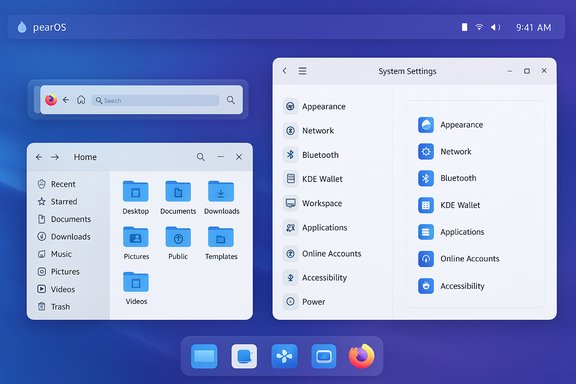
pearOS aims to deliver a macOS-like visual and interaction layer while remaining entirely Linux under the hood. Its key visible elements include:- A global menu bar with a pear-shaped system menu in the top-left corner (in place of Apple’s apple menu).
- A single-column Settings app that intentionally mirrors the iOS/macOS Settings layout.
- A collection of bespoke brands and names — Piri (voice assistant analogue), Pear Intelligence, Pinder (desktop), Wallet and Pear Pay, and integrated pCloud references — designed to complete the illusion of a tightly integrated ecosystem.
- A hybrid choice of apps: GNOME Files (Nautilus) for file management; KDE components such as Kate, Discover, and KWrite; Firefox as the default browser; Flatpak installed but with no pre-bundled Flatpak apps.
The technical base — verifying the claims
The project’s GitHub release page confirms pearOS’s current lineage: Arch Linux as the base with KDE Plasma (updated to Plasma 6) as the desktop environment, and a custom kernel packaging choice shown in recent changelogs. The release notes include details such as an updated kernel and the move of ISO hosting off GitHub for size reasons, which corroborates the project’s claim to a rolling, Arch-derived base. KDE Plasma itself is currently in its Plasma 6 series; KDE’s release cycle shows Plasma 6.5 and a bugfix release (6.5.4) published in December, which aligns with reports that pearOS is built with recent Plasma 6 components. That confirms pearOS is using a very recent KDE stack rather than an older Plasma 5 branch. The macOS look pearOS emulates — Apple’s macOS 26, nicknamed Tahoe — is also a real and recent release (announced at WWDC and rolled out in fall 2025). That gives pearOS a consistent visual target to borrow from; macOS Tahoe’s design language (called Liquid Glass by Apple) is widely reported and documented in the public Apple security and support pages. pearOS’s screenshots show it intentionally echoing that design.First impressions: design, usability, and what's actually implemented
Visual fidelity and UI choices
pearOS delivers an impressive cosmetic overlay:- The global menu and top-left pear menu are implemented and functional for many standard applications, and the system-wide iconography, fonts, and window treatments are heavily customized.
- The Settings app fronted by pearOS is intentionally single-columned and simplified — it visually mirrors modern macOS/iOS Settings but is still an in-development alternative to KDE’s full System Settings.
- Some Apple-like features are present only as placeholders: selecting features such as Focus Mode or Pear Intelligence often yields a Feature not available message, indicating UI elements are in place before their underlying services are implemented.
What’s present vs. what’s not
- Present: global menu, pear menu, theme and icon set, KDE apps (Kate, Discover), Firefox, Flatpak installed.
- Not present or only partially present: many of the “ecosystem” features (assistant, Wallet, Pear Pay) are placeholders; there’s no office suite preinstalled; Flatpak is enabled but no Flatpak apps ship by default.
Installation experience and practical problems
The installer — rough edges and real hazards
pearOS’s custom installer is one of the weakest areas in the current release. Multiple reviewers and community members report serious usability and safety issues:- The installer has only three language options in some builds (Romanian, Czech, English) and requires keyboard navigation (Tab) to reveal the Next/Continue control — a UI bug that can easily confuse less technical users. The Register documented having to discover the right UI workflow by hitting Tab.
- More alarmingly, the installer’s partitioning model currently offers only whole-drive installation. Users selecting a target drive can find the installer wiping that disk with minimal prompts — a behavior that has triggered repeated community warnings that the installer will remove existing OSes without providing a safe dual-boot option or an obvious warning. Multiple forum and subreddit posts describe sudden full-disk wipes and frustration from users who expected conventional partitioning choices.
- The released images have experienced reproducible installer failures linked to repository configuration or missing repository endpoints, leading to VM and physical-machine install failures. Community reports and issue threads point to an "alg_repo" URL problem and other broken repo links that make a successful install inconsistent.
Post-install behavior and runtime profile
- pearOS currently boots with X11 (not Wayland) and defers the creation of the first non-root user until after installation (a behavior reminiscent of Fedora’s earlier flows).
- Resource usage in live and installed sessions was reported by reviewers: about 12 GB of disk space and roughly 1.2 GB of RAM at idle. Those figures make pearOS heavier than ultra-light distributions but modest compared to full-featured mainstream desktops. The Register’s firsthand numbers provide a useful baseline for what to expect in practice.
Package ecosystem, compatibility, and maintenance
Arch base and AUR access
Because pearOS builds on Arch Linux, it inherits Arch’s rolling-release model and access to the Arch User Repository (AUR). That means:- A wide range of up-to-date packages is available.
- Third-party software and bleeding-edge KDE builds are easily reachable.
- Users can install almost anything they need from official repos, AUR, or Flatpak.
Hybrid app choices and defaults
pearOS makes a curious mix of desktop components:- File manager: GNOME Files (Nautilus)
- Editor: Kate (KDE)
- Store: Discover (KDE)
- Browser: Firefox
- Minimal text editor: KWrite (no office suite)
Community reaction and reported issues
Community feedback has been mixed but leans cautionary. Enthusiasts praise the visual ambition and the novelty of a polished macOS-like KDE spin. However, multiple Reddit threads and forum posts have documented installation failures, repo breakage, and the dangerous whole-disk installer behavior described above. Popular community messages explicitly warn users to avoid installing on machines with precious data. These reports are recent, public, and corroborate the problems noted by reviewers.Strengths: what pearOS does well
- Visual execution: The theme, icons, and shell polish are a clear strength. For those who prize aesthetics, pearOS delivers a very attractive KDE configuration that convincingly channels macOS Tahoe style.
- Creative ambition: Implementing a global menu on KDE, designing a pear-themed system menu, and building the Settings scaffolding all show a sophisticated level of theming and desktop engineering.
- Modern stack: Using Arch and the latest Plasma 6 gives pearOS immediate access to contemporary hardware support and new KDE features — a sensible base for an ambitious desktop remaster. The KDE Plasma 6 series’ active development (including recent 6.5.x bugfix releases) supports pearOS’s decision to adopt Plasma 6 as the platform.
- Experimentation value: For researchers, themers, and Linux designers, pearOS offers a real-world case study in how far theming can go to alter user perception while remaining a Linux system.
Risks and limitations
- Installer safety: The single most serious risk is the installer’s current behavior of allowing only whole-disk installs and, in some reports, erasing existing partitions without adequate warning. Until the installer offers safe partitioning options and clearer prompts, pearOS is only safe to install on sacrificial test hardware or in VMs.
- Incomplete features: Many features at the heart of the pearOS branding (voice assistant, payment wallet, integrated AI features) are placeholders. Shipping UI for missing services creates the perception of completeness while leaving significant functional gaps.
- Repository reliability: Broken repository endpoints and packaging issues have made installs fail for some users. The GitHub release notes show the team has been patching repo issues and moving hosting, but community reports show this was a real problem for many testers.
- Small-team maintenance: pearOS is effectively a hobby project maintained by a small team or a single developer. That limits long-term reliability guarantees, security response SLAs, and enterprise-level supportability.
- Legal and design gray areas: The decision to create a desktop that closely resembles a commercial OS raises only ethical or aesthetic concerns in the Linux space, but projects should avoid distributing assets that may violate trademark or copyrighted material — be mindful of icon packs, fonts, or proprietary assets that could present legal risk.
How pearOS fits in the broader Linux desktop ecosystem
pearOS continues a long-standing tradition of visual remixes — distributions that prioritize appearance and the feeling of familiarity to attract users. Those projects have a practical track record: customized themes and carefully curated defaults can dramatically lower the friction of switching to Linux for end users. At the same time, copycat aesthetics don’t solve underlying compatibility challenges (peripherals, niche Windows apps, proprietary drivers), and they place extra burden on maintainers to keep appearance and plumbing in sync. The broader Linux community has seen similar projects — from Pear Linux’s original Ubuntu-based efforts to more recent Windows- or macOS-themed spins — succeed at attracting attention while facing the same sustainability questions.Practical advice for testers and early adopters
- Back up everything: Create a full system image before running the pearOS installer on any hardware that contains valuable data. The installer’s whole-disk behavior has been reported by multiple users.
- Prefer a VM or a spare disk: Use VirtualBox/VMware or a separate physical drive for initial exploration to avoid accidental data loss.
- Test the live session first: Live booting will let you evaluate theming, performance, and hardware compatibility without committing to disk changes.
- Expect missing integrations: Treat features labeled “Pear Intelligence,” “Wallet,” and the voice assistant as visual placeholders unless the project publishes specific implementation details.
- Track the GitHub repo for fixes: The project has been actively issuing updates; follow releases for installer and repo fixes.
The verdict: an inspired experiment that needs hardening
pearOS is a fascinating project because it demonstrates how far a single developer or a small team can push the expressive possibilities of Linux desktops. The visual polish is impressive, the decision to target KDE Plasma 6 gives pearOS a modern foundation, and the concept of rebuilding Pear Linux’s charm for today’s desktop is appealing. At the same time, the project is clearly an early-stage, hobbyist effort that needs to address several high-impact problems — a safer installer, reliable repositories, clearer feature parity with its UI claims, and a plan for long-term maintenance.For enthusiasts, designers, and desktop tinkerers, pearOS is worth testing in a controlled environment. For production users or anyone with precious data on a machine, pearOS remains too risky to install on daily drivers until the installer, repos, and core features are hardened and the project demonstrates consistent stability across multiple hardware profiles.
Conclusion
pearOS is a vivid reminder that the Linux desktop remains a sandbox for creativity. It’s a project that wears its ambitions on its sleeve: the pear menu, the global menu bar, and the Tahoe-inspired visuals speak to a desire to craft a cohesive, branded experience. The technical choices — Arch Linux, KDE Plasma 6 — are sensible for a modern, rolling-base remaster. But aesthetics alone don’t make a stable operating system. Until pearOS addresses installer safety, repository reliability, and fills out the functional gaps behind its visual promises, it will remain an intriguing, entertaining experiment rather than a practical replacement for mainstream desktops. Those who try it should be careful, test in isolated environments, and treat the release as a preview of what can be achieved with design-first Linux remixes rather than as a finished product.Source: theregister.com pearOS is a Linux that falls rather close to the Apple tree
