

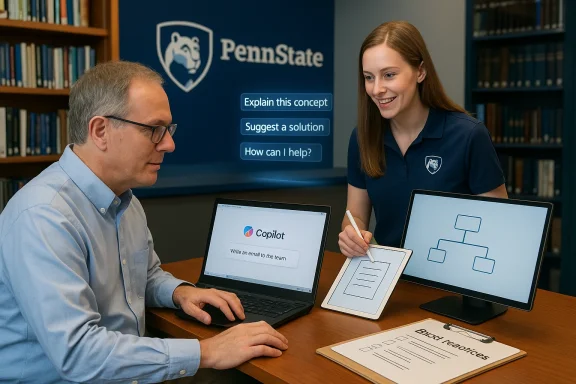
Penn State’s IT Learning and Development team has quietly opened the doors to a practical, hands-on AI enablement program aimed at moving faculty and staff beyond curiosity and toward everyday use of generative assistants — starting with Microsoft Copilot. The AI Guides Program entered a soft launch on February 2 and will run through May 29, offering one-on-one consultations, guided prompt-writing coaching, and workflow brainstorming designed to reduce busywork and introduce safe, responsible use of Copilot across teaching and administrative tasks.
Penn State’s announcement frames the AI Guides Program as a measured, pragmatic entry point for campus employees to gain confidence with generative AI. The program follows a pilot run last fall and is explicitly scoped as introductory-level support: it helps participants access and navigate Microsoft Copilot, refine prompts, prototype simple assistants, and understand basic validation and data-handling practices. The soft-launch schedule and limited weekly capacity reflect a staged rollout intended to collect user feedback before a broader expansion later in the year.
Penn State has signalled institutional alignment around Microsoft Copilot as its recommended generative assistant for university purposes; that positioning is reinforced by campus guidance noting the tool’s availability through the university’s Microsoft contract and campus-level data-protection commitments. Penn State’s IT landing pages and library guidance confirm Copilot is accessible to students, faculty and staff via institutional authentication and is the sanctioned tool for course-related use.
At the same time, this program is part of a broader national and sectoral turn toward role-based Copilot enablement: vend, and other universities are offering Copilot-centered training, developer sandboxes, and governance toolkits that combine hands-on practice with policy guidance. Those parallel efforts illustrate how institutions are balancing productivity gains with compliance and pedagogy.
From a practical adoption standpoint, Copilot’s integration across Word, Excel, PowerPoint, Outlook and Teams lets instructors and staff experiment with AI-enabled workflows without leaving the productivity apps they already use. Microsoft’s education messaging emphasizes enterprise data protection and tenant grounding features that keep prompts and responses inside the institution’s access controls — a major selling point for universities weighing privacy and regulatory obligations.
This layered approach is sensible: short, low-barrier interventions (one-on-one coaching) produce immediate productivity wins and identify practical use cases, while medium- and long-term investments in policy, labs, and curriculum ensure that AI adoption is pedagogically defensible and institutionally sustainable.
That said, institutional success will depend on disciplined governance: clear escalation pathways for technical requests, role-based training for research and administrative staff, and a measurable outcome framework that ties Copilot use to concrete productivity or pedagogical gains. If Penn State pairs this bottom-up enablement with top-down policy, contract oversight, and curriculum integration, the Guides Program could become a practical template for other universities navigating the same transition — turning assistants from a novelty into a constructive, governed part of academic life.
Source: Penn State University AI Guides Program aims to support artificial intelligence skills at Penn State | Penn State University
 Background
Penn State’s announcement frames the AI Guides Program as a measured, pragmatic entry point for campus employees to gain confidence with generative AI. The program follows a pilot run last fall and is explicitly scoped as introductory-level support: it helps participants access and navigate Microsoft Copilot, refine prompts, prototype simple assistants, and understand basic validation and data-handling practices. The soft-launch schedule and limited weekly capacity reflect a staged rollout intended to collect user feedback before a broader expansion later in the year. Penn State has signalled institutional alignment around Microsoft Copilot as its recommended generative assistant for university purposes; that positioning is reinforced by campus guidance noting the tool’s availability through the university’s Microsoft contract and campus-level data-protection commitments. Penn State’s IT landing pages and library guidance confirm Copilot is accessible to students, faculty and staff via institutional authentication and is the sanctioned tool for course-related use.
At the same time, this program is part of a broader national and sectoral turn toward role-based Copilot enablement: vend, and other universities are offering Copilot-centered training, developer sandboxes, and governance toolkits that combine hands-on practice with policy guidance. Those parallel efforts illustrate how institutions are balancing productivity gains with compliance and pedagogy.
What the AI Guides Program actually offers
The AI Guides Program is deliberately practical and scoped. During the soft launch it provides:- One-on-one consultations, available in-person at University Park (Guides can meet you at your office) or remotely via Zoom.
- Help accessing and navigating Microsoft Copilot, including initial setup and orientation to workspace integration.
- Prompt-writing support: techniques for creating effective, meaningful prompts so Copilot’s outputs are useful and actionable.
- Guided exploration of content generation and when it makes sense to use generative outputs versus human-created or curated material.
- Brainstorming sessions to identify workflow improvements in teaching, research administration, and day-to-day office tasks.
- Introductory guidance on building simple AI assistants (agents) for repeatable tasks and processes.
- Best practices for safe data handling when using Copilot, including basic validation techniques for AI-generated content.
How to request help (practical steps)
- Visit the AI Guides page on the IT Learning & Development site and click “Request a Consultation.”
- Complete the AI Guides Consultation Request form, specifying whether you want face-to-face or a Zoom session and describing your goals.
- Sessions are scheduled on a first-come, first-served basis during the soft-launch window; additional slots will be added in fall if demand warrants.
Why Penn State chose Microsoft Copilot as the starting point
Penn State’s decision to concentrate initial enablement on Microsoft Copilot reflects both contractual realities and operational risk management. The university’s Microsoft agreement covers Copilot access for campus accounts, and Penn State’s internal guidance highlights Copilot as the recommended tool for course-related use because it sits inside the institutional Microsoft 365 trust boundary and supports enterprise data protections. Those commitments — in principle — limit exposure to data leakage and customer-data training risks that plague consumer-grade AI services.From a practical adoption standpoint, Copilot’s integration across Word, Excel, PowerPoint, Outlook and Teams lets instructors and staff experiment with AI-enabled workflows without leaving the productivity apps they already use. Microsoft’s education messaging emphasizes enterprise data protection and tenant grounding features that keep prompts and responses inside the institution’s access controls — a major selling point for universities weighing privacy and regulatory obligations.
How this fits into Penn State’s wider AI strategy
The AI Guides Program does not exist in isolation. It complements other campus initiatives — curricular pilots, the Nittany AI Alliance, specialized AI programs and library-led guidance — creating a layered approach to institutional AI literacy. Program components across Penn State range from the ID2ID+AI program for instructional designers to centralized hubs and research centers that link academic projects with industry partners. Those parallel tracks indicate a two‑pronged strategy: build grassroots faculty readiness while expanding institutional infrastructure and governance over time.This layered approach is sensible: short, low-barrier interventions (one-on-one coaching) produce immediate productivity wins and identify practical use cases, while medium- and long-term investments in policy, labs, and curriculum ensure that AI adoption is pedagogically defensible and institutionally sustainable.
Strengths: what the AI Guides Program gets right
- Low friction for end users. One-on-one sessions make it simple for busy faculty and staff to try Copilot in the context of real tasks, reducing the discovery-to-adoption gap that often scuttles pilots. Personalized coaching for prompt writing is especially valuable; effective prompts materially change the usefulness of generative assistants.
- Clear scope and boundaries. By designating the program as an introductory service and routing technical faults to the IT Help Desk, Penn State avoids overcommitting scarce training resources and preserves a path for escalation when deeper engineering or tenant configuration issues arise.
- Alignment with enterprise-grade tools. Focusing on Copilot — a tool protected by the university’s Microsoft contract and enterprise data protections — reduces several practical risks around data governance and model training. Penn State’s library guidance emphasizes that information entered into Copilot is protected under the institution’s agreements.
- Scalability through feedback-driven expansion. A spring soft launch that gathers metrics and user feedback before a planned fall expansion lets the program iterate on formats, staffing, and service level agreements in a data-driven way. That approach matches best practices for technology adoption in higher education.
- Student Guides as a workforce multiplier. Penn State’s ITLD page notes that AI Guides are trained students — a clever model that both gives student workers practical experience and scales capacity for outreach while keeping overhead low.
Risks and limitations to watch
- Scope creep and expectations. When faculty discover productivity wins, demand for custom development, automation, or integrations with research datasets quickly follows. The program’s stated limitation — no advanced troubleshooting or support for non-Microsoft tools — is sensible, but administrators should codify escalation paths and partner services for more technical requests.
- Dependence on a single vendor ecosystem. Centering enablement on Copilot makes sense contractually and operationally, but it locks participants into a platform that may not be the best fit for every pedagogical or research use case. Institutions should maintain parallel guidance about alternative tools where appropriate, and avoid presenting any single assistant as a universal solution. ([microsoft.com](Bringing a new wave of Copilot innovation to education | Microsoft Education Blog integrity and assessment risks.** Faculty will need support redesigning assessments and clarifying what constitutes acceptable use. Without coordinated policies, generative tools can encourage superficial engagement or academic integrity problems. The Guides Program’s validation and teaching-focused coaching will help, but broader curricular redesign and honor‑code updates are essential.
- Data classification and hidden inputs. Even when Copilot operates inside the Microsoft trust boundary, users must be trained to recognize what data they should not provide to any external or agentic assistant. Implementing clear data-classification checklists and example prompts that avoid sensitive identifiers will reduce compliance risk. Penn State’s focus on “best practices for using data in Copilot safely and responsibly” tips in the right direction, but institutional enforcement mechanisms and role-based training are required to embed this behavior.
- Measuring impact. Productivity gains from Copilot can be diffuse and subjective. Without clear success metrics — time saved on common tasks, number of validated use cases adopted into departmental workflows, or measurable improvements in teaching outcomes — it will be difficult to justify scaling or additional budget. The soft-launch phase should prioritize collecting measurable indicators to inform the fall expansion.
Practical recommendations for Penn State leaders (and other campuses watching)
- Establish a clear service catalogue and escalation path. Define what AI Guides will and will not do, and publish a linked path to the IT Help Desk or vendor partners for engineering requests.
- Create role-based learning tracks. Separate quick-use coaching (administrative staff, instructors) from deeper, role-specific workshops (research administrators, data stewards) so content feels directly applicable. External partners and Microsoft learning paths can fill role-based gaps.
- Bundle policy refreshes with training. Whenever a department schedules Guides sessions, require a short policy primer on academic integrity, data handling, and acceptable use — this converts ad-hoc coaching into a governance touchpoint.
- Instrument outcomes from day one. Collect standardized feedback and objective metrics (task time estimates before/after Copilot use, number of new Copilot-based automations adopted) to guide staffing and ROI planning for fall.
- Maintain tool neutrality for research use cases. For research groups with specialized needs (sensitive data, reproducible experiments, or custom models), build a separate advisory lane that can evaluate alternatives to Copilot and manage compliance, contracts, and technical integration.
Practical tips for faculty and staff who want to get the most from a Guides consultation
- Bring a real task. Show the Guide a syllabus, email workflow, meeting notes, or a recurring admin process. Concrete examples produce immediate, repeatable workflows.
- Start with editing and summarization tasks. Copilot excels at turning long meeting threads or draft documents into concise summaries and suggested action items — low-risk, high-value wins that build confidence.
- Use prompt templates, not free-form experiments. Adopt simple templates for classroom prompts (e.g., “Summarize these readings into three discussion questions and two possible exam prompts”) and administrative prompts (e.g., “Draft a meeting agenda and a follow-up email with action items”). The Guides can help craft these templates.
- Validate outputs. Treat Copilot as a drafting partner: always verify facts and citations, especially when using generated material for public-facing or graded content. The Guides provide techniques for validation; make those checks part of your workflow.
- Protect sensitive information. Never paste personally identifiable data, unreleased research, or confidential HR information into an assistant without checking policy and consulting data stewards. Penn State’s library guidance and IT policies provide guardrails for what to avoid.
Longer-term considerations and what to watch for
- Agent authoring and governance. Copilot’s move toward agent builders and persistent “Copilot Pages” creates powerful productivity tools, but also new governance challenges when agents are granted access to organizational data. Penn State will need clear processes for approving, documenting, and auditing any agents used in operational workflows. Microsoft stresses enterprise data protection for these features, but tenant configuration and local process controls remain essential.
- Staffing and capacity planning. If the fall expansion follows demand, Penn State will have to balance student Guide workforce models with professional staff oversight. A hybrid model (student Guides + faculty/staff champions + centralized governance) tends to scale best while keeping quality consistent.
- Integration with curriculum. Short consultations are useful, but true academic value comes when departments co-design assignments that teach students how to use AI responsibly. Penn State’s ID2ID+AI and library initiatives already point in this direction; coordinate Guides outreach with curriculum redesign efforts.
- External partnerships and vendor risk. As universities deepen vendor relationships for AI services, procurement and legal offices should be engaged early. Contractual commitments to data privacy, model training exclusions, and continuity clauses protect institutional interests as tools evolve.
Conclusion
Penn State’s AI Guides Program represents a pragmatic, well-bounded attempt to convert curiosity into capability among faculty and staff. By offering low-risk, hands-on sessions focused on Microsoft Copilot — an assistant already covered by the university’s Microsoft contract and enterprise safeguards — the program reduces friction for early adopters while enforcing sensible limits around scope and technical complexity. The soft launch (Feb. 2–May 29) is an appropriate first step for testing demand, measurement approaches, and staffing models before a broader rollout in the fall.That said, institutional success will depend on disciplined governance: clear escalation pathways for technical requests, role-based training for research and administrative staff, and a measurable outcome framework that ties Copilot use to concrete productivity or pedagogical gains. If Penn State pairs this bottom-up enablement with top-down policy, contract oversight, and curriculum integration, the Guides Program could become a practical template for other universities navigating the same transition — turning assistants from a novelty into a constructive, governed part of academic life.
Source: Penn State University AI Guides Program aims to support artificial intelligence skills at Penn State | Penn State University
