

Microsoft’s formal cutoff for Windows 10 support on October 14, 2025 forced a hard choice for millions of users — and a team of repair activists answered that emergency with a series of “Fix‑a‑thon” refurb events that rescued more than a hundred laptops and redirected them away from landfill and complacent obsolescence.
Microsoft’s lifecycle announcement fixed the end of mainstream support for Windows 10 on October 14, 2025. After that date, consumer editions no longer receive routine security fixes, feature updates, or vendor technical assistance unless a device enrolls in the company’s short‑term Extended Security Updates (ESU) program. The company’s own guidance points users toward upgrading to Windows 11 where compatible, purchasing a new Windows 11 PC, or enrolling eligible devices in ESU through a Microsoft Account workflow. The timeline created an acute window of policy and practical choices. Windows 11’s hardware gate — TPM 2.0, UEFI Secure Boot, and supported CPU generations — means a large swath of otherwise perfectly functional Windows 10 machines can’t be migrated to Microsoft’s supported platform. Consumer advocates warned this could drive device replacement at scale, multiplying e‑waste and deepening digital inequity. Those warnings formed the technical and political backdrop for repair organizers who used International Repair Day (October 18, 2025) to push back practically as well as rhetorically.
But the deeper problem — software life cycles misaligned with device lifetimes — requires structural solutions: vendor commitments to longer security servicing windows, regulatory standards that include software servicing in eco‑design rules, and better transparency for consumers at point of sale about how long a device will be supportable.
For communities, the path forward is twofold: scale local repair and refurb capacity now, and press for policy changes that make these efforts the norm rather than the exception. The Fix‑a‑thons proved those two strategies are complementary: they meet immediate human needs while building the political coalition to change the rules that create those needs.
Source: PIRG As Windows 10 tech support ends, PIRG organizers rescue laptops across the country
 Background
Microsoft’s lifecycle announcement fixed the end of mainstream support for Windows 10 on October 14, 2025. After that date, consumer editions no longer receive routine security fixes, feature updates, or vendor technical assistance unless a device enrolls in the company’s short‑term Extended Security Updates (ESU) program. The company’s own guidance points users toward upgrading to Windows 11 where compatible, purchasing a new Windows 11 PC, or enrolling eligible devices in ESU through a Microsoft Account workflow. The timeline created an acute window of policy and practical choices. Windows 11’s hardware gate — TPM 2.0, UEFI Secure Boot, and supported CPU generations — means a large swath of otherwise perfectly functional Windows 10 machines can’t be migrated to Microsoft’s supported platform. Consumer advocates warned this could drive device replacement at scale, multiplying e‑waste and deepening digital inequity. Those warnings formed the technical and political backdrop for repair organizers who used International Repair Day (October 18, 2025) to push back practically as well as rhetorically.What PIRG’s Fix‑a‑thons did — the facts on the ground
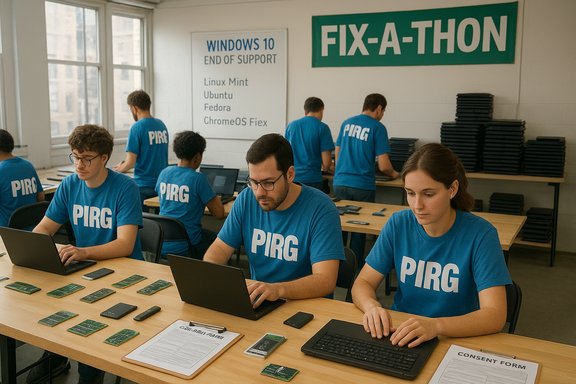
On International Repair Day, the Right to Repair team at the U.S. Public Interest Research Group (PIRG) organized Fix‑a‑thon events in multiple cities to keep Windows 10 hardware in productive use. Volunteers and partners:- Recruited community volunteers and refurbish partners to handle diagnostics, light hardware repairs, and OS reimages.
- Installed alternative, actively supported operating systems — including ChromeOS Flex and several Linux desktop distributions — when Windows 11 was not an option.
- Repaired or upgraded hardware components where feasible (RAM, SSDs, batteries) to extend useful life.
Why these Fix‑a‑thons mattered: Security, equity and e‑waste
Every functional computer removed from circulation produces two immediate costs: a potential new security risk for its user (if it runs an unsupported OS) and a greenhouse‑gas + toxic‑waste cost if it’s discarded and replaced. Community refurb events address both simultaneously.- Security: An unpatched Windows 10 machine becomes progressively riskier once new vulnerabilities are discovered after the end‑of‑support date. Enrolling in ESU is one short‑term mitigation, but community reimaging to a maintained OS (ChromeOS Flex, Ubuntu, Linux Mint, etc. provides ongoing vendor updates without the account or cost constraints ESU imposes.
- Equity: Low‑income households, public libraries, and small nonprofits are most exposed when vendor decisions remove a free upgrade path. Donated, refurbished machines can close that gap quickly and at low cost.
- E‑waste: Large, policy‑driven churn of devices can overwhelm recycling systems and increase landfill and informal recycling flows; repairing and repurposing is the most immediate countermeasure. Advocacy groups attached conservative, model‑based weight to the potential e‑waste impact, which should be read as a directional warning rather than an exact tonnage.
The technical toolkit: OS options that keep older hardware useful
When Windows 11 is not an option, volunteers and refurbishers typically choose one of three software strategies. Each option carries trade‑offs in security, usability, and hardware compatibility.ChromeOS Flex — the low‑maintenance option
ChromeOS Flex is Google’s offering for turning x86 PCs and Macs into ChromeOS‑like endpoints. It emphasizes fast boot, cloud‑centric workflows, and automated updates. The main points:- Many models are certified by Google and appear on an official certified models list; certification includes a published “end of support” date for the image on that model. Non‑certified devices may still run ChromeOS Flex but with varied feature support.
- Practical baseline for a satisfactory experience is roughly 4 GB RAM and modest storage (16 GB+), with better results on 8 GB and SSD storage.
- ChromeOS Flex is attractive for shared/public devices and basic productivity use (browser, web apps, cloud docs), and it can be provisioned quickly from USB installers or enterprise enrollment tools.
Linux distributions — flexible and privacy‑friendly
Linux offers broad hardware coverage and an ecosystem of distributions tuned to specific constraints:- Ubuntu, Linux Mint and their LTS releases provide familiar desktop environments, long security update windows, and extensive community and commercial support. Canonical’s certification programme shows how Ubuntu is tested across many OEM platforms.
- Lightweight distributions (Xubuntu, Lubuntu, Linux Lite) perform well on very old machines with limited RAM or slow CPUs.
- Software compatibility is generally strong for web, office, and multimedia tasks, and many Windows‑only apps have Linux alternatives or run under compatibility layers (Wine) or virtual machines.
Retaining Windows with ESU — a temporary bridge
Microsoft’s consumer ESU program provides a one‑year, security‑only update channel for eligible Windows 10 devices through October 13, 2026. Enrollment routes include signing into a Microsoft Account and syncing settings, redeeming Microsoft Rewards points, or a one‑time purchase (roughly $30 USD or local equivalent). ESU preserves vendor patches for a limited time but does not include feature updates or general technical support. Trade‑offs: ESU is explicitly a stopgap — not a long‑term substitute for migrating to a supported platform. Enrollment mechanics (account tie‑ins, rewards, or payment) introduce friction and affordability concerns, particularly for households and public institutions.How the Fix‑a‑thons run — practical steps and volunteer roles
The repair events run by PIRG and partner groups follow operational best practices that any community organizer can replicate.Typical Fix‑a‑thon flow
- Triage: Intake volunteers perform basic hardware checks (battery health, storage health, memory tests) and decide whether a unit should be repaired, reimaged, or donated for full refurbishment.
- Data hygiene: Devices slated for donation are securely wiped to accepted standards; volunteers require consent forms and documented chain‑of‑custody logs.
- OS decision: Volunteers trial ChromeOS Flex or live‑boot Linux to confirm hardware support before committing to a full install.
- Repair and upgrade: Replace failed parts, add an SSD or extra RAM where useful, and install the chosen OS image. Provide a post‑install orientation for recipients.
- Handover and follow‑up: Donated systems include recovery media or instructions and a brief follow‑up window for support.
Volunteer roles that scale
- Hardware triage and repair technicians (component swaps, battery replacement).
- Reimaging station operators (create and deploy image media; maintain a catalog of drivers and tools).
- User coaches (backup assistance, account setup, basic training).
- Logistics and data‑security managers (consent forms, data‑wipe verification).
Strengths of the Fix‑a‑thon approach
- Immediate impact: Events convert threatened hardware into useful devices within hours to days, rapidly reducing the pressure to replace at scale. PIRG’s 103‑unit rescue is an example of this rapid triage and reuse.
- Community empowerment: These events teach local volunteers and recipients repair literacy, increasing local capacity for maintenance and making future replacements less likely.
- Environmental gain: Reuse delays manufacturing‑related emissions and keeps hazardous materials out of informal recycling streams.
- Digital inclusion: Rapid redistribution to youth groups and nonprofits targets some of the populations most harmed by software lifecycle decisions.
Limits and risks — what Fix‑a‑thons cannot solve alone
Despite their value, community refurb events are not a substitute for systemic policy changes or corporate commitments.- Scale: Fix‑a‑thons can save hundreds or thousands locally, but their capacity pales next to the global volume of devices affected by a major OS EOL.
- Security trade‑offs: Installing alternative OSes mitigates the vendor patch gap, but Linux and ChromeOS Flex installations may require ongoing maintenance and occasional driver troubleshooting. Organizations receiving donated machines should plan for patch management and user support.
- Application compatibility: Some users depend on narrow Windows‑only applications that refuse migration; dual‑boot or virtualization is possible but complex, and retaining an unsupported Windows partition preserves risk.
- Data and liability: Improper data erasure or poor chain‑of‑custody practices create privacy and legal risks; events must adopt agreed IT asset disposition (ITAD) standards and clear consent processes.
Policy analysis: what PIRG and repair advocates are asking for
Consumer and environmental advocates coalesced around several policy asks in response to Windows 10’s end of support:- Free or universally available security updates for devices that cannot reasonably upgrade to new OS versions.
- Transparency and longer minimum software support commitments at point of sale, to align software servicing windows with expected hardware lifetimes.
- Firmware and driver upgrade pathways that make legitimate upgrades easier for consumers without forcing hardware replacement.
- Broader Right‑to‑Repair and ecodesign regulation that factors software servicing into product durability standards.
Concrete recommendations for communities and IT teams
For community organizers, IT managers, and individuals seeking to replicate PIRG’s outcomes, the following checklist distills practical lessons.- Inventory and prioritize: Catalog devices by hardware health and Windows 11 eligibility. Triage the best candidates for refurbishment first.
- Use live trials: Boot ChromeOS Flex or Linux from USB before installing to verify compatibility and speed onboarding.
- Keep a parts pool: SSDs and RAM dramatically improve older machines’ utility; maintain a small stock of commonly used components.
- Standardize data wiping: Adopt a documented, repeatable data‑erasure process and capture consent from donors and recipients.
- Provide training and documentation: Short printed or emailed orientation sheets reduce follow‑up support burden.
- Partner with local nonprofits: Align donations to trusted recipients who can provide continued support or training.
- Prepare media installers and recovery USBs ahead of the event.
- Label refurbished units with a short spec sheet (OS, RAM, storage, warranty period).
- Offer a 30‑ to 90‑day local follow‑up window for recipients.
A critical look at Microsoft’s ESU approach
Microsoft’s ESU program functionally turns a long‑standing expectation — that popular desktop OSes will continue to receive security patches for a reasonable window — into a short, conditional bridge for consumers. Key criticisms include:- Conditionality: For consumers, ESU enrollment routes require Microsoft Account linkage or rewards or a modest one‑time payment, adding friction and a cost floor for the otherwise‑free patching model.
- Time‑boxing: ESU is explicitly one year for consumers, which buys time but not a durable solution.
- Regional differences: Microsoft’s concessions for the European Economic Area altered some mechanics, but the underlying problem — software‑driven obsolescence — remains global.
Cross‑checking the numbers and flags for caution
- The October 14, 2025 end‑of‑support date and the existence of a consumer ESU program through October 13, 2026 are confirmed on Microsoft’s official lifecycle and support pages.
- PIRG’s Fix‑a‑thon figures — 64 volunteers across six U.S. cities and 103 rescued computers — come from PIRG’s reporting of their events and related campaign materials. These event counts are presented as operational results by PIRG. Readers should treat the specific volunteer and unit counts as PIRG’s reported outcomes.
- The Open Repair Alliance’s repair‑event tally (3,400+ events, a ~55% increase year‑over‑year) is published by ORA and corroborated by their Repair Day 2025 reporting. This provides independent confirmation that repair activity spiked around the Windows 10 EOL.
Bottom line: repair events are powerful but policy change is needed
PIRG’s Fix‑a‑thon events turned scarce local volunteer energy into immediate, tangible outcomes: machines saved, citizens trained, and donated devices sent to community partners. That direct action matters because it reduces near‑term replacement pressure and demonstrates the social value of repair and reuse.But the deeper problem — software life cycles misaligned with device lifetimes — requires structural solutions: vendor commitments to longer security servicing windows, regulatory standards that include software servicing in eco‑design rules, and better transparency for consumers at point of sale about how long a device will be supportable.
For communities, the path forward is twofold: scale local repair and refurb capacity now, and press for policy changes that make these efforts the norm rather than the exception. The Fix‑a‑thons proved those two strategies are complementary: they meet immediate human needs while building the political coalition to change the rules that create those needs.
Closing — how to support or replicate this work
- Join or host a Repair Day or Fix‑a‑thon: follow ORA’s toolkits and PIRG’s event templates to structure triage, consent, and reimaging workflows.
- Donate parts or volunteers: SSDs, RAM, and time are the highest‑leverage contributions for community refurb programs.
- Advocate for longer software support windows: encourage local officials and consumer‑rights organizations to press for regulatory changes that include software servicing as part of product durability standards.
Source: PIRG As Windows 10 tech support ends, PIRG organizers rescue laptops across the country
