
When your home generator kicks on, it solves one problem — keeping the lights, the fridge, and the heat running — but it does not create a guarantee that your internet will stay up, your streaming purchases will remain accessible, or that the wider infrastructure that delivers packets to your home is immune to failure.
Home backup generators are a powerful contingency for household power continuity. They automatically or manually supply electricity to selected circuits when the utility grid fails, and for many owners they restore a sense of independence during storms and extended outages. However, internet service depends on more than the electricity inside your house: it depends on power and redundant systems across the ISP’s network, the condition of local network nodes, the resiliency of upstream cloud services, and the contractual/technical models used by streaming platforms for purchased content.
That distinction — power at home versus power across the network — is the generator’s blind spot. Independent incident reconstructions of recent outages and infrastructure faults make the point bluntly: concentrated control‑plane failures, DNS errors, and single‑site power problems at critical facilities can make healthy services suddenly unreachable, even when local devices are powered. I guarantee internet access
Many platforms sell movies and shows under terms that grant a license to view rather than transfer full ownership of the master file. If a platform loses content rights, changes its catalog, or alters its licensing model, the availability of a purchased title can change. There have been reported class actions and consumer complaints over the wording of “Buy” versus “License” in digital marketplaces; some plaintiffs argue the representation at point‑of‑sale is misleading if a permanent download/ownership is implied when the platform actually issues a license to access. This legal and contractual ambiguity creates the risk that, even with downloaded files, long‑term access may be subject to the platform’s DRM, license checks, or later removal from libraries.
Practical consequences:
Practical, cost‑effective steps exist: use UPS units for networking gear, confirm ONT/ISP backup arrangements, download licensed content for offline playback, and consider cellular or satellite failover for critical connectivity. For organizations and power users, the right approach is layered: power continuity at home, tested failover for networking, contractual assurances where needed, and realistic expectations about what “ownership” of digital goods means in an era of licensing and DRM.
The generator reduces one dimension of risk. The rest — network nodes, cloud control planes, and contractual license models — require a different set of mitigations: planning, redundancy, verification, and, where appropriate, investment. The best defense is a posture that treats electricity as necessary but not sufficient, and prepares across power, network, and content layers to keep the lights, the packets, and the movies rolling when the storm arrives.
Source: kkam.com The Generator's Blind Spot: Why Your Internet Isn't Guaranteed.
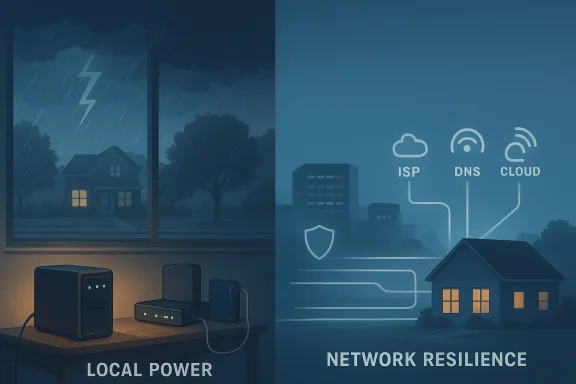 Background: the gap between power and connectivity
Home backup generators are a powerful contingency for household power continuity. They automatically or manually supply electricity to selected circuits when the utility grid fails, and for many owners they restore a sense of independence during storms and extended outages. However, internet service depends on more than the electricity inside your house: it depends on power and redundant systems across the ISP’s network, the condition of local network nodes, the resiliency of upstream cloud services, and the contractual/technical models used by streaming platforms for purchased content.That distinction — power at home versus power across the network — is the generator’s blind spot. Independent incident reconstructions of recent outages and infrastructure faults make the point bluntly: concentrated control‑plane failures, DNS errors, and single‑site power problems at critical facilities can make healthy services suddenly unreachable, even when local devices are powered. I guarantee internet access
1) Multiple layers of infrastructure need power
The internet that arrives in your home rides a chain of equipment owned and operated by ISPs and carriers: neighborhood fiber/cable nodes, signal amplifiers, roadside cabinets, cell towers, central offices, and data centers. Many of those sites do have backup power — batteries, UPS racks, and diesel generators — but those protections are designed for short outages or prioritized sites, and they vary by provider and geography.- Batteries degrade and have limited runtime under load.
- Generators at central facilities require fuel, maintenance, and periodic testing.
- Field cabinets, pole‑mounted nodes, and small remote nodes are sometimes lower priority for long‑duration backup.
2) Passive vs. active last‑mile technologies behave differently
Not all broadband types are equal during a power outage:- FTTH (fiber to the home): Passive fiber runs from the central office to your house and requires powered equipment only at the ends (your ONT and the carrier’s central office). If the carrier’s central office has robust backup and your ONT/router are powered, the connection can persist. Many fiber ONTs also support small battery backup units (BBUs) supplied by the ISP.
- Cable (DOCSIS): Cable systems rely on amplifiers and nodes distributed through neighborhoods. Those intermediate devices require power in the field; backup is possible but not always present for every node, so outages in the area can sever service for many substantialscribers even if a home has power.
- DSL: Runs over copper to a central office; central office backup matters most.
- Cellular data (hotspot): Dependent on tower site power and backhaul. If the tower loses power or the backhaul is down, mobile data can be degraded or unavailable; conversely, mobile networks often have higher resilience in urban cores but can also be overwhelmed by surge traffic.
3) Edge, control‑plane and DNS fragility
Even when underlying compute and storage are healthy, faults in the control plane (DNS, routing, identity or authentication fabrics) can make services appear offline. Recent high‑profile cloud and edge ge, a DNS automation error, or a propagation problem can cascade across services and geographies, taking authentication, content delivery, or API surfaces offline. These are not hypothetical: documented post‑incident reconstructions show cascading failures when shared control‑plane components were impacted.4) Power quality matters for sensitive gear
Generators — especially portable or inexpensive units — can produce voltage spikes, frequency instability, or harmonic distortion that stress sensitive electronics like routers, ONTs, and small UPS units. Without proper filtering or a UPS between the generator and the device, you risk damaging equipment or causing reboots and instability. Practical advice includes using a reliable UPS and an inverter or line‑conditioning generator for sensitive networking gear.Case studies and recent examples that illustrate the blind spot
National time service drift due to generator failure
A weather event at the National Institute of Standards and Technology (NIST) in Boulder caused a downstream standby generator failure that disrupted the institute’s time distribution systems, producing a measurable time bias (approximately 4–5 microseconds) in the national time signal. That incident shows how even facilities that are designed for continuity can experience single‑point failures in their backup chains, with real consequences for systems that depend on precise time — and it is an example of how generator problems at critical sites can ripple into unexpected services.Cloud control‑plane outages and DNS misconfigurations
Multiple rec failures in a large managed database service and configuration changes in an edge routing fabric) reveal how a single automated change or a DNS automation error can produce widespread authentication failures, API errors, and prolonged recovery tails due to cached state and retry storms. These events are instructive because they demonstrate outages that were not caused by a lack of local power but by software/configuration and the brittleness of shared infrastructure.What the average homeowner should understand (practical reality)
- A generator keeps your local electronics powered, not the ISP’s field gear. You can run your router, modem, smart TV, and NAS on generator power — and if the ISP’s node remains powered, you’ll have internet — but that second condition is outside your control.
- Short outages are different from long ones. ISPs’ batteries and generator systems are often sized for hours, not days. Extended weather events can exhaust battery capacity or fuel stocks.
- Generator type matters. Portable generators vs. standby generators vs. inverter/clean‑sine units present different risks and runtime characteristics. Sensitive equipment benefits from clean power and a UPS with surge protection.
- Home UPS is a cheap resilience multiplier. Backing up your modem, router, ONT (if you have physical access), and critical networking gear with a UPS can buy you hours of runtime and protect against generator startup transients. Ars Technica and practical troubleshooting guides recommend prioritizing the modem and router for UPS protection.
The downstream consequence: purchased streaming content and digital "ownership"
There’s a different blind spot that affects entertainment continuity: digital purchases are frequently licenses, not perpetual ownership.Many platforms sell movies and shows under terms that grant a license to view rather than transfer full ownership of the master file. If a platform loses content rights, changes its catalog, or alters its licensing model, the availability of a purchased title can change. There have been reported class actions and consumer complaints over the wording of “Buy” versus “License” in digital marketplaces; some plaintiffs argue the representation at point‑of‑sale is misleading if a permanent download/ownership is implied when the platform actually issues a license to access. This legal and contractual ambiguity creates the risk that, even with downloaded files, long‑term access may be subject to the platform’s DRM, license checks, or later removal from libraries.
Practical consequences:
- If you buy a movie on a major platform but do not download it for offline playback, you’ll need a working internet connection to stream it during a power outage.
- Even with downloaded copies, DRM can require license checks that fail if the platform revokes rights or changes the licensing servers.
- There are documented consumer disputes and regulatory scrutiny around how platforms describe “Buy” versus “License”; treat digital purchases as a form of licensed acer explicitly grants transferable, DRM‑free files.
How to prepare so your entertainment and work survive a blackout
Below are practical, prioritized steps to reduce the generator blind spot and preserve connectivity and entertainment access during outages.Immediate checklist (things to do today)
- Install UPS for modem and router. A UPS that supplies clean power to the modem, router, and any small PoE switch will prevent brownouts and give you time to switch to generator power or conserve battery. Aim for at least 1–4 hours of runtime depending on your UPS capacity and load.
- Confirm ONT/BBU options with your ISP. If you have fiber, ask whether the ISP provides a battery backup unit (BBU) for the ONT and what its expected runtime is. If they don’t provide one, consider a UPS dedicated to the ONT.
- Download purchases for offline viewing where allowed. Use each platform’s download feature to store copies for offline playback on devices that support local files. Be aware of DRM restrictions and platform policy. If a platform allows DRM‑free downloads (rare), prefer those for long‑term retention.
- Avoid plugging sensitive gear directly into a generator without conditioning. Use a UPS between the generator and equipment; prefer inverter generators or line conditioners that produce stable sine waves for electronics.
Medium‑term investments (weeks to months)
- Add a whole‑house standby generator or dedicated circuit for networking gear. For extended outages, a professionally installed standby generator with automatic transfer switch can handle critical loads and reduce the risk of improper backfeeding.
- Keep generator and UPS maintenance current. Test generators and UPS batteries periodically. Fuel stabilization and regular servicing are essential for reliable operation.
- Consider a cellular fallback plan. A secondary SIM in a router with failover, a dedicated cellular router, or a hotspot device can provide connectivity when wired infrastructure fails — but remember this relies on cellular tower resilience and may be throttled or congested during emergencies.
- Explore alternative internet paths. In critical use cases (remote work, medical devices), consider multi‑ISP redundancy: a primary wired connection and a cellular or satellite backup (e.g., low‑earth‑orbit satellite services) that are tested and authorized for failover.
Long‑term resilience (policy and estate planning)
- Document and automate failover. Create a simple runbook: which devices go on UPS, how to start the generator safely, and what to prioritize (medical equipment, communications, networking).
- Negotiate or confirm service‑level expectations with your ISP. If uptime during outages is a requirement for work or safety, look for business‑grade services that offer higher backup power assurances or SLA terms.
- Archive important digital purchases where you have legal rights to do so. Keep local backups of personal media that you own outright (photos, personal video) and maintain copies of critical documents off network volumes and on encrypted, offline storage.
Critical analysis: benefits, risks, and trade‑offs
The strengths of generator + network resilience
- **Immediate, practicrly sized generator and UPS will extend home life support and productivity during outages; for many households, this is life‑altering in extreme weather.
- Improves safety and communications. Powering routers and modems for hours enables emergency communications, VoIP/landline serviceaccess to news or mobile service fallbacks.
- Relatively low cost for high impact. A modest UPS plus strategic generator wiring provides outsized benefits compared with the cost.
The blind spots and systemic risks
- Dependency concentration at ISP and cloud layers. Households can harden local endpoints, but many modern failures are rooted in concentrated cloud control planes, DNS errors, or network vendor misconfigurations that local power cannot fix. Recent incident reconstructions show how control‑plane and DNS faults spread across services.
- Operational fragility of backup power. Backup power systems themselves fail if not maintained or if the outage exceeds their design (e.g., generator mechanical failure, drained batteries, fuel shortage). The NIST time service drift is a concrete example of backup failure at scale.
- Legal and commercial ambiguity of digital ownership. Platform terms can convert “buying” into a license to watch; courts and consumer agencies have seen disputes around these representations. Consumers should not assume perpetual access when DRM and license checks are part of the distribution model.
Threat vectors that are easy to underestimate
- Power quality transients that corrupt network equipment configuration or firmware.
- Chained failures where a small DNS fault leads to retry storms that overload downstream systems and amplification of outages.
- Regulatory or rights changes that cause platform catalogs to shrink or for purchased content to be withdrawn.
Quick decision guide: what to do depending on your needs
- If your primary goal is keeping lights on and running the fridge, a basic portable generator and safe wiring suffice.
- If your goal is keeping internet and remote work services up for a few hours, prioritize a UPS for networking gear plus a generator circuit that can handle the modem/router load.
- If your goal is high availability for hours or days (business continuity, telemedicine), invest in a professionally installed standby generator, UPS redundancy, dual ISPs or a verified cellular/satellite failover, and contractual SLAs.
- If your concern is preserving purchased media and digital ownership, assume a “license” model in most major platforms and keep local, DRM‑free backups where legally permissible.
Conclusion
A generator buys you electricity; it does not buy you internet resiliency, software reliability, or unambiguous digital ownership. The modern connectivity stack is a distributed system with chokepoints and interdependencies that sit outside the perimeter of your home — and those elements can fail fyPractical, cost‑effective steps exist: use UPS units for networking gear, confirm ONT/ISP backup arrangements, download licensed content for offline playback, and consider cellular or satellite failover for critical connectivity. For organizations and power users, the right approach is layered: power continuity at home, tested failover for networking, contractual assurances where needed, and realistic expectations about what “ownership” of digital goods means in an era of licensing and DRM.
The generator reduces one dimension of risk. The rest — network nodes, cloud control planes, and contractual license models — require a different set of mitigations: planning, redundancy, verification, and, where appropriate, investment. The best defense is a posture that treats electricity as necessary but not sufficient, and prepares across power, network, and content layers to keep the lights, the packets, and the movies rolling when the storm arrives.
Source: kkam.com The Generator's Blind Spot: Why Your Internet Isn't Guaranteed.
