PowerToys 0.96.0 Expands Advanced Paste with Multi-Provider AI and Local Models

  • Thread Author
Microsoft PowerToys 0.96.0 pushes Advanced Paste from a niche convenience feature into a configurable hybrid AI gateway—adding support for multiple cloud providers and local model hosts—while polishing the Command Palette, extending PowerRename with photo metadata tokens, and addressing a long list of stability and installer improvements that make this release a pragmatic productivity upgrade for power users and a configuration challenge for IT teams.

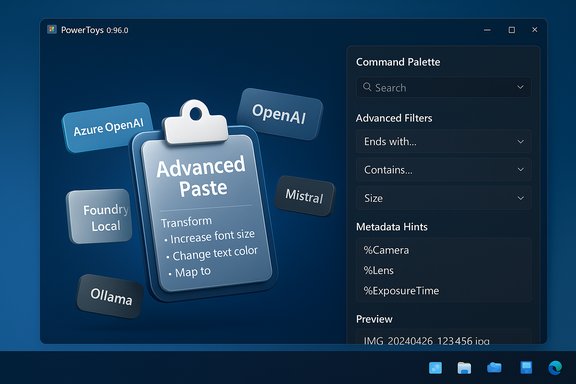
PowerToys UI featuring Advanced Paste with a 3D tile collage and a right-side Command Palette.Background​

Microsoft PowerToys is an open-source suite of lightweight utilities for Windows power users. It bundles tools such as FancyZones (window tiling), PowerRename (bulk renaming), Peek (file preview), Text Extractor (on-device OCR), and Advanced Paste (clipboard transformations). The project is maintained on GitHub and distributed via GitHub Releases, the Microsoft Store, and winget—making it easy for enthusiasts and administrators to install and update.
PowerToys releases typically combine a few headline features with dozens of internal fixes and polish. Version 0.96.0 follows that pattern: the headline is clearly the expansion of Advanced Paste into a multi-provider AI toolset and local model support, but the release also contains meaningful UX enhancements to the Command Palette, expanded EXIF/XMP usage in PowerRename, and infrastructure improvements (installer build migration, logging fixes) that reduce operational friction.

What’s new in v0.96.0 — the short list​

  • Advanced Paste now supports multiple AI providers: Azure OpenAI, OpenAI, Google Gemini, Mistral, Foundry Local, and Ollama. This opens both cloud and local model options for AI-driven clipboard transforms.
  • Command Palette receives substantial UX and metadata polish: better file filters, richer clipboard item metadata (image dimensions, file names/sizes, page titles for links), style tweaks to context menus, faster fallback items (calculations, Run commands), new navigation keys, and settings improvements.
  • PowerRename can now read EXIF/XMP photo metadata into rename tokens (e.g., %Camera, %Lens, %ExposureTime), which is a big productivity boost for photographers and anyone who batches rename based on camera attributes.
  • Installer and build improvements: migration to WiX v5, CI improvements, log recording fixes and a raft of bug/crash fixes across modules including ZoomIt, Window Walker, WinGet integration, and File Explorer add-ins.
These headline items are accompanied by many smaller fixes and usability improvements distributed across the suite, making this release both functional and stabilizing.

Deep dive — Advanced Paste: multi-provider AI and local model support​

What Advanced Paste can do now​

Advanced Paste began as a convenience: strip formatting, paste as plain text, paste as Markdown or JSON, save clipboard contents to a text file, or perform OCR on images and paste the recognized text. The major change in 0.96.0 is that the optional AI/semantic transform pipeline is no longer tied to a single provider—PowerToys now exposes multiple cloud AI providers and local hosting options, letting users choose Azure OpenAI, OpenAI, Google Gemini, Mistral, Foundry Local, or Ollama as the backend for transformations.
Practical capabilities unlocked by this change:
  • Use enterprise-grade Azure OpenAI with managed credentials and enterprise compliance controls.
  • Use OpenAI or Google Gemini for access to large cloud-hosted models when permitted by policy and budget.
  • Use local models hosted via Foundry Local or Ollama (on-device or on-prem hosts), reducing cloud egress and improving privacy for sensitive text.

Why this matters​

  • Flexibility and reduced vendor lock-in. Users and organizations can pick the provider that matches their cost/latency/privacy requirements instead of being forced into a single choice.
  • Privacy and compliance options. Local hosting options let teams avoid sending sensitive snippets to external servers—critical for regulated environments.
  • Practical hybrid workflows. For routine clipboard ops, use local or small models; for complex transformations, route to a large cloud model. This is a pragmatic tradeoff between resource use and output quality.

Risks and operational considerations​

  • API key management and credential security. Each cloud provider requires API keys or credentials. Mismanaged keys or accidental commits could lead to abuse or unexpected costs. Administrators should use secret management and restrict keys to least-privilege scopes.
  • Data egress and retention policies. Cloud AI providers may log or retain prompts; sensitive text sent via Advanced Paste must be evaluated against service terms and organizational policy. For high-sensitivity content, prefer local models or an enterprise gateway (e.g., Azure OpenAI with managed keys and controlled egress).
  • Local model resource demands. Running local models requires CPU/GPU, storage, and updates. Expect additional management overhead if local hosting is selected for multiple desktops.
  • User confusion and misconfiguration. Greater choice increases the risk that users will pick an inappropriate provider and unknowingly send confidential data offsite; clear defaults, UI warnings, and admin policies are recommended.

Command Palette: shaping up as a true successor to PowerToys Run​

Key improvements​

The Command Palette in 0.96.0 receives meaningful polish aimed at improving day-to-day search productivity:
  • File search filters that let you toggle quickly between showing all items, files only, or folders only, and that automatically add tokens to queries for precision.
  • Richer clipboard metadata: clipboard history entries now display image dimensions for image clips, file name and size metadata, and page titles for link-type clips—helping users find the right snippet faster.
  • Performance and UX: faster fallback items (calculations, Run commands), improved fuzzy matching, new navigation keys, and better remembered settings like window size/position.

Why this matters​

Command Palette is evolving into a more complete keyboard-driven productivity surface—closer in spirit to third-party launchers like Raycast but with Microsoft’s integration advantages and lower enterprise risk surface. The metadata improvements make clipboard history and search results more scannable and actionable.

Cautions​

  • As Command Palette becomes more capable, users will need to re-evaluate hotkey assignments to avoid conflicts with other apps. Historically, some PowerToys shortcuts conflicted with IDEs or system shortcuts; this is still worth checking during rollout.

PowerRename: EXIF/XMP tokens and practical uses​

PowerRename’s new ability to read EXIF and XMP metadata and expose camera-related tokens (for example, %Camera, %Lens, %ExposureTime) simplifies the photographer’s repetitive work. Instead of exporting metadata to a CSV and running external scripts, users can craft rename patterns that automatically pull in camera make/model, lens, exposure and other fields directly into filenames.
Practical scenarios:
  • Batch renaming wedding or event photos to include camera and lens info for later asset management.
  • Adding exposure or date tokens to file names for use in automated pipelines or DAM systems.
  • Prepping files for upload to services that rely on standardized naming conventions.
Recommendation: Always preview PowerRename actions before applying them to large batches and keep a backup copy—metadata mapping can vary across camera makes and some fields may be missing in specific files.

Installer and build chain: WiX v5 migration and logging fixes​

The 0.96.0 release includes infrastructural upgrades, notably a migration to WiX v5 for the installer and a series of CI and logging fixes. These changes reduce friction for enterprise deployments and make troubleshooting easier.
Operational impact:
  • Admins deploying via winget, MSI, or Microsoft Store should test the new installer on staging images. PowerToys recommends official channels (GitHub Releases, Microsoft Store, winget) for downloads and checksums.
  • The installer improvements make it easier to do machine-wide installs and to script updates via management tools (SCCM, Intune), but admins should still stage upgrades to detect any environment-specific regressions.
Rollback tip: If deployment issues occur, uninstall and reinstall the previous MSI, or use Settings → Apps to remove PowerToys and restore from your system image. Creating a restore point before broad rollouts remains best practice.

Deploying 0.96.0 safely — guidance for home users and enterprises​

For home and power users​

  • Install from a trusted source (GitHub Releases, Microsoft Store, winget).
  • Review the PowerToys Settings after upgrade. Enable only modules you need to reduce background footprint.
  • If you plan to use Advanced Paste’s AI features:
  • Start with local or small test prompts to estimate output and cost.
  • Prefer local models or a provider you trust for sensitive content.
  • For PowerRename large batches, always preview before applying.

For IT administrators and security teams​

  • Pilot first. Test 0.96.0 on a representative subset of devices; monitor logs and user reports.
  • Establish AI provider policy. Decide which providers are permitted (e.g., enterprise Azure OpenAI vs consumer OpenAI), and block others at the network perimeter if necessary. Document allowed providers and required security controls.
  • Credential governance. Use secret vaults (Azure Key Vault, HashiCorp Vault) for storing any API keys; avoid plaintext keys in shared profiles. Rotate keys regularly and audit usage.
  • DLP and egress controls. Ensure endpoint DLP or firewall rules track and control AI API traffic to prevent accidental leaks of PII or IP. Prefer enterprise gateways for cloud AI where possible to centralize logging and redaction controls.
  • Resource planning for local models. If supporting Ollama/Foundry Local, ensure desktops or on-prem hosts meet GPU/CPU and storage requirements; plan for software updates and security patches.

Security, privacy, and telemetry — what to watch for​

  • Clipboard sensitivity. Clipboard managers and command palettes can access sensitive text and images. PowerToys stores clipboard history locally, but enabling cloud transforms routes content to external providers. Treat the clipboard as an extension of your data protection boundary.
  • Cloud provider policies. Review provider-specific retention and usage policies before activating transforms that send text to third-party models. If the content is regulated or sensitive, choose local or enterprise-gated providers.
  • Telemetry and logging. The release fixes several logging issues, but admins should confirm log-rotation and retention settings to avoid unexpected disk use on endpoints. Where telemetry is a concern, check PowerToys’ settings and your organizational telemetry policy.
Flagged unverifiable claim: Some community chatter suggests Advanced Paste may in future integrate media transcoding directly (transcode to MP3/MP4), but that functionality is not confirmed in the official 0.96.0 notes included in these files; treat that as speculative until it appears in release notes or official docs.

Real-world workflows — practical examples​

  • Writer’s workflow: Copy a PDF paragraph, use Advanced Paste to remove formatting, then run an AI chain to summarize into a 2-sentence blurb. Use a local model for drafts, a cloud model for final polish when permitted.
  • Photographer’s workflow: Select a folder of raw images, use PowerRename with %Camera and %ExposureTime tokens to create standardized filenames for DAM ingestion. Preview the rename and verify EXIF fields before applying.
  • Admin workflow: Deploy 0.96.0 to a pilot group via winget MSI, validate Light Switch logging and disk usage, then roll to the wider org with group policy controls on allowed AI endpoints.

Strengths, limitations, and final verdict​

Strengths​

  • Choice and flexibility. Multi-provider AI and local model support gives users and orgs options for cost, latency, and compliance.
  • Usability improvements. The Command Palette metadata and search refinements make daily interaction snappier and more predictable.
  • Practical photographer features. PowerRename’s EXIF/XMP tokens save real time for workflows that previously required external scripting.
  • Installer / CI polish. WiX v5 migration and logging fixes reduce deployment friction for admins.

Limitations and risks​

  • Configuration complexity. More providers equals more configuration and governance work. Without clear policies, organizations risk accidental data exposure.
  • Local model overhead. On-device or local hosting requires hardware and ops resources that some teams may not be ready to provide.
  • Potential for user error. Increased functionality can lead to mistakes (sending sensitive text to cloud models) if UI defaults or admin controls aren’t set carefully.
Final verdict: PowerToys 0.96.0 is a significant, pragmatic update that nudges the suite deeper into hybrid AI territory while delivering concrete productivity improvements across several tools. For individual power users, it’s an immediate productivity uplift. For enterprise teams, it’s a capability that must be managed: the benefits are real, but so are the governance and operational responsibilities.

Quick reference — configuration and safety checklist​

  • Install from GitHub Releases, Microsoft Store, or winget. Confirm checksums on enterprise installs.
  • Review PowerToys Settings after update; enable only needed modules.
  • If enabling Advanced Paste AI:
  • Decide allowed AI providers and document them.
  • Store API keys in a secure vault and restrict permissions.
  • Test with non-sensitive examples to measure cost and latency.
  • Prefer local models or enterprise gateways for regulated content.
  • Pilot group rollout before enterprise-wide deployment; monitor logs and disk usage.
  • Preview PowerRename actions and keep backups prior to bulk renames.

PowerToys 0.96.0 makes clear that the project is evolving beyond simple window-management utilities into a practical bridge between local workflows and AI-assisted productivity. The new Advanced Paste provider model and local hosting options are the most consequential changes—delivering flexibility and privacy options when used with appropriate governance. For users and admins who plan carefully, this release can deliver genuine time savings; for those who do not, it introduces a modest but real data-governance burden.

Source: TechPowerUp PowerToys v0.96 Intros Advanced Paste with Cloud and Local AI Models | TechPowerUp}
 

Microsoft PowerToys’ Advanced Paste has quietly morphed from a handy clipboard tweak into a configurable, hybrid AI gateway for Windows 11—now explicit support for local model runtimes (Foundry Local and Ollama) and multiple cloud providers gives users and administrators unprecedented choice over where clipboard AI work runs and how sensitive data is handled.

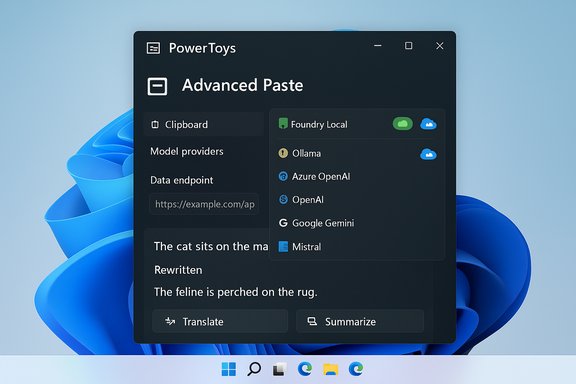
Dark PowerToys Advanced Paste window showing clipboard tools and AI model providers on Windows 11.Background / Overview​

PowerToys is an open-source utility suite for Windows power users that bundles small, focused tools—FancyZones, PowerRename, Peek, Text Extractor and Advanced Paste among them. The project is maintained by Microsoft on GitHub and distributed via GitHub Releases, the Microsoft Store, and winget. With the 0.96.0 update, PowerToys moves Advanced Paste beyond single-provider AI ties and into a multi-provider, hybrid local/cloud model that supports online services (Azure OpenAI, OpenAI, Google Gemini, Mistral) as well as local runtimes (Foundry Local and Ollama). That shift is important because clipboard operations are inherently transient and sensitive: users copy fragments from documents, emails, web pages and sometimes proprietary systems. Routing clipboard content to an AI model for summarization, translation, tone adjustment or code scaffolding requires careful trade-offs between convenience, latency, cost and data governance. The new Advanced Paste design surfaces model selection and a preview of the current clipboard item directly in the paste UI so users can see what will be transformed and choose the backend that best meets their privacy or quality needs.

What changed in Advanced Paste (the headline features)​

  • Multi-provider support: Advanced Paste no longer assumes a single OpenAI backend. You can configure providers for Azure OpenAI, OpenAI, Google (Gemini), Mistral, and Microsoft’s Azure AI inference endpoints. This expands both choice and enterprise options.
  • Local model runtime support: Foundry Local and Ollama are explicitly supported as local model providers, allowing inference to run on-device or on a local host instead of sending prompts to a remote cloud API. This is the critical change that enables on-device clipboard AI.
  • UI improvements and workflow polish: The Advanced Paste UI now shows the current clipboard content with a model-selection dropdown and quick actions (plain text, Markdown, JSON, OCR results, and “Paste with AI” transformations such as translate, summarize, rewrite). This reduces friction for quick, transient clipboard operations.
  • Expanded file and media handling: Advanced Paste retains and documents local OCR and media transcoding capabilities (image-to-text via on-device OCR and audio/video transcoding to MP3/MP4), keeping media processing local unless the user chooses a cloud model.
These items are documented in the official release notes and the Microsoft PowerToys Advanced Paste documentation, and covered by multiple independent outlets reporting on the 0.96 release.

How Advanced Paste uses local models and NPUs​

Technical model paths​

Advanced Paste exposes a list of “model providers” in PowerToys settings. Each provider is configured with the data that runtime needs:
  • For cloud providers, this typically means an API key, endpoint URL, and optional parameters (deployment/model selection).
  • For local providers (Foundry Local, Ollama), you point PowerToys at the local runtime or model path; inference requests are sent to the local runtime endpoint rather than a cloud API.
The result is a unified UI that treats cloud and local backends the same way: pick a provider, run a short transform on the clipboard content, and paste the transformed text immediately.

Neural Processing Units (NPUs) and acceleration​

When a local runtime and a compatible model are available, Advanced Paste can leverage the system’s AI runtime to accelerate inference on specialized hardware such as NPUs. This can dramatically reduce latency and power draw compared to CPU-only inference and avoids cloud data egress. However, real-world speed and availability depend on the device’s hardware, drivers and whether a model has been prepared/quantized for that NPU. Microsoft’s broader Copilot+ hardware program and community reporting discuss NPU thresholds as a performance gating factor for on-device features and local-model acceleration; some community sources reference device classes and TOPS targets for consistent local AI experiences. Treat those numbers as device-class guidance rather than absolutes.

Why this matters — benefits and practical gains​

  • Privacy-first workflows: Running inference locally means clipboard data never leaves the device. For organizations handling IP, medical, legal or otherwise regulated text, local models remove or reduce cloud egress risk and simplify compliance scoping for specific clipboard operations.
  • Lower operational cost for heavy use: If your team performs many short transforms (summaries, rewrites, translations), depending on cloud APIs can become expensive. Local runtimes and on-device inference remove per-call cloud billing for those flows.
  • Faster responses and offline capability: On-device inference avoids network latency and lets users perform AI transformations even without an internet connection (subject to having the local runtime and models installed). This is particularly valuable for remote or air-gapped environments.
  • Vendor flexibility and reduced lock-in: By supporting multiple providers, PowerToys allows organizations to pick providers that match policy, cost and capability needs—and to switch providers without changing workflows. This is a meaningful improvement over single-provider constraints.

Risks, limitations and governance concerns​

The functionality is powerful, but it introduces new operational and security responsibilities.
  • API key and credential management: Cloud provider workflows still require API keys or service credentials. Misconfigured keys, accidental commits in configuration files, or poor key rotation practices can expose expensive credentials or enable unauthorized API use. Administrators must store keys in secure vaults and limit scopes.
  • Data retention and provider logging: Sending clipboard content to cloud models may trigger provider-side logging or retention policies. Even short snippets can contain sensitive data (tokens, private emails, or PII). Organizations must evaluate cloud provider terms and prefer local runtimes for protected data.
  • User confusion and misconfiguration risk: Adding multiple providers increases the chance a user will pick an unsuitable backend (for example, choosing a cloud model by mistake for sensitive content). UI defaults, warnings, or centralized configuration are recommended for enterprise-managed deployments.
  • Local model operational overhead: Running local models has costs—disk, RAM, CPU/GPU (and possibly NPU) use; model updates and security patches; and centralized model management if deploying across many endpoints. These are non-trivial for IT teams that must balance performance and maintenance.
  • Model capability variance: Local, quantized models are often smaller and less capable than large cloud-hosted LLMs. For complex rewrites or high-quality creative generation, cloud models may still outperform local runtimes—so expect hybrid workflows.
Where claims were community-circulated rather than explicitly documented—such as precise TOPS thresholds for particular Copilot+ behaviors—these should be treated as informally reported guidance rather than Microsoft-stated requirements unless you extract them from official hardware certification documentation. Flag those as provisional during planning.

Deployment and admin checklist (practical guidance)​

  • Audit needs and use cases. Decide which clipboard transforms are allowed in your environment (summaries, translations, code scaffolding, OCR) and which are prohibited for sensitive content.
  • Select providers and policies. Choose the set of AI providers your organization permits. For regulated data, prefer local providers (Foundry Local, Ollama) or enterprise-grade managed services (Azure OpenAI) with contractual controls.
  • Centralize credential management. Store API keys in a secret store (Key Vault, password manager) and avoid copying keys into endpoint configuration files. If keys must exist on endpoints, use managed identities or short-lived credentials where possible.
  • Pilot carefully. Start with a small pilot group to validate model quality, latency, disk/CPU impacts and log/telemetry behavior. Monitor disk usage (PowerToys can log locally) and confirm log rotation to prevent unexpected endpoint storage growth.
  • Provide user training and safe defaults. Configure PowerToys settings to default to local providers for regulated users, add UI guidance, and document “safe” workflows that prevent accidental cloud egress.
  • Patch and update models. If using local models, plan for updates and security patches. Local runtimes like Foundry Local and Ollama require their own maintenance lifecycle.

Real-world examples — how users will actually use Advanced Paste​

Writer and editor​

A journalist copies a paragraph from a press release, invokes Advanced Paste, selects a local Ollama runtime configured with a small editing model, and chooses “Rewrite for clarity” to produce a concise two-sentence summary—no cloud API call required and the original text never leaves the machine. The UI preview reduces accidental transformations.

Developer​

A developer copies a function signature and a failing stack trace, uses Advanced Paste with a cloud Mistral or Gemini deployment for deep code-synthesis capability, and pastes back a small unit test scaffold. Here the team accepted cloud egress for richer model output.

Security-conscious enterprise​

An analyst working with financial models must keep data on-prem. The enterprise configures PowerToys to whitelist Foundry Local and lock out cloud model providers via endpoint configuration and group policy, ensuring any Paste-with-AI actions run in a controlled, auditable environment.

Performance and hardware considerations​

  • Model size vs. device capability: Local models must be selected carefully—smaller, quantized models will run more reliably on consumer hardware, while larger, higher-quality models demand GPUs or NPUs and significantly more RAM and storage.
  • NPU availability varies: Not every Windows 11 machine has an NPU or drivers that enable accelerated inference. The Copilot+ program and community reports describe certified device classes that provide consistent on-device AI experiences; check device capability before planning broad local-model deployments. Some guidance in community reporting references 40+ TOPS as a useful device-class target but that is not a universal mandate. Treat such numbers as guidance, verify against OEM/device documentation.
  • Power and thermal considerations: Running inference locally—especially on GPUs—can increase power draw and surface thermal throttling on thin laptops. Test workloads on representative hardware to understand user experience impact.

Implementation walkthrough: adding a model provider (step-by-step)​

  • Open PowerToys Settings and navigate to Advanced Paste.
  • Under “Model providers,” click Add Model. Choose the provider type from the dropdown (OpenAI, Azure OpenAI, Google, Mistral, Foundry Local, Ollama).
  • For cloud providers, paste the API key and endpoint; for local providers, enter the local runtime URL or model path. Click Save.
  • Back in the Advanced Paste UI, use the model-selection dropdown to pick the active provider before running a Paste-with-AI transform. Confirm the clipboard preview before applying.
This flow is intentionally designed to be straightforward for individual users but must be hardened by IT for enterprise deployment to avoid accidental cloud usage.

Critical analysis: strengths and where Microsoft needs to be cautious​

PowerToys 0.96’s Advanced Paste evolution is pragmatic and well-aligned with the “local-first” privacy trend. By enabling both cloud and local backends, Microsoft avoids a one-size-fits-all approach and lets technical teams make trade-offs for each use case. That flexibility is a strength—it reduces vendor lock-in and gives organizations levers to manage costs and data privacy. However, the same flexibility introduces governance complexity. Power users may inadvertently send clip snippets to cloud models; Keys and endpoints managed on endpoints are a risk surface; and local-model management requires capacity planning that many teams are not prepared for. Without conservative defaults, clear enterprise guidance, or managed deployment options, the practical result could be a proliferation of shadow AI configurations across endpoints.
Finally, UX and discoverability are improving—but every additional choice in a transient UI like the clipboard risks slowing the user down. Microsoft mitigates this by surfacing quick defaults and previews, but organizations should still define policy-driven defaults for their managed fleets.

Unverifiable or provisional claims (flagged)​

  • Community reports occasionally cite specific NPU performance thresholds (e.g., “40 TOPS”) as a Copilot+ gating metric for robust local-model experiences. Those numbers are useful heuristics but may vary by OEM, driver and model; treat them as provisional until confirmed from device vendor or Microsoft hardware certification documentation.
  • Speculation about future Advanced Paste features (for example, direct media transcoding to additional codecs via AI pipelines) has appeared in community chatter; only rely on official PowerToys release notes and Microsoft docs for confirmed capabilities.

Final verdict — who should enable it and how​

For individual power users and privacy-minded professionals, Advanced Paste’s support for Foundry Local and Ollama is an immediate win: fast, private transforms with clear on-device control. For developers and creative power users who need higher-quality outputs, the multi-provider cloud option gives access to larger models when the organization permits it. For enterprises, the release is significant but requires a careful rollout plan: pilot with small groups, centralize key management, enforce provider whitelists, and prefer local runtimes or enterprise-grade managed services for sensitive workloads. Document policies and adjust PowerToys defaults via configuration management to avoid accidental cloud egress.
PowerToys 0.96 nudges Advanced Paste into the next phase of on-device productivity tooling: flexible, hybrid, and powerful—provided governance and operational realities are treated with equal seriousness.

Advanced Paste’s transformation from a simple clipboard hygiene tool into a hybrid local/cloud AI surface is a textbook example of how small utilities can become infrastructure-sensitive features when AI is involved. It’s a welcome evolution—one that will save time and protect privacy when deployed carefully, and one that will create new operational headaches if treated as a mere consumer convenience. The update delivers meaningful capability, but the real win for administrators will be how they turn those capabilities into safe, repeatable workflows across managed Windows fleets.
Source: Mezha Advanced Paste in Windows 11 now supports local AI models
 

Back
Top