Microsoft’s PowerToys Advanced Paste has taken a decisive step toward local-first AI by adding on-device model support and multi-provider flexibility in the 0.96 update, turning a once-simple clipboard helper into a hybrid AI gateway that gives users faster transforms, reduced cloud costs, and stronger privacy guarantees.
Background
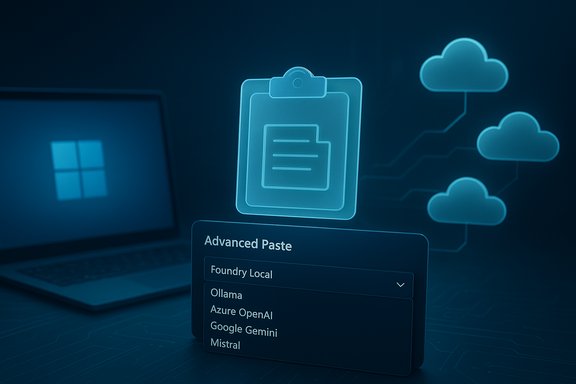
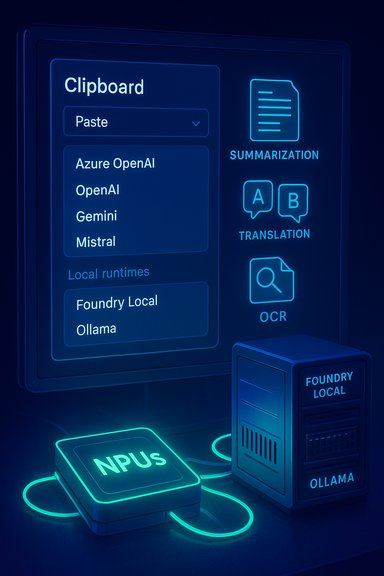
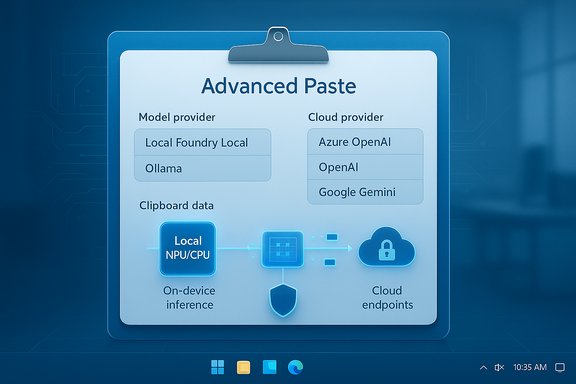
PowerToys has long been a collection of small, focused utilities for Windows power users; its Advanced Paste tool started as an efficient way to strip formatting or paste text in different formats. With PowerToys 0.96, Microsoft upgraded Advanced Paste to support multiple cloud providers and local model runtimes, explicitly adding Foundry Local and the open-source Ollama as on-device model hosts. This enables AI-driven clipboard transforms—translate, summarize, rewrite, code scaffold, and OCR post‑processing—to run either through cloud APIs or locally on a machine’s NPU or CPU.These changes are surfaced in a modest but important UI refresh: Advanced Paste now previews the active clipboard item and exposes a model-selection dropdown in the paste UI so users can see what will be transformed and choose the backend (local or cloud) at the moment of paste. That UI shift is as important as the plumbing underneath because clipboard actions are inherently transient and often contain sensitive information.
What changed in PowerToys 0.96 — at a glance
- On-device model support: Advanced Paste can route AI requests to local model runtimes (Foundry Local and Ollama), allowing inference to happen without leaving the device.
- Multi-provider cloud support: Advanced Paste now supports Azure OpenAI, OpenAI, Google Gemini, Mistral and other cloud models in addition to OpenAI. This removes prior single-provider constraints and offers choice for quality, compliance, and cost.
- UX refinements: Clipboard preview and a model-selection dropdown improve transparency and reduce accidental cloud egress.
- Command Palette and PowerRename polish: Alongside Advanced Paste, PowerToys 0.96 brings broader improvements—Command Palette metadata and filtering, and photo-metadata tokens for PowerRename—making the release substantively useful beyond the AI features.
How on-device AI works in Advanced Paste
Local runtimes: Foundry Local and Ollama
Advanced Paste treats model backends as configurable providers. For cloud providers you supply API keys and endpoints; for local providers you point PowerToys at a local runtime URL or host. When a local provider like Foundry Local or Ollama is selected, Advanced Paste sends the prompt to the local endpoint instead of a cloud API, and the transformation result is returned immediately for paste. This makes fully offline workflows possible.- Foundry Local is Microsoft’s local hosting component within the broader Windows AI Foundry ecosystem and integrates with Windows AI tooling for local model hosting and potential NPU acceleration.
- Ollama is an open-source local model runtime that many community users rely on for hosting a range of model families locally; PowerToys’ support allows Ollama-hosted models to be used without cloud egress.
Hardware acceleration and NPUs
When a device has an available Neural Processing Unit (NPU) and the local model is prepared/quantized for that accelerator, the Windows AI stack can offload inference onto the NPU for lower latency and power consumption. Microsoft’s Copilot+ hardware program and Windows AI APIs (including Phi Silica as a local SLM option) underpin that capability; however, actual performance varies widely by OEM, driver, and model. Published TOPS numbers (e.g., device baselines referenced in community coverage) are useful heuristics but should be treated as provisional until validated for a specific model and device.Why this matters: benefits for everyday use
Speed and responsiveness
Routing small clipboard transforms to a local model or an NPU removes the roundtrip to the cloud and reduces latency perceptibly for interactive paste operations. For workflows that require repeated short transforms (summaries, translations, tone adjustments), local inference provides near-instant results.Privacy and data locality
Clipboard content often contains sensitive fragments—credentials, internal notes, legal text. Local inference keeps that data on-device, reducing the data‑egress surface and potential obligations under provider logging policies. For regulated environments, this is a fundamental advantage.Cost savings
Cloud models typically bill per token or per-request; frequent, small transforms can quickly consume API credits. Local models avoid recurring API costs and are attractive for power users who apply many AI transforms daily.Vendor flexibility
Multi-provider support reduces lock‑in. Teams can choose Azure OpenAI for enterprise-grade controls, Google Gemini where latency or semantics favor it, or local models for cost and privacy—picking the right backend per use case.Setup and configuration: step-by-step
- Install PowerToys 0.96 from GitHub Releases, Microsoft Store, or winget and confirm package integrity for enterprise deployments.
- Open PowerToys Settings and enable Advanced Paste under the modules list.
- Under Advanced Paste Settings, open Model providers and click Add model. Choose a provider type: OpenAI, Azure OpenAI, Google, Mistral, Foundry Local, or Ollama.
- For cloud providers, enter API keys, endpoint URLs, and model/deployment names as required by your chosen service. For local providers, enter the local runtime endpoint (for example, the HTTP address where Foundry Local or Ollama serves models).
- Back in the Advanced Paste UI (hotkey default: Win+Shift+V), confirm the clipboard preview, choose the desired model provider from the dropdown, and run the “Paste with AI” action (translate, summarize, rewrite, etc..
Practical examples and workflows
- Copy a paragraph in a foreign language, open Advanced Paste, select a local translation model (Foundry Local or Ollama), and paste the translated text—no network required.
- Copy meeting notes and run “Summarize” with a cloud provider for higher-fidelity output, or use a local small model for on-device quick summaries and later refine in the cloud if needed.
- Capture a screenshot containing tabular data, use on-device OCR to extract text, then run a local model to clean and structure the result to JSON for pasting into a spreadsheet. All OCR runs locally by default.
Compatibility and operational considerations
Device and model readiness
- Not all Windows devices have NPUs or drivers that reliably accelerate local models. CPU-only local inference is possible but may be slower. Test the user experience on representative hardware before rolling out.
Storage and model management
- Local models require disk space and periodic updates. If multiple users rely on a local model catalog, plan for centralized distribution or use a local host that serves multiple endpoints.
Enterprise deployment and policy
- Enterprises should define sanctioned providers, centralize API key management, and prefer local model catalogs or enterprise gateway models for regulated data. Use configuration management to enforce provider whitelists and avoid shadow AI configurations on endpoints.
Risks, limitations, and governance
Unintentional cloud egress
Providing multiple providers increases the chance a user will accidentally route sensitive clipboard content to a cloud service. The new UI mitigates this risk by surfacing provider choice and clipboard preview, but administrators must still set policy and enforce whitelists to reduce human error.Credential and key security
Cloud providers require API keys or endpoint credentials. Storing keys insecurely on endpoints or in scripts creates a high-risk failure mode. Enterprises should use secret managers, scoped keys, and least-privilege credentials.Model fidelity and output variance
Local models—especially small or quantized ones suited for NPUs—will often deliver different output quality compared with large cloud models. That trade-off (privacy and speed vs. fidelity) must be communicated to users so they choose the right backend for the task.Supply chain and licensing concerns
Running third-party models locally introduces licensing and provenance checks. Organizations must verify model licenses, assess any embedded telemetry or commercial restrictions, and ensure that local models meet corporate compliance standards. This is especially important when using community-hosted models via Ollama or similar runtimes.Operational overhead for local hosting
Hosting and updating local models brings operational cost—storage, patching, quantization for NPUs, and possible GPU/NPU driver churn. Smaller teams should weigh this against expected cost savings from reduced cloud usage.Security checklist and rollout guidance for IT
- Pilot on a small set of devices representative of fleet diversity (CPU-only, GPU-accelerated, NPU-equipped).
- Define and enforce a whitelist of allowed model providers and, if possible, configure defaults that prefer local runways for regulated workloads.
- Use centralized API key vaults and restrict keys to least-privilege scopes. Rotate keys and audit their usage.
- Require users to test with non-sensitive data and document expected output quality differences between local and cloud providers.
- Monitor disk usage and background service health where local runtimes are deployed to avoid unexpected resource exhaustion or degraded user experiences.
Critical analysis: strengths and where Microsoft should be cautious
Microsoft’s approach in PowerToys 0.96 is pragmatic: deliver choice, keep local processing practical, and make the UI transparent. The strengths are clear:- Practical privacy gains: local inference keeps clipboard snippets on-device, which matters for high-frequency, sensitive workflows.
- Lower operational cloud costs for small transforms: frequent clipboard transforms mapped to local models are cheaper than continuous cloud calls.
- User control and transparency: a visible clipboard preview and provider dropdown reduces accidental cloud sends and increases user agency.
- Configuration complexity: Multiple providers mean more settings that must be decided, documented, and enforced by IT. Without defaults and enterprise tooling, endpoints could proliferate shadow AI setups.
- Divergent output quality: Local, quantized models will not always match cloud model outputs; users must internalize when local speed is preferable and when cloud fidelity is essential.
- Device heterogeneity: Not every Windows 11 device can deliver the same local AI experience; Copilot+ NPUs and vendor drivers shape the real-world experience, and those hardware thresholds are not universal. Treat NPU TOPS claims as a device-class guideline rather than a guaranteed performance metric.
What to test first (practical checklist for power users)
- Install PowerToys 0.96 on a test device and enable Advanced Paste.
- Configure Ollama or Foundry Local locally and point Advanced Paste at that runtime to verify on-device transforms.
- Compare output and latency for a set of representative transforms (translate, summarize, rewrite) across a local small model and a chosen cloud model. Measure latency, token costs, and fidelity.
- Track resource usage (CPU/GPU/NPU, disk) during typical usage bursts to identify real constraints.
- Document provider defaults and add a short “how we use Advanced Paste” guideline for colleagues to reduce accidental cloud routing.
Final verdict
PowerToys 0.96 is more than a modest update; it is an explicit demonstration that local-first AI can be practical for high-frequency productivity tasks. By enabling Foundry Local and Ollama, and by broadening cloud provider support, Microsoft made a small but meaningful utility into a flexible hybrid AI surface that addresses latency, cost, and privacy in a single workflow. For individual power users and privacy-conscious professionals, Advanced Paste’s on-device capabilities are an immediate win. For organizations, the release is strategically important—but not plug-and-play: it requires governance, key management, and representative hardware testing.PowerToys’ evolution in this release illustrates a broader industry trajectory: cloud scale for heavy tasks, local models for frequent, latency-sensitive primitives, and choice as the differentiator. When deployed thoughtfully—with clear policies and pilot testing—Advanced Paste’s new capabilities will save time, protect sensitive data, and reduce cloud spend; when left unmanaged, they risk accidental data egress and operational overhead. The practical power is now in the hands of users and IT teams alike—Microsoft has supplied the plumbing, the rest is organizational discipline.
Source: Tech Edition Microsoft adds on-device AI support to the Advanced Paste tool in Windows 11