

Microsoft has a better answer to Windows Search, but it still lives in PowerToys instead of the operating system’s default toolkit. Command Palette is faster, more predictable, and more flexible than the built-in search experience many Windows users rely on every day, yet you have to discover it, install PowerToys, and enable it yourself. That gap says a lot about where Microsoft is willing to experiment, and just as much about where it still hesitates to make bold changes to Windows.
Windows Search has always been one of those features that looks effortless from the outside and feels strangely fragile once you depend on it. Microsoft’s own documentation still frames the underlying search index as a mechanism for improving speed and efficiency by indexing local files and properties, which is exactly the kind of architecture that can become brittle when indexing falls behind or the catalog gets out of sync. Microsoft also continues to publish troubleshooting guidance for search performance problems, index rebuilding, and cases where search results fail to appear as expected, which is a quiet admission that the feature is not always as transparent or dependable as users expect.
That matters because search is not a niche feature. It is the front door to the operating system, the path users take when they want an app, a file, a setting, or even a command right now. If that doorway feels slow, incomplete, or inconsistent, users stop trusting it and fall back to memory, mouse clicks, and manual navigation. In practical terms, bad search is not just a UI annoyance; it becomes a drag on the entire Windows experience.
Microsoft has tried to address this in layers. The company has improved indexing, added recommendations for Copilot+ PCs, and kept a steady drumbeat of Windows Search documentation and troubleshooting. But the core user complaint has remained stubbornly familiar: the native search box often feels like it is working against the user, not with them. That is why PowerToys Command Palette lands with such force. It does not pretend to be a grand reinvention; it simply behaves like a modern launcher should.
PowerToys itself is important context here. Microsoft describes it as a free, open-source set of utilities for power users and developers, which gives the company room to experiment outside the rigid expectations attached to the Windows shell. Command Palette is part of that environment, and Microsoft’s own documentation says it is a fast launcher for commonly used commands, apps, and development tools. In other words, the company already knows what a better search-and-launch experience looks like; it has just chosen not to make it the default.
That distinction matters because traditional Windows Search has always carried multiple burdens at once. It tries to be app launcher, file finder, web entry point, settings navigator, and sometimes even a quasi-assistant. The more tasks a search box tries to absorb, the more likely it is to frustrate users who just want a single reliable action. Command Palette narrows the problem and then executes better.
Microsoft’s own overview for Command Palette emphasizes that it is customizable and extensible, and that it is intended for Windows power users. It can be invoked with a keyboard shortcut, enabled or disabled from PowerToys settings, and expanded with extensions. The feature is therefore not just a side experiment; it is a blueprint for how Microsoft believes a serious launcher should behave.
That range makes it more than a launcher. It becomes a daily operations layer for people who prefer the keyboard, and that is where Windows Search often falls down most visibly. A launcher should be boring in the best possible way: immediate, consistent, and invisible once you learn it.
The other reason it feels better is that it behaves like a modern desktop utility, not a legacy feature carrying years of compatibility baggage. Command Palette is part of PowerToys, which lets Microsoft iterate quickly and tweak behavior without making a high-stakes promise to every Windows user on earth. The company can improve the feature while keeping the default search untouched, and that separation is both a strength and a problem.
That matters because Windows Search is fundamentally constrained by its own broad mandate. It must serve casual users, office users, enterprise admins, and power users, all while staying familiar and non-threatening. The result is often a compromise that feels too generic for advanced users and too inconsistent for everyone else. Command Palette escapes part of that burden by being clearly targeted.
The plugin model also gives Microsoft a way to move functionality out of the OS shell and into a more modular ecosystem. That is a smart engineering pattern, but it has a downside: the most compelling capabilities are easy to miss because they are not exposed during the initial Windows experience. In effect, the best part of the product is hidden behind a layer of discovery friction.
The better comparison for many users may actually be Spotlight on macOS. Command Palette aims for the same keyboard-centric “type to do things” simplicity, only with Windows-specific integrations and a distinctly Microsoft flavor. It is less grand and less ambitious than Raycast, but it is also less likely to feel like a foreign implant inside Windows.
That native feel is important. Power users often tolerate friction when the payoff is huge, but most users want an improvement that feels like it belongs. Microsoft’s advantage is that Command Palette already lives in the PowerToys family, so it can borrow system trust without pretending to reinvent the entire desktop.
Command Palette is also a philosophical challenge for Microsoft. Turning it into the default search experience would imply that the company is willing to retire or radically reshape a long-standing Windows behavior. That is a bigger move than simply adding a feature to PowerToys. It would affect onboarding, support docs, enterprise training, and user expectations across a massive install base.
There is also the brand issue. Windows Search is familiar even when it is flawed, and Microsoft often prefers incremental evolution to abrupt replacement. A separate utility lets the company say, in effect, “We have a better idea, but only for those who want to opt in.” That is a safe stance, but it also leaves a lot of users stuck with the weaker default.
That means less time waiting, less confusion about where results are coming from, and fewer moments where the operating system seems to forget what is installed. It also means the user can treat the keyboard as the primary interface for basic system tasks, which is a productivity win whether you are a casual user or a heavy multitasker.
The catch, of course, is discoverability. Consumers are much less likely than enthusiasts to find PowerToys on their own. That creates a very Microsoft-looking problem: the company has a good solution, but only the audience most likely to search for it is likely to discover it.
That said, enterprises also have stricter requirements. They worry about rollout control, user support, policy management, and whether a utility is appropriate for locked-down environments. Command Palette being part of PowerToys helps with experimentation, but it also means deployment discipline matters. The average business is not eager to introduce another layer of tools unless the benefit is clear.
There is a subtle but important upside here: Command Palette could reduce helpdesk noise. If users can more easily reach settings, apps, commands, and files, fewer small Windows irritations escalate into tickets. That is the sort of practical productivity gain IT leaders understand quickly, even if they do not advertise it.
A great search experience should fade into the background. Users should not need to think about whether the index is complete, whether the search catalog is healthy, or whether the system understands what kind of result they want. Command Palette gets closer to that ideal because it narrows the scope and optimizes for action.
This is also a question of trust. Once a user stops believing that search will reliably find the obvious answer, every subsequent interaction becomes more expensive. The launcher might still work, but the user has already mentally priced in failure. That is a hard reputation problem to reverse.
Microsoft has already shown that it can modernize parts of the Windows experience without breaking the rest of the system. PowerToys is the proof. Command Palette extends that proof by showing that a launcher can be fast, capable, and extensible without feeling bloated. What remains uncertain is whether Microsoft is willing to give that experience the broader visibility it deserves.
Source: How-To Geek This tool is better than Windows Search, but Microsoft still makes you install it yourself
 Background
Windows Search has always been one of those features that looks effortless from the outside and feels strangely fragile once you depend on it. Microsoft’s own documentation still frames the underlying search index as a mechanism for improving speed and efficiency by indexing local files and properties, which is exactly the kind of architecture that can become brittle when indexing falls behind or the catalog gets out of sync. Microsoft also continues to publish troubleshooting guidance for search performance problems, index rebuilding, and cases where search results fail to appear as expected, which is a quiet admission that the feature is not always as transparent or dependable as users expect.That matters because search is not a niche feature. It is the front door to the operating system, the path users take when they want an app, a file, a setting, or even a command right now. If that doorway feels slow, incomplete, or inconsistent, users stop trusting it and fall back to memory, mouse clicks, and manual navigation. In practical terms, bad search is not just a UI annoyance; it becomes a drag on the entire Windows experience.
Microsoft has tried to address this in layers. The company has improved indexing, added recommendations for Copilot+ PCs, and kept a steady drumbeat of Windows Search documentation and troubleshooting. But the core user complaint has remained stubbornly familiar: the native search box often feels like it is working against the user, not with them. That is why PowerToys Command Palette lands with such force. It does not pretend to be a grand reinvention; it simply behaves like a modern launcher should.
PowerToys itself is important context here. Microsoft describes it as a free, open-source set of utilities for power users and developers, which gives the company room to experiment outside the rigid expectations attached to the Windows shell. Command Palette is part of that environment, and Microsoft’s own documentation says it is a fast launcher for commonly used commands, apps, and development tools. In other words, the company already knows what a better search-and-launch experience looks like; it has just chosen not to make it the default.
Why this debate keeps resurfacing
The reason this conversation never really goes away is simple: Windows users are not asking for a theoretical improvement, they are asking for trust. They want to press a key, type a few characters, and get the right result without wondering whether the index is up to date or whether the system has decided to omit something obvious. When Microsoft ships a better alternative in a separate utility, it makes the limitations of the default search feel even more deliberate.- Windows Search is part of the core operating system experience.
- PowerToys Command Palette is an opt-in utility for power users.
- The contrast makes the default search look unfinished by comparison.
- The installation barrier matters almost as much as the feature itself.
Overview
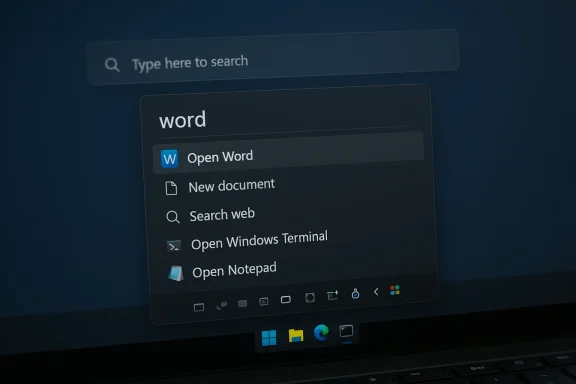
PowerToys Command Palette is best understood as a modern command launcher rather than a plain search box. Microsoft’s documentation says it can access applications, folders, files, system commands, web pages, settings, and more from a single fast interface. It is designed to be keyboard-driven, extensible, and configurable, which makes it feel less like a search panel and more like a productivity control center.That distinction matters because traditional Windows Search has always carried multiple burdens at once. It tries to be app launcher, file finder, web entry point, settings navigator, and sometimes even a quasi-assistant. The more tasks a search box tries to absorb, the more likely it is to frustrate users who just want a single reliable action. Command Palette narrows the problem and then executes better.
Microsoft’s own overview for Command Palette emphasizes that it is customizable and extensible, and that it is intended for Windows power users. It can be invoked with a keyboard shortcut, enabled or disabled from PowerToys settings, and expanded with extensions. The feature is therefore not just a side experiment; it is a blueprint for how Microsoft believes a serious launcher should behave.
The deeper design difference
Command Palette does not depend on the same kind of mental gymnastics that often make Windows Search frustrating. Users do not need to think about whether they are searching apps, files, settings, or commands first. They type, and the palette adapts. That small shift reduces friction in a big way because the interface is behaving like a command router instead of a fuzzy search engine.- Keyboard-first operation encourages speed and consistency.
- Unified access reduces the need to switch between tools.
- Extensions make the tool adaptable to different workflows.
- Predictable behavior is often more valuable than raw feature count.
Why Command Palette Feels Better
Command Palette feels better because it removes the uncertainty that often accompanies Windows Search. Microsoft says the utility supports searching apps, folders, files, running commands, switching windows, performing calculations, adding bookmarks, opening web pages, and launching web searches. It also supports extension-driven additions, which means the interface can grow with the user instead of forcing everyone into the same fixed experience.That range makes it more than a launcher. It becomes a daily operations layer for people who prefer the keyboard, and that is where Windows Search often falls down most visibly. A launcher should be boring in the best possible way: immediate, consistent, and invisible once you learn it.
The other reason it feels better is that it behaves like a modern desktop utility, not a legacy feature carrying years of compatibility baggage. Command Palette is part of PowerToys, which lets Microsoft iterate quickly and tweak behavior without making a high-stakes promise to every Windows user on earth. The company can improve the feature while keeping the default search untouched, and that separation is both a strength and a problem.
Practical advantages over Windows Search
The practical advantages are easy to understand because they line up with how people actually use PCs.- Fast access to apps and commands with a keyboard shortcut.
- Better predictability when the user already knows what they want.
- Lower friction for settings and file access.
- Plugin support for workflows that go beyond basic search.
- A more modern mental model than “search box plus categories.”
Plugins and Extensibility
One of the most important differences between Command Palette and Windows Search is extensibility. Microsoft says the utility supports rich extensions and provides sample projects and guidance for developers who want to add commands or new behaviors. That means the feature is not frozen around Microsoft’s own assumptions; it can be shaped by the kinds of tasks power users actually perform.That matters because Windows Search is fundamentally constrained by its own broad mandate. It must serve casual users, office users, enterprise admins, and power users, all while staying familiar and non-threatening. The result is often a compromise that feels too generic for advanced users and too inconsistent for everyone else. Command Palette escapes part of that burden by being clearly targeted.
The plugin model also gives Microsoft a way to move functionality out of the OS shell and into a more modular ecosystem. That is a smart engineering pattern, but it has a downside: the most compelling capabilities are easy to miss because they are not exposed during the initial Windows experience. In effect, the best part of the product is hidden behind a layer of discovery friction.
What extensibility changes in practice
Extensibility is not just a developer feature. It changes the entire relationship between the launcher and the user.- The interface can be tuned to a specific workflow.
- New commands can be added without waiting for Windows releases.
- Community contributions can fill obvious gaps.
- The launcher can become a habit-forming hub, not just a search field.
Raycast, Spotlight, and the Windows Problem
The comparison to Raycast is unavoidable because Command Palette is clearly playing in the same category, even if it does not match the ecosystem depth. Raycast is a mature launcher platform with a polished interface and a deep extension story, and Microsoft’s utility is still comparatively narrow. But that is exactly why Command Palette makes sense on Windows: it does not demand a wholesale lifestyle change to get useful.The better comparison for many users may actually be Spotlight on macOS. Command Palette aims for the same keyboard-centric “type to do things” simplicity, only with Windows-specific integrations and a distinctly Microsoft flavor. It is less grand and less ambitious than Raycast, but it is also less likely to feel like a foreign implant inside Windows.
That native feel is important. Power users often tolerate friction when the payoff is huge, but most users want an improvement that feels like it belongs. Microsoft’s advantage is that Command Palette already lives in the PowerToys family, so it can borrow system trust without pretending to reinvent the entire desktop.
Where Command Palette stands apart
- Raycast is a platform.
- Spotlight is a polished system launcher.
- Command Palette is a Windows-native productivity layer.
- Windows Search is still trying to be all things to all people.
Why Microsoft Won’t Make It Default Yet
Microsoft’s hesitation is easy to criticize, but the reasons behind it are understandable. PowerToys exists precisely so Microsoft can test utilities with a smaller audience before deciding whether they belong in the core operating system. That approach protects Windows from being disrupted by features that are still evolving, still power-user oriented, or still subject to major design changes.Command Palette is also a philosophical challenge for Microsoft. Turning it into the default search experience would imply that the company is willing to retire or radically reshape a long-standing Windows behavior. That is a bigger move than simply adding a feature to PowerToys. It would affect onboarding, support docs, enterprise training, and user expectations across a massive install base.
There is also the brand issue. Windows Search is familiar even when it is flawed, and Microsoft often prefers incremental evolution to abrupt replacement. A separate utility lets the company say, in effect, “We have a better idea, but only for those who want to opt in.” That is a safe stance, but it also leaves a lot of users stuck with the weaker default.
The corporate logic behind the split
Microsoft’s strategy is not irrational. It is conservative, and conservatism has real organizational value.- PowerToys lowers risk by separating experiments from the OS core.
- Support complexity stays lower when features are opt-in.
- Compatibility concerns are easier to manage in a utility than in the shell.
- Product messaging stays simpler when Windows Search remains the default.
Consumer Impact
For consumers, the biggest benefit of Command Palette is immediate relief from search frustration. Microsoft’s own guidance acknowledges that Windows Search depends on indexing and that search problems can require troubleshooting or rebuilding the index when results do not appear as expected. Command Palette sidesteps much of that dependency by acting more like a launcher and command surface than a traditional index-bound search tool.That means less time waiting, less confusion about where results are coming from, and fewer moments where the operating system seems to forget what is installed. It also means the user can treat the keyboard as the primary interface for basic system tasks, which is a productivity win whether you are a casual user or a heavy multitasker.
The catch, of course, is discoverability. Consumers are much less likely than enthusiasts to find PowerToys on their own. That creates a very Microsoft-looking problem: the company has a good solution, but only the audience most likely to search for it is likely to discover it.
Why this matters for everyday users
Command Palette is not just for developers or IT staff. It helps any user who wants to launch apps quickly, jump to folders, or trigger common commands without hunting through menus. The irony is that the more ordinary the task, the more frustrating it is to rely on a search experience that feels unreliable.- Launch speed improves everyday workflow.
- Reliability reduces user frustration.
- Keyboard shortcuts save attention and movement.
- Better settings access helps users solve small problems faster.
Enterprise and IT Impact
In enterprise environments, the value of a better launcher is slightly different. IT teams care less about novelty and more about consistency, supportability, and the ability to standardize workflows. Microsoft’s PowerToys model gives administrators a feature they can evaluate separately from the Windows shell, which may be preferable to waiting for core operating system changes.That said, enterprises also have stricter requirements. They worry about rollout control, user support, policy management, and whether a utility is appropriate for locked-down environments. Command Palette being part of PowerToys helps with experimentation, but it also means deployment discipline matters. The average business is not eager to introduce another layer of tools unless the benefit is clear.
There is a subtle but important upside here: Command Palette could reduce helpdesk noise. If users can more easily reach settings, apps, commands, and files, fewer small Windows irritations escalate into tickets. That is the sort of practical productivity gain IT leaders understand quickly, even if they do not advertise it.
Enterprise relevance in plain terms
- Standardization can improve if the feature is rolled out intentionally.
- Helpdesk load may shrink if users can self-serve more tasks.
- Training burden is lower when the interface behaves predictably.
- Policy concerns remain because it is still an optional utility.
The Search Experience Gap
The biggest story here is not that Command Palette is good. It is that its existence highlights how far behind the default Windows Search experience can feel in daily use. Microsoft continues to document indexing behavior, troubleshooting steps, and search performance fixes, which shows the underlying system is still working hard to compensate for user-facing rough edges.A great search experience should fade into the background. Users should not need to think about whether the index is complete, whether the search catalog is healthy, or whether the system understands what kind of result they want. Command Palette gets closer to that ideal because it narrows the scope and optimizes for action.
This is also a question of trust. Once a user stops believing that search will reliably find the obvious answer, every subsequent interaction becomes more expensive. The launcher might still work, but the user has already mentally priced in failure. That is a hard reputation problem to reverse.
What makes search feel broken
- It misses obvious apps or files.
- It returns the wrong category first.
- It feels slower than manual navigation.
- It depends on background indexing users do not control.
- It behaves inconsistently enough to erode confidence.
Strengths and Opportunities
Microsoft has a real opportunity here, and the strength of Command Palette is that it already proves the company can build a modern launcher experience that people actually want to use. It is not flashy in the wrong ways; it is useful in the right ways. If Microsoft decides to push this further, it could meaningfully improve how people interact with Windows at both the consumer and enterprise levels.- Faster access to common tasks
- Better keyboard-first workflow for power users and casual users alike
- Extensibility through plugins and commands
- Lower friction for settings, apps, and file access
- Clearer product direction for a modern Windows shell
- Potential enterprise value through standardizable workflows
- A path to reduce dependence on brittle search indexing
Risks and Concerns
The downside is that Microsoft’s current approach can make the company look indecisive. By keeping Command Palette in PowerToys, Microsoft gets flexibility, but it also signals that the feature is not yet trusted enough for the mainstream. That can be read as caution, but it can also be read as hesitation, and users tend to notice the difference.- Discoverability remains poor for mainstream users
- Feature fragmentation keeps the best tools out of the default path
- Power user branding may discourage average users from trying it
- Support complexity grows if Microsoft eventually changes course
- Over-reliance on PowerToys can make core Windows feel second-rate
- Search expectations may keep rising faster than the default experience improves
- Plugin flexibility can create inconsistency if not managed carefully
Looking Ahead
The most interesting question is not whether Command Palette is better than Windows Search. It clearly is, at least for many use cases. The real question is whether Microsoft sees it as a feature bridge, a permanent power-user utility, or the eventual shape of a future default experience. The answer will tell us a lot about how Redmond thinks Windows should evolve.Microsoft has already shown that it can modernize parts of the Windows experience without breaking the rest of the system. PowerToys is the proof. Command Palette extends that proof by showing that a launcher can be fast, capable, and extensible without feeling bloated. What remains uncertain is whether Microsoft is willing to give that experience the broader visibility it deserves.
Things to watch next
- Whether Command Palette gains more built-in extensions
- Whether Microsoft simplifies PowerToys onboarding
- Whether Windows Search continues to get incremental fixes only
- Whether Command Palette starts appearing in broader Microsoft guidance
- Whether enterprise deployment support improves
Source: How-To Geek This tool is better than Windows Search, but Microsoft still makes you install it yourself
