

Paessler’s PRTG Network Monitor 25.4 lands as a pragmatic, sensor-driven monitoring platform that doubles down on its longtime strengths — broad protocol support, flexible on‑prem or hosted deployment, and an all‑sensors-included licensing model — while introducing a full redesign of the web interface that’s being shipped as an alpha “new UI” for early adopters. The release preserves PRTG’s core advantage (license measured by active sensors, not devices or modules), but it also raises the same trade-offs that have defined PRTG for years: wide visibility comes with the risk of rapid sensor consumption, and operational discipline is required to keep costs and noise under control.
PRTG’s founding differentiator is its sensor model: every individual metric, port, disk, interface or service is represented by a sensor and the license limits how many sensors are active simultaneously. That architecture is deliberately granular — it gives administrators precise control over what is monitored and which telemetry consumes their license. Paessler documents this sensor-first licensing approach across its manuals and pricing pages. There are two common ways vendors structure monitoring licenses: per-host (or per-agent), per-feature modules, or the sensor/metric model PRTG uses. Open-source alternatives like Zabbix remain unrestricted by commercial sensor counts, while large SaaS platforms such as Datadog charge per host and levy usage‑based fees for logs and custom metrics; the financial and operational behaviours that follow from each model are materially different and should drive procurement decisions. PRTG 25.4 focuses less on one-off feature knockouts and more on incremental platform evolution: a new alpha web UI, an expanded sensor catalog (IT Pro’s review cites 321 sensors available in v25.4), and continued rolling updates that fold new sensor types and integrations into the base product without add‑on licensing. Note: the precise figure "321" reported in press coverage is useful context for scale but could not be independently enumerated on Paessler’s public release notes at the time of review; treat such counts as indicative rather than contractual.
PRTG 25.4 is an evolutionary update that consolidates Paessler’s long‑standing strengths while introducing a redesigned web experience that will matter more as it matures beyond alpha. The product’s sensor model continues to be its defining characteristic: it offers control and coverage but demands governance and planning. For organisations that need broad, protocol‑rich monitoring without modular upsells, PRTG still represents a pragmatic, cost‑predictable option — provided procurement teams validate pricing, capacity and support terms, and operations teams enforce sensor discipline and staged upgrades.
Source: IT Pro Paessler PRTG Network Monitor 25.4 review: The network monitoring host with the most
 Background
PRTG’s founding differentiator is its sensor model: every individual metric, port, disk, interface or service is represented by a sensor and the license limits how many sensors are active simultaneously. That architecture is deliberately granular — it gives administrators precise control over what is monitored and which telemetry consumes their license. Paessler documents this sensor-first licensing approach across its manuals and pricing pages. There are two common ways vendors structure monitoring licenses: per-host (or per-agent), per-feature modules, or the sensor/metric model PRTG uses. Open-source alternatives like Zabbix remain unrestricted by commercial sensor counts, while large SaaS platforms such as Datadog charge per host and levy usage‑based fees for logs and custom metrics; the financial and operational behaviours that follow from each model are materially different and should drive procurement decisions. PRTG 25.4 focuses less on one-off feature knockouts and more on incremental platform evolution: a new alpha web UI, an expanded sensor catalog (IT Pro’s review cites 321 sensors available in v25.4), and continued rolling updates that fold new sensor types and integrations into the base product without add‑on licensing. Note: the precise figure "321" reported in press coverage is useful context for scale but could not be independently enumerated on Paessler’s public release notes at the time of review; treat such counts as indicative rather than contractual. Deployment and discovery
What to expect during install
PRTG supports both on‑premises core server installations and Paessler’s hosted (managed) offering. New installations are guided by a discovery wizard that identifies devices and assigns a set of default sensors, allowing teams to get a usable monitoring baseline in minutes. Paessler provides a full 30‑day trial with unlimited sensors for evaluation and a free edition limited to 100 sensors for long‑term small deployments or proof‑of‑concepts. Hardware guidance from Paessler is conservative and sensible: for mid‑sized installations the vendor recommends multi‑core servers and modest RAM — for example, an 8‑core server is a common recommendation when you plan to host several thousand sensors, with memory guidance scaling by expected sensor count. These platform sizing recommendations should be validated against scanning intervals, the number of active probes, and the mix of sensor types (SNMP, WMI, NetFlow, packet sniffing, etc.. Paessler’s published system requirements outline these CPU and RAM recommendations for different sensor tiers. IT Pro’s lab review echoes real‑world practice: a repurposed HPE 1U with eight CPU cores and 16 GB RAM drove up to ~5,000 sensors in their environment during testing, which aligns closely with Paessler’s published guidance though specific capacity depends on scan intervals and the devices you monitor. That same review also highlights that a single rack of modest gear can easily exceed hundreds of sensors in environments with many switch ports, virtualization hosts and storage arrays — an important practical warning for any procurement or proof‑of‑concept.Discovery behaviour and first steps
- The discovery wizard creates groups and attaches default sensors so teams get immediate visibility.
- PRTG’s device tree is hierarchical; credentials, scan schedules and triggers are inherited from parent groups to reduce configuration overhead.
- Recommended sensors and an in‑UI search help you add the right probes for specific devices (Redfish, iDRAC/iLO, SNMP, WMI, NetFlow, etc..
Monitoring, alerting and integrations
Sensor coverage and telemetry
PRTG’s strength is breadth: SNMP, WMI, SSH, Redfish, NetFlow/sFlow/IPFIX, packet sniffing, HTTP checks, API probes, database queries, and cloud APIs are all first‑class citizens. Because Paessler includes new sensors in the base product (rather than gating them behind paywalls), teams gain immediate coverage for new technologies as Paessler updates the platform. That rolling update model reduces surprise module charges and simplifies procurement — you buy sensors, and everything else is available.Alerts, actions and integrations
PRTG’s alarm engine is feature‑rich: threshold and state triggers can execute external scripts, call webhooks, and integrate with ticketing and collaboration tools such as Microsoft Teams, Slack, and ServiceNow. Notifications are sent by email, SMS, SNMP trap, or syslog. Alerts can be defined at any group level and inherited downward, allowing consistent policies across device classes. This makes PRTG suited to both hands‑on ops teams and automated incident workflows.Practical caveat: sensor bloat
The flip side of PRTG’s granularity is an operational requirement to manage sensor consumption. Device types with many measurable metrics (high‑port switches, virtualization hosts, multi‑drive arrays) will claim dozens or hundreds of sensors quickly. If you do not define a sensor governance strategy — which sensors are mandatory, which are optional, and which can be polled less frequently — license exhaustion and alert fatigue follow. IT Pro’s lab example warns that a relatively small rack (a 52‑port switch + virtualization hosts + NAS) consumed hundreds of sensors in short order.The new web UI (alpha): what changes and what matters
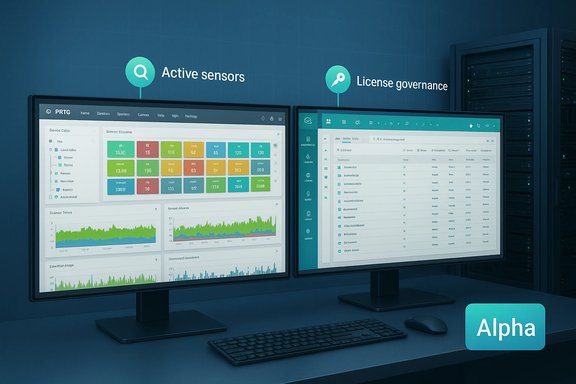
PRTG 25.4 introduces a brand new web UI that Paessler denotes as alpha. This is a full redesign rather than a cosmetic refresh: menus are relocated to a left rail, monitoring views emulate the desktop split‑pane experience, and the main pane surfaces new filtering and ribbon-style controls for device, sensor and channel navigation. The initial alpha exposes core read and control capabilities: reading probes, groups, devices, sensors and channels; pausing/resuming and acknowledging sensors; basic scanning actions. Paessler explicitly cautions that the UI is not feature‑complete and remains subject to change. Key aspects of the alpha UI:- Streamlined left navigation with a central monitoring canvas.
- Status filters at the top of the main view (Down, Warning, Paused) for rapid triage.
- A ribbon below device selection that surfaces Overview, Sensors, Logs, Settings and Triggers.
- Mobile auto‑scaling — the web UI attempts a responsive layout for phones and tablets.
- A single toggle in the setup allows you to revert to the classic UI if required.
Pricing, licensing and the real cost picture
Paessler’s published model
Paessler sells sensor packages (PRTG 500, 1,000, 2,500, 5,000, 10,000) as subscription plans billed annually with options for hosted or on‑prem deployment. The PRTG free edition remains available for 100 sensors. For example, Paessler lists the PRTG 500 pack at a headline price on its pricing pages and provides Hosted Monitor plans with yearly billing tiers. Pricing and currency presentation may vary by region. Paessler’s FAQ and pricing pages are the authoritative reference for current costs and licensing entitlements.Press figure vs. vendor list price
Press coverage of 25.4 quoted a starter “PRTG 500” figure of €137 per month (annual billing) — however Paessler’s published list prices in the region examined show different headline numbers (site list shows $179 per month for PRTG 500 on a USD billing page). Pricing differences may result from currency conversions, regional pricing, promotional discounts, negotiated enterprise deals, or changes to the product’s commercial model over time. Always confirm current net pricing, the billing currency, and the renewal terms directly with Paessler or an authorized distributor before procurement. This is important because periodic changes to Paessler’s licensing model in recent years have prompted customer concern and migration discussions in vendor forums.How this contrasts with other vendors
- Datadog: typically bills per host for infrastructure monitoring and layers additional, usage‑based charges for logs, custom metrics and APM, which can outpace host costs quickly when teams over‑collect telemetry. Datadog’s model incentivizes careful data retention and metric curation.
- Zabbix: an open‑source alternative that has no built‑in sensor or host charge; costs arise from hosting, integration, and support contracts if you choose commercial services. For organizations averse to vendor licensing creep, Zabbix’s model can be compelling — but the trade‑off is internal operational burden and lower turnkey integrations compared to commercial SaaS platforms.
Strengths, trade-offs and operational risks
Strengths
- Granular control: Sensor licensing enables precise monitoring rollouts and the ability to pause or reassign sensors as needs change.
- All sensors included: No add‑ons for virtualization, NetFlow, or Redfish sensors — everything sits under the sensor cap, simplifying procurement.
- Flexible deployment: Hosted or on‑prem choices with pause/cluster/failover options.
- Broad protocol support and integrations: PRTG works with the usual enterprise stack — Teams, Slack, ServiceNow, SNMP, WMI, NetFlow and more — enabling integration into existing incident management workflows.
Trade‑offs and practical risks
- Sensor bloat and cost creep: Without governance, switch ports, per‑core CPU sensors and spare channels can consume sensors rapidly, forcing license upgrades or painful triage. IT Pro’s lab example demonstrates this in practice.
- Operational dependency on stable upgrades: Community reports describe upgrade hiccups and support friction around some 25.x releases (for example, SNMP v3 regressions reported in community forums during earlier 25.1 builds). Any monitoring platform must be tested in staging before full production upgrades. Paessler’s knowledgebase and release notes should be reviewed for known issues prior to upgrades.
- Support and pricing sensitivity: In recent years some customers have reported dissatisfaction with subscription price changes and perceived post‑sales support quality; these are operational factors to weigh against technical strengths. Validate SLA, renewal pricing mechanics, and support SLAs during procurement.
- Alpha UI caveats: The new UI is alpha — functional gaps or regressions are possible. Use the toggle to remain on the classic UI for critical operations until the new interface matures.
Security and resilience considerations
Monitoring infrastructure is a high‑value target: a compromised PRTG core could be used to blind teams, suppress alerts, or serve as a pivot point. Operational best practices apply:- Harden the PRTG core host and limit administrative access to jump hosts with MFA.
- Use TLS for all PRTG web and probe communications; rotate certificates and follow vendor guidance on ports and firewall rules.
- Isolate monitoring traffic where feasible (management VLANs or segmented networks) and restrict probe communication to known endpoints.
- Stage upgrades and verify sensor behaviour on non‑production clusters before applying changes broadly. Paessler documents cluster and failover options — use them to protect availability.
How to adopt PRTG 25.4 successfully — practical checklist
- Prepare a staging environment that mirrors production scale (or at least the types of devices and sensor density you’ll manage).
- Run Paessler’s capacity guidance against your expected sensor counts, and size CPU and memory accordingly; consider remote probes for distributed or high‑volume environments.
- Build a sensor governance policy:
- Define required sensors per device class.
- Set standard polling intervals by metric criticality.
- Establish a lifecycle for non‑critical sensors (disable, archive, or schedule less frequent checks).
- Validate integrations and incident workflows (email/SMS/webhooks, Teams/ServiceNow) in staging.
- If you plan to try the new UI, enable it for a small admin group first and keep the classic UI available until all essential workflows are verified.
- Lock down access: use least privilege, MFA for admins, and network segmentation for probes.
- Budget for growth: model sensor consumption increases over time and include upgrades or hosted alternatives in your three‑year TCO. Compare cost scenarios against host‑based or open‑source alternatives to validate total cost of ownership.
Verdict — who should pick PRTG 25.4?
PRTG remains an excellent choice for teams that desire an appliance‑like experience with deep protocol coverage and granular, sensor‑level control — particularly where monitoring requirements are heterogeneous (virtualization hosts, physical server health via Redfish, NetFlow feeds, and diverse networking gear). The lack of modular paywalls is attractive: once you buy sensor capacity, new sensors rolled into the platform are available without extra licensing surprises. However, PRTG is best for organisations that:- Have disciplined monitoring governance or are willing to implement it.
- Prefer the predictability of sensor caps to per‑host or per‑GB usage models.
- Can commit engineering time to staging upgrades and validating alpha UI changes before broad rollout.
PRTG 25.4 is an evolutionary update that consolidates Paessler’s long‑standing strengths while introducing a redesigned web experience that will matter more as it matures beyond alpha. The product’s sensor model continues to be its defining characteristic: it offers control and coverage but demands governance and planning. For organisations that need broad, protocol‑rich monitoring without modular upsells, PRTG still represents a pragmatic, cost‑predictable option — provided procurement teams validate pricing, capacity and support terms, and operations teams enforce sensor discipline and staged upgrades.
Source: IT Pro Paessler PRTG Network Monitor 25.4 review: The network monitoring host with the most
