

RapidRAW’s latest patch, v1.4.11, arrives as a focused, image‑quality–first update: a rebuilt RAW preprocessing pipeline that promises markedly cleaner color noise handling, targeted improvements for Fuji X‑Trans demosaicing, and workflow refinements such as flat‑line curves clipping and smoother image navigation. The release (published by the project on GitHub) is squarely aimed at raising the core fidelity of RapidRAW’s processing pipeline rather than adding headline features — a practical approach that should benefit everyday editing and culling workflows. (github.com)
RapidRAW is an open‑source, GPU‑accelerated RAW editor and browser built with performance and speed as primary goals. The project bundles a compact runtime (the app is intentionally lightweight) and a modern UI while exposing advanced editing primitives — tone curves, HSL mixer, local adjustments, masking, and optional generative tools driven by ComfyUI. It targets photographers who want a snappy, responsive editing loop and an alternative to heavier tools like Lightroom or Darktable. The project homepage and repository emphasize cross‑platform builds for Windows, macOS and Linux and a non‑destructive sidecar workflow. (getrapidraw.com)
The project is notable for its lean footprint and rapid release cadence: the application is compact (tens of megabytes) and the developer publishes platform builds (Windows, macOS, Ubuntu) directly from the GitHub releases page. The codebase uses Rust on the backend with a TypeScript/React front end and is packaged via Tauri — a modern desktop approach that trades a small footprint and native performance against the complexity of traditional large native toolchains. The project is licensed under AGPL‑3.0, ensuring derivatives remain open source. (getrapidraw.com)
Community reactions and comparisons show this tension: reviewers and forum posts commonly compare RapidRAW to more mature, color‑accurate tools (Darktable, RawTherapee, Capture One) and emphasize that while RapidRAW’s UI and responsiveness are strong, specialized production workflows may still prefer the deeper color controls of legacy RAW developers. The 1.4.11 release directly addresses one of the most consequential technical complaints — early‑pipeline color noise and X‑Trans artifacts — indicating the developer is iterating toward greater parity in image quality while retaining the project’s performance focus.
Community commentary (in forums and aggregated download sites) provides useful, pragmatic context: many users praise the speed and UI polish, while more color‑critical power users still default to mature RAW processors for final color grading. These voices are consistent with RapidRAW’s stated priorities — performance and a pleasurable editing loop.
Who should care most:
RapidRAW 1.4.11 is not an overhaul of the app’s philosophy; instead, it’s a considered refinement of the foundation — the part of the pipeline that decides whether an edit looks good or merely adequate. For users who value speed and a lightweight, modern UI, the release pushes the project closer to the image‑quality bar set by longer‑mature projects while preserving the fast, iterative editing experience that made RapidRAW attractive in the first place. If you rely on RapidRAW in your workflow, install the build in a test environment, run your representative images through the new preprocessing, and judge the results against your current baseline — the improvements in v1.4.11 are the kind that become obvious when you flip between before and after on real shoots. (github.com)
Source: Neowin https://www.neowin.net/software/rapidraw-1411/
 Background
RapidRAW is an open‑source, GPU‑accelerated RAW editor and browser built with performance and speed as primary goals. The project bundles a compact runtime (the app is intentionally lightweight) and a modern UI while exposing advanced editing primitives — tone curves, HSL mixer, local adjustments, masking, and optional generative tools driven by ComfyUI. It targets photographers who want a snappy, responsive editing loop and an alternative to heavier tools like Lightroom or Darktable. The project homepage and repository emphasize cross‑platform builds for Windows, macOS and Linux and a non‑destructive sidecar workflow. (getrapidraw.com)The project is notable for its lean footprint and rapid release cadence: the application is compact (tens of megabytes) and the developer publishes platform builds (Windows, macOS, Ubuntu) directly from the GitHub releases page. The codebase uses Rust on the backend with a TypeScript/React front end and is packaged via Tauri — a modern desktop approach that trades a small footprint and native performance against the complexity of traditional large native toolchains. The project is licensed under AGPL‑3.0, ensuring derivatives remain open source. (getrapidraw.com)
What’s new in RapidRAW 1.4.11
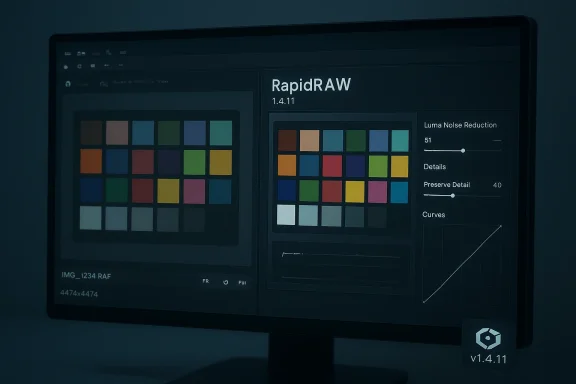
New RAW preprocessing algorithm: color noise under control
- The headline item in v1.4.11 is a completely rewritten RAW preprocessing algorithm intended to reduce color noise while preserving fine detail and sharpness.
- The release notes explicitly state the new pipeline converts many previous color‑noise artifacts into mainly luma noise — a welcome improvement because luma noise is easier to treat with conventional denoisers and is less damaging to color fidelity. The developer includes before/after comparisons in the release assets to illustrate the change. (github.com)
Fuji X‑Trans improvements
- v1.4.11 calls special attention to Fuji X‑Trans sensor handling: the new preprocessing is reported to handle the non‑Bayer sensor pattern more robustly, delivering cleaner and sharper details for many RAF files.
- Fuji X‑Trans demosaicing is a long‑running challenge for RAW processors because of the irregular color filter array; improvements at preprocessing rather than solely at demosaic/post‑processing can materially improve final image appearance. (github.com)
Flat‑line clipping in Curves
- The curves tool gains flat‑line clipping: you can now drag start/end points along the X‑axis to clip blacks or whites precisely. This gives creative control similar to traditional film‑style clipping and hard tonal separations without relying on aggressive global exposure tweaks. (github.com)
Core improvements and workflow polish
- Lens detection: improved Lensfun parser logic to detect and match lenses more reliably, and added support for additional manufacturers. This should improve automatic lens‑correction accuracy for many users. (github.com)
- Smoother image navigation: the app cancels pending load requests while you rapidly step through images, reducing stuttering and improving culling speed for large folders. (github.com)
- Quality‑of‑life features: curves cross‑channel copy/paste, productivity context menu shown inside editor view, and backend improvements to wgpu and RAW tonemapping fixes on non‑edited images. These smaller updates remove friction in everyday tasks and stabilize corner cases. (github.com)
How this fits into RapidRAW’s broader philosophy
RapidRAW’s design philosophy favors a fast, pleasing editing loop over exhaustive color‑science perfection. The project intentionally positions itself as an efficient alternative for photographers who prioritize speed and ease of use, while remaining fully open‑source and cross‑platform. The official project material calls out that RapidRAW is not targeting absolute color‑managed accuracy on day one; instead the goal is a fluid creative experience with rapid GPU feedback and straightforward workflows. These tradeoffs are visible in the choice of features and in the compact size of the application. (getrapidraw.com)Community reactions and comparisons show this tension: reviewers and forum posts commonly compare RapidRAW to more mature, color‑accurate tools (Darktable, RawTherapee, Capture One) and emphasize that while RapidRAW’s UI and responsiveness are strong, specialized production workflows may still prefer the deeper color controls of legacy RAW developers. The 1.4.11 release directly addresses one of the most consequential technical complaints — early‑pipeline color noise and X‑Trans artifacts — indicating the developer is iterating toward greater parity in image quality while retaining the project’s performance focus.
Technical verification and cross‑checks
- The official release notes and the GitHub tag for v1.4.11 list the new preprocessing algorithm, Fuji X‑Trans improvements, flat‑line curves clipping and core improvements. The release page includes demonstration images and the platform assets for Windows, macOS and Ubuntu builds. These are the canonical primary sources for the change log. (github.com)
- The project homepage corroborates the app’s GPU‑accelerated design, cross‑platform goals, and feature set (masking tools, library, sidecar-based non‑destructive edits and optional generative features via ComfyUI). That page also documents the project’s licensing (AGPL‑3.0) and minimum system requirements for Windows and macOS. (getrapidraw.com)
- Independent community coverage (international software download sites and news aggregators) reflects the same summary of v1.4.11’s emphasis on core image quality and the UX refinements; community posts add useful, real‑world notes about behavior on larger RAW files and user expectations versus mature RAW developers. These third‑party writeups and forum echoes align with the developer’s stated goals for the release.
Strengths (what will benefit users immediately)
- Noticeable image‑quality uplift: the revised preprocessing reduces color speckling and preserves detail, an outsized return because early pipeline improvements affect all subsequent edits. Rapid tests from the release’s comparison images show cleaner mid‑tone color and crisper detail, especially in noisy frames. (github.com)
- Better X‑Trans handling: Fuji shooters will likely see immediate reductions in common X‑Trans artifacts, simplifying high‑ISO and fine‑detail workflows. (github.com)
- Improved culling and navigation: the “cancel pending load” logic helps in rapid browser workflows where holding the arrow key or skipping many frames is common; this materially speeds folder triage and selection. (github.com)
- Lightweight, responsive UI: RapidRAW’s small footprint and GPU processing make the app fast to open and nimble for iterative adjustments, ideal for photographers who prefer a single app for review + light edits. (getrapidraw.com)
- Open‑source, cross‑platform: the AGPL license and GitHub‑first workflow mean users can inspect, contribute, or package the app; cross‑platform builds help teams that span macOS, Linux and Windows. (getrapidraw.com)
Risks, caveats and what to watch
- Not yet a finished color‑science replacement: while v1.4.11 makes important strides, RapidRAW’s stated design remains focused on a creative, fast loop rather than laboratory‑grade color accuracy. Professionals with strict color pipelines (print shops, color‑managed editorial workflows) should validate results against reference tools before switching wholesale. (getrapidraw.com)
- Installer warnings and trust signals: the releases note the installers are not code‑signed; Windows SmartScreen prompts and macOS quarantine behaviors are expected and require cautious user interaction (More info → Run anyway on Windows). For managed environments or cautious users, waiting for a code‑signed build or verifying checksums is prudent. (github.com)
- Edge‑case RAW compatibility: community threads and download commentary occasionally surface problems with very large RAW files (example: 80‑MB sensor outputs) or unusual container variants. Test your camera models and compressed/unusual RAW options before mass migration. Community feedback indicates these issues can be device‑specific and often get fixed in follow‑up patches.
- Maturity tradeoffs: RapidRAW’s rapid cadence is an advantage, but it also means features and integrations (cataloging, advanced color profiling, tethering) might lag compared to mature alternatives. Plan for staged adoption if you depend on features not yet present. (getrapidraw.com)
- Generative and cloud features require attention to privacy: the app offers both built‑in local AI tools and optional ComfyUI self‑hosted or cloud services. Users with strict data governance requirements should prefer on‑device/local ComfyUI usage or avoid cloud tiers entirely. The official site clearly documents the three modes (built‑in local, self‑hosted ComfyUI, optional cloud). (getrapidraw.com)
Practical upgrade checklist (Windows photographers)
- Back up a sample folder of original RAW files and any existing sidecar (.rrdata or other) files.
- Download the new build from the official GitHub releases page; verify the file name and platform match your system. (github.com)
- Verify SHA‑256 (or other checksum) when provided — the GitHub release assets typically include checksums for installers. If you operate in a managed environment, test the installer in a staging VM first. (github.com)
- Install and launch the app; expect a Windows SmartScreen notice if the binary isn’t code‑signed. Use the “More info → Run anyway” flow only if you confirmed the download’s authenticity from GitHub. (github.com)
- Open representative RAWs from your typical cameras (including any X‑Trans RAFs) and compare previous edits (or export an unedited TIFF) to evaluate tonality, color noise, and demosaic differences.
- Evaluate performance and memory use during rapid culling — the update explicitly improves image navigation; validate that cancellation of pending loads reduces stutter on your hardware. (github.com)
- If you use automatic lens corrections, validate the Lensfun auto‑detection and correct any false positives; report mismatches as GitHub issues to help the parser improve. (github.com)
- If your workflow uses cloud or ComfyUI integrations, confirm privacy and licensing tradeoffs before enabling them. Use the local ComfyUI option for sensitive workflows. (getrapidraw.com)
Developer posture and community signals
The RapidRAW project continues to demonstrate rapid iteration and responsiveness: the developer publishes frequent releases and bug‑fixes and emphasizes community feedback. The project’s GitHub repository shows active commits and reactions on the release post, and independent package listings (third‑party download portals and software news aggregators) reflect the same changelog items. That combination — active upstream development plus community testing — is a positive sign for rapid bug fixes, but it also means users should track updates and pin versions for production systems. (github.com)Community commentary (in forums and aggregated download sites) provides useful, pragmatic context: many users praise the speed and UI polish, while more color‑critical power users still default to mature RAW processors for final color grading. These voices are consistent with RapidRAW’s stated priorities — performance and a pleasurable editing loop.
Verdict: where RapidRAW 1.4.11 lands
RapidRAW v1.4.11 is an important incremental release that addresses one of the most consequential technical elements of any RAW editor: the early preprocessing path. By reducing color noise, sharpening better while preserving detail, and improving X‑Trans handling, the release should produce materially better results for noisy images and make common edits feel cleaner. Workflow improvements (curves clipping, lens detection and faster navigation) reduce friction in everyday tasks, which aligns with RapidRAW’s goal of a fast, nimble editing experience. (github.com)Who should care most:
- Photographers who prioritize rapid culling and quick, pleasing edits will find the update especially valuable.
- Fujifilm X‑Trans shooters should test this release carefully — early signs indicate improved results.
- Open‑source advocates and cross‑platform teams will appreciate the AGPL licensing and the project’s transparency.
- Color‑managed professionals and print studios should validate color and gamut chaining against their current toolchain before migrating.
- Managed enterprise deployments should wait for code‑signed installers or integrate the new build into a controlled staging rollout due to SmartScreen/quarantine behaviors. (github.com)
RapidRAW 1.4.11 is not an overhaul of the app’s philosophy; instead, it’s a considered refinement of the foundation — the part of the pipeline that decides whether an edit looks good or merely adequate. For users who value speed and a lightweight, modern UI, the release pushes the project closer to the image‑quality bar set by longer‑mature projects while preserving the fast, iterative editing experience that made RapidRAW attractive in the first place. If you rely on RapidRAW in your workflow, install the build in a test environment, run your representative images through the new preprocessing, and judge the results against your current baseline — the improvements in v1.4.11 are the kind that become obvious when you flip between before and after on real shoots. (github.com)
Source: Neowin https://www.neowin.net/software/rapidraw-1411/