When Microsoft set a hard end-of-support date for mainstream Windows 10 on October 14, 2025, many IT teams reacted as if every Windows 10 machine suddenly became a ticking cybersecurity time bomb—but for operational technology (OT) environments the reality has always been more nuanced, and the right response is far less about panic and far more about measured, risk‑based program management.
Microsoft’s mainstream servicing for the consumer and broad enterprise builds of Windows 10 (the Semi‑Annual Channel builds) reached its lifecycle cutoff on October 14, 2025. That date stopped routine, free OS‑level security and quality updates for the standard Home, Pro, Enterprise and Education branches unless an endpoint is enrolled in a formal extension program. At the same time, Microsoft’s Long‑Term Servicing Channel (LTSC) and IoT‑focused LTSC releases follow different fixed lifecycles: LTSC releases issued in 2019 and 2021, and IoT‑LTSC variants, continue to receive security updates according to their individual end‑of‑support calendars—in practice granting OT operators multiple years of supported operation when deployed on the correct LTSC SKU. Likewise, Windows Server editions used widely in SCADA/back‑end roles are governed by their own lifecycle dates, extending support for many server platforms into the late 2020s and early 2030s.
Those distinctions are the critical first fact for OT teams: the October 2025 deadline applied to mainstream Windows 10 servicing channels and not uniformly to every Windows image that sits inside a plant control room. That technical nuance has large operational consequences.
Key implications for OT teams:
Advantages:
Advantages:
Principles:
Approach:
Organisations that treat LTSC and server lifecycles as part of a measured operating model—and invest in repeatable recoverability and vendor engagement—will both maintain safe, compliant operations and satisfy insurers and auditors. The alternative—forced, ill‑timed migrations or unsupported “hope‑it‑works” strategies—exposes plants to exactly the outages and regulatory exposure everyone wants to avoid. The end of mainstream Windows 10 is a deadline; for OT, it is also an opportunity to build a concrete, auditable resilience program that protects production first, and endpoints second.
Source: Acronis What Windows 10 end of support means for OT environments
 Background / Overview
Microsoft’s mainstream servicing for the consumer and broad enterprise builds of Windows 10 (the Semi‑Annual Channel builds) reached its lifecycle cutoff on October 14, 2025. That date stopped routine, free OS‑level security and quality updates for the standard Home, Pro, Enterprise and Education branches unless an endpoint is enrolled in a formal extension program. At the same time, Microsoft’s Long‑Term Servicing Channel (LTSC) and IoT‑focused LTSC releases follow different fixed lifecycles: LTSC releases issued in 2019 and 2021, and IoT‑LTSC variants, continue to receive security updates according to their individual end‑of‑support calendars—in practice granting OT operators multiple years of supported operation when deployed on the correct LTSC SKU. Likewise, Windows Server editions used widely in SCADA/back‑end roles are governed by their own lifecycle dates, extending support for many server platforms into the late 2020s and early 2030s.Those distinctions are the critical first fact for OT teams: the October 2025 deadline applied to mainstream Windows 10 servicing channels and not uniformly to every Windows image that sits inside a plant control room. That technical nuance has large operational consequences.
Where Windows actually runs inside OT environments
Understanding where Windows lives in a typical industrial estate is the first step in building a defensible, auditable migration or sustainment strategy.HMIs and engineering workstations
- Human‑Machine Interfaces (HMIs) and engineering workstation desktops frequently run Windows 10 Enterprise LTSC or Windows 10 IoT Enterprise LTSC. Vendors certify these long‑service builds because LTSC minimizes feature churn and enables predictable validation windows.
- Many HMI products and design suites explicitly list LTSC builds among supported OSes and test against those versions; switching to a Semi‑Annual Channel or to Windows 11 often requires re‑qualification.
Historians, SCADA backends and control servers
- Historian databases, SCADA servers and aggregate back‑end services more commonly live on Windows Server platforms (2016/2019/2022) rather than client Windows 10 desktops. Server lifecycles and support models differ from desktop branches and often extend further through Extended Support windows.
Embedded panels and OEM appliances
- Gateways, operator panels and OEM‑supplied embedded devices typically use Windows 10 IoT Enterprise LTSC or Windows IoT Core variants. Those installations are often locked to a hardware and firmware baseline and are validated by OEMs for a specific software/hardware constellation—making in-place OS upgrades risky or impossible without vendor engagement.
What the October 2025 “end of support” actually means for OT
For general IT estates the headline is binary: mainstream Windows 10 no longer receives free OS‑level updates. For OT the impact is typically strategic, not immediate—because many industrial systems already run LTSC releases or server OSes with longer lifecycles.Key implications for OT teams:
- The migration clock is now public and irrevocable: every unsupported platform increases security debt and operational exposure over time.
- Vendor certification cycles will continue to drive the pace of change. Many automation vendors will not certify their stacks on a new OS until they complete testing—so immediate blanket migrations are unrealistic in many plants.
- Driver and firmware ecosystem support for aging hardware will erode gradually: replacement parts, signed drivers, and validated OEM images become harder to source the older a platform grows.
- Even on supported LTSC or server builds, the longer a platform stays in place without modernization, the larger the chance that an unanticipated failure will cascade into long outages.
Compliance, regulation and the insurance view: the new reality for legacy OT
Regulators and cyber insurers are reframing questions away from simple “Are you patched?” toward “Can you recover?” and “Can you demonstrate compensating controls?”- European NIS2 rules and implementing guidance require essential and important entities to adopt proportionate cybersecurity risk‑management measures, including business continuity, backup and recovery planning, vulnerability handling and demonstrable incident response capabilities.
- OT‑specific standards (the IEC/ISA‑62443 family) mandate security program elements such as vulnerability and patch management or documented mitigations when patching is infeasible; the standard explicitly expects patch processes to be integrated with change control, safety impact analysis, and verification steps.
- Sector regulators with safety/regulatory overlays—such as FDA 21 CFR Part 11 in pharma—require validated computerized systems and strong controls around data integrity, change control and disaster recovery.
- Grid and utility operators governed by NERC CIP must maintain recovery plans and tested backup/restore procedures for Bulk Electric System cyber assets and document configuration baselines and vulnerability assessments.
- Measured Recovery Time Objectives (RTO) and Recovery Point Objectives (RPO) for critical OT functions.
- Evidence of tested backup, bare‑metal recovery and immutable snapshotting.
- Proof that legacy drivers, images and a reproducible rebuild path exist for critical HMIs and engineering stations.
Structural operational risks that persist even on supported LTSC/server platforms
Even when platforms remain vendor‑supported, long life cycles create structural failure modes OT teams must manage.- Legacy drivers may be unique, unsigned or vendor‑specific; if a board or HMI fails and drivers are unavailable, a bare replacement can be unusable.
- OEM disk images and provisioning media often disappear after years; without retained golden images or vendor image support, recovery becomes manual and error‑prone.
- Engineering workstations are sometimes validated against a single firmware/driver combination; OS or firmware drift can invalidate testing or break interfaces.
- Historians and data bridges that span OT/IT zones can be corrupted by a single catastrophic event, affecting years of telemetry and forensic trails.
- Air‑gapped or isolated safety networks cannot rely on continuous endpoint telemetry or cloud‑delivered detections; compensating protections must be local and deterministic.
The OT migration dilemma: four realistic strategic paths
Rather than a single “upgrade now” answer, most industrial operators confront four pragmatic options. Each has valid use cases, benefits and tradeoffs.Option 1 — Full migration to Windows 11 (when and where it makes sense)
Best for: greenfield projects, virtualized SCADA, non‑safety critical systems, or new production lines.Advantages:
- Modern security primitives (hardware roots of trust, VBS, Secure Boot).
- Long support horizon tied to new OS lifecycles.
- Better alignment with mainstream IT tools and future vendor testing.
- Vendor certification gaps: many automation ISVs and OEMs are still testing Windows 11 for complex stacks.
- Hardware eligibility: TPM, Secure Boot, and CPU families may force wholesale refresh.
- Validation burden in regulated industries: full GxP / pharma requalification may be required and can cause production freezes.
- New equipment where revalidation is part of the procurement life cycle.
- Virtualized or containerized SCADA stacks that decouple OS from hardware.
Option 2 — Migrate LTSC → newer LTSC (e.g., 2019 → 2021)
Best for: brownfield OT that needs stability but must refresh a generation or two.Advantages:
- Preserves vendor certification and hardware compatibility in many cases.
- Minimizes validation and operational disruption compared with a Windows 11 migration.
- Migration still requires testing, driver checks, and golden image updates.
- Recovery exposures (lost images, missing drivers) are not solved automatically.
- When your vendor cert matrix lists the newer LTSC and hardware supports it without major change.
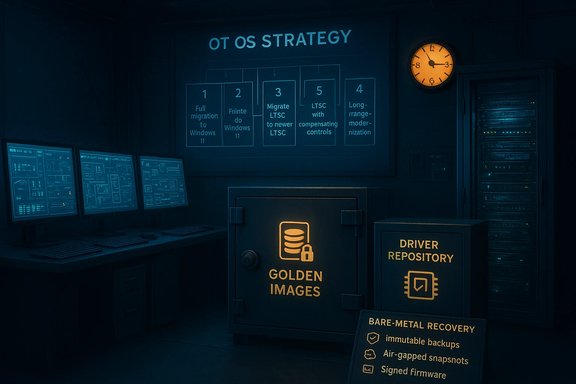
Option 3 — Long‑life LTSC with hard compensating controls (recommended safeguard for many OT estates)
Best for: sites where stability is paramount and hardware change is expensive or risky.Principles:
- Treat the LTSC lifecycle as a deliberate operating model and invest heavily in recovery, not forced upgrades.
- Make backup and recovery guarantees operational, testable and auditable.
- Immutable backups and air‑gapped snapshot retention (prevents ransomware from deleting last‑known‑good images).
- A verified driver repository and preserved OEM images (store on secure media and in tested artifact repositories).
- Bare‑metal recovery automation to restore full HMI/engineering stacks (including drivers) to replacement hardware within documented RTOs.
- Application allowlisting tailored for air‑gapped systems (blocks unauthorized execution without cloud dependencies).
- Offline, one‑click system recovery workflows that operators without full IT experience can execute.
- Frequent, documented recovery drills (including historian restore and alarm routing validation).
- Preserves validated application compat and avoids unnecessary hardware refreshes.
- Produces documentary evidence for auditors and insurers that compensating controls exist.
- Minimizes the risk of prolonged production outages.
- Doesn’t remove exposure to unpatched OS‑level vulnerabilities forever; it reduces business impact and supports forensic recovery.
Option 4 — Long‑range planning for industrial editions and staged modernization
Best for: enterprises with multi‑year modernization programs or heavily regulated lines.Approach:
- Map OS lifecycles (e.g., LTSC and IoT‑LTSC end dates) to control system modernization timelines.
- Plan staged pilots on discrete lines, run co‑existence windows, and align OS moves with planned capital projects.
- Standardize offline recovery, imaging, and allowlisting across the estate.
- Controlled, auditable transitions that respect both regulatory validation cycles and operational uptime.
Practical, technical checklist: seven action items for OT operators this quarter
- Inventory and classification
- Build an authoritative register of OS SKUs (e.g., Windows 10 LTSC 2019 vs IoT LTSC 2021), firmware versions, and driver families for every HMI, engineering workstation and server.
- Establish immutable backup and artifact preservation
- Create offline, tamper‑resistant backups of golden images, OEM drivers, firmware blobs, and license keys; test recovery from those artifacts.
- Build and test a bare‑metal recovery path
- Verify that a failed HMI or engineer workstation can be rebuilt from scratch (drivers + image) on replacement hardware within a defined RTO—document and rehearse the steps.
- Implement application allowlisting for isolated OT hosts
- Use an OT‑suitable allowlisting solution that supports offline enforcement and does not require cloud connectivity.
- Harden change control and patch governance
- Integrate safety impact analysis into patch decisions, maintain a documented patch/deviation registry and require multidisciplinary approvals for OT updates.
- Contract and vendor validation
- Confirm vendor support matrices for candidate OSes. Put image management and recovery SLAs into OEM/ISV contracts where possible.
- Test insurance and audit narratives
- Prepare artifacts insurers ask for: recovery test reports, RTO/RPO metrics, immutable backup proofs and a documented operational playbook for incident response.
Questions to ask your vendors, insurers and executive leadership
- To vendors/OEMs:
- Which specific LTSC or IoT‑LTSC builds do you certify for our product line, and through what date?
- Do you provide driver packages, signed firmware and golden images for rebuilds? How long will you keep them?
- What is your recommended change control and validation process for our control system?
- To insurers/underwriters:
- What OT recovery capabilities do you require at renewal (RTO, RPO, test frequency)?
- Which incident response firms or forensic partners do you expect us to have on contract?
- Are there policy exclusions tied to unsupported OS operation or known‑vulnerable platforms?
- To leadership/board:
- What is our acceptable downtime risk profile by production line and what level of investment are we willing to approve to reduce that risk?
- Do we prefer a longer‑term sustainment posture with compensating controls, or an acceleration of OS/hardware refresh to minimize platform risk?
Recovery and resilience design patterns that work in OT
- Immutable backups + offline retention: Keep multiple immutable snapshots that are isolated from the production network and validated for restorability.
- Driver and image vaults: Treat drivers, firmware and OEM images as first‑class artifacts of operations; store them with verifiable checksums and offline copies.
- Bare‑metal orchestration: Automate the rebuild process from image/driver vaults so that non‑IT operational staff can execute recovery tasks reliably.
- Partitioned update lanes: Separate test, pilot and production lanes for any OS or firmware update—keep rigorous rollback plans and snapshots at each stage.
- Recovery playbooks and tabletop drills: Run regular, documented drills that include historian restoration, alarm validation and safe control takeover procedures.
How to measure success: KPIs and audit evidence
- Recovery Time Objective (RTO) validated via drill (goal: minutes to hours, not days).
- Recovery Point Objective (RPO) tested for historians and critical databases.
- Frequency of successful bare‑metal restores (drills per 6 months).
- Count of validated golden images with preserved drivers and checksums.
- Number of critical HMIs with documented offline allowlisting and immutable backups.
- Evidence of vendor certification status per system (matrix maintained and auditable).
Where teams commonly go wrong
- Treating LTSC as a get‑out‑of‑risk‑free card rather than an operating model—LTSC buys runway but not immunity.
- Keeping a single untested golden image and assuming it will restore correctly on different hardware.
- Rushing into Windows 11 without vendor test windows and revalidation plans for safety systems.
- Assuming anti‑virus and endpoint telemetry alone are sufficient; they cannot replace immutable backups and tested recovery for OT.
- Overlooking procurement and spare‑parts lifecycles: even with a supported OS, unavailable BIOS firmware or vendor drivers can stall restores.
Executive briefing checklist (one page, printable)
- Inventory: % of OT estate on LTSC vs Windows Server vs unsupported SAC.
- Critical HMI list with RTO and RPO.
- Recovery readiness: number of successful blind restores in last 12 months.
- Driver/image vault health: number of validated images + last test date.
- Insurance posture: renewal requirements and outstanding gaps.
- Vendor certification matrix: planned upgrades and validation windows.
- Recommended path (one of the four options) with resource ask and timeline.
Conclusion
The essential truth for OT operators is simple and practical: the October 14, 2025 deadline was a calendar marker for mainstream Windows 10 servicing, not the immediate end of life for properly deployed industrial platforms. For OT, the right program is not a frantic, universal push to force every production HMI onto the newest consumer SKU; it is a disciplined, risk‑driven lifecycle plan that preserves validated stability while building real, tested resilience—immutable backup, preserved OEM images and drivers, one‑click bare‑metal restore, allowlisting for offline hosts, and frequent recovery drills.Organisations that treat LTSC and server lifecycles as part of a measured operating model—and invest in repeatable recoverability and vendor engagement—will both maintain safe, compliant operations and satisfy insurers and auditors. The alternative—forced, ill‑timed migrations or unsupported “hope‑it‑works” strategies—exposes plants to exactly the outages and regulatory exposure everyone wants to avoid. The end of mainstream Windows 10 is a deadline; for OT, it is also an opportunity to build a concrete, auditable resilience program that protects production first, and endpoints second.
Source: Acronis What Windows 10 end of support means for OT environments