

ZDNet’s short answer—if your PC can’t be upgraded to Windows 11, try SDesk—lands at the exact crossroads many Windows 10 users face today: a familiar, fast desktop experience that aims to replace Windows 10 without the usual pain of switching operating systems. view
Windows 10 reached its end of standard support on October 14, 2025, creating a practical deadline for users who don’t want to run an unsupported OS indefinitely. Microsoft’s official guidance urges users to upgrade to Windows 11 where possible or enroll in an Extended Security Updates (ESU) program if they need more time.
That policy has driven a realistic question for millions of people: if I can’t run Windows 11 (TPM, Secure Boot and CPU checks aside), what next? The options are broadly threefold:
SDesk is an Arch Linux–based, rolling‑release distribution packaged and themed by a project called Steve Studios. It ships a GNOME‑centered desktop configured to feel like a “standard” desktop (panel, favorites, system tray, desktop icons) and opts for Wayland as the default compositor. The project distributes ISO images that target both UEFI and legacy BIOS systems and bundles a small, curated set of applications to make first‑boot usability straightforward.
Key technical facts that can be independently verified:
What reviewers consistently note:
Practical guidance:
ZDNet’s reviewer encountered exactly this and solved it with one simple command:
sudo pacman -S vlc
That’s a correct and standard way to install VLC on pacman‑based distributions; VLC’s own documentation and Arch packaging guidelines confirm pacman -S vlc as the normal install path. The VLC package on Arch often pulls in or depends on plugin packages (or you may prefer the Flatpak to avoid dependency concerns).
Practical checklist:
At the same time, the presence of in‑house closed components (browser, language, filesystem claims) means you should require transparency before trusting SDesk in sensitive environments. Open source ecosystems rely on inspectable code and community review; where upstream components are closed or not widely audited, you should treat them as potential risk vectors until evidence shows otherwise. NotebookCheck and Linux community coverage have raised this issue as a caution.
However, for mainstream, non‑technical Windows 10 users who need the lowest possible maintenance and the highest security transparency, a long‑term supported distro (Ubuntu LTS, Linux Mint, Zorin OS LTS) or staying with Windows via ESU may still be the more practical route. SDesk can be that path for many, but it’s not a one‑click equivalence to the enterprise assurances some organizations require.
Conclusion: SDesk is a credible, attractive contender for users who want to replace Windows 10 with Linux today—especially if you value performance, a polished GNOME desktop, and access to the latest drivers. But weigh the benefits of immediacy and speed against the distribution’s relative youth and the presence of non‑standard components; those trade‑offs will determine whether SDesk is the "best" choice for your specific needs.
Source: ZDNET Can't upgrade to Windows 11? I found the best Linux distro to replace your Windows 10 PC
Windows 10 reached its end of standard support on October 14, 2025, creating a practical deadline for users who don’t want to run an unsupported OS indefinitely. Microsoft’s official guidance urges users to upgrade to Windows 11 where possible or enroll in an Extended Security Updates (ESU) program if they need more time.
That policy has driven a realistic question for millions of people: if I can’t run Windows 11 (TPM, Secure Boot and CPU checks aside), what next? The options are broadly threefold:
- Upgrade hardware or buy a new PC (the Microsoft path).
- Pay for ESU to keep Windows 10 patched temporarily.
- Replace Windows 10 with an alternative OS such as Linux or ChromeOS Flex.
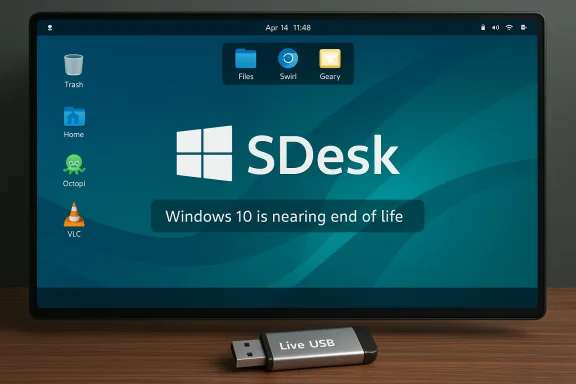 What is SDesk? The TL;DR
SDesk is an Arch Linux–based, rolling‑release distribution packaged and themed by a project called Steve Studios. It ships a GNOME‑centered desktop configured to feel like a “standard” desktop (panel, favorites, system tray, desktop icons) and opts for Wayland as the default compositor. The project distributes ISO images that target both UEFI and legacy BIOS systems and bundles a small, curated set of applications to make first‑boot usability straightforward. Key technical facts that can be independently verified:
- SDesk follows an Arch‑style rolling release and uses pacman as the package manager.
- The default desktop is GNOME built on Wayland (GNOME 46/47 depending on release).
- It bundles Octopi as a graphical front end to pacman, making package installs easier for newcomers who prefer a GUI.
First impressions: familiarity without mimicry
SDesk’s biggest selling point for Windows switchers is familiarity. The distribution’s GNOME session is preconfigured so that the average Windows user sees familiar visual cues: a top bar with date/time and tray icons, a user‑centric favorites row, quick access to Workspaces, and a conventional menu. That isn’t the same as “making GNOME act like Windows” in a deep way—SDesk keeps GNOME’s conventions—but the defaults and theming smooth the cognitive gap.What reviewers consistently note:
- A preinstalled productivity stack (LibreOffice, a mail client, music/video players) reduces initial setup friction.
- Window snapping and tiling work intuitively; SDesk extends the usual half‑screen snap to convenient quarter‑screen snapping, which helps multitaskers used to Windows snapping.
- Performance is responsive: Arch’s rolling model and trimmed defaults generally produce snappy app starts and fluid desktop behavior. Several early reviews confirm the distro feels fast on modern and older hardware alike.
What’s in the box: apps, package tooling, and surprises
Out of the box SDesk includes a compact set of apps intended to cover day‑to‑day needs:- LibreOffice — full office suite for documents and spreadsheets.
- Geary — lightweight email client.
- GNOME Music / GNOME Video — basic media playback utilities.
- Octopi — GUI for pacman-based package management. Octopi provides a familiar software‑store‑like experience for users who prefer a graphical front end.
- Swirl — the distro’s default web browser (not Chromium / Firefox–based). SDesk ships Swirl as the default, but community coverage flags the browser as an unknown to most Linux users.
The Swirl question: minimal browser vs. mainstream engines
One of the more unusual choices for a desktop distribution is shipping an in‑house browser that isn’t based on Chromium or Firefox. SDesk includes a browser named Swirl; reviewers describe it as intentionally minimal and note the scarcity of independent information about the project behind the engine. That scarcity is precisely the reason many reviewers — including ZDNet’s tester — stopped short of recommending Swirl as a default browser for everyday use. Instead they recommend installing a mainstream browser for reliability and security assurances.Practical guidance:
- If you plan to rely on SDesk for daily web work, install Firefox or Chromium immediately after setup (Octopi or pacman will do this). Community and security tooling around mainstream engines are mature; they receive faster mitigations for zero‑days and broader extension support.
- Treat Swirl as an experimental, small‑footprint browser rather than a substitute for a battle‑tested engine—until verifiable security audits or upstream disclosures appear.
Multimedia and codecs: what you’ll need to install (and why)
A common, expected Linux quirk for some distros is the absence of patent‑encumbered codecs out of the box. SDesk follows that pattern: MP3 and MP4 playback may fail until you install codecs or a media player that bundles them.ZDNet’s reviewer encountered exactly this and solved it with one simple command:
sudo pacman -S vlc
That’s a correct and standard way to install VLC on pacman‑based distributions; VLC’s own documentation and Arch packaging guidelines confirm pacman -S vlc as the normal install path. The VLC package on Arch often pulls in or depends on plugin packages (or you may prefer the Flatpak to avoid dependency concerns).
Practical checklist:
- Run a full system update after install: sudo pacman -Syu (keeps rolling systems consistent).
- Install VLC or mpv if you want a media player with broad codec coverage: sudo pacman -S vlc or use the Flatpak if you prefer sandboxing.
Stability, bugs, and rough edges you should know about
SDesk is new, and that brings trade‑offs. Several outlets and hands‑on reviews report small but real issues:- Login freeze on first account in some setups: ZDNet’s tester described a login lockup after an update; a temporary workaround was to select “Not Listed” and type the username manually, which bypassed the bug. This appears to be a window manager/login manager interaction rather than a common problem across all SDesk installs, but it’s a concrete bug reviewers reproduced.
- Proprietary or closed pieces: NotebookCheck and other hands‑on stories mention SDesk shipping some proprietary components and an in‑house browser and (according to project marketing) a separate “Blue” programming language and an upcoming filesystem project. These claims raise red flags for some in the FOSS community and warrant healthy skepticism until code and security audits are public.
- Rolling release implications: Being Arch‑based and rolling means you get new kernels, drivers and apps faster—but you also shoulder the occasional breakage or dependency churn that rolling users expect. For many desktop users this is not a problem, but for production or mission‑critical setups it requires a different maintenance discipline.
Security and privacy posture: mixed picture
SDesk’s move to Wayland and the inclusion of SELinux pieces in recent releases point to attention around security hardening, and the distribution’s maintainers tout features like hardened_malloc and other mitigations in newer images. Those are positive signals; independent verification of any distributed security policy or a hardening roadmap remains a work in progress.At the same time, the presence of in‑house closed components (browser, language, filesystem claims) means you should require transparency before trusting SDesk in sensitive environments. Open source ecosystems rely on inspectable code and community review; where upstream components are closed or not widely audited, you should treat them as potential risk vectors until evidence shows otherwise. NotebookCheck and Linux community coverage have raised this issue as a caution.
Who should consider SDesk (and who should not)
SDesk is worth considering if:- You want an Arch‑flavored rolling distro with a polished GNOME session that feels modern and fast.
- You like the idea of a shorter path from install to productivity: office, mail and media are bundled so newcomers can be productive quickly.
- You’re comfortable occasionally troubleshooting package issues and running pacman commands.
- You need enterprise‑grade, long‑term stability without having to respond to occasional breakages. In that case, Ubuntu LTS, Debian stable, or Linux Mint are safer choices.
- You require only audited, mainstream browser engines and fully open components for security compliance—Swirl and other proprietary pieces mean SDesk isn’t a turnkey compliance option yet.
A short, practical migration checklist: how to replace Windows 10 with SDesk the safe way
- Backup everything. Use an external drive or cloud storage and verify the backup.
- Create a Live USB and test hardware boot compatibility (no install required). Most distros will run as a live session so you can test Wi‑Fi, sound, printing, and display scaling.
- If you rely on specialized hardware (fingerprint readers, exotic printers), check community threads or vendor docs—SDesk’s driver set is good but not exhaustive.
- If you like what you see in the live session, install. Choose either a full wipe (recommended for a clean transition) or dual‑boot if you want a rollback path.
- After install:
- Update the system: sudo pacman -Syu.
- Install a mainstream browser: sudo pacman -S firefox (or chromium).
- Install VLC or mpv for media support: sudo pacman -S vlc.
- Consider snapshot tooling or backups (Timeshift, BTRFS snapshots) so you can roll back after problematic upgrades. Rolling releases benefit from having a safe restore point.
- Join community channels (forum, GitHub, upstream issue trackers) for real‑time help and to report bugs like any login freeze you might encounter. Community involvement both accelerates fixes and reduces your personal support burden over time.
Strengths: why SDesk is an attractive alternative right now
- Fast, modern desktop experience: GNOME + Wayland + tuned defaults = responsive feel. Multiple reviews underline that SDesk is snappy even on modest hardware.
- Low friction for everyday users: A packaged office suite and GUI package manager mean less time hunting for fundamentals.
- Rolling updates and up‑to‑date kernels: Good for users who want the latest hardware enablement and drivers without waiting for fixed releases.
Risks and caveats: what could go wrong
- Smaller project with limited audit surface: Fewer independent audits and less community scrutiny than larger distros means that hidden issues take longer to surface. Treat any unique, closed components as risk points until proven otherwise.
- Rolling release maintenance burden: If you prefer a “set it and forget it” desktop, the rolling model can be more hands‑on. Regular system backups and a rollback plan are a must.
- Browser and ecosystem unknowns: Swirl’s limited public footprint means you should default to a mainstream browser for sensitive work.
Final verdict: is SDesk the best replacement for Windows 10?
“Best” is subjective and depends on what you value. For users who want a fast, attractive, and ready‑to‑use desktop that feels familiar and don’t mind a bit of Linux learning, SDesk is a strong contender among Arch‑based offerings. It’s particularly compelling for hobbyists, developers and enthusiasts who want cutting‑edge kernels and driver stacks without building from scratch. Multiple independent reviews and community coverage confirm that SDesk delivers the core promises: a polished GNOME desktop, rolling updates, and a low‑friction out‑of‑the‑box experience.However, for mainstream, non‑technical Windows 10 users who need the lowest possible maintenance and the highest security transparency, a long‑term supported distro (Ubuntu LTS, Linux Mint, Zorin OS LTS) or staying with Windows via ESU may still be the more practical route. SDesk can be that path for many, but it’s not a one‑click equivalence to the enterprise assurances some organizations require.
Recommendation: try before you commit
If you’re blocked from upgrading to Windows 11 and want a modern replacement without buying new hardware:- Make a Live USB of SDesk and test your device for a weekend. SDesk’s out‑of‑the‑box applications and Octopi make for a painless trial.
- If you rely on specific Windows apps, test them with Wine, Proton, or a Windows VM before moving fully. Some workflows still require Windows-specific software, and planning for that keeps the migration smooth.
- If you need a conservative, low‑maintenance environment, evaluate Ubuntu LTS or Linux Mint first; if you want the latest drivers and a polished GNOME experience, give SDesk a serious look.
Conclusion: SDesk is a credible, attractive contender for users who want to replace Windows 10 with Linux today—especially if you value performance, a polished GNOME desktop, and access to the latest drivers. But weigh the benefits of immediacy and speed against the distribution’s relative youth and the presence of non‑standard components; those trade‑offs will determine whether SDesk is the "best" choice for your specific needs.
Source: ZDNET Can't upgrade to Windows 11? I found the best Linux distro to replace your Windows 10 PC
