

Microsoft’s August preview for Windows 11 landed as a routine quality flight, but tucked inside the notes is a high‑priority operational alert that every IT manager and many savvy consumers should treat like a dated calendar item: several Secure Boot certificates issued around 2011 are scheduled to begin expiring in June 2026, with additional boot‑manager certificates following in October 2026. Left unaddressed, affected devices could lose the ability to receive pre‑boot security updates — and in constrained firmware configurations, may refuse to validate newer, properly signed boot components, creating difficult recovery scenarios. The preview update KB5064081 (OS Build 26100.5074) underscored that advisory while delivering a batch of non‑security fixes and UI polish for Windows 11, version 24H2.
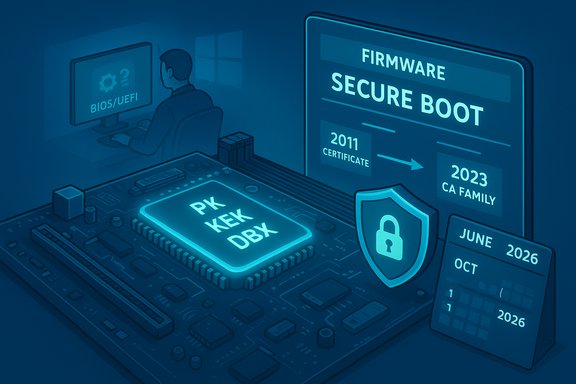
Secure Boot is a UEFI mechanism that enforces a cryptographic chain of trust from firmware to bootloaders. Core firmware variables — PK (Platform Key), KEK (Key Exchange Key), DB (Allowed Signature Database), and DBX (Revoked Signature Database) — contain X.509 certificates and hashes that determine which pre‑OS components firmware will run. Those certificates have finite lifetimes; Microsoft’s widely deployed certificates issued circa 2011 are reaching their end of life in mid‑2026. Microsoft has prepared a replacement set (the 2023 CA family) and multiple rollout paths to update devices before the expiry window arrives. Why this matters now: once the 2011‑era certificates begin to expire, a device that still relies on them may be unable to install new Secure Boot or boot manager updates — which directly affects platform hardening and mitigations for real boot‑level threats. For many devices with normal Windows Update behavior, Microsoft expects the OS and OEM firmware teams to deliver the new certificates automatically. For fleets with restricted update flows, air‑gapped systems, or locked firmware policies, administrators must plan and act.
Common themes in community reports:
By following the steps above, teams can convert the August preview’s terse warning into a measured, manageable program — ensuring Secure Boot continues to protect device startup and that Windows 11 systems remain capable of receiving vital pre‑boot security updates into 2026 and beyond.
Source: WebProNews Windows 11 Update Warns of Secure Boot Certificate Expiry in 2026
 Background / Overview
Secure Boot is a UEFI mechanism that enforces a cryptographic chain of trust from firmware to bootloaders. Core firmware variables — PK (Platform Key), KEK (Key Exchange Key), DB (Allowed Signature Database), and DBX (Revoked Signature Database) — contain X.509 certificates and hashes that determine which pre‑OS components firmware will run. Those certificates have finite lifetimes; Microsoft’s widely deployed certificates issued circa 2011 are reaching their end of life in mid‑2026. Microsoft has prepared a replacement set (the 2023 CA family) and multiple rollout paths to update devices before the expiry window arrives. Why this matters now: once the 2011‑era certificates begin to expire, a device that still relies on them may be unable to install new Secure Boot or boot manager updates — which directly affects platform hardening and mitigations for real boot‑level threats. For many devices with normal Windows Update behavior, Microsoft expects the OS and OEM firmware teams to deliver the new certificates automatically. For fleets with restricted update flows, air‑gapped systems, or locked firmware policies, administrators must plan and act. What Microsoft’s August preview actually said
The August 29, 2025 preview — KB5064081 (OS Build 26100.5074) — is a non‑security “C” update for Windows 11, version 24H2. On its face it bundles UI refinements (input fixes, stability patches for explorer and other components) and preparatory work for future functionality, but the release notes also reiterated the Secure Boot certificate expiry advisory and directed administrators to the official guidance and tools for remediation. The update itself is optional; Microsoft publishes it to preview channels so organizations and power users can test fixes ahead of a broader cumulative rollout. Key takeaways from the KB notes:- The Secure Boot certificate advisory is a platform‑level note inside routine servicing documentation.
- Microsoft pairs these update notes with guidance on how to verify WinRE and Setup dynamic updates — because recovery payloads and pre‑OS binaries are part of the same ecosystem affected by Secure Boot trust.
The technical underpinnings: which certificates, and when
The technical picture is straightforward once you strip the marketing jargon:- Microsoft Corporation KEK CA 2011 — scheduled to expire in June 2026; replacement: Microsoft Corporation KEK 2K CA 2023 (or KEK CA 2023 variants).
- Microsoft Corporation UEFI CA 2011 — scheduled to expire in June 2026; replacements: Microsoft UEFI CA 2023 and Microsoft Option ROM UEFI CA 2023 (splitting previous roles).
- Microsoft Windows Production PCA 2011 — scheduled to expire in October 2026; replacement: Windows UEFI CA 2023 (used to sign the Windows boot manager).
What could go wrong — realistic risk scenarios
The dominant fear in headlines — “millions of bricked PCs” — is an overbroad conclusion. The realistic outcomes fall across a spectrum:- Most users on consumer devices that accept Windows Update and OEM firmware patches will receive the required certificate updates automatically and experience no disruption. Microsoft expects automatic rollout on many devices that participate in Controlled Feature Rollout or that have normal diagnostic telemetry enabled.
- Devices with restricted update channels, old/out‑of‑support OEM firmware, or tightly locked firmware policies (where OS‑initiated UEFI variable writes are disallowed) are at the highest risk. These systems may not accept the new KEK/DB entries and therefore won’t be able to receive future Secure Boot and boot‑manager updates. In constrained cases, that can prevent receiving needed mitigations or validating updated pre‑OS components; in the worst configurations, it could make recovery flows complex. OEM coordination is the critical path for these systems.
- Virtual machines and cloud images are another common failure mode: if the hypervisor image does not include the new certificate set or does not permit guest‑side firmware updates, guests may not benefit from Microsoft’s OS‑driven rollout. Test your VM fleet and cloud provider images.
How Microsoft and OEMs are handling the rotation
Microsoft’s approach is deliberately multi‑pronged:- OS‑driven updates: Windows servicing packages include the 2023 certificates and a controlled scheduled task that writes the new CA entries into firmware variables where permitted. For many consumer and managed devices, this will be the primary path.
- OEM firmware updates: OEMs release BIOS/UEFI updates listing minimum supported firmware versions that accept the OS‑driven roll. Large vendors (HP, Surface/OEMs) have published per‑platform guidance mapping minimum BIOS versions and rollout timelines. If a device’s firmware blocks OS‑initiated writes, you need the OEM update first.
- Enterprise controls: Microsoft documented administrative methods — a Group Policy / ADMX toggle that sets a registry flag to opt devices into an OS‑driven rollout, plus offline MSU/DISM methods, an Intune/ConfigMgr path, and guidance for WSUS/Update Catalog deployment for air‑gapped or restricted environments. These options are critical for IT teams that cannot or will not rely on Microsoft’s automated CFR.
- Staged revocation: DBX revocations (the list of revoked signatures) are effectively irreversible on many platforms; Microsoft and OEMs must sequence DBX updates carefully to avoid accidental denials of legitimate components. That sequencing is why blanket “push DBX” tactics are avoided without rigorous testing.
Practical checklist — what IT should do now
The clock is visible; treat June 2026 as a milestone target for most certificate work. This actionable checklist is designed for Windows admins to convert concern into results.- Inventory your estate (immediately)
- Capture OEM model, BIOS/UEFI version and date, Secure Boot state (enabled/disabled), Windows build and SSU/LCU status, management channel (WSUS/Intune/CFR), and whether the device accepts OS‑initiated UEFI variable writes. Use msinfo32, Confirm‑SecureBootUEFI, and PowerShell tooling for automated sweeps.
- Map OEM firmware readiness
- For each make/model, consult OEM advisories (HP, Dell, Lenovo, Microsoft Surface pages) for minimum BIOS versions and rollout instructions. If OEM firmware is required, schedule a firmware pilot and staged deployment.
- Patch test ring: apply Microsoft test packages
- Pilot with optional preview updates (like KB5064081 and later KB5070311 preview flights) on representative hardware to observe the servicing path and recovery flows, particularly WinRE and BitLocker interactions.
- Validate recovery media and images
- Inject the Safe OS/WinRE dynamic updates into golden images using DISM, and verify WinRE versions with Microsoft’s GetWinReVersion.ps1. Test "Reset this PC", cloud reinstall, and BitLocker recovery flows on test hardware. Safe OS DUs often cannot be removed once embedded — test before broad image refresh.
- Decide deployment method
- For consumer‑style fleets with normal Windows Update behavior: rely on Microsoft’s automated rollout but monitor progress.
- For enterprise/managed fleets: use the GPO opt‑in, WSUS/ConfigMgr/Intune, or catalog MSU + DISM workflows as appropriate. Document telemetry/diagnostic requirements if using Microsoft’s Controlled Feature Rollout.
- Back up and secure BitLocker keys
- Before any firmware or Secure Boot variable changes, ensure BitLocker recovery keys are escrowed (Azure AD, AD DS, or secure vault). Firmware writes can cause recovery prompts on some configurations.
- Communicate and timeline
- Build an internal timeline to complete pilots and staged rollouts well before June 2026; treat October 2026 as the deadline for boot‑manager PCA rotations. Coordinate with procurement and OEM support for devices approaching end of firmware support.
Tools, commands and verification techniques
Admins have pragmatic tools to check and verify certificate status and deployment progress:- PowerShell checks:
- Confirm‑SecureBootUEFI — summarizes Secure Boot state and presence of DB/KEK entries.
- Custom inventory scripts (Microsoft and community sample scripts) can enumerate firmware entries and return device readiness metrics.
- WinRE/WinPE verification:
- Use reagentc /info to locate winre.wim, mount it with DISM, and verify WinREVersion values against the KB manifest. Microsoft publishes file manifests for Safe OS DU packages.
- Registry/GPO controls:
- Microsoft provides an ADMX and a registry flag to signal the scheduled Secure Boot servicing task (for enterprise opt‑in), plus status keys to monitor progress — use Group Policy or Intune to push the opt‑in at scale where appropriate.
- Update Catalog and DISM:
- For offline or air‑gapped systems, download MSU/CAB packages from the Microsoft Update Catalog and apply them via DISM to images or live systems following Microsoft ordering guidance (SSU before LCU, etc..
Community reaction and watch points
Windows admins and power users have discussed the rollout extensively across forums and social channels. Community threads show a mix of proactive testing, confusion around telemetry dependencies, and inventive workarounds for labs and VMs. Those discussions are useful — they surface real‑world edge cases such as BitLocker recovery prompts triggered during remediation or blocked telemetry causing Microsoft’s CFR to skip a device — but they should be balanced with OEM advisories and the official Microsoft FAQ.Common themes in community reports:
- Confirmation that many OEMs (HP, Surface) are coordinating updates and listing minimum BIOS versions.
- Reports that virtual platforms behave inconsistently depending on hypervisor‑level firmware emulation.
- Anecdotes of successful image injection and WinRE tests that validate update mechanics.
Strengths and risks — a critical assessment
Strengths- Advance notice: Microsoft’s transparent advisory and KB documentation give months of lead time. That makes a staged, auditable rollout feasible for enterprises.
- Multiple deployment paths: OS‑driven updates, GPO opt‑in, OEM firmware updates, and offline catalog packages provide flexibility to suit diverse environments.
- OEM coordination: Major OEM advisories and per‑platform lists reduce ambiguity about which devices require a firmware update.
- Firmware variability: The single largest risk is OEM firmware behavior. Devices that do not permit OS‑driven writes require coordinated firmware updates — and some older platforms may be unsupported. That creates a patching gap that cannot be resolved purely from the OS side.
- Irreversible operations: DBX revocations and some Safe OS image injections are effectively irreversible; poor sequencing or testing can cause persistent operational problems for recovery media.
- Telemetry dependency confusion: Microsoft’s automatic rollout works best on devices that share diagnostic data; in heavily restricted environments, administrators must not assume automatic remediation will occur. This dependency trips many unsuspecting teams.
Looking ahead: timelines, patches, and what to monitor
- Short term (next 3–6 months): prioritize inventory, pilot updates, and update recovery media. Apply firmware updates where required and confirm WinRE/Setup DU injection results on golden images. Monitor Microsoft’s release notes on the Windows release health dashboard and OEM advisories for device‑specific instructions.
- Medium term (by June 2026): ensure the majority of devices that need the KEK/DB updates have accepted the 2023 CA family. Devices that still rely on 2011 CAs will cease to receive Secure Boot pre‑boot updates, which increases security exposure.
- Longer term (by October 2026): ensure Windows boot‑manager signing trust has been rotated to the Windows UEFI CA 2023 family to avoid gaps in boot manager security updates.
- Microsoft Support KB pages for the relevant previews and cumulative updates (for build numbers and file manifests).
- Microsoft’s Secure Boot FAQ and IT Pro blog posts for deployment nuances and troubleshooting.
- OEM advisory pages for per‑model BIOS/UEFI requirements.
Final assessment and recommendations
KB5064081’s headline may look routine, but its Secure Boot advisory is an operational red flag with a fixed calendar. Organizations that treat it as a low‑priority “interesting note” risk last‑minute scramble — and those with constrained update policies or older hardware risk non‑trivial remediation work. The right posture is pragmatic and structured:- Treat Secure Boot certificate rotation as a project with owners, deadlines, and test gates.
- Build a firmware‑aware inventory and sample across generations and VM/cloud images.
- Pilot the full process (firmware as needed + OS‑driven certificate writes + image injection) on representative hardware, including recovered scenarios that exercise WinRE and BitLocker flows.
- Use Microsoft’s documented GPO and catalog methods for enterprise‑scale deployment where automatic updates are not suitable.
By following the steps above, teams can convert the August preview’s terse warning into a measured, manageable program — ensuring Secure Boot continues to protect device startup and that Windows 11 systems remain capable of receiving vital pre‑boot security updates into 2026 and beyond.
Source: WebProNews Windows 11 Update Warns of Secure Boot Certificate Expiry in 2026
