

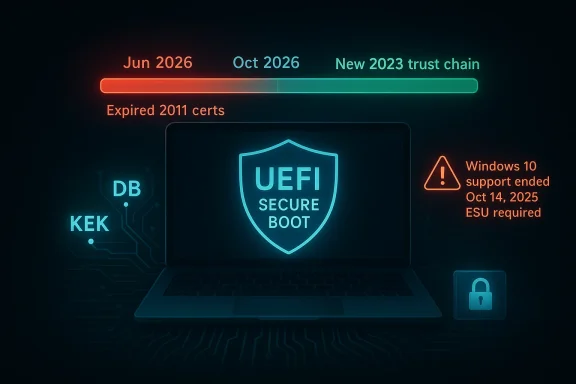
Microsoft’s Secure Boot certificate rollover is no longer a theoretical maintenance task tucked away in an enterprise playbook; it is now a deadline that affects millions of Windows PCs, and the stakes are higher than most users realize. The current Microsoft-issued Secure Boot certificates begin expiring in June 2026 and run out by October 2026, which means older systems that never receive the new trust chain will gradually lose the ability to accept future boot-level security updates. Microsoft says Windows 11 and supported Windows 10 systems can receive the new certificates through normal update channels, but it also makes clear that Windows 10 support ended on October 14, 2025, with Extended Security Updates now the only path for continued protection. (support.microsoft.com)
Secure Boot exists to establish a chain of trust before Windows ever starts loading. In practice, that means firmware checks whether the bootloader and related boot components are signed by a certificate the platform recognizes as valid, helping block bootkits and other malware that try to infect a machine before the operating system can defend itself. Microsoft’s current guidance states that the same three Secure Boot certificates have been in use since the Windows 8 / Windows Server 2012 era, and that all three are now on a path to expiration beginning in June 2026. (support.microsoft.com)
The key detail is that Secure Boot is not a one-time setup. It is a living trust infrastructure stored in UEFI variables such as KEK and DB, and Microsoft has to refresh that trust over time if it wants the ecosystem to remain secure. According to Microsoft, the old 2011-era certificates must be replaced with the newer 2023 certificates before they expire, or affected devices will lose access to future security fixes for boot components and fall out of compliance. (support.microsoft.com)
That matters because boot security is the foundation for everything above it. If the platform can no longer accept updated boot managers, revocation lists, or related Secure Boot protections, then the machine’s most trusted layer becomes stale precisely when attackers are still developing new ways to tamper with boot paths. Microsoft’s own wording is blunt: once the 2011 certificates expire, security updates for boot components will no longer be possible. (support.microsoft.com)
There is also an ecosystem reality that makes this rollover harder than ordinary patching. Microsoft says the rollout depends on a collaboration between Windows Update, firmware from PC makers, and the ability of a given device to accept the new certificate chain in UEFI. That means the operating system, the firmware, and the vendor’s update policy all have to line up, and that is exactly where older PCs tend to fall behind. (support.microsoft.com)
For consumers, the story is easy to misunderstand because nothing dramatic happens the moment the certificate crosses its expiration date. Microsoft notes that devices do not simply stop booting on day one; instead, the problem is that future security fixes tied to boot trust can no longer be delivered normally. That distinction matters, because silent degradation is often more dangerous than a loud failure: users keep working, but the machine becomes progressively less trustworthy. (support.microsoft.com)
That design choice reflects a more mature security posture. Instead of treating “trusted boot” as a single blob, Microsoft is separating responsibilities so it can update one part of the chain without unnecessarily widening trust in another. In security terms, that is a better blast-radius model, even if it also makes deployment more complex. (support.microsoft.com)
The firmware angle is equally important. Microsoft emphasizes that the certificates are stored in UEFI variables such as DB and KEK, which are not the sort of thing Windows can fully rewrite on its own without firmware cooperation. In other words, this is not just a Windows patch issue; it is a platform trust update. (support.microsoft.com)
That is a bigger issue than many users might assume. Boot-level protection is not glamorous, but it is one of the few defenses that still matters when malware is trying to run before the operating system’s normal protections are available. If that layer goes stale, attackers gain a longer runway. (support.microsoft.com)
The timing also matters because certificate expiry is predictable. Microsoft is not reacting to a sudden emergency; it is trying to steer an enormous installed base through a planned cryptographic transition. The fact that this still risks leaving older machines behind says more about the age of the Windows ecosystem than about the quality of the rollout itself. (support.microsoft.com)
Microsoft’s support article makes that dependency explicit: if you are on Windows 10 Home, Pro, or Education and receiving updates automatically, the new certificates are applicable to you. But if the OS is no longer supported, the Secure Boot transition is no longer something Microsoft can promise in the ordinary way. That is the real meaning of end-of-support in 2026: not just feature stagnation, but loss of trust-chain maintenance. (support.microsoft.com)
The result is a familiar but uncomfortable Microsoft pattern. Older hardware may still run, still browse, and still look perfectly functional, yet it is slowly cut off from platform security improvements because the surrounding ecosystem has moved on. For consumers, this feels like planned obsolescence; for Microsoft, it is the cost of not supporting an aging cryptographic baseline forever. (support.microsoft.com)
That distinction is especially important for businesses. Enterprises often assume they can buy time with ESU and keep legacy devices operational, but platform trust updates are different from ordinary security fixes. If firmware support is missing or deferred, the machine may still receive some updates while remaining partially stranded on the Secure Boot front. (support.microsoft.com)
Consumers, meanwhile, may not even know whether their PC is eligible for a smooth rollover until the update path reaches them. Microsoft says home and Pro editions are being rolled out first, and the company’s language suggests a staged deployment that depends on telemetry and device targeting. That is efficient for Microsoft, but it also means the experience will be uneven. (support.microsoft.com)
That creates a troubling asymmetry: the operating system can be patched, but the trust store inside firmware may not move at the same pace. In practical terms, Secure Boot becomes only as good as the weakest vendor in the chain. That is a hard truth for users who assume Windows Update can always paper over hardware age. (support.microsoft.com)
It also explains why Microsoft keeps stressing preparation and monitoring. The company is trying to avoid a situation where millions of machines discover too late that the certificates they depend on are no longer enough. No vendor wants a silent trust failure at boot time. (support.microsoft.com)
There is also a distinction between managed enterprise devices and consumer PCs. Microsoft says systems with IT-managed updates need more deliberate planning, because the target population and policy controls are different. It also notes that the automatic targeting data is strongest for client devices, while servers are less likely to qualify automatically. (support.microsoft.com)
All of this means the “just update Windows” instinct is incomplete. The machine needs the right OS state, the right firmware state, and the right certificate chain at the right time. If any one piece lags, the trust model degrades. (support.microsoft.com)
Users should also confirm whether Windows updates are paused. That sounds mundane, but in a staged rollout like this, paused updates can turn a normal transition into a security gap. A user who thinks they are “being careful” may actually be missing the only path to the new trust chain. (support.microsoft.com)
A third check is support status. Windows 10 support ended on October 14, 2025, and that date is not cosmetic; it determines whether updates continue to arrive at all. If the machine is still on Windows 10 but not enrolled in ESU, the odds of receiving the Secure Boot rollover in the normal channel shrink dramatically. (support.microsoft.com)
There is also a psychological cost to these transitions. When a device that “still works” is told it is no longer fully protected, users tend to delay action because the risk is abstract. But boot security is one of those areas where feeling fine is not the same as being secure. (support.microsoft.com)
That is why Microsoft’s best-case outcome is so quiet: devices get the new certificates in the background, nobody notices, and the ecosystem moves on. The worst-case outcome is similarly quiet, but in the opposite direction: older systems drift into a permanently reduced-security state while their owners continue using them. (support.microsoft.com)
Enterprise teams also have more moving parts to test. Virtualized environments, recovery media, BitLocker interactions, and firmware diversity all make rollout harder. Microsoft’s consumer page even acknowledges that some devices may not start or may trigger BitLocker recovery after receiving the new certificates. (support.microsoft.com)
That kind of warning is especially relevant to organizations with aggressive imaging or provisioning pipelines. If the Secure Boot chain changes underneath them, they may need to revise deployment baselines, test recovery procedures, and verify that hardware vendors have actually issued the right firmware packages. This is a patch, but it behaves like a platform change. (support.microsoft.com)
That split is logical, but it is also a warning sign for admins who expected a uniform rollout. A fleet of desktops managed through Microsoft’s normal channels may transition reasonably well, while servers and special-purpose systems could require more hands-on intervention. (support.microsoft.com)
The enterprise lesson is simple: do not assume that because a system is “managed,” it is automatically future-proof. Secure Boot trust updates require explicit planning, and the window before June 2026 is not generous. (support.microsoft.com)
That does not mean every Linux install is automatically simpler. Secure Boot support still depends on the distribution, the shim or bootloader path, and whether the firmware accepts the current certificate set. But the broader market implication is clear: alternatives exist, and they are not standing still. (support.microsoft.com)
For users who are already contemplating an operating system change, the certificate rollover adds another argument in favor of not waiting. If a PC is old enough that its firmware is unlikely to be refreshed, switching to a maintained Linux distribution may be a more realistic way to keep Secure Boot enabled than hoping for a late Windows fix. That is a hardware policy decision masquerading as an OS decision. (support.microsoft.com)
The competitive implication is subtle. Windows’ historical advantage was that security continuity came from the platform vendor’s control over both the OS and the ecosystem. But the more aggressively Microsoft uses lifecycle boundaries, the more attractive a maintenance model becomes where the OS is decoupled from a single vendor’s support timetable. (support.microsoft.com)
For enthusiasts, that is not a theoretical argument. It is the difference between a PC that keeps receiving trust updates and one that slowly turns into a frozen snapshot of a bygone boot policy. (support.microsoft.com)
Microsoft also says Windows updates are not paused and Secure Boot is enabled by default on newer systems, which means many users need do nothing at all. But that only holds if their device is actually in the supported, update-receiving pool. Default settings are only useful when defaults are still maintained. (support.microsoft.com)
The company’s IT guidance also signals a deployment and remediation mindset. That tells us Microsoft expects some amount of recovery work, not just a clean one-shot upgrade. In other words, even a well-executed rollout will likely generate edge cases. (support.microsoft.com)
That possibility should not be overblown, but it should not be ignored either. When firmware and boot trust are involved, the risk of a bad interaction is higher than with ordinary app updates. The more heterogeneous the hardware fleet, the more likely a few systems will need manual intervention. (support.microsoft.com)
For home users, the best-case experience is straightforward. For everyone else, the rollout is a reminder that platform security is often maintained through a series of compromises, not a single magic fix. (support.microsoft.com)
The most important signal to watch is whether OEM firmware updates arrive in time for older but still usable PCs. If vendors keep shipping those updates, the rollover will feel like a normal cryptographic renewal. If they do not, then 2026 could become the year a large number of still-functional Windows 10-era machines quietly inherit a permanent security deficit.
Source: How-To Geek The Secure Boot certificates on your PC expire in June, and Windows 10 machines will never get the fix
 Background
Secure Boot exists to establish a chain of trust before Windows ever starts loading. In practice, that means firmware checks whether the bootloader and related boot components are signed by a certificate the platform recognizes as valid, helping block bootkits and other malware that try to infect a machine before the operating system can defend itself. Microsoft’s current guidance states that the same three Secure Boot certificates have been in use since the Windows 8 / Windows Server 2012 era, and that all three are now on a path to expiration beginning in June 2026. (support.microsoft.com)The key detail is that Secure Boot is not a one-time setup. It is a living trust infrastructure stored in UEFI variables such as KEK and DB, and Microsoft has to refresh that trust over time if it wants the ecosystem to remain secure. According to Microsoft, the old 2011-era certificates must be replaced with the newer 2023 certificates before they expire, or affected devices will lose access to future security fixes for boot components and fall out of compliance. (support.microsoft.com)
That matters because boot security is the foundation for everything above it. If the platform can no longer accept updated boot managers, revocation lists, or related Secure Boot protections, then the machine’s most trusted layer becomes stale precisely when attackers are still developing new ways to tamper with boot paths. Microsoft’s own wording is blunt: once the 2011 certificates expire, security updates for boot components will no longer be possible. (support.microsoft.com)
There is also an ecosystem reality that makes this rollover harder than ordinary patching. Microsoft says the rollout depends on a collaboration between Windows Update, firmware from PC makers, and the ability of a given device to accept the new certificate chain in UEFI. That means the operating system, the firmware, and the vendor’s update policy all have to line up, and that is exactly where older PCs tend to fall behind. (support.microsoft.com)
For consumers, the story is easy to misunderstand because nothing dramatic happens the moment the certificate crosses its expiration date. Microsoft notes that devices do not simply stop booting on day one; instead, the problem is that future security fixes tied to boot trust can no longer be delivered normally. That distinction matters, because silent degradation is often more dangerous than a loud failure: users keep working, but the machine becomes progressively less trustworthy. (support.microsoft.com)
What Microsoft Is Actually Changing
The rollover is not just a renewal of one certificate. Microsoft’s guidance says the company is replacing the 2011 set with a new 2023 trust chain, and the renewal of the Microsoft Corporation UEFI CA 2011 is being split into separate certificates for boot loader signing and option ROM signing. That gives Microsoft finer-grained control over what the platform trusts, rather than leaving one broad signing authority to cover everything. (support.microsoft.com)The new trust chain
Microsoft’s IT guidance names the new certificates explicitly: Microsoft Corporation KEK 2K CA 2023, Windows UEFI CA 2023, Microsoft UEFI CA 2023, and Microsoft Option ROM UEFI CA 2023. The company says these are meant to preserve Secure Boot continuity after the 2011 certificates begin expiring in June 2026. (support.microsoft.com)That design choice reflects a more mature security posture. Instead of treating “trusted boot” as a single blob, Microsoft is separating responsibilities so it can update one part of the chain without unnecessarily widening trust in another. In security terms, that is a better blast-radius model, even if it also makes deployment more complex. (support.microsoft.com)
The firmware angle is equally important. Microsoft emphasizes that the certificates are stored in UEFI variables such as DB and KEK, which are not the sort of thing Windows can fully rewrite on its own without firmware cooperation. In other words, this is not just a Windows patch issue; it is a platform trust update. (support.microsoft.com)
Why expiration matters
Microsoft’s consumer guidance says the current certificates begin expiring in June 2026, and by October 2026 the 2011 certificates will be fully out of date. Once that happens, a device that never got the new certificates will no longer be able to receive future security fixes related to Windows boot manager updates or Secure Boot. (support.microsoft.com)That is a bigger issue than many users might assume. Boot-level protection is not glamorous, but it is one of the few defenses that still matters when malware is trying to run before the operating system’s normal protections are available. If that layer goes stale, attackers gain a longer runway. (support.microsoft.com)
The timing also matters because certificate expiry is predictable. Microsoft is not reacting to a sudden emergency; it is trying to steer an enormous installed base through a planned cryptographic transition. The fact that this still risks leaving older machines behind says more about the age of the Windows ecosystem than about the quality of the rollout itself. (support.microsoft.com)
Why Windows 10 Is the Fault Line
The biggest controversy around this rollout is not the certificate math. It is the support boundary. Microsoft’s consumer guidance explicitly says Windows 10 support ended on October 14, 2025, and that users who want ongoing security updates, including Secure Boot-related updates, must enroll in the Windows 10 Extended Security Updates program. (support.microsoft.com)The support gap
This creates a sharp divide between machines that are still in the support funnel and those that are not. Windows 11 devices and supported Windows 10 systems can receive the new certificates through regular update channels, but Windows 10 systems that are no longer supported will not get the same treatment unless they are covered by ESU. (support.microsoft.com)Microsoft’s support article makes that dependency explicit: if you are on Windows 10 Home, Pro, or Education and receiving updates automatically, the new certificates are applicable to you. But if the OS is no longer supported, the Secure Boot transition is no longer something Microsoft can promise in the ordinary way. That is the real meaning of end-of-support in 2026: not just feature stagnation, but loss of trust-chain maintenance. (support.microsoft.com)
The result is a familiar but uncomfortable Microsoft pattern. Older hardware may still run, still browse, and still look perfectly functional, yet it is slowly cut off from platform security improvements because the surrounding ecosystem has moved on. For consumers, this feels like planned obsolescence; for Microsoft, it is the cost of not supporting an aging cryptographic baseline forever. (support.microsoft.com)
ESU as a bridge, not a solution
The Extended Security Updates path is a temporary bridge, not a clean fix. Microsoft positions ESU as the route for continued updates on Windows 10, but that only extends the support window, it does not erase the fact that Secure Boot’s trust roots are changing underneath older systems. (support.microsoft.com)That distinction is especially important for businesses. Enterprises often assume they can buy time with ESU and keep legacy devices operational, but platform trust updates are different from ordinary security fixes. If firmware support is missing or deferred, the machine may still receive some updates while remaining partially stranded on the Secure Boot front. (support.microsoft.com)
Consumers, meanwhile, may not even know whether their PC is eligible for a smooth rollover until the update path reaches them. Microsoft says home and Pro editions are being rolled out first, and the company’s language suggests a staged deployment that depends on telemetry and device targeting. That is efficient for Microsoft, but it also means the experience will be uneven. (support.microsoft.com)
The Firmware Bottleneck
A Secure Boot certificate update sounds like something Windows should handle automatically. In reality, the firmware is often the slowest and least predictable part of the chain. Microsoft’s own guidance says users should check with their device manufacturer if Secure Boot is disabled, and it warns that firmware updates may be needed to include the latest Secure Boot configuration. (support.microsoft.com)Why OEMs matter
This is where older hardware is most likely to lose out. Microsoft says devices manufactured since 2012 may have expiring certificate versions that need updating, but whether that update arrives depends heavily on the OEM’s willingness to ship firmware support. If a motherboard has effectively reached end-of-life in the vendor’s eyes, the user may be stuck. (support.microsoft.com)That creates a troubling asymmetry: the operating system can be patched, but the trust store inside firmware may not move at the same pace. In practical terms, Secure Boot becomes only as good as the weakest vendor in the chain. That is a hard truth for users who assume Windows Update can always paper over hardware age. (support.microsoft.com)
It also explains why Microsoft keeps stressing preparation and monitoring. The company is trying to avoid a situation where millions of machines discover too late that the certificates they depend on are no longer enough. No vendor wants a silent trust failure at boot time. (support.microsoft.com)
The update chain is multi-layered
Microsoft says the rollout uses Windows Update for supported systems, but firmware still has to accept and store the updated certificates. The company’s IT guidance frames the task as a deployment playbook involving preparation, monitoring, deployment, and remediation. That is not how you describe a simple patch; that is how you describe a coordinated platform migration. (support.microsoft.com)There is also a distinction between managed enterprise devices and consumer PCs. Microsoft says systems with IT-managed updates need more deliberate planning, because the target population and policy controls are different. It also notes that the automatic targeting data is strongest for client devices, while servers are less likely to qualify automatically. (support.microsoft.com)
All of this means the “just update Windows” instinct is incomplete. The machine needs the right OS state, the right firmware state, and the right certificate chain at the right time. If any one piece lags, the trust model degrades. (support.microsoft.com)
Consumer Impact
For ordinary users, the immediate message is not panic; it is inventory. Microsoft says most supported Windows 10 and Windows 11 Home, Pro, and Education devices that receive automatic updates should get the new certificates without manual intervention. The practical question is whether a given PC still qualifies as supported and is actually receiving updates. (support.microsoft.com)What users should check
Microsoft recommends checking whether Secure Boot is enabled, and it suggests using the System Information tool to confirm the Secure Boot state. That is a useful starting point because if Secure Boot is already off, the machine may need manufacturer guidance before certificate updates can be safely applied. (support.microsoft.com)Users should also confirm whether Windows updates are paused. That sounds mundane, but in a staged rollout like this, paused updates can turn a normal transition into a security gap. A user who thinks they are “being careful” may actually be missing the only path to the new trust chain. (support.microsoft.com)
A third check is support status. Windows 10 support ended on October 14, 2025, and that date is not cosmetic; it determines whether updates continue to arrive at all. If the machine is still on Windows 10 but not enrolled in ESU, the odds of receiving the Secure Boot rollover in the normal channel shrink dramatically. (support.microsoft.com)
Why this affects everyday trust
Most consumers never inspect Secure Boot, so they may not notice the issue until a security warning, a firmware prompt, or a boot recovery event appears. That is precisely why Microsoft is trying to get ahead of the deadline: once expiration becomes visible, the user experience can get messy fast. (support.microsoft.com)There is also a psychological cost to these transitions. When a device that “still works” is told it is no longer fully protected, users tend to delay action because the risk is abstract. But boot security is one of those areas where feeling fine is not the same as being secure. (support.microsoft.com)
That is why Microsoft’s best-case outcome is so quiet: devices get the new certificates in the background, nobody notices, and the ecosystem moves on. The worst-case outcome is similarly quiet, but in the opposite direction: older systems drift into a permanently reduced-security state while their owners continue using them. (support.microsoft.com)
Enterprise Impact
Enterprises are not just a bigger version of consumers here; they face a different problem entirely. Microsoft’s IT guidance frames the rollout as a deployment project, and that is the right mental model for organizations with fleets, imaging processes, compliance requirements, and recovery procedures. (support.microsoft.com)Compliance and risk management
Microsoft says affected devices that fail to move to the 2023 certificates can fall out of security compliance. That matters because Secure Boot is often part of baseline hardening, audit scope, and endpoint assurance programs. Once the trust chain expires, it is not just a technical issue; it becomes a governance issue. (support.microsoft.com)Enterprise teams also have more moving parts to test. Virtualized environments, recovery media, BitLocker interactions, and firmware diversity all make rollout harder. Microsoft’s consumer page even acknowledges that some devices may not start or may trigger BitLocker recovery after receiving the new certificates. (support.microsoft.com)
That kind of warning is especially relevant to organizations with aggressive imaging or provisioning pipelines. If the Secure Boot chain changes underneath them, they may need to revise deployment baselines, test recovery procedures, and verify that hardware vendors have actually issued the right firmware packages. This is a patch, but it behaves like a platform change. (support.microsoft.com)
Patch cadence and targeting
Microsoft’s March 2026 Server update notes say Windows quality updates now include additional high-confidence device targeting data to expand eligibility for automatically receiving new Secure Boot certificates, but they also say servers are unlikely to qualify because of limited diagnostic data. That suggests Microsoft is leaning on telemetry-driven targeting for client devices while handling servers more conservatively. (support.microsoft.com)That split is logical, but it is also a warning sign for admins who expected a uniform rollout. A fleet of desktops managed through Microsoft’s normal channels may transition reasonably well, while servers and special-purpose systems could require more hands-on intervention. (support.microsoft.com)
The enterprise lesson is simple: do not assume that because a system is “managed,” it is automatically future-proof. Secure Boot trust updates require explicit planning, and the window before June 2026 is not generous. (support.microsoft.com)
Linux and Alternative Platforms
One reason this story has resonated beyond Windows circles is that Secure Boot is not exclusively a Microsoft concern. Microsoft says the same Secure Boot infrastructure is used by third-party operating systems, which means the certificate transition has implications beyond Windows itself. (support.microsoft.com)Why Linux users are paying attention
Many Linux distributions support Secure Boot, and that means some users may be able to preserve a signed boot chain even on older hardware where Windows support has ended. In practical terms, Linux can sometimes outlive Windows on the same machine because it is not tied to Microsoft’s support lifecycle in the same way. (support.microsoft.com)That does not mean every Linux install is automatically simpler. Secure Boot support still depends on the distribution, the shim or bootloader path, and whether the firmware accepts the current certificate set. But the broader market implication is clear: alternatives exist, and they are not standing still. (support.microsoft.com)
For users who are already contemplating an operating system change, the certificate rollover adds another argument in favor of not waiting. If a PC is old enough that its firmware is unlikely to be refreshed, switching to a maintained Linux distribution may be a more realistic way to keep Secure Boot enabled than hoping for a late Windows fix. That is a hardware policy decision masquerading as an OS decision. (support.microsoft.com)
The Windows-shaped alternative
Microsoft’s own guidance mentions that the new certificates are being rolled out broadly to keep Secure Boot security and continuity intact, but it also acknowledges that not every device will be easy to update. That leaves room for alternative OS paths, especially on systems whose vendors have already exited the firmware support cycle. (support.microsoft.com)The competitive implication is subtle. Windows’ historical advantage was that security continuity came from the platform vendor’s control over both the OS and the ecosystem. But the more aggressively Microsoft uses lifecycle boundaries, the more attractive a maintenance model becomes where the OS is decoupled from a single vendor’s support timetable. (support.microsoft.com)
For enthusiasts, that is not a theoretical argument. It is the difference between a PC that keeps receiving trust updates and one that slowly turns into a frozen snapshot of a bygone boot policy. (support.microsoft.com)
How the Rollout Works in Practice
Microsoft is trying to make this transition invisible for most people, but “invisible” does not mean trivial. The company says the new certificates will be delivered gradually through June 2026, starting with Home and Pro devices to reduce risk and smooth the transition. (support.microsoft.com)The staged rollout model
This is a classic Microsoft approach: target the broadest, easiest-to-reach devices first, observe the results, and then expand. The advantage is obvious. The downside is that devices outside the happy path can wait longer for certainty. (support.microsoft.com)Microsoft also says Windows updates are not paused and Secure Boot is enabled by default on newer systems, which means many users need do nothing at all. But that only holds if their device is actually in the supported, update-receiving pool. Default settings are only useful when defaults are still maintained. (support.microsoft.com)
The company’s IT guidance also signals a deployment and remediation mindset. That tells us Microsoft expects some amount of recovery work, not just a clean one-shot upgrade. In other words, even a well-executed rollout will likely generate edge cases. (support.microsoft.com)
What can go wrong
Microsoft acknowledges a few failure modes, including startup issues and BitLocker recovery after the new certificates are received. It also offers the option to disable Secure Boot if a device will not start, which is a reminder that even a security update can create a temporary usability problem. (support.microsoft.com)That possibility should not be overblown, but it should not be ignored either. When firmware and boot trust are involved, the risk of a bad interaction is higher than with ordinary app updates. The more heterogeneous the hardware fleet, the more likely a few systems will need manual intervention. (support.microsoft.com)
For home users, the best-case experience is straightforward. For everyone else, the rollout is a reminder that platform security is often maintained through a series of compromises, not a single magic fix. (support.microsoft.com)
Strengths and Opportunities
The good news is that Microsoft is not waiting for June 2026 to start the transition, and the rollout has enough lead time to avoid the worst disruption if users and OEMs cooperate. The change is also an opportunity to modernize boot trust, narrow the trust scope of option ROMs, and push older devices toward a more realistic support posture.- The rollout is already underway, which lowers the odds of a sudden deadline shock. (support.microsoft.com)
- The new 2023 certificates improve long-term Secure Boot continuity. (support.microsoft.com)
- Splitting boot-loader and option-ROM trust gives Microsoft finer control. (support.microsoft.com)
- Supported Windows 10 and Windows 11 devices can receive updates through normal channels. (support.microsoft.com)
- Enterprises get a clear playbook instead of a vague warning. (support.microsoft.com)
- The change may help reduce future bootkit exposure on maintained systems. (support.microsoft.com)
- Users who upgrade hardware or OS versions can extend the security lifespan of older PCs. (support.microsoft.com)
Risks and Concerns
The biggest concern is not that Secure Boot expires; it is that a large installed base of older devices may never fully transition to the new trust chain. That creates a long tail of machines that still run but no longer receive the same boot-level security maintenance, and that is exactly the sort of quiet risk that lingers for years.- Windows 10 support ended on October 14, 2025, limiting the pool of devices that can receive help. (support.microsoft.com)
- Some older OEM firmware may never be updated. (support.microsoft.com)
- BitLocker recovery or startup issues can complicate deployment. (support.microsoft.com)
- Server and special-purpose systems may not qualify for automatic targeting. (support.microsoft.com)
- Users who pause updates may miss the transition window. (support.microsoft.com)
- A partial update path can leave devices in a confusing in-between state. (support.microsoft.com)
- The gap between “still works” and “still secure” will widen on aging hardware. (support.microsoft.com)
Looking Ahead
The next several months will determine whether this becomes a smooth background maintenance event or a visible support headache. Microsoft has already told the ecosystem what is coming, and the broad outline is clear: supported devices should move to the 2023 certificates, while older or unsupported systems risk falling out of the Secure Boot trust chain.The most important signal to watch is whether OEM firmware updates arrive in time for older but still usable PCs. If vendors keep shipping those updates, the rollover will feel like a normal cryptographic renewal. If they do not, then 2026 could become the year a large number of still-functional Windows 10-era machines quietly inherit a permanent security deficit.
- OEM firmware release cadence for older desktops and laptops. (support.microsoft.com)
- Whether ESU coverage meaningfully fills the Windows 10 support gap. (support.microsoft.com)
- The scale of automatic certificate delivery on consumer Windows 11 PCs. (support.microsoft.com)
- How many enterprises need manual remediation for servers or niche hardware. (support.microsoft.com)
- Whether Microsoft publishes additional troubleshooting or migration guidance before June 2026. (support.microsoft.com)
Source: How-To Geek The Secure Boot certificates on your PC expire in June, and Windows 10 machines will never get the fix
