

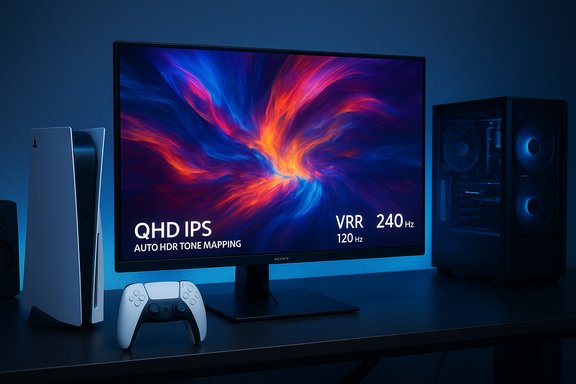
Sony’s new 27‑inch PlayStation gaming monitor takes the console out of the living room and onto the desktop with a deliberately focused spec sheet: a QHD (2560×1440) IPS panel, Auto HDR Tone Mapping, VRR support, refresh rates tuned for both console and PC gaming, two HDMI 2.1 inputs, a DisplayPort 1.4 input, and a small but conspicuous design flourish — a built‑in DualSense charging hook that tucks away when not in use. The monitor is positioned as a companion product for PS5 owners who want a purpose‑built desktop display and is slated to arrive in the United States and Japan in 2026, with pricing and detailed availability to be announced later.
Sony’s official product reveal frames the 27” display as an answer to a growing behavioral trend: PlayStation players increasingly want to play outside the main living room TV — at a desk, in a personal space, or via remote play devices like PlayStation Portal. The monitor’s feature set — QHD, Auto HDR Tone Mapping, VRR, and a DualSense charging hook — is explicitly designed to support that desktop‑first use case while also offering cross‑platform compatibility with PC and Mac devices. The company highlights pairing the screen with its Pulse Elevate wireless speakers to round out a desktop audio/video package. This is Sony’s clearest attempt yet to build first‑party peripherals tailored for the intersection of console and desktop gaming. The move follows Sony’s recent expansions — more PlayStation ports to PC, the PlayStation Portal remote player, and desktop‑focused audio accessories — indicating a strategy that treats the PC/desktop as a legitimate part of the PlayStation ecosystem rather than an afterthought. The monitor announcement leans on that ecosystem logic while keeping the hardware narrowly focused on a mainstream 27‑inch desktop form factor.
The strategy is familiar in consumer electronics: create an adjacent hardware product that enhances the core experience and locks users deeper into the brand. If Sony pairs attractive pricing and compelling software integration (firmware updates, PlayStation settings integration, and strong support), the monitor could become a useful niche product that gains traction among streamers, content creators who also play on PlayStation, and competitive console gamers who want better desktop ergonomics.
Source: Windows Report Sony Unveils 27” PS5 Desktop Gaming Monitor With DualSense Charging Hook
 Background / Overview
Sony’s official product reveal frames the 27” display as an answer to a growing behavioral trend: PlayStation players increasingly want to play outside the main living room TV — at a desk, in a personal space, or via remote play devices like PlayStation Portal. The monitor’s feature set — QHD, Auto HDR Tone Mapping, VRR, and a DualSense charging hook — is explicitly designed to support that desktop‑first use case while also offering cross‑platform compatibility with PC and Mac devices. The company highlights pairing the screen with its Pulse Elevate wireless speakers to round out a desktop audio/video package. This is Sony’s clearest attempt yet to build first‑party peripherals tailored for the intersection of console and desktop gaming. The move follows Sony’s recent expansions — more PlayStation ports to PC, the PlayStation Portal remote player, and desktop‑focused audio accessories — indicating a strategy that treats the PC/desktop as a legitimate part of the PlayStation ecosystem rather than an afterthought. The monitor announcement leans on that ecosystem logic while keeping the hardware narrowly focused on a mainstream 27‑inch desktop form factor. What Sony announced: feature summary
Sony provided a concise set of technical highlights in the reveal, which independent outlets reproduced in their coverage. Key features are:- Panel and resolution
- Quad High Definition (QHD) IPS panel, up to 2560×1440 resolution.
- HDR
- High Dynamic Range support with Auto HDR Tone Mapping that configures HDR settings automatically when paired with PS5 or PS5 Pro consoles.
- Refresh rates and variable refresh
- Up to 120 Hz with VRR support on PS5 and PS5 Pro; up to 240 Hz on compatible PC and Mac devices.
- Connectivity
- Two HDMI IN ports (version 2.1) and one DisplayPort 1.4 IN port. Sony’s documentation states HDMI 2.1 supports 2560×1440 at up to 240 Hz with FRL and VRR; the DisplayPort path supports 2560×1440 at up to 240 Hz with DSC.
- Controller charging hook
- A built‑in charging hook for DualSense and DualSense Edge controllers; the controller hardware itself remains a separate purchase. Sony’s messaging is explicit that controllers are sold separately.
- I/O and extras
- Two USB‑A and one USB‑C ports (intended for PlayStation Link adapters and similar accessories), built‑in stereo speakers, a 3.5mm headphone output, and VESA mounting compatibility for flexible desk setups.
- Platform positioning
- Marketed for desktop PlayStation gaming — a product that “pairs nicely” with the Pulse Elevate speakers that Sony announced recently to create a compact desktop ecosystem.
Technical analysis: what the specs mean in practice
Panel choice: 27” QHD IPS
A 27‑inch QHD (2560×1440) IPS panel is the de‑facto sweet spot for desk gaming: pixel density remains comfortably sharp at typical monitor viewing distances, and 1440p is the most practical resolution for achieving high frame rates on mid‑range and higher GPUs. On console, the PS5 historically targets either 4K or upscaled 1080p modes for many games; pushing consoles to render natively at 1440p is a more recent trend enabled by system updates and third‑party game support. Sony’s choice of QHD shows a clear intent to balance visual fidelity and refresh rate for desktop players.Refresh rates and platform trade‑offs
Sony states 120 Hz VRR support for PS5 and 240 Hz for PC/Mac devices. That split is sensible but meaningful:- On PS5, 120 Hz is the practical ceiling for many high‑frame modes. The PS5’s SDK and game dev pipelines support 120 fps modes, and VRR can stabilize frame pacing. Sony’s provisioning of 120 Hz with Auto HDR Tone Mapping means the monitor will be optimized for the console’s game modes.
- On PC and Mac, the monitor’s 240 Hz capability competes with high‑end 27‑inch gaming panels; hitting 240 fps at 1440p requires substantial GPU power, so this feature is aimed at competitive PC gamers with powerful GPUs.
HDMI 2.1 and DisplayPort 1.4 nuances
Sony’s spec sheet leans on HDMI 2.1 for console connectivity. The claim that HDMI 2.1 supports 2560×1440 at up to 240 Hz with FRL and VRR is technically plausible — HDMI 2.1’s FRL (Fixed Rate Link) modes allow high bandwidth operation that can be used to push custom resolution/refresh combinations. DisplayPort 1.4’s support with DSC (Display Stream Compression) for 240 Hz at QHD is also consistent with industry implementations. However, real‑world performance can be sensitive to firmware and cable quality — not all HDMI 2.1 cables or ports are equal, and some displays require specific firmware support to negotiate the best FRL lane widths and VRR timing with consoles and GPUs. That makes post‑launch firmware behavior and Sony’s cable recommendations important.Auto HDR Tone Mapping
Auto HDR Tone Mapping is a useful convenience for players who don’t want to dive into picture menus. On consoles, automatic mapping can reduce oversaturation or blown highlights and present HDR games closer to the developer’s intent at launch. The useful caveat: Auto HDR Tone Mapping requires cooperation from the console’s firmware and the monitor’s HDR engine; the result can vary between titles and between HDR implementations (HDR10, Dolby Vision, etc.. Sony’s positioning explicitly ties this feature to PS5/PS5 Pro consoles, indicating close integration.The DualSense charging hook: a small detail with outsized UX value
The charging hook is the announcement’s headline novelty: a flip‑down hook on the monitor’s back designed to hold and charge a DualSense or DualSense Edge controller so the controller sits at the back of the monitor and is immediately available for desktop play. It’s a neat ergonomics solution for cramped desks where a charging cradle or separate dock can be clutter. Sony’s marketing emphasizes convenience and a cleaner desk profile. Two important clarifications — and a discrepancy in early media copy — are worth noting:- Sony’s official text makes clear the controller itself is sold separately; it does not explicitly say the hook is a paid accessory. Independent writeups are inconsistent: some outlets repeated that the charging hardware is built in, while others suggested a separate dock or accessory might be sold separately. Until Sony clarifies packaging and SKU differentiation, buyers should assume the controller is not included and confirm whether the charging hook requires additional accessories. This is a small but crucial buying detail.
Market context: why Sony is releasing a first‑party PS5 monitor now
Sony is launching peripheral products at a time when the PlayStation ecosystem is larger than ever, and its software strategy increasingly embraces desktop and portable play. The monitor release fits into that ecosystem expansion:- A large installed base of PS5 hardware increases the potential addressable market for branded peripherals. Recent internal figures and industry reporting indicate strong PS5 shipment numbers, making a PlayStation‑branded desktop monitor a credible commercial play.
- Sony has been softening the boundaries between console and PC with official PC ports of PlayStation exclusives, the PlayStation Portal, and desktop audio accessories like Pulse Elevate. A first‑party monitor aligns with that broader approach of offering tightly integrated hardware and software experiences that keep players within the PlayStation brand while on desktop hardware.
Strengths — what this monitor does well
- Console‑aware tuning: Auto HDR Tone Mapping and explicit PS5 compatibility make setup frictionless for non‑technical console players.
- Desktop ergonomics: 27” QHD is well matched to desk viewing distances and popular among productivity and gaming users. The DualSense hook offers tidy cable/charging management for controller owners.
- Cross‑platform utility: With DisplayPort and 240 Hz support, the monitor remains competitive for PC gamers who need high refresh rates.
- Connectivity: Two HDMI 2.1 inputs let users keep a PS5 and another HDMI device connected simultaneously, reducing cable swapping. USB ports for PlayStation Link adapters add ecosystem flexibility.
- Design coherence: Pairing the monitor with the Pulse Elevate speaker system shows Sony’s intention to sell a desktop bundle experience rather than isolated peripherals.
Risks, limitations, and open questions
- Price and positioning unknown: Sony hasn’t announced MSRP or region‑by‑region availability beyond the U.S. and Japan. Market acceptance will depend strongly on price vs. similarly spec’d third‑party monitors. Expect premium pricing for first‑party hardware, but treat this as speculation until Sony releases numbers.
- Compatibility caveats: While the monitor supports 120 Hz VRR on PS5, the degree of per‑title and per‑mode support will vary. Some PS5 titles cap frame rates or use dynamic resolution targets; the monitor’s advantages will be most visible in titles with high‑frame modes.
- Cable and firmware sensitivity: HDMI 2.1 and FRL implementations are occasionally inconsistent across consoles, GPUs, and cables. Users should expect that firmware updates (from Sony and possibly GPU vendors) could affect the monitor’s behavior post‑launch. Sony’s cable guidance and a robust firmware update policy will matter.
- Charging hook ambiguity: Early media coverage diverged about whether the charging hardware or a dock would be included or sold separately. Sony’s official text confirms controllers are sold separately but is less explicit about the hook’s packaging; buyers should confirm this detail before purchasing. Consider this a flag until Sony provides SKU and box‑contents clarification.
- Market competition: The 27” QHD 240 Hz segment includes many established third‑party monitors that undercut first‑party hardware on price while offering similar panel and connectivity specs. Sony’s differentiator will be PlayStation‑focused features and brand cachet; whether that’s enough to justify a price premium is an open question.
Buying guide: who should consider Sony’s 27” PlayStation monitor?
- PS5 owners who:
- Prioritize a compact, desk‑centric setup.
- Want a plug‑and‑play PlayStation experience with HDR and VRR integration.
- Value the convenience of a built‑in DualSense charging solution and integrated audio pairing.
- PC gamers who:
- Need a 27” QHD panel that can reach high refresh rates (240 Hz) and will pair with a high‑end GPU.
- Prefer an IPS panel and VESA compatibility for multi‑monitor setups.
- Users who should wait or compare:
- Buyers on a budget should compare third‑party monitors with equivalent QHD/240 Hz specs, as they may offer better price/performance.
- People who need proven long‑term behavior around HDR tone mapping and firmware should wait for independent reviews confirming Sony’s implementation.
- Exact box contents (is the charging hook included or an optional accessory?.
- Firmware update behavior and how promptly Sony addresses issues.
- The monitor’s HDR peak brightness and color calibration numbers in independent reviews.
- Whether the monitor’s HDMI 2.1 ports reliably deliver the announced FRL/VRR modes with their PS5 consoles and chosen HDMI cables.
How this fits into Sony’s broader hardware strategy
Sony’s monitor reinforces a broader pattern: the company is building a more integrated PlayStation ecosystem that spans console, desktop, and portable devices. The monitor is not a mass market necessity; rather, it’s a brand statement and a convenience product targeting a subset of PlayStation fans who care enough about their desktop experience to buy first‑party accessories.The strategy is familiar in consumer electronics: create an adjacent hardware product that enhances the core experience and locks users deeper into the brand. If Sony pairs attractive pricing and compelling software integration (firmware updates, PlayStation settings integration, and strong support), the monitor could become a useful niche product that gains traction among streamers, content creators who also play on PlayStation, and competitive console gamers who want better desktop ergonomics.
What to watch next (post‑announcement timeline)
- Sony to announce SKU and pricing details for U.S. and Japan; international availability remains unconfirmed.
- Independent reviews to verify HDR performance, color accuracy, and the ergonomics and charging behavior of the DualSense hook.
- Firmware updates or clarifications from Sony regarding HDMI 2.1 FRL behavior and cable recommendations.
- Bundling or cross‑promotion with Pulse Elevate speakers or any PlayStation Desktop bundles that could sweeten the value proposition.
Final assessment
Sony’s 27” PlayStation gaming monitor is a thoughtful, narrowly focused product that addresses a clear, real use case: PlayStation owners who want a desktop‑first gaming setup without the bulk of a living‑room TV. Its strengths are in console‑aware features — Auto HDR Tone Mapping, 120 Hz VRR on PS5, and the DualSense charging hook — combined with cross‑platform flexibility via 240 Hz support on PC and macOS through DisplayPort and high‑bandwidth HDMI. The announcement is strategically sound: it rounds out Sony’s desktop ambitions and taps into a sizable installed PS5 base. However, the ultimate verdict will depend on price, the delivery quality of HDR mapping and HDMI 2.1 handling, and whether Sony clarifies packaging details about the charging hook. Buyers should wait for hands‑on and independent lab testing before committing, especially if they plan to pay a premium for the PlayStation badge. In the meantime, the monitor is a credible and welcome addition to the console accessory landscape and a notable indicator of how Sony plans to meet players where they game — including at the desk.Source: Windows Report Sony Unveils 27” PS5 Desktop Gaming Monitor With DualSense Charging Hook