

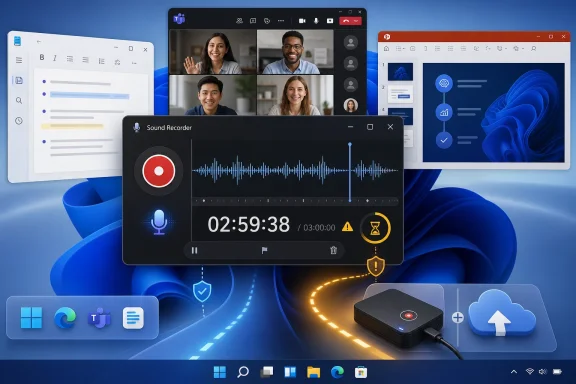
Sound Recorder is Microsoft’s built-in Windows audio recording app for short-form voice capture, supporting recordings of up to three hours per file and running alongside other desktop work. That simple fact is the whole story and the problem: Microsoft ships a recorder good enough for notes, interviews, lectures, and quick narration, but not robust enough to be trusted as a professional capture pipeline. In 2026, that dividing line matters because Windows users increasingly expect inbox apps to handle real work, not merely demonstrate that a feature exists. Sound Recorder is useful, but its ceiling is visible from the first serious session.
The Sound Recorder FAQ looks like one of those modest support pages that exists only to answer “where did my file go?” or “why can’t I record longer?” But buried in its plain language is a revealing statement about Microsoft’s philosophy for bundled Windows apps: give users a safe, simple default, then stop well short of the messy edge cases.
That is not necessarily a failure. A built-in recorder should be obvious, fast, and hard to misuse. It should not ask a student to understand sample rates before recording a lecture or force a home user into a multitrack interface just to capture a spoken note.
But the three-hour-per-file limit turns the app from “simple” into “bounded.” It tells users that Sound Recorder is not a substitute for a dedicated recording workflow, even if it looks close enough to one in the Start menu. That distinction is where casual convenience becomes operational risk.
For WindowsForum readers, the useful question is not whether Sound Recorder works. It does. The better question is whether Microsoft has made the boundaries clear enough for the people most likely to lose work when they discover them too late.
The limit is not unusual for consumer-facing software, especially software designed to hide complexity. Long recordings raise questions about file size, power state, storage availability, crash recovery, device switching, and format handling. A strict cap is a blunt but understandable way to keep a lightweight app from becoming a support nightmare.
The problem is that audio recording is one of those tasks where failure is not always visible while it is happening. A word processor can autosave. A browser can reload. A recorder may appear to be doing its job until the final file is shorter than the event it was supposed to preserve.
That is why the cap should be treated less like a specification and more like a warning label. Sound Recorder is fine for sessions that fit comfortably under the limit. It is a bad choice for anything where the last thirty minutes matter as much as the first thirty.
That matters because recorder apps live or die on confidence. A waveform, a visible timer, clear input selection, and predictable playback controls do more for most users than a dense menu of audio engineering options. If an app looks neglected, people assume the recording might be neglected too.
The return to the “Sound Recorder” name also has a pleasing historical symmetry. Windows has had some form of audio recorder for decades, and the brand has drifted through different naming and capability phases. The current app is not trying to be a digital audio workstation; it is trying to be the dependable red button Windows should always have had.
Still, modernization is not the same thing as maturity. A cleaner interface can make a bounded tool feel more capable than it is. That is the tension at the center of Sound Recorder today: it looks like part of a refreshed Windows, but its role remains deliberately narrow.
This is where Sound Recorder makes sense. It is not designed to own the screen. It is designed to sit in the background while Windows does what Windows does best: let the user juggle several tasks at once.
That makes the app valuable for lightweight knowledge work. A student can record a lecture while annotating slides. A technician can narrate a troubleshooting session while stepping through settings. A user can capture a voice memo while reading source material. For all of those jobs, the simplicity is the point.
But side-by-side recording also creates a false sense of resilience. Multitasking is not the same as workflow protection. If a user changes microphones, docks or undocks a laptop, joins a call, switches Bluetooth devices, or runs into a sleep policy, the recording chain becomes more fragile than the app’s minimal interface suggests.
Windows audio routing can support complex scenarios, but Sound Recorder is not the control room for them. Its natural job is to take input from a selected recording device and save it. Once users expect it to capture system audio, mix multiple sources, or behave like a session recorder, they are already outside the app’s comfort zone.
This is not just a consumer problem. In small organizations, the built-in Windows tool is often the first thing people reach for because it is already there and does not require procurement. That convenience can collide with compliance, retention, and quality expectations very quickly.
IT departments should be blunt about this. If an employee needs to record a one-off voice note, Sound Recorder is appropriate. If a department needs reliable meeting archiving, interview capture, transcription prep, or auditable recordings, the built-in app should not be the standard operating procedure.
That restraint is defensible. Many Windows inbox apps are at their best when they do one job quickly and leave specialized work to specialized software. Notepad should not become Word. Paint should not become Photoshop. Sound Recorder should not become Audition.
But audio capture is less forgiving than text editing or image doodling. A thin feature set can be charming right up until someone needs input metering, automatic backups, silence detection, gain control, multichannel capture, noise reduction, or recovery after a crash. These are not luxury features in professional contexts; they are safeguards.
Microsoft’s support language implicitly acknowledges that Sound Recorder is a convenience app. The company does not market it as a production tool. The trouble is that Windows users often infer capability from availability: if Microsoft put it in Windows, surely it is safe for ordinary work. That assumption needs correcting.
That means starting a new recording before the limit becomes dangerous. It means watching the timer. It means saving and verifying files during breaks. It means using a second device when the recording matters. These are mundane habits, but mundane habits are what prevent data loss.
For admins, the point is policy. If your organization permits local recording for business purposes, document which tools are acceptable for which scenarios. A built-in app with a hard per-file limit may be fine for informal notes but unacceptable for regulated or client-facing recordings.
The Windows ecosystem has no shortage of alternatives. Audacity, OBS Studio, commercial audio editors, conferencing-platform recording features, and dedicated hardware recorders all exist because different capture jobs have different failure modes. Sound Recorder’s value is that it is already present, not that it replaces those tools.
The company has been moving toward small, Store-updated system apps that can evolve outside the traditional Windows feature release cycle. That is good for velocity. It also means users may not know exactly which version of an app they have, which features changed, or whether a guide written for Windows 10 still applies to Windows 11.
This is the quiet administrative burden of modern Windows. The OS is no longer just a platform; it is a bundle of living apps, each with its own update cadence. That makes Windows feel fresher, but it also makes documentation and support more slippery.
Sound Recorder is a small example of a larger issue. Microsoft wants inbox apps to be polished enough that users trust them, but limited enough that they stay simple. The company then has to make sure users understand where polish ends and professional reliability begins.
For students, it can work well with discipline. A lecture under three hours is within the design envelope, assuming the microphone is selected correctly and the PC remains awake and stable. The risk grows when users record back-to-back classes, forget the timer, or treat the app as an academic archive.
For creators, the answer is mixed. Sound Recorder can capture scratch audio, voice references, and quick takes. It is not where you want to manage a podcast workflow, music recording, long narration, remote interview, or anything requiring serious post-production.
For IT pros, the recommendation is straightforward: treat it as a convenience utility, not a managed recording solution. If recording is part of a business process, standardize something else.
That does not make the Windows app redundant. A PC has better access to external USB microphones, local files, productivity apps, and large displays. It can be the better capture device when the user is already working at a desk.
But Microsoft has to compete with the phone’s reliability story. People trust phone recorders because they are simple, isolated, and familiar. A Windows recorder that sits among Teams calls, Bluetooth stacks, driver updates, power plans, and notification noise has to work harder to earn the same trust.
That is why the Sound Recorder FAQ is more than a how-to. It is a reminder that the PC is a more powerful environment, but also a more complicated one. Recording on Windows gives users flexibility; it also gives them more ways to make a mistake.
Before recording anything important, make a short test file and play it back. Confirm the input device. Confirm the save location. Confirm that the waveform and timer behave as expected. If the event matters, run a backup recorder.
These steps sound pedestrian, but they reflect the reality of audio work. Most recording disasters are not caused by exotic bugs. They are caused by wrong inputs, exhausted batteries, sleeping PCs, full disks, unexpected device switching, and users discovering limits after the fact.
Sound Recorder is at its best when it is part of that disciplined routine. It is at its worst when treated as magic.
If the recording is short, informal, and microphone-based, Sound Recorder is a sensible default. If the recording is long, regulated, mixed-source, client-facing, or production-bound, the default should be a more capable tool. That is not an indictment of Microsoft’s app; it is the normal separation between consumer convenience and operational tooling.
The same logic applies across Windows. Snipping Tool is excellent for a quick capture, but not a video production suite. Notepad is excellent for plain text, but not structured documentation. Sound Recorder is excellent for basic audio capture, but not an archive-grade recorder.
Microsoft could help by making the app more explicit at the point of use. A visible warning as a recording approaches the three-hour limit would be more useful than a support page discovered afterward. Better preflight checks for input devices and storage would also reduce the most common failures without turning the app into pro software.
But low friction must not be mistaken for high assurance. The more important the recording, the more the user needs redundancy, monitoring, and a tool designed for the job. A recorder that caps files at three hours is telling you exactly how much trust to place in it.
The most concrete reading of Microsoft’s FAQ is also the most useful one: Sound Recorder is a convenient, limited, microphone-first utility for everyday Windows audio capture. It is not a silent replacement for a proper recording workflow.
 Microsoft’s Small Recorder Carries a Bigger Windows Argument
The Sound Recorder FAQ looks like one of those modest support pages that exists only to answer “where did my file go?” or “why can’t I record longer?” But buried in its plain language is a revealing statement about Microsoft’s philosophy for bundled Windows apps: give users a safe, simple default, then stop well short of the messy edge cases.That is not necessarily a failure. A built-in recorder should be obvious, fast, and hard to misuse. It should not ask a student to understand sample rates before recording a lecture or force a home user into a multitrack interface just to capture a spoken note.
But the three-hour-per-file limit turns the app from “simple” into “bounded.” It tells users that Sound Recorder is not a substitute for a dedicated recording workflow, even if it looks close enough to one in the Start menu. That distinction is where casual convenience becomes operational risk.
For WindowsForum readers, the useful question is not whether Sound Recorder works. It does. The better question is whether Microsoft has made the boundaries clear enough for the people most likely to lose work when they discover them too late.
The Three-Hour Limit Is the Product Design, Not a Footnote
Microsoft states that Sound Recorder can record audio for up to three hours per recording file. That sentence deserves more attention than the rest of the FAQ because it is the app’s implicit service-level agreement. If your meeting, deposition, class, podcast taping, or remote job runs longer than that, Sound Recorder is no longer a set-and-forget tool.The limit is not unusual for consumer-facing software, especially software designed to hide complexity. Long recordings raise questions about file size, power state, storage availability, crash recovery, device switching, and format handling. A strict cap is a blunt but understandable way to keep a lightweight app from becoming a support nightmare.
The problem is that audio recording is one of those tasks where failure is not always visible while it is happening. A word processor can autosave. A browser can reload. A recorder may appear to be doing its job until the final file is shorter than the event it was supposed to preserve.
That is why the cap should be treated less like a specification and more like a warning label. Sound Recorder is fine for sessions that fit comfortably under the limit. It is a bad choice for anything where the last thirty minutes matter as much as the first thirty.
Windows Finally Has the Right Shape of a Recorder
The modern Sound Recorder app is part of Microsoft’s broader Windows 11-era cleanup of inbox utilities. Like Notepad, Paint, Media Player, and Snipping Tool, it belongs to the family of small apps Microsoft has been slowly modernizing after years of Windows feeling like a museum of mismatched eras. The old Windows pattern was functional but visually incoherent; the new one tries to make everyday tools feel native again.That matters because recorder apps live or die on confidence. A waveform, a visible timer, clear input selection, and predictable playback controls do more for most users than a dense menu of audio engineering options. If an app looks neglected, people assume the recording might be neglected too.
The return to the “Sound Recorder” name also has a pleasing historical symmetry. Windows has had some form of audio recorder for decades, and the brand has drifted through different naming and capability phases. The current app is not trying to be a digital audio workstation; it is trying to be the dependable red button Windows should always have had.
Still, modernization is not the same thing as maturity. A cleaner interface can make a bounded tool feel more capable than it is. That is the tension at the center of Sound Recorder today: it looks like part of a refreshed Windows, but its role remains deliberately narrow.
Side-by-Side Recording Is the Quiet Killer Feature
The FAQ’s other important promise is that Sound Recorder can be used side by side with other apps. That is exactly how most people actually record on a PC. They are not sitting in a studio; they are taking notes in Word, watching slides in Teams, reading a browser tab, or capturing narration while working through another application.This is where Sound Recorder makes sense. It is not designed to own the screen. It is designed to sit in the background while Windows does what Windows does best: let the user juggle several tasks at once.
That makes the app valuable for lightweight knowledge work. A student can record a lecture while annotating slides. A technician can narrate a troubleshooting session while stepping through settings. A user can capture a voice memo while reading source material. For all of those jobs, the simplicity is the point.
But side-by-side recording also creates a false sense of resilience. Multitasking is not the same as workflow protection. If a user changes microphones, docks or undocks a laptop, joins a call, switches Bluetooth devices, or runs into a sleep policy, the recording chain becomes more fragile than the app’s minimal interface suggests.
The App Is Built for Microphones, Not Ambitious Capture Chains
Sound Recorder is best understood as a microphone recorder. That sounds obvious, but it is a practical distinction many users miss. People often ask built-in recorders to capture whatever they can hear from the PC: a browser stream, a meeting, a game, a remote session, or audio routed to wireless headphones.Windows audio routing can support complex scenarios, but Sound Recorder is not the control room for them. Its natural job is to take input from a selected recording device and save it. Once users expect it to capture system audio, mix multiple sources, or behave like a session recorder, they are already outside the app’s comfort zone.
This is not just a consumer problem. In small organizations, the built-in Windows tool is often the first thing people reach for because it is already there and does not require procurement. That convenience can collide with compliance, retention, and quality expectations very quickly.
IT departments should be blunt about this. If an employee needs to record a one-off voice note, Sound Recorder is appropriate. If a department needs reliable meeting archiving, interview capture, transcription prep, or auditable recordings, the built-in app should not be the standard operating procedure.
The Missing Professional Features Are Not Accidents
The absence of heavier features is part of the design. Sound Recorder does not present itself as a full editor, a mixer, a compressor, a transcription platform, or a broadcast tool. It avoids the complexity that would make it intimidating.That restraint is defensible. Many Windows inbox apps are at their best when they do one job quickly and leave specialized work to specialized software. Notepad should not become Word. Paint should not become Photoshop. Sound Recorder should not become Audition.
But audio capture is less forgiving than text editing or image doodling. A thin feature set can be charming right up until someone needs input metering, automatic backups, silence detection, gain control, multichannel capture, noise reduction, or recovery after a crash. These are not luxury features in professional contexts; they are safeguards.
Microsoft’s support language implicitly acknowledges that Sound Recorder is a convenience app. The company does not market it as a production tool. The trouble is that Windows users often infer capability from availability: if Microsoft put it in Windows, surely it is safe for ordinary work. That assumption needs correcting.
The File Limit Should Change How People Plan
The three-hour cap is not just a maximum. It is a planning constraint. Users who insist on using Sound Recorder for longer events should split the session intentionally, not hope the app behaves generously at the edge.That means starting a new recording before the limit becomes dangerous. It means watching the timer. It means saving and verifying files during breaks. It means using a second device when the recording matters. These are mundane habits, but mundane habits are what prevent data loss.
For admins, the point is policy. If your organization permits local recording for business purposes, document which tools are acceptable for which scenarios. A built-in app with a hard per-file limit may be fine for informal notes but unacceptable for regulated or client-facing recordings.
The Windows ecosystem has no shortage of alternatives. Audacity, OBS Studio, commercial audio editors, conferencing-platform recording features, and dedicated hardware recorders all exist because different capture jobs have different failure modes. Sound Recorder’s value is that it is already present, not that it replaces those tools.
Microsoft’s Inbox App Strategy Still Has a Trust Gap
Windows 11’s modern inbox apps have improved markedly, but Microsoft still struggles with communicating the seriousness of their limits. A support FAQ is useful after a user goes looking. It is less useful at the moment someone presses Record before a four-hour session.The company has been moving toward small, Store-updated system apps that can evolve outside the traditional Windows feature release cycle. That is good for velocity. It also means users may not know exactly which version of an app they have, which features changed, or whether a guide written for Windows 10 still applies to Windows 11.
This is the quiet administrative burden of modern Windows. The OS is no longer just a platform; it is a bundle of living apps, each with its own update cadence. That makes Windows feel fresher, but it also makes documentation and support more slippery.
Sound Recorder is a small example of a larger issue. Microsoft wants inbox apps to be polished enough that users trust them, but limited enough that they stay simple. The company then has to make sure users understand where polish ends and professional reliability begins.
The App’s Best Audience Is Smaller Than Microsoft’s Install Base
For home users, Sound Recorder is a good answer to a common need. Record a thought. Capture a quick explanation. Save a practice reading. Make a rough narration track. For those jobs, the app is exactly the right size.For students, it can work well with discipline. A lecture under three hours is within the design envelope, assuming the microphone is selected correctly and the PC remains awake and stable. The risk grows when users record back-to-back classes, forget the timer, or treat the app as an academic archive.
For creators, the answer is mixed. Sound Recorder can capture scratch audio, voice references, and quick takes. It is not where you want to manage a podcast workflow, music recording, long narration, remote interview, or anything requiring serious post-production.
For IT pros, the recommendation is straightforward: treat it as a convenience utility, not a managed recording solution. If recording is part of a business process, standardize something else.
The Real Competition Is Not Another App, But the Smartphone
One reason Sound Recorder receives less attention than it might is that most users already have a recorder in their pocket. Smartphone voice memo apps are often faster to launch, less vulnerable to Windows audio routing quirks, and less likely to be disrupted by desktop multitasking.That does not make the Windows app redundant. A PC has better access to external USB microphones, local files, productivity apps, and large displays. It can be the better capture device when the user is already working at a desk.
But Microsoft has to compete with the phone’s reliability story. People trust phone recorders because they are simple, isolated, and familiar. A Windows recorder that sits among Teams calls, Bluetooth stacks, driver updates, power plans, and notification noise has to work harder to earn the same trust.
That is why the Sound Recorder FAQ is more than a how-to. It is a reminder that the PC is a more powerful environment, but also a more complicated one. Recording on Windows gives users flexibility; it also gives them more ways to make a mistake.
The Practical Advice Is Boring Because Boring Works
The best way to use Sound Recorder is to stay well inside its boundaries. Do not run a mission-critical recording up to the three-hour wall. Do not assume it is capturing system audio just because sound is coming from the speakers. Do not assume a Bluetooth headset will behave like a wired microphone in every context.Before recording anything important, make a short test file and play it back. Confirm the input device. Confirm the save location. Confirm that the waveform and timer behave as expected. If the event matters, run a backup recorder.
These steps sound pedestrian, but they reflect the reality of audio work. Most recording disasters are not caused by exotic bugs. They are caused by wrong inputs, exhausted batteries, sleeping PCs, full disks, unexpected device switching, and users discovering limits after the fact.
Sound Recorder is at its best when it is part of that disciplined routine. It is at its worst when treated as magic.
The Three-Hour Recorder Belongs in a Larger Toolkit
The right mental model is not “Should I use Sound Recorder or something else?” It is “Which recording job am I actually doing?” A built-in utility is appropriate when the cost of failure is low and the requirements are simple.If the recording is short, informal, and microphone-based, Sound Recorder is a sensible default. If the recording is long, regulated, mixed-source, client-facing, or production-bound, the default should be a more capable tool. That is not an indictment of Microsoft’s app; it is the normal separation between consumer convenience and operational tooling.
The same logic applies across Windows. Snipping Tool is excellent for a quick capture, but not a video production suite. Notepad is excellent for plain text, but not structured documentation. Sound Recorder is excellent for basic audio capture, but not an archive-grade recorder.
Microsoft could help by making the app more explicit at the point of use. A visible warning as a recording approaches the three-hour limit would be more useful than a support page discovered afterward. Better preflight checks for input devices and storage would also reduce the most common failures without turning the app into pro software.
Where the Red Button Really Fits in Windows
Sound Recorder’s value is that it lowers friction. It gives every Windows user a red button for audio. That is not trivial, especially on shared, managed, or newly installed systems where third-party tools may not be available.But low friction must not be mistaken for high assurance. The more important the recording, the more the user needs redundancy, monitoring, and a tool designed for the job. A recorder that caps files at three hours is telling you exactly how much trust to place in it.
The most concrete reading of Microsoft’s FAQ is also the most useful one: Sound Recorder is a convenient, limited, microphone-first utility for everyday Windows audio capture. It is not a silent replacement for a proper recording workflow.
The Fine Print That Should Shape Every Recording Session
Sound Recorder is not complicated, but its limits are concrete enough that users should treat them as operating rules rather than trivia. The app is useful precisely because it is simple; the mistake is asking simplicity to cover professional risk.- Sound Recorder can record audio for up to three hours per recording file, so longer events should be split deliberately or captured with another tool.
- The app is well suited to voice notes, lectures, quick narration, and informal microphone recordings that do not require advanced editing or mixing.
- Users should make and replay a short test recording before any important session to confirm the selected input device and actual captured audio.
- Sound Recorder should not be assumed to capture system audio, meeting audio, or mixed sources unless the Windows input configuration has been tested.
- Organizations should not standardize on Sound Recorder for regulated, client-facing, or archive-critical recording workflows without backup procedures and clearer policy.
References
- Primary source: Microsoft Support
Published: Wed, 20 May 2026 10:09:30 Z
Sound Recorder app for Windows: FAQ - Microsoft Support
Answers to frequently asked questions about the Sound Recorder app for Windows, including how to record and how to share your recordings. support.microsoft.com
- Official source: learn.microsoft.com

How to create a .wav file using sound recorder in win 8.1? - Microsoft Q&A
How to create a .wav file using sound recorder in win 8.1? Original title: .WAV file in WIN 8.1learn.microsoft.com - Official source: apps.microsoft.com
Audio Recorder - Record Sound and Voice - Free download and install on Windows | Microsoft Store
Effortlessly capture every sound with Audio Recorder—a simple yet powerful tool for all your recording needs. Whether it’s meetings, lectures, music, or personal notes, our app delivers crystal-clear audio quality. Designed with simplicity in mind, it’s easy for anyone to use. Record, save, and...apps.microsoft.com - Related coverage: filmora.wondershare.com
Microsoft Voice Recorder: Everything You Need to Know
Find out everything about Microsoft Voice Recorder on Windows. We will also discuss its alternative for recording audio.filmora.wondershare.com
- Related coverage: windowscentral.com
- Related coverage: windowslatest.com

Hands on with Windows 11's new Sound Recorder, Microsoft says more to come
Ahead of Windows 11 version 22H2 release later this year, Microsoft is refreshing apps that ship with its operating system. Many apps have already received a design makeover, including MS Paint, Photos, Notepad, and even a new Outlook has been confirmed for fall 2022. Microsoft is now rolling... www.windowslatest.com
- Related coverage: pureinfotech.com

Windows 11 gets redesigned version of Sound Recorder app - Pureinfotech
Sound Recorder app replaces the Voice Recorder app and brings a new interface that matches the design of Windows 11. First look here. pureinfotech.com
- Related coverage: howtogeek.com

How to Record Audio on Windows 11
Use Sound Recorder for simple recording and Audacity for advanced recording. www.howtogeek.com
- Related coverage: thurrott.com

Windows 11 is Getting a “New” Sound Recorder App
Continuing its slow-motion redesigning of the bundled apps in Windows 11, Microsoft said today it is “reimagining” Voice Recorder as Sound Recorder. www.thurrott.com
- Related coverage: windowsreport.com
- Related coverage: gigazine.net

The recording app 'Sound Recorder' has been revived on Windows 11, making it possible to display the waveform of audio during recording and playback and change the playback speed.
The news blog specialized in Japanese culture, odd news, gadgets and all other funny stuffs. Updated everyday. gigazine.net
- Related coverage: ghacks.net

Microsoft releases a new Sound Recorder app for Windows 11 Insiders- gHacks Tech News
A new Sound Recorder app is available for users in the Dev Channel of the Windows 11 Insider Program. We take a look at its features. www.ghacks.net
- Related coverage: guidingtech.com

5 Ways to Fix Sound Recorder App Not Working on Windows 11
Are you facing issues in using the Sound Recorder app on Windows 11? Read this explainer to find an easy fix.www.guidingtech.com
- Related coverage: winbuzzer.com

Windows 11 Sound Recorder Gets New Design
Microsoft is rebranding Voice Recorder as Sound Recorder with a design overhaul to fit with the Windows 11 aesthetic. winbuzzer.com
- Official source: news.microsoft.com
